Ebru Cankaya, Anindita Palit, Elissa Williams (2022). A Didactic Tool for Digital Forensics. In: Human Factors in Cybersecurity. AHFE Open Access, vol. 53, pp. 19–28. https://doi.org/10.54941/ahfe1002197
Several tools exist for performing digital forensics investigations on evidence data. As the vast variety of options available provides a wide span of choices to select from, this variation itself contributes to the complexity of learning and navigating these tools. To facilitate user’s learning efforts, we present a didactic tool that can be used to explore different digital forensics tools for investigating various evidence files in different OS platforms. We use synthetically generated data in the form of a made up scenario that offers safe, realistic, yet reliable data analysis. The digital forensics tools we use are Autopsy, WinHex, ProDiscover, and StegHide; and we demonstrate the execution of these tools in two different OS platforms as Windows and Mac. Our tool is promising to offer explanation and deep insight into commonly available digital forensics tools, and is offered to serve digital forensics students and/or professionals.
Because of the colossal advancements in various forms of technologies, there are potential gains in utilizing the technologies, but there are also various drawbacks that can occur, such as hacking into accounts/computers, and numerous illegal actions. Digital forensics is primarily based around these concepts. Although digital forensics is primarily taught in a university envi- ronment, it is important to understand its usefulness in the real world. With the growth of crimes committed on digital devices, information about the crimes is often found on computers. According to the Federal Bureau of Investigations (FBI), the number of missing persons is 609,000 in the Uni- ted States in 2019 (Almulla et al. 2014). Of these numbers, some cases can be solved using digital forensics by examining the contents of the missing per- son’s personal belongings, such as phone, social media, computer, etc. Digital investigators acquire, analyze, and interpret the found evidence to find the victim and/or culprit. Email servers are also an important tool for digital exa- miners. During an investigation, investigators use Email servers to locate the source of an Email, find deleted or hidden Email files, and analyze server logs. Since Email servers maintain the address of where Email is sent from, they can help investigators locate the sender and potential culprits. Information found from email servers can enable investigators to obtain formal warrants. As a result, Emails are heavily used in this project to piece the timeline of events together, search for keywords, and extract web artifacts.
Although the underlying case scenario of the project is synthetically gene- rated, all works performed and implemented in the project follow strict guidelines outlined by the IEEE and digital related case laws to ensure
consistency and formality (Bulbul et al., 2013). This project focuses on inve- stigating a missing person and fraud case using digital forensics. A sample scenario based on the Mario/Luigi/Peach sample story is analyzed on a vir- tual machine to accommodate various Operating System platforms. A list of freely available digital forensics tools including Autopsy, WinHex, ProDisco- ver, StegHide, and Aid4Mail are used for forensics analysis of the synthetic data without the risk of violating privacy of any actual data (P˘atra¸scu et al. 2013, Rahman et al. 2016).
BACKGROUND AND RELATED WORK Digital Forensics Procedure
In order to reliably adhere to the requirements for the preservation of the integrity of digital evidence, it is recommended to follow an analytical pro- cedure model for all phases of a digital forensics (DF) investigation based on the tasks and subtasks to be undertaken in each phase. A model, origi- nally proposed in (Bulbul et al. 2013), met the need for a model focusing on the sequential tasks of digital forensics investigators in each DF phase, rather than the differing tools being used in the acquisition and analysis of the many types of digital evidence. This model was defined to “ensure that the digital evidence is collected, preserved, examined, or transferred in a manner safe- guarding the accuracy and reliability of evidence” and includes the following phases: Managerial Activities, Crime Scene Examination, System Assurance, Evidence Search, Evidence Acquisition, Hypothesis and Validation, Organi- zation of Potential Evidence, Physical Management of Evidence, System - Service Restoration, Provide Chain of Custody.
Each of the listed phases is further broken down into tasks and subtasks that provide an outline of the consecutive steps that should be taken to enable investigators to conduct a legally defensible acquisition and analysis of evide- nce that can later be used in a court setting. Due to our model being based on the procedural requirements of a digital forensics firm that is hired to process evidence that has already been seized by our client, a Police Department, it is in the list of tasks and subtasks for each phase and the exclusion of several phases that our model differs from the ACSPM.
Email Forensics Within the scope of digital forensics, there are many specialized fields of analysis that may be employed to varying degrees depending on the speci- fics of the case. Email forensics is one such field. However, the tools that are utilized for such analysis are widely differing and require professionals to be knowledgeable about their varying capabilities in order to be used efficiently to find and extract useful evidence. For example, the following nine criteria may be helpful in identifying the correct tool for an email analysis task, based on the need for each capability (Devendran et al. 2015): the requirement of an input file on the hard disk, search options, types of information extra- cted or provided by the tool, recovery capabilities, email file format support, visualization support, OS support, extended device support, export format support.
A Didactic Tool for Digital Forensics 21
For the purpose of our sample hypothetical case, we compared two tools, MailXaminer and Aid4Mail, to determine which would be the most useful for our investigation. MailXaminer is useful in that it provides visualization support, allowing an investigator to view the extracted information pertai- ning to an email in Hexa-decimal, Normal, Property, Email Header, MIME, Email Hop, HTML and RTF formats or views. However, MailXaminer has the drawbacks of requiring an input file on the hard disk and only being sup- ported on Windows machines. This is where Aid4Mail comes in. Aid4Mail allows an investigator to view both offline (through a Desktop client) and online (through a Web client) mail. This is a powerful capability given that many people use their email through a Web client rather than a Desktop cli- ent. Aid4Mail also has the benefit of OS support for Windows, Mac, and Linux. Given that we would not know what type of mail client was accessed by the user of the device, we chose to incorporate the use of Aid4Mail into our investigation procedures because it allowed us to conduct a thorough search for and analysis of both offline and online emails.
Encryption As technology advances, the encryption of files and data transmissions is becoming increasingly accessible to users without previous technological experience or training. This may come in the form of easy to operate Gra- phical User Interfaces (GUIs) or simple command line tools which require little knowledge to operate and allow the user to encrypt files, using a vari- ety of algorithms, with ease. According to (Ho et al. 2015), which focuses on the procedures, tools, techniques, and case types of three separate digital forensics laboratories within the United Kingdom and China, some cases may require the use of a specialized Password Recovery tool to decrypt data within encrypted files. For this purpose, the handbook suggests the use of Access- Data PRTK. This tool may be used to crack passwords associated with an encrypted file, such an encrypted image in a Child Pornography case, so that the investigator may access the decrypted data as evidence. In the context of our case, we chose to employ the AccessData PRTK tool after the iden- tification of encrypted files (Kumar et al. 2012). However, unlike the Child Pornography cases described in the handbook, our case does not involve simi- lar images obtained from other cases and, therefore, cannot utilize a database to hash for such images. To meet the need to find and analyze encrypted or cryptographic files, we employed alternative techniques, such as attempting to open suspect files and examining files that were unusually large for their data type in Hexadecimal format, to identify which files may be encrypted or hold additional hidden data.
Verification The validity of the evidence collected is arguably the most important aspect of any digital forensics investigation. If evidence is not collected and verified in a manner that adheres to jurisdictional standards, it may not be admissible in a court setting. Therefore, it is up to investigators to follow best practi- ces for acquiring, analyzing, validating and documenting all evidence found
on a digital device. According to (Hay, 2010), the validation stage must be completed for all evidence recovered to ensure that the data being presented accurately reflects that which was found on the original device. The genera- lized process for conducting a forensics investigation that protects verifies is as follows: Obtain the evidence disk, apply a write blocker to prevent any modification of the evidence disk, utilize a Forensic tool to copy the evidence disk, acquire an image, or copy, of the evidence disk, verify the copy, using a hashing technique, and present the evidence found.
For the purpose of verification, a technique known as hashing is widely used. The generation of a hash for a particular set of data involves running the data through an algorithm which calculates a number that is unique to that data. This hash allows an investigator to copy the original data and generate a new hash of the copied data for comparison to the original hash. If the hashes match, this validates that the copy is identical to the original and has not been altered during the copying stage. This hashing should be completed during the Analysis phase of an investigation for each piece of digital evidence collected.
There are four primary hash functions in use today. These include message digest functions, MD4 and MD5, and Secure Hash Algorithms, SHA-0 and SHA-1. For the purpose of our case, we utilized the newest versions of the MD and SHA functions, MD5 and SHA-1.
Our proposed model differs slightly from that of the proposed solution in (Kumar et al. 2012) in that we create two separate copies of the original disk and verify the hashes against each other and the original disk, to provide an additional layer of verification. We also utilize hashing functions for the verification of separate files found on the copied disk to ensure that no data was modified during the analysis phase.
Recovery As mentioned in the first portion of this paper, the objective of digital foren- sics is to recover deleted hardware files that are used for various cases using different methods and procedures in investigations. For these investigations to perform well, a set of steps are needed to process the characteristics and content of the hardware. From the Research Center at Korea University, the researchers used a sample example and ran the hardware file through VMw- are, using the concept of virtualization (Lim et al. 2012, Poore et al. 2013, Song et al. 2011). They recovered virtual machine images that are somewhat hard to read and process because they are SPARSE and FLAT Extent systems, but in this scenario, they were able to process the SPARSE, and discovered that it allocates about 500 bytes of metadata, which is also included in the log file as well. They also noted that after the SPARSE was processed and allocated through the VMware Workstation and stored in a Descriptor file, it did take up memory within the usable desktop. Furthermore, when they processed the FLAT Extent system file, the file was not able to be proces- sed. This portrayed that it is possible to process the VDI image files they used within the VMware Workstation, and it is possible to view the activity because essentially, pulling up the VDI on a virtual machine is exactly the same thing as using an actual desktop of the same system.
A Didactic Tool for Digital Forensics 23
When it comes to the scenario for this research paper, we are utilizing a similar process, except we are utilizing VirtualBox, and using different OS systems to test out our scenario. Although this research paper did not go that in-depth when it comes to trying various methods, it provided ample number of diagrams and evidence of the goal of the paper, which is to portray that the best way to investigate a suspect’s hard drive is using a virtual machine.
Scenario Development When developing a scenario for the exercise, it is important to ensure that the plot line reflects the intended purpose of the training. If the purpose is to teach investigators how to analyze or collect a specific type of hardware or software as evidence, this evidence must be included in the scenario. The scenario development should cover all aspects of the case, including all per- sons that are involved, background information, any communications made, system and hardware information of the evidence, and crime scene descri- ption. Every action that will be taken on a device to be investigated should be well documented within the scenario development process. This docu- mentation will be used in the Improvement phase to identify gaps in the investigation procedures or analysis, effectively determine if the exercise is a success, and make modifications where necessary. Those who will be inve- stigating the case should not be involved in the scenario development if the purpose of the training is to evaluate their ability to analyze the evidence.
Evidence Creation During the Evidence Creation phase, all devices that are to be investigated must first be collected. Depending on the purpose of the exercise, the use of virtual machines may be considered for the creation of evidence drives. The next step in the creation of evidence is to use the device in the man- ner defined in the scenario documentation. This creates all of the evidence within the device that the investigators will be challenged to identify in the Investigation phase. Those who will be investigating the device should not be involved in the process of evidence creation if the purpose of the training is to evaluate their ability to analyze the evidence. To build the evidence drive for our exercise, we created an Ubuntu virtual machine and used it to take each action defined in the scenario documentation. This included the access and transmission of emails using a Gmail Web application, Web browsing, creation/modification/deletion of text files, downloading an encryption sof- tware, and decryption/encryption of text files within image files in the order described in the scenario documentation. The times and dates of these acti- ons were added to the scenario documentation to provide more detail for the evidence items that should be found by investigators during the Investigation phase.
Investigation The Investigation phase of a training exercise should resemble all aspects of a legitimate case as closely as possible. Depending on the purpose of and
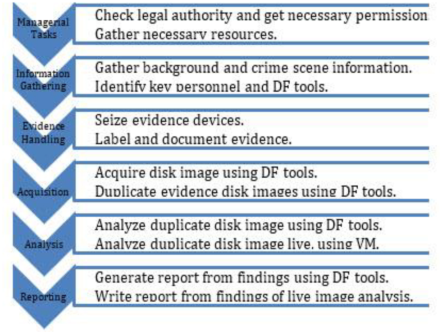
Figure 1: Training exercise development process.
resources available for the exercise, the use of virtual machine disk images may be considered as evidence for disk images to be analyzed by the investi- gators. Additionally, tabletop exercises may be conducted in lieu of activities such as physical handling of evidence devices. For example, when using a virtual machine disk image created on-site as the evidence device image, your team may opt for the use of tabletop exercises for the seizure, packaging, and transport of the device. Figure 1 describes the development process in detail, ending the process in analyzing the images into a report.
Information Gathering In any investigation, the gathering of preliminary information is essential for the identification of the resources that will be needed and the future identifi- cation of digital evidence. The process of information gathering begins with the collection of background information and reports related to the case. This includes in-depth interviews with the crime scene examiners and all persons associated with the case. These interviews can provide valuable insight into the target evidence and how to obtain it from evidence devices. When used in conjunction with the case reports, these are the building blocks from which the case background is constructed. This background information will help to decide what resources may be necessary during the analysis phase.
In the context of our investigation, we needed to rely solely on the gene- ral case description and case reports created in the scenario development stage due to a lack of human resources to interview. This exclusion was dee- med appropriate, given that the purpose of our exercise was to focus on the challenges surrounding email and encrypted files.
Within the case report, it mentioned that an email had been received by a person involved in the case. Given that the email was sent by the supposed suspect, it was easy to see that we would need a tool built for email analysis.
The encryption aspect, however, would not have been foreseeable through the use of case reports. Therefore, if we had not already incorporated it into
A Didactic Tool for Digital Forensics 25
our forensics toolkit, we likely would have incurred additional unexpected costs during the course investigation.
Evidence Handling For the evidence handling tasks, we used tabletop exercises to simulate the seizure, labeling, packaging, transport, and storage of evidence items. These simulations included the completion of chain of custody (COC) documen- tation upon receipt of the evidence device, the packaging of the device in a Faraday bag, to prevent any modification of data on the device, and the sto- rage of the evidence in a secure storage container in the transport vehicle. The vehicle was then driven directly to the forensic lab, where the evidence was removed from the storage container and stored in a secure storage locker within the lab. Once placed within the storage locker, the evidence item’s COC documentation was updated, and the item was added to the forensic lab’s evidence list.
ANALYSIS General Analysis - Autopsy
The analysis phase of an investigation is typically the most intensive. Tho- rough analysis must be conducted to ensure that no file gets overlooked in the process. This includes using a general DF tool to identify possible evidence and generate reports then utilizing specialized tools to further inve- stigate suspicious data found within the disk image. Additionally, the live analysis of a disk image may prove beneficial for identifying useful data or other potential sources of evidence, such as servers hosting Web applications where incriminating files or metadata may be stored. Since Web caching is the method by which users are able to view Web pages as images, the cached images can be used to view some images of what the user was browsing. These cached images were identified and tagged in the analysis of the image files. In addition, there were several image files that had mismatched extensi- ons. These files require further investigation to see if they contain additional, hidden data.
Several files were also found in the unallocated space but weren’t viewable using Autopsy. The recovery of these files will likely require the use of an additional tool. So, these files were tagged for further review and analysis.
Encryption Analysis – AccessData Password Recovery Toolkit (PRTK) We used PRTK to conduct encryption analysis on the suspect image and text files. During the initial attempts to investigate these files, it was noted that the file type was not supported by the tool. This required research to determine why the tool did not recognize the jpeg and txt formats of the files. After investigating possible causes, it was determined that the files were not ordi- nary encrypted files and were likely stenographic files whose contents could not be accessed using this encryption tool. Therefore, the decision was made to incorporate a new steganographic tool to access the hidden file contents.
Figure 2: Email attachment downloads.
Steganographic Analysis – StegCracker Using the evidence obtained from the Autopsy analysis, we determined that the most effective tool for investigating the suspect steganographic files would be StegCracker. This was decided based on the web searches for the compa- nion steganography product “StegHide”and the bash shell history, indicating its use on these files, that were found on the disk image. However, StegCra- cker is not compatible with the Windows operating system. Therefore, we chose to incorporate a Linux workstation to utilize the software.
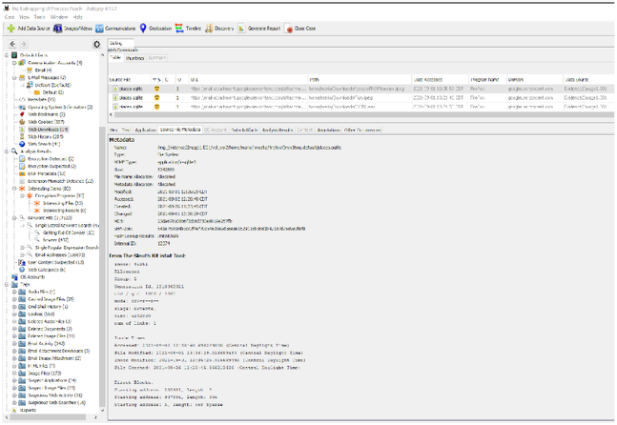
Figure 2 depicts a sample of downloads of email attachments. Within the Web Downloads section, there were three notable records found of down- loads from email attachments in the days surrounding the crime. Therefore, these metadata files were tagged for further analysis and review.
Email Analysis - Aid4Mail During our attempt to analyze the Gmail Web client activity, using Aid4Mail, it was discovered that the tool is only useful for Gmail Web activity when the IMAP settings are manually configured by the user. Since the account owner had not enabled this setting, we were unable to gain access to the email activity using this tool.
General Analysis – Autopsy The analysis phase of an investigation is typically the most intensive. Tho- rough analysis must be conducted to ensure that no file gets overlooked in the process. This includes using a general DF tool to identify possible evide- nce and generate reports, then utilizing specialized tools to further investigate suspicious data found within the disk image. Additionally, the live analy- sis of a disk image may prove beneficial for identifying useful data or other
potential sources of evidence, such as servers hosting Web applications where incriminating files or metadata may be stored.
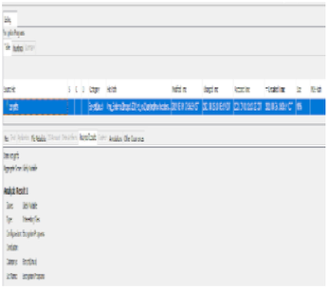
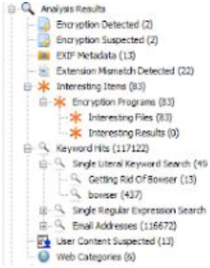
In our exercise, we used Autopsy for our general analysis. This tool is useful for organizing evidence and generating reports based on the tags and comments created by the investigator. It also has the added benefit of produ- cing its own tags for suspicious files, such as encryption software. In our disk image, it automatically tagged 83 items as encryption programs, an example illustrated in Figure 3. Upon further analysis, many of these programs sho- wed access times within days of the crime. This alerted us to the possibility that some of the evidence may be encrypted and the software that may have been used for the encryption process, which can be useful for decryption once the encrypted files are identified. Figure 4 provides an excellent example of the identified encrypted files.
CONCLUSION
When using DF tools for the analysis stage of an investigation, many tools allow for the tagging and commenting of files and provide the ability to automatically generate a report. However, in the case of live analysis, it will
be necessary to manually document all findings. In our exercise, we deter- mined that further examination and incorporation of new DF tools in the initial phase of an investigation may be necessary going forward, based on the level of difficulty in viewing emails transmitted via a Web application. Additionally, during the investigation, we discovered the need to add a ste- ganographic tool to our DF toolkit instead of relying only on decryption software. This experience highlighted the need for DF professionals to be fle- xible in their investigation strategy as new evidence is uncovered and to be prepared to accrue additional costs when necessary.
Overall, we discovered that the primary area of our strategy that needed improvement was the initial development of our toolkit for the case. Our ori- ginal toolkit was missing two key components, which created a large deficit in the overall effectiveness of the investigation. However, now that we have identified this flaw, we will be able to improve our strategy moving forward by incorporating new components into our digital forensics’ toolbox.
REFERENCES
Almulla, Sameera, Iraqi Youssef, Jones Andrew. (2014). “A State-Of-The-Art Review of Cloud Forensics.” Journal of Digital Forensics, Security and Law. Bulbul Halil, Yavuzcan H. Guclu, Ozel Mesut. (2013). “Digital Forensics: An
Analytical Crime Scene. Devendran Vamshee, Shahriar Hossain, Clincy Victor. (2015). “A Comparative Study of Email. Forensic Tools,” Journal of Information Security. Vol. 6. No. 2. Hay Brian. (2010). “Applications of Virtualization to Digital Forensics Education,”
43rd Hawaii Int’l. Conference on System Sciences. pp. 1–7. Ho Anthony, Shujun Li. (2015). “Handbook of Digital Forensics of Multimedia Data and Devices”. pp 68–156. Kumar Kailash, Sofat Sanjeev, Jain S. K., Aggarwal Naveen. (2012). “Significance of
Hash Value Generation in Digital Forensic: A Case Study”, International Journal of Engineering Research & Development. pp. 64–70. Lim Sungsu, Yoo Byeongyeong, Park Jungheum, Byun KeunDuck, Lee Sangjin.
(2012). “A research on the investigation method of digital forensics for a VMware Workstation’s virtual machine”. Mathematical and Computer Modelling, Volume 55, Issues 1–2, pp. 151–160. P˘atra¸scu Alecsandru, Patriciu V. (2013). “Beyond digital forensics. A cloud computing perspective over incident response & reporting”. Int’l Symposium on Applied Computational Intelligence&Informatics. pp. 455–460. Poore James, Flores Juan Carlos, Atkison Travis. (2013). “Evolution of digital foren-
sics in virtualization by using virtual machine introspection.” 51st ACM Southeast Conference, New York, NY, USA, Article 30. pp. 1–6. Procedure Model (ACSPM),” Forensic Science International. pp. 244–256. Rahman, Shuaibur, Khan M. N. A. (2016). “Digital Forensics through Application Behavior Analysis.” International Journal of Modern Education and Computer Science, vol. 8, no. 6, 2016, pp. 50–56. Song Zheng., Jin Bo, Zhu Yinghong, Sun Yongqing. (2011) Investigating the Impli-
cations of Virtualization for Digital Forensics. Int’l Conference on Forensics in Telecommunications, Information, and Multimedia. pp. 110–121.
LISTED IN THE AHFE DIGITAL BOOKSTORE CATALOGUE
Explore the complete digital volume
Human Factors in Cybersecurity
Read this individual research paper free through the original publisher, or explore the full digital proceedings book.
ISBN 978-1-958651-29-2
Explore this ISBN in the AHFE Bookstore ↗Listed in the July 2026 bookstore catalogue; search by ISBN to confirm current availability · Digital book purchase optional