Christina Braza, Ahmed Seffahb, Pierre Poirierc (2019). Designing Usable, Yet Secure Authentication Services: A User-Centric Protocol. In: Advances in The Human Side of Service Engineering. AHFE Open Access, vol. 8. https://doi.org/10.54941/ahfe100257
User authentication is a vital and critical service in many modern interactive applications including online banking, commerce, government as well as critical infrastructures protection. Such critical software systems should provide highly secure services for establishing if user access should be granted or not. As it will be highlighted in this paper, there is an intrinsic conflict between creating user authentication services that are secure, yet easy to use by the end-users. Our main goal is to adopt a human-centric approach which consists to study the intimate relationship between usability and security before the user authentication service has been implemented and deployed. We propose a framework that models the usability and security symmetry meaning the security consequences of usability issues. It suggests a novel usable security protocol through an inspection method named Usable Security Symmetry for dealing with usable security of user authentication methods that in turns will guide the development of truly secure and usable user authentication systems. The framework uses NGOMSL (Natural Goals, Methods, and Selection Language) to understand the user cognitive processes involved in user authentication while helping to identify and model the diverse situations of conflict between usability and security attributes.
Security-sensitive systems require the management of user accounts that include personal profile and give access to sensitive data and services. A user is a single entity whose behavior is solely identified within a computer-based system (i.e. Personal Digital Assistant (PDA), workstation, server login, Web sites, etc.). Individual users classically correspond to individual people, but they might also represent particular system services or resources. Most accounts are protected by an easy keyboard password that even a novice hacker can crack easily. Once inside, hackers use the attacked account for a diversity of nefarious activities, such as launching distributed denial of service (DOS) attacks, distorting Web sites, stealing billing and credit card information or making counterfeit purchases. Distribution of budget for security initiatives, information security, has increased from 17.7 percent in 2008 to 18.5 percent in 2009.
However in the last decade, we have seen a major shift from what was broadly recognized as security best-practices and standards. Within the advent of mobile and Web services, the access to almost any system protecting the organization's information assets is a critical concern. Data security (90%) is most frequently mentioned as a vital concern for IT security organizations, followed by application security (86%), and business continuity/disaster recovery (84%). Data security tops also the list of business objectives, with 89% mentioning protection of corporate data and 87% mentioning protection of personal data. Most of the spending on information security countermeasures are dedicated to confidentiality and integrity solutions which two sub-factors contributing to the overall security. The solutions includes firewalls to protect the information perimeter of an enterprise (or encryption), Virtual Private
Networks (VPNs), and anti-virus and intrusion detection to safeguard the actual information.
However, without user authentication products to safely identify users, most of these tools fail to deliver their promises. For example, inefficient user authentication marginalizes perimeter security and access controls, showing vulnerabilities in the confidentiality and integrity areas. The growing trend toward identity theft, or employing stolen names, birthdays and identification numbers to perpetrate fraud, would meet firm resistance if strong authentication practices were universally employed. Privacy violations, another example, are seriously compromised by weak user authentication. User authentication is crucial issue in confidentiality and integrity when the application has to identify huge numbers of users which is a costly and overwhelming task.
However, most of the time companies forget to address issues related to the weakest link in the security engineering of user authentication: the human experience and the usability concerns. The front side of the service showing to the user – should be designed so that it is suitable to the risk involved and as easy to use as possible. Applying too low a level of security might compromise the integrity of the company’s process. But applying too high a level for a low- risk process means the process will be too hard to use and will confront low usability rates. Indeed, security and usability are both essential in user authentication and management. One of the biggest challenge facing heterogeneous organizations is providing usable and secure access, authentication (“who do you claim to be”), and authorization (“we will grant you these rights”) of users to systems. Besides, the majority of contemporary computer users for example need to authenticate to a company network several times during work day. Another particular concern in authentication according to (Cranor and Garfinkel, 2005) is that authentication technologies do not fail gracefully. Failing gracefully means that even if authentication fails (e.g. user forgets her/his username but gets the password right) the system can give her or him a partial access to the service or secure and fast support in getting login data to a safe place.
The fundamental question is the following: How is it possible to ensure usability of user authentication without compromising security and vice-versa? It is broadly held that security and usability are two opposing goals in system design (Cranor and Garfinkel, 2005; Jøsang et al., 2007; Nielsen, 2000) but there are several cases in which security and usability can be synergistically enhanced by reviewing the usable security approach. In considering the extent that users are important in the authentication process, a company’s goal is to select an Authentication Method (AM) that is suitable to the risk involved and as easy to use as possible. Applying too low a level of security might compromise the integrity of the company’s process. But applying too high a level for a low-risk process means the process will be too hard and will confront low adoption rates. As stated by Penn (2008), the key criteria when assessing such solutions are ease of use, portability, cost, security, manageability, and cross-channel utility.
Our objective is to build a harmony between usability and security while providing requirements and design tools grounded in specific usability and security principles. In certain situations it is possible to concurrently increase usability and security by revisiting user interface/usability design decisions that were made in the past. In other situations it is possible to align the requirements of security and usability by changing the human environment in which the system will be used. In this paper, we introduce a framework that its goal is not to address usability and security after the product has been manufactured, but to make security a natural outcome of the requirements and design phase of the authentication development life cycle.
CREATING SYSTEMS THAT ARE BOTH SECURE AND USABLE The Challenging Issues
To motivate this research, one can mention the CSI/FBI Computer Crime and Security Survey (2008) on how without a proper user authentication system (the “door-entry” of any system), organizations are susceptible to potential attackers. This survey defined 13 types of attacks or computer mishandling resulting in direct financial loss to the survey’s participants. The survey questions the different sorts of computer attacks and incidents, which are in fact directly related to user authentication: Unauthorized access represented (29%), Insider Abuse (4%), Theft/Loss of proprietary information (9%), Password Sniffing (9%), and finally Theft/Loss of customer data represented (9%). In the real world, organizations struggle to enforce security policies — even the most basic ones (e.g. password). When users have unsupervised physical access to a mobile device, they can usually do whatever they wants with it, for example even authenticate themselves through the software token installed in the mobile device since they know their friend’s username and password. As a result, most of these policies violate the Big Stick principle: Whoever has physical access to the device is allowed to take it over (Stajano, 2003) (as in the previous example). These policies are extremely hard to enforce and thus scarcely of practical usage. The Big Stick Principle is a very high- level security policy model which identifies a set of cases in which authentication is superfluous. In the Internet of services era, it is worth noting that five out of the top 10 Web application security vulnerabilities are directly or indirectly related to authentication according to (OWASP, 2009).
Research on usable security user authentication methods are traditionally about the evaluation of Pretty Good Privacy (PGP) (Whitten and Tygar, 1999), public key encryption program primarily intended for authentication and email privacy, anti-phishing authentication mechanisms (Dhamija et al., 2006) security toolbars (Wu et al., 2006), user authentication mechanisms (pictorial passwords) (Angeli et al., 2003), security user studies (Chiasson et al., 2007), secure User Interface (UI) for network applications (i.e. authentication of the communication) (Jøsang and Patton, 2003), design principles and patterns for computer systems that are secure and usable (Cranor and Garfinkel, 2005), and some general white papers about user authentication.
In recent years, Human Computer Interaction-Security (HCI-Sec) researchers have been applying HCI techniques in security software. However, there are no methods or techniques to effectively design secure and usable user authentication systems from the HCI perspective. Despite all these efforts made by researchers and organizations to provide suitable authentication methods, vulnerabilities still remain. Mechanisms and models that are complicated to the user will be misused. When an authentication method is too demanding the user might not keep up with the increasing workload (e.g. users might refuse to sign up to a Web site due to its complex strong authentication method). Thus, organizations often tend to blame the users for the human failure of not handling complex and demanding technical systems. However, (Norman, 1988) argues that what we often view as human error is the result of design flaws that may be surmounted. Additionally, according to the Computing Technology Industry Association (CompTIA, 2002), human errors turn out to be one of the major causes of security breaches in organizations; they account for 84% of security breaches in 900 private and public American organizations.
More research effort is needed on usable security systems. It aims to study how information security and usability factors should be handled in the system, including both front and back-end processes, and taking into consideration the resources and costs involved. It is critical to the effective adoption and deployment of user authentication methods. As a matter of fact there is no set of recognized usable security standards particularly targeted to user authentication methods but rather only to security mechanisms in general. As expected, there are numerous examples that fully characterize this hypothesis such as the so-called password complexity, locking Personal Identification Number (PIN) systems, cumbersome data input of challenge-response calculators, lack of usability in security software, “negative redundancy” of biometrics systems when users are authenticating to a system (e.g., combine a username/PIN with fingerprint), and so on. Moreover, to reduce management and support costs, organizations are placing more and more of the burden of authentication on the user (i.e. key stakeholders like employees, partners, end-users, etc.), forcing them to perform - at the enterprise’s discretion - lifecycle-management tasks (i.e. self-service user authentication) such as token activation, password replacement, and certificate renewal.
The Case of Strong User Authentication Strong authentication relates to systems that entail rigorous user identity verification, which is accomplished through multiple factors for authentication. It allows us to irreversibly determine the user’s identity or the integrity of precise data. Strong authentication also presumes that access to a network is extremely hard to break, thus creating a secure network. The goal of strong authentication is to strengthen the security by replacing the classic authentication method of password for a software-only authentication solution with dynamic password generators, or software and/or hardware authenticators like smart cards, biometrics, CAPTCHA, and so on. Traditional authentication assumes we know something: the user and the password.
Strong authentication assumes that the username and the password are known even if the password is generated automatically. A password generator offers the user the choice to allow the system to assign passwords to usernames and logins. Password generators use an amalgamation of case sensitive letters, numbers, and symbols mathematically generated to offer the user with the strongest, hardest to hack passwords. A single factor authentication is not secure. Actual information security requires an amalgamation of mechanisms (i.e. multi-factor user authentication) to verify who the user is, what the user knows, what the user has, or where the user is. Verifying who the user is typically requires a Personal Identification Number (PIN) to attest what the user knows. The PIN combined with a biometric method, such as a fingerprint or iris scan, attests what the user has, or a smart card or digital certificate also assures what the user has and a Global Positioning Satellite (GPS) receiver (e.g., an iPhone with a Google maps application installed) corroborates where the user is.
Combining multiple user authentication methods generates almost infallible user authentication on the Web, just as multiple levels of identification provide security for the physical access control. For example, a user who enters the top secret area of a military building might be asked to present two pieces of identification which is information known only to the user, match a fingerprint, and finally type in the combination for an electronic door lock. Once inside, the user still has to log onto the computer. Multi-factor user authentication such as this has been employed for a long time in physical world security systems. There are currently several authentication technologies to select from, and they each verify the identity of a user and grant access to resources. Nevertheless, they essentially diverge in the level of security they offer as shown in Figure 1.4. While passwords are usually considered weak forms of authentication, token and especially Biometrics have been established as much stronger forms of authentication.
Users frequently and understandably resist strong authentication because it adds additional steps to their login and Internet sessions. Once they are authenticated, users' identities are securely established. As expected, corporate users are more receptive to strong user authentication, especially since it is intrinsic to their jobs. Generally speaking consumers have shown more resistance to additional or intrusive steps that eliminate anonymity. Many security experts foresee equivalent trends toward stricter user authentication for Internet consumers as e-commerce continues to increase and an increase in novel kinds of services that require strong authentication in the market.
Authentication policies are required to manage how the authentication methods interoperate. These policies orchestrate user authentication methods, such as the methods to employ for specific resources, the order in which to employ them, and the back-up activities to be carried out should the selected methods fail. Developing user authentication policies typically requires the expertise of highly skilled security system designers to put -the system into operation on- a long-term basis. Automated user authentication management systems are only in their infancy to ease the human-intensive effort usually associated with deploying and operating strong authentication. However, that same automation on one end- pushes the burden to the other end of the chain, which is the end-user.
The greatest challenge of strong authentication is to make fraud more difficult for an attacker while respecting the constraints associated with an application: the technical, economical, and organizational environment (Braz and Aïmeur, 2005).
NGOMSL: A METHOD FOR COGNITIVE TASK ANALYSIS Users employ programs for performing their tasks. Cognitive Task Analysis (CTA) have been used to boost human performance while guiding the development of tools that support the cognitive processes required for a task (Chipman et al., 2000). Within our research, we used CTA to provide a description of the conceptual and procedural knowledge utilized by users as they perform, for example, authentication tasks such as accessing a protected network resource using a Knowledge-Bases Authentication (KBA) method (e.g. security questions as an emergency access method). GOMS is the most widely used method of CTA. First introduced by Card et al. (1983), it refers to a family of human information processing techniques that attempts to model and predict user behavior. The acronym GOMS stands for Goals, Operators, Methods, and Selection Rules. GOMS is both a performance model and a cognitive task analysis method. The GOMS modeling technique has proven extremely successful in developing accurate cognitive task models (Williams and Voigt, 2004). Some of the types of applications in which cognitive task models have been applied in their research include assessing human-computer interaction complexity, determining the productivity of human-computer interfaces, and analyzing an interface design to determine whether methods can be automated.
We investigate NGOMSL (Natural Goals, Methods, Selection Language) (Kieras, 1996) analysis to understand and identify the cognitive processes involved in user authentication. NGOMSL is one of the GOMS models that support quantitative predictions for systems that have not yet been built. NGOMSL is a structured natural language notation for representing GOMS models and a procedure for constructing them. An NGOMSL model is in program form, and provides predictions of operator sequence, execution time, and time to learn the methods. An analyst constructs a NGOMSL model by performing a top-down, breadth-first expansion of the user's top-level goals into methods, until the methods contain only primitive operators, typically keystroke-level operators (e.g. click on "Sign In" button with left mouse button).
Furthermore, NGOMSL refines the basic GOMS concept by representing methods in terms of a cognitive architecture called Cognitive Complexity Theory (CCT) (Kieras and Polson, 1985). This cognitive theory allows NGOMSL to incorporate internal operators such as manipulating working memory information or setting up sub- goals. Because of this, NGOMSL can also be used to estimate the time required to learn how to achieve tasks. NGOMSL is a structured natural language notation for representing GOMS models and a procedure for constructing them (Kieras, 1996). An NGOMSL model is in program form, and provides predictions of operator sequence, execution time, and time to learn the methods. An analyst constructs a NGOMSL model by performing a top-down, breadth-first expansion of the user's top-level goals (e.g. Access a Word file) into methods (e.g., Select word), until the methods contain only primitive operators, typically keystroke-level operators (e.g. Move cursor to middle of word with the mouse), and select rules (e.g., If the application is GAME, select CTRL-W-METHOD).
THE USABLE SECURITY PROTOCOL As already highlighted in the introduction, making a system secure and usable can be achieved if and only if it is a pre-hoc consideration. This strengthens the argument made by other HCI-SEC researchers (Balfanz et al., 2004; Flechais et al., 2003; Yee, 2004) that security and usability must be developed in unison from conception right through to development. According to Yee (2004), integrated iterative design means iterative development processes based on repeated analysis, design, and evaluation cycles, rather than linear processes in which security or usability testing occurs at the end. Although many teams have adopted iterative processes, few seem to incorporate security and usability throughout. The usable security protocol adopts an iterative process that aims to build and maintain the trade-off between security and usability.
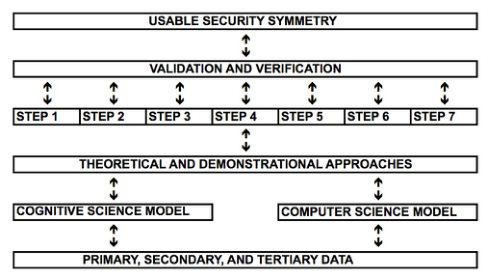
Protocol Architecture The usable security protocol is a human-centric framework that aims to structure, develop, and control the process of the Usable Security Symmetry user authentication inspection method (Figure 1). It starts with the gathering of Primary, Secondary, and Tertiary Data. Then, the Cognitive Science Model (theoretical approach), which is based in Cognitive Ergonomics, is established in parallel with the Computer Science Model (demonstrational approach) to demonstrate the inspection method. Next, an orderly and sequential seven-step methodology assists in the actual development phase. After that, the Validation and Verification (V&V) phase is undertaken to validate our protocol by using a multi-teller automated machine.
Figure 1. Usable security protocol architecture and methodology: The six stages indicated in figure 1 and that form the essential of the protocol are:
Step 1: Define the mission and conceptual design objective
Step 2: Identify the most representative user authentication methods categories
Step 3: Perform the NGOMSL model
Step 4: Develop the user authentication risk assessment
Step 5: Define the usability criteria for the evaluation of the user authentication method
Step 6: Develop the Usable Security Symmetry inspection method
Step 7: Demonstrate the inspection method using a multi-teller automated machine and a One Time Password (OTP) authentication method Protocol Methodology Development
Step 1: Define the mission and conceptual design objective This stage consists of specifying the usable security use cases. Each use case identifies a type of users (e.g. Super Admin, etc.) and working context in which an existing user authentication method is used. It aims to collect data to understand what authentication method is used, how it works, and what its functionalities are. Examples of use cases include the following: i. Check Business E-mail; ii. Update the hardware token user interface specification; iii. Make electronic funds transfer; and iv. Access a file on a personal laptop. This stage includes also a classification analysis is undertaken to specify the main user authentication methods to be used for the purposes of the user authentication inspection method.
Step 2: Specify the most representative user authentication methods categories The user authentication methods are identified as follows: i. Password/PINs (wired network-based task): username and password login operation in a desktop environment; ii. One-Time-Passwords (wireless/token network-based task): real-time generated OTPs based on the challenge-response method; iii. Out-of-Band Authentication (wired and wireless network-based task): utilization of two separate networks working concurrently to authenticate a user (e.g., PC computer and smart phone interaction), and finally iv. Biometrics (wired network and electronic access control- based task): logical and physical access control (e.g. fingerprint).
Step 3: Perform the NGOMSL Model (Natural Goals, Methods, Selection Language) analysis Using the user authentication methods categories identified previously, we use NGOMSL to predict the learning time and execution time based on a program-like representation of the procedures that the user must learn and execute to perform tasks with the system. We first specify standard primitive external operators (e.g., Type <username>), mental operators (e.g., Recall <passcode>), and analyst-defined mental operators (e.g., Think-of <VPN Dialer>). Then, we generate task description, high-level user Goals, Operators, Methods for accomplishing Goals, and total execution and learning times estimates for each of the user authentication scenarios.
The time analysis of the data gathered for each set of the four task scenarios (figure 1) was based on the operator sequences, execution times, and procedure learning times. As shown in Table 1, the user took 28.85 seconds, which, is the total execution time (TET) for T1 using the Password/PIN, and so forth for the tasks T2, T3, and T4.
Table 1: Total Execution Time by task scenario.
The TET does vary depending on the type of the authentication method used. In fact it takes more time if the user employs an OOBA method’ This is because the user interaction during authentication is more demanding than the other authentication methods as shown in Table 2. The results show the total execution time for the set of four authentication benchmark methods, which is the profile for the Method for goal: Log into the system in Table 2. The profile includes the total time in seconds spent using this method and the percentage of the time spent on it. Our research is more concerned with the investigation of the authentication portions of the tasks scenarios as shown in Table 2, which are the time related to the Method for goal: Log into the system.
Task Scenario Method for goal Authentication % of Total Total Execution Time(s) Human Side of Service Engineering (2019)
Table 2: Total Execution Time by user authentication method: Log into the system.
The main factors influencing the amount of time a user spends authenticating to a system are the number of different artifacts to interact with and the type of authentication method. The Password/PIN takes more time to be performed, 23.25 seconds, when compared to Fingerprint recognition, 9.16 seconds. The former is a Knowledge-Based Authentication (KBA), which requires users to prove the knowledge of a single secret, memorize items, and recall them when accessing a specific system. The latter is Biometrics, which recognizes users physically through their fingers; no cognitive process is directly involved. Using OTP takes a little more time than OOBA, given that either users need to interact with different artifacts and make use of KBA which directly involves cognitive processes. With OTP users are required to refer to a hardware authentication token, then type the code displayed there on their application (e.g. VPN application). In addition, users need to remember the PIN (i.e. 4-digit) but not the password (i.e. strong password like Rtyr78nM!), which facilitates memory retrieval, although this authentication method is the one that takes more time. As expected, the fingerprint (Biometrics) takes the least amount of time out of all methods. No cognitive process is directly involved (e.g. not KBA), and there is minimal interaction with artifacts when using a USB drive. The authentication processing time may vary depending on the infrastructure, the equipment, and also on different versions of the authentication methods.
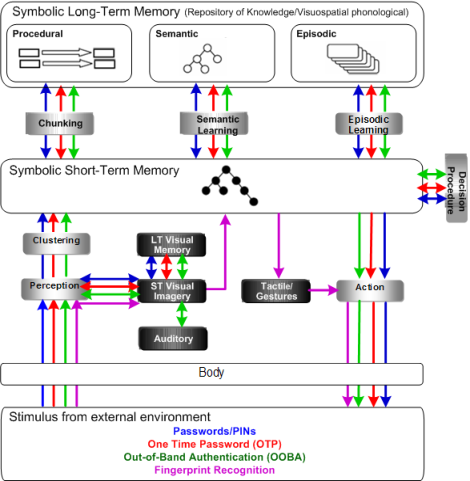
Also in parallel, the identification of the main cognitive areas of focus relating to user authentication is established (i.e. perception, attention and memory, mental models) followed by the definition of the appropriate cognitive architecture [i.e. adaptation of the Executive-Process/Interactive Control (EPIC) (Kieras and Meyer, 1997), and State Operator and Result (SOAR) (Laird et al., 1987) architectures], which lead to our Cognitive Model of User Authentication (CMUA) It provides a relevant contribution to the understanding of what and how cognitive processes are involved in user authentication. On the basis of this formalization, CMUA is the first attempt to build a cognitive model for user authentication methods. The architecture and the underlying processing cycle are shown in Figure 2.
Figure 2. Cognitive Model of User Authentication (CMUA)
This model helps to determine how and what cognitive processes are involved in user authentication tasks such as perception, attention and memory, mental models, chunking, clustering, and so on. It also serves as the basis for the development of the Usable Security Symmetry inspection method. The four most representative categories of user authentication methods are depicted in our model with the following colors: Password/PINs ([Equation or mathematical symbol available in the original paper PDF]), One-Time Password ([Equation or mathematical symbol available in the original paper PDF]), Out-Of-Band-Authentication, and Fingerprint Recognition in Figure 2. . Figure 4.8 depicts the user authentication tasks with their corresponding cognitive and motor process flows shown in colored arrows as follows: PPs OTP [Equation or mathematical symbol available in the original paper PDF] OOBA [Equation or mathematical symbol available in the original paper PDF] FR.
The CMUA consists of a LTM, which is encoded as production rules, and a STM, which is encoded as a symbolic graph structure so that objects can be represented with properties and relations. Symbolic STM holds the agent’s evaluation of the current situation derived from perception and via retrieval of knowledge from its LTM. Action in an environment takes place through creation of motor commands in a buffer in STM. The decision procedure selects operators and detects impasses. At the lowest level, CMUA’s processing consists of matching and firing rules. Rules provide a flexible, context-dependent representation of knowledge, with their conditions matching the current situation and their actions retrieving information relevant to the current situation.
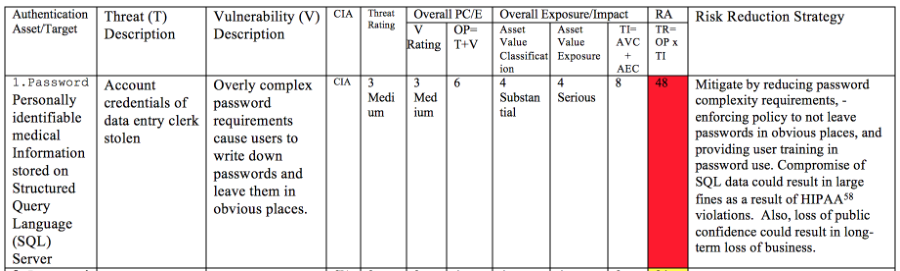
Step 4: Develop the User Authentication Risk Assessment This assessment must be done prior to the development of the usable security inspection method itself. It is a vital step to identify the most critical vulnerabilities and threats related to online user authentication (user-to-machine). This assessment determines which security review should be considered within each usability criterion in the inspection method. It describes the user authentication assets, threats, and vulnerabilities along with their corresponding descriptions and mitigation strategies. It also shows the types of rating scales for Threat, Vulnerability, CIA (Confidentiality, Integrity, and Authorization model), Probability, Asset Value and Asset Exposure Classifications, Total Impact and Total Risk Ratings, and finally Risk Reduction Strategy as shown in Figure 3.
Figure 3. User authentication risk assessment matrix excerpt.
Step 5: Specify the usability factors and criteria To specify the usability factors and criteria to be employed in our inspection method, we use the Use Integrated Measurement (QUIM) (Seffah et al, 2006). QUIM adopts the viewpoint of most HCI standards while decomposing quality in use into different factors, then into criteria which are measurable attributes. For the purposes of our inspection method, the following nine usability factors and eight criteria have been considered:
Usability factors: Minimal Action, Minimal Memory Load, Operability, Privacy, Security, Load Time, and Resource Safety
Step 6: Develop the Usable Security Symmetry Inspection Method
The Usable Security Symmetry is a checklist-based inspection method. It involves having a group of evaluators systematically examine a user interface and judge its compliance with security and usability principles. It can be used to guide a design decision or to assess a design that has already been created. When using it earlier in the requirements and design phase, this method helps security designers to make more informed decisions before the bulk of the functionality design is done. "Symmetry" is an important concept introduced by the inspection method we are proposing. Symmetry is one idea by which a human through the ages comprehend and create order, beauty, and perfection.” The word, order, is in fact a synonym of harmony. Our utmost goal is that security and usability will no more be two separate entities, but will work in harmony to produce secure and easy to use authentication methods.
As the inspection method provides very specific and practical review questions (not general ones), it is common to unfold issues and as well as opportunities for the overall functionality improvement. According to Nielsen (1992), usability specialists were much better than those without usability expertise at finding usability problems by heuristic evaluation, one of the most popular inspection methods. Moreover, usability specialists with specific expertise (e.g., security) did much better than regular usability specialists without such expertise, especially with regard to certain usability problems that were unique to that kind of interface. Thus, the Usable Security Symmetry inspection method is developed for system designers - acting also as evaluators – who have knowledge in security especially user authentication.
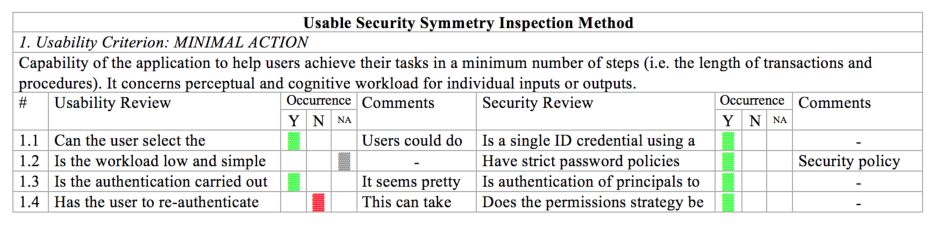
A partial view of our checklist is shown in Figure 4. Depending on the type evaluation we wish to conduct, the checklist can be quite long. The evaluators are given the possibility to collapse or expand each checklist item (e.g., # 1.3), thereby facilitating "Occurrence" data visualization.
The inspection checklist is related to the following issues: (i) Identify one (or up to 5) security designers and/or usability professionals to examine the system on an individual basis, (ii) Develop the usability Review Questions in conjunction with the Occurrences (iii) “Occurrences” are represented by Y (Yes), N (No), and NA. Y (Yes) represents that the authentication method being reviewed complies with the Usability Review question; N (No) represents that it does not comply with the Usability Review question, and NA (Not Applicable) means that the Usability Review question does not apply for that particular authentication method. The default value for the Occurrences fields is empty (none) (iv) Comments column: If there are no comment, we should include a dash "-" given that leaving it blank can mislead evaluators into thinking that data are missing. (v) The outcome of the inspection checklist is a list of usability and security problems in the interface with references to the predefined usability criteria and security aspects (vi) Finally, review any identified concerns, and assess their compliance with your criterion. Then, allocate a severity level for each grouped concern based on the impact to the end-user, and provide recommendations to fix the problem
Step 7: Demonstrate the inspection method using a multi-teller automated machine and a One Time Password (OTP) authentication method.
The Validation and Verification phase is undertaken by using a Multi-function Teller Machine (MTM) and a hardware OTP token, as an example. To illustrate how our inspection method can be applied in a real world scenario, the following three-factor authentication use case is employed which is “Transfer funds to an international bank account” by using a Multi-Function Teller Machine (MTM).
A user, Alice, needs to transfer US$5,000 to an international account by dealing either with access control and strong authentication. She first authenticates herself to the MTM using a smart card and a PIN (the bank PIN policy states that a PIN must have 4 digits and 1 letter). In high-value financial transactions environment, procedures to control access to several areas of the card become predominantly important. The degree of security changes with the degree of sensitivity of the data related to the application, which requires another layer of security to the current system: Biometrics. The MTM asks Alice to prove again her identity. So in addition to the bank card and PIN, Alice must provide a biometric authentication such as palm recognition - a multiple factor authentication.
The OTP authentication method in turn, which was the subject of the GOMS analysis, revealed the difficulties users have in terms of the user interaction with the system. The OTP demo is a wireless-and-token based authentication task, which consists of the following elements: Wireless Local Area Network (WLAN), hardware token with OTP functionality, Personal Identification Number (PIN), and tokencode. Finally, a usability testing is performed to identify the high-priority usability issues. The testing assesses the usability of user authentication tasks involving remote access, Secure Socket Layer (SSL), and Virtual Private Network (VPN), which is commonly known as SSL- VPN user authentication, a two-factor One Time Password (OTP) system that provides strong authentication.
A CONCLUDING REMARK So far, there has been very little research on usable security of user authentication methods although a considerable body of research work has been made for computer security mechanisms in general other than authentication methods. Therefore a usable security protocol is needed for user authentication. To build reliable, effective, security yet usable systems, the proposed inspection method take into account usability concerns of authentification mechanisms and their potential security threats. Systems should be built so as to be easy to learn and use by the average corporate or consumer computer user. According to Sasse (2004), "Don’t focus only on UIs to security tools - the big problems are in security requirements, job design and user involvement." That is exactly what the proposed method is all about. Additionally, according to Whitten and Tygar (1999) using methods for usability evaluation that concentrate on the interplay between usability on security assist developers to discover usability problems threatening the security of a system. This research has investigated the security consequences of usability issues and presented a novel usable security protocol which uses an inspection method named Usable Security Symmetry for dealing with usable security of user authentication methods. We hope it will guide the development of more secure and usable user authentication systems.
REFERENCES
Angeli, A.D., Coventry, L., Johnson, G. and Coutts, M. 2003. “Usability and User Authentication: Pictorial Passwords vs. PIN”.
Contemporary Ergonomics. p. 253-258. London, England: Taylor and Francis. Booher, H.R., Minninger, J. (2003), “Human systems integration in army systems acquisition”, in: Handbook of human systems integration, Booher, Harold (Ed.). pp. 663-698 Balfanz, D., Smetters, D.K. and Grinter, R.E. 2004. “In search of usable security: Five Lessons from the Field”. IEEE security
and privacy. 2(5), p. 19-24. Braz, C. and Aïmeur, E. 2005. “ASEMC: Authentication for a Secure Mobile Commerce”. RFID Journal, White Papers, Security. Computing Technology Industry Association (CompTIA). 2002. “Committing to Security: A CompTIA Analysis of IT Security and the Workforce”. Security survey. Card, S., Moran, T., and Newell, A. 1983. The Psychology of Human-Computer Interaction. Hillsdale, NJ: Lawrence Erlbaum
Associates. Cranor, L.F. and Garfinkel, S.L. 2005. Security and Usability: Designing Secure Systems that People Can Use. Sebastopol, CA: O'Reilly Media Inc. Chiasson, S. , Biddle, R. and Somayaji, A. 2007. “Even Experts Deserve Usable Security: Design guidelines for security
management systems”. Workshop on Usable IT Security Management (USM’07).
Chipman, S. F., Schraagen, J. M., & Shalin, V. L. (2000) Introduction to cognitive task analysis. In J. M Schraagen, S. F.
Chipman & V. J. Shute (Eds.), Cognitive Task Analysis (pp. 3-23). Mahwah, NJ: Lawrence Erlbaum Associates. Chapanis, A. (1996), “Human factors in systems engineering”. Wiley Series in Systems Engineering and Management. Andrew Sage, series editor. Hoboken, NJ: Wiley. Dhamija, R. and Tygar, J.D. 2005. “The Battle Against Phishing: Dynamic Security Skins”. SOUPS’05: Proceedings of the 2005
symposium on Usable privacy and security, p. 77-78. Folds, D. Gardner, D., Deal, S. (2008). “Building Up to the Human Systems Integration Demonstration”, INCOSE INSIGHT Volume 11 No. 2. Friedenthal, S. Moore, A. Steiner, R. (2008), “A Practical Guide to SysML: The Systems Modeling Language”, Morgan
Kaufmann; Elsevier Science. Flechais, I., Sasse, A.M. and Hailes, S.M.V. 2003. “Bringing security home: A process for developing secure and usable systems”. Workshop on New Security Paradigms. p. 49-57. Ascona, Switzerland: ACM Press. Jøsang, A. and Patton, M. A. 2003. “User Interface Requirements for Authentication of Communication”. Proceedings of the
Fourth Australasian user interface conference on User interfaces 2003. 18, p.75-80. Kieras, D. E., and Polson, P. G. 1985. “An approach to the formal analysis of user complexity”. International Journal of Man- Machine Studies, 22, p. 365-394. Kieras, D., Wood, S. and Meyer, D. 1997. “Predictive Engineering Models Based on the EPIC Architecture for a Multimodal
High-Performance Human-Computer Interaction Task”. ACM Transactions on Computer Human Interaction. 4 (3), p. 230-275. ACM: New York. Kieras, D. E. 1996. “A Guide to GOMS Model Usability, Evaluation using NGOMSL”. <ftp://ftp.eecs.umich.edu/people/kieras/ GOMS/NGOMSL_Guide.pdf> Retrieved on February 3, 2009. Laird, J. E., Newell, A. and Rosenbloom, P.S. 1987. “SOAR: An Architecture for General Intelligence”. Artificial Intelligence,
33 (1), p. 64. Norman, Donald A. 1988. The Design of Everyday Things. New York, NY: Doubleday. Nielsen, J. 1992. “Finding Usability Problems through Heuristic Evaluation”. Proceedings of ACM Computer Human Interaction (CHI’92). p. 373-380. Open Web Application Security Project (OWASP). 2009. “SQL Injection Vulnerabilities – SQL Injection Prevention Cheat
Sheet”. <http://www.owasp.org/index.php/SQL_Injection_Prevention_Cheat_Sheet> Retrieved on July 28, 2009. Penn, J. 2008. “The State of Enterprise IT Security 2008 to 2009”. Business Data Services North America and Europe. Forrester Research survey. <http://www.forrester.com/rb/Research/state_of_enterprise_it_security_2008_to/q/id/47857/t/2> Retrieved on February 2, 2009. Sasse, M.A. 2004. “Usability and Security - Why we need to look at the big picture”. ISS 2004, University College London, UK. Seffah A., Donyaee M., Kline R., and Padda H.K. 2006. “Usability Metrics: A Roadmap for a Consolidated Model”. Journal of
Software Quality, 14 (2) Taubman, P. (2008), Top Engineers Shun Military; Concern Grow. The New York Times Website: http://www.nytimes.com/2008/06/25/us/25engineer.html Williams, K.E. and Voigt, J. R. 2004. “Evaluation of a Computerized Aid for Creating Human Behavioral Representations of Human-Computer Interaction”. Human Factors, 46(2), p. 288-303. Whitten, A. and J. Tygar. 1999. “Why Johnny Can’t Encrypt: A Usability Evaluation of PGP 5.0.” Proceedings of the 8th
USENIX Security Symposium. p. 169-184. Wu, M., Miller, R.C. and Garfinkel, S. 2006. “Do Security Toolbars Actually Prevent Phishing Attacks?” Massachusetts Institute of Technology, Cambridge, MA. Yee, K.P. 2004. “Aligning Security and Usability.” IEEE Security and Privacy, 2(5), p. 48-55.
LISTED IN THE AHFE DIGITAL BOOKSTORE CATALOGUE
Explore the complete digital volume
Advances in The Human Side of Service Engineering
Read this individual research paper free through the original publisher, or explore the full digital proceedings book.
ISBN 978-1-4951-2091-6
Explore this ISBN in the AHFE Bookstore ↗Listed in the July 2026 bookstore catalogue; search by ISBN to confirm current availability · Digital book purchase optional