Néstor J. Rodríguez, José A. Borges, Isabel Nájera, Joseph Marrero, Miguel A. Aleman, Carlos A. Rivera (2021). An In-Patient Nursing Documentation Application for Smart Phones. In: Advances in Human Aspects of Healthcare. AHFE Open Access, vol. 13. https://doi.org/10.54941/ahfe100527
It is a widely known fact that mobile hardware and software technologies are exponentially evolving. Even though the health industry is taking advantage of these technological advances, very little has been accomplished from a nursing perspective of electronic medical records documentation applications. Nursing tasks remain mostly documented via rudimentary, inefficient, and time-consuming pen and paper methods. There is very little research literature regarding the use electronic devices for nursing documentation. In this article we describe a nursing documentation system implemented for the Android platform running on smart phones. The system is a successor of a previous PDA-based nursing documentation system. The general functionality of the original PDA-based system is described as well as the validation of the user interfaces of the system. The new smart phone-based system is described and at the same time contrasted with the PDA-based system in terms of their user interfaces and interaction paradigms. In general, the transition from the PDA version to the smart phone version was painless because it was possible to transfer most of the user interface paradigms from de PDA system and also reuse the database that held its electronic medical record. We expect the new system to be more agile in terms of interaction because of the improved interaction paradigms of smart phones and also because many nurses will be using it on a very familiar device.
As health care grows more complex, the access to timely information, and the ability to communicate effectively about patient care are more important than ever. This need has been recognized and acted upon by the USA government by enacting the HIPPA law requiring hospitals and private physicians’ practices to make the transition from their paper-based medical records into electronic-based medical records (EMRs). Within a clinical setting nurses are key collectors, generators, and users of patient information, and good nursing care is dependent upon the quality of the information they have available. Since most of the patients’ information is collected by nurses at bedside, EMRs can be greatly improved with mobile technology. The portability of smart phones and their ability to link to a central database without a hard-wired connection make them an alternative for providing access to EMRs at the point-of-care. These devices are very well suited for accessing and capturing clinical data at bedside in a hospital.
The viability of small mobile devices for accessing medical records has been demonstrated on previous studies
(Rodriguez, 2007 and Rodriguez, 2009). These studies demonstrated that it is possible to design PDA-based nursing documentation applications that allow nurses to achieve similar performance and satisfaction levels as with paper- based systems or a Tablet PC-based applications. These results support the use of smart phones for clinical documentation since they provide larger screens and are lighter than PDAs. In addition, smart phones feature user interfaces that are well known for a significant portion of the population, what reduces the learning curve for new applications.
In spite of the potential of smart phones as a useful tool for EMRs, there is not much evidence in the literature of the use of these devices in clinical settings. In this paper we present a nursing documentation application for hospitalized patients implemented for an Android–based smart phone platform. This application is essentially a redesign of and older PDA-based system (Najera, 2007). We will address the main issues involved in the redesign and how the system was transformed from a PDA-based to an Android-based smart phone application.
LITERATURE REVIEW
Mobile technologies are evolving exponentially. Among them, the fastest growing segment is the smartphone technology. According to Gartner (Gartner Inc., 2013), one of the leading information technology research and advisory company, smartphone sales exceeded feature phone sales for the first time in the second quarter of 2013. In the third quarter of 2013, worldwide sales of smartphones accounted for 55 percent of all mobile phones sold during the period (Bora, 2013). This tendency is expected to grow and sales of smartphones should soon reach one billion. The growth on mobile devices is also matched by the growth in apps for those devices. Several technology news sources report downloads between 70 to 100 billion apps for 2013.
The smartphone technology has penetrated significantly into our society and is being used by a wide population that covers most age, social, and cultural spectrum. This is also true among the healthcare professionals and for healthcare applications. A study by K. Terry (Terry, 2012) indicates that 86% of the clinicians use smartphones in their professional activities, up from 78% in 2012.
An article from the AAMC Reporter (Pelletier, 2012) states that some experts estimate the number of health-related mobile apps at no fewer than 40,000. Among the popular apps we have Epocrates, which services information on dosages and interactions; UPTODATE, that provides reference material doctors can consult when making treatment decisions; ISABEL, lists possible diagnoses as well as medications that could cause specific symptoms; Pubsearch, which provides access to millions of journals indexed in Pubmed; iDoc which contains 20 medical textbooks; and Medscape which offers prescribing and safety information for drugs, procedure videos, a medical calculator, and access to continuing medical education material.
Several studies have evaluated the use of mobile devices to support healthcare professionals in their practice. A paper by E. Kamel Boulos (Kamel Boulos, 2011) provides a brief state-of-the-art overview of health and healthcare smartphone apps on the market. They also describe in detail the development of the eCAALYX smartphone app which aims at building a remote monitoring system targeting older people with multiple chronic diseases.
An article in the Journal of Medical Internet Research (Ozdalga, 2012) provides a comprehensive and up-to-date summary of the role of the smartphone in medicine by highlighting the ways in which it can enhance continuing medical education, patient care, and communication. The study concludes that the health impact of smartphones in medicine remains to be answered, but that it will have a very bright future in the world of medicine with continuing contributions from doctors, engineers, and others.
There is much less evidence of smartphone applications for nursing practice support. An article by Wyatt (Wyatt, 2012) reviews and highlights the more commonly used applications and websites to enhance nursing practice. Another study (Doswell, 2011) describes the mHealth (Mobile Health) initiatives underway at the University of Pittsburgh School of Nursing and discusses the importance of mHealth in nursing practice, education, and research. They conclude that mobile technologies are changing the ways in which nurses intervene, access health information, and communicate with patients and other care providers, thus enhancing their practice in general.
Even less evidence is found regarding applications to assist nurses in clinical practices and their daily clinical interventions. Lin (Lin, 2011) proposes the development of interactive interface of an intelligence nursing information system (INIS) based on friendship that can decrease the nurses' effort to remember information and enable user to operate INIS easier. The authors state that there are few conventional nursing information systems (NIS) that can be used at the nursing site to provide the patient's present conditions in real-time, and the desirability to develop an easy-to-learn and easy-to-use mobile device for the nursing personnel to use, in order to improve the nursing quality. They also indicate that the familiarity of nurses with the smartphone technology should result in an efficient use of such devices without a significant additional effort.
A recent article by Ehrler (Ehrler, 2013) identifies the challenges involved in the deployment of clinical applications on handheld devices and shares their solutions to these problems. The study discussed and addressed challenges regarding financial, hardware, communication, security, and user interface for such devices. They conclude that “the ease of development of mobile applications and their rapid spread should not overshadow the real challenges of clinical applications and the potential threats for patient safety and the liability of people and organizations using them”.
THE ORIGINAL SYSTEM: PDA-BASED SYSTEM The smart phone-based nursing documentation system described in the next section is a successor of a previous PDA-based system. The implementation of the PDA-based nursing documentation system was based on a paper- based system of a cardiovascular hospital. The development of the system required a task analysis that involved interviews with nurses and physicians to gather information for the functional specifications of the system. Additional meetings with nurses and physicians were held in order to guarantee that the system complied with the needs of the health care personnel and the protocols, rules and regulations of the hospital. During the design process the system was subjected to usability evaluations. Validation of the system was accomplished with an evaluation method based on Jackub Nielsen’ usability heuristics (Nielsen, 1995), used during the early stages of the development process, and usability tests with nurses of the hospital at the latter stages of the implementation (Rodriguez, 2007 and Rodriguez, 2009).
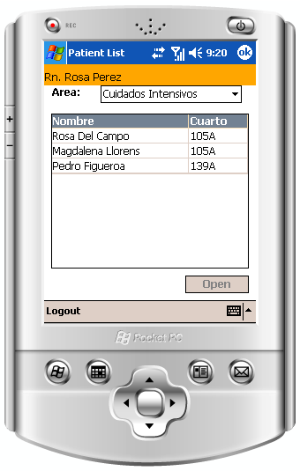
The User Interface The PDA-Based system was developed for the Windows Pocket PC operating system (Najera, 2007). The system features charting forms for documenting daily health assessment, administration of medicines, vital signs, nurses’ notes, pain assessment, ulcers assessment, patient positioning, intake & output of fluids, glucose levels and medical orders. After proper authentication the system enters a screen where the nurse can select the clinical area she/he is assigned to and select a patient from a list of patients provided in the same screen (Figure 1).
Figure 1. Patients list.
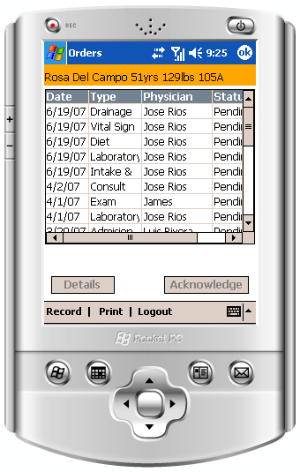
Once a patient is selected, a screen with the physicians’ orders for the patient appears (see Figure 2.a). This screen and all other documentation screens feature the name, age, weight and room of the patient at the top bar. Similarly the bottom bar features a Record button for selecting the different documentations screens for a patient, a Print button for printing a summary of the specific documentation category, and a Logout button for logging out of the system. The screen provides a list that is the history of all the orders of the patient. Each entry of the list indicates the date, the type, the physician that ordered it, and the whether the order has been taken care off (Acknowledged) or still pending (Pending). Orders that are pending are listed at the top of the list. Selecting an acknowledged order and then the Details button moves the system to a screen that shows the details of the order, when was it executed, and by whom (see Figure 2.b). Selecting a pending order and then the Acknowledge button takes the system to a screen that allows nurses to acknowledge the execution of an order (see Figure 2.c). The user has the option of canceling the acknowledge action or proceed with it by selecting the Save button. Either action takes the system back to the list of the orders screen (Figure 2.a).
(a) Orders list (b) Order details (c) Order
acknowledge
Figure 2. Physician’s orders interface.
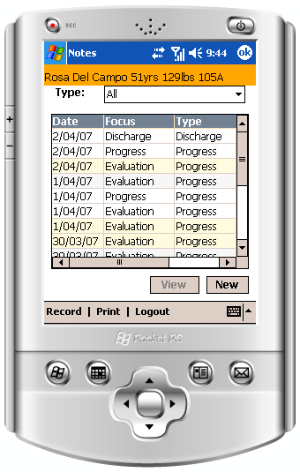
From the Orders screen nurses can accesses any of the documentation categories of the system by selecting the Record button. The interface for a documentation category usually consists of three screens (see Figure 3): a main screen with a history of the documentation interventions (Figure 3.a); a screen providing details of a documentation intervention (Figure 3.b); and a screen for a new documentation intervention (Figure 3.c). The details screen can be reached from the main documentation screen by selecting an entry from the list and then the View button. Selecting the Close button on the details screen takes the user back to the main documentation screen. The new documentation intervention screen can be reached by selecting the New button on the main documentation screen. This screen provides the option of saving the documentation intervention or canceling it. For the case of notes documentation there is a third option of saving the note as a draft.
System Validation The (Rodriguez, 2009) study served to demonstrate the viability of PDAs for nursing documentation. It compared the PDA-based with the paper-based system used in the hospital in terms of the usability with typical nursing documentation tasks. Twenty staff nurses from a hospital serving only a cardiovascular clientele participated in the study. They were selected on a first-come first-served basis from those that responded a call for participation. They average 9.3 years of experience as staff nurses and used computers in their job an average of 2.7 hours. However, none had experience using electronic patient record systems, nor PDAs. All had experience with the paper-based documentation system of the hospital, but none had previously seen the PDA-based system. They were asked to perform twelve typical tasks such as: looking up patients’ clinical information; executing medical orders;
(a) Main documentation screen (b) Documentation details (c) New
documentation entry
Figure 3. PDA notes documentation interface.
documenting vital signs, medication administration, intake/output, health assessment, and pain; and writing progress notes. The results of the study support the conclusion that a PDA-based nursing documentation system can be superior to a paper-based system in terms of performance for tasks that don’t required writing notes. Age is a factor since younger nurses exhibit better performance than older nurses. The study demonstrated that nurses are able to learn to use PDA-based nursing documentation applications with relative ease and minimal training since the participants were able to complete most of the tasks with just a short tutorial of the system and without having any experience using PDAs or electronic patient record systems.
The (Rodriguez, 2007) study served to compare the PDA nursing documentation system with a Tablet PC version of the system, which is a more flexible electronic version in terms of interaction capabilities. The table PC has a larger screen with larger capacity for displaying information and better object manipulation capabilities. The study followed the same methodology of the (Rodriguez, 2009) study. In fact, they were run at the same time period with the same nurses, however, they were published in different years. For this study the nurses were requested to perform 13 tasks. A task for reading a note was added. None of the nurses had prior experience using PDAs or Table PCs. The results of the study support the conclusion that it is possible to design PDA-based nursing documentation applications that allow nurses to achieve similar performance and satisfaction levels as with a Tablet PC-based application. The small screen size and display resolution of the PDAs are not factors that limit nurses’ performance and satisfaction in comparison to Tablet PCs. In general, nurses are more satisfied with the physical aspects of the PDA and preferred it over the Tablet PC. The study revealed that age is a factor that can influence nurses’ performance. Younger nurses exhibited better performance than older nurses. The nurses that participated in the study were able to complete most of the tasks with just a short tutorial of the systems and without having any experience using PDAs, Tablet PCs, or electronic patient record systems. Considering nurses’ performance and satisfaction with the physical aspects of the PDA, and their relatively low cost, PDAs were a better alternative for supporting nursing documentation tasks at bedside than Tablet PCs.
THE SMART PHONE-BASED NURSING DOCUMENTATION SYSTEM The smart phone version of the nursing documentation system was developed for the Android OS using Java because is a widely available platform. In the development of this version we took advantage of the user interfaces and interaction paradigms already developed for the PDA-based system. We also took advantage of the larger screen and improved interaction paradigms of smart phones. In general, the fundamental user interface elements of the PDA-based system were preserved. However, most of the buttons were relocated to the top of the screens. Schroll bars were eliminated due to the fingers schroll and swipe capability of smart phones. On-screen numeric keyboards were eliminated because smart phones provide a native keyboard for text and numeric input. Some documentation screens were eliminated because their functionality was integrated in other documentation screens. Due to the larger screen of the smart phones documentation screens featuring lists are able to display longer lists. In all, these changes combined to produce a new look and feel of the user interface.
The nursing documentation of each patient forms part of an electronic medical record stored in a MySQL/MariaDB database. The nursing documentation displayed on the smart phones is accessed from the database via a WiFi network. Similarly, new charting recordings made with smart phones are uploaded into the database through the WiFi network. In essence, the system provides nurses access to the medical record of any patient on the palm of their hands, at the point-of-care, with a very familiar device.
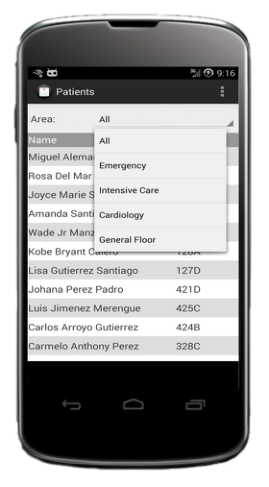
The User Interface Similar to the PDA-based system, the smart phone system features charting screens for documenting daily health assessment, administration of medicines, vital signs, nurses’ notes, pain assessment, ulcers assessment, patient positioning, intake & output of fluids, glucose levels and medical orders. After proper authentication the system enters a screen where the nurse can select the clinical area and view a list of patients of that clinical area (see Figure 4). The interface of this screen has been made simpler by removing the vertical and horizontal separation lines in the PDA version and separating the entries of the list with shades of light gray. Tapping on a patient name gets the system to a list of pending medical orders of the patient (see Figure 5). The interface of this screen has been significantly improved with respect to the PDA version. Vertical and horizontal separation lines were removed and shades of grades used for entry separation. The acknowledge column was also removed. For this version pending orders are displayed in bold at the top of the list. This screen and all other documentation screens feature the name, age, weight and room of the patient at the top bar. Tapping the top left corner of this or any main documentation screen reveals a side bar that provides access to the patient’s list as well as all the main documentation screens (see Figure 6). Tapping on an entry of the sidebar takes the system to the corresponding main documentation screen.
Figure 4. Patients list for clinical area. Figure 5. Medical orders. Figure 6. Sidebar documentation
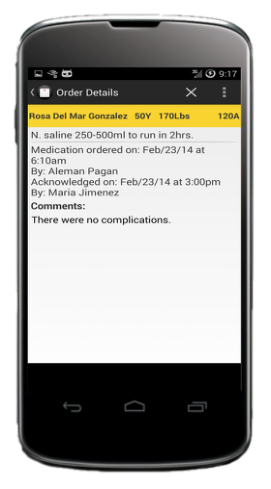
menu Tapping on an acknowledged order takes the system to a screen that shows the details of the order (see Figure 7). Tapping on a pending order takes the system to a screen that allows nurses to acknowledge the execution of an order (see Figure 8). The user has the option of canceling the acknowledge action by selecting the X button at the top right of the screen or proceed with it by selecting the ✓ button at the top of the screen. Either action takes the system back to the list of the Medical Orders screen. This screen and the screen for viewing the order details are very similar to their PDA counterparts with the exception of the buttons naming and location.
Figure 7. Order details. Figure 8. Order acknowledge.
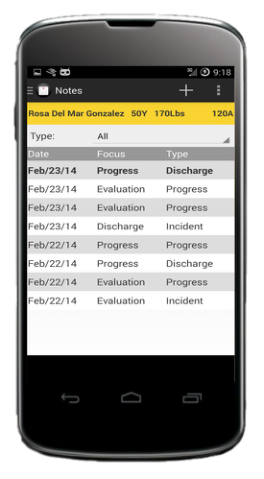
Similar to the PDA version, the interface for a documentation category usually consists of three screens as shown on Figure 9 for the Notes interface. Consistent with the new interface, items on the lists are separated with shades of light gray. Notes that are in draft mode are listed in bold. The details of a note can be viewed by tapping on a note in the list. This action opens the Notes Details window shown in Figure 9.b. A new note can be entered by selecting the + button. This action opens the screen shown in figure 9.c. The Details and New Note screen are very similar to their PDA counterparts. However, the buttons were moved to the top of the screen, with the X button for canceling or closing the screen, and the button with the disc icon for saving a note as final or as a draft.
(a) Main Notes screen (b) Note Details (c) New Note entry
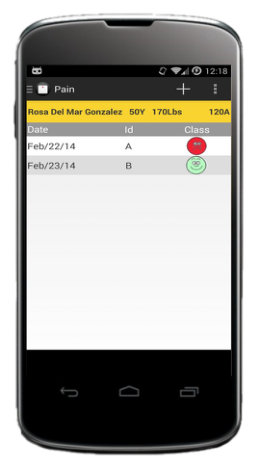
Some of the documentation interfaces experienced significant changes from the PDA version. These changes were mostly due to the larger screen and schrolling capabilities of the smart phones. One of the documentation interfaces that experienced a significant change was the Pain documentation interface. In the PDA version the main screen displayed the history of pain assessment (Figure 10.a) while in the smart phone version only the last recording of each pain identified is displayed (Figure 10.b). In the smart phone version tapping on a pain entry gives access to the pain details and follow up. A new pain can be added by selecting the + button at the top right of the screen.
(a) PDA system (b) Smart phone system
Figure 10. Pain main documentation screens.
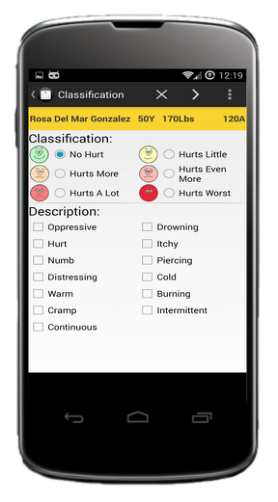
Adding a new pain involved four screens in the PDA version. However, in the smart phone version adding a pain requires only three screens a shown in Figure 11.
(a) Classification (b) Location (c) Treatment
Figure 11. Screens for adding a pain.
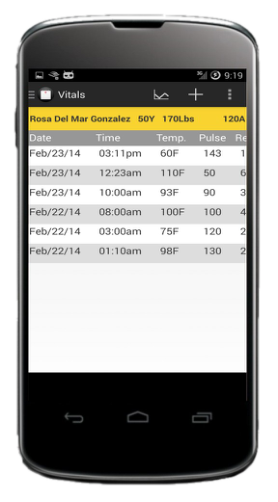
The Vital Signs interface also experienced a significant redesign. In the PDA version the history of vital signs is displayed horizontally (see Figure 12.a) while in the smart phone version it is listed vertically (see Figure 12.b). This rearrangement of the listing was made to maintain consistency with other screens of the application featuring lists. This change was facilitated by the ease of horizontal schrolling on smart phones.
(a) PDA system (b) Smart phone system
Figure 12. Vital signs main documentation screens.
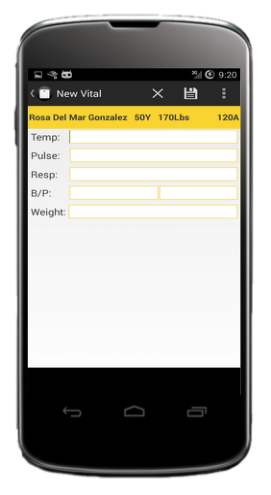
The screen for entering a new set of vital sign measurements was also redesigned (see Figure 13). The keyboard featured in the PDA version was eliminate since the smart phones provides its own.
(a) PDA system (b) Smart phone system
Figure 13. Vital signs new entry screens.
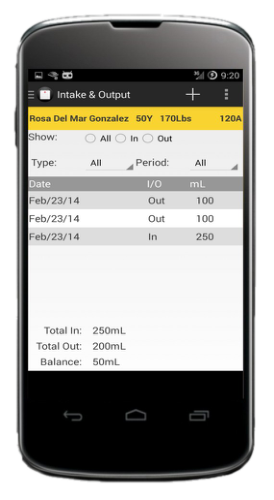
Another interface that experienced a significant redesign is the Intake/Output interface (see Figure 14). The smart phone version follows the consistency of the new look and feel without vertical and horizontal separation lines, gray shading for item separation and buttons on the top of the screen.
(a) PDA system (b) Smart phone system
Figure 14. Intake/Output main documentation screens.
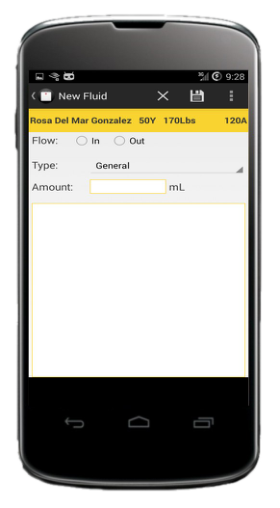
The screens for entering a new intake/output measurement also experienced a redesign (see Figure 15). The on- screen keyboard was eliminated on the smart phone version.
(a) PDA system (b) Smart phone system
Figure 15. Intake/Output new entry screens.
CONCLUSIONS
Implementing the Nursing Documentation System on the Android smart phones platform was painless, fundamentally because we already had a PDA system from which we could transfer most of the user interface fundamentals. The fact that smart phones provide a larger screen and better interaction tools facilitated the implementation of the user interfaces. These advantages of smart phones over PDAs allowed the display of more information on a single screen, improved schrolling actions, and the elimination of on-screen numeric keyboards. Being able to reuse the database implemented for the PDA system was also a factor that contributed to a relatively fast porting of the system.
The resulting system is definitely a more agile system in terms of interaction. It maintains must of the user interface fundamentals of the PDA system with an improved look and feel and better interaction paradigms. We expect that given the proliferation of smart phones the new version of the system should be easier to learn and interact with than with the PDA version since many nurses will be very familiar with the interaction paradigms of the smart phone. In the experiments conducted for the PDA system none of the nurses had prior experience using PDAs (Rodriguez, 2007 and Rodriguez, 2009). We expect this to be a significant background difference when we run a new user test experiment with the new system.
ACKNOWLEDGMENTS
This research work was made possible in part with the contribution of undergraduate research assistants Alan López, Jammy Vélez, José A. Ocasio, Brian L. Reyes, Fernando M. Mari, Pedro A. Colón, Francisco S. Morales, and Javier E. Colón, all from the Electrical and Computer Engineering Department of the University of Puerto Rico at Mayagüez..
REFERENCES
Bora, K. (2013), “Worldwide Smartphone Sales In Q3 2013: Samsung, Android Maintain Lead As Apple’s Market Share Slips”, International Business News, November 15, 2013, http://www.ibtimes.com/worldwide-smartphone-sales-q3-2013- samsung-android-maintain-lead-apples-market-share-slips-1471754
Doswell, W., Braxter, B., et al. (2011), “mHealth: Technology for nursing practice, education, and research”, Journal of Nursing Education and Practice, 2013, Vol. 3, No. 10 Ehrler, F., Wipfli, R.m, et al. (2013), “Challenges in the Implementation of a Mobile Application in Clinical Practice: Case Study
in the Context of an Application that Manages the Daily Interventions of Nurses”, JMIR Mhealth Uhealth 2013;1(1):e7. Gartner, Inc. (2013), “Gartner Says Smartphone Sales Grew 46.5 Percent in Second Quarter of 2013 and Exceeded Feature Phone Sales for First Time” Gartner Inc., Press Release, http://www.gartner.com/newsroom/id/2573415 Kamel Boulos, M., Wheeler, S., et al. (2011), “How smartphones are changing the face of mobile and participatory healthcare:
an overview, with example from eCAALYX”, Biomed Eng Online. 2011; 10: 24, http://www.ncbi.nlm.nih.gov/pmc/articles/PMC3080339 Lin, S. and Wang, C. (2011), “The Interactive Interface Implementation for the Smartphones Intelligence NIS”, Nano, Information Technology and Reliability (NASNIT), 2011 15th North-East Asia Symposium, pages 1 – 5, 24-26 Oct. 2011. Najera, I. (2007), “Development of a PDA-Based Nursing Documentation Application for Hospitals”, Master Thesis, University
of Puerto Rico at Mayaguez, 2007. Nielsen, J., and Mack, R. (1995), “Usability Inspection Methods”, John Wiley & Sons, Inc. Ozdalga, E., Ozdalga A., and Ahura, N. (2012), “The Smartphone in Medicine: A Review of Current and Potential Use Among Physicians and Students”, Journal of Medical Internet Research, 2012 Sep-Oct; 14(5): e128, http://www.ncbi.nlm.nih.gov/pmc/articles/PMC3510747/?report=printabl Pelletier, S. (2012), “Explosive Growth in Health Care Apps Raises Oversight Questions“, AAMC Reporter: October 2012,
https://www.aamc.org/newsroom/reporter/october2012/308516/health-care-apps.html Rodriguez, N. J., Borges, J. A., et al. (2007), “Usability Study of Nurses’ Interaction with Tablet PC and PDA Nursing Documentation Applications”. IASTED International Conference on Human Computer Interaction (IASTED-HCI 2007), Chamonix, France. Rodriguez, N. J., Borges, J. A., et al. (2009), “Users can do Better with PDAs than Paper: A Usability Study of PDA-Based vs
Paper-Based Nursing Documentation Systems”, HCI International 2009. Terry, K. (2012), “47% Of Doctors Use Smartphone, Tablet And PC”, Information Week, August 14, 2013, http://www.informationweek.com/mobile/47--of-doctors-use-smartphone-tablet-and-pc/d/d-id/1111170 Wyatt, T. (2012), “E-health and Nursing: Using Smartphones to Enhance Nursing Practice”, Online Journal On Nursing
Informatics, June 2012, Vol. 16, No. 2, http://ojni.org/issues/?p=1706
LISTED IN THE AHFE DIGITAL BOOKSTORE CATALOGUE
Explore the complete digital volume
Advances in Human Aspects of Healthcare
Read this individual research paper free through the original publisher, or explore the full digital proceedings book.
ISBN 978-1-4951-2093-0
Explore this ISBN in the AHFE Bookstore ↗Listed in the July 2026 bookstore catalogue; search by ISBN to confirm current availability · Digital book purchase optional