The number of industrial robotic installations in Asia, Europe and the Americas is continuously growing every year, and a forecast from the International Federation of Robotics (IFR) shows that these values will increase more in the future. Process automation level measured by operational industrial robots relative to the number of factory employees is getting higher in the multiple industries of mass and serial production. With the expansion of robotic-based solutions and automation tools for manufacturing processes, the industrial HMI (human-machine interface) integration to operations management becomes vital for end users to operate efficiently on the daily basics. As a result, each equipment vendor and software solution provider supplies custom HMI screens, which makes the lack of a homogeneous user experience one of the main issues for rapidly growing Industry 4.0 applications. Intuitive interfaces and well-designed human-machine interaction improve visibility to robotics cell operators, prevent them from unexpected errors and allow maintenance engineers to recover from faults and resolve issues quickly in case of line stoppages. Usually, such interfaces support the factory commissioning phase, and after a successful launch and go-live decision, the integration team handovers commissioned system to the operations team after training with personnel and the hypercare period. As an Industry standard, the main problems that Industrial HMI solves are factory operations use cases and essential manufacturing business processes: production management and process control, process and equipment configuration, equipment monitoring and diagnostics, reactive and predictive maintenance management, historical reporting and analytics, health and safety. To be able to design, develop and release to production user interfaces for specific manufacturing and assembly processes, we provide the HMI product design framework and design principles for configurable scalable factory interfaces. Using such an industrial HMI framework, the development team can rapidly prototype and build custom-tailored applications from existing tested and validated components and keep a holistic user experience across multiple sites. Flexible product architecture for HMI applications allows automation integration businesses to deliver to the end user robust UI solutions with a high level of accessibility to control robotic cells and lines supporting specific process implementations in different production environments. The central proposal of this paper is the design framework and design principles for configurable industrial HMI based on the product strategy that allows the creation of customised interfaces on demand. The principle methodologies of the design system presented in the paper have been validated and tested through multiple research studies and continuous product improvements in the production environment. Several HMI solutions have been integrated into automotive production, composite materials manufacturing, high-voltage modules production and battery assembly, transportation and warehouses with autonomous mobile robots. The research and automation community can use described approaches to design better human-computer interaction for their HMI solution and dramatically improve the user experience of using them.
Industrial HMI Design Principles for Highly Automated Manufacturing Processes 367
INTRODUCTION
Intelligent manufacturing is a modern concept widely developed and imple- mented in the new generation of manufacturing to increase the efficiency of production (Zhou et al., 2018). The integration of cyber-physical production systems with the ideas of Industry 4.0, AI & ML technologies, Virtual and Augmented Reality, the Internet of Things and Digital Manufacturing has been considered (Chryssolouris et al., 2009) as one of the possible soluti- ons for the essential improvement of production parameters like lead time, quality, safety, flexibility and cost (Rüßmann et al., 2015).
Even though technological progress and the level of automatisation are growing, production systems require the supervision and involvement of trai- ned personnel in the production processes. Human continuously interacts with machines and their interfaces and needs to be guided to perform ope- rations such as commissioning, supervision and maintenance safely. Human- Machine Interface (HMI) represents all available options for the end user in 100% manual and hybrid human-machine operations for not autonomous processes (O’Hara et al., 2010).
Nowadays, complex manufacturing processes require multiple integrati- ons. Firstly, with multiple equipment vendors, including autonomous mobile robots (AMR). Secondly, with business systems like enterprise resource planning (ERP), product lifecycle management (PLM), customer relation- ship management (CRM) and etc. Unlike IT systems, integrating specific equipment and machines into the production process requires installing out- of-the-box user interfaces from vendors. The usage of various interfaces in different locations without common principles between them creates a poten- tial risk for an operator to make the wrong decision in a critical situation. Some formalised guidelines and usability principles for industrial interfa- ces have been presented for some of the existing solutions on the market (Di Gregorio et al., 2020). However, the standard for all industrial interfaces across the whole production is still subject to future research.
Typically equipment is grouped into the station to produce the semi- finished product according to the high-level operations of the manufacturing process, which requires one or more operators to monitor and control the cur- rent state. In addition to numerous unique interfaces, the different types of interaction with machines, such as touch, voice, or augmented reality, incre- ase the complexity of designing the HMI with harmonised user experience for any station operations (Cannan and Hu, 2011). The European Working Conditions Survey report (Parent-Thirion et al., 2016) shows that an acces- sible and native user interface is more important in challenging factory work conditions than modern solutions with complicated interaction, which people are not used to yet.
The recent research studies (Villani et al., 2019) shift the paradigm of designing the industrial HMI and explore the application of Human-centred design (HCD) principles with a focus on the user’s workflow instead of functional-oriented or Activity-Centred design (ACD) approaches. Never- theless, the unique mix and combination of HCD and ACD methodologies could be a foundation of the intuitive user experience (Norman, 2013). The
basic principles of reducing the cognitive load on the user are the informa- tion architecture based on mental models representing the physical world and a range of operators’ tasks organised according to the sequence of steps of the production scenario. Using such a mixed approach can help to build the user interface with clear correspondence of functions with required produ- ction operations and represent the system feedback to allow making decisions quickly and faultlessly.
Other methodologies like Object-Oriented Design, Aspect-Oriented Design, Event-Driven Design and fundamental ideas from them can also be applicable to industrial HMIs. Our research study and the proposed design principles integrate multiple design methodologies into one compreh- ensive guideline, which provides the standardised design framework for any factory-level industrial HMI design and principles on how to develop them.
INDUSTRIAL HMI DESIGN PRINCIPLES FOR HOLISTIC USER EXPERIENCE ACROSS THE WHOLE MANUFACTURING PROCESS To achieve the common industrial HMI standard and define HMI design pri- nciples for application on the multiple levels of the UX for highly automated manufacturing processes, we use the concept similar to Garett’s five elements of the UX design: strategy, scope, structure, skeleton and surface (Jesse James Garrett, 2010). The following sections describe the HMI design principles from the abstract product concept to the concrete interface elements and controls. On each level of the UX hierarchy, we summarise task-oriented and information-oriented best practices for designing the interaction and interface for industrial HMIs that have been validated and continuously improved in the production environment.
HMI Product and UX Strategy By definition, any industrial HMI solution is a user-centric system that allows operators to complete their tasks according to the sequence of operations in the production process and interact with any physical devices on demand. It means that the best user experience should be independent of the use case and location of interaction with the HMI.
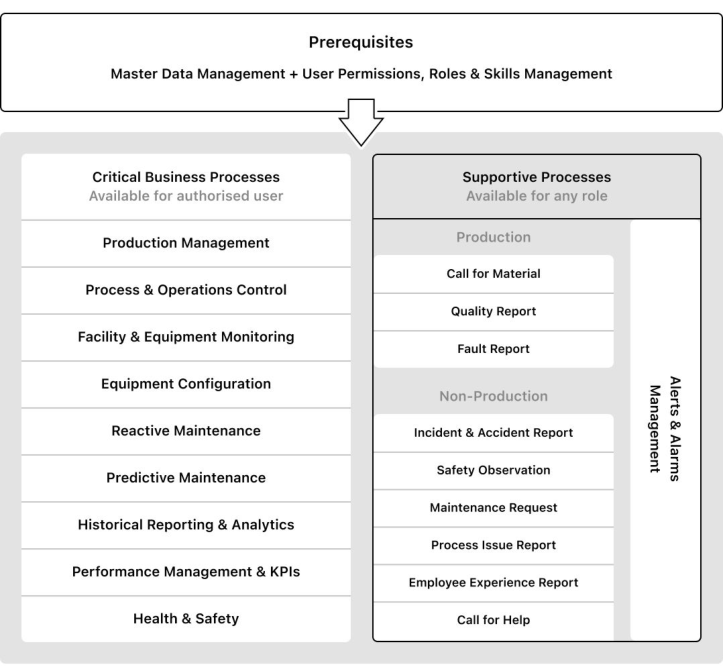
Usually, the business defines high-level objectives for the HMI product based on the specific manufacturing process and common factory-level busi- ness processes. Using the industry standards for processes and procedures related to product development, such as ISO 9001 and IATF 16949, we define the list of standardised business processes to achieve the certified production of any product with good quality. To expand this idea and integrate such pro- cesses into the HMI interface, we split requirements into prerequisites, critical business processes, supportive production and non-production processes (see Figure 1). With such a wide range of business scenarios to be implemented in the HMI, we define the first principle of product strategy as business flexibi- lity. It especially means the HMI should not have unique interfaces for each business need but instead should have a configurable interface to support
Industrial HMI Design Principles for Highly Automated Manufacturing Processes 369
Figure 1: Factory-level business processes define high-level requirements for the HMI.
multiple use cases. As a flexible system, HMI provides operators with stan- dard interaction patterns and interfaces for unique custom solutions applied to any process step.
Many product lifecycle management systems (PLM) define the bill of equi- pment (BOE) as a tree structure of assets in relation to the physical layout. In general, we describe the factory BOE as an object-oriented graph where each object could be a tangible asset or a complex object as a superposition of its sub-components with an appearing emergence between them. Such logic of structuring equipment according to the user’s mental models helps to keep a 1-to-1 relation to physical installation and allows to search for any equi- pment following the links between objects and parent-child relations. For example, the camera is a part of the computer vision system installed in the measurement station at the end of the assembly line. This data model allows users to navigate through equipment using zoom-in and zoom-out functions to observe different levels of abstraction and access all items and their relati- ves using a breadth-first search (BFS) across the same hierarchy level. It also suits well for changing equipment and relations in dynamic: AGVs or mobile robots, drones and interchangeable tooling. Supporting such flexible object
models and navigation in the HMI, we define the second principle of product strategy as equipment independence. This principle means equipment from any vendor should be compatible with HMI, and its physical location can be described by the proposed data model to be integrated into the system. As a result, any equipment used in production should have a consistent user interface aligned with common design principles and guidelines.
The solution for the UX strategy implementing principles from the pro- posed product strategy is the plugin-based platform of equipment widgets. Many complex products like OS, IDE or GUI editors are built based on configurable widgets around the core platform functionality. Using such an approach in the HMI product allows design teams to easily add new widgets for equipment on the shop floor and keep a homogeneous user experie- nce for all of them. Each widget provides operators with an interface to interact with equipment and displays all required information for diagno- stics and troubleshooting issues. As any object in the system has a general widget, the application allows access to the interface on any level from BOE. Therefore, such flexible widget systems for HMI applications can be served and deployed as a stand-alone app for any factory location or embed- ded directly into the equipment’s hardware. As a part of the plugin-based architecture, widgets can be developed, tested, deployed and configured inde- pendently, which allows for delivering new functionality in an iterative Agile approach.
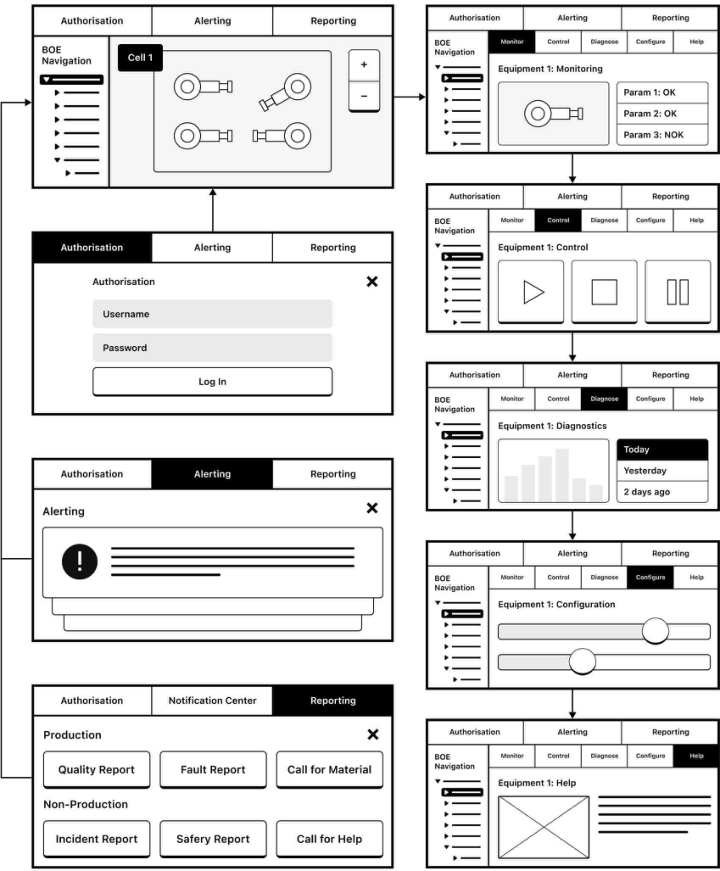
Information Architecture and Interaction Design Principles In order to enable two product strategy principles, such as business flexibi- lity and equipment independence, with the right HMI application structure, we define that the overall HMI interface in any location for any business case should have identical information architecture and navigation patterns. To achieve that, we split the responsibilities between the different areas on the screen (see Figure 2). Applicaton-level navigation allows zooming in and out to observe multiple levels of the BOE hierarchy and switch between different equipment vendors. It also provides all available features for the superposition of the equipment. Equipment-level navigation allows opera- tors to navigate through the equipment widget and access the same features available for the specific machine. To support the harmonised user experience with common interaction principles and void custom interfaces for different equipment, we split standard business processes for HMI into the following core features:
1. Monitor — observe the current process values and equipment state; 2. Control — execute process operations and interact with equipment; 3. Diagnose — access collected historical data and analyse trends; 4. Configure — modify and set process or equipment parameters; 5. Help — get any supportive content: instructions, guidelines, specs, etc.; Any supportive processes (such as reporting issues) that are not central to the business logic, using the Aspect-Oriented Design principles, we determine as interface accessible at any point in time from any screen. This approach
Industrial HMI Design Principles for Highly Automated Manufacturing Processes 371
Figure 2: HMI high-level information architecture and navigation principles.
allows such features to be added to any application module without cluttering the core functionality and navigation. Examples of supportive features:
1. Authorisation — get access according to the permissions and skills; 2. Reporting — notify about any production and non-production issues; 3. Alerting — display any mission-critical information such as faults; The main principle for the core features is that screen content, available functions, and navigation stays the same regardless of the selected hiera- rchy level of equipment. When users open an interface for an assembly line or a specific cell or particular machine inside the cell, HMI provides the same interaction on any level to an authorised user. Monitor and Control
screens combine the main ideas from HCD and ACD methodologies. The equipment is displayed as an object tree structure plus a visual 2D map representing the physical world layout which is human-centric and meets the user’s mental model and real-world understanding. Control functions allow an operator to execute any atomic task on equipment or high-level process operation. They are activity-centred and organised using the matrix navi- gation approach: sequentially according to the manufacturing process flow or relatively to the business domain (such as maintenance, health&safety or commissioning). The modular interface for such screens is widget-based, which allows plugging in new equipment, business capabilities and manufa- cturing operations on the fly using the configuration module or on-premise deployment.
Supporting features such as reporting, alerting, authorisation, and user settings or application/system preferences should have a visible state at any moment on any application screen. A system designed with an event-based approach triggers different user actions but always informs them in the same way. For example, if a critical issue happens with equipment inside the cell, the user can see the popped-up action-interrupting fault from the cell or equipment level view on any screen. Such action required fault mode can disable any interaction with the interface until the resolution isn’t found. Non-critical alerts can inform the user with warnings or messages with help- ful information and become visible for some time without interrupting the user’s interaction. The modular approach of the user interface for suppor- tive features makes the application scalable as a separate independent screen represents each feature. Integration of new features for non-production pro- cesses like application settings, gamification, health&safety or HR-related activities is simplified as a result of reserved space in the application-level navigation.
Proposed high-level informational architecture and interaction design pri- nciples provide a unified user experience and navigation across all application screens for any individual equipment, production line, area and the whole factory. Due to the modularity and the plug-in widget system, the product development could be split into sprints with continuous new features integra- tion, and any screen can be customised according to business needs without damaging the overall structure.
User Interface and Visual Design Guidelines Visual design is the surface and focal point of the complete user experience, and look-and-feel adds specifics to the interface as users start treating gra- phic elements on the screen. Ideally, everybody should speak the same design language to achieve unified UX between different screens in the application. Designers reuse consistent visual styles and components to assemble typical screens; developers organise a shared database of tested and reused code com- ponents; users learn new behaviours and how the interface works, get used to it and develop habits. System thinking and atomic design methodology (Frost, 2016) applied for visual design help to keep harmony in the graphical interface and avoid any visual inconsistency.
Industrial HMI Design Principles for Highly Automated Manufacturing Processes 373
A design system is a shared library of reusable UI components and the standard principles or patterns guiding how screens are assembled from ele- ments. Taking into account the specifics of the industrial manufacturing environment, we define the main principles for visual interface design:
1. Proximity. Simplify screens and keep the number of layouts with naviga- tion choices to a minimum. Less is more. 2. Robustness. Provide multiple interaction options and adopt the interface elements for the industrial environment with insufficient lighting, dust, and people wearing gloves, masks and glasses. 3. Affordance. Make the interface status and component state clear at any moment. Provide feedback from the system to present the current situation. Apply verbs for indication of interactive, actionable elements. 4. Contrast. Use big font sizes and high-contrast visual hierarchy visible from a long distance. 5. Colour. Unify colour identification and align it with meaning in the physical world. Highlight the interface status and visualise a context. 6. Unity. Align data formats, units of measure and visualisation principles to represent the same data across multiple screens in a consistent way. 7. Accessibility. Create alternative interactions with the screen to support form completion and data collection with external devices like scanners.
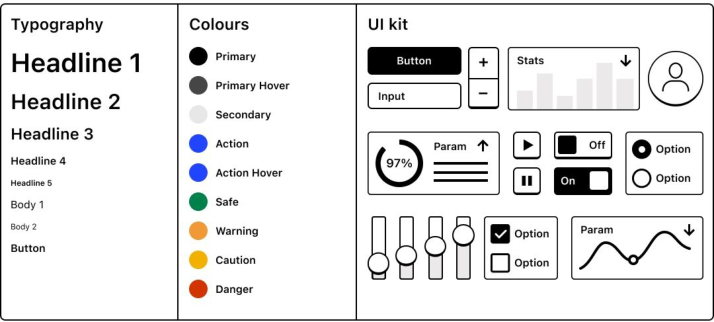
The well-structured design system sets the boundaries for the visual design and allows keeping the same visual look to reuse solutions across multiple screens. A limited collection of components sets powerful constraints for the design team and is used to construct unique interfaces from standard elements. The atomic component is a ready-to-use interface element with a predefined visual style, interaction and representation logic. Different atomic components inherit the visual principles from each other, and complex non- standard components are assembled from atomic ones. Generally, the basic design system is split into static and interactive elements. The foundations enabling the creation of any interface blocks are Typography, Colours and UI Kit (see Figure 3).
Typography. Text rendering depends on pixel density and device settings (such as TV, laptop, tablet, and smartphone), but the main purpose of the design system is to define rules to keep readable physical size across multiple devices. Users interact with larger screens at a distance that tends to have lower pixel densities, and interactive elements size for touch devices should be two times larger than for computers with the cursor. As a result, the button on the TV could be almost the same size as the smartphone to make it readable and usable from a long distance.
Colours. The most important aspect of the industrial HMI is to keep all colours recognisable in the production environment. Meeting the accessibi- lity requirements can be achieved with the colour scheme adopted for colour blindness people, reinforcing colour meaning with icons or text, using colours with high contrast against each other and avoiding the creation of different shades of colours. The contrast rate between text colour and background should not be less than 7:1, according to WCAG standards (W3C, 2018).
Figure 3: Visual design system fundamental elements for HMI application design.
In addition, the UI colour coding should also be aligned with the physical world. Thereby, the standard colours for the industrial screens and light sta- cks are red for danger/emergency, green for safe/normal conditions, amber for warning/abnormal, yellow for caution and blue for mandatory action.
UI Kit. As a part of the design system UI Kit contains a library of intera- ctive atomic components and complex components composed from atomic ones. The list of them can differ according to business needs (Material Design, 2023), but the basic ones are form controls and navigation elements. If the component is active or interactable, it should be clear from its appeara- nce, form and content. Use different visual techniques (see Figure 4), such as backgrounds and borders, to differentiate the control’s states during the interaction. For the specific cases when users interact with HMI in the usual conditions (ex., with touch screen wairing gloves), allow multiple ways of form completion and navigation using a keyboard, shortcuts or input from external devices. In addition, the cross-platform design system should have various size modifications for each component to support the best experience across different devices.
Figure 4: Interactive component affordance adapted for the industrial environment.
In order to maintain visual and interface design consistency for different equipment, designers need a common UI design system for building specific interfaces from reusable blocks. Therefore, all UI solutions become similar from the user’s point of view, which increases the intuitiveness of interaction with any screen. Integration of the new equipment-specific applications beco- mes cheaper and faster, plus interfaces could scale intensely based on the same
Industrial HMI Design Principles for Highly Automated Manufacturing Processes 375
standard components. Ideally, any member of the design team, like managers and analysts, can use the same design system to assemble quick prototypes and test ideas.
CONCLUSION
With the expansion of Intelligent Manufacturing solutions in the industry and integration of HMI interfaces into the production processes, the amount of custom user interfaces is growing without standard design guidelines. From the business point of view, it causes inconsistency in the user experience and creates a potential risk of the user’s mistake at a critical moment. This proposal has described the industrial HMI design principles that product design teams could apply on the multiple levels of the user experience: from product strategy to interaction design and UI controls. Using these design principles as a framework for the new HMI interface design enables teams with the validated and tested in-the-field best practices of the user experi- ence for the industrial environment. The flexibility of the introduced HMI product strategy allows incremental integration of such principles, which should be a subject of review by the business as a solution for the requi- red UX improvements. Harmonised and standardised user interfaces could also be implemented using the same proposed design framework by different equipment providers to comply with the overall design guideline. Also, future applications of any presented design principles could be valuable for the HMI interface design for the upcoming industrial equipment on the market.
REFERENCES
Cannan, J. and Hu, H., 2011. Human-machine interaction (HMI): A survey.
University of Essex, p. 27. Chryssolouris, G., Mavrikios, D., Papakostas, N., Mourtzis, D., Michalos, G.
and Georgoulias, K., 2009. Digital manufacturing: history, perspectives, and outlook. Proceedings of the Institution of Mechanical Engineers, Part B: Journal of Engineering Manufacture, 223(5), pp. 451–462. Di Gregorio, M., Nota, G., Romano, M., Sebillo, M. and Vitiello, G., 2020, September. Designing usable interfaces for the industry 4.0. In Proceedings of the International Conference on Advanced Visual Interfaces (pp. 1–9). Frost, B. (2016). Atomic design. Massachusetts: Brad Frost. Jesse James Garrett (2010). The Elements of User Experience: User-Centered Design
for the Web and Beyond. Pearson Education. Material Design. (2023). Material Design. [online] Available at: https://m3.material.
io/. Norman, D. (2013). The Design of Everyday Things : Revised and Expanded Edition.
New York: Basic Books. O’Hara, J. M., Higgins, J., Fleger, S. and Barnes, V., 2010. Human-system interfaces for automatic systems (No. BNL-93950-2010-CP). Brookhaven National Lab. (BNL), Upton, NY (United States). Parent-Thirion, A., Biletta, I., Cabrita, J., Vargas Llave, O., Vermeylen, G.,
Wilczy´nska, A. and Wilkens, M., 2016. Sixth European working conditions survey–overview report.
Rüßmann, M., Lorenz, M., Gerbert, P., Waldner, M., Justus, J., Engel, P. and Harnisch, M., 2015. Industry 4.0: The future of productivity and growth in manufacturing industries. Boston consulting group, 9(1), pp. 54–89. Villani, V., Sabattini, L., Loch, F., Vogel-Heuser, B. and Fantuzzi, C., 2019. A
general methodology for adapting industrial HMIs to human operators. IEEE Transactions on Automation Science and Engineering, 18(1), pp. 164–175. W3C (2018). Web Content Accessibility Guidelines (WCAG) 2.1. [online] W3.org.
Available at: https://www.w3.org/TR/WCAG21/. Zhou, J., Li, P., Zhou, Y., Wang, B., Zang, J. and Meng, L., 2018. Toward newgeneration intelligent manufacturing. Engineering, 4(1), pp. 11–20.
Read this individual research paper free through the original publisher, or explore the full digital proceedings book.
ISBN 978-1-958651-87-2
Explore this ISBN in the AHFE Bookstore ↗Listed in the July 2026 bookstore catalogue; search by ISBN to confirm current availability · Digital book purchase optional