Nancy J. Lightner (2021). A Systematic Approach to Providing Accessible Electronic Communication. In: Advances in Human Aspects of Healthcare. AHFE Open Access, vol. 13. https://doi.org/10.54941/ahfe100492
Legislation enacted throughout the world requires government agencies and affiliates to make electronic and information technology for internal and public use accessible to people with disabilities. Ensuring an awareness of the law and compliance with it requires a multi-part process, including advertisement, training, retro-fitting, template and instruction development and follow-up review. The regulations are under almost constant revision, as technology innovations require additional consideration. While checklists and automated tools are available, they do not necessarily guarantee compliance with the most recent guidelines. This paper presents a systematic approach for consideration in organizations that are required to comply with accessibility laws.
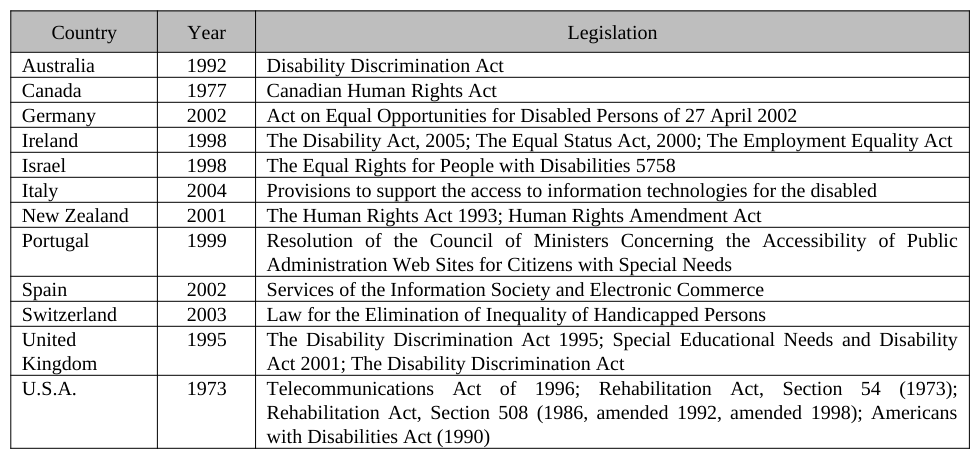
Legislation related to providing accessibility of electronic communication to everyone regardless of physical or mental capability exists in many countries. On the 25th anniversary of the World Wide Web, Web inventor Tim Berners-Lee said “The Web’s billions of users are what have made it great. I hope that many of them will join me today in celebrating this important milestone. I also hope this anniversary will spark a global conversation about our need to defend principles that have made the Web successful, and to unlock the Web’s untapped potential. I believe we can build a Web that truly is for everyone: one that is accessible to all, from any device, and one that empowers all of us to achieve our dignity, rights and potential as humans.” (Jacobs, 2014). While accessibility of electronic documents from text and picture format to interactive Web sites is important, providing it remains elusive, especially in retro-fitting documents created without concern for accessibility. This paper contains recommendations to systematically comply with laws requiring accessibility by all, using Section 508 of the Rehabilitation Act in the United States (US), as an example. As shown in Table 1 below, legislation related to providing accessibility of electronic communication to those regardless of physical or cognitive capability exists in many countries. In the United States, Section 508 of the Rehabilitation Act (29 U.S.C. 794d), as amended by the Workforce Investment Act of 1998 (P.L. 105-220), August 7, 1998 provides the motivation for Federal agencies to make electronic communication, including documents, presentations and Web sites, accessible to all. However, new employee training may not include Section 508 compliance. Awareness of Section 508 among those employed in Federal Agencies prior to 1998 is the result of agency-specific efforts. Lawsuits claiming discrimination, such as the one filed by Michael Leiterman against the US Department of Homeland Security (Espo, 2013), provide motivation to comply. Employees throughout Federal Agencies create electronic communication and there is no clearinghouse that will review documents for compliance. The United States Access Board (HTTP://WWW.ACCESS- BOARD.GOV/THE-BOARD) promotes equality for people with disabilities and provides technical assistance and Human Aspects of Healthcare (2021) training. The VA Section 508 area previously provided review and compliance checks, but now only provides information, such as “Best Practices” and standards checklists. They also host training seminars. During one of those sessions, the instructor mentioned that requests for compliance reviews overwhelmed their capacity so they stopped offering that service. They now empower areas to create compliant communication.
Table 1: Sample legislation concerning electronic document accessibility throughout the world (W3C, 2006) Country Year Legislation
STEPS IN THE COMPLIANCE PROCESS Creating Awareness
A project manager contacted the Human-Computer Interaction (HCI) and Simulation Lab in Veterans Affairs Center for Applied Systems Engineering (VA-CASE) at a large, mid-western VA Medical Center (VAMC) for assistance in reviewing documents and Web pages produced over the past three years for Section 508 compliance. They indicated that ideally, Lab personnel would modify the electronic communications to comply once they identified issues. The Project Manager and Web Master admitted that they did not know about Section 508 when the project started. Therefore, they developed the communication without regard to the law. At one point they learned of Section 508 and began retro-fitting documents. They found this process burdensome and not enjoyable at all, but realized its importance. They calculated that it would take them, at their current pace, about a year to complete the review and modifications. Their concern was that the VA Section 508 office would audit the Web site and force a shutdown once they deemed it out of compliance. Within VA, software applications and products in production are eligible for a randomly selected Section 508 compliance audit. If defects are found, a waiver request and remediation plans are required, as well as possible participation in a meeting. In order to avoid any difficulties with the Section 508 office, this project team requested assistance.
As a result of these circumstances, the HCI Lab team decided to present the project at an all-hands meeting of VA- CASE. The presentation included an overview of Section 508 and how it affects project communication efforts. The feedback received during and after the presentation indicated that most had heard of the law but thought it was new. They assumed that older communication was ‘grandfathered’ in, meaning it was exempt from compliance. They were surprised to learn that the law was effective in 1998. Since VA-CASE formed in 2000, all documents and Web pages developed for projects need to comply with Section 508 requirements. Suddenly an awareness that their communication did not have Section 508 in mind and therefore, probably was not compliant, was replaced with questions such as “How do we make documents and presentations we already published compliant?” and “Do you have templates we can use for new documents?” and “What suggestions do you have for document conversion?” Human Aspects of Healthcare (2021)
Accessibility Review Under Section 508 (29 U.S.C. ‘794 d), US Federal agencies must give disabled employees and members of the public access to information that is comparable to access available to others. The goal of this law is to eliminate barriers in information technology, resulting in more opportunities for people with disabilities. Federal contracting officials use the Voluntary Product Accessibility Template (VPAT) to assess a vendor’s intent to provide electronic communication that meets Section 508 requirements (Section508.gov, n.d.). Since viewing documents and Web pages is primarily a visual effort, consideration for accommodating visually-impaired individuals using screen readers, color contrast modifiers, or screen magnifiers was included. Concern for viewing online video games inducing seizures in individuals with photosensitive epilepsy (Ferrie et al., 1994) , when combined with other factors, prompted the inclusion of avoiding the screen to flicker with a frequency greater than 2 Hz and less than 55 Hz (§ 1194.22.j). According to the US Access Board, they submitted a proposed rule to update Section 508 Standards to the Office of Management and Budget (OMB) on February 23, 2014. OMB has 90 days to complete its review (US Access Board, 2014) after which publishing in the Federal Register makes it available for public comment. The refresh began in 2011, so the process of finalizing changes is lengthy. The revised standards and guidelines include the following:
“E207.2 WCAG Conformance. User interface components and content of platforms and applications shall conform to Level A and Level AA Success Criteria and Conformance Requirements specified for web pages in WCAG 2.0 (incorporated by reference in Chapter 1).
Advisory E207.2 WCAG Conformance. WCAG is written to be technology neutral. While oriented towards web pages which are defined as being delivered using HTTP, it is straightforward to apply the WCAG 2.0 Success Criteria and Conformance Requirements to user interface components and content of platforms and applications.” (United States Access Board, 2011, pg. 15) This refers to the Web Content Accessibility Guidelines (WCAG) version 2.0, released by the World Wide Web Consortium (W3C®) in 2008. W3C® is an international community with the mission to lead the Web to its full potential (W3C®, 2012a). The Levels included above indicate total accessibility conformance. Level A indicates minimum conformance and Level AA represents medium conformance. W3C® indicates that Level AAA conformance is likely not possible. In October 2012 (W3C®, 2012b), the International Organization for Standardization (ISO) and the International Electrotechnical Commission (IEC) announced approval of the WCAG 2.0 as an ISO/IEC International Standard (ISO/IEC 40500:2012), making these guidelines accepted as appropriate throughout the world. The W3C® Web Accessibility Initiative (WAI) continues to provide guidance on accessibility issues. A new Cognitive Accessibility Task Force was created to address web accessibility needs of individuals challenged by cognitive and learning disabilities (W3C®, 2014). They are seeking participation and the web site indicates that as of November 1, 2013, no meetings had taken place.
Because the VA provides services to veterans, VA communication requires sensitivity to cognitive events and disabilities, such as those that result from post-traumatic stress disorder (PTSD) and traumatic brain injury (TBI). An estimate of the incidents of PTSD among deployed and non-deployed US military members between 2000 and September 2010 is 88,719 (Fischer, 2010). The US Department of Defense reports a Medical Diagnosis of TBI as 294,172 from 2000 to the end of calendar year 2013 (Defense and Veterans Brain Injury Center, 2014). As of 2010, an estimated 1.7 million people in the US sustain TBI annually, excluding military and those treated at VA medical facilities, primarily as a result of falls in those aged 0 to 4 years and aged 75 years and older (Faul et al., 2010).
Cognitive difficulties related to comprehension of information presented via electronic media as a result of TBI include working memory capacity and information processing speed (Dean and Sterr, 2013), decreased mental flexibility and problems with sequencing (Levin and Kraus, 1994; Miller, 2000; Godefroy, 2003). A review of guidelines addressing accessibility for the cognitively challenged indicates that the following are consistently recommended (Friedman and Bryen, 2007):
1. Use pictures, icons and symbols along with text 2. Use clear and simple text 3. Consistent navigation and design on every page Human Aspects of Healthcare (2021)
4. Use headings, titles and prompts
Admittedly, additional research is needed to identify more specific guidelines.
Accessibility Tools Organizations such as W3C and VA have developed accessibility checklists to provide guidance for specific document and Web page review. These checklists require visual inspection of the electronic communication in order to determine compliance. An automated method presents an easier and more convenient review. Microsoft Office® version 2010 includes accessibility checkers, allowing a review of electronic communication created in Word®, PowerPoint®, and Excel®. However, the Government Accessibility Guide provided by Microsoft indicates that the Accessibility Checker “identifies areas which could be challenging for users with disabilities to view or use.” (Microsoft Corporation, 2011, pg. 41). As Office® is used throughout the world, it understandably does not commit to guaranteeing compliance with any standard. Adobe® Systems Acrobat® is another popular document creation platform. Acrobat® has included an accessibility checker since version 8. This statement was found on the Adobe® Web site:
“Acrobat and Reader were created with the regulations in Section 508 of the U.S. Rehabilitation Act of 1998 in mind. To help government customers determine their own compliance, Adobe has prepared a document called the Voluntary Product Accessibility Template (VPAT) that details Acrobat and Reader accessibility features in the context of Section 508 guidelines. This compliance statement applies to the two applications, not to the compliance of specific PDF files, which must be evaluated on a case-by-case basis.” (Adobe Systems, Incorporated, 2014a).
Use of the accessibility checker requires human intervention to repair the inconsistencies found. Microsoft Office® and Adobe® Acrobat® both provide guidance on how to make the documents accessible.
An automated method presents an easier and more convenient initial review; however it’s clear that these tools should only supplement human inspection (Mifsud, J., 2011). For example, red-green color deficiency is estimated at between four and eight percent of the world male population (Birch, 2012). A visual check can confirm that this combination is either not used (e.g. blue substituted for green) and that color is not the only indication of the value it represents. A free tool for evaluating Web Content for flashing called the Photosensitive Epilepsy Analysis Tool (PEAT) is available from the Trace R&D Center at the University of Wisconsin-Madison (2014). W3C Validator Suite® checks websites for compliance with its open standards, however, it does not currently test for accessibility (W3C Validator Suite, 2014). As of March 2006, W3C published a list of over 100 Web accessibility evaluation tools that includes details about each checker such as what guidelines they follow and whether there is a charge for use (W3C Web Accessibility Initiative, 2006). Because most internally-developed VA communication resides behind a firewall, checkers of this type are not available. VA has contracted with FireEyes/WorldSpace to check for accessibility on Web pages behind the VA firewall. FireEyes is a free Firefox plug-in, requiring installation of the FireFox browser. Since users of VA-furnished equipment are not able to install software, installing FireFox requires a request to the Office of Information and Technology, which is an inconvenience but does result in FireFox installation. While Deque Systems holds Section 508 Webinars, their site did not make clear the extent that FireEyes and WorldSpace guarantee compliance.
WebAIM (Web Accessibility In Mind – http://webaim.org) is a US-based organization with the goal of helping to make the web more accessible to individuals with disabilities (WebAIM, 2014). It started in 1999 and hosts a community of interested people on its blog and through its monthly newsletter. The organization also conducts training, technical assistance, site evaluation and certification. See below the list of guidelines recommended in the design phase (WebAIM, 2013): [Equation or mathematical symbol available in the original paper PDF] Plan heading structure early [Equation or mathematical symbol available in the original paper PDF] Make sure links are recognizable [Equation or mathematical symbol available in the original paper PDF] Consider reading order [Equation or mathematical symbol available in the original paper PDF] Design link focus indicators [Equation or mathematical symbol available in the original paper PDF] Provide good contrast [Equation or mathematical symbol available in the original paper PDF] Design a “Skip to Main Content” link
Human Aspects of Healthcare (2021)
• Use true text whenever possible [Equation or mathematical symbol available in the original paper PDF] Ensure link text makes sense on its own [Equation or mathematical symbol available in the original paper PDF] Watch the use of CAPS [Equation or mathematical symbol available in the original paper PDF] Use animation, video, and audio carefully [Equation or mathematical symbol available in the original paper PDF] Use adequate font size [Equation or mathematical symbol available in the original paper PDF] Don’t convey content with color alone [Equation or mathematical symbol available in the original paper PDF] Remember line length [Equation or mathematical symbol available in the original paper PDF] Design accessible form controls WebAIM also developed the Web accessibility evaluation tool (WAVE – http://wave.webaim.org/ ) and toolbar (http://wave.webaim.org/toolbar/ ) that provides accessibility checks within the Firefox browser.
So many tools exist to assist in making Web pages compliant that selecting one (or more) to use can seem daunting. A Google search on “web accessibility checker” returned about 990,000 results. Adding “Section 508” reduced the number of results to about 135,000. Because tool selection depends on the technology used by an organization, careful consideration of applicability should precede tool choice.
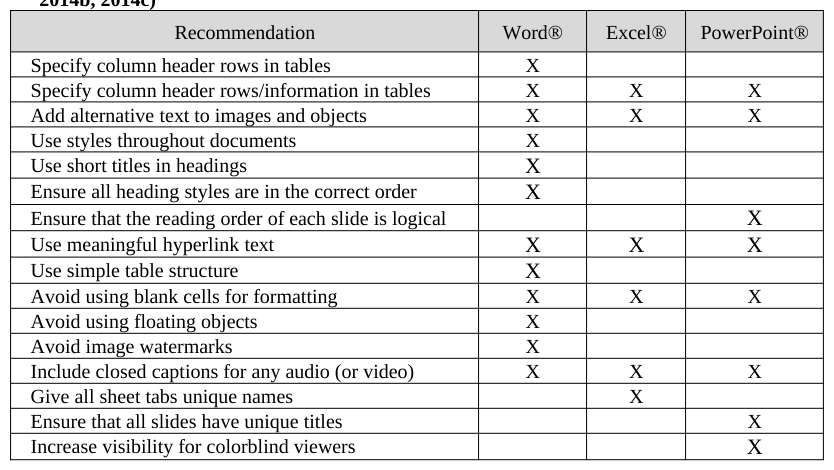
Template Development Reviewing electronic communication for the appropriate compliance once the document is complete, or at a minimum started, lengthens the publication process as retro-fitting is sometimes impossible. Members of our organization have requested creation of Section 508 compliant templates for Word®, Excel® and PowerPoint® documents for use as a baseline when they develop internal documents and deliverables. Microsoft includes the following suggestions when creating Office® documents (see Table 2 below). Descriptions of what each suggestion means, why it is included and how to provide it is included on each Web site referenced. Adobe® provides training concerning creating and reviewing Acrobat® documents on their “Training Resources” Web site.
Table 2: Recommendations for accessibility in Microsoft Office® documents (Microsoft Corporation, 2014a, 2014b, 2014c) Recommendation Word® Excel® PowerPoint®
Almost anyone in an organization can create a MS Office document, such as a Word® deliverable or an Excel® file to calculate return on investment. However, development of a Web site usually involves special skills. Publication Human Aspects of Healthcare (2021) of sites requires permissions and authorization. Organizations may have Web site templates for use and whether they include accessibility requirements depends on the awareness of those developing the templates.
It’s difficult to design a universal accessible Web site, because the structure depends on the purpose and content. Class room material is a common use addressed, with accessible syllabus templates available. Universities have made material available online. Desire2Learn provides Hypertext Markup Language (HTML) templates for use specifically in a classroom setting (see http://www.desire2learn.com/products/accessibility/instructor-resources/ HTML-templates/ ). Other companies make basic templates available free and charge for premium content.
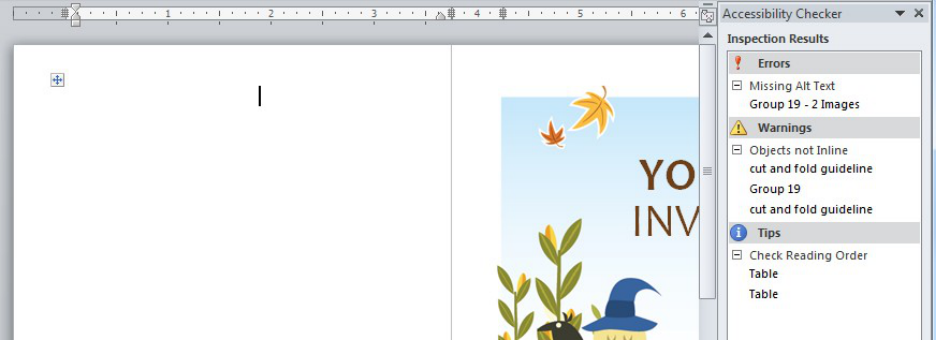
Figure 1: Results of accessibility check for a party invitation downloaded from Microsoft.com As in template development for MS Office® documents, organizations should develop approved templates for use in online communication.
Acrobat® pdf files are converted from other source documents, which introduces more complexity into the accessibility process. Because PDF 1.7 is an ISO standard (ISO 32000-1), directions on how to make pdf files accessible are part of WAI (see http://www.w3.org/WAI/GL/WCAG20-TECHS/pdf.html) and US government Web sites (see http://www.howto.gov/web-content/accessibility/create-accessible-pdfs).
Instruction Development As with other projects that require a change to standard practices, planning reduces the overall risk of failure. Once awareness is created and templates are developed for use in an organization, the next step includes conveying how to comply with the law.
As with accessibility checkers and checklists, an abundance of tutorials and training material that describe how to create compliant electronic communication is available online. W3C has posted draft tutorials to provide guidance on meeting WCAG in online content (see www.w3.org/WAI/tutorials/).
Adobe describes various elements to consider when creating an accessible Web site, including static or dynamic content, tools and technique standardization, navigation considerations, how to make images accessible, the use of cascading style sheets, including rich media content, such as that requiring Adobe Flash Player and finally how to incorporate the use of plug-ins (Adobe Systems, Incorporated, 2014b).
The California State University, Los Angeles (CSULA) developed instructions on how to modify their standard Web templates using Dreamweaver CS5.5 (California State University, Los Angeles, 2013). After describing how to use the Dreamweaver interface, it describes CSULA Web templates, how to access and customize them for use in a new CSULA Web site. Pages 28 to 30 contain a description of Section 508, why it applies to CSULA sites, and specific instructions on how to accommodate it with links to more details. As long as an organization has a standard method of developing Web sites, this type of instructional manual seems comprehensive and detailed. However, any modifications to the tool interface with future versions will require updates to the training material.
Human Aspects of Healthcare (2021)
For MS Office® documents, a start is to distribute instructions on how to use the built-in accessibility checker and the pertinent checklist. Emphasis on visual inspection to complete the checklist introduces the idea that relying on the automated checklist does not guarantee compliance. Watching a visually impaired colleague use the JAWS® system to read our documents was a reality check for our project team as we realized the value of the project to individuals. The project was no longer about passing a compliance review, but making our electronic communication usable by our disabled customers and colleagues. A search on YouTube.com for “JAWS demonstration blind” resulted in about 13,000 hits. Incorporating a video such as this into instructional material might motivate proper communication development.
LESSONS LEARNED The biggest lesson we learned from the Section 508 compliance project is that it’s more efficient to make the original documents compliant than to retro-fit them after they are complete. This is especially true of the Adobe Acrobat® format. The project team has encountered Word® documents that require almost 10 hours to make compliant. Some are so out of compliance that the team has returned them to the authors to modify. The most prevalent error found involves providing alternative text to images. Sometimes the proper alternative text is not apparent to an independent reviewer and assigning it results in guesswork. The most prevalent error in Word® documents is not using styles to designate headers. Excel® files present a host of different possibilities which were highlighted by the JAWS demonstration we received. Although not an issue identified by the accessibility checker, defining column and row names allows the screen reader to read the column and row titles from any cell in the document along with the content of the cell.
As with any organizational change, follow-up is needed to ensure the change remains in effect. The VA Section 508 audit acts as an enforcer of the compliance. Without some type of check, it’s likely creating compliant communication occurs randomly.
CONCLUSIONS
Providing electronic communication accessible to everyone was made law in the US in 1998, and in other countries since 1995. Although these laws have existed for years, the increase in the amount of electronic communication and resulting lawsuits has raised visibility to compliance issues. Because almost everyone in an organization creates electronic communication, those that are accountable to the law must systematically address how to accommodate it. In the US, this includes all federal government agencies as well as organizations developing documents procured, maintained or used by federal agencies. Preparation concerning templates and instructional materials facilitates training employees to comply with the applicable laws. The threat of periodic follow-up provides incentive to meet guidelines.
REFERENCES
Adobe Systems, Incorporated (2014a), “Accessibility/By product/Adobe Acrobat/FAQ”, available from: http://www.adobe.com/accessibility/products/acrobat/faq.html Adobe Systems, Incorporated (2014b), “How do I create an accessible site?” available from:
http://www.adobe.com/accessibility/create.html Birch, J. (2012), "Worldwide prevalence of red-green color deficiency," J. Opt. Soc. Am. A Volume 29, pp. 313- 320, available from: http://www.opticsinfobase.org/josaa/abstract.cfm?URI=josaa-29-3-313 California State University, Los Angeles (2013), “Creating Accessible Websites Using Dreamweaver CS5.5 and Human Aspects of Healthcare (2021)
CSULA Web Templates”, available from http://web.calstatela.edu/its/training/pdf/dreamweavercs55cc.pdf Dean, P.J.A. and Sterr, A. (2013), “Long-term effects of mild traumatic brain injury on cognitive performance”, Frontiers in Human Neuroscience, Volume 7, Issue 30, pp. 1-11, available from: http://www.ncbi.nlm.nih.gov/pmc/articles/PMC3569844/pdf/fnhum-07-00030.pdf Defense and Veterans Brain Injury Center (2013), “DoD Worldwide Numbers for TBI”. Available from
http://dvbic.dcoe.mil/dod-worldwide-numbers-tbi Espo, J.B. (2013), “Leiterman v. Napolitano, Case 1:13-cv-00394-CKK”, available from: http://www.empowermentzone.com/Leiterman508lawsuit.pdf Faul, M., Xu, L., Wald, M.M. and Coronado, V.G. (2010), “Traumatic Brain Injury in the United States: Emergency Department Visits, Hospitalizations and Deaths 2002-2006”, US Department of Health and Human Service, Centers for Disease Control and Prevention, National Center for Injury Prevention and Control. Available from: www.cdc.gov/TraumaticBrainInjury. Ferrie, CD, De Marco, P., Grűnewald, RA, Giannakodimos, S. and Panayiotopoulos, CP (1994), “Video game
induced seizures”, J Neurol Veurosurg Psychiatry, Volume 57, Issue 8, pp. 925-931. Fischer, H. (2010), “U.S. Military Casualty Statistics: Operation New Dawn, Operation Iraqi Freedom, and Operation Enduring Freedom”, Congressional Research Service. Available from: http://www.google.com/url? sa=t&rct=j&q=&esrc=s&frm=1&source=web&cd=1&cad=rja&uact=8&ved=0CCUQFjAA&url=http%3A %2F%2Fwww.fas.org%2Fsgp%2Fcrs%2Fnatsec %2FRS22452.pdf&ei=VvwpU5e3A4rXyAG824DAAQ&usg=AFQjCNEeHaY8jLY1goMy_JtbF1COvfqB7Q Friedman, M.G. and Bryen, D.N. (2007), “Web accessibility design recommendations for people with cognitive
disabilities”, Technology and Disability, Volume 19, Number 4, pp. 205-212. Godefroy O. (2003), “Frontal syndrome and disorders of executive functions”, J Neurol, Volume 250, pp: 1–6. Hoofien, D., Gilboa, A., Vakil, E. and Donovick, P.J. (2001), “Traumatic brain injury (TBI) 10-20 years later: a comprehensive outcome study of psychiatric symptomatology, cognitive abilities and psychosocial functioning”, Brain Injury, Volume 15, Issue 3, pp. 189-209. Jacobs, I. (2014), “The World Celebrates 25 Years of the Web!”, 12 March 2014, W3C® Website:
http://www.webat25.org/news/press-release-the-world-celebrates-25-years-of-the-web Levin HS, Kraus MF. (1994), “The frontal lobes and traumatic brain injury”, J Neuropsychiatry Clin Neurosci, Volume 6, pp. 443–454. Available from: http://brain.oxfordjournals.org/content/130/10/2508.full.pdf+html Litz, B.T. and Schlenger, W.E. (2009), “PTSD in Service Members and New Veterans of the Iraq and Afghanistan Wars: A Bibliography and Critique”, PTSD Research Quarterly, Volume 20, Issue 1, Winter, available from http://www.ptsd.va.gov/professional/newsletters/research-quarterly/V20N1.pdf Microsoft Corporation (2011), “Accessibility: A Guide for Government Organizations”, available from:
http://office.microsoft.com/govaccessibility Microsoft Corporation (2014a), “Creating Accessible Word documents”, available from: http://office.microsoft.com/en-us/word-help/creating-accessible-word-documents-HA101999993.aspx Microsoft Corporation (2014b), “Creating Accessible Excel documents”, available from:
http://office.microsoft.com/en-us/excel-help/creating-accessible-excel-workbooks-HA102013545.aspx Microsoft Corporation (2014c), “Creating accessible PowerPoint presentations”, available from: http://office.microsoft.com/en-us/powerpoint-help/creating-accessible-powerpoint-presentations- HA102013555.aspx Mifsud, J. (2011), “10 Free Web-Based Web Site Accessibility Evaluation Tools”, UsabilityGeek, available from:
http://usabilitygeek.com/10-free-web-based-web-site-accessibility-evaluation-tools/ Miller E. (2000), “The prefrontal cortex and cognitive control”, Nat Neurosci Rev, Volume 1, pp: 59–65. Section508.gov (n.d.), “EIT Vendor”, available from: http://www.section508.gov/eit-vendor U.S. Government Accountability Office. DOD and VA: Preliminary Observations on Efforts to Improve Care Management and Disability Evaluations for Servicemembers. GAO-08-514T. February 27, 2008: 1 United States Access Board (n.d.), “About the U.S. Access Board”, Website: http://www.access-board.gov/the-board United States Access Board (n.d.a), “Section 508 Checklist for §1194.22 Web-based Intranet and Internet Information and
Applications”, Website: http://www.section508.va.gov/docs/checklist_1194_22.pdf United States Access Board (2011), “Information and Communication Technology (ICT) Standards and Guidelines: Advance Notice of Proposed Rulemaking”, Available from: http://www.access-board.gov/attachments/article/490/draft-rule.pdf United States Access Board (2014) “About the ICT Refresh”, available from: http://www.access-board.gov/guidelines-and-
standards/communication University of Wisconsin Trace R&D Center (2104), “Photosensitive Epilepsy Analysis Tool”, available from: Human Aspects of Healthcare (2021) http://trace.wisc.edu/peat/ W3C (2006), “Policies Relating to Web Accessibility”, W3C® Website: http://www.w3.org/WAI/Policy/ W3C (2012a), “About W3C”, W3C®. Available from:: http://www.w3.org/Consortium/ W3C (2012b), “W3C Web Content Accessibility Guidelines 2.0 Approved as ISO/IEC International Standard”,
W3C® Website: http://www.w3.org/2012/07/wcag2pas-pr.html/ W3C (2014), “Cognitive and Learning Disabilities Accessibility Task Force (Cognitive A11Y TF) of the PFWG and WCAG WG”, W3C® Website: http://www.w3.org/WAI/PF/cognitive-a11y-tf/ W3C Validator Suite™ (2014), “Frequently Asked Questions”, available from: https://validator-suite.w3.org/faqs#accessibility W3C Web Accessibility Initiative (2006), “Complete List of Web Accessibility Evaluation Tools”, available from:
http://www.w3.org/WAI/ER/tools/complete WebAIM (Web Accessibility in Mind), (2014), “We have web accessibility in mind”, available from: http://webaim.org WebAIM (2013), “Web Accessiblity for Designers”, available from: http://webaim.org/resources/designers/
Human Aspects of Healthcare (2021)
LISTED IN THE AHFE DIGITAL BOOKSTORE CATALOGUE
Explore the complete digital volume
Advances in Human Aspects of Healthcare
Read this individual research paper free through the original publisher, or explore the full digital proceedings book.
ISBN 978-1-4951-2093-0
Explore this ISBN in the AHFE Bookstore ↗Listed in the July 2026 bookstore catalogue; search by ISBN to confirm current availability · Digital book purchase optional