Olmo Alonso Moreno Franco, Daegeun Park, Christian Di Natali, Luigi Monica, Francesco Draicchio, Darwin Caldwell, Jesus Ortiz (2023). Design and Evaluation of A Wearable Adaptable Setup System for Occupational Exoskeletons. In: Human Interaction & Emerging Technologies (IHIET 2023): Artificial Intelligence & Future Applications. AHFE Open Access, vol. 111, pp. 54–61. https://doi.org/10.54941/ahfe1004009
1 Advanced Robotics Department, Istituto Italiano di Tecnologia, Genova, Via Morego 30, 16163, Genova, Italy ↗
2 Department of Technological Innovation and Safety Equipment, Italian Workers’, Compensation Authority, Monte Porzio Catone, 00078, Rome, Italy
3 Department of Occupational and Environmental Medicine, Epidemiology and Hygiene, Italian Workers’ Compensation Authority, Monte Porzio Catone, 00078, Rome, Italy
Background: Industrial activities depend upon tasks involving manual material handling; these expose workers to considerable risk of injuries causing low back pain and musculoskeletal disorders. A potential solution for this problem presents the use of wearable robots known as exoskeletons. Their purpose is to improve ergonomics and reduce the load on the lumbar spine. Exoskeletons can be classified in two categories according to the actuation type: (i) passive, and (ii) active. Active exoskeletons are based on the principles of man-machine interaction and equipped with drive, sensor and control systems. Such devices require system adaptation in diverse scenarios to produce the proper assistive modulation forces for the user. A novel solution is allowing the user access capabilities to certain areas of the exoskeleton controller. The user command interface is a wearable adaptable setup system device for occupational exoskeletons. This device commands the interactions between the user and the exoskeleton to achieve easy adjustments in the system.Purpose: In this paper we present the design and evaluation of a human-machine interface called the User Command Interface, a wearable device to access the different domains of the exoskeleton control system. The interface is an electro-mechanical device attached to the exoskeleton. Its design is divided into two software layers, a hardware architecture and the mechanical interface. The main objective is to control who has access to the exoskeleton and how some domains could be modified without affecting the safety of the user and performance of the exoskeleton. There are twenty actions you can perform using the device, seven of them directly affect the exoskeleton's operation. Some examples of the actions you can do are: (i) accessing the exoskeleton system using fingerprint recognition, (ii) calibration (iii) parameters modification, (iv) monitoring the exoskeleton's signals, and (v) displaying instructions as safety rules or tutorials. Our group is focused in the design and development of upper/lower-limbs active occupational exoskeletons such as XoTrunk and Shoulder-sideWINDER.Methods: To assess the interface we performed functionality, experience, and usability tests. We divided the experiment according to the type of interactions (interface-only and interface-exoskeleton interaction) between the user, the interface, and the exoskeletons. The interface-only interaction evaluates the navigation intuitiveness of the graphical layer and the functionality of user data-base management. On the other hand, the interface-exoskeleton interaction assesses the rapid parameter configuration during lifting tasks related to real scenarios.Results: In total 52 test subjects participated in the study. The evaluation was most frequently conducted using controlled tasks. The study results are divided in: (I) subjective results (user pain points and system usability scale), and (ii) completion time for activities. The evidence shows that the assessment of the interface is a dynamic process. There are statistically significant effects in terms of usability and the completion time of the tasks.Conclusions: The interface allows simple access to the exoskeleton's adjustments and user database management. After evaluation, the device presents a solution for occupational exoskeleton design matters when the user requires parameter modifications during task performance.
Many industrial tasks such as manual material handling (MMH) sometimes are performed in inappropriate body postures, even with the use of additio- nal tools (Ebrahimi, 2017). This could lead to work-related musculoskeletal disorders (MSD) such as serious shoulder and back injuries, which affect a considerable portion of the working population (Bosch et al., 2016). These considerations, in combination with an ongoing technological change, sug- gest the need for new solutions to support workers against MSD (Spada et al., 2017). A solution to mitigate MSD during MMH working tasks could be the upper body occupational exoskeletons as an example. An exoskeleton
Design and Evaluation of a Wearable Adaptable Setup System 55
is a wearable device attached in parallel to the human body. These exo- skeletons include upper limb and back supports to reduce the load in the spinal cord and the shoulders. The principle of an exoskeleton is typically to add mechanical power to the human body, therefore, reducing the biome- chanical load and the risk of MSDs (Huysamen et al., 2018). Exoskeletons could be grouped according to their actuation type in passive and active. The passive type generally implements mechanical or pneumatic springs that redi- stribute stored potential energy in a body region. Active exoskeletons have a more complex architecture since these use electromechanical actuation gene- rated by electric motors. Thus, the active exoskeletons use electromechanical systems and power sources to produce modulated assistive force in a region of the body (Kuber et al., 2022). Active exoskeletons are likely to be more effective and versatile since there is a modulation of the proper assistive forces (Toxiri et al., 2018). This creates a challenge for exoskeleton designers and users.
To conquer this challenge, a Human-Machine Interface (HMI) is intro- duced to provide easy access and adjustments to the user during a MMH task. A HMI utilizes intelligent control to enhance an interface architecture when the user interacts with a device (Agah & Tanie, 1996). According to Chao (2009), an HMI interaction occurs in diverse modes such as: a) data interaction, b) image interaction, c) voice interaction, and d) intelligent interaction.
The Command User Interface (UCI) is an electromechanical device to afford an adaptable setup system considering the variability between tasks and users for occupational exoskeletons. The main objective is to pro- vide the user secure access to some exoskeleton domains and perform easy adjustments. In this paper we present the design and evaluation of a human-machine interface developed to interact with XoLab’s occupational exoskeletons in collaboration with INAIL (Italian Worker’s Compensation Authority).
This paper presents the design and evaluation of the UCI. In the next section (Methodology) is described the UCI’s system definition and the eva- luation metrics for its assessment. After (Experimental Evaluation), presents the test participants and the experiment design for the UCI alone and with an exoskeleton. Then, Results and Discussion are presented. Finally the Conclusions.
METHODOLOGY
To assess the UCI we performed functionality, experience, and usability tests. We divided the experiment according to the type of interactions (interface- only and interface-exoskeleton interaction) between the user, the interface, and the exoskeletons. The interface-only interaction evaluates the navigation intuitiveness of the graphical layer and the functionality of user data-base management. On the other hand, the interface-exoskeleton interaction asses- ses the rapid parameter configuration during lifting tasks related to real scenarios.
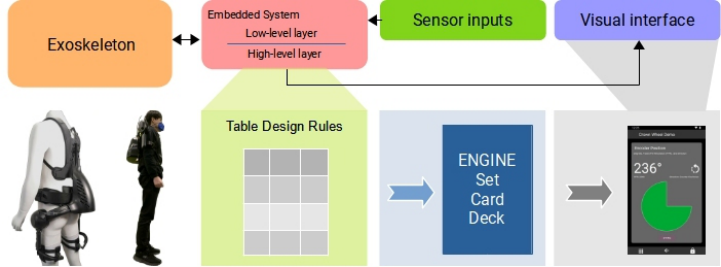
System Description The interface is an electro-mechanical device attached to the exoskeleton. The main objective is to control who has access to the exoskeleton and how some domains could be modified without affecting the safety of the user and performance of the exoskeleton. The UCI was developed to interact with the active occupational wearable robots: XoTrunk (Poliero et al., 2021), and Shoulder-sideWINDER (Park et al., 2021) as seen in Figure 1.
The UCI’s architecture is mainly formed by an embedded system with three sensor inputs: 1) a fingerprint sensor for user access recognition, 2) an enco- der for the crown wheel navigation system, and 3) two push-buttons for item selection (these have the same function, and are duplicated for usability pur- poses). The output part of the system is the visual interface, which is an 800×480 pixels resolution colour screen. Inside the embedded system run two-application layers: a) a low-level layer executing actions just for input sensors, and b) a high-level layer acting as a visual engine for the output part of the interface. As depicted on Figure 1, the high-level layer uses a table design rule system, this is a file containing all the information of the visual element layout to be displayed on screen. Once the table design rule is deco- ded by the visual engine, it drops a visual item according to the hierarchical visual architecture.
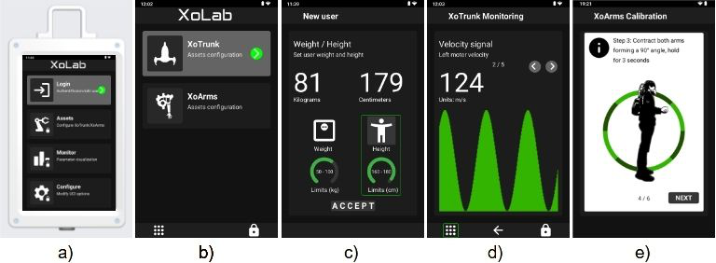
Figure 2 shows the hierarchical visual architecture, it is composed by menu, sub-menus, cards, decks, and prompt information messages. The minimal information element in the UCI is a card, this displays information regarding the status of the exoskeleton or user parameters. A deck is a group of cards stacked together to show aligned information. Menus and sub-menus are the navigation tree of the UCI, these lead to cards and decks. Finally, the prompt information messages display is an element to present instructions defined as low, mid, or high on a critical scale.
There are twenty actions you can perform using the device, seven of them directly affect the exoskeleton’s operation. Some examples of the actions you can do are: (i) accessing the exoskeleton general system using fingerprint unlock, (ii) calibration (iii) adjusting parameters, (iv) monitoring the exo- skeleton’s signals, and (v) displaying instructions as safety rules or tutorials.
Figure 1: User command interface system architecture.
Design and Evaluation of a Wearable Adaptable Setup System 57
Figure 2: UCI hierarchical visual architecture. a) UCI device displaying a menu, b) sub- menu, c) card element, d) deck element, and e) prompt information message.
The state of the art, cases of study, and the GDPR argument of the UCI can be consulted in Moreno Franco et al., 2022. Lastly, it is important to remark that the academic contribution of this work is the generic and flexible interface device that supports active occupational exoskeletons.
Evaluation Metrics The User Pain Points (UPP) questionnaire is a set of 10-negative items eva- luated by the user when interacting with the interface. The objective is to assess the experience of the user interface. The options in the questionnaire are: (a) I agree or (b) I disagree.
System Usability Scale (SUS) is a 10-item questionnaire with five response options in the Linkert scale format. This tool gives a global view of subje- ctive assessments of usability. To see the standard items in the SUS please consult: (Brooke, 1996).
EXPERIMENTAL EVALUATION The experiment assesses the functionality, experience, and usability of the User Command Interface. It is divided according to the type of interaction: a) UCI-Only interaction, and b) UCI-Exoskeleton interaction.
Participants A group of 52 persons participated in the experiments in different sessions, they are divided in two categories: a) UCI-Only focus group, and b) heal- thy people with no history of low back pain (LBP) and shoulder pain. Test participants with LBP can not be part of any of the lifting tasks, they just participated in the UCI-Only interaction. The experiment was conducted in accordance with the Declaration of Helsinki and was approved by the Ethics Committee of Liguria (protocol no.: CER Liguria 001/2019). Additionally, 55% of the participants wore glasses for their daily activities.
Experiment Design In the UCI-Only interaction activity, the user has to accomplish five goals using a GOM model (John & Kieras, 1996). The first goal is to successfully log-in as an administrator, then the participant has to add ten-new user to the UCI’s database (in Moreno Franco et al., 2022 is defined the user’s characte- ristics details for this action). After, the participant must find the monitor signals for XoTrunk exoskeleton, and verify that the fingerprint sensor light works properly. Finally, the user should erase the UCI’s database. At the end, the participants answered UPP and SUS surveys.
For the last activity (UCI-Exoskeleton interaction), the test participants must carry out five lifting tasks wearing the XoTrunk exoskeleton and inte- racting with the UCI. The lifting task is described in Lazzaroni et al., 2022. Each task has a different parameter configuration to be adjusted by the user: a) transparency, b) max. Torque of 10 Nm, c) max. Torque of 20 Nm, d) max. Torque of 30 Nm, e) max. Torque of 40 Nm; an additional task with- out lifting involves loading a preset configuration saved in the UCI. Time was recorded before performing each task. In this particular activity only participants without LBP were allowed to execute the experiment.
RESULTS AND DISCUSSION
Table 1 presents the results of UPP from (n = 52) in the interaction: UCI-Only. Pain point (5) had the highest score and pain point (2) the lowest score of the survey. Since the interface of the UCI has a rigid navigation system (there is one path to follow and perform the action), it is remarkable that not all the actions have a navigation button to go to the desired action. The maximum number of levels to reach a card/deck is four (from the main menu).
Table 1. User pain points (UPP) results: interface experience assessment.
Table available in the original PDF paper.
Pain point Acceptance (I agree)
0.0%
(1) It is difficult to navigate through the menu interface 12.28% (2) The information of the actions is poor and not understandable
26.31%
(3) The information to perform an action is not enough 7.01% (4) Not all actions have easily access through the menu 22.8% (5) Not all the actions have navigation buttons to go where I want
19.29%
(6) Prompted information is not enough to make sure that the action has been performed correctly
5.26%
(7) Introducing data such as assets configuration, saving users, configuration sessions is confusing or hard to achieve
1.75%
(8) The actions are slow to execute 7.01% (9) I do not trust the interface, I do fear to damage the exoskeleton
1.75
(10) I am worried about user information being stored in the device
Design and Evaluation of a Wearable Adaptable Setup System 59
Also as part of the UCI-Only interaction, Table 2 shows the results of (SUS) from (n = 44). The average score was 82.1. The highest mean is in item (6), and the lowest mean in item (4).
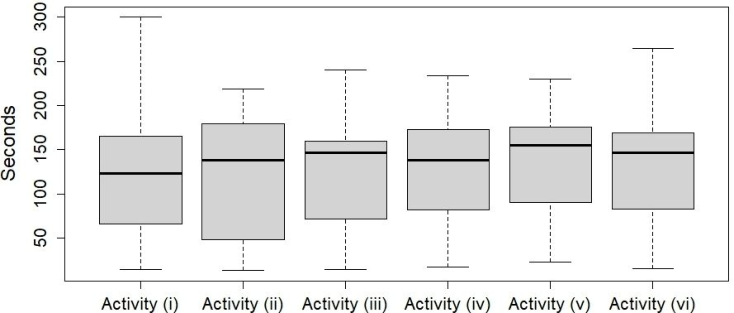
Figure 3 shows the timing results before performing the lifting tasks (n = 15). As seen, the 50th percentile is similar in all the activities. The obje- ctive is to understand if the time between tasks is different or not. A few portion of the participants took more time to configure the parameters using the UCI device. Each participant modified the exoskeleton’s parameters such as maximum torque and the controller’s gain in advance of the lifting task using the UCI device. After the adjustment, the parameters are sent to the exoskeleton and this one is configured with the new set values.
Table 2. System usability scale (SUS) results.
Table available in the original PDF paper.
Item Mean SD
2.931 1.301
(1) I think I would like to use this system 3.045 0.938 (2) I found the system unnecessarily complex 3,431 0.728 (3) I thought the system was easy to use 3.227 0.803 (4) I think I will need the support of a technical person to be able to use this system
3.295 0.904
(5) I found the various functions in this system were well integrated
3.727 0.499
(6) I thought there was too much inconsistency in this system
3.136 0.795
(7) I would imagine that most people would learn to use this system very quickly
3.431 0.818
(8) I found the system very cumbersome to use 3.295 0.978 (9) I felt very confident using the system 3.318 0.707 (10) I needed to learn a lot of things before I could get going with this system
Figure 3: UCI-exoskeleton interaction activity. Performing time of parameter adju- stment on each lifting task (activities i to v) and load preset configuration (activity vi).
CONCLUSION
The UCI interface allows simple access to the exoskeleton’s adjustments and user database management. XoLab’s exoskeletons benefit from the interface in terms of usability and operability for the easy parameter change process during the tasks. The UPP survey presents a low level of acceptance in each pain item for the user interface, this shows that the user had a positive experience when interacting with the UCI device. Similar to the previous, the SUS survey shows that the test participants find the UCI useful but still some actions need to be improved. After the evaluation, the UCI device pre- sents an intuitive and robust solution for occupational exoskeleton when the user requires rapid parameter modifications while interacting with the exoskeleton.
ACKNOWLEDGMENT
This work was supported by the Italian Workers’ Compensation Authority (INAIL) and Istituto Italiano di Tecnologia (IIT) within the project Sistemi Ciberneteci Collaborativi (SCC).
REFERENCES
Agah, A., & Tanie, K. (1996). Human-machine interaction through an intelligent user interface based on contention architecture. Proceedings 5th IEEE Internatio- nal Workshop on Robot and Human Communication. RO-MAN’96 TSUKUBA, 537–542. Bosch, T., van Eck, J., Knitel, K., & de Looze, M. (2016). The effects of a passive
exoskeleton on muscle activity, discomfort and endurance time in forward bending work. Applied Ergonomics, 54, 212–217. Brooke, J. (1996). SUS: A “Quick and Dirty” Usability Scale. In Usability Evaluation In Industry. CRC Press. Chao, G. (2009). Human-Computer Interaction: Process and Principles of Human-
Computer Interface Design. 2009 International Conference on Computer and Automation Engineering, 230–233. Ebrahimi, A. (2017). Stuttgart Exo-Jacket: An exoskeleton for industrial upper body applications. 2017 10th International Conference on Human System Interactions (HSI), 258–263. Huysamen, K., de Looze, M., Bosch, T., Ortiz, J., Toxiri, S., & O’Sullivan, L. W.
(2018). Assessment of an active industrial exoskeleton to aid dynamic lifting and lowering manual handling tasks. Applied Ergonomics, 68, 125–131. John, B. E., & Kieras, D. E. (1996). Using GOMS for user interface design and evaluation: Which technique? ACM Transactions on Computer-Human Interaction, 3(4), 287–319. Kuber, P. M., Abdollahi, M., Alemi, M. M., & Rashedi, E. (2022). A Systema-
tic Review on Evaluation Strategies for Field Assessment of Upper-Body Indu- strial Exoskeletons: Current Practices and Future Trends. Annals of Biomedical Engineering, 50(10), 1203–1231. Lazzaroni, M., Fanti, V., Sposito, M., Chini, G., Draicchio, F., Natali, C. D., Caldwell, D. G., & Ortiz, J. (2022). Improving the Efficacy of an Active Back-Support Exoskeleton for Manual Material Handling Using the Accelerometer Signal. IEEE Robotics and Automation Letters, 7(3), 7716–7721.
Design and Evaluation of a Wearable Adaptable Setup System 61
Moreno Franco, O. A., Ortiz, J., & Caldwell, D. G. (2022). Evaluation of the User Command Interface, an Adaptable Setup System for Industrial Exoskeletons. 2022 9th IEEE RAS/EMBS International Conference for Biomedical Robotics and Biomechatronics (BioRob), 01–07. Park, D., Toxiri, S., Chini, G., Natali, C. D., Caldwell, D. G., & Ortiz,
J. (2021). Shoulder-Sidewinder (Shoulder-Side Wearable Industrial Ergonomic Robot): Design and Evaluation of Shoulder Wearable Robot With Mechanisms to Compensate for Joint Misalignment. IEEE Transactions on Robotics, 1–12. Poliero, T., Sposito, M., Toxiri, S., Natali, C. D., Iurato, M., Sanguineti, V., Caldwell, D. G., & Ortiz, J. (2021). Versatile and non-versatile occupational back- support exoskeletons: A comparison in laboratory and field studies. Wearable Technologies, 2. Spada, S., Ghibaudo, L., Gilotta, S., Gastaldi, L., & Cavatorta, M. P. (2017). Investi-
gation into the Applicability of a Passive Upper-limb Exoskeleton in Automotive Industry. Procedia Manufacturing, 11, 1255–1262. Toxiri, S., Koopman, A. S., Lazzaroni, M., Ortiz, J., Power, V., de Looze, M. P., O’Sullivan, L., & Caldwell, D. G. (2018). Rationale, Implementation and Evalu- ation of Assistive Strategies for an Active Back-Support Exoskeleton. Frontiers in Robotics and AI, 5.
Read this individual research paper free through the original publisher, or explore the full digital proceedings book.
ISBN 978-1-958651-87-2
Explore this ISBN in the AHFE Bookstore ↗Listed in the July 2026 bookstore catalogue; search by ISBN to confirm current availability · Digital book purchase optional