Nora Almania, Sarah Alhouli, Deepak Sahoo (2024). User Preferences for Smart Applications for a Self-Powered Tabletop Gestural Interface. In: Human Interaction and Emerging Technologies (IHIET-AI 2024): Artificial Intelligence and Future Applications. AHFE Open Access, vol. 120, pp. 24–36. https://doi.org/10.54941/ahfe1004552
Nowadays, technologies and applications have become remarkably widespread and versatile. This versatility lies in their ability to be adapted and controlled by users through different kinds of interfaces. A self-powered tabletop gestural interface presents a significant technological advancement in a sustainable manner, resulting in energy-harvesting technologies that alter the concept of power consumption. However, determining the applications for some gestural interfaces to align with users' requirements and preferences requires further consideration. To this end, we conducted a survey and a semi-structured interview through a user-centred design (UCD) approach with 20 end-users in pairs to increase engagement between participants in selecting a smart application for a self-powered gestural interface. We presented the self-powered gestural interface with eight different applications and domains determined from the literature. Our findings indicated that users may find one application more beneficial than the other based on the quantitative data. In addition, our qualitative investigation focused on the reasons behind the ratings, where we used open coding from participant interviews and conducted a thematic analysis that revealed three high-level themes: touchless gestures, user experience, and other applications. Ultimately, the combination of users' feedback from quantitative and qualitative means led us to capture the selected application by users and build on it in future research.
Applications in the technological era are versatile and could be controlled by users using a variety of interactions and interfaces. User-friendly appli- cations are one of the outcomes of research in the field of human-computer interaction (HCI), aimed at building applications that meet users’ needs and preferences. The user-centred design (UCD) approach (Lowdermilk, 2013) is an effective way to build user-friendly applications where researchers can gather feedback from end-users directly according to their decisions. Con- sequently, determining the applications based on users’ perceptions could contribute to the adaptation of technologies.
User Preferences for Smart Applications for a Self-Powered Tabletop Gestural Interface 25
The new generation of some technologies relies on gesture-based inputs for navigation and manipulation (Xiao et al., 2022), along with using sensor technologies as controllers for applications (Li et al., 2018). Self- powered sensor technologies are comprised of components that possess the capability to sense, communicate, control, and respond (Wu et al., 2020), thereby enabling them to function autonomously, without the need for external power sources, and in a sustainable manner (Wang, 2010). Therefore, this is what will result in the development of green Internet of Things systems, as these energy-harvesting technologies will alter the con- cept of power consumption (Adila et al., 2018), which could enhance the feasibility of controlling a selected application through self-powered sensor technologies.
Existing research has explored different types of self-powered sensors. Ser- pentine (Shahmiri et al., 2019) is a self-powered cord that is based on the principles of the triboelectric nanogenerator and can be deformed reversibly to measure a variety of human inputs, including gestures. Researchers have suggested that Serpentine might be used as a slingshot gaming controller since it permits control using two-handed gestures. In addition, PViMat (Sorescu et al., 2020) is a self-powered tabletop gestural interface that is based on a solar photovoltaic system. This interface is portable and could be used on indoor surfaces or outdoor environments that could control some potential applications. These studies have suggested some applications that could be controlled by these sensors. The current literature focuses only on the technical aspects and benefits of self-powered sensors in terms of sustainability, energy efficiency, cost-effectiveness, and flexibility. How- ever, understanding users’ preferences for controlling smart applications using self-powered sensors requires further consideration. In contrast, Web on the Wall (Morris, 2012), emphasises the consideration of users’ needs by asking participants about the scenarios they find most preferred and beneficial while interacting with a web browser, using Microsoft’s Kinect sensor.
In this study, we used the self-powered sensor featuring technical aspects along with user engagement to identify applications for the gestural inter- face to match their preferences and needs, as previous research suggested potential applications from the researchers’ perspective, yet the end-users’ perspective was not considered, which needs further investigation. In light of this, it becomes imperative to adopt the UCD approach (Chammas et al., 2015) by incorporating a survey and a semi-structured interview as mixed- methods (John w. Creswell, 2017; Lazar et al., 2017) that could provide valuable input and a comprehensive understanding of users’ preferences. In this paper, we elicited users’ preferences on smart applications for a self- powered tabletop gestural interface and obtained results from quantitative and qualitative means through the UCD approach applied to 20 end-users, leading to the selection of the preferable smart application to build future research on it.
COMBINING QUANTITATIVE AND QUALITATIVE RESEARCH METHODOLOGIES IN SELECTING A SMART APPLICATION We followed the principle of combining the quantitative and qualitative meth- ods by conducting a survey, and then followed up with a semi-structured interview. In order to gain a more comprehensive understanding of users’ preferences in selecting a smart application, a combination of quantitative and qualitative research methods is necessary (Onwuegbuzie & Leech, 2004). In addition, approaching both techniques allows practical researchers to use qualitative research to inform quantitative research, and vice versa (Onwueg- buzie & Leech, 2005). To find the preferable application from the end-users’ perspective that likely benefits from using touchless hand gestures with the self-powered tabletop gestural interface (Sorescu et al., 2020), we initially selected the domains based on the literature (see Table 1), where these studies applied hand gestures with different applications. Then we set our hypothesis to be evaluated through the survey:
H1: Participants’ preferences significantly differ when selecting the appli- cations to be controlled by the self-powered tabletop gestural interface, reflecting its effect.
Table 1. The eight applications with their possible functionalities.
Table available in the original PDF paper.
Smart applications Possible actions and functions References Smart-home devices Controlling TV, media player, smart speaker, light bulbs, blinds, AC, thermostat, fan, security systems, etc.
(Kühnel et al., 2011; Vogiatzidakis & Koutsabasis, 2019)
Wall/Public displays
Media controlling and navigation, using maps, web browsing, playing games, voting and commenting for urban planning, etc.
(Du et al., 2019; H. J. Kim et al., 2011; Rodriguez & Marquardt, 2017) (Chen et al., 2021)
VR/AR and Mixed reality – using head mounted displays
3D objects/hologram manipulation (e.g., selection, translation, rotation, and scale), map navigation, playing games, etc.
Smartphone/ Smartwatch
Menu navigation, selection, home screen and app switching, map navigation, web browsing, controlling media player, etc.
(Faleel et al., 2020; Shimon et al., 2016) (Wobbrock et al., 2009)
Tabletop/Tablet Using a Microsoft Surface or tablet computer, i.e., menu navigation and selection, text/image/video editing, web browsing, playing games, etc.
(May et al., 2017)
Vehicle Media controlling, answering phone calls, map navigation, etc.
Robot Movement, following, getting attention, object selection and manipulation, etc.
(L. H. Kim et al., 2020)
Drone Flying, object following, and camera controls, etc.
(Seuter et al., 2018)
User Preferences for Smart Applications for a Self-Powered Tabletop Gestural Interface 27
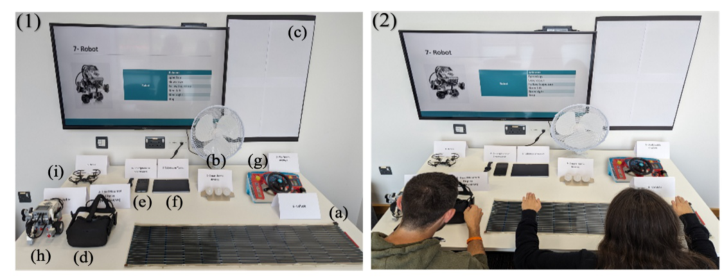
Figure 1: (1) Experimental setup: (a) self-powered tabletop gestural interface is shown alongside all eight smart applications as artefacts: (b) smart-home devices (i.e., light bulbs and fan), (c) wall/public displays, (d) VR/AR and mixed reality – using head- mounted displays, (e) smartphone/smartwatch, (f) tabletop/tablet, (g) vehicle, (h) robot, and (i) drone. (2): Participants work in pairs to increase engagement in selecting the smart application for the gestural interface.Table 2. The eight applications with the giving six commands.
Table available in the original PDF paper.
Smart applications Commands
Move (up/down), Select, Shrink, Create, and Delete.
Smart-home devices Lights (Turn on/off – Dim up/down), and Fan (Airflow increase/decrease). Wall/Public displays Browser (Open/Close), Go (Backword/Forward), and Option (Select/Deselect). VR/AR and Mixed reality – using head mounted displays Smartphone/Smartwatch Call (answer/hang up/ignore), Stopwatch (start/stop), and View time. Tabletop/Tablet Select (single/group), Rotate, Shrink, Enlarge, and Pan. Vehicle Call (answer/hang up), Screen zoom (in/out), and Media (play/pause). Robot Speed (up/down), Steer (left/right), Follow trajectory, and Stop. Drone Land, Take off, Follow, Stop following, and Fly (higher/lower).
We conducted the study by recruiting 20 participants (13F, 7M, aged 26–35 years, with an average and SD of 28.8 ± 5.5 years) from a university cam- pus as open participation through an email invitation advertisement. The participants were diverse, coming from various backgrounds and nationali- ties with different cultures. The experiment was done in pairs to expand the opportunity for engagement, interaction, and discussion, generating appli- cable findings through the collaboration of diverse individuals. All eight applications were presented in front of the participants, including the self- powered gestural interface (see Figure 1). The participants were given six
commands for possible actions and functions of each application to investi- gate the likely benefit of using touchless hand gestures with a mobile rollable gestural interface, as we asked participants to perform gestures based on that command using the interface in a simulation manner (see Table 2). The study was divided into filling out a survey and following up with a semi-structured interview with open-ended questions. Hence, the partici- pants stated if they had prior experience with touchless gestures, recorded their ratings on a 5-point Likert scale for all eight applications, answered an open-ended question for each rating, and gave their thoughts on any other applications:
1. Do you have prior experience with using touchless gestures before this study? If the answer is yes, what was the interface? 2. Please state your level of agreement for the following applications with their possible functions (see Table 1), likely benefiting from using touch- less gestures with the self-powered tabletop gestural interface. 3. Could you please tell us why you rated the application at this level of agreement? 4. Do you think there is another application that can be used and will be beneficial?
We obtained the following answers from participants:
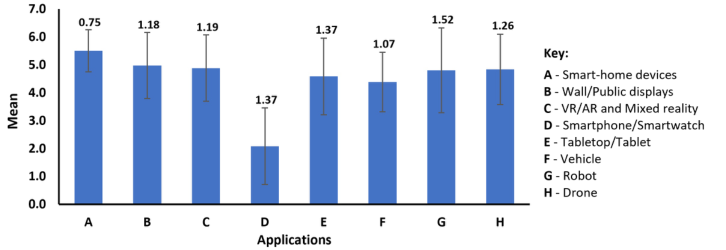
1. Two participants reported prior experiences with touchless gestures on tablets and smartphones. The rest 18 participants had no prior experience. 2. All participants rated the smart-home devices as the most preferable application, whereas they rated the smartphone/smartwatch as the least preferable application (see Figure 3). 3. We answer the following question through thematic analysis, as discussed in the section: Qualitative Semi-Structured Interview. 4. Nine participants out of 20 suggested that the self-powered tabletop gestural interface could be helpful in serving the medical/healthcare, edu- cation, and entertainment sectors. Whereas the rest 11 stated nothing came to their mind, as most of them were presented in the study.
Ultimately, combining these methods yielded significant results that led us to capture the users’ preferences in eliciting the desired application.
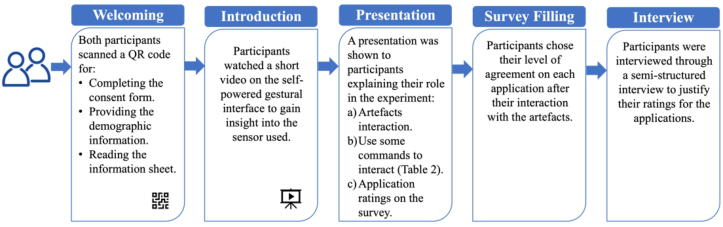
Procedure Before proceeding with our study, we followed the approved procedures of our Institutional Review Board (IRB–021121/4583) to organise and run the study. We started with a 10-minute welcoming phase, as we welcomed par- ticipants in pairs and asked each participant to scan a QR code to access the study materials, including the consent form, demographic information, and information sheet. Then we introduced a 2-minute short video illustrating the self-powered tabletop gestural interface to give participants an insight into this interface. Afterwards, 8 minutes were spent explaining the partici- pants’ role through a presentation where we asked participants to consider three main points before going ahead and filling up the survey questions. The
User Preferences for Smart Applications for a Self-Powered Tabletop Gestural Interface 29
three main points covered the following by asking participants to: a) take time to interact with the artefacts and imagine the possible interactions by shar- ing and discussing thoughts and ideas in pairs before giving the agreement ratings on the survey; b) use some of the commands (see image3.pngby-step experimental protocol.
Figure 2: Step-by-step experimental protocol explaining the procedure.
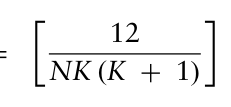
QUANTITATIVE SURVEY The quantitative data that was acquired from the 5-point Likert scale online survey assessing participants’ agreement level on the type of applications was tested using Friedman’s two-way ANOVA by rank test (Lazar et al., 2017) within SPSS quantitative analysis software based on the following equation:
k X ∗
FM =
R2
3 N (k + 1)
(1)
j −
Equation reproduced from the original PDF.
In Eq. (1), K is the number of applications (K = 8), N is the num- ber of participants (N = 20), and Rj is the total of the ranks. The test found that: FM = 31.030, degree of freedom (df) = 7, and p < 0.001. Assuming that we select α = 0.05, the critical value is χ2 = 14.067. Hypothesising that participants’ preferences significantly do not differ when selecting the applications to be controlled by the self-powered tabletop ges- tural interface, reflecting its effect. Therefore, we reject the null hypothesis as the critical value is less than the test value. Depending on their prefer- ences and the effect of the interface, users may find one application more preferred than the other. By showing the error bars, we were able to repre- sent the variability and precision of the data, while selecting applications based on the mean and standard deviation reflected different aspects of the data. It is noticeable that the smart-home devices application was the most preferable and consistent, as it received the highest mean and lowest standard deviation. Conversely, smartphone/smartwatch obtained the low- est mean, while the robot acquired the highest standard deviation, reflecting lower mean satisfaction and higher data variability among the participants (see Figure 3).
Figure 3: The mean ranks and standard deviations for eight smart applications.
QUALITATIVE SEMI-STRUCTURED INTERVIEW We conducted a semi-structured interview with participants to clarify their ratings among applications and their suggestions about other applications. The qualitative data was collected through notes and voice recordings from the interviews, and then we transcribed and coded these data within the NVivo qualitative analysis software. Using open coding from participants’ interviews, we conducted a thematic analysis (Terry et al., 2017) of our data under the oversight of two researchers. Our qualitative investigation revealed three high-level themes: touchless gestures, user experience, and other appli- cations. We identified 76 codes linked to the level of agreement for the eight applications, likely benefiting from using touchless gestures with the self-powered tabletop gestural interface.
A. Touchless gestures: We extracted this theme based on the thematic anal- ysis that shed light on participants’ attitudes towards the ease of use, personal hygiene, and accessibility benefits offered by touchless gesture interaction on a self-powered tabletop gestural interface to control smart applications. The majority of participants showed their willingness to use touchless gestures on the interface to control smart-home devices, as 17 out of 20 participants sensed the usefulness of touchless gestures and thought it would be valu- able for controlling home appliances where it is suitable and considered the hygiene aspect. Conversely, 14 out of 20 participants showed their unwill- ingness to use touchless gestures on the interface to control smartphones and smartwatches as they are self-sufficient and already feature mobility, where touch interaction is much more convenient than touchless interaction. In addition, for the rest six applications, participants were moderately support- ive when they had the option to control them using touchless gestures (see Table 3).
B. User experience: This theme illustrates participants’ prior experiences justifying their ratings on the eight applications, highlighting the potential impact this interface could have across these applications and suggesting a shift towards a more intuitive and engaging user experience across smart applications. Based on participants’ ratings, smart-home devices scored the highest due to their ease of use and convenience, making it the most pre- ferred application. On the other hand, participants reported that using
User Preferences for Smart Applications for a Self-Powered Tabletop Gestural Interface 31
touchless gestures on smartphones/smartwatches are uncomfortable and not user-friendly, as they could cause some usability issues, leading to frustration and inconvenience, such as answering calls or deleting important apps by mistake (see Table 4).
Table 3. Quotes from participants indicating the touchless gestures theme. +/– signs indicate positive and negative opinions; neutral opinions do not contain signs.
Table available in the original PDF paper.
Smart applications Quotes from participants Smart-home devices Touchless Gestures P10+”In situations like smart-home device control, I think this type of interaction is ideal and really suits”. P19+”I believe it is more useful because it keeps the device clean, and you can control it just by a gesture”. P20+”Touchless gestures will help me to keep my home clean”. Wall/Public displays
P8+”I think using touchless gestures on public displays are useful as they protect my hand from collecting any dirt and bacteria”. VR/AR and Mixed reality – using head mounted displays
P8+”When I play a game and I am tense while controlling it with a joystick, it will not make me comfortable, so I believe using gestures will make it easier to control the game”. P14”Touchless gestures are nice, even if it’s not my specialty to use head mounted display, but if I feel it does the same features as traditional controllers no problem to have it”. P6–”This type of interaction would be more suitable for applications that don’t require movement and can be controlled while sitting, so I don’t think it is useful for VR/AR users”. Smartphone/ Smartwatch
P3–”I can just use my phone; I don’t need this interface to control”. P10–”In most cases, if I am using a smartwatch and going somewhere, I want to touch the actual screen for interaction”. Tabletop/Tablet P19+”As we use the tabletop sometimes in public places, it is safer and cleaner to use gestures than to touch it”. P6”I would rate tabletops as neutral, as I think zooming or rotating something using a touchscreen probably isn’t too much harder than waving your hands over the sensor”. Vehicle P10”Gesture controls are great for quick functions like picking up calls, but when it comes to controlling media and navigation, my hand is often off the steering wheel, which needs to be considered”. Robot P17+”I strongly agree with using touchless gestures to control robots, as it can enhance performance”. Drone P17+”I agree with using gestures to control a drone, as it is an interesting advanced technology”. P9–” I am used to using a traditional controller to operate a drone, so I imagine that using gestures might make me feel more uneasy”.
Table 4. Quotes from participants indicating the user experience theme. +/– signs indicate positive and negative opinions; neutral opinions do not contain signs.
Table available in the original PDF paper.
Smart applications Quotes from participants Smart-home devices User Experience P9+”For ease of use, I think I’d prefer an automated system rather than manually turning on the heater at home”. P1+”I am lazy, so if the interface was placed next to my bed, then I don’t have to get up to turn off the lights”. P14+”I feel this interface is comfortable to use to control smart-home devices and might be better than the traditional ways”. Wall/Public displays
P1”I would rate it neutral as it may cause some mistakes while selecting some options, yet I feel it could be interesting”. VR/AR and Mixed reality – using head mounted displays
P13+”I think it’s much easier because you are wear- ing a head-mounted display and your hand is just moving over the interface”. P10–”As VR requires moving around and having dynamic interaction with objects, I believe this interface requires me to stay fixed, which makes integrating with these systems difficult”. Smartphone/ Smartwatch
P11–”Using my phone with the touching feature is much easier”. P1–”I don’t think smartphones and smartwatches will take any benefit from using this interface; it is already super mobile”. P8–” It is easy and simple to pick up my phone, as it is pointless to carry my smartphone and the interface together”. Tabletop/Tablet P14–”As a researcher, I would prefer to be very accurate and careful about things I do with my tablet. I prefer to make sure that everything is secure, so it’s not an option for me”. Vehicle P5+”For safety, I guess it is important to use it with the vehicles”. P2”I might want to use it in vehicles controlling media and GPS, but I still wouldn’t for safety issues, so I am uncertain”. P7–”Only for safety, I wouldn’t say I agree because this is dangerous, where I can’t trust it”. Robot P11–”I think that this interface should be more precise in deciding the movements of robots”. Drone P12–”In my experience, the joystick expresses my thoughts; I would like to operate drones using only the joystick or controller”.
C. Other applications: This theme covers participants’ suggestions for other applications that could be controlled by using the interface, where 11 out of 20 stated nothing came to their mind, as most were presented in the study. However, one participant suggested that it could be helpful to serve the medical/healthcare sector: “Instead of clicking on the buttons of the patients’ bed, you can just control it with gestures, by moving up and down to adjust
User Preferences for Smart Applications for a Self-Powered Tabletop Gestural Interface 33
the bed” [P8]. In addition, three participants suggested that it would be ben- eficial to serve the education domain, P7 stated “Having this interface in the classroom while teaching students will be interesting and would ease teach- ing”. Finally, entertainment was also mentioned by two other participants, as P10 mentioned that “Controlling video games or geometric-based games with this interface would be very interesting”.
In light of our analysis, as we combined the quantitative and qualitative results, we were able to select and determine the smart application for the self-powered tabletop gestural interface to be smart-home devices. Therefore, smart-home devices were defined by the end-users as being the most suitable, convenient, and easy to control among the eight applications that promote the user experience.
DISCUSSION
Our research findings by employing a mixed-methods approach through quantitative and qualitative means, revealed that mixing different methods could produce more complete and reliable insights for researchers to cap- ture the preferred application for the self-powered tabletop gestural interface. Consistent with prior research (Weichbroth, 2019), we fed our quantitative results with our qualitative findings, as the quantitative aspect of the study provides numerical insights into users’ preferences, yet it might not capture the specific details that the qualitative mean could reveal. In the same line with previous research (Morris, 2012), paralleling the focus on understand- ing users’ preferences in specific interaction scenarios, where they focused on scenarios while interacting with web browsers, we focused on users’ desires for a smart application for a self-powered tabletop gestural interface. We both followed a survey procedure to collect the users’ preferences, which highlights the value of the UCD approach to tailoring research to users’ perceptions. Our study included a diverse population of participants representing vari- ous backgrounds and nationalities, yet cultural differences could affect users’ preferences in unforeseen ways.
CONCLUSION
In this paper, we identified the smart application for a self-powered tabletop gestural interface with 20 end-users based on their needs and preferences. With technologies becoming increasingly widespread and versatile, choos- ing the application to align with users’ preferences and requirements needs further consideration. Therefore, the participants explored the likely benefit of using touchless hand gestures with a mobile rollable gestural interface on eight different smart applications. Our findings from the quantitative analy- sis revealed that end-users rated smart-home devices as the highest, with the top mean rank and a low standard deviation. Consequently, our qualitative findings informed our quantitative results by giving richer results showing the reasons behind these ratings and their choices to use the interface for controlling the applications. Combining quantitative and qualitative research
methods provided more complete and reliable insights for researchers to cap- ture the user-friendly preferred application and to build future research aimed at improving user experiences as part of HCI.
ACKNOWLEDGMENT
This research was funded by Swansea University by the EPSRC Impact Accel- eration Fund and Shaqra University. For the purpose of Open Access, the author has applied a CC BY license to any Author Accepted Manuscript (AAM) version arising from this submission.
REFERENCES
Adila, A. S., Husam, A., & Husi, G. (2018). Towards the self-powered Internet of Things (IoT) by energy harvesting: Trends and technologies for green IoT. 2nd International Symposium on Small-Scale Intelligent Manufacturing Systems, SIMS 2018, 1–5. https://doi.org/10.1109/SIMS.2018.8355305 Chammas, A., Quaresma, M., & Mont’Alvão, C. (2015). A Closer Look on the User
Centred Design. Procedia Manufacturing, 3, 5397–5404. https://doi.org/10.1016/ j.promfg.2015.07.656 Chen, T., Xu, L., Xu, X., & Zhu, K. (2021). GestOnHMD : Enabling Gesture-based Interaction on Low-cost VR Head-Mounted Display. IEEE Transactions on Visu- alization and Computer Graphics, 27(5), 2597–2607. https://doi.org/10.1109/TV CG.2021.3067689 Du, G., Degbelo, A., & Kray, C. (2019). User-generated gestures for voting and
commenting on immersive displays in urban planning. Multimodal Technologies and Interaction, 3(2), 1–25. https://doi.org/10.3390/mti3020031 Faleel, S. A. M., Gammon, M., Sakamoto, Y., Menon, C., & Irani, P. (2020). User gesture elicitation of common smartphone tasks for hand proximate user inter- faces. Proceedings of the 11th Augmented Human International Conference, 1–8. https://doi.org/10.1145/3396339.3396363 John w. Creswell. (2017). Research design: Qualitative, quantitative, and mixed
methods approaches. In Research Design Third Edition (Third Edit). Sage publi- cations. Kim, H. J., Jeong, K. H., Kim, S. K., & Han, T. D. (2011). Ambient Wall: Smart wall display interface which can be controlled by simple gesture for smart home. SIGGRAPH Asia 2011 Sketches, 1–2. https://doi.org/10.1145/2077378.2077380 Kim, L. H., Drew, D. S., Domova, V., & Follmer, S. (2020). User-defined Swarm
Robot Control. Proceedings of the 2020 CHI Conference on Human Factors in Computing Systems, 1–13. https://doi.org/10.1145/3313831.3376814 Kühnel, C., Westermann, T., Hemmert, F., Kratz, S., Müller, A., & Möller, S.
(2011). Im home: Defining and evaluating a gesture set for smart-home con- trol. International Journal of Human Computer Studies, 69(11), 693–704. https: //doi.org/10.1016/j.ijhcs.2011.04.005 Lazar, J., Feng, J. H., & Hochheiser, H. (2017). Research Methods in Human Computer Interaction (Second Edi). Morgan Kaufmann. https://www.sciencedirect.co m/book/9780128053904/research-methods-in-human-computer-interaction Li, Y., Li, T., Patel, R. A., Yang, X. D., & Zhou, X. (2018). Self-powered gesture
recognition with ambient light. Proceedings of the 31st Annual ACM Symposium on User Interface Software and Technology, 595–608. https://doi.org/10.1145/ 3242587.3242635
User Preferences for Smart Applications for a Self-Powered Tabletop Gestural Interface 35
Lowdermilk, T. (2013). User-Centered Design: A Developer’s Guide to Building User-Friendly Applications (First Edit). O’Reilly Media, Inc. May, K. R., Gable, T. M., & Walker, B. N. (2017). Designing an in-vehicle air gesture
set using elicitation methods. Proceedings of the 9th International Conference on Automotive User Interfaces and Interactive Vehicular Applications, 74–83. https: //doi.org/10.1145/3122986.3123015 Morris, M. R. (2012). Web on the wall: Insights from a multimodal interaction elicitation study. ITS 2012 - Proceedings of the ACM Conference on Interactive Tabletops and Surfaces, 95–104. https://doi.org/10.1145/2396636.2396651 Onwuegbuzie, A. J., & Leech, N. L. (2004). Enhancing the Interpretation of Signif-
icant Findings: The Role of Mixed Methods Research. The Qualitative Report, 9(4), 770–792. https://doi.org/10.46743/2160-3715/2004.1913 Onwuegbuzie, A. J., & Leech, N. L. (2005). On becoming a pragmatic researcher: The importance of combining quantitative and qualitative research methodolo- gies. International Journal of Social Research Methodology, 8(5), 375–387. https: //doi.org/10.1080/13645570500402447 Rodriguez, I. B., & Marquardt, N. (2017). Gesture elicitation study on how to opt-
in & Opt-out from interactions with public displays. Proceedings of the 2017 ACM International Conference on Interactive Surfaces and Spaces, 32–41. https: //doi.org/10.1145/3132272.3134118 Seuter, M., Bauer, G., Macrillante, E., & Kray, C. (2018). Running with drones: Desired services and control gestures. Proceedings of the 30th Australian Con- ference on Computer-Human Interaction, 384–395. https://doi.org/10.1145/ 3292147.3292156 Shahmiri, F., Chen, C., Waghmare, A., Zhang, D., Mittal, S., Zhang, S. L., Wang,
Y. C., Wang, Z. L., Starner, T. E., & Abowd, G. D. (2019). Serpentine: A reversibly deformable cord sensor for human input. Proceedings of the 2019 CHI Confer- ence on Human Factors in Computing Systems, 1–14. https://doi.org/10.1145/ 3290605.3300775 Shimon, S. S. A., Lutton, C., Xu, Z., Morrison-Smith, S., Boucher, C., & Ruiz, J. (2016). Exploring non-touchscreen gestures for smartwatches. Proceedings of the 2016 Chi Conference on Human Factors in Computing Systems, 3822–3833. https://doi.org/10.1145/2858036.2858385 Sorescu, C., Meena, Y. K., & Sahoo, D. R. (2020). PViMat: A Self-Powered Portable
and Rollable Large Area Gestural Interface Using Indoor Light. Adjunct Pro- ceedings of the 33rd Annual ACM Symposium on User Interface Software and Technology, 80–83. https://doi.org/10.1145/3379350.3416192 Terry, G., Hayfield, N., Clarke, V., & Braun, V. (2017). Thematic analysis. In The SAGE handbook of qualitative research in psychology (Vol. 2, pp. 17–37). SAGE Publishers. Vogiatzidakis, P., & Koutsabasis, P. (2019). Frame-Based Elicitation of Mid-Air
Gestures for a Smart Home Device Ecosystem. Informatics, 6(2), 1–23. https: //doi.org/10.3390/informatics6020023 Wang, Z. L. (2010). Toward self-powered sensor networks. Nano Today, 5(6), 512–
514. https://doi.org/10.1016/j.nantod.2010.09.001 Weichbroth, P. (2019). A mixed-methods measurement and evaluation methodology for mobile application usability studies. Communication Papers of the 2019 Fed- erated Conference on Computer Science and Information Systems, 20, 101–106. https://doi.org/10.15439/2019f299 Wobbrock, J. O., Morris, M. R., & Wilson, A. D. (2009). User-defined gestures
for surface computing. Conference on Human Factors in Computing Systems - Proceedings, 1083–1092. https://doi.org/10.1145/1518701.1518866
Wu, Z., Cheng, T., & Wang, Z. L. (2020). Self-powered sensors and systems based on nanogenerators. Sensors (Switzerland), 20(10), 2925 1–46. https://doi.org/10. 3390/s20102925 Xiao, Y., Liu, T., Han, Y., Liu, Y., & Wang, Y. (2022). Realtime Recognition of
Dynamic Hand Gestures in Practical Applications. ACM Transactions on Multi- media Computing, Communications, and Applications (TOMM). https://doi.org/ 10.1145/3561822
LISTED IN THE AHFE DIGITAL BOOKSTORE CATALOGUE
Explore the complete digital volume
Human Interaction and Emerging Technologies (IHIET-AI 2024): Artificial Intelligence and Future Applications
Read this individual research paper free through the original publisher, or explore the full digital proceedings book.
ISBN 978-1-958651-96-4
Explore this ISBN in the AHFE Bookstore ↗Listed in the July 2026 bookstore catalogue; search by ISBN to confirm current availability · Digital book purchase optional