Okan Yilmaz, Miriam Lange, Klaus Radermacher, Frank Beger, Sven Kämmer, Thomas Maser, Peter Selig, Björn Seitz, Simon Kißmann, Armin Janß (2025). Interoperable medical device GUI for SDC Workstations. In: Human Factors in Design, Engineering, and Computing. AHFE Open Access, vol. 199, pp. 1504–1517. https://doi.org/10.54941/ahfe1006962
This paper investigates whether, within the framework of interconnected medical devices, a graphical user interface (GUI) that is developed based on standardized, machine-readable user-interface requirements (UI Profiles) can achieve the same level of usability and safety as commercially available High Frequency (HF) devices. The results of this study demonstrate that a GUI generated from a standardized UI Profile can be as safe and usable as established solutions on the market. The UI Profile-based GUI and two commercially available solutions (BOWA ARC 400, ERBE VIO® 3) were evaluated in a formative usability study by 17 clinicians at the University Hospital Aachen and University Hospital Essen, Germany. The task completion times and rates, user satisfaction, and learnability have been measured and evaluated. The UI Profile-based GUI performed well for all tasks and achieved similar performance levels compared to the established solutions. UI Profiles could provide a practical complement to medical device interoperability standards (IEEE 11073 SDC), enabling the exchange of usability-related data and commonly agreed device (type) specific human-machine-interface requirements.
High-frequency (HF) devices have become vital tools in modern surgical procedures. The device uses HF electrical currents to cut tissue and coagulate blood vessels, minimizing blood loss and reducing the need for sutures or staples.
When integrating such HF devices in open networked operating rooms, usability and risk management challenges will arise as soon as remote control or power release are being performed.
The open interoperability standard ISO IEEE 11073 SDC (Service- oriented Device Connectivity) enables technical interoperability between
Interoperable Medical Device GUI for SDC Workstations 1505
medical devices. Although standardized device descriptions address technical interoperability, usability and safety challenges persist. If a third party wants to remotely change device parameters via SDC or use those parameters for any medical purpose, certain HMI-related risks and requirements must be addressed. For example, in an HF device, the relationships between the footswitch and the instrument/socket must be visible at all times for the clinical users. There are also commonly accepted icons and symbols for neutral electrodes, which have to be taken into account.
This work proposes, applies, and evaluates a method to define medical device-type-specific UI Profiles containing objective and testable requirements for medical devices. A medical device UI designer can adhere to these while designing a system and potentially reduce preventable errors early in development.
This work presents a GUI (which could be used for a central OR workstation) based on a UI Profile for an SDC-connected HF device. The newly designed GUI and two available HF devices on the market were evaluated for hazard-related use scenarios according to the IEC 62366–1 standard. By comparing the usability of the three systems, we aim to determine if a GUI built with a UI Profile is comparable to current solutions on the market (IEC TR 62366–2, 2016).
RELATED WORK
Medical Device Connectivity - ISO IEEE 11073 SDC The ISO IEEE 11073 SDC standard family enables interoperability for medical device systems. By defining the methods to exchange data and discover participants using specific semantics and nomenclature, the “communication” part of interoperability has been solved (IEEE 11073™ Standards Committee of the IEEE Engineering in Medicine and Biology Society; IEEE 11073™Standards Committee of the IEEE Engineering in Medicine and Biology Society, 2018; IEEE Standards Association, 2019). Current research focuses on the required documents for conformity assessment in Europe (Medical Device Regulation) and approval in the USA (Food and Drug Administration).
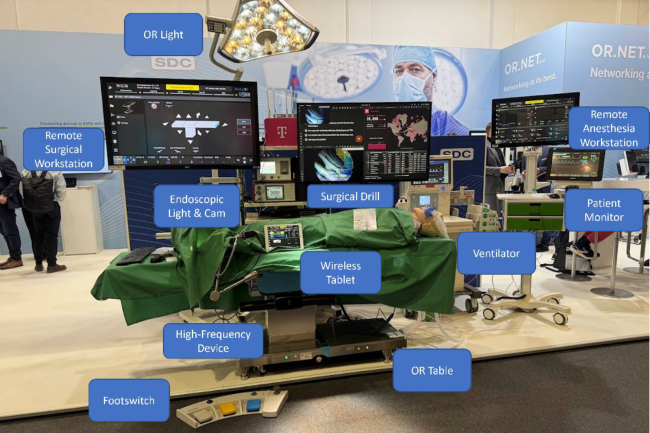
An SDC use-case is shown in Figure 1. Monitoring and controlling medical devices in the OR becomes possible using a remote workstation or a wireless tablet. Medical devices, which are from the same “device type”, such as OR table, OR light, or HF device, should be controlled by the same interaction elements/in the same way, with only manufacturer-specific differences/additions.
Medical Device GUI Creation Process Developing a GUI for a medical device usually follows a structured process, beginning with gathering user, task, and context requirements. According to IEC 62366-2, several methods, such as Failure Modes and Effects Analysis (FMEA), observations, interviews, the Perception-Cognition-Action (PCA) method, and functional analysis, can be employed. It is crucial to consider hazard-related use scenarios at this stage.
Risk management enables manufacturers to identify potential hazards, evaluate their associated risks, implement risk control measures, and assess
Figure 1: SDC feature demonstration at DMEA 2025 in Berlin. The boxes represent user interfaces serving as input and/or output for medical devices.
residual risks. This process includes analyzing reasonably foreseeable misuse (use errors) and typical use scenarios. The resulting list of requirements can also be transferred into a machine-readable format, a so-called UI Profile for open networked devices (IEC TR 62366–2, 2016; DIN EN ISO 14971, 2019; Yilmaz et al., 2022; Yilmaz et al., 2025).
After identifying user and task requirements, the concept and design phase starts. Here, different paths can be taken by starting with prototyping or directly implementing a design using the target programming language. Corporate design guidelines or previous products might influence the resulting design. Existing benchmarks can help you to choose suitable elements to assemble the GUI (Johnsgard et al., 1995; Vanderdonckt, 1999; Yilmaz et al., 2023). After multiple iterations and improvements due to feedback gathered by formative evaluations, a final summative evaluation is performed to test whether the developed design meets the required safety and usability requirements (DIN EN ISO 14971, 2019; IEC TR 62366–2, 2016). The medical device regulation (MDR) in Europe demands that the manufacturer present a Design Dossier, which contains, among other things, hazard-related use cases, a risk management file, verification reports, and a validation within a usability file (MDR, 2017).
High Frequency Devices HF surgery is a technique that involves both open and minimally invasive surgery. High alternating current is generated, and an HF surgical instrument can be applied to a target tissue. The resulting thermal effect depends on the temperature reached. There are two basic methods of HF application: Monopolar and bipolar. In a monopolar application, an active and a neutral
Interoperable Medical Device GUI for SDC Workstations 1507
electrode are connected to the HF generator/device. The desired thermal effect is generated at the end of the active electrode, where the current density is high due to its small area. The current density at the neutral electrode is low due to its large size, thereby protecting the tissue from undesired thermal effects. In bipolar application, both electrodes are usually incorporated into one single instrument (Hug and Haag, 2017; Hausmann, 2006; BOWA Medical, 2022).
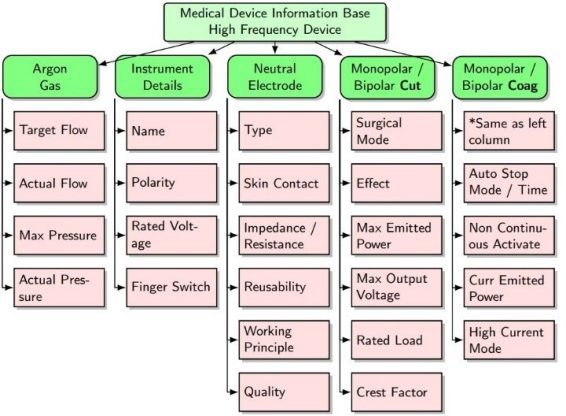
The HF device has several adjustable parameters that influence the effect on the tissue, and a few must be monitored while using the device. The research project Modular Specialisations for Point-of-Care Medical Devices PoCSpec brought manufacturers and interoperability experts together to develop a standard to model a technical description of HF devices. Those technical device descriptions are modeled in a Medical Device Information Base (see Figure 2) and can be either active accessory-oriented (instrument) or output-terminal-oriented. The developed device description can thereby change depending on the chosen approach. In this work, we will focus on the output-terminal-oriented devices. The developed interface could be altered to support an accessory-oriented solution (Kasparick et al., 2021; OR.NET Draft Document).
Figure 2: Simplified and shortened visualization of the HF device containment tree with its technical properties (Kasparick et al., 2021; Kasparick, 2022).
METHODS
UI Profile Creation Steps Developing a specific UI Profile for a medical device type involves systematically integrating different requirements and specifications to ensure usability and safety in open-networked systems.
Requirement Collection The first steps include identifying users, stakeholders, standard operating procedures, use environment, hazard- related use scenarios, use specification, foreseeable use errors, and particular standards for the chosen medical device (such as EN 60601-2-2 for HF devices).
Process Modeling In the second step, a high-level task analysis regarding the human-machine interaction using tools such as mAIXuse (HiFEM methodology) based on ConcurTaskTree (CTT) is performed. (Janß, 2016; Paterno, 2004) In mAIXuse, the tasks can be further divided into cognitive, motoric, and perceptual operations and tasks performed by the system. Additionally, temporal relations between the tasks can be modeled.
Risk Management In the third step, a systematic analysis of errors and risks can be performed using specific failure taxonomies. Performing shaping factors have to be taken into account. After identifying potential risks, risk control measures will be implemented by reducing the probability of errors, increasing the detection rate, or mitigating the impact of errors (harm) (DIN EN ISO 14971, 2019).
Manufacturers’ Expert Interview As the last step, the state of the art should be reviewed by integrating expert knowledge from medical device manufacturers, existing interfaces, and publications regarding risks for that specific device type, such as (Bundesinstitut für Arzneimittel und Medizinprodukte, 2003) for an HF device from the Federal Institute for Drugs and Medical Devices (BfArM).
CLICKDUMMY DEVELOPMENT UI Profile for an HF Device
We interviewed multiple HF device manufacturers for their input regarding UI requirements and created a UI Profile by following the steps mentioned in the subchapter “UI Profile Creation Steps”. The interviews and discussions were fruitful and allowed more profound insight into the devices’ usage and procedures. We presented the use cases, tasks, and process model step by step to get the requirements for each use case and compared those to the already developed requirements. In the workshop organized by the Chair of Medical Engineering (RWTH Aachen) and Beger Design, the HF device manufacturers BOWA-electronic GmbH & Co. KG, Aesculap AG, and Erbe Elektromedizin GmbH took part and delivered valuable insights for medical devices’ GUIs.
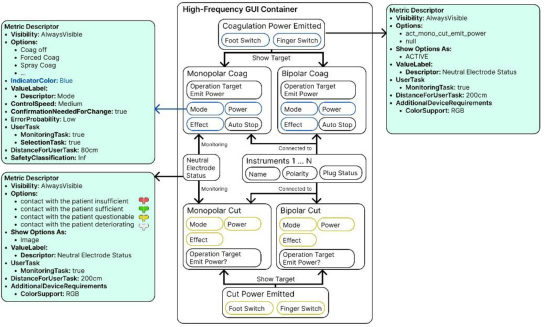
The UI Profile is visualized in Figure 4 and consists of grouped metrics. Every medical device property contains requirements regarding its labeling, control requirements, conditions, and its intended use (monitoring, selection, etc.). More information regarding UI Profiles can be found at (Yilmaz et al., 2025).
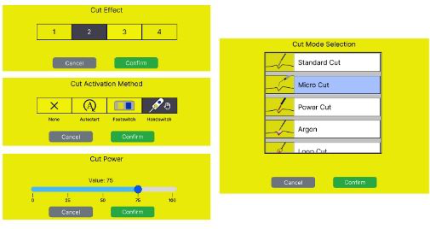
Interoperable HF Device GUI The developed interoperable HF device GUI is shown in Figure 4. It is designed to allow clinicians to monitor and control the properties of
Interoperable Medical Device GUI for SDC Workstations 1509
an HF device using a touchscreen. We excluded the ability to release power using solely the touchscreen, since additional input devices are necessary with specific requirements (e.g., for a footswitch: left=cut, right=coagulation, 10N force over 625mm2, handswitch: cut=closer to electrode, coagulation=further away from electrode) with specific activation and test procedures (DIN EN 60601-2-2 2016, 43).
Figure 3: Visualized UI profile for an HF device.Figure 4: HF device GUI (top) and value change popups (bottom).
The Home Screen contains information regarding the power delivery status, emitted power, activation method, effect, surgical mode, instrument connection status and type, neutral electrode type and status, socket status, and an optional smoke evacuation status. The information blocks mode, effect, activation, and power are grouped by the same color for cut and coagulation, and are grouped per socket. The Power delivery status is shown at the top as a wide bar with a label inside. The neutral electrode is displayed at the bottom left with an additional descriptor and a label. Interacting with the boxes inside each socket group will open an extra window to allow mode, effect, activation method, or power change.
FORMATIVE EVALUATION The goal of a formative evaluation is to identify design shortcomings in early developmental stages that induce (harmful) use errors (IEC TR 62366–2, 2016). This work evaluates three different systems and whether their GUIs are safe and usable. Electrosurgical unit ARC 400 from BOWA- electronic GmbH & Co. KG and VIO® 3 Erbe Elektromedizin GmbH. Those products are already on the market, and their designs have been awarded with the iF Design Award 2012 and the Red Dot Award 2016 (Red Dot GmbH & Co. KG 2016; iF Design Award 2012). The awards alone, however, do not indicate that the design is safe and usable. Still, since the devices are on the market, we can derive that the manufacturers have performed formative and summative usability evaluations. Our GUI (Figure 4) has been developed on the basis of the User Interface Profiles to evaluate its usability compared to the commercially available systems.
Participants 17 participants (8 surgeons, and 9 nurses/surgical technologists) from the University Hospital Aachen, Germany, and the University Hospital Essen, Germany, took part. To identify potential bias, we asked about prior HF device experience (see Figure 5).
Figure 5: Prior experience in HF device usage.
Figure available in the original PDF paper.
Interoperable Medical Device GUI for SDC Workstations 1511
(Hazard-Related) Use Scenarios
Table 1: Use scenarios of HF devices and the study tasks.
Table available in the original PDF paper.
Use Scenarios User Tasks in Study Monitoring Device Properties
Match the correct power value to the used instrument
Checking power value
Checking neutral electrode status and type
Checking power release methods
Checking instrument connection status
Checking instrument type
Hearing and identifying played audio sounds
1. Can you determine from the GUI if an instrument is currently connected? 2. Can you determine from the GUI what instrument is connected? 3. Can you determine the connected instrument’s cutting/coagulation power values? 4. Can you determine from the GUI whether a neutral electrode is connected? 5. Can you determine from the GUI what the neutral electrodes’ contact quality is? [Good] [Medium] or [Bad] 6. Can you determine from the GUI which type of NE is connected? [Split] [Not Split] or [Baby Split] 7. Can you determine from the GUI how to release power? [Footswitch] [Handswitch] [Other] or [None]
Adjusting Device Parameters
Adjust power, mode, and effect
Adjust power activation method
Apply presets
Enable ventilation
Adjust NE type
Adjust connected instrument
8, 9, 10. For the connected instrument: Change Monopolar Cut Mode to x 11. Set the Monopolar Cut power to x (Medium distance change) 12. Set the Monopolar Cut power to y (Large distance change) 13. Set the Monopolar Cut power to z (Small distance change) 14. Change the Monopolar Cut activation method to any Footswitch 15, 16, 17. Change the Monopolar Cut Effect to x
Usability Criteria To evaluate the three GUIs, we followed the usability definition of ISO 9241-11, which characterizes usability by effectiveness, efficiency, and user satisfaction (DIN, 2018). In addition, we investigated learnability, which is highly relevant in OR environments, and also gathered qualitative insights using the thinking-aloud method.
Effectiveness: The moderator documented whether the pre-defined success criteria were met for all tasks being performed. Overall effectiveness was calculated as the percentage of completed tasks per device. If a participant needed help from the moderator, the run was counted as a failure.
Efficiency: The time per task was chosen as the primary criterion for efficiency. For critical tasks, in which time matters (tasks 8-17), one of the
two moderators read the task loudly, and the second one measured the time to complete the task.
Learnability: Each participant performed all tasks three times. The times were measured in the second and third runs. To determine the degree to which the usage improved while being exposed to the system for a few minutes, we analyzed the time differences between the second and third runs. An overall faster execution time implies a higher learnability.
User satisfaction: After finishing all the tasks on a single device, participants filled in a digital questionnaire containing Likert-scale questions. Those included questions regarding user satisfaction. In addition, qualitative feedback was also gathered using the thinking-aloud method.
Statistical Methods Likert Scale Ratings (ordinal, independent systems): The subjective 5-point ratings were treated as ordinal. We first applied a Kruskal–Wallis test per statement, in which significant, post-hoc pairwise comparisons were conducted using Mann–Whitney U tests with a Bonferroni correction (adjusted α = 0.05/number of comparisons = 3) (Kruskal and Wallis, 1952; Mann and Whitney, 1947).
Task completion times: We applied pairwise, parametric t-tests between the systems with Bonferroni correction (continuous, repeated-measures design), in which the adjusted α was 0.0167 (Dunn, 1961).
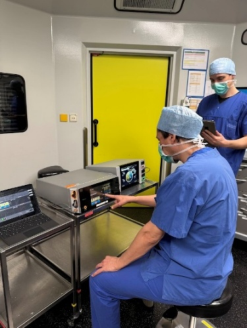
Test Setup The devices were placed next to each other, and a neutral electrode (split) was connected to the VIO® 3 and ARC 400 devices, respectively. The accessories were placed in an inaccessible place to prevent any user interaction or even the possibility of harm.
Figure 6: Setup for evaluation. Left: University Hospital Aachen’s OR, HF devices are placed on two tables, right: University Hospital Essen’s conference room, HF devices are placed on top of drape-covered tables.
Interoperable Medical Device GUI for SDC Workstations 1513
The environment was quiet, and the users could focus on their tasks. The following tasks were performed for all three systems:
Run 1: Thinking Aloud – all tasks
Run 2: Time measurements for tasks 8–17
Run 3: Time measurements for tasks 8–17
Questionnaire To ensure equal distribution of learning effects, we varied the order of tasks. For the three systems, we rotated through all possible permutations after each user completed their set of tasks.
RESULTS AND DISCUSSION
Figures 7, 8, and 9 contain results regarding error rates, efficiency (times to complete the specific task), and user satisfaction. We deliberately anonymized the data to prevent preferential treatment towards a specific brand, encourage open collaboration with industry partners, and support future joint studies.
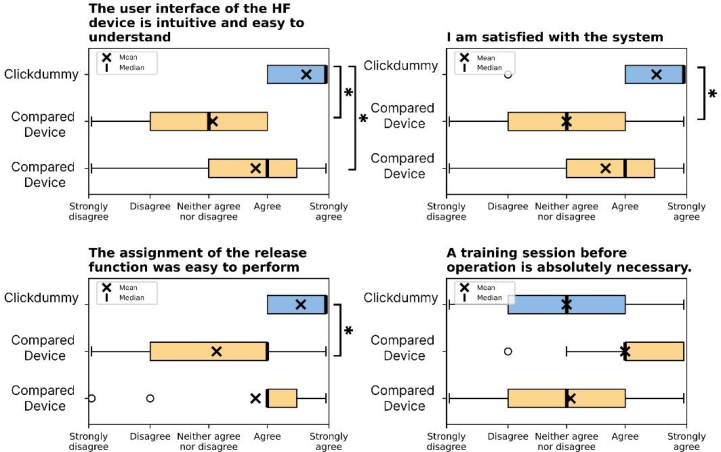
Figure 7: Boxplots comparing Likert ratings of the Clickdummy and the two devices named previously. For impartiality and to ensure an unbiased comparison, we do not disclose which rating corresponds to which device.
Subjective Ratings using Likert Scales: Figure 7 demonstrates that the Clickdummy was rated at least on par with the two compared systems in all categories. It was rated significantly better in three out of four categories than at least one system.
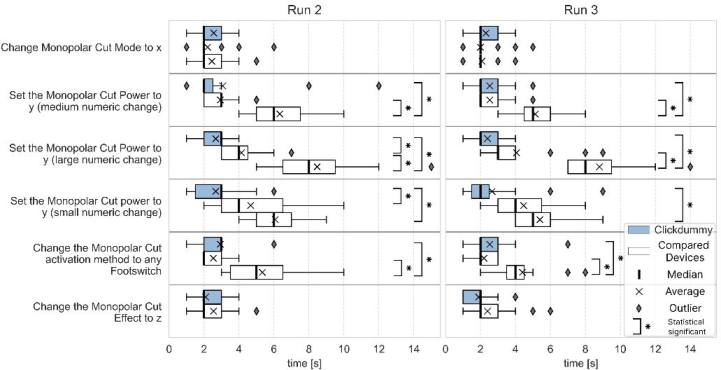
Measured times analysis: Figure 8 demonstrates in boxplots the time it took for the participants to complete the tasks. The tasks performed included the change of modes, effect, power value, and footswitch assignment. Across
all tasks, no system was systematically superior. All bold highlighted times present the Clickdummy.
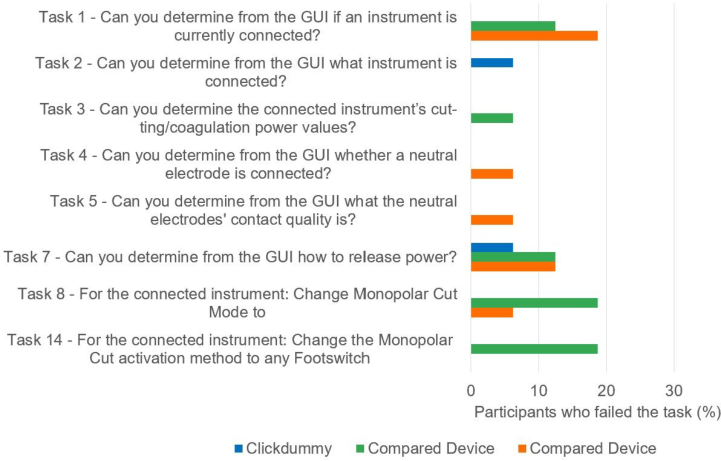
Figure 8: Times it took the participants to complete a given task per device. Blue boxplots represent the Clickdummy, and white the two compared devices.Figure 9: Number of participants who failed the given task.
All 17 participants completed the mode and effect tasks within only 6 seconds
Mode: [2.20 ± 0.87], [2.44 ± 0.89], [2.56 ± 0.69]
Effect: [2.09 ± 0.82], [2.53 ± 0.92]
Interoperable Medical Device GUI for SDC Workstations 1515
One of the two compared solutions was slow for all numeric selection tasks. Even when performing a numeric selection task for the third time, it was still significantly slower, e.g., for a large numeric change, the times were: [2.40 ± 0.83] vs. [4.07 ± 2.05] vs. [8.80 ± 2.04]. The faster two solutions, including the Clickdummy, used a slider that allowed fast and large jumps, whereas the slightly slower solution used a step-only interaction. The activation assignment task for one solution was significantly slower in both runs compared to the other two [2.20 ± 0.68], [2.53 ± 1.51], [4.40 ± 1.68].
Effectivity: The task completion rate for the first run (with no given introduction into the system) is shown in Figure 9. The completion rate was 100% for tasks 6, 9-13, and 15-17. For the first 7 tasks, in which information had to be determined from the GUI alone, 1 to 5 participants failed across all three systems. The Clickdummy failure rate was zero across all tasks except tasks 2 and 7, in which one participant failed. The two compared systems had each 8 failures across all 272 first runs.
Collectively, these findings confirm that the UI-profile-based Clickdummy is at least as safe and effective as the market devices. At the same time, across all performed tasks, no solution was generally superior. The Clickdummy consistently performed well for all tasks and was in the same efficiency range as the faster of the two devices.
A limitation of the study is its primary focus on usability, without examining how the GUI operates within more complex systems that incorporate multiple device interfaces into a single GUI.
CONCLUSION
This study aimed to determine whether a UI-profile-based remote user interface (Clickdummy) for an HF generator can match the usability of two commercially available devices (BOWA ARC 400 and ERBE VIO® 3). Usability was assessed formatively with 17 operating-room professionals from two university hospitals, covering the usability categories effectiveness, efficiency, learnability, and user satisfaction.
This study provides a first formative validation that a GUI based on UI Profiles can be as safe and usable as existing solutions on the market.
In the future, interoperable SDC network participants, who will not know each other beforehand, will be able to exchange usability and safety requirements using UI Profiles before their operation. This can ensure that the stated usability requirements, including risk control measurements and constraints for usage, will be transmitted.
The present validation is limited to a single device class. Further devices, such as tables, ventilators, or syringe pumps, will add additional challenges, such as alarming or competing resources. UI Profiles could serve as the missing layer that connects ISO IEEE 11073 SDCs technical interoperability with harmonized and usable GUIs. It could be transferred alongside the technical device description in SDC, enabling future applications, such as automatic GUI rendering.
ACKNOWLEDGMENT
The author(s) declare that financial support was received for the research and/or publication of this article. The Medi.NET project (Medical device platform for openly networked central workstations in operating theaters and clinics) is funded by the BMFTR (Federal Ministry of Education and Research in Germany) as part of the RUBIN (Regional Entrepreneurial Alliances for Innovation) program line. Grant no: 03RU3U02C (Project duration: 03/2024–02/2027).
REFERENCES
BOWA Medical (2022). Key Facts & Quellenverzeichnis Hochfrequenzchirurgie.
Gomaringen, Germany 2022. Bundesinstitut für Arzneimittel und Medizinprodukte (2003). Risiken der Patientenschädigung bei der Hochfrequenz-Chirurgie. Available online at https://www.bfarm.de/SharedDocs/Risikoinformationen/Medizinprodukte/DE/ hochfreq_chirug_risk.html. DIN (2018). DIN EN ISO 9241–11. Ergonomie der Mensch-System-Interaktion – Teil 11: Gebrauchstauglichkeit: Begriffe und Konzepte (ISO 9241–11:2018); Deutsche Fassung EN ISO 9241–11:2018. DIN EN 60601–2-2 (2016). DIN EN 60601–2-2. Medizinische elektrische Geräte –
Teil 2–2: Besondere Festlegungen für die Sicherheit einschließlich der wesentlichen Leistungsmerkmale von Hochfrequenz-Chirurgiegeräten und HF-chirurgischem Zubehör. DIN EN ISO 14971 (2019). Medizinprodukte - Anwendung des Risikomanagements auf Medizinprodukte (ISO 14971:2019); Deutsche Fassung EN ISO 14971:2019. Dunn, Olive Jean (1961). Multiple Comparisons among Means. Journal of
the American Statistical Association 56 (293), 52–64. https://doi.org/10.1080/ 01621459.1961.10482090. Hausmann, V. (2006). Chapter 5: High-frequency surgery. In: Christian Krettek/ Dirk Aschemann (Eds.). Positioning Techniques in Surgical Applications. Thorax and Heart Surgery - Vascular Surgery - Visceral and Transplantation Surgery - Urology - Surgery to the Spinal Cord and Extremities - Arthroscopy - Paediatric Surgery - Navigation/ISO-C 3D. Berlin, Heidelberg, Springer Medizin Verlag Heidelberg, 41–54. Hug, Bernhard/Haag, Reiner (2017). 32 - Hochfrequenzchirurgie. In: Rüdiger
Kramme (Ed.). Medizintechnik. Berlin, Heidelberg, Springer Berlin Heidelberg. IEC TR 62366–2 (2016). Guidance on the application of usability engineering to medical devices. Guidance on the application of usability engineering to medical devices, Part 2 : IEC TR 62366–2. Internationale Elektrotechnische Kommission. Geneva. Technical report International Electrotechnical Commission VDE 0750–241-1. IEEE 11073™Standards Committee of the IEEE Engineering in Medicine and
Biology Society (2018). 11073–10207-2017 - IEEE Health informatics–Point-of- care medical device communication Part 10207. Domain Information and Service Model for Service-Oriented Point-of-Care Medical Device Communication. S.l., IEEE. IEEE 11073™Standards Committee of the IEEE Engineering in Medicine and Biology Society. IEEE Std 11073™-20702–2016, Health informatics— Point-of-care medical device communication—Part 20702: Medical Devices Communication Profile for Web Services.
Interoperable Medical Device GUI for SDC Workstations 1517
IEEE Standards Association (2019). ISO/IEC/IEEE 11073–10101-2019. IEEE. iF Design Award (2012). ARC 400, ARC+ HF generator. Available online at https:// ifdesign.com/en/winner-ranking/project/arc-400-arc/84496. Janß, Armin (2016). Modellbasierte Risikoanalyse und -behandlung sicherheit-
skritischer Mensch-Maschine-Schnittstellen in der Medizintechnik. Dissertation. Rheinisch-Westfälische Technische Hochschule Aachen; Shaker Verlag. Johnsgard, Todd J./Page, Stanley R./Wilson, Robert D./Zeno, Ronald J. (1995). A Comparison of Graphical User Interface Widgets for Various Tasks. Proceedings of the Human Factors and Ergonomics Society Annual Meeting 39 (4), 287–291. https://doi.org/10.1177/154193129503900414. Kasparick, Martin (2022). PoCSpec Custom_XML HF-Device.xml. Available online
at https://sourceforge.net/p/pocspec/git/ci/master/tree/DevSpecs/HF-Device.xml. Kasparick, Martin/Köny, Marcus/Andersen, Björn/Riech, Kathrin/Keller, Anton/ Kämmer, Sven/Guth, Andreas/Mündermann, Lars/Stickel, Axel/Klöckner, Stephan/Golatowski, Frank/Timmermann, Dirk (2021). Service-Oriented Medical Device Connectivity: Particular Interoperability Standards for High Frequency Surgical Equipment and External Control Devices. Current Directions in Biomedical Engineering 7 (2), 523–526. https://doi.org/10.1515/ cdbme-2021–2133. Kruskal, William H./Wallis, W. Allen (1952). Use of Ranks in One-Criterion Variance
Analysis. Journal of the American Statistical Association 47 (260), 583. https:// doi.org/10.2307/2280779. Mann, H. B./Whitney, D. R. (1947). On a Test of Whether one of Two Random Variables is Stochastically Larger than the Other. The Annals of Mathematical Statistics 18 (1), 50–60. https://doi.org/10.1214/aoms/1177730491. MDR (2017). VERORDNUNG (EU) 2017/ 745 DES EUROPÄISCHEN PARLAMENTS UND DES RATES - vom 5. April 2017 - über Medizinprodukte, zur Änderung der Richtlinie 2001/ 83/ EG, der Verordnung (EG) Nr. 178/ 2002 und der Verordnung (EG) Nr. 1223/ 2009 und zur Aufhebung der Richtlinien 90/ 385/ EWG und 93/ 42/ EWG des Rates. (accessed 1/4/2023). OR. NET Draft Document. P11073–10721 - Device Specialization - High Frequency
(200 kHz to < 5 MHz) Surgical Equipment. Paterno, Fabio (2004). ConcurTaskTrees: An Engineered Notation for Task Models. Red Dot GmbH & Co. KG (2016). reddot award 2016 winner: VIO 3 – Plug and Operate. Available online at https://www.red-dot.org/de/project/vio-3-plug-and- operate-15070–15070. Vanderdonckt, J. (1999). Advice-giving systems for selecting interaction objects. In:
Proceedings User Interfaces to Data Intensive Systems, Proceedings User Interfaces to Data Intensive Systems, Los Alamitos, CA, USA, 06.09.1999–06.09.1999. IEEE, 152–157. Yilmaz, Okan/Janß, Armin/Radermacher, Klaus (2022). Applying User Interface Profiles to Ensure Safe Remote Control within the Open Networked Operating Room in accordance with ISO IEEE 11073 SDC. In: Healthcare and Medical Devices, 13th International Conference on Applied Human Factors and Ergonomics (AHFE 2022), July 24–28, 2022. AHFE International. Yilmaz, Okan/Radermacher, Klaus/Wickel, Noah/Nitsch, Verena/Janß, Armin
(2023). Risk-Based Selection of GUI Elements for different Input Devices. In: Human-Centered Design and User Experience, AHFE 2023 Hawaii Edition, December 4–6, 2023. AHFE International. Yilmaz, Okan/Stegemann, Dominik/Radermacher, Klaus/Lange, Miriam/Janß, Armin (2025). Integrating machine-readable user interface requirements into open networked operating rooms. Frontiers in Digital Health 7. https://doi.org/ 10.3389/fdgth.2025.1520584.
LISTED IN THE AHFE DIGITAL BOOKSTORE CATALOGUE
Explore the complete digital volume
Human Factors in Design, Engineering, and Computing
Read this individual research paper free through the original publisher, or explore the full digital proceedings book.
ISBN 978-1-964867-75-5
Explore this ISBN in the AHFE Bookstore ↗Listed in the July 2026 bookstore catalogue; search by ISBN to confirm current availability · Digital book purchase optional