Okan Yilmaz, Klaus Radermacher, Noah Wickel, Verena Nitsch, Armin Janß (2023). Risk-Based Selection of GUI Elements for different Input Devices. In: Human-Centered Design and User Experience. AHFE Open Access, vol. 114, pp. 553–562. https://doi.org/10.54941/ahfe1004275
Following the U.S. Food and Drug Administration and the EU Medical Device Regulation, manufacturers must design graphical user interfaces (GUI) with appropriate controls that meet risk and usability requirements, including safety, efficiency, effectivity, learnability and satisfaction. To meet these, we collected and categorized commonly used GUI elements and analyzed those based on criteria related to criticality, such as visibility of options or selections, number of options, accuracy, and control speed. We created tabular overviews to display each GUI element's characteristics, enabling the GUI designer to choose risk-, task- and usability-based the most suitable GUI element. These tabular overviews could increase efficiency during early development phases and help avoid common mistakes. While this work has the potential to support choosing appropriate GUI elements, reduce risks and improve usability, its practicality and effectiveness still need to be verified in further work.
Errors when interacting with medical devices can cause harm to patients, users, or third parties. To prevent this, the U.S. Food and Drug Adminis- tration and the EU Medical Device Regulation demand that medical device functionalities be usable and free of unacceptable risks (FDA, 2016; ISO 14971). To achieve that, it is necessary to identify use-related device hazards through preliminary analyses and evaluations. It should be controlled by eliminating hazards and reducing the likelihood or severity of the resulting harm before human factors validation testing.
A medical device user interface designer must choose different graphical UI elements and assemble them into panels to build usable, safe user inter- faces. The developed interfaces must repeatedly be evaluated, using formative and, finally, summative tests to avoid mistakes during on-market usage (IEC 62366-1, 2015).
The “rule of ten” in software testing and quality assurance states that the further an error stays undiscovered, the higher the costs of eliminating it. The ISO 9004 suggests that plans to avoid or minimize identified risks should be developed (DIN EN ISO 9004:2018; Schmitt & Pfeifer, 2015).
The medical device control tasks can be characterized by the device func- tion’s risk, the use context, and the intended use. Wrongly chosen UI elements during the early design phase can cause errors that are later costly to eliminate (IEC 62366-1, 2015).
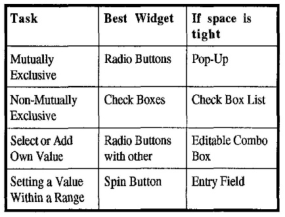
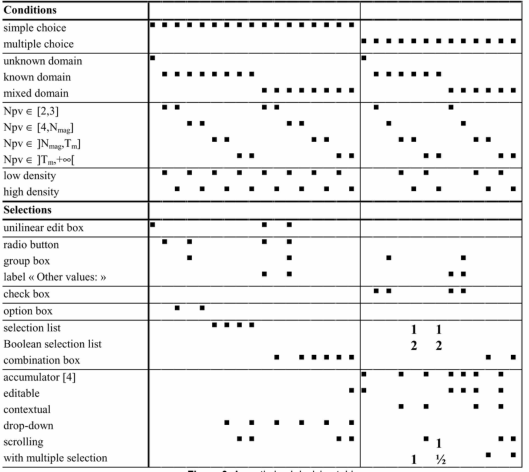
Figure 1: Practitioner’s widget table (Johnsgard et al., 1995).Figure 2: Vanderdonckt 1999 - Advice-giving systems for selecting interaction.
In 1995, Johnsgard et al., developed a decision-supporting table after test- ing a number of different UI elements in two studies with 101 participants and recording their response time, errors, and preferences. The result is shown in Figure 1: Practitioner’s widget table (Johnsgard et al., 1995).
Risk-Based Selection of GUI Elements for Different Input Devices 555
A more concrete data-based decision matrix (as shown in Figure 2) was developed by Vanderdonckt in 1999. He limited the tasks to single/multi- ple choice but added the UI density, number of values, and the domain as conditions to select appropriate UI elements (Vanderdonckt, 1999).
In 2004, Gajos and Weld embraced a different approach, considering the attainment of an optimal layout as an optimization problem. They developed a rendering algorithm incorporating various elements such as constraints, device characteristics, available widgets, user-specific and device-specific cost functions, and usage patterns. This algorithm aimed to render an interface that satisfied these factors.
In contrast to the previous work, this guideline incorporates a broader set of criteria, especially risk related aspects, the task to be performed and the use context. This inclusion helps to harmonize with recognized standards such as ISO 14971, IEC 62366-1, FDA and Medical Device Regulation (MDR).
We analyzed different GUI elements, characterized those, and created different categories. The defined categories, such as criticality, visibility of options, or interaction speed, are described shortly and, in a later step, applied to the chosen UI elements.
This guideline can be a valuable resource for UI designers looking to optimize their user interfaces, minimize errors, increase their efficiency, and address risk management concerns.
Regulatory Requirements This chapter gives a short introduction into medical device regulatory topics which are necessary for the approval process across Europe. Next to usability related topics, the risk management process for the conformity assessment will be shortly explained.
Usability Engineering for Medical Devices The IEC 62366–1 describes how the usability engineering process on medical devices has to be applied. It offers guidance for medical device manufactur- ers on how to design and develop medical devices that are safe and useable for their intended use. The defined usability engineering process contains the creation of the use specification (5.1) and UI specification (5.6), which shall include “testable technical requirements relevant to the UI, including the requirements for those parts of the UI associated with the selected RISK CONTROL measures.” Some of those risk control measures can be real- ized by using more appropriate UI controls or by implementing an additional confirmation step (IEC 62366-1, 2015).
Risk Management for Medical Devices (ISO 14971) Medical Device Regulation (MDR) 10.2 states, “Manufacturers shall estab- lish, document, implement and maintain a system for risk management as described in Section 3 of Annex I.” The DIN EN ISO 14971 specifies such a process for the risk management of medical devices. It assists manufacturers “[…] to identify the hazards associated with the medical device, to estimate and evaluate the associated risks, to control these risks, and to monitor the
effectiveness of the controls.”By following this standard, medical device man- ufacturers can fulfill requirement 10.2 of the MDR (ISO 14971; European Regulations, 2017).
DIN EN 894–3 - Safety of Machinery – Ergonomics Requirements for the Design of Displays and Control Actuators The DIN EN 894–3 contains requirements about the selection, design, and placement of manually operated actuators, such as accuracy, speed, operator force, visual detectability, tactile control, prevention of unintended actuation, prevention of hand slippage, actuation capability with gloves, and ease of cleaning. Some of those categories also apply to graphical UI elements and will be considered in this work (DIN EN 894-3:2010-01).
User Interface Guidelines User Interface Profile The User Interface Profile is an approach to define a device-specific set of requirements a UI designer can use to create user interfaces. Such require- ments have the potential to minimize risks, increase usability, and allow safe HMI via an ISO IEEE 11073 SDC network. The User Interface Profile could be standardized in the future to harmonize them and make it easier for med- ical device manufacturers to provide such information (Janß et al., 2014) (Yilmaz et al., 2022).
Existing Design Guidelines for UI Control Selection There are several design guidelines available for building user interfaces. Sev- eral frameworks offer a variety of controls in all shapes and colors, which lets designers build appealing graphical interfaces. In this paper, we will con- sider the latest guidelines from Microsoft (Microsoft, 2023), Apple (Apple, 2023), Google (Google LLC, 2023), and Balsamiq (balsamiq, 2023). In addi- tion, requirements from the “Federal Institute for Occupational Safety and Health” (Hölscher et al., 2008) as well as existing work for selecting user interface elements (Vanderdonckt, 1999; Johnsgard et al., 1995) and Galitz book titled “The Essential Guide to User Interface Design”will be considered (Galitz, 2007).
Requirements for Control Tasks In 1989, Jüptner laid out requirements for actuating based on the required operations. These operations were to set one, two, or more stable positions and to set in steps or continuously. Depending on the operation, different requirements such as control speed, accuracy, force transmission, position visibility, and reliability would need to be considered. In addition, he sug- gested, that the expected response of the system and redundancy/additional feedback (visual or audible) should be important criteria for actuators in med- ical devices. He identified that using a single finger its actuating force is low, but it exhibits high speed and high accuracy. Using multiple fingers has a medium actuating force and medium speed and medium accuracy (Jüptner, 2008).
Risk-Based Selection of GUI Elements for Different Input Devices 557
Methodology
Collection and Categorization of GUI Elements: HTML5 defines different groups for XML tags. These groups include metadata, sections, grouping content, text-level semantics, links, edits, embedded content, tabular data, forms, interactive elements, and customized elements. (W3C, 2023) Differ- ent descriptions of those labels for different platforms and manufacturers are common. This work focuses on Human-Machine-Interaction and touch- based UI controls, so all HTML5 controls will be reduced to interaction- and touch-based ones. Several variations, implementations, and styles are pos- sible depending on which style guideline has been followed, but the basic interaction principle stays the same.
Task analysis for medical device control: We analyzed different medical device interfaces such as an operating table, operating light, operating cam- era, endoscopic device, endoscopic camera, high frequency cutting device, drill, and anesthesia device and collected their used basic UI elements and UI element combination, further called UI widget. We defined several categories and analyzed the UI elements using those. The results are shown in Tables 1, 2 and 3.
Critical Task Suitability Categories The overall goal was to figure out whether a UI element is suitable to control a property of a medical device given its use context. Every UI element has been analyzed and classified using the following categories.
Visibility of options: This category describes whether the options available with the UI element are visible to the user. It will be categorized as “vis- ible” when the options are always visible to the user or “On-click” when the options are shown upon interacting with the element. By increasing the number of elements, scrolling might be necessary, further decreasing the interaction speed.
Recommended number of options: This category contains various guide- lines and recommended number of options for each UI element. It is expressed as “N/A” when no specific number is recommended or as a numeric range when there is an ideal range of options. A 2011 performed experiment showed that a design that used more tapping outperformed one with more scrolling (Gaunt et al., 2011).
Accuracy: The category accuracy refers to the precision and correctness of the user interaction. It shows how reliably a user can select their desired option. It is categorized as “High” when the accuracy is precise, “Medium” if it is more prone to accidental touches, or “Low” if it does not provide any constraints and the UI element heavily requires the user’s ability to enter the desired information accurately. We evaluated the targets’ accuracy using Johnsgard’s rating and Fitt’s Law. We grouped the UI Elements according to Johnsgard’s accuracy rating for values above 98% into “High,” between 97% and 98% into “Medium,” and lower than 97 into “Low.” (Johnsgard et al., 1995) According to Fitt’s Law, the longer the distance and the smaller the target’s size, the longer it takes to interact with the element; thus, the accuracy for smaller UI Elements, such as chips, will be lower than for larger toggle Switches (Fitts, 1954).
Control Speed: Accot-Zhai Steering Law is a formula to predict the time to steer through a path with boundaries (Accot & Zhai, 1997). This means that accurately moving a slider in one dimension becomes more difficult the smaller the boundary is. Thus, the category control speed is added. It refers to the UI element’s responsiveness and speed in reflecting user inputs. It gets lower when the number of options available increases. It is categorized as “Fast,” “Medium,” or “Slow.”
Criticality: The criticality level indicates the suitability of a UI element in controlling critical medical device properties. UI elements classified as “High” may be suitable for controlling device properties that may cause harm to a patient, user, or third party. “Medium” may be suitable for tasks in which errors do not lead to severe consequences or immediate harm, and “Low” is suitable for tasks where no patient harm can occur.
RESULT
After an analysis of current guidelines, literature, and regulatory require- ments and applying the categories for a “mutually exclusive selection,” a “non-mutually exclusive selection,” and “setting a numeric value within a range,” Tables 1, 2, and 3 were created. Not all fields could be filled or extrapolated using existing data; those with no available data have been marked as, “N/A.”
Table 1. Selection table for mutually exclusive controls.
Table available in the original PDF paper.
Risk-Based Selection of GUI Elements for Different Input Devices 559
Table 2. Selection table for a non-mutually exclusive selection.
Table available in the original PDF paper.
Table 3. Selection table for setting a numeric value within a range.
Table available in the original PDF paper.
DISCUSSION
We have gathered data on various UI elements from different sources and guidelines to aid in the selection of GUI elements. Three tables were created which can serve as decision-support. The defined categories have an impact on the criticality of a medical devices function, and taking them into account during the UI development phase can help mitigate potential risks.
While the guideline provides valuable support through recommendations, it is essential to acknowledge their limitations and potential challenges for
their practical use. The guideline primarily focuses on touch-based UI ele- ments, excluding non-touch input devices such as mouse, keyboard, voice, and gesture, as well as any type of hardware controls like rotation knobs, buttons, or switches. Such devices and their safe use in the OR are discussed by Wickel et al. (Wickel et al., 2023).
This guide does not address hybrid combinations of GUI Elements and hardware, which can be used for critical device functions. Additionally, the categories do not encompass feedback mechanisms such as audio, visual, or haptic responses. Furthermore, this guide does not take into account the strain that can be caused by performing exact and/or repetitive actions.
To ensure a sterile environment, medical staff should wear gloves. One would expect this to increase the touch area, reduce sensitivity, and make touch motions more difficult. Kopka found “no significant difference in skin- pressure sensibility thresholds […] when wearing standard latex or latex-free Biogel surgical gloves”. (Kopka et al., 2005) Tiefenthaler found no difference in touch sensitivity (Tiefenthaler et al., 2006).
This guideline has the potential to reduce possible risks by supporting the selection of UI elements. However, it cannot eliminate all usability-related risks. An initial bridge to device-specific medical device user interface descrip- tion (UI-Profile) has been done. An evaluation of this proposal is needed to show its effectiveness and to promote consistent and safe UI design practices across different devices and manufacturers.
The listed UI elements in this guideline are limited, and new or additional UI elements might perform better in specific contexts or for certain tasks. Ongoing research should incorporate emerging UI elements and a combi- nation of those to provide more comprehensive guidance. Cooperate designs influence this guideline’s accuracy and correctness. The analysis performed in our study may not account for design variations in size, shape, and interaction modifications.
CONCLUSION
In conclusion, while our proposed guideline could provide valuable insights and recommendations, it should be noted that its efficiency and accuracy have not been verified through evaluation. Subsequent research endeavors should critically evaluate, verify and validate this guideline, encompassing non-touch input devices, and consider scenarios involving hybrid input modalities.
ACKNOWLEDGMENT
This research work has been funded within the project “5G FORUM - 5G based Flexible OR Use and Monitoring” by the German Federal Ministry of Economy and Climate Protection, grant no. 01MJ22009C.
REFERENCES
Accot, J., & Zhai, S. (1997). Beyond Fitts’ law: Models for Trajectory-Based HCI Tasks. In S. Pemberton (Ed.), Proceedings of the ACM SIGCHI Confer- ence on Human factors in computing systems (pp. 295–302). New York, NY, USA: ACM.
Risk-Based Selection of GUI Elements for Different Input Devices 561
Apple (2023). Apple Developer Documentation - Human Interface Guidelines. https: //developer.apple.com/design/human-interface-guidelines/. Accessed 23.05.2023. balsamiq (2023). UI Control Guidelines - Wireframing Academy. https://balsamiq.c
om/learn/ui-control-guidelines/. Accessed 23.05.2023. DIN EN 894-3: 2010–01. DIN EN 894-3:2010-01, Sicherheit von Maschinen_- Ergonomische Anforderungen an die Gestaltung von Anzeigen und Stellteilen_- Teil_3: Stellteile; Deutsche Fassung EN_894-3:2000+A1:2008. Berlin: Beuth Verlag GmbH. 10.31030/1533913. DIN EN ISO 9004:2018. DIN EN ISO 9004:2018-08, Qualitätsmanagement_-
Qualität einer Organisation_- Anleitung zum Erreichen nachhaltigen Erfolgs (ISO_9004:2018); Deutsche und Englische Fassung EN_ISO_9004:2018. Berlin: Beuth Verlag GmbH. 10.31030/2809779. European Regulations (2017). VERORDNUNG (EU) 2017/ 745 DES EUROPÄIS- CHEN PARLAMENTS UND DES RATES - vom 5. April 2017 - über Medizin- produkte, zur Änderung der Richtlinie 2001/ 83/ EG, der Verordnung (EG) Nr. 178/ 2002 und der Verordnung (EG) Nr. 1223/ 2009 und zur Aufhebung der Richtlinien 90/ 385/ EWG und 93/ 42/ EWG des Rates. FDA (2016). Applying Human Factors and Usability Engineering to Medical Devices. Fitts, P. M. (1954). The information capacity of the human motor system in con-
trolling the amplitude of movement. Journal of Experimental Psychology, 47, 381–391. Galitz, W. O. (2007). The essential guide to user interface design: An introduction to GUI design principles and techniques. (3rd ed.). Indianapolis IN: Wiley Pub. Gaunt, K., Schmitz, F. M., & Stolze, M. (2011). Choose Popovers over Buttons
for iPad Questionnaires. In P. Campos, N. Graham, J. Jorge, N. Nunes, P. Palanque, & M. Winckler (Eds.), Human-Computer Interaction – INTERACT 2011 (pp. 533–540). Berlin, Heidelberg: Springer Berlin Heidelberg. Google LLC (2023). Material Design. https://m3.material.io/. Accessed 25.05.2023. Hölscher, U., Laurig, W., & Müller-Arnecke, H. W. (Eds.) (2008). Prinziplösungen zur ergonomischen Gestaltung von Medizingeräten: Erkenntnisse, Empfehlun- gen und Prinziplösungen zur ergonomischen Produktgestaltung am Beispiel der Gebrauchstauglichkeit von Medizingeräten ; Forschung Projekt F 1902 ; [Abschlussbericht. (2. Aufl.). Dortmund: Bundesanst. für Arbeitsschutz und Arbeitsmedizin. IEC 62366–1 (2015). IEC 62366–1 2015 - Part 1 Application. ISO 14971. Medical devices — Application of risk management to medical
devices. Janß, A., Benzko, J., Merz, P., Dell’Anna, J., Strake, M., & Rademacher, K.
(2014). Development of Medical Device UI-Profiles for Reliable and Safe Human- Machine-Interaction in the Integrated Operating Room of the Future. Proceed- ings of the 5th Conference on Applied Human Factors and Ergonomics 2014, 1855–1860. Johnsgard, T. J., Page, S. R., Wilson, R. D., & Zeno, R. J. (1995). A Comparison of Graphical User Interface Widgets for Various Tasks. Proceedings of the Human Factors and Ergonomics Society Annual Meeting, 39, 287–291. Jüptner, H. (2008). Griffe und Stellteile. In U. Hölscher, W. Laurig, & H. W.
Müller-Arnecke (Eds.), Prinziplösungen zur ergonomischen Gestaltung von Medi- zingeräten: Erkenntnisse, Empfehlungen und Prinziplösungen zur ergonomischen Produktgestaltung am Beispiel der Gebrauchstauglichkeit von Medizingeräten ; Forschung Projekt F 1902 ; [Abschlussbericht (pp. 142–151). Dortmund: Bunde- sanst. für Arbeitsschutz und Arbeitsmedizin.
Kopka, A., Crawford, J. M., & Broome, I. J. (2005). Anaesthetists should wear gloves--touch sensitivity is improved with a new type of thin glove. Acta anaes- thesiologica Scandinavica, 49, 459–462. Microsoft (2023). Build desktop apps for Windows: This documentation provides
the latest guidance about building desktop apps for Windows 11 and Win- dows 10. https://learn.microsoft.com/pdf?url=https%3A%2F%2Flearn.microsof t.com%2Fen-us%2Fwindows%2Fapps%2Ftoc.json. Accessed 23.05.2023. NN/g (2020). Nielsen Norman Group - Listboxes vs. Dropdown Lists. https://www.
nngroup.com/articles/listbox-dropdown/. Accessed 26.05.2023. Schmitt, R., & Pfeifer, T. (2015). Qualitätsmanagement: Strategien - Methoden - Techniken. (5., überarbeitete Auflage). München: Hanser. Tiefenthaler, W., Gimpl, S., Wechselberger, G., & Benzer, A. (2006). Touch sensitivity
with sterile standard surgical gloves and single-use protective gloves. Anaesthesia, 61, 959–961. Vanderdonckt, J. (1999). Advice-giving systems for selecting interaction objects. In Proceedings User Interfaces to Data Intensive Systems (pp. 152–157): IEEE. W3C (2023). HTML Living Standard. https://html.spec.whatwg.org/print.pdf. Wickel, N., Yilmaz, O., Radermacher, K., & Janß, A. (2023). Dynamic control
assignment and automated risk assessment for external control interfaces in the operating room based on ISO IEEE 11073 SDC. In Health Informatics and Biomedical Engineering Applications: AHFE International. Yilmaz, O., Janß, A., & Radermacher, K. (2022). Applying User Interface Profiles to Ensure Safe Remote Control within the Open Networked Operating Room in accordance with ISO IEEE 11073 SDC. In Healthcare and Medical Devices: AHFE International.
LISTED IN THE AHFE DIGITAL BOOKSTORE CATALOGUE
Explore the complete digital volume
Human-Centered Design and User Experience
Read this individual research paper free through the original publisher, or explore the full digital proceedings book.
ISBN 978-1-958651-90-2
Explore this ISBN in the AHFE Bookstore ↗Listed in the July 2026 bookstore catalogue; search by ISBN to confirm current availability · Digital book purchase optional