Micael Gonçalves, Lídia Lemos Ribeiro, Hugo Rodrigues, Marc Schledorn, Nélson Costa (2026). Design of Graphical User Interfaces for Validation of Steering-Wheel HMI Solutions. In: Human Factors in Design, Engineering, and Computing. AHFE Open Access, vol. 238, pp. 1590–1601. https://doi.org/10.54941/ahfe1008387
The increasing integration of digital functionalities, Advanced Driver Assistance Systems (ADAS), and autonomous driving technologies is transforming the steering wheel into a more complex and demanding Human–Machine Interface (HMI), requiring new interaction technologies capable of balancing usability, safety, and efficiency. Within the GreenAuto research project, this work contributes to the development of an innovative steering-wheel HMI aimed at enabling intuitive, safe, and efficient driver–vehicle interaction in conventional and autonomous driving scenarios.This paper presents the graphical user interfaces (GUIs) developed for an automotive driving simulator used to evaluate and compare different steering-wheel HMI solutions. The simulator integrates conventional vehicle interfaces, including the instrument cluster, head-up display, and central stack, while introducing an innovative steering wheel equipped with two integrated mini-displays and new interaction controls. The proposed GUIs define the context and visual interaction between the steering-wheel controls and integrated displays, including mini-displays and the head-up display, providing support for infotainment, communication, navigation, and ADAS functionalities.The design process combined ergonomic constraints, information architecture, and user-centered interface design principles to define interaction flows, navigation structures, and visual feedback mechanisms. A reachability assessment was conducted to establish the dimensions and positioning of the display areas, ensuring accessibility without compromising driving ergonomics. The resulting interfaces provide a consistent interaction framework for implementing and evaluating different steering-wheel HMI solutions within an automotive driving simulator equipped to collect behavioral, subjective, and physiological data during experimental studies.The proposed GUIs establish a reusable research platform for the experimental evaluation of steering-wheel HMIs, supporting future studies on usability, driver interaction, cognitive workload, and interface design.
The increasing digitalization of modern vehicles, together with the widespread integration of Advanced Driver Assistance Systems (ADAS), connectivity services, and automated driving technologies, has considerably expanded the number of functions available to drivers. Consequently, the steering wheel has evolved from a simple vehicle control device into a central Human– Machine Interface (HMI), providing access to infotainment, communication, navigation, and driving assistance functionalities. This evolution introduces significant challenges for interface design, as increasingly complex interactions must remain intuitive, efficient, and safe while minimizing driver distraction and cognitive workload (Banjo et al., 2016; Gkikas, 2016; Wang et al., 2025).
Within the GreenAuto research project, the University of Minho and ZF LIFETEC are researching alternative steering-wheel HMI solutions intended to support both conventional and future autonomous driving scenarios. These solutions will later be used in the experimental validation stage that will involve the comparison of three steering-wheel concepts: a legacy production steering wheel, the latest ZF steering wheel, and the steering-wheel prototype developed within the project (Gonçalves et al., 2026; Ribeiro et al., 2026).
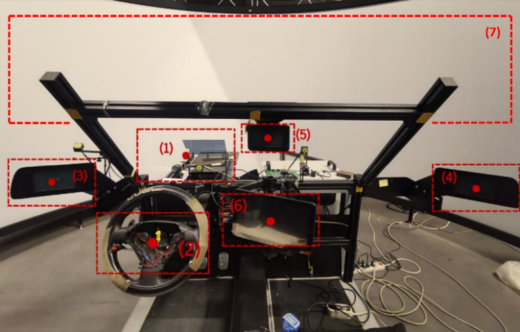
An existing automotive Driving Simulator Mock-up (DSM) available at the University of Minho was adopted as the experimental platform. The simulator comprises a modular vehicle cockpit with a 180° projection system, side and rear-view mirror displays, a head-up display, a central stack display, and support for additional HMI hardware and data acquisition devices, including eye-tracking and physiological sensing systems. The platform runs on the SILAB 5.0 driving simulation environment, which enables the implementation of custom driving scenarios and communication with external HMI components (Mackay et al., 2020). Figure 1 presents the experimental platform used in this work.
Figure 1: Driving Simulator Mock-up used for the development and integration of the proposed HMI architecture, including (1) head-up display, (2) steering wheel with integrated HMI, (3–4) side mirror displays, (5) rear-view mirror, (6) central stack display and (7) projected driving scene.
Evaluating steering-wheel technologies requires not only the development of new hardware concepts but also coherent graphical user interfaces (GUI) capable of coordinating information across multiple vehicle displays. These interfaces must provide consistent interaction mechanisms and support experimental studies in which behavioural, subjective, physiological, and eye-movement data can be simultaneously collected (Harvie, 2024; Xu et al., 2022).
This paper presents the GUIs developed for integration within the driving simulator. Their first application is to support the experimental evaluation of three steering-wheel HMIs. However, the proposed GUIs were intentionally designed as a generic and reusable research framework, capable of supporting future HMI developments, interaction concepts, and simulation studies without requiring modifications to the underlying driving simulator infrastructure.
The remainder of this paper is organized as follows. Section 2 presents the design requirements that guided the development of the graphical user interfaces. Section 3 describes the GUI architecture, interaction concepts, and visual design. Section 4 outlines the implementation of the interfaces within the driving simulator. Finally, Sections 5 and 6 present the discussion and conclusions.
DESIGN REQUIREMENTS The GUIs were designed to support the most common driver–vehicle interactions while providing a flexible platform for the experimental evaluation of different steering-wheel HMI solutions. The interfaces provide access to infotainment, communication, navigation, vehicle settings, and ADAS functionalities while rem aining integrated with conventional vehicle displays, namely the head-up display, central stack, and the vehicle instrument cluster. Furthermore, the architecture was designed to support rapid reconfiguration, allowing different steering-wheel layouts and interaction concepts to be implemented without modifications to the underlying driving simulator infrastructure.
Since one of the steering-wheel concepts incorporates two embedded displays, particular attention was given to their positioning and dimensions. The displays had to remain visible during steering manoeuvres while avoiding interference with the driver’s grip and ensuring comfortable thumb operation. Consequently, a reachability assessment was conducted to identify suitable display locations based on ergonomic principles and thumb accessibility.
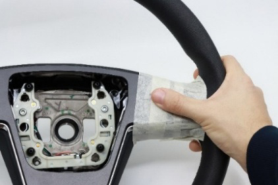
The assessment considered anthropometric data for thumb reach in the Portuguese population reported by Umami (2015), namely a mean reach of 82.0 mm (SD = 6.2 mm) for females and 89.0 mm (SD = 6.0 mm) for males. Based on these values, reference points were defined on the steering wheel and participants were asked to evaluate whether each point could be comfortably reached without releasing their normal driving grip (Figure 2). The assessment indicated that all reference points could be reached while maintaining both hands on the steering wheel.
Figure 2: Interaction with the steering wheel with reference points at 89mm and 82mm.
Based on these findings, the maximum recommended interaction radius for positioning interface elements was established at 89 mm, ensuring that the graphical controls remained within comfortable thumb reach while preserving ergonomic posture and driving safety. Considering this interaction area together with the dimensions of the physical interaction controllers, the embedded displays were defined with dimensions of 45 × 30 mm, providing sufficient space for graphical information while maintaining accessibility.
Beyond the ergonomic constraints of the steering-wheel displays, the graphical interfaces were designed according to established automotive HMI recommendations reported in the literature. Particular attention was given to display dimensions, typography, touch targets, color selection, iconography, and visual feedback to support readability, usability, and interaction reliability under driving conditions. Table 1 summarizes the main design guidelines adopted during the GUI development process.
Table 1: Summary of the recommendations for user interface design.
Table available in the original PDF paper.
Design Aspect Guideline Adopted Reference Head Up dimensions 125 × 300 mm Project specification Mini-display dimensions 45 × 30 mm Reachability study
Touch target shape Rounded square Reimer et al. (2014) Typeface Frutiger Reimer et al. (2014)
Minimum text height 3.1–3.6 mm Viita & Muir (2013) Recommended text height 3.6–4.7 mm Viita & Muir (2013)
Primary colours Bluish-purple; Sky blue Xu et al. (2022) Iconography Custom icon set for consistency Srivastava (n.d.)
The interaction design followed user-centred design principles aimed at minimizing cognitive workload and visual distraction. The menu organization was designed to minimize navigation depth, allowing drivers to access frequently used functions with as few interaction steps as possible. A consistent visual language, menu organization, and interaction patterns were adopted across the head-up, central stack, and steering-wheel displays to facilitate learning and reduce visual search. Immediate graphical feedback was provided after every user action, ensuring that system status remained continuously visible and easily understandable.
Unlike production-oriented automotive interfaces, the proposed GUIs were conceived as a modular research platform rather than as a fixed production interface. The architecture supports the rapid implementation and comparison of alternative steering-wheel solutions, interaction mechanisms, layouts, and visual organizations while preserving the same experimental environment. Consequently, new HMI technologies can be incorporated into the driving simulator without requiring major changes to the experimental environment, enabling controlled usability studies under consistent experimental conditions and synchronized acquisition of behavioral, subjective, physiological, and eye-tracking data.
GRAPHICAL USER INTERFACE DESIGN The proposed GUI framework was developed to support the experimental evaluation of different steering-wheel HMI solutions within the driving simulator. Rather than reproducing the interface of a specific production vehicle, the objective was to create a modular and reusable interface framework capable of supporting alternative steering-wheel layouts and interaction concepts while maintaining a familiar automotive user experience.
The developed framework comprises two common interface components: a head-up display and a central stack interface, complemented by steering- wheel-specific interfaces where applicable. In the GreenAuto steering-wheel concept, these include two embedded mini-displays integrated into the steering wheel. These interfaces operate together as a unified HMI architecture, distributing information and interaction according to the characteristics of each display. The instrument cluster available in the driving simulator was maintained as the original simulator interface and was not modified during this work.
The information architecture was organized according to the frequency of use and driving relevance of each functionality. Frequently used functions, including media control, communication, navigation, and Adaptive Cruise Control (ACC), are directly accessible through the steering-wheel interaction controls. More detailed interaction and contextual information are presented on the head-up display, while the central stack supports infotainment functionalities and interactions requiring a larger display area, such as text entry or detailed configuration. This distribution is intended to reduce visual search while preserving a clear separation between quick interactions and more complex tasks.
The GUI framework was designed independently of the physical interaction technology adopted by each steering-wheel concept. Frequently used functions are always exposed as first-level shortcuts, regardless of whether they are accessed through physical buttons, rotary controllers, touch interfaces, or embedded displays. Consequently, the interaction logic and interface behaviour remain consistent across all steering-wheel concepts, while the physical interaction mechanisms vary according to the steering- wheel design. In the steering-wheel concept developed within the GreenAuto project, these shortcuts are presented on two embedded mini-displays
Design of Graphical User Interfaces for Validation 1595 associated with dedicated interaction controllers. The mini-displays do not display hierarchical menus. Instead, they present a persistent set of shortcut icons whose positions remain fixed, supporting rapid identification of available functions through spatial memorization. Because the shortcuts are digital, the assigned functions, icons, and layout can be personalized without altering the overall interaction logic.
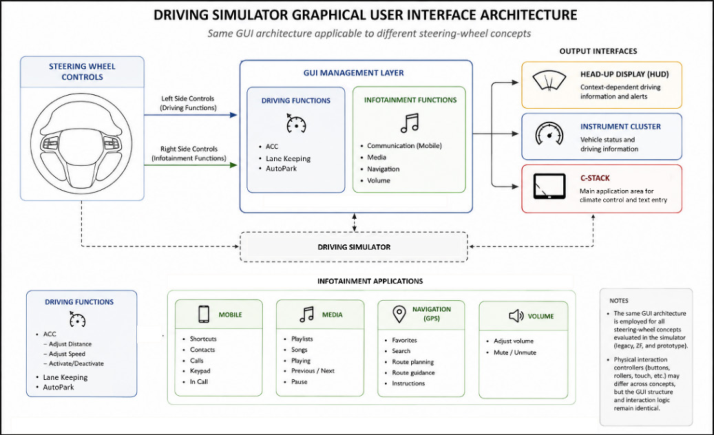
Figure 3 illustrates the GUI architecture implemented in the driving simulator and the interaction between the steering-wheel controls and vehicle interfaces.
The head-up display acts as the primary interaction display during driving, presenting menus, navigation instructions, communication information, media controls, and driving assistance functionalities. Once a function is activated from the steering wheel, the corresponding interaction is presented on the head-up, where options, contextual information, and system feedback are displayed. This approach allows the steering-wheel interface to remain simple and stable while providing sufficient interaction space for more complex vehicle functions.
The central stack complements the interaction ecosystem by providing an infotainment interface consistent with current production vehicles. Besides supporting media and vehicle information, it accommodates interactions that are less suitable for the steering wheel or head-up, such as text input and detailed system configuration. Consequently, the three interface components operate cooperatively, each fulfilling a specific role within the overall HMI architecture.
Figure 3: Overview of the proposed GUI architecture.
To ensure consistency across all interfaces, a common graphical language was adopted throughout the GUI framework. Icons, typography, color palette, highlighting mechanisms, spacing, and visual feedback remain
consistent regardless of the display being used. Immediate visual feedback is provided after every interaction, clearly indicating the current system state and confirming user actions while supporting readability under driving conditions.
A unified interaction paradigm was implemented across all supported functionalities. Drivers can access functions either through dedicated steering-wheel shortcuts or by navigating menus using the steering-wheel interaction controls. Once a function is selected, the corresponding interface is displayed on the head-up, providing additional options and system feedback. Continuous functions, such as volume adjustment when supported by the steering-wheel controls, use continuous input, while discrete functions, such as ACC distance settings or navigation options, rely on predefined selections. The behaviour of the available physical controls adapts to the active context, enabling different interaction strategies without increasing the number of steering-wheel controls.
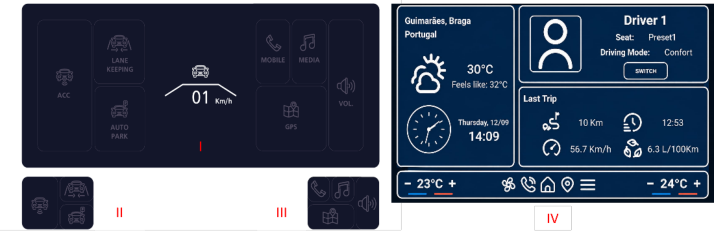
Figure 4 presents the default interface setup implemented for the GreenAuto steering-wheel concept.
Figure 4: Default interface setup: I. Head-up display; II. Left steering-wheel mini- display; III. Right steering-wheel mini-display; IV. Central stack.
Finally, the proposed GUI framework was conceived as a reusable research platform rather than as a fixed interface implementation. All screens, menu structures, visual layouts, interaction flows, and functional mappings were implemented as independent modules, allowing new steering-wheel solutions and interaction technologies to be incorporated without major changes to the overall interface architecture. In this work, the framework is applied to the evaluation of three steering-wheel concepts: a legacy production steering wheel, the latest steering wheel developed by ZF LIFETEC, and the steering-wheel concept developed within the GreenAuto project. However, the proposed framework is not limited to these concepts and can support future HMI developments and experimental studies within the same driving simulator.
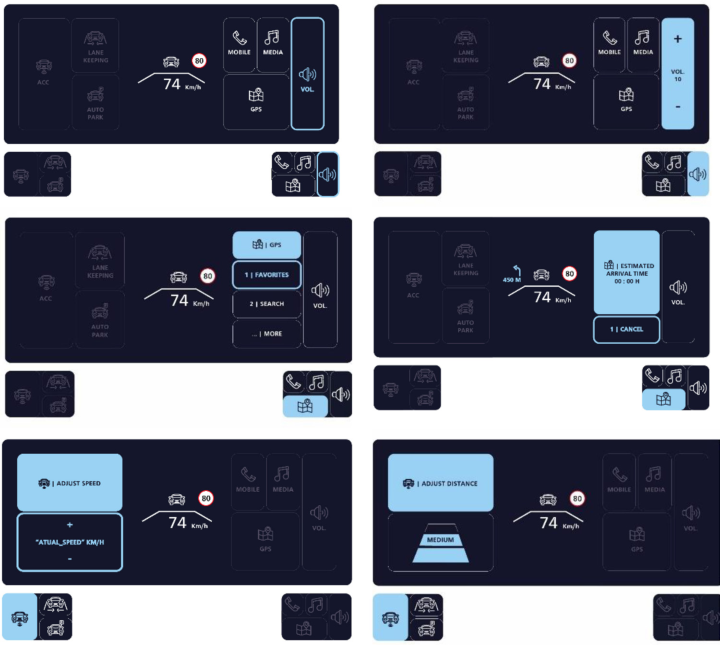
Figure 5 shows examples of the graphical interfaces for the steering-wheel mini-display and head-up display developed for different driving scenarios, illustrating the consistent visual language adopted throughout the proposed HMI framework.
Figure 5: Representative examples of the graphical interfaces developed for the driving simulator platform.
IMPLEMENTATION The proposed GUI were implemented as distributed applications integrated with the driving simulator, providing a common interaction environment for the evaluation of different steering-wheel solutions. The implementation comprises two common interface components, the head-up display and the central stack, complemented by steering-wheel-specific interfaces where applicable, such as the embedded mini-displays of the GreenAuto steering- wheel concept.
The central stack was implemented as an Android application running on an NXP i.MX 8M Plus development board, providing a realistic infotainment interface representative of current production vehicles. Within the simulator, it supports interaction with functions such as navigation, communication, climate control, and infotainment, serving as a common interface for all steering wheels evaluated.
The head-up display was developed using the Qt framework and deployed on a Raspberry Pi 4. It acts as the primary visual interface during
driving, presenting menu structures, ADAS information, media controls, communication functions, and driving-related feedback. Regardless of the steering wheel being evaluated, the head-up display maintains the same graphical interface and functionality, ensuring consistent experimental conditions across all test scenarios.
Communication between the driving simulator, graphical interfaces, and steering-wheel controllers is enabled through dedicated middleware supporting Ethernet, CAN, and Bluetooth communication. This architecture synchronizes simulator events, user inputs, and graphical updates in real time. For the GreenAuto steering-wheel concept, bidirectional communication additionally enables dynamic updates of the embedded mini-displays and context-dependent interaction behaviours according to the active interface context.
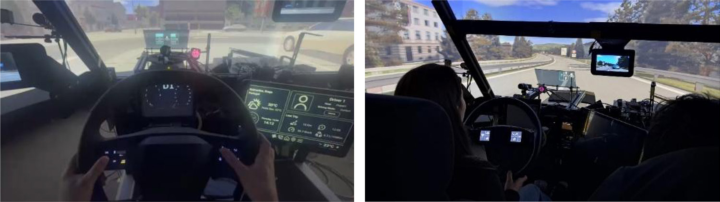
The modular software architecture allows different steering-wheel technologies to interact with the same set of GUIs while preserving identical functionality and visual presentation. This common graphical environment is intended to minimise variability associated with the GUI when comparing different steering-wheel interaction concepts. Figure 6 shows the driving simulator with the implemented GUI operating during experimental scenarios.
Figure 6: Driving simulator integrating the developed GUI.
DISCUSSION
The proposed GUI architecture was conceived as a research platform for the experimental evaluation of steering-wheel HMI solutions. Its primary contribution lies in providing a consistent graphical environment that enables different steering-wheel technologies and interaction concepts to be compared under identical experimental conditions.
A key design decision was the separation between graphical interfaces and physical interaction devices. The same head-up and central stack interfaces are maintained regardless of the steering wheel under evaluation, while the interaction mechanisms may vary according to the available controls. This separation enables the assessment of the impact of different steering-wheel interaction concepts without introducing variability caused by changes in the graphical interface itself.
Design of Graphical User Interfaces for Validation 1599 The proposed architecture also emphasizes modularity. Interface components, interaction flows, menu structures, graphical layouts, and control mappings can be independently modified, allowing new steering- wheel solutions or interaction technologies to be incorporated without major changes to the overall platform. Consequently, the developed interfaces are not limited to the steering-wheel concepts evaluated in this work but can also support future HMI research conducted using the driving simulator.
This work presents the design and implementation of the graphical interfaces but does not evaluate their usability or effectiveness through user studies. Although the interfaces were developed following ergonomic recommendations and user-centred design principles, their impact on driving performance, cognitive workload, visual attention, physiological responses, and user acceptance remains to be experimentally validated. In addition, the current implementation was developed for a specific driving simulator environment and selected steering wheels. While the underlying architecture is sufficiently modular to accommodate other HMI configurations, further adaptations may be required when integrating additional vehicle or interaction technologies. Future experimental studies will therefore use the developed framework to compare alternative steering-wheel technologies under controlled conditions using the same graphical interfaces.
CONCLUSIONS
This paper presents the design and implementation of a GUI framework developed to support the experimental evaluation of steering-wheel HMI concepts within an automotive driving simulator. The proposed framework integrates a head-up display, a central stack, and, when applicable, steering- wheel embedded displays, providing a consistent interaction environment that can accommodate different steering-wheel technologies while supporting consistent experimental conditions.
The GUI framework was designed following ergonomic recommendations and user-centered design principles, with particular attention to information organization, interaction consistency, display reachability, and modularity. By distributing information across complementary interfaces and separating graphical presentation from the physical interaction devices, the proposed architecture provides a flexible platform that can be adapted to different steering-wheels without requiring substantial modifications to the simulator infrastructure.
The main contribution of this work is the development of a reusable and modular interface framework for automotive HMI research. Although demonstrated through its application to the evaluation of three steering- wheel concepts, the framework can support future studies involving alternative interaction technologies and interface configurations using the driving simulator platform.
Future work will use the developed GUI framework as the common interaction environment for controlled experimental studies comparing different steering-wheel concepts. These studies will investigate how alternative steering-wheel interaction technologies influence usability,
interaction performance, visual attention, cognitive workload, physiological responses, and overall driving performance while interacting with the same set of vehicle interfaces.
ACKNOWLEDGMENT
This work has been supported by the European Union under the Next Generation EU, through a grant of the Portuguese Republic’s Recovery and Resilience Plan (PRR) Partnership Agreement, within the scope of the project GreenAuto: Green Innovation for the Automotive Industry (Project ref. nr. 54- C6448637037-00000013). This work has also been supported by FCT – Fundação para a Ciência e Tecnologia within the R&D Unit Project Scope UID/00319/2025 - Centro ALGORITMI (ALGORITMI/UM) https://doi. org/10.54499/UID/00319/2025.
REFERENCES
Banjo, O., Stewart, D., & Fasli, M. (2016). Optimising mixed model assembly lines for mass customisation: A multi agent systems approach. Advances in Transdisciplinary Engineering, 3, 337–342. https://doi.org/10.3233/978-1-61499- 668-2-337 Gkikas, N. (2016). Automotive ergonomics: Driver-vehicle interaction. In Automotive
Ergonomics: Driver-Vehicle Interaction. Gonçalves, M., Lourenço, V., Ribeiro, L. L., Silva, R., & Costa, N. (2026). Driver Interaction , Needs , and Preferences for Steering-Wheel HMIs : An International Survey. Human Interaction and Emerging Technologies (IHIET 2026), 236, 622–632. https://doi.org/10.54941/ahfe1008137 Harvie, L. (2024). The Complete Guide to UI/UX Design for Automotive Infotainment
Systems Plain Vanilla The Complete Guide to UI/UX Design for Automotive Infotainment Systems. https://runtimerec.com/wp-content/uploads/2024/09/The- Complete-Guide-to-UI-UX-Design-for-Automotive-Infotainment-Systems.pdf Mackay, A., Fortes, I., Santos, C., Machado, D., Barbosa, P., Boas, V. V., Ferreira, J. P., Costa, N., Silva, C., & Sousa, E. (2020). The impact of autonomous vehicles’ active feedback on trust. Advances in Intelligent Systems and Computing, 969, 342–352. https://doi.org/10.1007/978-3-030-20497-6_32 Reimer, B., Mehler, B., Dobres, J., Coughlin, J. F., Matteson, S., Gould, D., Chahine, N.,
& Levantovsky, V. (2014). Assessing the impact of typeface design in a text-rich automotive user interface. Ergonomics, 57(11), 1643–1658. https://doi.org/10.10 80/00140139.2014.940000 Ribeiro, L. L., Gonçalves, M., Lourenço, V., Pontes, A., Sampaio, Á., & Costa, N.
(2026). Comparative Analysis of Steering Wheel Button Types , Layouts and Functions in the Market. Human Interaction and Emerging Technologies (IHIET 2026), 236, 633–643. https://doi.org/10.54941/ahfe1008138 Srivastava, A. (n.d.). 12 Design Strategies to develop an In-Vehicle Infotainment System.
https://www.embitel.com/wp-content/uploads/pdf/12-IVI-design-startegies_ Embitel-Technologies_ver1.0-1.pdf Viita, D., & Muir, A. (2013). Exploring comfortable and acceptable text sizes for in-vehicle displays. Proceedings of the 5th International Conference on Automotive User Interfaces and Interactive Vehicular Applications, AutomotiveUI 2013, 232–236. https://doi.org/10.1145/2516540.2516568
Design of Graphical User Interfaces for Validation 1601 Wang, Y., Xue, Z., Li, J., Jia, S., & Yang, B. (2025). Human-Machine Interaction
(HMI) Design for Intelligent Vehicles: From Human Factors Theory to Design Practice. https://doi.org/10.1007/978-981-97-7823-2 Xu, B., Li, Z., Wu, Z., & Ai, X. (2022). A Visual Study of In-vehicle Human-machine Interaction Interface. 2022 3rd International Conference on Intelligent Design (ICID), 65–70. https://doi.org/10.1109/ICID57362.2022.9969716
SEARCH THE AHFE DIGITAL BOOKSTORE BY ISBN
Explore the complete digital volume
Human Factors in Design, Engineering, and Computing
Read this individual research paper free through the original publisher, or explore the full digital proceedings book.