Abbas Moallem (2022). Terminology Matters: About Labeling Used in the User Interfaces of Home Networking Devices. In: Advances in Ergonomics In Design, Usability & Special Populations: Part II. AHFE Open Access, vol. 19. https://doi.org/10.54941/ahfe1001255
This paper presents the results of a terminology survey on home networking. The results of this study show that all of the major brands of home networking appliances use complex terminology in their user interfaces and that a very small percentage of people know the meaning of these terms.
Labels are the static text that is used on screen to identify edit boxes, list boxes, images, group boxes, or other graphical user interface controls. Labels are not editable. Labels are essential for user success in using applications. If users do not understand a label, they will be unable to perform the tasks that they need to accomplish. Probably, all of us have experienced problems with confusing labels when, for example, we find ourselves struggling to understand the difference between a field labeled “Find” and another field labeled “Search”. The importance of using understandable terminology in “User Language” is considered one of the top heuristic evaluation criteria by HCI professionals. (Nielsen J., 1994).
Several studies have also investigated the relationship between the usability of an application and the complexity of terminology used in the application. For example, a recent study (Bakhshi-Raieza et al, 2012) evaluates the usability of a large compositional interface terminology based on SNOMED CT (SNOMED Clinical Terms healthcare terminology. The results of this study “revealed that the usability of the interface terminology fell” and concluded that “the extensiveness, complexity of the hierarchy, and the language usage of an interface terminology are defining for its usability. Carefully crafted domain-specific subsets and a well-designed terminology application are needed to facilitate the use of a complex compositional interface terminology based on SNOMED CT.”
Another study investigates (Kupersmith, 2012) the understandability of library terms to “help library web developers decide how to label key resources and services in such a way that most users can understand them well enough to make productive choices. It compiles data from usability studies evaluating terminology on library websites, and suggests test methods and best practices for reducing cognitive barriers caused by terminology, and provides an extensive list of resources.”
With the growing number of smart appliances at home (TMC News, 2011), (Grinter et al. 2005) that need to connect securely to the Internet efficiently to operate, Internet and Internet-based technologies have become a basic utility, like electricity, gas, or water. Thus the need for wireless connections at home to allow all devices to be connected and interconnected is an essential feature of a modern home.
Despite progress in the hardware of these devices, improvements in the usability of their software are still very primitive. Among users, it is commonly agreed upon that managing home networks is a tedious, difficult task that is out of reach for most users with limited networking experience. Some research points out a variety of usability issues for home networking technologies (Yang et al. 2007, Cheng et al. 2009, Edwards 2011). The expansion of the smart home concept adds even more complexity to home networking. Pairing devices with routers, selecting the right channels, conflicts, ranges, incompatibility and signs are some of the most common issues that confronting users (Shehan et al 2007, Yang et al.2010, Moallem 2012).
The poor usability of user interfaces (UIs) is an issue not only with one or two brands of products. A simple comparison among the most common brands on the market reveals that all brands suffer to some degree from the same usability issues. This study investigates the understandability of the terminology used in home networking devices. Extensive usage of home networking is not achievable unless the usability of devices (software and hardware) along with their configurations is extensively improved and accessible to all types of users, and the labeling and terminology are the first step in the design.
METHOD
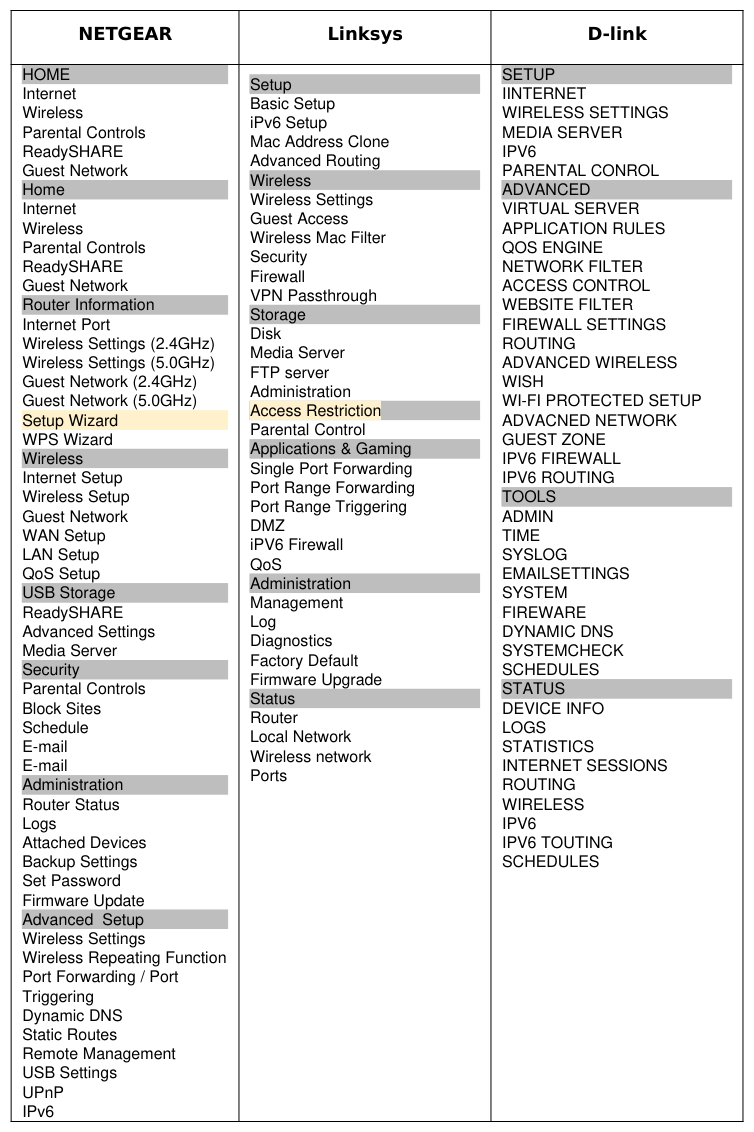
We compiled all the terms used in the major brands of user interfaces of home networking devices (routers). Then a compiled list of the common terms of the main page UIs of the four major router brands were selected. (Table 1 & 2) Table (1) shows the 30 common terms used in configuration and settings of major Wi-Fi router brands.
84 participants (mostly college students and former graduate students in software engineering, human factors, and psychology) completed an online survey. 55% of participants were male, 45% female, with 54% under age 25, 24% ages 26-35, 12% ages 36-45 and 8% over 46 years. 54% of participants had a formal undergraduate level education, 26% with graduate level and 14% with other. It is important to underline that 86% of the respondents owned a router at their home.
Table 1: Labeling terms used in most router user interfaces
Table available in the original PDF paper.
Cable Modem, Channel, DNS Servers, Domain Name, DSL Modem, Enable SSID Broadcast, FTP (via internet), Gateway IP Address, Guest Network, HTTP (via internet),Hitter, Internet IP Address, IP Address, IP Subnet Mask, IP Subnet Mask,IPv6,Media Server, Modem, Passphrase, Primary DNS, Router, Router MAC Address, Secondary DNS, Static IP Address, USB Settings, WEP, WPA/WPA2
If you have a home networking device, there is a good chance that you have experienced a variety of home networking user interfaces. You might have even asked someone with technical knowledge to help you with installing, connecting, and configuring the device that you acquired or had problems with. This might have happened for any type of device from a Wi-Fi router to more advanced devices such as storage, security systems, and interactive TV or sound systems.
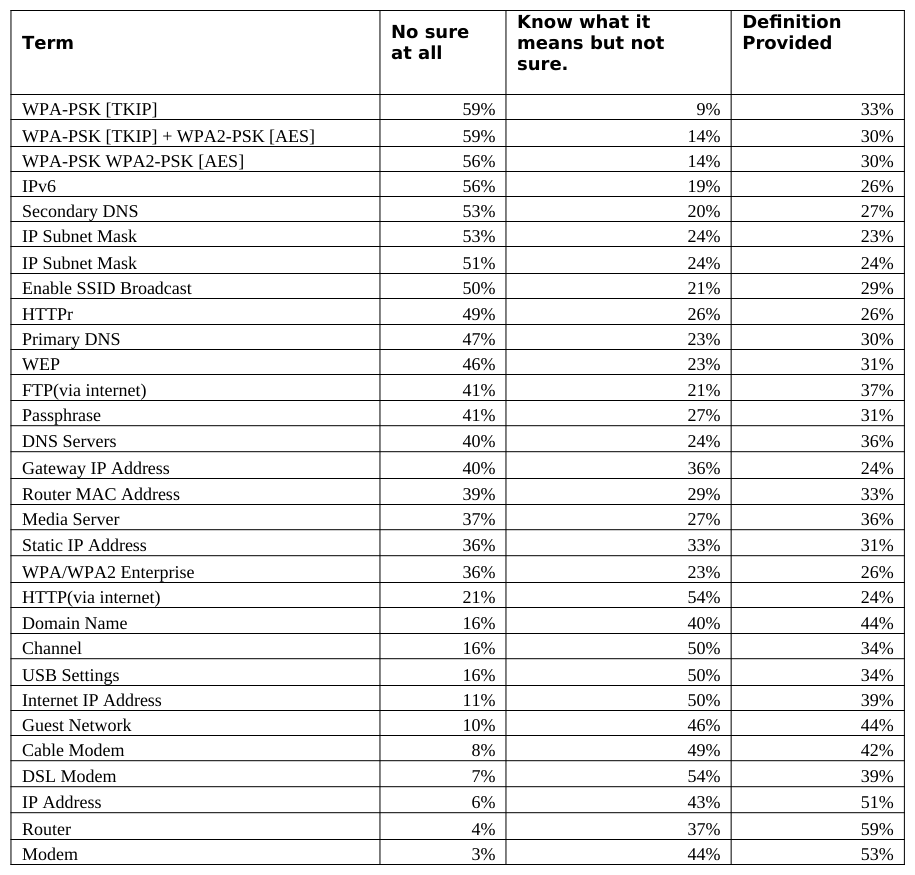
The results of 84 potential users survey show that a very small percentage of people know the meaning of the terms used in these devices’ user interfaces (UIs). Many users do not understand even the more common terms shown in Table 3, such as DSL modem or IP address. For example, 41% of participants could not be certain of the meaning of the term “Passphrase”, 37% weren’t certain of “Media Server”, 46% weren’t certain of “WEP”, and 4% weren’t certain of what “Router” meant (Chart 1 and Table 3).
Table 2: Left hand navigation in the three major router brands NETGEAR Linksys D-linkTable 3: Understandability of selected networking terminologies used in field labeling of router UI Definition Provided Term No sure at all
Even for terms like “Modem”, “Router, and “IP address”, while the percentage of participants who were “not sure at all” was low (3%, 4% and 6%), those who “know what it means but not sure” was very high (44% Modem, 37% Router and 43% IP Address) (Chart 2, Table 3).
Considering that 80% of the participants had a formal education of college or higher and 54% were under the age 25, the assumption of this level of computer knowledge and understanding of terminology used is interesting to note, especially in consideration in the design of user interfaces for networking products. However, seeing as this survey was conducted out of the context of the UI, it is hard to draw a global conclusion (Chart 1 & 2).
Empirical observations also support the extent to which users are unfamiliar with all terms used. Knowledge of the terms and their meanings requires education, training and the reading of many pages of documentation and online help, which is a hard task for the average user. To underline the unfamiliarity with these terms, the readers of this article can check to see which ones they themselves are familiar with.
100%
90%
80%
70%
60%
50%
40%
30%
20%
10%
0%
Chart 1: Understandability of the terminology used on home networking device user interfaces.
100%
90%
80%
70%
60%
50%
40%
30%
20%
10%
0%
Ergonomics In Design, Usability & Special Populations II
Know what it means but not sure.
Chart 2: Understandability of the terminology used on home networking device user interfaces.
CONCLUSIONS
The results of this study suggest that the user interfaces in all home networking devices are not built with the users in mind. Most of the terminology used seems to be unfamiliar to most users while the user interface itself is complex. However, users themselves feel that they would like to be enabled to accomplish some important tasks using their home networking devices if the interfaces were built in an easy-to-use manner.
Today’s market is not about focusing on more features and functionalities. We are moving towards a situation where comparable products often offer the same functionality. The example of the mobile smart phone illustrates that despite the complex functionalities among smart phones, people will prefer the phone that is the easiest to use and operate rather than the one that offers the most functionality. This philosophy is applicable to all types of technology. With the expansion of smart home appliances, success will fall to the home networking enterprises that offer a simple product, satisfying the needs of most common users. The improvement of user-friendly terminology certainly is a first step in improving the ease of use of home networking device user interfaces.
REFERENCES
Bakhshi-Raieza, F., de Keizera N.F., Corneta R., Dorrepaala M., Dongelmansb D., Jaspersa M.W.M., (2012) A usability evaluation of a SNOMED CT based compositional interface terminology for intensive care, International Journal of Medical Informatics, Volume 81, Issue 5, May 2012, Pages 351–362 Cheng J. and Kunz Th., 2009, A Survey on Smart Home Networking Inside the smart home, Springer. Carleton University,
Systems and Computer Engineering, Technical Report SCE-09-10, September 2009. Edwards, W. K. 2011, Before building the network or its components, first understand the home and the behavior of its human inhabitants. June 2011, vol. 54, no. 6, communications of the ACM. Grinter, R.E., Ducheneaut, N., Edwards, W.K. and Newman, M., (2005), The Work To Make The Home Network Work.
ECSCW, Springer/Kluwer, Paris, France, 2005, 469-488. Kupersmith, J. (2012), Library Terms That Users Understand, LAUC-B and Library Staff Research, UC Berkeley Library, Berkeley CA, USA. http://escholarship.org/uc/item/3qq499w7 Moallem A. (2012), Why should home networking be complicated?, Advances in Usability Evaluation, Edited by Francesco
Rebelo, Marcelo M. Soares, CRC Press, Jul 17, 2012 - Technology & Engineering - 660 pages Nielsen J., (1994), Usability engineering, (1993), Academic Press, Inc., Cambridge, MA, USA. Page 115- 123 Nielsen, J. (1994b). Heuristic evaluation. In Nielsen, J., and Mack, R.L. (Eds.), Usability Inspection Methods, John Wiley & Sons, New York, NY. Rashidi P., Cook D.J., Keeping the Resident in the Loop: Adapting the Smart Home to the User, IEEE Transactions on Systems
Man & Cybernetics. Part A. Shehan E. and Edwards W. K., 2007: Home Networking and HCI: What Hath God Wrought?, CHI 2007 Proceedings , April 28- May 3, 2007
San Jose, CA, USA. TMC News, (2011) Cisco Home Networking Issues Consumer Survey [Professional Services Close - Up], August 31, 2011,
TMC News. http://www.tmcnet.com/usubmit/2011/08/31/5741669.htm Yang J. and Edwards W. K., (2007) ICEbox: Toward Easy-to-Use Home Networking Graphics, Visualization and Usability Center, College of Computing, Georgia Institute of Technology. Accessed on December 2011. Yang J., Edwards W. K., Haslem D. (2010) Eden: Supporting Home Network Management through Interactive Visual Tools,
UIST’10 October 3-6, 2010, New York, New York, USA.
LISTED IN THE AHFE DIGITAL BOOKSTORE CATALOGUE
Explore the complete digital volume
Advances in Ergonomics In Design, Usability & Special Populations: Part II
Read this individual research paper free through the original publisher, or explore the full digital proceedings book.
ISBN 978-1-4951-2107-4
Explore this ISBN in the AHFE Bookstore ↗Listed in the July 2026 bookstore catalogue; search by ISBN to confirm current availability · Digital book purchase optional