Xingguo Zhang, Zinan Chen, Xinyu Zhu, Zhenyu Gu (2022). Dora: an AR-HUD interactive system that combines gesture recognition and eye-tracking. In: Human Factors in Virtual Environments and Game Design. AHFE Open Access, vol. 50, pp. 253–260. https://doi.org/10.54941/ahfe1002086
AR-HUD is a popular driving assistance system that can display the image information on the front windshield to ensure driving safety and enhance the driving experience. AR-HUD will deal with more complex non-driving tasks in future highly automated driving scenarios and provide more diverse information to drivers and passengers. To meet the changing needs with new technologies, this paper proposes an interactive gesture and gaze controlled AR-HUD system. Following the user experience design method, the interactive system design was conducted through specific research on driving behaviors and users’ demands in HAD scenarios. A prototype for evaluation was made based on OpenCV, and then a virtual driving scene was built. Through the evaluation of a user study(n=20), the usability of the system was verified.
With the integration of new technologies, the automobile is no longer just a means of transportation. Various sensors and electronic displays assembled inside and outside the vehicle facilitate the driving system more powerful and intelligent. Human-machine interaction (HMI) is developing towards multi- modal modes (Lagoo et al., 2019). Under the Highly Automated Driving (HAD) system, drivers can get rid of the safety-first driving tasks and enjoy more non-driving-related tasks such as communication and entertainment (Schroeter, 2022). Researches have indicated that Augmented Reality Head- up Display (AR-HUD) can improve system efficiency, driving safety, and personalized display (Deng et al., 2021). In HAD environment, the AR-HUD should carry more diversified information with natural interaction methods (Jiang et al., 2019), which requires in-depth exploration of human factors and user experience design. Therefore, this paper explores an AR-HUD inte- ractive system, aiming to find better interaction modes, user interfaces, and design frameworks for AR-HUD under the background of L4L5 automatic driving.
Head-up Display (HUD) is a multi-functional auxiliary instrument panel cen- tered on the driver. The obtained driving information can be superimposed on the windshield so that drivers can focus on the front to ensure safety (Maroto et al., 2018). For the increasingly more complex driving demands, the combination of HUD, augmented reality (AR), advanced driving assi- stance system (ADAS), and infotainment system becomes vital important (Betancur et al., 2018). By presenting information more intuitive and non- distracting, AR-HUD has been proved to greatly reduce driving pressure and improve driving safety and experience (Janssen et al., 2019). In the driving task with security as the first essence, the existing research has focused on AR information’s display mode and placement to improve the driver’s atten- tion distribution and task efficiency (Haar et al., 2022). Due to the growing demand for infotainment systems, researchers are investigating more possibi- lities in HMI experience to improve the convenience and comfort of drivers and passengers (Cheng et al., 2011). Based on AR-HUD, Wang et al. designed gesture-controlled games for children to enhance the entertainment of pas- sengers (Wang et al., 2017). Vassilis et al. demonstrated an improved gesture and eye gaze controlled AR-HUD interactive system to provide entertainment functions in a safe way (Charissis et al., 2021).
Gesture is an important part of interpersonal communication (Krauss et al., 1996). Karam’s research has shown that the hand is most suita- ble for applying human-computer interaction compared with other body parts (Karam, 2006). In the automotive field, gesture control can expand the interactive range over human arm length and enable seamless switching between various functions, which has been proved to improve driving safety and driving experience (Lagoo et al., 2019) and is more popular with users (Parada-Loira et al., 2014). With increased task complexity, the combina- tion of gesture and multimodal interaction of head movement, especially eye movement, has become a promising application direction. It has been a rela- tively mature technology to use gaze tracking to control the screen pointer in the operating interface. The advantages of eye gaze controlled automotive HMI have been studied (Poitschke et al., 2011), which can expand the intera- ctive range, shorten the response time, and realize more flexible positioning on the interface than the head movement.
USER STUDY Card Sorting Experiment
In this study, 10 participants (male = 5, average age = 25.5) were invited to conduct an offline one-on-one open card sort experiment. The contents of the 27 cards prepared in advance originated from the research results (Prabhakar et al., 2020) and an interview of 5 professional users. The cards were grouped, named, and placed in the corresponding position on cardboard simulating the windshield by participants individually, and interviews were conducted for their decision reasons.
Dora: An AR-HUD Interactive System 255
Table 1. Card frequency and percentage in each category.
Table available in the original PDF paper.
Notification Vehicle In-car
Entertainment Status Application Frequency
control
Road information office
display
17% 0% 17% 0% 0% 67% 0% 6
Battery information
0% 0% 75% 0% 0% 25% 0% 8
Video call 0% 0% 0% 29% 57% 0% 14% 6 Traffic information
75% 0% 0% 25% 0% 0% 0% 8
Message reminder
50% 0% 0% 25% 0% 0% 0% 8
Fatigue reminder
75% 0% 0% 25% 0% 0% 0% 8
Speed information
50% 0% 25% 13% 0% 13% 0% 8
Navigation information
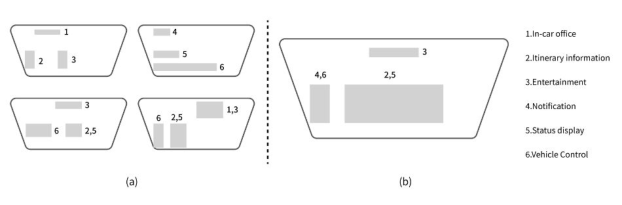
Figure 1: (a) Four typical functional partitions (b) The final functional partition.
Table 1 shows the card frequency (n>5) and the percentage of the card in each category. The percentage of the card represents the value of confidence level in terms of user agreement (Mohammad Shuhaili et al., 2019). In the statistics of the final results, each card is divided into the category with the highest confidence level. For example, “Battery information” is divided into the “Status display”. The display area of the front windshield is divided into three parts. The top area is often set as a functional area for non-driving tasks such as entertainment. The lower partition is further divided into left and right parts. They are assigned different functions according to their respective classifications. Figure 1 shows four typical functional partitions and the final selected functional partitioning scheme.
Gesture Elicitation Experiment Gesture elicitation study is a user-centered study method that allows par- ticipants to propose a set of gesture interaction techniques that they would have used to accomplish the given interaction tasks. Based on the card sorting study, 12 basic gesture interaction tasks were extracted and made into anima- tions in Keynote as referents. 10 participants (male = 6, average age = 22.5)
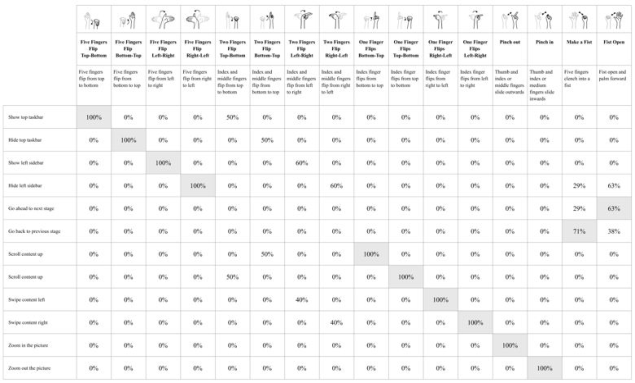
Figure 2: The collected gestures and gesture guessability analysis results.
were invited for this experiment. They were asked to perform a gesture to exe- cute the action of each referent. The experiment was recorded by the front camera of the computer for playback and analysis.
A total of 122 gestures were captured in this experiment, including 21 dif- ferent kinds of gestures. A measure of guessability was proposed to infer the guessability of a proposed referent (Wobbrock et al., 2005). Figure 2 shows the collected gestures (n>3) and the guessability analysis results. The gesture guessability analysis results indicate that two-finger-related gestures are not so attributable to the given referent compared with other gestures. Gestures with the highest guessability value in each referent were selected.
SYSTEM DEVELOPMENT Concept Design
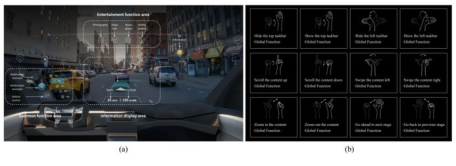
Based on the card sorting study results, we finally selected 12 high-frequency (n >= 5) functions and divided the display area of AR-HUD into three parts: entertainment function area, common function area, and information display area. The entertainment function area becomes an independent partition located in the middle and upper part of the display area since the theme emph- asizes entertainment. The common function area located directly in front of the driver. The information display area is in the middle of the display, which displays the vehicle’s status information and navigation information. For the interface design of the eye gaze controlled AR-HUD, attention should be paid to the parameters such as icon position, size, and color. In our work, we refer to the research conclusions of Prabhakar et al. (Prabhakar et al., 2020). In terms of the interaction, user selects interactive targets through eye gaze and sends instructions through gestures. If the user gazes on the target for more than 1s, the target will become selected status that is bigger and with gradi- ent background. Then the user can use the “Fist Open” gesture to confirm and go to the next page or use the “Make a Fist” gesture to go back to the
Dora: An AR-HUD Interactive System 257
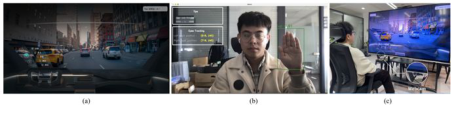
Figure 3: (a) Final user interface with annotations (b) Functional description of all gestures.Figure 4: (a) The dynamic web page (b) The interface of the backend (c) Experiment environment.
previous state. The final user interface and gesture function descriptions are shown in Figure 3.
Interactive Prototype An interactive prototype system is developed to evaluate the system’s usabi- lity. The system consists of a dynamic web page and a Python-based backend model. The web page is used to simulate the content display of the AR- HUD. The backend model is used for eye tracking and gesture recognition. The eye-tracking model is based on the method proposed by Zheng (Zheng and Usagawa, 2018). The gesture recognition model is trained based on the yolov5 machine learning algorithm. The average recognition accuracy of the model is 0.8. The results of the model recognition are transmitted to the web page through MQTT protocol to realize the dynamic control of the web content.
Design Evaluation A total of 20 participants (male = 12, average age = 22.6) were invited to evaluate the usability of the proposed system in the virtual driving environ- ment. Before the experiment, participants received a brief description of the function and interaction mode of the system. After that, each participant had one minute to familiarize and experience the system. Participants performed five tasks in random order. These five tasks came from five typical functions in the card sorting study and covered all gestures. The experimenter recor- ded the time spent by participants in completing each task and the number of errors. After completing all tasks, participants completed the SUS scale and received a five-minute interview.
With the increasing difficulty of the task, the time it took participants to complete the task, and the number of errors increased. But in general, all the participants took no more than 1 minute with the average errors within two
Table 2. The task introduction and experimental data Task index Mission statement Gesture numbers Average time
Table available in the original PDF paper.
Average error numbers 0 3.5s 0 times/person
a Get the current driving speed and cruising range.
1 8.2s 0 times/person
b When receiving a reminder message, hide it after reading.
4 15.2s 1 times/person
c Please take a photo of the street and zoom in to see the details.
4 22.0s 2 times/person
d Turn on the car aroma and switch the scent to citrus.
6 51.6s 2 times/person
e Find a restaurant called SMAKA, make a reservation and navigate to.
times. The findings indicated that participants could quickly remember this interaction pattern, which was verified in the interview. “Most of the gestures are what I often used by other electronic devices” – P3; “I think this way of interaction is similar to interacting with a computer” – P7. The mean score of the SUS scale was 82.5, further proving the high usability of the proposed system.
The experiment also revealed some potential usability problems. Firstly, there might be some cases where gestures are triggered by mistake. For exam- ple, between two consecutive “Open Fist” gestures, the participant inevitably needs to make a fist, which may trigger the “Make a Fist”gesture by mistake. Secondly, due to the limited field of view of the camera in the prototype, participants should raise their hands within the recognition range. When completing complex interactive tasks, participants would feel tired. Finally, some participants also feedback that some icons were so small that they spent much time selecting them.
CONCLUSION AND FUTURE WORK This paper focuses on the interaction design of AR-HUD for non-driving- related tasks such as entertainment, office, and social interaction in the context of highly autonomous driving. Firstly, we explore the user’s functi- onal requirements and functional layout preferences for AR-HUD based on a card sorting study. Then we successfully obtained a set of gesture intera- ction sets that conform to the user’s psychological cognitive model through gesture elicitation study. We propose an AR-HUD interaction system com- bining gesture recognition and eye tracking in future highly autonomous driving scenarios based on the two studies. The usability evaluation expe- riment has shown that the proposed system conforms to the user’s natural interaction habits, with low learning cost and high usability, which provides a certain reference for the design of the interaction system of future auto- nomous vehicles. In our future work, we will conduct in-depth research on the problems found in the usability evaluation experiment and propose a complete solution.
Dora: An AR-HUD Interactive System 259
REFERENCES
Betancur, J. A., Villa-Espinal, J., Osorio-GÓMez, G., CuÉLlar, S. & SuÁRez, D. 2018. Research topics and implementation trends on automotive head-up display systems. International Journal on Interactive Design and Manufacturing (IJIDeM), 12, 199–214. Charissis, V., Falah, J., Lagoo, R., Alfalah, S. F. M., Khan, S., Wang, S., Altarteer, S.,
Larbi, K. B. & Drikakis, D. 2021. Employing Emerging Technologies to Develop and Evaluate In-Vehicle Intelligent Systems for Driver Support: Infotainment AR HUD Case Study. Applied Sciences, 11, 1397. Cheng, H. T., Shan, H. & Zhuang, W. 2011. Infotainment and road safety service support in vehicular networking: From a communication perspective. Mechanical Systems and Signal Processing, 25, 2020–2038. Deng, N., Ye, J., Chen, N. & Yang, X. 2021. Towards Stereoscopic On-vehicle AR-
HUD. The Visual Computer, 37, 2527–2538. Haar, A., Haeske, A. B., Kleen, A., Schmettow, M. & Verwey, W. B. 2022.
Improving clarity, cooperation and driver experience in lane change manoeuvres. Transportation Research Interdisciplinary Perspectives, 13, 100553. Janssen, C. P., Donker, S. F., Brumby, D. P. & Kun, A. L. 2019. History and future of human-automation interaction. International Journal of Human-Computer Studies, 131, 99–107. Jiang, L., Wang, X., Li, Z. & Zhang, Y. Research on Design Model of Human-
Machine Interface of Automatic Driving Takeover System Based on User Experi- ence. 2019 Cham. Springer International Publishing, 41–60. Karam, M. 2006. PhD Thesis: A framework for research and design of gesture-based human-computer interactions. Krauss, R. M., Chen, Y. & Chawla, P. 1996. Nonverbal Behavior and Nonverbal
Communication: What do Conversational Hand Gestures Tell Us? In: ZANNA, M. P. (ed.) Advances in Experimental Social Psychology. Academic Press. Lagoo, R., Charissis, V. & Harrison, D. K. 2019. Mitigating Driver’s Distraction: Automotive Head-Up Display and Gesture Recognition System. IEEE Consumer Electronics Magazine, 8, 79–85. Maroto, M., CAÑO, E., GONZÁLEZ, P. & VILLEGAS, D. 2018. Head-up Displays
(HUD) in driving. arXiv preprint arXiv:1803.08383. Mohammad Shuhaili, F., Sulaiman, S., Rambli, D. R. A. & Mahamad, S. Identifying Suitable Icon Button for Museum Application Interface Using Online Card Sorting Method. 2019 Cham. Springer International Publishing, 628–639. Parada-Loira, F., GonzÁLez-Agulla, E. & Alba-Castro, J. L. Hand gestures to con-
trol infotainment equipment in cars. 2014 IEEE Intelligent Vehicles Symposium Proceedings, 8–11 June 2014 2014. 1–6. Poitschke, T., Laquai, F., Stamboliev, S. & Rigoll, G. Gaze-based interaction on multiple displays in an automotive environment. 2011 IEEE International Conference on Systems, Man, and Cybernetics, 9–12 Oct. 2011 2011. 543–548. Prabhakar, G., Ramakrishnan, A., Madan, M., Murthy, L. R. D., Sharma, V. K.,
Deshmukh, S. & Biswas, P. 2020. Interactive gaze and finger controlled HUD for cars. Journal on Multimodal User Interfaces, 14, 101–121. Schroeter, R. 2022. Inception of Perception—Augmented Reality in Virtual Reality: Prototyping Human–Machine Interfaces for Automated Driving. In: RIENER, A., JEON, M. & ALVAREZ, I. (eds.) User Experience Design in the Era of Automated Driving. Cham: Springer International Publishing.
Wang, S., Charissis, V. & Harrison, D. K. 2017. Augmented reality prototype HUD for passenger infotainment in a vehicular environment. Advances in Science, Technology and Engineering Systems, 2, 634–641. Wobbrock, J. O., Aung, H. H., Rothrock, B. & Myers, B. A. 2005. Maximizing the
guessability of symbolic input. CHI ‘05 Extended Abstracts on Human Factors in Computing Systems. Portland, OR, USA: Association for Computing Machinery. Zheng, C. & Usagawa, T. A Rapid Webcam-Based Eye Tracking Method for Human Computer Interaction. 2018 International Conference on Control, Automation and Information Sciences (ICCAIS), 24–27 Oct. 2018 2018. 133–136.
LISTED IN THE AHFE DIGITAL BOOKSTORE CATALOGUE
Explore the complete digital volume
Human Factors in Virtual Environments and Game Design
Read this individual research paper free through the original publisher, or explore the full digital proceedings book.
ISBN 978-1-958651-26-1
Explore this ISBN in the AHFE Bookstore ↗Listed in the July 2026 bookstore catalogue; search by ISBN to confirm current availability · Digital book purchase optional