Tzu-hsin Kao, Johan Chang (2024). The Impact of Digital Device Configuration on Elementary Students' Experience of Writing Traditional Chinese Characters: A Preliminary Study. In: Human Factors in Design, Engineering, and Computing. AHFE Open Access, vol. 159, pp. 982–993. https://doi.org/10.54941/ahfe1005665
The rapid development of digital devices and online learning platforms has increased the flexibility of education. However, younger elementary school students still struggle to learn Traditional Chinese in the digital environment. The purpose of this study was to investigate the effects of various digital equipment configurations on Chinese traditional writing on screens. Because of the numerous differences in device settings and setups, preliminary studies are necessary to eliminate ineffective parameters, thereby reducing experimental costs and minimizing the strain on children.In this study, 32 adult participants were recruited through experimental, observational, and interview methods. The variables were eight equipment configurations, visual line smoothness, smoothness of forearm movements, overall comfort, and the number of visual switches. The results revealed that the “horizontal dual-screen configuration” provided the most comfort overall, while the “vertical dual-screen configuration” had the least visual switches. These quantitative findings are further supported by the interview data, indicating that orienting the devices in the same direction may create a smoother viewing experience. However, left-right layouts with irregular screen angles can cause issues such as discontinuous vision and insufficient viewing distances.
With technology advancing rapidly, digital learning has been playing an increasingly important role in elementary education in Taiwan. As of 2024, the Ministry of Education in Taiwan has officially launched the Digital Learning Enhancement Program for primary and secondary schools (Ministry of Education, 2024). Against this backdrop, the flourishing development of digital devices, software, and online learning platforms has made the teaching process more flexible (Camargo et al., 2020). However, for young elementary school students, learning traditional Chinese characters remains a relatively difficult process. At this stage, they are in the process of decoding and formal reading (Chall, 1996), while also experiencing a critical period of rapid development in writing ability, during which misspellings are not uncommon (Arnes, 2006). With the use of various learning devices,
The Impact of Digital Device Configuration on Elementary Students’ Experience 983
this may affect students’ attention, learning effectiveness, and cognitive load (Chang and Thorson, 2023; Lee et al., 2018). As such, device switching may be one of the reasons that make it difficult for young students to concentrate on learning traditional Chinese characters.
While existing literature focuses primarily on adults and university students as research subjects, there are relatively fewer studies on elementary school children. Most research mainly explores variables such as eye fixation counts, duration, span, and reasoning abilities, with less discussion on variables related to learning outcomes.
Due to the many variations in device parameters and configurations, a preliminary experiment is necessary to exclude unsuitable parameters, thereby reducing experimental costs and burden on the children. Considering the above factors, this study first uses adults as subjects to analyze the parameters of multi-device usage, compare the effects of different digital device configurations, and provide recommendations for improvement.
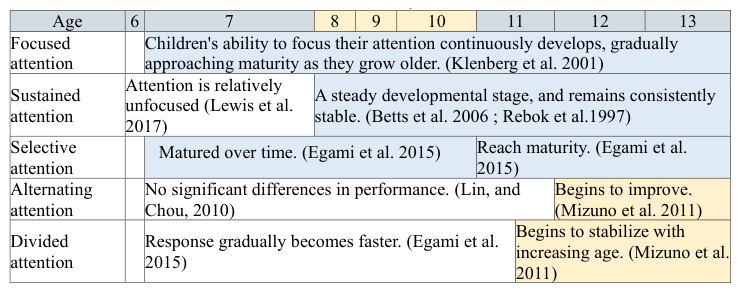
National Elementary School Students’ Attention Development Process Online learning involves extensive use of alternating and divided attention. Before the age of 12, children have relatively low levels of alternating and divided attention development, which is the latest stage of attentional maturation, as shown in Table 1. This highlights the critical role of individual factors in attention development. Different types of attention exist at different age stages, which may lead to attention deficits in online learning scenarios, thereby affecting learning outcomes and cognitive load.
Table 1. Attention development process.
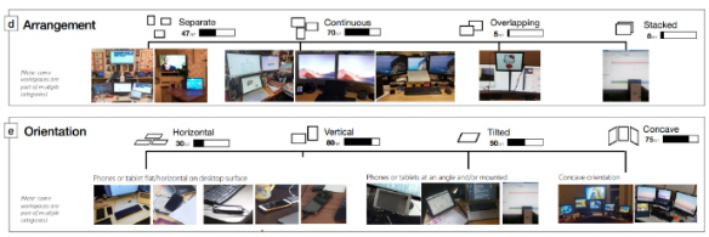
Management of a Digital Device’s Hardware Based on the findings of Yuan et al. (2022), a majority of users prefer multi-device setups and employ a visual continuous configuration mode. This finding will be incorporated into the design considerations of this study.
984 Kao and Chang
Figure 1: Digital configuration reference basis (Yuan et al., 2022).
Online Learning Equipment Analysis When users use multiple devices, device parameters such as distance, size, angle, and screen curvature can have a significant impact on attention, comfort, and posture. Previous studies have explored some of these parameters:
1. Viewing a tablet in landscape mode can lead to better comprehension of the topic compared to portrait mode (Sanchez and Branaghan, 2011). 2. Viewing digital devices from a closer distance can help improve focus, and a viewing distance of 30 to 45 centimeters is considered optimal (Hartmann et al., 2019). 3. When writing, keep the bottom edge of the screen parallel to the edge of the table and 10 centimeters away from it (Rungkitlertsakul et al., 2023). 4. Tracking letters on larger screens (greater than 9.7 inches) is more efficient compared to tracking letters on smaller screen sizes (Amornchewin and Sitdhisanguan, 2017). 5. Numerous studies have concluded that 0 degrees is the most fatiguing writing posture (Chiang and Liu, 2016; Rungkitlertsakul et al., 2023; Tomita et al., 2022). Tilt angles of 45
and 60
have been shown to be comfortable viewing angles (Chiang and Liu, 2016; Tomita et al., 2022), while 15
is considered the optimal writing angle for subjective comfort and 35
results in the fastest writing speed (Xiong et al., 2021).
Based on the results of the literature discussed above, this study will fix the digital viewing and writing angles at 60 degrees and 35 degrees, respectively, and keep the bottom edge of the writing screen parallel to the edge of the table and 10 centimeters away as control variables.
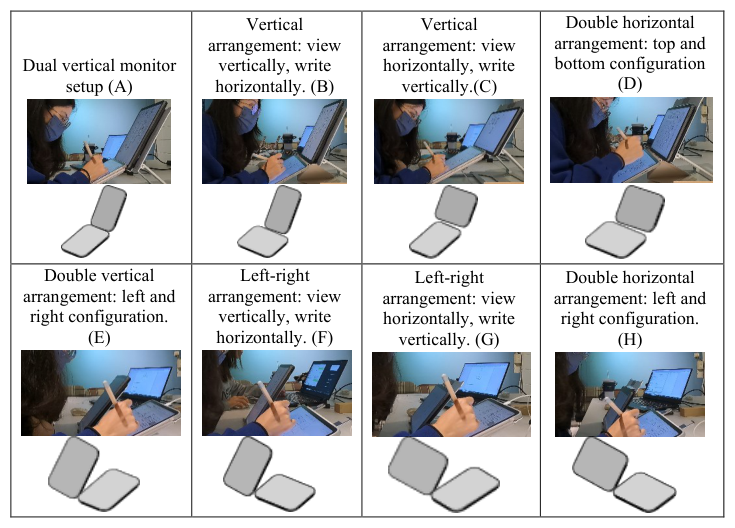
Eight different device configurations are designed, including top-down placement, left-right placement, vertical pairing, and horizontal pairing, as shown in Table 2.
The Impact of Digital Device Configuration on Elementary Students’ Experience 985
Table 2. Diagram of eight configurations A-H.
METHODS
A. Experimental Method: Investigate the impact of the eight configurations on writing performance using a Chinese writing task.
B. Writing Task: Design a writing task using pseudo-characters (non- existent Chinese characters) Arnes (2006) to eliminate the learning effect among participants.
C. Questionnaire Survey: Conduct a subjective perception survey using a 5-point Likert scale to assess the eight configurations in terms of visual flow smoothness, forearm comfort, and overall comfort.
D. Interview Method: Conduct interviews to explore participants’ reasoning behind their responses to each questionnaire item.
1. Please explain your thoughts on the smoothness/lack of smoothness of your visual flow.
2. Please explain your thoughts on the comfort/discomfort of your forearms.
3. Please explain your thoughts on the overall comfort/discomfort. 4. After completing all eight configurations, do you have any additional suggestions?
E. Observation Method: Calculate the number of times participants switch their visual gaze between the writing surface and the digital screen.
F. Statistical Analysis: 1. Descriptive Statistics: Calculate the distribution of the overall data to understand the sample structure.
986 Kao and Chang
2. Sphericity Test: Conduct a sphericity test to determine whether the data are suitable for a one-way repeated measures ANOVA.
3. One-Way Repeated Measures ANOVA: Analyze the impact of eight configurations on visual flow smoothness, forearm comfort, overall comfort, and the number of visual switches under different combinations of digital writing tasks.
4. Friedman test ANOVA: Use this test to examine the impact of eight configurations on the operation task when the data do not pass the sphericity test.
5. Wilcoxon Rank-Sum Test: Use this test to examine the impact of eight configurations on the operation task when the data do not pass the sphericity test.
EXPERIMENTAL CONTENT This study involved the recruitment of 32 adult participants during the period of March 4, 2024, to March 29, 2024. The primary objective of this research endeavor was to gather feedback and suggestions regarding the usability of eight distinct device configurations through the writing process of adult participants. This data will be utilized to prioritize the elimination of samples and serve as a reference for designing future experiments involving schoolchildren.
A. Experiment Participants: The initial recruitment for this study involved 32 adult participants. During the data processing stage, some data that did not meet the inclusion criteria were excluded. These included data from left- handed participants and those with non-compliant postures. Ultimately, data from 30 adults were used for analysis, with 90% of the participants having experience in product design and human factors.
Experimental Variables:
1. Independent Variable: Eight digital device configuration forms (coded A-H) 2. Dependent Variables: a. Subjective Evaluation:
(i) Visual Flow Smoothness: The degree of smoothness with which the eyes move when viewing content on a digital screen. (ii) Forearm Comfort: The degree of smoothness and naturalness of forearm movement when using a digital device (e.g., writing or using a touchscreen). (iii) Overall Comfort: The overall feeling of comfort experienced by the user when using a digital device for an extended period. This includes comfort in various body parts (e.g., eyes, neck, back, and arms) and psychological satisfaction.
b. Number of Visual Switches: The number of times the user’s eyes switch between different screens when using a digital device.
The Impact of Digital Device Configuration on Elementary Students’ Experience 987
3. Controlled Variables:
Visual screen angle: 60 degrees. Writing angle: 35 degrees. Tablet distance from the edge of the table 10 cm (centered). Elbow height: 3 cm below the table surface Experimental equipment.
Experimental Tools: Two iPad Pro 11-inch tablets. Two computer stands. Subjective satisfaction questionnaire (Likert five-point scale). Two GoPro cameras
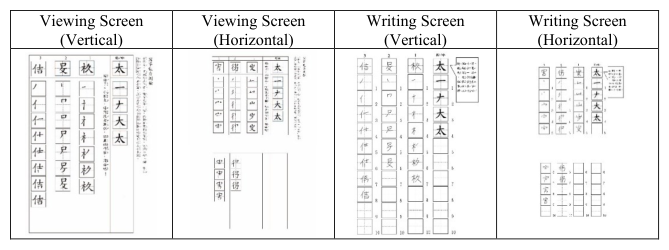
D. Experimental Materials: Chinese traditional characters designed based on Arnes (2006) basic Chinese character structure for writing tasks, as shown in Table 3.
Table 3. Vertical and horizontal interface of devices.
In the interface configuration shown in Table 3, portrait devices can display all strokes of the text. Landscape screens, due to their shorter length, require flipping to the next page when viewing and writing. Under the eight configurations, participants will experience the most comfortable configuration form by using different combinations of viewing and writing directions.
RESULTS
Descriptive Statistics of Subjective Satisfaction for Eight Digital Device Configurations
Table 4. Descriptive statistics of subjective satisfaction for eight digital device configurations.
Table available in the original PDF paper.
Visual Workflow Forearm Smoothness Overall Comfort Level Number of Visual Smoothness
Transitions
Average Standard Deviation
Average Standard Deviation
Average Standard Deviation
Average Standard Deviation A 3.37 1.27 3.50 1.31 3.43 1.19 44.93 21.40 B 3.07 1.26 2.90 1.42 2.97 1.30 60.97 26.33 C 3.30 1.09 3.03 1.10 3.33 1.03 59.70 22.41 D 3.63 1.12 3.23 1.33 3.60 1.10 62.33 28.18 E 2.87 1.22 0.90 0.90 3.17 1.15 58.53 23.81 F 2.80 0.84 1.17 1.17 3.13 0.97 57.40 27.75 G 2.40 1.10 0.97 0.97 2.93 0.98 57.47 31.49 H 2.20 1.03 1.26 1.26 2.33 1.24 64.70 27.43
988 Kao and Chang
Mauchly’s Sphericity Test for Subjective Perception Across Eight Digital Device Configurations
Table 5. Mauchly’s sphericity test for subjective perception across eight digital device configurations.
Table available in the original PDF paper.
Source Mauchly’s W Approx chi-square DF p Smoothness of visual workflow 0.141 51.773 27 0.003** Forearm smoothness 0.020 103.046 27 0.000** Overall comfort level 0.263 35.348 27 0.134 Number of visual transitions 0.277 33.967 27 0.171
According to the results of Mauchly’s sphericity test shown in Table 5, both overall comfort (p = 0.134 > 0.05) and the number of gaze switches (p = 0.171 > 0.05) passed the sphericity test, indicating that these variables meet the assumption of homogeneity of variances and are thus suitable for ANOVA analysis. However, visual pathway smoothness (p = 0.003 < 0.05) and forearm smoothness (p = 0.000 < 0.05) did not pass Mauchly’s sphericity test. Consequently, these two variables will be analyzed using non-parametric methods, specifically the Friedman test (Nonparametric test ANOVA) and the Wilcoxon signed-rank test.
Impact of Eight Digital Device Configurations on Overall Comfort Level and Number of Visual Transitions
Table 6.
Table available in the original PDF paper.
Source Source of Variation
SS DF MS F p η2 Post-hoc Comparison (LSD)
Overall Comfort
7395.262 7 1056.466 6.13 0.000** 0.174 A**>B, C, D, E, F, G, H
31.596 7 4.514 3.80 0.001** 0.116 D>G*,B* A, B, C, D, E, F, G>H** Error 241.029 203 1.187 Number of Visual Transitions Error 34988.612 203 172.358
From the analysis of the table 6 above, overall comfort shows a significant difference with F(7,203) = 3.80, P = 0.001, and η2 = 0.116. The number of gaze switches also shows a significant difference with F(7,203) = 6.13, P = 0.000, and η2 = 0.174. Post-hoc comparisons using the LSD test indicate that configuration H is significantly lower than all other configurations in terms of overall comfort, while configuration D is significantly better than configurations G and B. For the number of gaze switches, configuration A is significantly better than all other configurations.
The Impact of Digital Device Configuration on Elementary Students’ Experience 989
Table 7. Friedman two-factor analysis of variance and Wilcoxon signed-rank test results for visual pathway smoothness and forearm smoothness across eight digital device configurations.
Table available in the original PDF paper.
Dependent Variable N Chi-square Test DF Asymptotic Significance
In the experiment of writing traditional Chinese characters on digital screens, configurations B, E, F, G, and H showed no significant differences in visual pathway smoothness, but their visual pathway smoothness was significantly lower than that of configuration D. Additionally, configuration H exhibited significantly lower visual pathway smoothness compared to configurations E, F, C, and A.
Based on the quantitative analysis results above, it is evident that configuration D performs better in terms of overall comfort and visual pathway smoothness. Configuration A, on the other hand, has the fewest number of gaze switches.
Interview Results of Participants for Eight Digital Device Configurations After the completion of the experiment, an interview with the participants was conducted. To understand the impact of the interview results on the participants’ subjective evaluation of writing traditional Chinese characters using eight device configurations and their suggestions, the frequency of subjective evaluation words used by the 30 participants was calculated. The results are shown in Table 8.
Table 8. Interview results of subjective satisfaction ratings on visual workflow for eight configurations.
Table available in the original PDF paper.
Interview Results on Visual Workflow Smoothness Visualization Consistency of Device Orientation Screen Switching Visual Workflow Distance Device Angle A Uniform orientation; top-down workflow. (27%)
Not needing to switch screens is preferable. (13%)
Stretched view feels uncomfortable. (43%)
B C Inconvenient to switch screens.(20%)
D Consistent screen alignment makes the comparison quite smooth. (23%)
Not as smooth when needing to switch pages. (23%) E Consistency in viewing smoothness between both devices. (17%)
Viewing is a bit too close due to the angle. (13%) Different angles still cause viewing discomfort. (13%) F Angled devices create visual break. (13%)
G Screens at different angles disrupt smooth view transition. (17%) H Wider left-right view requires more head movement. (23%) Close view causes lean; page turns disrupt work. (13%)
Dual-side scrolling or switching may irritate users. (17%)
990 Kao and Chang
Based on the information provided, it can be inferred that 40% of the participants found switching their eyes up and down to be smoother than switching them left and right. For configurations A and D, where the device orientation is consistent, participants felt smoother during viewing. Additionally, since traditional Chinese interfaces are displayed in portrait mode, writing in landscape mode requires flipping pages, which can be inconvenient for participants. Participants also reported that the inconsistent screen angles in configurations E, F, G, and H caused discontinuous vision and viewing distances that were too close.
Table 9. Interview results on subjective evaluation of forearm smoothness for eight configurations.
Table available in the original PDF paper.
Interview Results on Forearm Smoothness Writing Posture Comfort of Space Comfort of Writing
Visualization Writing Flow Smoothness Preference
Utilization
Angle Sensation of Page Turning
A
Vertical top-down writing flows smoothly. (10%) C Writing space limited; arms strain more. (10%)
Hovering for handwriting feels unsmooth. (10%)
B
Mid-writing feels stuck; users lean left unconsciously. (10%)
Lower horizontal writing cramps arm movement. (10%)
Righties write comfortably rightward. (27%) The support for writing is very good. (13%)
Higher writing extends forearm, causing uneven hover-writing. (10%) G
Vertical writing flows smoother. (10%)
Scrolling and moving across grids interrupts smooth writing. (13%)
Horizontal writing is easier. (13%)
The writing is a bit slanted. (17%)
F Right-side writing smooth; horizontal support comfortable. (10%)
H Scrolling on both screens hinders convenience. (17%)
In the quantitative analysis, the use of the forearm did not show a significant difference. However, from the results of the subjective evaluation, due to individual writing habits, the feedback on the use of different configurations showed a large dispersion.
Table 10. Eight digital device configuration recommendations for visual flow smoothness, overall comfort, and number of visual transitions.
Table available in the original PDF paper.
Visual Flow Smoothness
Overall Comfort
Forearm Smoothness
Number of Visual Transitions A
-
B - C
- D
- E - F - G - H -
The Impact of Digital Device Configuration on Elementary Students’ Experience 991
According to the table above, among the eight devices used for writing traditional Chinese characters, configurations A, C, and D have the smoothest visual flow. Configuration D has the best overall comfort, and configuration A has the second best visual flow switching.
CONCLUSION
This study explored the impact of different device configurations on user comfort and visual flow smoothness when writing traditional Chinese characters on digital screens. From the experimental data and participant feedback, several key observations can be drawn: A. In terms of visual switching frequency, the “Dual Portrait Top-Bottom Configuration (A)” has the least number of switches, with the most ideal objective value performance. This study infers that this may be due to the consistency of this configuration with the vertical arrangement of strokes in traditional Chinese character writing. The advantage of this configuration method in terms of visual switching frequency may help to reduce visual fatigue and improve writing efficiency.
B. In terms of subjective satisfaction, the “Dual Landscape Top-Bottom Configuration (D)” has the best overall comfort performance, and the subjective evaluations of the participants further support these quantitative results. This may be similar to the experience of participants using tablets.
C. Participants generally found switching their eyes vertically to be smoother than horizontally. This suggests that vertical arrangement should be prioritized when designing digital writing interfaces for Chinese characters.
D. For vertical writing interfaces for traditional Chinese characters, horizontal arrangement requires frequent page flipping, which is inconvenient for users and can affect their user experience.
E. Participants also pointed out that the inconsistent screen angle when arranged horizontally can lead to discontinuous vision and viewing at too close a distance.
This suggests that future designs should focus on screen angle consistency to improve user comfort and work efficiency.
For future applications, these design principles could extend to developing digital writing tools for elementary students. As their writing habits and visual needs differ from adults’, future research should focus on this group’s usage characteristics to design suitable digital writing devices. These devices should consider elementary students’ physiology and learning needs, providing a comfortable, efficient writing experience to promote learning outcomes and user satisfaction.
This study revealed how different digital device configurations impact handwriting traditional Chinese characters, offering specific design recommendations. It is hoped these recommendations apply to future digital writing device development, enhancing overall user satisfaction and efficiency. Future experiments could adjust to include elementary student participation.
992 Kao and Chang
REFERENCES
Amornchewin, R., and Sitdhisanguan, K. (2017). Evaluation of the impact of tablet screen size on children tracing performance. Artificial Life and Robotics, 22(2), 191–196. Available at: https://doi.org/10.1007/s10015-016-0343-0 Arnes. (2006). 1st grade student’ handwriting ability and the relationship between
students’ handwriting ability and visual perception ability (Unpublished master’s thesis). National Taichung University of Education, Taichung City. Available at: https://hdl.handle.net/11296/z3ppq4 Camargo, C. P., Tempski, P. Z., Busnardo, F. F., Martins, M. d. A., and Gemperli, R. (2020). Online learning and COVID-19: a meta-synthesis analysis. Clinics, 75, e2286. Chall, J. S. (1996). Stages of reading development (2nd ed.). Harcourt Brace College
Publishers. Chang, Y., and Thorson, E. (2023). Media multitasking, counterarguing, and brand attitude: Testing the mediation effects of advertising attention and cognitive load. Computers in Human Behavior, 139, 107544. Available at: https://doi.org/https://doi.org/10.1016/j.chb.2022.107544 Chiang, H.-y., and Liu, C.-H. (2016). Exploration of the associations of touch-screen
tablet computer usage and musculoskeletal discomfort. Work, 53, 917–925. https: //doi.org/10.3233/WOR-162274 Egami, C., Yamashita, Y., Tada, Y., Anai, C., Mukasa, A., Yuge, K., Nagamitsu, S., and Matsuishi, T. (2015). Developmental trajectories for attention and working memory in healthy Japanese school-aged children. Brain and Development, 37(9), 840–848. Available at: https://doi.org/https://doi.org/10.1016/j.braindev.2015. 02.003 Hartmann, M., Sommer, N. R., Diana, L., Müri, R. M., and Eberhard-Moscicka,
A. K. (2019). Further to the right: Viewing distance modulates attentional asymmetries (‘pseudoneglect’) during visual exploration. Brain and Cognition, 129, 40–48. Available at: https://doi.org/https://doi.org/10.1016/j.bandc.2018.11.008 Hung-Yu Lin, and Tair-Jye Chou. (2010). The Development of an Attention Test for Elementary School Children. Bulletin of Special Education, 35(2), 29–53. Available at: https://doi.org/10.6172/BSE201007.3502002Ministry of Education. (2024). Portal for Advancing Digital Learning in Primary and Secondary Schools. Available at: https://pads.moe.edu.tw/pads_front/index.php?action=index Klenberg, L., Korkman, M., and Lahti-Nuuttila, P. (2001). Differential development
of attention and executive functions in 3-to 12-year-old Finnish children. Developmental neuropsychology, 20(1), 407–428. Lee, S., Baek, J., and Han, G. (2018). Effects of using a second-screen application on attention, learning, and user experience in an educational content. Interactive Learning Environments, 26(3), 289–307. Available at: https://doi.org/10.1080/10494820.2017.1324494 Lewis, F. C., Reeve, R. A., Kelly, S. P., and Johnson, K. A. (2017). Evidence of
substantial development of inhibitory control and sustained attention between 6 and 8years of age on an unpredictable Go/No-Go task. Journal of Experimental Child Psychology, 157, 66–80. Available at: https://doi.org/https://doi.org/10. 1016/j.jecp.2016.12.008 Mizuno, K., Tanaka, M., Fukuda, S., Sasabe, T., Imai-Matsumura, K., and Watanabe, Y. (2011). Changes in cognitive functions of students in the transitional period from elementary school to junior high school. Brain and Development, 33(5), 412–420.
The Impact of Digital Device Configuration on Elementary Students’ Experience 993
Rungkitlertsakul, S., Bhuanantanondh, P., and Buchholz, B. (2023). The effect of tablet tilt angles and time on posture, muscle activity, and discomfort at the neck and shoulder in healthy young adults [Article]. PLoS One, 17(3), 1–14. Available at: https://doi.org/10.1371/journal.pone.0283521 Sanchez, C. A., and Branaghan, R. J. (2011). Turning to learn: Screen orientation and
reasoning with small devices. Computers in Human Behavior, 27(2), 793–797. Available at: https://doi.org/https://doi.org/10.1016/j.chb.2010.11.004 Tomita, Y., Suzuki, Y., Shibagaki, A., Takahashi, S., and Matsuka, Y. (2022). Physical Load While Using a Tablet at Different Tilt Angles during Sitting and Standing. Sensors, 22(21), 8237. https://www.mdpi.com/1424-8220/22/21/8237 Xiong, Z., Huang, C., Wang, H., Liu, X., Huang, X., and Jiang, L. (2021). Evaluation
of Writing Efficiency When Using Tablet Computers at Inclines. IEEE Access, 9, 144149–144156. Available at: https://doi.org/10.1109/ACCESS.2021.3121202
LISTED IN THE AHFE DIGITAL BOOKSTORE CATALOGUE
Explore the complete digital volume
Human Factors in Design, Engineering, and Computing
Read this individual research paper free through the original publisher, or explore the full digital proceedings book.
ISBN 978-1-964867-35-9
Explore this ISBN in the AHFE Bookstore ↗Listed in the July 2026 bookstore catalogue; search by ISBN to confirm current availability · Digital book purchase optional