Tim Willaert, Andreas Stöckl, Rimbert Rudisch-sommer (2025). Humans and AI writing lectures together. In: Intelligent Human Systems Integration (IHSI 2025): Integrating People and Intelligent Systems. AHFE Open Access, vol. 160, pp. 45–55. https://doi.org/10.54941/ahfe1005809
With the recent advancements in Generative Artificial Intelligence (GenAI) technologies, particularly Large Language Models (LLMs) like GPT4, there has been a significant shift in how information can be easily accessed, generated, and utilized. This study uses these advancements to create a tool where humans and AI generate complete lectures, encompassing the entire process from structure outlining and scriptwriting to slide creation and delivery via a digital avatar.The motivation behind this study comes from the challenges faced in the educational sector, including the time-consuming nature of lecture preparation and the potentially static nature of reused lectures. By integrating LLMs and other GenAI technologies such as image, video, and speech synthesis, the proposed solution aims to provide a dynamic and adaptable workflow that may speed up the lecture creation process and keep content up-to-date. We are interested in whether such a hybrid system of human experts and AI technologies can be helpful.To answer our research question, we developed a tool that combines multiple AI technologies into one easy-to-use interface. It allows educators to generate a lecture within minutes by simply entering a topic. As LLM’s are not yet fully trustworthy. Thus, we deemed it important that the system allows the user (educator) to step in at any point and make manual changes if needed.The tool creates a lecture in four steps:1. Outline: The process begins with generating a lecture outline, where users enter the lecture topic and specify the students’ proficiency level (beginner, intermediate, advanced). This chosen proficiency level is passed to the LLM, which helps to create a lecture tuned to the student’s level. Additionally, users can offer more context by indicating the students’ Existing knowledge and pinpointing specific areas they should learn more about. The user can edit the outline by changing the titles or adding and removing sections or chapters.2. Script: Based on the outline, a script for the lecture is generated. The script generation process went through several different iterations. Initially, the whole script was generated using a single-generation process. This worked to a certain extent; however, it is only a viable approach when creating a concise lecture.3. Slides: Based on the script, complementary slides are created. Each slide contains bullet points and an image. The slides are generated through a collaborative process involving a language model, an image generation model, and Google Images. First, the language model dissects the script into smaller chunks. The model has complete control over how to split up the text. We decided to give it complete control because this is a task that language models should excel at, and we want to evaluate its performance in finding the right balance between the number of slides and detail per slide.4. Avatar: A digital avatar is created by selecting a face and voice. This avatar will present the lecture. There is the option to use any custom image the user can upload.To evaluate the usability and effectiveness of the tool, a user study was conducted with 12 experienced educators from various fields and educational levels. The study revealed that the prototype achieved a mean System Usability Scale (SUS) score of 80,42, indicating a good level of usability. It was found that the tool increased workflow efficiency, with most participants agreeing that it made lecture creation faster and more streamlined. Most participants said they would integrate this tool into their workflow, but only a few believed it would improve the quality of their lectures.Overall, this research demonstrates the practical applications of GenAI technologies in an educational context. While the prototype shows promise in increasing educators’ productivity and streamlining the lecture creation process, it also highlights the need for expert oversight to make sure the content is accurate and qualitative. Our study found that most participants would integrate AI-generated lectures into their workflow, albeit to serve as a starting point or inspiration. This indicates that GenAI cannot educate people properly, but the thesis clarifies GenAI’s current capabilities in an educational context. Further advancements in large language models will make them more reliable and helpful in creating lecture content. For now, an expert educator is still needed to craft a quality syllabus and teach the content. Future work may focus on addressing the identified limitations and further refining the tool to better meet educators' needs.
Since the launch of ChatGPT by OpenAI at the end of 2022, Generative Artificial Intelligence (GenAI) has revolutionized various sectors worldwide. Large Language Models (LLMs), such as ChatGPT, empower users to access information, generate content, perform analyses, and more, all through natural language interaction. This new ease of use, coupled with the remarkable quality of outputs, has made this technology a game-changer in many areas.
In education, GenAI holds significant potential to address several persistent challenges. Firstly, the process of crafting lectures—from laying out the structure to creating slides—consumes considerable time. Consequently, lectures may become static and reused, lacking adaptation to up-to-date information or the different learning preferences of students. Moreover, global educational inequalities persist due to resource limitations, while more developed nations struggle with ongoing teacher shortages.
Educators have begun integrating LLMs into their workflows for small tasks such as lesson planning and writing assistance, thus increasing productivity. However, we hypothesize that a more comprehensive approach, leveraging GenAI’s diverse capabilities, could revolutionize lecture creation and make qualitative education—tailored to each student’s need—more accessible worldwide. Beyond text generation, GenAI encompasses image, video, and speech synthesis technologies, suggesting the possibility of developing a ‘virtual teacher’.
This paper introduces a tool that leverages AI to autonomously generate complete lectures. It facilitates the entire lecture creation process, from outlining and scriptwriting to slide generation and delivery through a digital avatar. The primary evaluation of this tool focuses on its usability and its potential to streamline educators’ workflows effectively. By doing so, this research aims to evaluate current state of the art AI models and their efficacy in reshaping lecture preparation and creation. Furthermore, we explore the uncanny valley effect in virtual teachers using cutting-edge models for speech synthesis and talking head generation.
RELATED WORK
The notion of using virtual characters as educators has been around for a while. In 2000, Johnson et al. explored the use of animated pedagogical agents to enhance learning experiences in educational software (Johnson, 2000). These agents were seen as capable of providing rich, face-to-face learning interactions, using gestures, conveying emotional responses, and employing behavior spaces to create engaging instructional experiences. Their work laid important groundwork for future research and development in this field. Fifteen years later, the researchers reflected on the progress and found that pedagogical agents were showing promising results. However, they noted that the technology had evolved more than anticipated and was being utilized interactively rather than to replace traditional teaching methods. Additionally, significant progress in artificial intelligence has been made since then (Johnson, 2015).
Numerous studies have delved into how students perceive virtual teachers. Matsui et al. explored the impact of virtual teachers’ appearance on students’ learning outcomes and perceptions (Matsui, 2019). It aimed to understand how the virtual teacher’s appearance, combined with the subject matter, influenced students’ understanding, motivation, and perception of the teacher’s credibility. The experiment revealed that the match between the teacher’s appearance and the subject matter significantly affected its effectiveness. Tailoring the appearance of virtual teachers to the subject matter can enhance educational outcomes and increase students’ interest and motivation. Kim et al. studied the role and perception of AI teaching assistants, finding that students’ acceptance relied on the virtual teacher’s perceived usefulness and ease of communication (Kim, 2020). In other papers they noted that a more human-like voice (Kim, 2022) and higher social presence (Kim, 2021) increased adoption rates.
Humans and AI Writing Lectures Together 47
Su et al. came up with the IDEE framework which aims at guiding teachers or institutions when trying to integrate AI into their curriculum (Su, 2023). They also listed some benefits for using GenAI, such as more personalized content for students, being able to provide a more interactive and engaging learning experience, and making it easier for teachers to answer students’ questions. That being said, they also realize there are many challenges and limitations. The most important one being that the effectiveness has not been fully tested yet. On top of that, the models are also limited by their training data quality.
Finally, there have been some experiments where they tried to use GenAI for education in a more direct way. Schroeder et al. used AI-generated courseware in their lessons (Schroeder, 2022). The key detail here is that the AI did not generate the lecture content. Instead, it was being used to take existing content and generate interactive questions, such as fill-in-the-blank exercises. It was thus not responsible for completely creating the lecture. They found that this was mostly useful for the teachers, as it saved them a lot of time. They also noted that years of teaching expertise allowed the teachers to tailor the courseware accordingly. Other research tried to use AI for a language learning course (Rüdian, 2023). They stated that it’s beneficial for creating interactive tasks and that it’s incredibly cheap, but there were also drawbacks. For example, the generated content was sometimes grammatically correct but didn’t make any sense. The most closely related work (Dao, 2021) where they created MOOCs (Massive Open Online Courses) using GenAI techniques. While a human had to create the content and slides of the lecture, they used WaveNet, Tacotron2, and Wav2Lip to automatically generate a virtual teacher that presents the lecture. This allows for a faster conversion of lecture content into ‘watchable’ videos, eliminating a high resource and time investment from educators.
METHOD AND RESEARCH QUESTION We are aiming to answer the following research question: To what extent are teachers willing to adopt AI-generated lectures into their workflow? Our research allows this question to be answered by building a streamlined solution that encompasses all steps in the workflow for creating and sharing AI-generated lectures. The prototype should...
1. be able to generate lectures autonomously given a topic. 2. provide teachers a simple to use interface to generate and customize these lectures. 3. allow students to watch and interact with the lectures in the application.
To programmatically create fully-fledged lectures, we need three main components:
1. Large Language Model: An LLM will serve as the backbone throughout the creation process. It will generate the lecture’s structure, its actual content, and finally the lecture’s slides.
2. Speech Synthesis: To present the lecture, a text-to-speech model is needed. This model will read out the lecture’s content which results in the virtual teacher’s voice. We want to have different voice options available to represent different genders, ages, or dialects. Ideally, we would be able to create custom voices to imitate the voice of the real teacher using the application. That way, we could recreate the educator as a virtual avatar of themselves. 3. Talking Head Generation: Finally, we want the virtual teacher to have a face as well. As input, it should take any face we want and the generated audio clip from the speech synthesis model. Then, it should animate the face based on what is being said in the audio clip.
It is crucial to emphasize that the primary objective of our research is not to replace teachers with virtual counterparts. We firmly believe that such a transition is presently neither feasible nor ethically responsible. Rather, our prototype is designed with the intention of supporting and empowering teachers in the lecture creation process. The focus is on assessing the current capabilities of AI, particularly in the realms of large language models, speech synthesis, and talking head generation. Our commitment lies in enhancing educational practices through thoughtful augmentation rather than replacement.
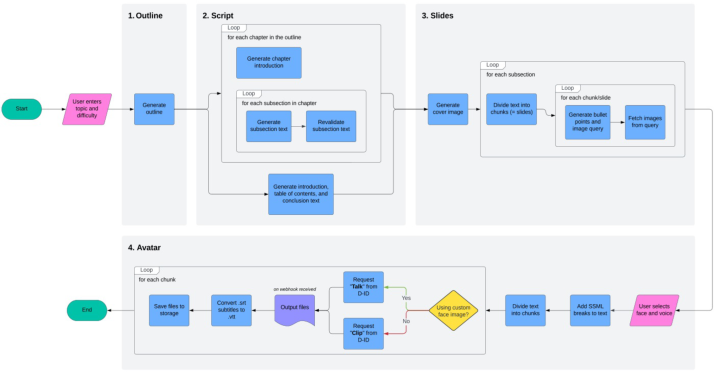
IMPLEMENTATION The tool creates a lecture in four steps (see Figure 1):
1. Generate an outline by entering the lecture topic and selecting the students’ proficiency level (beginner, intermediate, advanced). This level is sent to the LLM to tailor the lecture. Users can provide additional context on students’ existing knowledge and focus areas. The outline can be edited by adjusting titles, adding, or removing sections.Script: Based on the outline, a script for the lecture is generated. The script generation process went through several different iterations. Initially, the whole script was generated using a single-generation process. This worked to a certain extent; however, it is only a viable approach when creating a concise lecture. 2. Slides: Based on the script, complementary slides are created. Each slide contains bullet points and an image. The slides are generated through a collaborative process involving a language model, an image generation model, and Google Images. First, the language model dissects the script into smaller chunks. The model has complete control over how to split up the text. We decided to give it complete control because this is a task that language models should excel at, and we want to evaluate its performance in finding the right balance between the number of slides and detail per slide. 3. Avatar: A digital avatar is created by selecting a face and voice. There is the option to use any custom image the user can upload.
Humans and AI Writing Lectures Together 49
Figure 1: High-level overview of the lecture creation process.
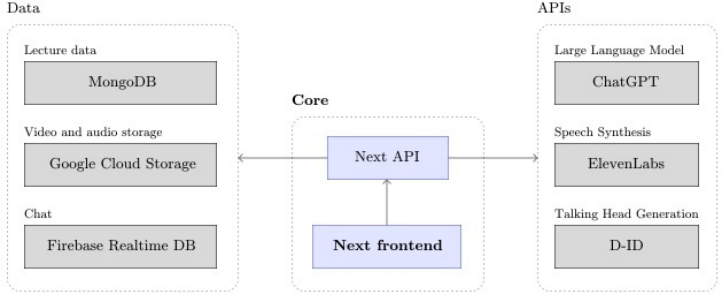
Architecture A Next.js application serves as the central part of the system, orchestrating the entire process, MongoDB is used to persist all necessary information. Google Cloud was chosen as file storage for all assets associated with a lecture, like video, audio, subtitle files, and images. Firebase was used to implement the integrated chat function when watching a lecture. Finally, the system uses the APIs of OpenAI, D-ID, and ElevenLabs for all of the generative AI work (see Figure 2).
Figure 2: System architecture diagram.
Outline The process begins with the generation of a lecture outline, where users enter the lecture topic and specify the students’ proficiency level (beginner, intermediate, advanced). This chosen proficiency level is passed to the LLM, which helps to create a lecture tuned to the students’ level. Additionally, users
can offer more context by indicating the students’ existing knowledge and pinpointing specific areas they should learn more about. The user can then choose between GPT 3.5-Turbo or GPT 4 to serve as the LLM throughout the generation process. Subsequently, a Next route handler interfaces with the OpenAI API, and the language model generates the outline, comprising chapters, each with several subsections. The OpenAI API allows you to enter a system prompt and user prompt. The system prompt is usually where the model receives instructions about its persona and the task they have to complete, whereas the user prompt contains the input of the user. The system prompt for generating the outline looks as follows: You generate an outline for a lecture about a provided topic. The outline should include the main points of the lecture (minimum 3, maximum 10) and the subpoints that support each main point (minimum 3, maximum 8). The more, the better. Don’t number the main points and subpoints. The user will tell you what the audience already knows and what they want to learn more about. You must avoid including the things the audience already knows and you must include the things they want to learn more about.
Our aim was for the resulting lectures to be around 20 minutes in length, which is why we chose the limitations on chapters and subsections (named main points and subpoints in the code). The user prompt is then constructed based on the user’s input of a topic and the level of the intended audience. Optionally, the user can add additional information about pre- existing knowledge of the audience to exclude, and specific information on subtopics to include. An example of a user prompt to generate a lecture about ‘Introduction to Large Language Models’ on an intermediate level could look like this: Topic: Introduction to Large Language Models. Level: Intermediate. An intermediate lecture is for people who have some prior knowledge in the field and are looking to deepen their understanding. The chapters should be more advanced concepts. The audience already knows the following, so you shouldn’t include it: basic computer science concepts and programming fundamentals. The audience wants to learn more about the following, so you must include it in the outline: how large language models are trained.
To ensure a structured and predictable output that can be worked with, a JSON schema is passed as a function parameter. The API will then return a response structured as the given schema. Once the outline is generated, users still have the flexibility to edit it as needed before beginning the script generation process upon satisfaction. They can add, edit, or remove subsections or chapters as desired.
Script For efficiency reasons the script generation process creates the chapters in parallel. This means that none of them know the context of what was said before, but each chapter receives its index within the lecture structure, as well as the name of the chapter that came before to ensure natural transitions between chapters. Again a a system and a user prompt was defined The system prompt for chapter generation looks as follows:
Humans and AI Writing Lectures Together 51
You are a college professor giving an online lecture about a certain topic. You generate a script for a certain chapter of the lecture. Each chapter has an introduction and a few subsections. You can think of a subsection being a new slide of the presentation. Each subsection’s explanation should be at least 500 words long. Go in-depth and provide examples when possible.
GPT is able to count the amount of words in its responses. The word limit was introduced to prevent sometimes very short explanations, that occurred without it. The user prompt contains information about the Topic, the title of the chapter and its sections as created in the first step. If information about previous knowledge was added in the first step it will be repeated here. Additionally, information is given on how to do the introduction and ending in context of the previous and next chapter. Continuing the ‘Lecture on LLMs’ example, the user prompt could look like this: Topic: Introduction to Large Language Models. Chapter: Components of Language Models. Sections:
Architecture of Language Models
Inputs and Outputs in Language Models
Training Process of Language Models You can assume the audience already knows about the following: basic computer science concepts and programming fundamentals. Introduction to the chapter. Tell the students what you will be talking about in this chapter. Don’t say ‘Welcome to this chapter’. Instead, start it in a more natural and smooth way. More context about the chapter so you know how to start the introduction: This is chapter 2. The previous chapter was Understanding Language Models. You could say “Next, we will talk about”, or “The next thing we will talk about is”, or something similar.
Each text segment also undergoes revalidation, as GPT doesn’t always get the information right the first time, but is able to correct itself. This process happens in two steps: (1) checking if there are any factual errors in the text, and (2) if there are any, fix them. The reason this is split up in two steps is because sometimes it wouldn’t find any mistakes, but still make slight changes to the original text, which we don’t want. It would do so even when being explicitly told not to. The system prompt for step 1 looks like this: You check if you can find any factual errors in the input text. If so, put contains_error to true and describe which errors there are. If there are no mistakes in the text, set contains_error to false. For more context, the topic is: Introduction to Large Language Models, the chapter is: Components of Language Models, and the section is: Training Process of Language Models.
This is the system prompt for step 2: You replace factual errors in a text by the correct information. Then, return the text. For more context, the topic is: Introduction to Large Language models, the chapter is: Components of Language Models, and the section is: Training Process of Language Models.
The user prompt contains both the original text, as well as which errors were found during the first step. This way, GPT knows which mistakes it has to fix. Finally, the revalidated text gets returned and is used instead of the
original one. This process happens automatically to each text segment upon first generation, but it can be retriggered by the user at any point for any segment, if they suspect there are still errors in the text.
For the general introduction to the lecture, the general conclusion part and the table of contents, again system and user prompts were defined in a similar fashion.
Slides For slide generation a web-based presentations format was selected. The slides are generated through a collaborative process involving a language model, an image generation model, and Google Images. First, the language model dissects the script into smaller chunks. The model has complete control over how to split up the text. This is the corresponding system prompt:
The user will input a long script that is used for slides in a presentation. The script is too long to fit on one slide, so the user wants to split it into multiple slides. Don’t split it too much. Each slide should contain at least a few sentences.
The user prompt contains the previously generated script of the lecture. When this step is done, we have a number of text chunks. Each chunk is from now on associated with a single slide. For each chunk/slide, another GPT call is made to summarize its text into bullet points. Additionally, GPT is told to generate a search query that is used to fetch an image for that slide from Google Image API. Users are free to customize the generated query and fetch new images, if they feel like it might yield better.
Avatar In the final step of the creation process, the user defines the virtual teacher’s avatar and voice. The user starts by selecting a face for the presenter. They are shown a list of every available D-ID face, from which they can choose. There is also the option to use any custom image. In that case, the user can upload an image which gets stored in our Google Cloud Storage bucket and becomes available for use.
After selecting a face, the user needs to choose a voice. Once again they get the list of every available voice on ElevenLabs, the service we use for voice synthesis. Custom voices can also be created by providing an audio clip of at least 1 minute, preferably with the subject speaking English. Upon choosing a fitting voice, the back-end commences the avatar generation process, and the user has to wait a few minutes for it to complete.
As an initial step for generating the voice, the text undergoes conversion into Speech Synthesis Markup Language (SSML). After converting the script into SSML, the text gets segmented into smaller chunks due to maximum length constraints with both D-ID and ElevenLabs. Now, for each text segment, an API call is initiated to D-ID to commence the generation of an animated video. Generating a video can take a few minutes, so the API simply returns a confirmation if the generation has successfully begun. Upon completion of a video generation, D-ID sends a response to a webhook of our application.
Humans and AI Writing Lectures Together 53
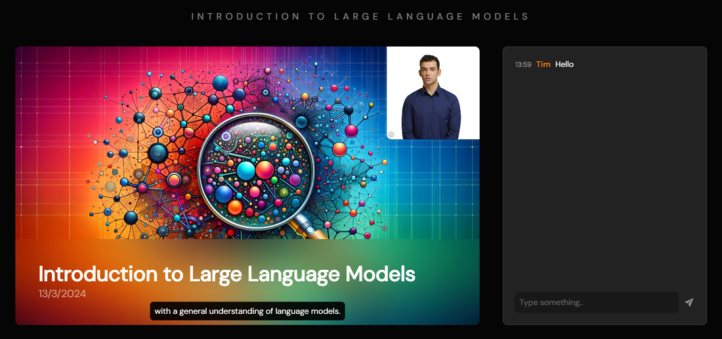
Watching the Lecture Once all videos are done generating, the lecture is ready to be watched. The teacher receives a public link for sharing with students. This link leads to a dedicated page where the lecture can be played akin to a video (see Figure 3).
Figure 3: Final result.
EVALUATION The study was conducted both in a lab setting and virtually, using the same procedure. Participants were briefed on the project’s objectives and granted access to a prototype to create a brief lecture in their area of expertise. Each lecture, generated by GPT 4, lasted around 5 minutes. Minimal guidance was given during the prototype interaction to assess user-friendliness and usability. Participants selected a topic, reviewed a generated lecture outline, offered feedback, modified the outline, and verified the factual accuracy of the generated lecture script. They also went through the generated slides, selected an avatar to present their lecture, and finally watched their created lecture. After completing the creation process, the survey gathered demographic data and included questions about the outline, script, slides, and avatar, primarily using a Likert scale. The survey also covered participants’ thoughts on AI in education to understand their standpoint regarding AI. In the final stage, participants answered open questions in an interview-style format to provide deeper insights into their reasoning and perception of AI.
The study revealed the following insights: The outline was often found to be incomplete and didn’t always consider users’ requests. This arises from the system’s underlying prompts and the difficulty in ensuring all requests are fulfilled.
Regarding the generated script, feedback was mixed. It varied based on the lecture’s domain, topic, and level. The script didn’t consistently meet academic standards and sometimes contained factual errors. It reinforced the need for an experienced educator to oversee the process.
Participants had mixed responses to the slides. While the presentation of the script made sense, there were often too many slides with sparse content, and the accompanying images received largely negative feedback, indicating a weak link between the text and images. More customization options and the ability to export the slides were also requested.
On the other hand, participants had positive feedback about the avatar’s quality due to the integration of state-of-the-art tools. The appearance and voice of the avatar were well-received, with some reservations about using it for their own lectures due to the perceived value of human interaction.
In answering the research question about educators integrating AI-generated lectures, 10 out of 12 participants indicated they would integrate the tool into their workflow in some way, primarily for efficiency and inspiration. However, more refinement is needed in all aspects of the process to ensure a reliably qualitative output, especially regarding script and slide generation. This sentiment was echoed in 11 participants disagreeing with AI’s current capability to independently educate and create lectures.
CONCLUSION
Our research has encountered several limitations worth considering. Firstly, large language models like GPT 4 vary in their knowledge across subject fields, impacting the lecture quality. However, given the rapid evolution in the industry, we anticipate improvements in these models. Our research results are tied to the performance of the LLM, prompting techniques, and system design, which we seek to streamline for lecture generation. While the prototype leans towards a generalized design, future work could focus on refining it for specific subject domains, significantly elevating lecture quality. Regarding the web-based nature of slides, the inability to export them as traditional .pptx files hinders further customization, potentially impacting the results. The cost associated with lecture creation remains a substantial consideration, but transitioning to a self-hosted model may reduce expenses. Additionally, the sample size in our user study should be considered when interpreting the results, suggesting the need for more diverse participants in future studies.
In conclusion, or work explored the viability of fully generating lectures using generative AI. Our research revealed limited exploration in increasing educators’ efficiency and presented a web-based prototype encompassing the entire lecture creation process. Most participants expressed willingness to integrate AI-generated lectures into their workflow, albeit as a starting point or for inspiration. Our study shed light on GenAI’s current capabilities in an educational context, indicating that expert educators are still needed to ensure quality content. We anticipate further advancements in large language models to increase their reliability and usefulness in creating lecture content.
REFERENCES
Dao, Xuan-Quy, Le, Ngoc-Bich and Nguyen, Thi-My-Thanh (2021): AI-Powered MOOCs: Video Lecture Generation, proceedings of the seventh International Conference on Image, Video and Signal Processing, Kawasaki, Japan.
Humans and AI Writing Lectures Together 55
Johnson, W. Lewis, Rickel, Jeff W. and Lester, James C. (2000). Animated Pedagogical Agents: Face-to-Face Interaction in Interactive Learning Environments, International Journal of Artificial Intelligence in Education. Volume 11, No. 2. Johnson, W. Lewis and Lester, James C. (2015). Face-to-Face Interaction with
Pedagogical Agents, Twenty Years Later, International Journal of Artificial Intelligence in Education. Volume 26, No. 2. Kim, Jihyun, Merril Jr., Kelly, Xu, Kun and Sellnow, Deanna D. (2020). My Teacher Is a Machine: Understanding Students’ Perceptions of AI Teaching Assistants in Online Education, International Journal of Human-computer Interaction. Volume 36, No. 1. Kim, Jihyun, Merril Jr., Kelly, Xu, Kun and Sellnow, Deanna D. (2021). I Like
My Relational Machine Teacher: An AI Instructor’s Communication Styles and Social Presence in Online Education, International Journal of Human-Computer Interaction. Volume 37, No. 6. Kim, Jihyun, Merril Jr., Kelly, Xu, Kun and Kelly, Stephanie. (2022). Perceived credibility of an AI instructor in online education: The role of social presence and voice features, Computers in Human Behavior. Volume 136, No. 6. Matsui, Tetsuya and Yamada, Seiji (2019). The Design Method of the Virtual Teacher,
proceedings of the seventh International Conference on Human-Agent Interaction, Kyoto, Japan. Rüdian, Leo Sylvio and Pinkwart, Nils (2023). Auto-generated language learning online courses using generative AI models like ChatGPT, proceedings of DELFI 2023, Aachen, Germany. Schroeder, Kersten T., Hubertz, Martha, Van Campenhout, Rachel and Johnson,
Benny G. (2022). Teaching and Learning with AI-Generate Courseware: Lessons from the Classroom, Online Learning. Volume 26, No. 3. Su, Jahong and Yang, Weipeng (2023). Unlocking the Power of ChatGPT: A Framework for Applying Generative AI in Education, ECNU Review of Education. Volume 6, No. 1.
LISTED IN THE AHFE DIGITAL BOOKSTORE CATALOGUE
Explore the complete digital volume
Intelligent Human Systems Integration (IHSI 2025): Integrating People and Intelligent Systems
Read this individual research paper free through the original publisher, or explore the full digital proceedings book.
ISBN 978-1-964867-36-6
Explore this ISBN in the AHFE Bookstore ↗Listed in the July 2026 bookstore catalogue; search by ISBN to confirm current availability · Digital book purchase optional