Murad Al-Rajab, Samia Loucif, Suhail Odeh, Hadeel Nooreldin, Sedra Dawalibi, Hajra Nadeem (2026). "Simply": AI-Powered Browser Extension to Support People with Learning Disabilities. In: Accessibility, Assistive Technology and Digital Environments. AHFE Open Access, vol. 202, pp. 91–102. https://doi.org/10.54941/ahfe1007300
People with learning disabilities, including dyslexia and Attention-Deficit/Hyperactivity Disorder (ADHD), as well as individuals with visual and motor impairments, often face challenges when accessing Web content. Even though, there are accessibility solutions, but they do not integrate multiple accessibility features in a single, unified tool. This paper proposes an AI-powered browser extension designed to enhance web accessibility with a set of automated features, including text simplification, visual explanation, text-to-speech (TTS), and speech-to-text (STT) functionalities. The system uses Artificial Intelligence (AI) technique, such as Natural Language Processing (NLP) and computer vision, to transform complex textual and visual information into simplified, user-friendly formats, while voice-based interaction enables hands-free and aural support. The proposed solution is implemented using a web browser extension to ensure lightweight deployment and ease of use. Initial testing results demonstrate that Simply effectively achieves reliable performance and positive usability outcomes. The contribution of this work lies in advancing browser-based accessibility solutions by combining AI-driven content simplification with multimodal interaction, thereby promoting digital inclusion, educational accessibility, and reducing barriers to information access for people of determination.
While digital information has increasingly been accessed through web-based platforms, there are still several websites that are hard to use for people who have learning disabilities, cognitive impairments, visual processing difficulties, or motor limitations (World Health Organization, 2023). For example, people with dyslexia, attention deficit disorders, and restricted comprehension of visual information find it hard to understand the content of a website because this is often represented in dense text with difficult-to- navigate visual layouts and a lack of embedded access features in standard web content. Although standards for web accessibility do exist, the adoption of these standards has been considerably inconsistent, with many real-world websites failing to support a wide range of user needs and diverse impairments sufficiently (World Wide Web Consortium (W3C), 2018). Because of this, a
large part of the population still encounters barriers when interacting with online information.
Guided by a human-centric perspective (Alekseev, 2025), accessibility is both a social responsibility and a core quality attribute that concerns usability, inclusivity, and system design. Contemporary software systems are supposed to support heterogeneous user groups while ensuring scalability, performance, and privacy (Sommerville, 2016). However, most accessibility mechanisms are considered optional add-ons rather than being integrated into systems from the system design phase. This gap brings up the necessity for software solutions to embed accessibility directly into widely used platforms, such as web browsers, using modular and maintainable designs.
Accessibility tools currently exist, but most of them target isolated functionalities, such as screen readers, TTS utilities, or browser reading modes. These technologies rarely handle textual and visual accessibility simultaneously and frequently call for separate installation, manual configuration, or prior technical knowledge (Lazar, Goldstein and Taylor, 2015). Additionally, many solutions are less effective for users with a variety of accessibility demands because they are static, rule-based, or have little capacity for dynamic content adaptation.
To overcome these limitations, this paper proposes Simply, a lightweight, AI-powered browser extension (in our case chrome extension) that integrates various accessibility services into one browser-integrated system. The main contribution of this paper is to propose an AI-powered to support people with various learning disabilities. This solution integrates several AI technologies, including NLP for text simplification, computer vision for explanation of visual and chart data, and browser-based speech technologies for text-to- speech and speech-to-text functionalities (Jurafsky and Martin, 2023) and (Szeliski, 2022). Since it works in the browser itself, Simply empowers real- time accessibility enhancement without forcing users to leave the webpage or invoke multiple external tools.
The rest of the paper is organized as follows. Section II discusses related work, while Section III presents the system requirements and the architecture of the proposed solution. Section IV details the implementation of the proposed solution. Finally, Section V concludes the paper and outlines future research directions.
LITERATURE REVIEW
This study intends to illustrate the application of AI in simplifying online content for user with learning difficulties. This section reviews research studies on existing solutions designed to support people with disabilities in perceiving and reading content presented by web browsers.
Simplification of text means converting a long and complex text into a short version which conveys the principles extracted from the original content. Existing systems use a variety of approaches to implement this feature. In (Hijazi, Espinasse and Gala, 2022), GRAph based Semantic representation for syntactic Simplification (GRASS), a proposed rule-based automatic text simplification system, which relies on a set of rules to change
Simply: AI-Powered Browser Extension to Support People With Learning Disabilities 93 the construction of the sentence. This approach uses Dependency Minimal Recursion Semantics (DMPS) to describe the original sentence as a graph with nodes (predicates), and edges that represent the relationship between nodes. The system effectively supports a wider range of syntactics constructions, and the results are understood by the rules of the change. However, GRASS focuses only on sentence structures as a whole, and does not perform lexical simplification at word level, complex words remain unchanged.
The ’TextSimplifier’ framework (North et al., 2024) which employs deep learning based lexical simplification, aims to simplify texts by separating complex words into simpler ones. By means of lexical replacement, which may involve several steps, ‘TextSimplifier’ can convert identified difficult words into simplified ones. Additionally, it explains the meaning of the abbreviations found. The information module ends with additional information on definitions and sources of information through the sites ‘WordNet’ and ‘Wikipedia’ to help the reader fully understand the meaning of the links provided. The modular architecture facilitates the process of combining components. This helps users to read and understand the content. However, the main limitations of this framework it does not simplify the sentence structure for the user, but only replacing complex words which may leave texts hard to follow. Additionally, the framework does not adapt to personal needs.
In many cases, it may be difficult to see or understand the visual content online, especially for people who may have dyslexia or visual impairments. Current proposed features, including image captioning and Visual Question Answering (VQA), help those people to read text explaining the meaning of images. For instance, the ‘PromptCap’ is a model designed for optimizing the descriptions produced for images (Hu et al., 2022). In the training phase, datasets for image captioning and VQA are used, then GPT-3 is used to rewrite the caption to clarify the picture context. The GPT-3 is used because of its ability to enhance captioning because of its different information and thinking capabilities (Yang et al., 2022). This model has been shown to have regular improvements in the quality of the captions over time.
People diagnosed with ADHD may face difficulties when it comes to focusing on reading content. Therefore, TTS implementations help in diverting the focus of the user to the voice instead of reading it and make it easier to understand the content (Raffoul and Jaber, 2023). The proposed system was developed independently without reliance on third-party tools (Chowdhury and Hussan, 2023). The experimental design included two methods: syllable- based and phoneme-based. Though, this implementation was constrained by a limited dataset, which impacted the system development. In addition, the proposed enhancement for the system failed in generating natural-sounding speech output (Chowdhury and Hussan, 2023).
People with visual impairments benefit from systems with STT functionality, as this ensures accessibility. Apple’s voice assistant ‘Siri’ is triggered by a wake phrase “Hello Siri,” enabling the system to access relevant data, interact with applications, and provide answers to user inputs (Gyulyustan et al., 2024).
Overall, most of these implementations provide support to users according to their needs, but some of them may be limited due to their focus on users with a single type of disability. With our proposed ‘Simply’ solution, four
features will be integrated in order to ease navigation for users rather than using multiple tools, which will enhance accessibility for users with various types of disabilities.
SYSTEM REQUIREMENTS AND ARCHITECTURE Requirements Gathering
To ensure a better understanding of the requirements for our proposed framework, “Simply”, we applied two requirements elicitation techniques: interview (with a clinical psychologist) and questionnaire. Due to space limitations in this paper, we present only the results of the questionnaire.
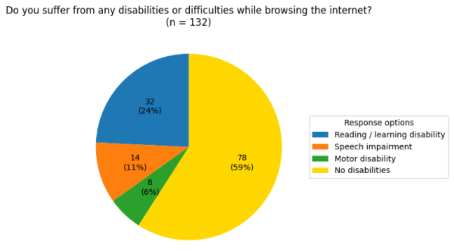
The questionnaire consisted of 20 questions and collected responses from 132 participants, including university students and community adults in the UAE. The questionnaire was organized into three main sections: identifying common types of disabilities, examining challenges encountered while browsing the Internet, and gathering participants’ opinions on the selected features of the proposed solution, namely a web browser extension. Due to space limitations, below are only some of the key questions and responses collected from participants. When asked whether they experienced any form of disability while browsing the Internet, as shown in Figure 1, 59% reported no difficulties. However, 24% indicated difficulties related to reading website content, 11% reported speech impairments, and 6% reported motor disabilities. These results show diverse accessibility challenges that affect how users read, navigate, and interact with web content.
Figure 1: Types of disabilities experienced while browsing the Internet.
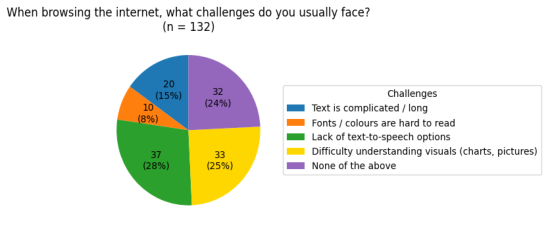
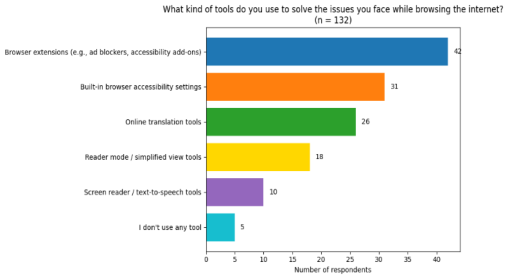
Regarding the types of challenges faced while browsing the Internet, 28% of respondents reported the absence of TTS option, while another 28% experienced difficulties in understanding visual elements, such as images, diagrams, and charts, 15% struggled with lengthy or complex text, 8% reported challenges related to color choices or font type and size. In contrast, 24% of participants reported no difficulties when browsing the Internet or reading website content. These results are illustrated in Figure 2. Building on the previous question and as illustrated in Figure 3, participants were asked about the tools used to overcome browsing challenges. 31.8% of respondents reported using browser extensions, 23.5% rely on built-in accessibility settings, 19.7% use online translation tools, 13.6% of the respondents use reader mode or simplified view options, while 7.6% use screen readers or TTS tools.
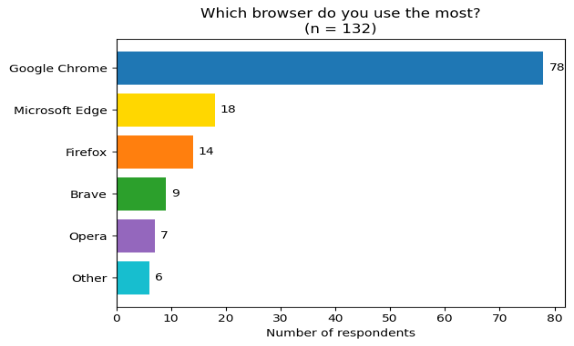
Simply: AI-Powered Browser Extension to Support People With Learning Disabilities 95 To further identify the Web browsers most commonly used by participants when browsing the Internet, Figure 4 shows that the majority of respondents (59%) use Google Chrome, followed by Microsoft Edge (13.6%). The remaining responses were distributed among Firefox, Brave, Opera, and other browsers. The responses collected from participants provide us with valuable insights that guide us to design and implement our proposed solution.
Figure 2: Types of challenges faced when browsing the Internet.Figure 3: Tools used to overcome browsing challenges.Figure 4: Web browsers most commonly used by participants.
Functional Requirements The functional requirements of the proposed solution “Simply” are summarized as follows:
The person with disability shall be able to convert complicated text (long or complex) and visuals (pictures, charts, etc.) to simplified text. This includes long and complex texts
The person with disability shall be able to convert texts to speech and vice versa.
The proposed solution “Simply” shall allow learners to select text for simplification.
The proposed solution “Simply” shall display the simplified content clearly in a pop-up window.
The proposed solution “Simply” shall maintain the original meaning while simplifying complex vocabulary and structure.
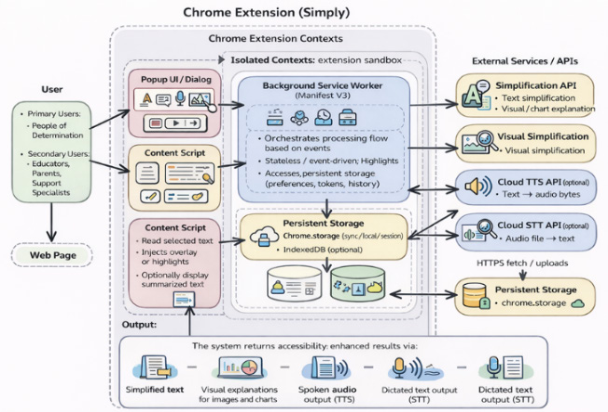
System Architecture The design of the Simply system is driven by established software engineering principles, that focus on separation of concerns, modularity, and integration at the browser level (Sommerville, 2016). To enable this system to function directly within existing web environments without modifications to external websites, a Chrome extension architecture has been adopted (Google Developers, 2024). This decision ensures that deployments are easy, overheads on the part of the users are light, and there is compatibility with heterogeneous web platforms. The Simply architecture is organized into three layers: a presentation layer (a popup user interface), an extension orchestration layer (content scripts), and an external AI services layer (background service worker).
Event-driven communication between components ensures proper handling of user events across system modules. Individual accessibility options text simplification, visual explanation, text-to-speech, and speech-to-text are each implemented as standalone modules, enabling features to be added, changed, or removed without any impact on the overall system structure.
The Simply architecture is illustrated in Figure 5. The popup user interface layer operates on a web page content and provides controls for accessibility features such as text simplification, visual explanation, TTS, and STT. Regarding the content scripts, they are injected into matching webpages and work within an isolated environment. Their role is to display accessibility- enhanced output extracted from user-selected text or images on a webpage, without modifying the original web content or source code. On the other hand, the background service worker is implemented following the Manifest V3, as an event-driven orchestrator. It takes inputs from the user-interface popup along with the content scripts, and sends them to the external AI services (APIs). User preferences and configurations settings are stored in Chrome storage. Note that Simply is stateless meaning that it processes information and deletes it once the task is done preserving users’ privacy (World Wide Web Consortium (W3C), 2018).
Figure 5: Architecture of the Simply Chrome extension.
IMPLEMENTATION The proposed Simply solution consists of four accessibility features. Two features use external AI services: text simplification and visual explanation (which includes image captioning and chart interpretation). It uses a standard desktop web browsing setup based on Google Chrome as the experimental environment. It is implemented and evaluated as a Chrome extension that fully complied with the Chrome Extensions Manifest V3 specification. The setup provides direct interactions with Web content without modifications to the underlying websites. This extension is developed by using standard Web technologies: JavaScript for the application logic, and HTML/CSS for the user interface.
The implementation of the text simplification feature was using a transformer-based large language model (LLM) and which can be accessed through a REST-based text simplification API. The input is the text that the user selects and the output is the simplified text with reduced linguistic complexity, but of course without changing the semantic meaning of the original text. Regarding the visual explanation, the latter is implemented through visual simplification API. A multimodal transformer-based model takes as input an image extracted from a webpage using content scripts, it processes it and then generates a descriptive textual explanation. The implementation of the third feature which is the TTS uses the browser- native Speech Synthesis API. This allows an audio playback of the original or simplified text directly from the popup interface of the extension. Lastly, the implementation of the STT feature is achieved via the Web Speech API. The latter allows users to input speech that is subject to explicit permission. The system uses pre-trained AI models that can be accessed through standardized APIs, thus eliminating the need for training on the device and reducing computational overhead (Chinthapatla, 2024).
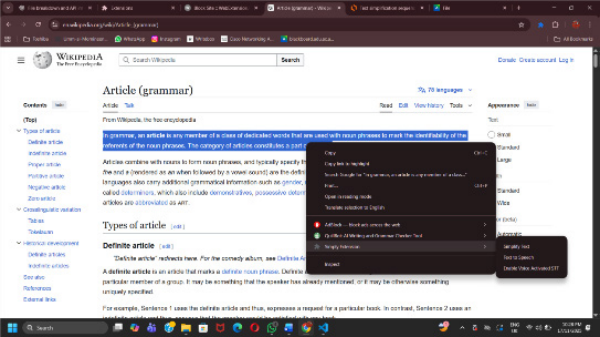
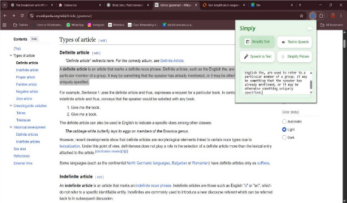
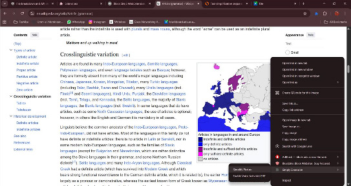
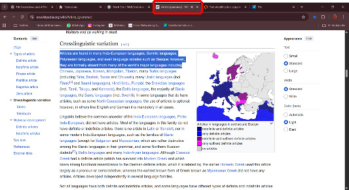
All these Simply features were evaluated in a client-side setup that reflects a realistic usage scenario. After installing the Simply extension in Google Chrome, the four features appear when needed, as shown in Figure 6. When the user selects text on a webpage and right-clicks it, the user can choose “Simplify Text” from the pop-up menu, and the simplified text is displayed in a pop-up window, as illustrated in Figure 7. Similarly, for the visual explanation feature, the user can right-click any visual object on the webpage and select “Simplify Picture.” The extension then generates and displays an explanation of the selected visual content, as seen in Figure 8. Figure 9 illustrates how the user can request the TTS feature: by selecting text on a webpage, the browser’s Speech Synthesis API plays back the audio, indicated by the active speaker icon in the browser tab. Finally, to activate the STT feature, the user must follow several steps, as shown in Figure 10. The user opens any online text editor, right-clicks anywhere on the screen, and selects the enabled voice-activated STT option. Once activated, the user enables the microphone. The service is then ready to listen to external speech, and the dictated text is successfully transcribed by the extension.
Figure 6: Context menu integration of the Simply Chrome extension, showing available accessibility actions on selected web content.Figure 7: The text simplification feature: (left) Selected input text; (right) the result of text simplification.Figure 8: The visual simplification feature: (left) Selected visual object; (right) the result of visual explanation.Figure 9: The visual simplification feature: (left) Selected visual object; (right) the result of visual explanation.Figure 10: The sequence of steps to activate the STT feature.
There exist several solutions which provide accessibility support to users when browsing webpages. However, most if not all these solutions are addressing one or few target functions. This requires users to resort to external tools. For instance, screen readers provide TTS support but do not offer other features discussed here. Similarly, text magnifiers, translators, and browser reading modes focus on limited accessibility aspects, with partial support for text presentation and minimal support for visual content. These standalone tools offer advanced text and visual processing capabilities, but they function outside the browser environment and lack integration into the user’s web interaction workflow. Table 1 summarizes these tools and the feature integration. As indicated in the table, the proposed solution “Simply” represents an integrated, browser-level accessibility solution with all features within a single Chrome extension. Simply offers textual and visual accessibility support and at the same time it reduces user efforts and cognitive loads.
CONCLUSION
This paper presents a holistic solution called Simply, which addresses one of the most common challenges faced by users: web content accessibility. Simply is a lightweight Chrome extension that integrates multiple accessibility features in a single, unified tool. These features include text simplification to reduce linguistic complexity, visual object explanation, text-to-speech, and speech- to-text—without requiring any external tools or additional software. The extension operates across any website, making accessibility more seamless and widely applicable.
Moreover, the proposed solution demonstrates the potential benefits of combining several AI-driven accessibility functions into one system, thereby reducing user effort, and increasing overall usability. The findings highlight the importance of user-centred and integrated accessibility solutions in enhancing everyday web experiences.
As future work, we plan to focus on improving the accuracy of the NLP and computer vision models to better handle different Web content. Also to make the solution working with any type of Web browsers. Lastly, the evaluation of the proposed solution will be conducted to assess accessibility impact, scalability, and real-world performance across diverse impairments and browsing environments.
Browser Reading Modes (Google, 2024b) and (Mozilla, 2024)
✓ ✓ ✓ ✓ ✗ ✗
Standalone AI Tools (OpenAI, 2024) and (Google DeepMind, 2024) Simply (Proposed) ✓ ✓ ✓ ✓ ✓ ✓
REFERENCES
Alekseev, P. (2025). “Integrated adaptive approaches to ensuring accessibility of web applications for users with disabilities”. Advances in Research, 26(3), pp. 62–69. Available at: https://doi.org/10.9734/air/2025/v26i31325 Chinthapatla, Y. (2024). Integrating APIs with AI: Revolutionizing Modern
Applications. Chowdhury, M.J.U. and Hussan, A. (2023). “A review-based study on different textto-speech technologies”. arXiv. Available at: https://arxiv.org/abs/2312.11563 Freedom Scientific (2024a). JAWS Screen Reader. Available at: https://www.
freedomscientific.com/products/software/jaws/ (Accessed: January 2026). Freedom Scientific (2024b). ZoomText Magnifier/Reader. Available at: https://www.
freedomscientific.com/products/software/zoomtext/ (Accessed: January 2026). Google (2024a). Google Translate. Available at: https://translate.google.com/ (Accessed: January 2026). Google (2024b). Chrome Reading Mode. Available at: https://support.google.com/
chrome/answer/7343019 (Accessed: January 2026). Google DeepMind (2024). Gemini AI. Available at: https://deepmind.google/ technologies/gemini/ (Accessed: January 2026). Google Developers (2024). Chrome Extensions Documentation (Manifest V3).
Available at: https://developer.chrome.com/docs/extensions/ Gyulyustan, H., Hristov, H., Stavrev, S. and Enkov, S. (2024). “Measuring and analysis of speech-to-text accuracy of some automatic speech recognition services in dynamic environment conditions”. AIP Conference Proceedings. Available at: https://doi.org/10.1063/5.0196448 Hijazi, R., Espinasse, B. and Gala, N. (2022). “GRASS: A syntactic text simplification
system based on semantic representations”. Data Science and Machine Learning, pp. 221–236. Available at: https://doi.org/10.5121/csit.2022.121518 Hu, Y., Hua, H., Yang, Z., Shi, W., Smith, N.A. and Luo, J. (2022). “Prompt-Cap: Prompt-guided task-aware image captioning”. arXiv. Available at: https://arxiv. org/abs/2211.09699 (Accessed: 27 December 2025). Jurafsky, D. and Martin, J.H. (2023). Speech and Language Processing. 3rd ed.
Stanford: Stanford University. Lazar, J., Goldstein, D. and Taylor, A. (2015). Ensuring Digital Accessibility through Process and Policy. Burlington: Morgan Kaufmann. Mozilla (2024). Firefox Reader View. Available at: https://support.mozilla.org/kb/
firefox-reader-view-clutter-free-web-pages (Accessed: January 2026). North, K., Ranasinghe, T., Shardlow, M. and Zampieri, M. (2024). “Deep learning approaches to lexical simplification: A survey”. Journal of Intelligent Information Systems. Available at: https://doi.org/10.1007/s10844-024-00882-9 NV Access (2024). NVDA Screen Reader. Available at: https://www.nvaccess.org/
(Accessed: January 2026). OpenAI (2024). ChatGPT. Available at: https://openai.com/chatgpt (Accessed: January 2026). Raffoul, S. and Jaber, L. (2023). “Text-to-speech software and reading comprehension:
The impact for students with learning disabilities”. Canadian Journal of Learning and Technology, 49(2), pp. 1–18. Available at: https://doi.org/10.21432/cjlt28296 Sommerville, I. (2016). Software Engineering. 10th ed. Harlow: Pearson. Szeliski, R. (2022). Computer Vision: Algorithms and Applications. 2nd ed. Cham: Springer. World Health Organization (2023). World Report on Disability. Geneva: WHO
Press.
World Wide Web Consortium (W3C) (2018). Web Content Accessibility Guidelines (WCAG) 2.1. Available at: https://www.w3.org/TR/WCAG21/ Yang, Z. et al. (2022). “An empirical study of GPT-3 for few-shot knowledge-based
VQA”. Proceedings of the AAAI Conference on Artificial Intelligence, 36(3), pp. 3081–3089. Available at: https://doi.org/10.1609/aaai.v36i3.20215
LISTED IN THE AHFE DIGITAL BOOKSTORE CATALOGUE
Explore the complete digital volume
Accessibility, Assistive Technology and Digital Environments
Read this individual research paper free through the original publisher, or explore the full digital proceedings book.
ISBN 978-1-964867-78-6
Explore this ISBN in the AHFE Bookstore ↗Listed in the July 2026 bookstore catalogue; search by ISBN to confirm current availability · Digital book purchase optional