Jose Miguel Gago da Silva, Fernando Moreira da Silva (2022). Drawing Accessibilities - Classroom Introductory Module to UX Design. In: Advances in Ergonomics In Design, Usability & Special Populations: Part I. AHFE Open Access, vol. 18. https://doi.org/10.54941/ahfe100766
Reflection through drawing is a strategy capable of developing perception, project values. Several studies explain how drawing serves as a reasoning tool when engaging a student to learn a subject of study; the learner tries to represent their comprehension on a specific subject. The act of drawing works as an incentive, students interact with the subject of study through the graphic representation of an idea. There is the need to empower drawing as a reasoning tool in higher education settings, in finding new approaches in classroom in developing user experience (UX) projects focused in accessibility, usability factors. This learning strategy is crucial in the contemporaneous context of user Interface design because it allows new outcomes, allows learners to understand in a systematic approach how to develop, empower accessibility solutions in a UX project.
Ergonomics In Design, Usability & Special Populations I (2022) https://openaccess.cms-conferences.org/#/publications/book/978-1-4951-2106-7
PROJECT FRAMEWORK Due to the markets internationalization, more and more studies on product usability are also conducted in trans national context. Additionally, usability develops itself further according to technological development. The latest developments in the domain of usability concerns the higher significance given to emotions get when interacting with a product. This tendency is generally covered by the term user experience (UX). The ISO 9241-210, 2010 defines the user experience as “A person´s perceptions and responses that result from the use of anticipated use of a product, system or service, the user perceptions and physical and psychological responses are also influenced by his/her the expectations and experiences. (Karwowski, Soares, Stanton, 2011)
Accessibility, usability, and user experience (UX) are the most important issues of every discussion centered on human — system interaction. These conceptual dimensions of the interaction define the qualitative and quantitative aspects that guide the design judgment, assessment, measurement, and implementation of the system-use interaction. The concept of accessibility interconnects in how a technological product can be used by people regardless to their disability, abilities, attitudes, and skills for accessing and reaching information and their goals. If we consider the concept of accessibility to that of usability, however, the two can be regarded as aligning in a temporal order-i.e, people first access the artifact and then they use it.
The accessibility is just the possibility and the ease of accessing the artifacts. On the other hand, usability describes how the user perceives the system. The usability evaluation is the process for assessing the communication (interaction) quality between a technological product (system) and a user (the one who uses a technological product). The unit of measurement is the user’s behavior (satisfaction. contort. time spent in performing an action. etc.) in a specific context of use. (Borsci, Kurosu, Federici, Mele, 2013).
Working in classroom environment requires different approaches in order to engage students in a motivated experience in understanding and constructing the UX Design project.
In the context of UX design was carried out in the course of Interactive systems (Bachelor degree in Communication Design, Superior School of Arts - PICB) a project classroom entitled “Task app” a UX design project in IOS 7, iPhone 5 settings. The project developed in-group and individual settings from the first diagnostic till the first wireframe clue was a group project and all the classroom interacted in the problem-solving quest. From the wireframe design till the final frame maps each student developed different solutions.
The systematic approach to the project incorporates several phases, from the diagnostic through persona method to function evaluation, wireframe design, and mockup testing, till the last graphic maps. The first phase involves a persona test, in this phase the students design 4 personas incorporating in their 24 hour activities directly related with appliances related with the app subject of the classroom project.
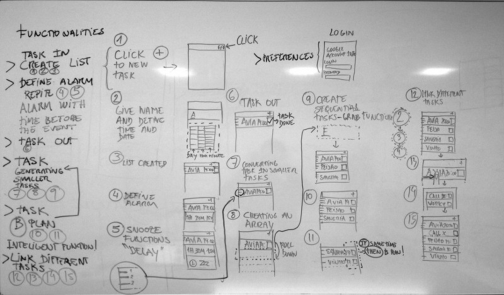
To draw the personas the students must undertake a reflection on what are the cultural and social trends in potential markets, these cultural and social settings are transnational. From these 4 personas characterization the students retrieve activities (qualities) related with possible functions within the app. These possible functions will differentiate the projected app from others in the market. When signing these functions the students draw what to expect of these functions in a simple and clear way (see Figure 1).
Ergonomics In Design, Usability & Special Populations I (2022) https://openaccess.cms-conferences.org/#/publications/book/978-1-4951-2106-7
Figure 1. List of functions
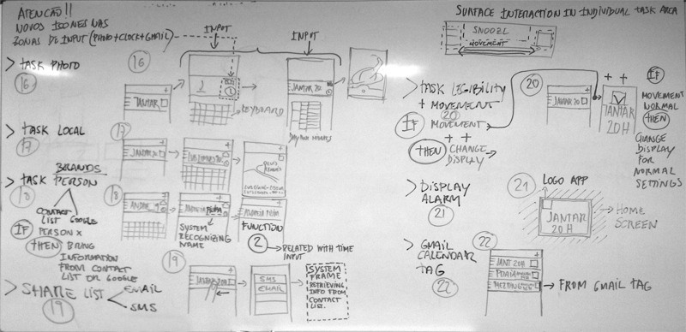
From these references the students build the app list of functionalities from the simpler till the more complex functions, structuring in outline the list of functions the frames required and how they repeat them self when applied in the functional sequence. A call function to outline a task settings in this app defines the time and repeating functions, this frame acts in the input of a new task or when the user change the task settings. The students try to structure the list of functions optimizing the outline of frames maximizing certain frames related to task settings, in this perspective one frame of settings links to several functionalities (see Figure 2).
Figure 2. List of functions (continued)
From this group of functions outlined the students draw the first wire frames in cardboards having the screen proportion of the final device (see Figure 3).
Ergonomics In Design, Usability & Special Populations I (2022) https://openaccess.cms-conferences.org/#/publications/book/978-1-4951-2106-7
Figure 3. Students drawing in the cardboards
Figure available in the original PDF paper.
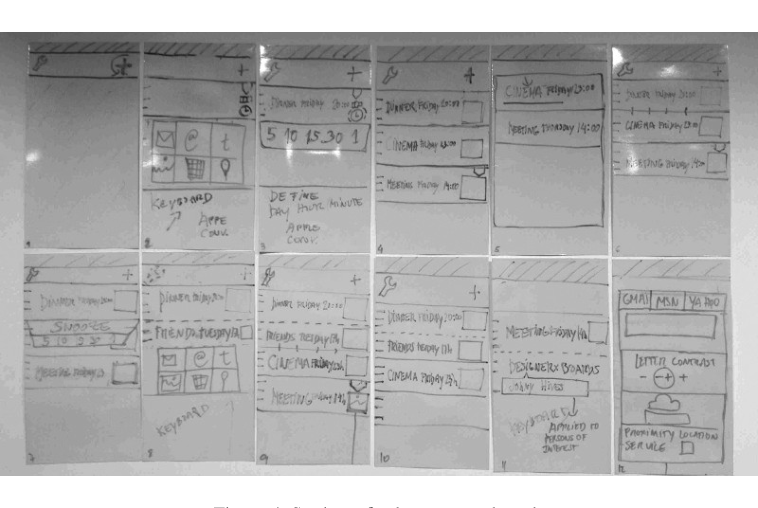
The student’s in-group interaction filled a unique set of cardboards in the classroom, discussing possible solutions to reach a consensus in the frames sequence and user logic of interaction (see Figure 4).
Figure 4. Students final consensus boards
From this consensus the students engage the individual project, drawing the wire frames in a digital tool for mockup using the real dimension in the device screen. This drawing in followed by a wireframe printed version applying mobility settings students will test the visual accessibility’s factor required in the reading process. The drawing, test and correction require three turns. The wire frame test gives way to the second phase of diagnostic incorporating an image diagnostic phase, more associated with aesthetic values, and composed by an emotional archetypes analysis. Resulting from the functionality diagnostic students retrieve information to the last phase, more related with the aesthetic properties concerning the graphic layouts. This last phase enclosures the final maps with the frames on the device full resolution. These maps incorporate the main and the transition frames in the app. The transition maps link to short movies animating the time and type of transition, those act as instructions to the app programmer.
Ergonomics In Design, Usability & Special Populations I (2022) https://openaccess.cms-conferences.org/#/publications/book/978-1-4951-2106-7
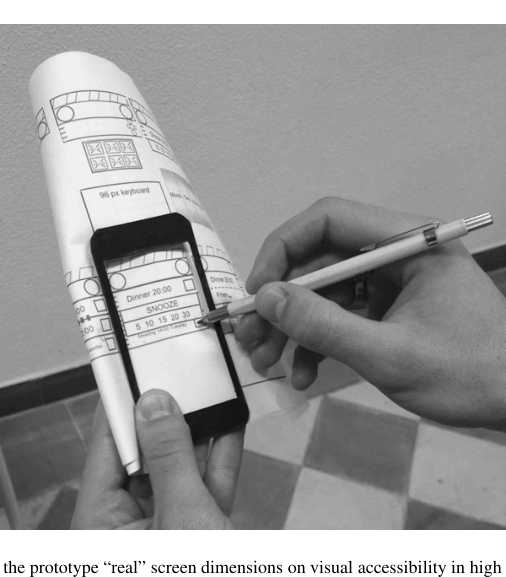
The project must balance the two “strings” in the accessibility settings. Low context in the screen effectiveness in communicating the message, but well adapted to a high context where physical mobility is key in designing visual accessibility and where the expressiveness (aesthetic feedback) from the app screen is crucial. The two elements must be tuned with perception, the process by which individuals select, organize, and evaluate stimuli from the environment to provide meaningful experiences for themselves (Adler 1997, p. 71) To engage student in this two-side strategy they must “feel” the different settings. The most easy affordable way to producing fast modifications and inputs is by prototyping not only in the wire frame but through layers of several adjustments using the device real dimensions and employing different visual distances from the closest reading till the length of the arm distance that works not so much on reading but more on information perception (see Figure 5). Therefor students try different levels of reading from the objective reading to the intuitive perception.
Figure 5. Testing the prototype “real” screen dimensions on visual accessibility in high mobility settings.
From the several tests, the students repeat the wire frame design test twice; in test the students produce annotations directly on the frame content. After they insert the annotations in the Mockup wire frame app (Pencil) students print the layout and go though new tests and repeat the process till they solve any flaws still visible in accessibility settings (see Figure 6).
Ergonomics In Design, Usability & Special Populations I (2022) https://openaccess.cms-conferences.org/#/publications/book/978-1-4951-2106-7
Figure 6. View from wire frame screen´s layout and iPhone 5 card frame.
Figure available in the original PDF paper.
CONCLUSIONS
To engage students in the problematic of accessibility first of all they have to felt what problems came in the distinct readings, the perception on information at long range, and the objective reading and closest range, and how the screen size limitation is “played” in the overall design. This experience with the physical limitations will launch quality parameters, to the last phase referred as “final frame maps” involving the device screen resolution and the demonstration movies constructed and organized and pre produced to the app programmer. Reasoning by drawing plays a major roll in improving possible solutions from the first assessments using wireframes till the usability tests. Students understand the sequence logic and how drawing allows fast modifications in the classroom consensus discussion. Due to fast pace of solutions developed in this project classroom, concerning accessibility factors in UX design projects is justifiable in the near future to engage students in other learning strategies applying drawing as a reasoning tool.
REFERENCES
Adler, N. S. (1997). “International dimensions of organizational behavior”, Cincinnati: South-Western College Publishing. Borsci, S., Kurosu, M., Federici, S., Mele, Maria. (2013). “Computer Systems Experiences of Users with and Without Disabilities: An Evaluation Guide for Professionals”. CRC Press. Hall, E. T. (1989). “Beyond culture”. Anchor Books Karwowski, W., M. Soares, M., Stanton, N. (2011). “Human Factors and Ergonomics in Consumer Product Design: Uses and
Applications”. CRC Press
Ergonomics In Design, Usability & Special Populations I (2022) https://openaccess.cms-conferences.org/#/publications/book/978-1-4951-2106-7
LISTED IN THE AHFE DIGITAL BOOKSTORE CATALOGUE
Explore the complete digital volume
Advances in Ergonomics In Design, Usability & Special Populations: Part I
Read this individual research paper free through the original publisher, or explore the full digital proceedings book.
ISBN 978-1-4951-2106-7
Explore this ISBN in the AHFE Bookstore ↗Listed in the July 2026 bookstore catalogue; search by ISBN to confirm current availability · Digital book purchase optional