Nadine Vigouroux, Damien Sauzin, Frédéric Vella (2022). Software Interfaces of the Jaco Robotic Arm: Results of a Focus Group. In: Advances in Ergonomics In Design, Usability & Special Populations: Part II. AHFE Open Access, vol. 19. https://doi.org/10.54941/ahfe1001244
Robotics is a good opportunity for developing assistive technologies that could provide greater functionalities to provide for more independent activities of daily living. The Jaco robotic arm is one of these devices. Using standard joystick control requires fine motor skills, which are often lacking in persons with spinal cord injury (SCI). A user-centered approach was conducted to design two alternative graphical user interfaces to control the Jaco arm. Firs, five Graphical User Interfaces (GUI) were designed: three based on a software keyboard and two on pie menu concepts. The three software keyboards differ from the visual representation: text buttons, icon buttons, or color organization and are adapted to the Jaco’s control modes. The two pie menus differ according to the interaction technique used to access the second level of the pie menu, i.e. the two techniques designed: pointing and “goal crossing”. Then two groups (one of occupational therapists and another of persons with quadriplegia caused by SCI) were invited to answer a questionnaire to collect their feedback and evaluate their future needs regarding the five GUIs presented. Following the focus group two GUIs were proposed taking into account these issues. The paper will discuss the user-centered approach and the issues that arose at each stage of the design.
Recent advancements in robotics make it possible for people with Spinal Cord Injuris (SCI) and other upper limb mobility impairments to perform daily living tasks and other ones more independently through the assistance of a robotic arm.
Robotics provides opportunity for developing assistive technologies by allowing greater functionalities. (Maheu et al. 2011) have shown that the Jaco arm is easy to use: the majority of the participants were able to accomplish the test tasks on their first attempt. Economic model results implied that the use of the JACO arm system could potentially reduce the caregiver’s time by 41% and could enhance user’s autonomy.
However, the ability to access and manipulate a device is a significant challenge for people with SCI and other upper limb impairments. Indeed, traditional manual joysticks for robotic arms require fine motor skills. In the last decade, several interfaces based on new technologies [Equation or mathematical symbol available in the original paper PDF]speech control, eye-tracking and brain computer interfaces[Equation or mathematical symbol available in the original paper PDF] have been tested. (Chen et al 2006) studied the effectiveness of a universal integrated pointing device. They reported that this device could help most people with severe SCI because it was designed based on SCI severity and finger flexor muscle strength.
(Malkin et al 2011) explored the use of the vocal joystick to control a simulated arm in two dimensions. This study showed that the use of the vocal joystick was appropriate, yet there was no significant time saving.
(Jiang et al 2013) designed a 3D joystick to operate a robotic arm, as an assistive device, in a more independent and efficient manner. This 3D joystick was compared to two different manual input modalities, a keyboard control and traditional joystick. Two different populations tested performing tasks with the robotic arm: subjects without disabilities and those with upper limb mobility impairment. Fitts’ law showed that the 3D joystick had the best performance index though it required a similar number of operations and errors as the standard robotic arm joystick.
A new study in http://news.brown.edu/pressreleases/2012/05/braingate2 reported that two persons with tetraplegia were able to reach for and grasp objects in a three-dimensional space; they used robotic arms, which they controlled directly with the BrainGate neural interface system. These interfaces based on brain activities offer new opportunities to for persons with severe SCI to control assistive technologies. However these BCI needs long training.
The second challenge is that each potential user has their own skill abilities, even for persons with the same level of SCI. (Cowan et al 2012) suggested that each user interface must offer available customization to adapt to individual skills of the person.
In this paper, we reported the user-centered design approach used to design several Graphical User Interfaces (GUIs) to control the Jaco arm. First, we will underline the agenda of the Focus Group and its main issues, then we will report the changes made following the empirical trials conducted by the team of therapists.
RELATED WORK
Human computer researches have investigated new paradigms to facilitate the accessibility of devices and interfaces for people with disabilities. It is critical that assistive technologies be closely matched to the user’s needs and abilities. Here we report some HCI paradigms on the design of accessible interfaces. Graphical user interfaces are often difficult to use for people with motor impairments. One of the reasons for this difficulty is the challenge of acquiring targets with pointing devices. A lot of targets (e.g. buttons, checkboxes, menus, radio buttons, are available and require the user to point inside before these widgets can be activated. This “pointing task” is sometimes difficult or impossible for some people with motor impairments. (Hwang et al 2004) showed that motor- impaired users often pass-over or slip-out of their target. Several works were conducted to solve these problems. (Trewin et al 2006) developed the concept of steady clicks, to assist the cursor movement for people with motor impairments. Other works showed similar difficulties with area pointing in an elderly population. (Vigouroux et al, 2009) reported that the type of interaction technique had an important impact on the cognitive activity of elderly subjects with cognitive impairments. They observed the same problems of positioning the cursor and difficulty in performing “drag and drop” interaction. To solve the problem of the “drag and drop” (Vigouroux et al 2009) designed the clicking and magnetic interaction (automatically associated with the cursor). (Wobrock et al 2008) explored “goal crossing” as an alternative strategy for more accessible targets in persons with motor impairments. In “goal crossing” targets are simply crossed by the pointing device cursor. The study compared the pointing and goal crossing techniques. Overall, the results were in favour of the “goal crossing”.
The Pie Menu paradigm was also studied. A pie menu is an interface where items are placed along the circumference in equal radial distances from the center. (Callaban et al 1998) reported that pie menus fare better than traditional linear menus by reducing target-seeking time, lowering the traditional error rates by fixing the distance factor and increasing the target size according to Fitts’ law (Fitts, 1954). Using a pie menu with a pointing device requires clicking and releasing the device over the desired item. Pie menus can even be hierarchically organized; in this case after clicking over a certain pie slice, a submenu would appear, and the user would make a selection by clicking a second time over the desired sub-slice. Hierarchical pie menu were implemented to include a large number of items (Kurtenbach et al., 1999). These hierarchical menus can be found in many of today’s software applications for pointing devices. However these interaction methods are questionable for touch screen-based devices. To address this problem, (Hesselmann et al. 2009) proposed stacked half-pie menus that allowed the visualization of an unlimited number of hierarchical menu items as well as providing interactive navigation via touch command. (Vaittinen et al 2007) designed pie menus for 5-way joysticks. Regarding design issues, they reported that the spatial nature of the task needed to be addressed when designing the map of the pie menus as well as icon knowledge. The results of these previous studies will be considered for the design of the GUI of the Jaco arm for upper impairment.
JACO ARM Description
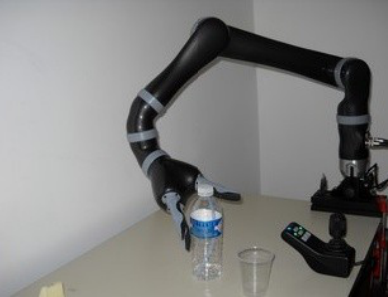
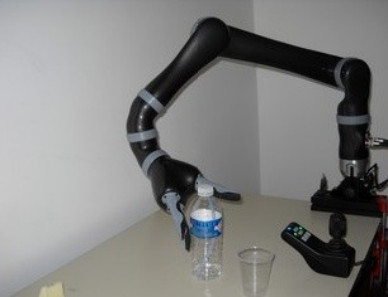
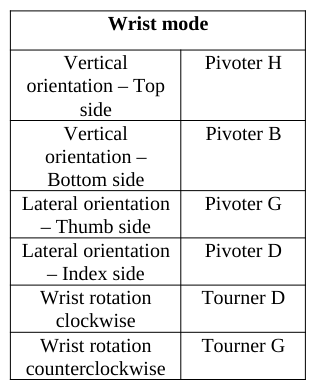
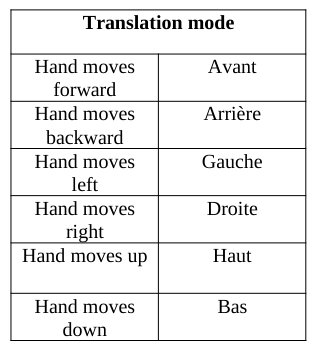
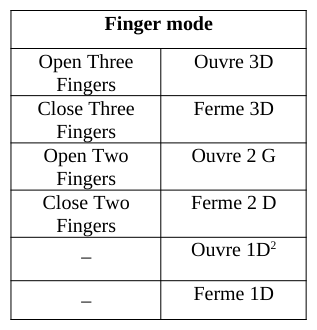
Developed by Kinova (http://kinovarobotics.com/), the JACO arm system is a lightweight (6 kg) robotic arm designed to compensate for upper limb impairments. Although it is normally mounted on a wheelchair, it can also be fitted on a table (Figure 1) or a bed. With its six degrees of freedom it may reach objects anywhere within its workspace, and in any direction or orientation. The 6 degrees of freedom refers to 6 movements in a three- dimensional space (Table 1), 6 movements of the JACO's wrist (Table 2) and opening and closing of the 3 fingers (Table 3). The three axes are: 1) shaft forward or backward; 2) shaft right or left; 3) handle turned clockwise and anti- clockwise. The joystick is fitted with two push buttons enabling to switch between different control modes. Through the first control mode, the user can move the robot hand in three-dimensional space, while maintaining the hand’s orientation. In a second control mode, the user can change the hand’s orientation while keeping the hand centered over the same point in space. Finally, through the third control mode, the user can control the grasp and release functions of the hand, using either two or three fingers.
Figure 2. Joystick to control the Jaco armFigure 1. Jaco Arm (http://kinovarobotics.com/)
(http://kinovarobotics.com/) The main control over the JACO arm is Cartesian as the user only controls movements of and around the hand. The second control is said to be Angular. The different joints of the Jaco arm are piloted automatically following the given command. The JACO arm is capable of 18 different movements which may be divided into several control modes. The following tables (Table 1, Table 2 and Table 3) summarize the different movements and control modes described in the Jaco manual1. The right column corresponds to the label of each text command of the text-based GUI (Figure 3).
1 http://kinovarobotics.com/wp-content/uploads/2012/04/JACO_User_Guide-1.2.7_RELEASED.pdf Ergonomics In Design, Usability & Special Populations II
Table 2: Jaco arm movement (Wrist mode)Table 1: Jaco arm movementTable 3: Jaco arm movement
(Translation mode)
(Finger mode)
Here, we have reported the principles of the three main modes (translation, wrist and finger). “In the “Translation mode”, the user controls the position of the hand in space. The hand will always stay parallel to the wheelchair seat frame. Translation X refers to left/right movements of the hand. Translation Y refers to front/back movements of the hand. Translation Z refers to up/down movements of the hand. In the “Wrist mode”, the user controls the position of the arm around the center point of the hand (reference point) which will not move (or move slightly) when operating in this mode. Lateral orientation refers to a thumb/index circular movement of the wrist around the reference point. Vertical orientation refers to a top/bottom circular movement of the wrist around the reference point. Wrist rotation refers to a circular movement of the hand around itself. In the “Finger mode”, the user controls the opening and closing of one, two or three fingers.” (1) The Kinova’s standard controller is a 3 axis joystick mounted on a support which includes 5 independent push buttons and 4 external audio outputs (on the back side) as illustrated in Figure 2. However, sometimes, this joystick cannot be used by people with upper extremity impairments.
Joystick use difficulties Some accessibility difficulties are observed by occupational therapists when the end user is training to control the Jaco arm by means of a joystick. Several limitations of use are identified:
– Long time pressing (around 4 seconds) the On/Off push button; – Very long time pressing (around 10 seconds) on the Home position push button;
– Difficulty in reaching the five push buttons (1, 2, 3, On/Off push button and Home position push button, Figure 2) due to the person’s poor forearm mobility. This difficulty is increased if the person only has the use of one hand.
– Necessity to release the handle with the hand to access the push buttons;
2 Not available for the three axis joystick Ergonomics In Design, Usability & Special Populations II
– Difficulty to rotate the handle ring of the joystick. This command requires a good control of the wrist.
All these accessibility restrictions can stop users from controlling the Jaco arm. GUI could be an alternative technique for interacting with the Jaco robotic arm to avoid previously mentioned limitations. As reported in the introduction, several works have studied the design of new pointing devices based on new technologies take into account individual motor skills. This paper describes the methodology used to design usable GUI as an alternative to joystick devices.
METHODOLOGY
A user-centered design approach (Norman, 1986) lead to the design of graphical user interface sketches. First, we conducted a Focus Group study. Then, the occupational therapists evaluated via observation sessions the different steps of the prototypes. Our objective was to implement the affordance concept (Gibson, 1977) for designing the GUIs. This part will describe the different steps of this approach. The different choices will be discussed.
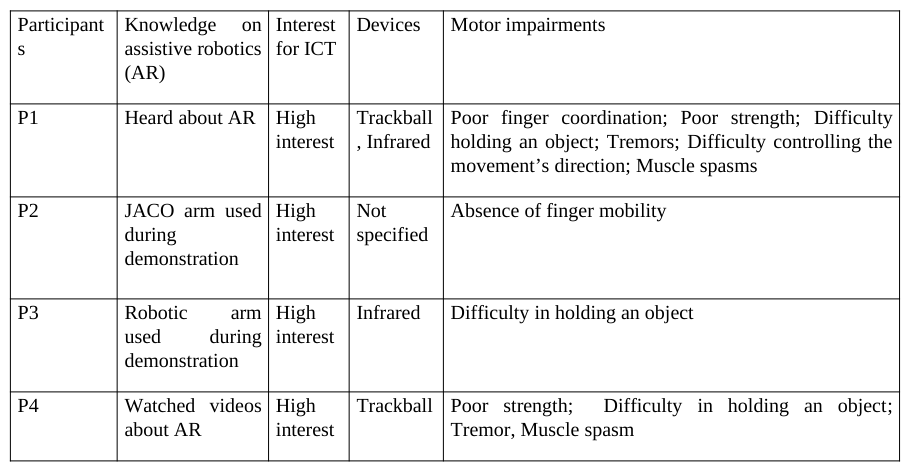
Focus Group description Focus Group: Two groups were involved: One made of five physical medicine and rehabilitation (PM&R) experts in and another of five people with upper limb impairments.
The first group included four occupational therapists and one PM&R physician working within a neurological rehabilitation center. The four occupational therapists were highly knowledgeable on assistive robotics and technological devices for persons with SCI.
The four participants with upper limb abilities were aged from 31 to 57 year old. Three of them were working and had a higher level of education. All were using a computer, cell phone and internet on a daily basis.
Table 4: Characteristics of participants with motor impairments Devices Motor impairments Participant s Interest for ICT Knowledge on assistive robotics (AR)
Focus group agenda For each group, the agenda was as follows:
– Explaining the focus group’s objectives; – Recording participants’ consent;
– Demonstration of the Jaco arm controlled through the joystick and GUI (text button version, Figure 3). The task consisted of “filling-up a glass with water and drinking it" and was intended to be carried out by a person with muscular dystrophy. The goal of this demonstration was to show the set of commands of the Jaco arm using the joystick and text-based GUI (Figure 3).
– Presentation of the five GUIs, which were described above, by a Human Computer Interaction designer; – Collecting user feedback from each focus group via a questionnaire on their impression and future needs: software keyboard versus pie menu; interaction technique; button representation and organization, devices.
GUI design The design guidelines of the GUIs were inspired by the research on usability and human computer interaction:
– Interfaces should be easy to learn and use; – Interface should have short menus and as few submenus as possible;
– Interface should leverage a person’s motor skills to increase the success their command; – Interface should accommodate multiple access devices.
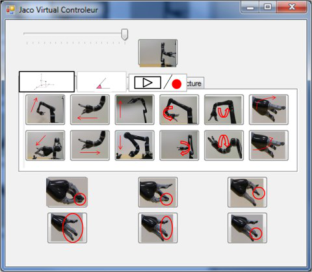
They were applied to design three software keyboard sketches and two pie-menu sketches for the focus group. To measure the impact of the visual representation, two types of software keyboard were designed. The first one (Figure 3) is based on textual buttons whereas the Figure 4 is based on icon representation. The Table 1, Table 2 and Table 3 give the name of the commands according to the user manual of the Jaco arm (1). The GUI interface consists of: – A slider to manage the speed control of the arm movement;
– Two tabs corresponding respectively to the two available controls over the Jaco arm (Cartesian and Angular mode) and the Playing/Recording tab. We have retained this representation because the tab structure allows to reduce the amount of information displayed on the screen; – Home button corresponds to the switch sleep mode;
– 12 buttons representing all the commands of the translate mode; – 6 buttons to control the opening and the closing of the fingers (1, 2 and 3 finger (s)).
Figure 3. Software keyboard with label buttons Figure 4. Software keyboard with icon buttons
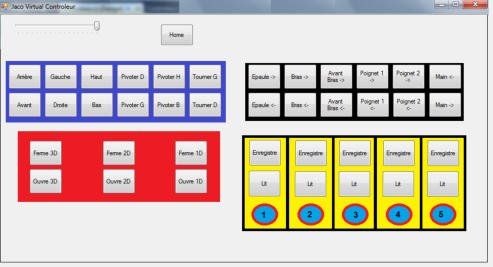
The Figure 5 is the display in full screen of the three tabs. We have chosen to associate a color to each tab to facilitate the memorization of the set of Jaco commands organization. The black color is linked to the Angular control of the arm. This control mode will not be described in this article. Five buttons (“Lit” [Equation or mathematical symbol available in the original paper PDF] Play, “Enregistre” [Equation or mathematical symbol available in the original paper PDF] Record) were designed. These buttons offers to the user the possibility to record or to play a predefined task. Each of these buttons can be assigned to a number or a sequence name. The interaction technique was the classical pointing.
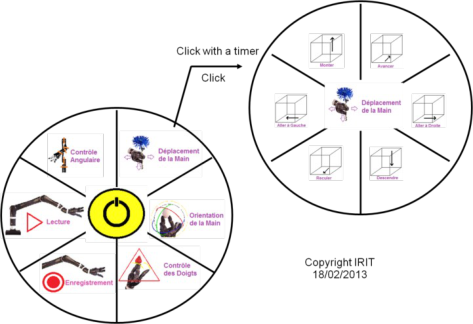
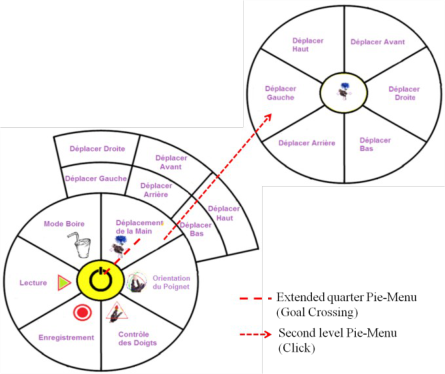
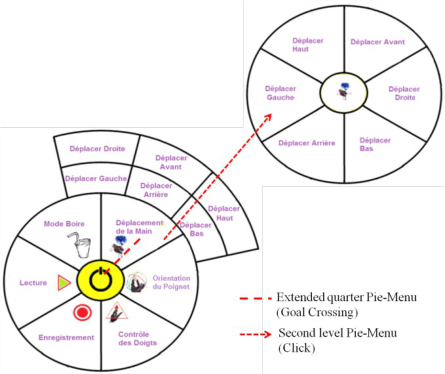
Figure 5. Software keyboard with the labels buttons grouped by mode The two Pie-Menus (Figure 6 and Figure 7) were designed to avoid the display overload and reduce the movement of the pointing cursor.Figure 6. Hierarchical Pie Menu Interface Figure 7. Extended Pie Menu Interface The visual representation of the buttons is the same for the two Pie Menus with two levels. The first level consists of six slices and the Home position center button. The six slices corresponds respectively in the clockwise to the translation mode, the wrist mode, the finger mode, the recording mode, the playing mode and the 6-axis angular control. The difference lies in two levels. The first one is the interaction technique used to make the second level of the Pie Menu appear. The second one is the visual representation of the second level.
To access to the second level (submenu), with the Hierarchical Pie Menu (Figure 6), the user clicks over a slice (here the slice of the “translation mode”), then the first level of the Pie Menu disappears while the second is displayed. To go back to the first level, the user has to click again over the center button. To access to the second level (submenu) with the Extended Pie-Menu (Figure 7), the user moves the cursor over slice (here, the slice of the “translation mode” is selected) then the submenu appears. The representation of the submenu is a quarter circle layout pressed against the first level of the Pie Menu. This extension can be considered as a help. The interaction technique is the “goal crossing” (Wobbrock and Gajos, 2008a), (Wobbrock and Gajos, 2008b), (Apitz et al., 2010). This technique was retained because users do not acquire a confined area but instead pass over a target line. This choice is argued by the study of (Wobbrock and Gajos, 2008a) reporting that “goal crossing” may be viable for motor impairments using mice and trackballs. The study has also shown that motor-impaired users have preferred “goal crossing” rather than pointing among. We hypothesize that the “goal crossing” is interesting because it saves up a click to access to the submenu and potentially decrease the cursor movement.
Then, in both types of Pie-Menu, the user can select a command of the “translation mode” by clicking on the appropriate area. The six couples (cube and label) respectively represent the six commands. Two types of click were proposed: a simple click and a click with a timer according to the user’s skill.
Post questionnaire We collected feedback from the two Focus Groups for the five GUI. The Table 5 and Table 6 summarize the main feedback.
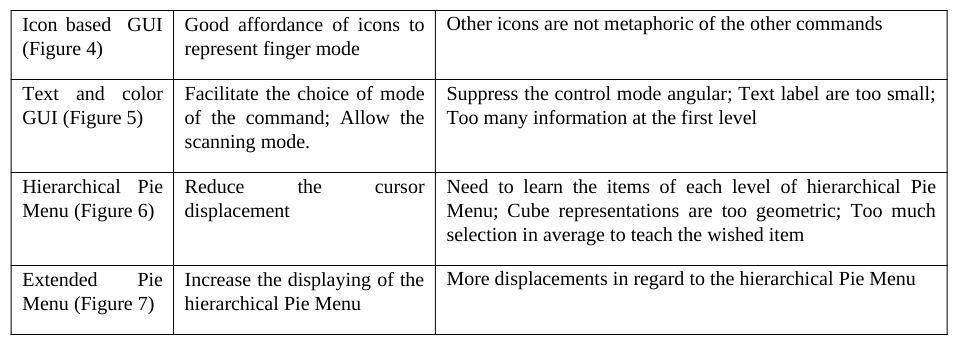
Table 5: Feedback from the participants with Spinal Cord Injuries Advantages DisadvantagesTable 6: Feedback from the occupational therapists
Results and discussion
We expected that the Text and color GUI (Figure 5) would be preferred to the Text based GUI (Figure 3) and Icon based GUI (Figure 4) only for finger command. Not surprisingly, most of participants with SCI have preferred icon representation. Some commented that these three GUI allow scanning technique. All participants with SCI like the Pie Menu concept. Most of them have a strong preference for the Extended Pie Menu because this GUI offers the displaying of the two Pie Menu levels at the same time. The therapists have confirmed the preference of the participants with SCI. They emphasize on the greater accessibility of the second level of the Pie Menu.
DESIGN OF NEW INTERFACES New design after the Focus Group
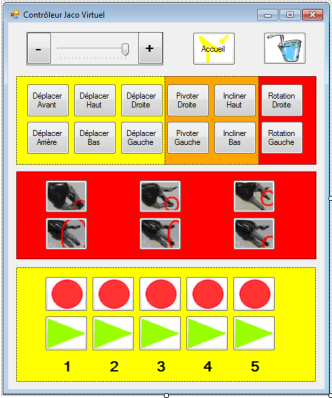
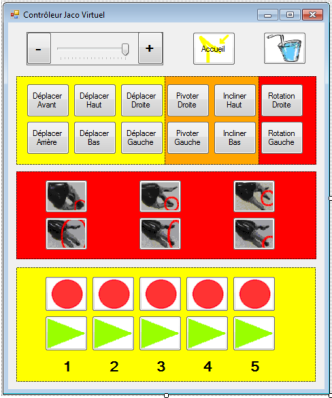
Two new designs of the GUI were done: one for virtual keyboard interface () and another for the Pie Menu (Figure 10). Ergonomics In Design, Usability & Special Populations II
Figure 9. Virtual GUI after evaluation byFigure 8. Virtual GUI after the Focus Group
therapists
The command structuring according to the mode command has been confirmed (). This choice aims to facilitate the appropriate command. For the “finger mode”, the figure representing the number of fingers and the opening/closing task has been preferred to text button. Fingers involved in the command are surrounded by a red ellipse for a better identification. A more universal iconic representation has been chosen to represent the recording versus playing command. The GUI also offers to the end user the possibility to label the record. The speed slider was completed by two buttons “-” and “+” to directly adjust the speed of the Jaco arm. This suggestion was retained because “the drag and drop” technique is more difficult to achieve. Indeed, dragging requires more physical effort than moving the same pointing device without holding down any buttons. The study of (MacKenzie et al., 1991) reported that the dragging task was slower than a pointing task and that more errors were committed during a dragging task than during a pointing task. They also noted that dragging is particularly difficult with a trackball because of the confluence of the thumb and finger muscles. These issues suggest us to avoid this interaction technique. The button was added following a request by the occupational therapists because this mode facilitates the user tries to drink from a glass or bottle without a straw.
The figure (Figure 10) is the result of the fusion of the two types of Pie-Menu presented during the Focus group. The control mode Angular was removed and replaced by the “Boire mode”(“drink mode”: . This control mode was judged too difficult by the end-users: indeed, the end user must plan the movement of the arm, joint by joint. This scheduling needs to have expertise about the motor coordination. Besides, the end user must view all the joints of the arm whereas in the control mode Cartesian he has only to view the hand joint.
Figure 10. Hierarchical and extended Pie MenuFigure 11. Hierarchical and extended Pie Menu
Interface after the focus group
Interface after trial
This Pie Menu integrates the Hierarchical structure to have two levels of menu but also the extension principles. The extension was added because the participants of the Focus Group have mentioned the benefits of the displaying of the slice of the submenu when the pointing cursor is passing over. Here the quarter circle is considered as a memory aid. Thus, this help facilitates the command memorization of the submenu. Two interactions were implemented to select the slice of the first level menu: the pointing and the “goal crossing” as illustrated in the Figure 10. We have retained these two interactions to offer the choice to the user according to his/her motor dexterity skill.
New design after empirical trials by occupational therapists Several iterative design propositions have been discussed between the human computer interaction team and the occupational therapist involved in the Focus Group. The goal of this design step is to increase the icon with a good affordance. This is why the finger representation of the arm was replaced by a representation of human fingers. The number of the fingers used to realize the command was added. The representation of a tortoise and a hare were preferred to “-“ and “+” symbols to define the Jaco arm speed. Wrist rotation command and finger opening/closing command have been put together in the second set (Figure 9) because of the proximity of the members used in the command execution command. A white background for all icons was chosen to increase the contrast. We also added the icon representation at the center of the circle of the first level to facilitate the memorization of these commands.
CONCLUSION AND FUTURE WORK The work presented here results from collaboration between human computer interaction experts and occupational therapists to design control interfaces for individuals with upper extremity mobility impairments, more efficient and intuitive for operating the Jaco Arm. Consideration of ergonomic factors has always driven our collaborative design.
In this paper, we presented a user centered approach including the focus group and iterative sessions of the design of two GUI. Each one is based on a specific concept: one is based on the virtual keyboard and the second on Pie Menu principles. The paper reports each step of this design method. Two populations (occupational therapists and persons with motor impairment) have participated to the focus group: The both groups of participants have wished icons with affordance and structuring of command according to the command mode of the Jaco arm. Due to positive feedback from participants during the Focus Group, a Pie Menu integrating both the Hierarchical and extended principles was designed. A specific effort was made for the design layout to represent an explicit layer of command representation. The expertise of the occupational therapists was considerable in this step. Future works will include recruiting control subjects and subjects with SCI for interface evaluation and evaluating fatigue. The objectives of these evaluations are to analyze the utility and the usability of these alternatives GUI to control the Jaco arm.
AKNOWLEDGEMENT The authors would like to acknowledge the Paul Bennetot Fondation under the aegis of the Fondation de l'Avenir for the financial support provided to this project (N° RMSQV1044). Special thanks to all the participants of the Propara Rehabilitation Center.
REFERENCES
Accot, J., Zhai, S. (1997), “Beyond Fitts' law: Models for trajectory-based HCI tasks”, in: Proceedings of ACM CHI'97, New York, ACM Press, pp. 295-302 Apitz, G., Guimbretière, F., Zhai, S. (2010), “Foundations for Designing and Evaluating User Interfaces Based on the Crossing
Paradigm”, in: ACM Transactions on Computer-Human Interaction, Volume 17, No. 2. Callahan, J., Hopkins, D., Weiser, M., Shneiderman, B. (1988), “An empirical comparison of pie vs. linear menus”, in: Proceedings of SIGCHI Conference on Human Factors in Computing Systems, CHI’88. pp. 95-100 Chen, C.-L., Chen, H.-C., Cheng, P.-T., Chen, C.-Y., Chen H.-C., Chou, S.-W. (2006), “Enhancement of Operational Efficiencies
for People With High Cervical Spinal Cord Injuries Using a Flexible Integrated Pointing Device Apparatus”, in: Arch Phys Med Rehabil, Volume 87 pp.886-873 Cowan, R. E., Fregly, B.J., Boninger, M. L., Chan, L., Rodgers, M.M., Reikensmeyer, D.J. (2012), “Recent trends in assistive technology for mobility”, in: J. NeuroEngineering and Rehab, pp. 9-20 Hesselmann, T., Flöring, S., Schmitt, M. (2009), “Stacked Half-Pie Menus Navigating Nested Menus, on Interactive Tabletops”,
in: Proceedings of the ACM International Conference on Interactive Tabletops and Surfaces, ITS'09, Banff, Alberta, pp. 173-178 Hwang, F., Keates, S., Langdon, P. and Clarkson, P.J. (2004), “Mouse movements of motion-impaired users : A submovement analysis”, in: Proceedings of the ACM SIGACCCESS Conference on Computers and Accessibility (ASSETS42004), pp. 102-109 House, B., Malkin, J. Bilmes, J. A. (2009), “The VoiceBot: a voice controlled robot arm”, in: Proceedings of the SIGCHI
Conference on Human Factors in Computing Systems, Boston, MA, USA, ACM Press, pp. 183-192 Jiang, H., Wachs, J.-P., Bradley, S., Duerstock, B.,S., Pendergast, M. (2013),“3D Joystick for Robotic Arm Control by Individuals with High Level Spinal Cord Injuries”, in: IEEE International Conference on Rehabilitation Robotics Gibson, J. J. (1977), “The theory of affordances”, Perceiving, Acting, and Knowing. Hillsdale, NJ: Lawrence Erlbaum
Associates.,R. E. Shaw & J. Bransford (Eds.) Mackenzie, I.S., Sellen, A., Buxton, W. A. S. (1991), “A comparison of input devices in elemental pointing and dragging tasks”, in: Proceedings of the Conference on Human Factors in Computing Systems: Reaching through Technology(CHI’91), S. P. Robertson, G. M. Olson, and J. S. Olson (Eds). ACM Press, pp. 161–166 Maheu, V., Frappier, J., Archambault, P.S., Routhier, F. (2011), “Evaluation of the JACO robotic arm: clinico-economic study
for powered wheelchair users with upper-extremity disabilities”, in: International conference on Rehabilitation Robotics, pp. 1-5 Malkin, J., Li, X., Haranda S;, Landay J., Bimes, J., (2011), “The Vocal Joystick, Engine v1.0”, in: Computer Speech & Langage, Volume 25 No. 3, pp. 546-554 Norman A., D., Draper W., S. (1986), “User-centred system design: New perspectives on Human Computer Interaction”, L.
Mounted Robotic Arm”; in: Proceedings of the 3rd ACM/IEEE international conference on Human robot interaction, pp. 105-112 Vaittinen, T., Viljamaa, T.-P., Piippo, P. (2007), “Design Issues Related to Pie Menus for 5-way Joysticks”, in: Proceedings of the 4th International conference on mobile technology, Applications and Systems, pp. 564-570 Vigouroux N., Rumeau, P. Vella, F., Vellas B. (2009), “Studying Point-Select-Drag interaction techniques for older people with
cognitive impairment”, in: HCI International, Springer-Verlag, pp. 422-428 Wobbrock, J. O., Gajos, K. (2008a), “Goal Crossing with Mice and Trackballs for People with Motor Impairments Performance, Submovements,and Design Directions”, in: ACM Transactions on Access Computing, Volume 1 No. 1, 37 pages. DOI = 10.1145/1361203.1361207. http://doi.acm.org/10.1145/1361203.1361207. Wobbrock, J. O. and Gajos, K. (2008b), “A comparison of area pointing and goal crossing for people with and without motor Ergonomics In Design, Usability & Special Populations II impairments”, in: Proceedings of the 9th international ACM SIGACCESS conference on Computers and accessibility, ASSETS’07, pp. 3-10.
LISTED IN THE AHFE DIGITAL BOOKSTORE CATALOGUE
Explore the complete digital volume
Advances in Ergonomics In Design, Usability & Special Populations: Part II
Read this individual research paper free through the original publisher, or explore the full digital proceedings book.
ISBN 978-1-4951-2107-4
Explore this ISBN in the AHFE Bookstore ↗Listed in the July 2026 bookstore catalogue; search by ISBN to confirm current availability · Digital book purchase optional