Santawat Thanyadit, Matthias Heintz, Effie L Law, Eleni Mangina (2022). How easy is it to eXtend Reality? A Usability Study of Authoring Toolkits. In: Human Interaction & Emerging Technologies (IHIET 2022): Artificial Intelligence & Future Applications. AHFE Open Access, vol. 68, pp. 9–19. https://doi.org/10.54941/ahfe1002707
Extended Reality (XR) can be a powerful educational tool as it enables students to experience a learning environment combining real-life physical and virtual objects. This combination not only augments what is possible with physical learning material alone but also makes use of the real world as a frame of reference for the digital content. Nonetheless, creating an XR lesson requires technical expertise that can be very challenging for many educators who have no or little relevant background. Hence, support systems like XR Lesson Authoring Toolkits (XRLATK) are needed to empower teachers to create XR lessons effectively and efficiently. XRLATK comprise three main components: authoring tools for teachers to create an XR lesson, viewer tools for students to view the XR lesson, and a platform for content creators (e.g., 3D designers and artists) to add 3D models and animation to be used in the XR lesson. While several surveys have suggested the importance of XRLATK (Radu, 2014, Jensen and Konradsen, 2018, Radianti et al., 2020), only a few XRLATK are available. Designing, developing, and evaluating XRLATK is a highly demanding task that requires careful considerations and inputs from three main groups of stakeholders - students, teachers, and content creators - with each having different priorities and preferences. According to the recent surveys (Heintz et al., 2021), students prefer XR lessons that are interactive, intuitive, and easy to follow whereas teachers prefer usable authoring tools that can help reduce their workload. Based on our observations (Nebeling et al., 2021), content creators prioritize a streamlined method to modify contents with the toolkits and gather requirements from teachers. To enhance their quality and impact, XRLATK must be evaluated from the technical (usability), social (presence), and educational (learning outcomes) perspective. Nonetheless, the related research has targeted students and considered learning outcomes as the primary performance indicator of XRLATK; teachers and content creators are largely neglected in the design and evaluation process.To address this shortcoming, we have been motivated to conduct a usability study for MirageXR, an interactive XRLATK software prototype developed under the auspices of the ARETE project (Augmented Reality Interactive Educational Systems). MirageXR allows teachers to enhance the physical teaching space by putting virtual learning elements like labels, models, and animations at different positions and structure the learning process by guiding students from one learning station to another. This way it gives teachers and students access to innovative XR contents to enhance learning and teaching. It also provides plugin support which enables content creators to extend the software beyond available materials to suit different classroom scenarios.In this paper, we present our research study on evaluating the usability of MirageXR with the mixed-method approach. Participants with heterogeneous higher education backgrounds were asked to assume the role of a secondary school teacher. First, they were introduced to MirageXR through a tutorial, then they were requested to create an XR lesson on the topic of their choice within a set amount of time during which their behaviour and performance were observed. Next, they were asked to provide feedback based on the interaction experience with MirageXR through questionnaires and interviews. Insights gained from the empirical findings could help us improve the design of MirageXR and contribute to building general guidelines for systematic evaluation of XRLATK.
XRLATKs comprise three main components: authoring tools for teachers to create an XR lesson, viewer tools for students to view the XR lesson, and a platform for content creators to add 3D models and animations to be used in the XR lesson. While several surveys have suggested the impor- tance of XRLATKs (Radu, 2014; Jensen and Konradsen, 2018; Radianti et al., 2020), only a few XRLATKs are available. Designing, developing, and evaluating XRLATKs is a highly demanding task that requires careful con- siderations and inputs from three main groups of stakeholders - students, teachers, and content creators - with each having different priorities and preferences. According to recent surveys (e.g., Heintz et al., 2021), students prefer XR lessons that are interactive, intuitive, and easy to follow whereas teachers prefer usable authoring tools that reduce workload. Content creators prioritize a streamlined method to modify contents with the toolkits and to gather requirements from teachers (Nebeling et al., 2021). To enhance their quality and impact, XRLATKs must be evaluated from the technical (usa- bility), social (presence), and educational (learning outcomes) perspective. Nonetheless, the related research so far has targeted students and considered
learning outcomes as the primary performance indicator of XRLATKs; tea- chers and content creators are largely neglected in the design and evaluation process.
To address this shortcoming, this publication presents a usability study for MirageXR, an interactive XRLATK open-source software prototype curren- tly developed under the auspices of the ARETE project (Augmented Reality Interactive Educational Systems) and initiated within the XR4ALL develo- pment platform (MirageXR 2021). MirageXR allows teachers to enhance the physical teaching space by putting virtual learning elements like labels, models, and animations at different positions and to structure the learning process by guiding students from one task station to another. Additionally, content creators can extend the content of the software beyond the curren- tly available materials to suit different classroom scenarios. In this paper, we present our research study on evaluating the usability of MirageXR with a mixed-method approach. Participants with heterogeneous higher education backgrounds were recruited as proxy end-users and asked to assume the role of a teacher. First, they were introduced to MirageXR through a tutorial, then they were requested to create an XR lesson using the XRLATK on a Microsoft HoloLens2 based on an example topic. Their behaviour and per- formance were observed, and they were asked to provide feedback based on the interaction experience with MirageXR through questionnaires and inte- rviews. Insights gained from the empirical findings could help the research team to improve the design of MirageXR.
XRLATK AND MIRAGEXR This section investigates the basic features necessary for XRLATKs as autho- ring tools to allow teachers to design a successful XR lesson and how they are derived from related works. We will also discuss how each of these features (F) is implemented in MirageXR.
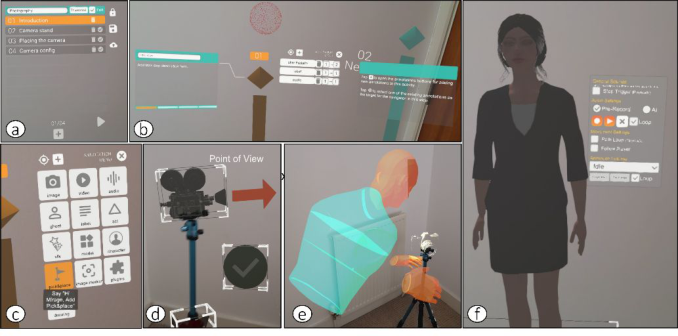
F1. Temporal tool: Teachers should be able to plan their lessons and stu- dents’ learning sequence. As a result, XRLATKs should feature a temporal tool that allows teachers to divide XR lessons into manageable steps. Since 3D settings may place additional cognitive demands on the learner, the lesson must be organised carefully to prevent cognitive overload. TutoriVR (Kuma- ravel et al., 2019) is an example of this strategy since it enables teachers to utilise annotation tools to mark parts of the lesson and divide it into key steps, enabling students to anticipate the teacher’s actions and reduce their cognitive burden. MirageXR employs a similar method, allowing the instru- ctor to break down the training into easily digestible steps. Figure 1a depicts MirageXR temporal control panel.
F2. Teachers’ representation: Teachers’ presence in the classroom could help students become more immersed and engaged (Cao et al., 2020). There are various ways to display instructors in an XR environment. One common technique is to utilise a full-body or half-body avatar to represent the teach- ers in the XR class. In MirageXR, teachers have three options to represent themselves. Teachers may employ a ghost — a half-body avatar — to record themselves when performing a demonstration (Figure 1e). Another option is
How Easy is it to Extend Reality? A Usability Study of Authoring Toolkits 11
Figure 1: (a) Temporal menu panels to divide the lesson into steps. (b) The orange task station (shaped like a diamond on top of a pillar) represents the suggested vantage point for the current step; the turquoise task station represents the suggested vantage point for the next step. (c) List of available augmentations in MirageXR. (d) Example of act visual cues and bounding box control to manipulate them. (e) Ghost recor- ding demonstrating a physical activity, in this case the camera setup procedures. (f) Example of an available 3D character and the character’s submenu for configuration.
to use 3D character models (Figure 1f) with voice recordings, enabling tea- chers to choose avatars that best suit their students. 3D character models are also powered by IBM Watson artificial intelligence, allowing them to operate as virtual teaching assistants that can answer students’ questions. Finally, teachers might play back a voice-recording of themselves without a visual representation to prevent the virtual environment from becoming too crowded.
F3. Viewer guidance: Students in a 3D environment may view the learning contents from many angles, which might cause them to miss key details in the lesson. Therefore teachers should be able to communicate with students about the best vantage point from which to see the instructions. To address this problem, some systems include viewer guidance suggestion, which posi- tions and directs the student’s attention in the 3D space during the lesson. For example, XR Studio (Nebeling et al., 2021) enables professors to move a virtual camera around the 3D environment to suggest the optimal viewing angles for students to observe the lecture. MirageXR employs a similar appro- ach by allowing teachers to position task stations to indicate the viewing area for their students (Figure 1b).
F4. 3D objects and visual cues: Teachers should have a multitude of 3D objects and visual cues at their disposal to use in their XR lesson. 3D objects can be used for demonstrating subjects that are difficult for students to learn, and visual cues provide students with in-situ instructions to follow (Oda et al., 2015). As a result, 3D objects and visual cues are a crucial aspect of XR lessons and having a vast selection available will increase generalisation and acceptance of XRLATKs. MirageXR takes advantage of Sketchfab, an open online library of 3D objects that offers educators with a broad selection of 3D models. MirageXR also includes a wide range of both 3D visual cues as
well as configurable 2D components. 3D visuals include act in-situ visual cues for guiding students (Figure 1d), visual effects (VFX) for capturing students’ attention, and 3D annotations that instructors may sketch in mid-air using hand tracking. Labels, images, and videos are examples of 2D components available in MirageXR. The list of available augmentations in MirageXR is depicted in Figure 1c.
F5. 3DUIs: XRLATKs should have user interfaces that are straightforward and clean, allowing novice teachers to quickly understand them and to be able to determine the steps needed to complete the creation of an XR lesson. User interfaces for XR applications are frequently designed using usability heuri- stics (Nielsen, 2005) and 3D user interface design principles (LaViola et al., 2017). Similarly, MirageXR uses a simple user interface design based on the Microsoft HoloLens2 interface, which translates Windows, Icons, Menus, and Pointers (WIMP) user interfaces into 3D UIs. Various menu panels are placed adjacent to the current task station to make them easy to find; users can rearrange those panels and place them in other 3D locations at their convenience. “Air-tap”, a 3D hand gesture interface provided by HoloLens2 analogous to a mouse click is used to interact with these menu panels. To interact with 3D objects, a bounding box user interface (Figure 1d) is provi- ded around the 3D object, allowing the user to move, scale, and rotate 3D objects.
MIRAGEXR EVALUATION In this section, we present the procedure and results of our usability evalua- tion of MirageXR, which focused on the critical features of XRLATKs descri- bed above (F1-5). An example XR lesson making use of the corresponding MirageXR features has been developed.
Example XR Lesson: Tripod Setup Tutorial Participants were asked to assume the role of a photography teacher, teach- ing the basics of tripods and camera setup. This topic was chosen because it would be easy to demonstrate and allows various types of interactions. To begin creating the XR lesson, participants had to divide the lesson into three steps (F1). In the first step, the participants had to create 3D characters (F2) that introduce the students to the teaching subject, i.e., a physical tripod. The participants were asked to use the available 3D user interfaces (F5) and task stations (F3) to configure the 3D character to face and point at the tripod and then record their introduction audio (F2). Then, the participants should place labels (F4) on specific parts of the tripod. In the second step, the participants were instructed to use the ghost features (F2) to record themselves demon- strating how to properly ensemble the tripod. The participants also had to play back and view their ghost recordings to ensure that the demonstration was done properly. For the next steps, the participants had to find a camera model (F4) from Sketchfab and place it on the tripod and use act visual cues (F4) to provide students with instructions on how the camera should be pla- ced on the tripod. Finally, a picture was taken using MirageXR features (F4) and the resulted picture had to be placed near the virtual camera model.
How Easy is it to Extend Reality? A Usability Study of Authoring Toolkits 13
Procedures Ten participants (three females and seven males, aged 20–50) were recrui- ted. Their disciplinary backgrounds ranged from art undergraduate students to engineer post-graduate students. None of the participants in the study had any prior knowledge of the MirageXR application. After completing the consent form and pre-test questionnaire, we showed the participants a 12-minute introductory video that demonstrated how to use MirageXR and let them perform a five-minute training session with the Microsoft Holo- Lens2 interface. Following the practice session, participants were asked to recreate the example lesson using MirageXR. Most participants managed to create their XR lesson in about 25 minutes. Some participants, howe- ver, skipped some steps or chose to deviate from the example. Participants were told to think-aloud to describe their thought processes and actions throughout the lesson creation. Following the XR session, participants com- pleted a post-experiment questionnaire to collect subjective data as well as a semi-structured interview to gather additional feedback. The entire user study took around 50 minutes. Video was captured to understand the parti- cipants’ point of view using the Microsoft HoloLens2 recording capabilities, which resulted in approximately 251 minutes of video footage. We also col- lected subjective ratings of the task’s difficulty, enjoyment, focus (Sauro et al., 2009), and mental effort (Zijlstra et al., 1985) in the post-experiment questi- onnaire. Also, we used a modified version of HARUS: Handheld Augmented Reality Usability Scale (Santos et al., 2015) to measure MirageXR’s usabi- lity based on comprehension and manipulation score. The comprehension score represents how well the user understands the information offered by the AR system (Table 1: Q5-12), whereas manipulation score indicates the ease of handling the AR device as the user performs the task (Table 1: Q13- 20). We also used Simulation Sickness Questionnaire to quantify simulator sickness (SSQ).
Results
The questionnaire results are presented in Table 1. On a 7-point Likert scale, participants assessed the task’s difficulty as kind of challenging (Q1: M = 3, SD = 0.74), which corresponded to participants’ mental effort evaluation of “rather hard to do” to “pretty hard to do” (Q4: M = 63, SD = 25.24). However, the majority of participants enjoyed the experience (Q2: M = 5.1, SD = 1.56) and were able to focus on the task (Q3: M = 5.2, SD = 1.03).
The HARUS score indicated further issues, with lower-than-average sco- res for both comprehensibility (M = 46.04, SD = 16.68) and manipulability (M = 43.33, SD = 16.97). Further inspection of the HARUS scores revealed that the participants gave particularly low ratings to questions 5, 8, 13, 16, and 18, which correlated to mental effort, responding time, bodily exertion, inputs, and controls (Table 1). In terms of simulation sickness, the analysed SSQ scores yielded no significant difference between before and after the test, indicating that MirageXR is unlikely to induce simulation sickness. To deter- mine the root causes of the usability issues encountered by our participants, we analysed video footage from the participants’ point of view and counted
Table 1. Questionnaire results.
Table available in the original PDF paper.
# Statements Mean SD Task’s difficulty, Enjoyment, Focus, and Mental Effort
5.1 1.56
Q1 Overall, this task was (1: Very difficult – 7: Very Easy) 3 0.74 Q2 I enjoyed the experience (1: Strongly Disagree – 7: Strongly Agree)
5.2 1.03
Q3 I was able to focus on the task (1: Strongly Disagree – 7: Strongly Agree)
63 25.24
Q4 Please rate your mental effort in this task according to the scale provided (0: Not at all hard to do – 150: Tremendously hard to do) Handheld Augmented Reality Usability Scale (1: Strongly Disagree – 7: Strongly Agree)
5.6 1.02
Q5 I think that interacting with this application requires a lot of mental effort.
4.4 1.56
Q6 I thought the amount of information displayed on screen was appropriate.
4.3 1.95
Q7 I thought that the information displayed on screen was diffi- cult to read.
4.2 1.83
Q8 I felt that the information display was responding fast enough. 2.5 1.43 Q9 I thought that the information displayed on screen was con- fusing.
4.3 1.42
Q10 I thought the words and symbols on screen were easy to read. 4.6 1.56 Q11 I felt that the display was flickering too much. 3.6 1.02 Q12 I thought that the information displayed on screen was consi- stent.
Comprehension Score (%) 46.04 16.68
5.1 1.45
Q13 I think that interacting with this application requires a lot of body muscle effort.
3.6 1.74
Q14 I felt that using the application was comfortable for my arms and hands.
3.5 1.36
Q15 I found the device difficult to hold while operating the appli- cation.
4.2 1.94
Q16 I found it easy to input information through the application. 3.0 1.55 Q17 I felt that my arm or hand became tired after using the application.
3.3 2.33
Q18 I think the application is easy to control. 2.8 1.33 Q19 I felt that I was losing grip and dropping the device at some point.
3.5 1.69
Q20 I think the operation of this application is simple and uncom- plicated.
Manipulation Score (%) 43.33 16.97
the number of times they struggled to perform a particular action throughout the usability test. The issues were classified according to the categories shown in Table 2.
How Easy is it to Extend Reality? A Usability Study of Authoring Toolkits 15
Table 2. Video analysis result divided by categories.
Table available in the original PDF paper.
# Category Description Total SD
83 2.97
Comprehension Issues 1 Participants misunderstood the UI, interacted with incorrect UIs, or tried to interact with non-UI elements.
31 1.14
2 Participants cannot find the menu panels/objects in 3D envi- ronments.
19 1.30
3 The target interfaces were obstructed by other interfaces or face away from participants.
15 1.36
4 Participants cannot find the correct option in the 2D menu. 17 1.35 5 Participants misunderstood that the function was already acti- vated, e.g., they thought that the ghost/voice was already recorded, and vice versa.
5 0.67
6 Participants had problems recover from error/mistakes. (e.g., participants select “follow player” by mistake then cannot manipulate the character).
4 0.66
7 Participants misunderstood the features’ function, e.g., trying to talk to an AI 3D character while selecting pre-recorded.
3 0.46
8 Participants have problems dividing steps, skipping step crea- tion, or creating steps in the wrong order.
Manipulation issues
133 4.58
9 Participants’ gestures were not registered or missed the target UI.
57 3.00
10 Participants used the wrong gesture to interact with the UI (scroll instead of air-tap, direct interaction instead of air-tap).
24 1.28
11 Participants had problems with 3D object manipulation, moving, rotating, and scaling (scale when intending to rotate).
12 Participants accidently selected an unintended target. 4 0.66
Issues by steps
Step 1: Create Step (F1), Character (F2), Label (F4). Then, configure the character to face a physical object (F3, F5). 247 5.46 Step 2: Make a step (F1), record Ghost (F2), and view Ghost (F5). 53 2.49
Step 3: Create a step (F1), download and position a 3D model (F4), and position act visual cues (F4) near a physical object (F3). 91 4.04
Comprehension Issues The major comprehension issues appeared to be participants misinterpreting the purpose of the user interfaces and being unable to locate the correct user interface in the 3D environment. The bulk of the issues arose during the first step, which required participants to configure 3D character models as their representation. The main issue here is that participants often want to edit the character model directly, as if they were adjusting a mannequin; their men- tal model differs from the MirageXR user interface concept, which employs additional menu panels and bounding boxes to adjust the character model.
Furthermore, due to the limited field-of-view of HoloLens2, the character context menu panels and bounding box were often presented outside of the participants’ field-of-view, making them difficult to detect. Character models also obscured and hampered access to other user interfaces, adding to the participants’ frustration. Additionally, the character configuration contains the most complicated features in the applications, which confused the inex- perienced participants and many times caused them to pick an erroneous choice. Aside from the problems encountered in creating character augmen- tation, we found other frequent user interface issues, such as unnecessary and non-functional buttons. These buttons should be eliminated to prevent those misunderstanding.
Manipulation Issues According to our observations, all participants struggled to perform the “air- tap” gesture, which was used to select the vast majority of MirageXR’s user-interface components. These issues, however, seemed to be caused by the inexperience of the participants, as seen by a decrease in the issue count as the evaluation progressed. These findings suggest that MirageXR should support direct touch control and provide haptic or sound feedback as much as possible, and that 3D UIs should be designed around direct touch con- trol rather than gesture control. This advice is consistent with the opinions expressed by interviewees, who suggested that we replace the air-tap gesture.
Other Feedback Despite the difficulties with the user interface, the majority of participants appreciated MirageXR for its extensive features. “I like how the users can record themselves and add multiple objects into the scene” one participant said. Another participant praised the 3D objects available in MirageXR such as visual effects and act, saying, “it’s quite lively, and should catch the stu- dents’ interest.” Most participants had a positive perspective and believed that MirageXR would be highly beneficial for the teacher if the user interfaces were upgraded. Regarding the teachers’ representation, several individuals commented that the ghost recording appearance was rather unsettling and that it would be preferable if it seemed more human. Some participants, how- ever, disagreed with this recommendation, arguing that 3D character model should also be enhanced further since they do not appear human.
Discussion
Based on the results of the usability evaluation, the shortcomings and sugge- sted improvements were highlighted, which can also serve as guidelines for XRLATKs in general. The usability findings show that the WIMP principle does not translate well to 3D settings because users have an additional cogni- tive demand when identifying items in the 3D environment, and certain users may not execute gestural control appropriately. Thus, the redesign of the menu panels is the key priority for overcoming these issues. The menu panels should be positioned within easy reach of users and should follow them in 3D space, promoting direct touch input, eliminating occlusion, and reducing
How Easy is it to Extend Reality? A Usability Study of Authoring Toolkits 17
the need of the “air-tap” gesture control. Another observation is that users interact with virtual things as if they were real; hence, the application should offer interaction that is as close to real 3D object manipulation as possible. A direct control mechanism may be a viable approach for reducing the comple- xity of manipulating the character model. Another alternative for changing 3D character models is to use the ghost recording technique, which seems to be intuitive for participants as seen by reduced issues in step 2 (Table 2), enabling them to “act out” the movement they want the model to perform. The system’s unresponsiveness was also identified as a serious concern in this usability study, due to the fact that adding 3D objects to the scene typically takes a long time and MirageXR failed to notify the user of the current system state. Another factor influencing perceived responsiveness is a lack of feed- back. MirageXR should keep users aware of the system status by including a loading screen and providing haptic, audio, or visual feedback to interactions with the UI to increase the sense of responsiveness and remove unnecessary buttons to minimise misunderstandings that occurred several times through- out the evaluation. Finally, teachers are unlikely to utilise avatars to represent themselves in XR lessons if they find the avatar to be unsettling. Several par- ticipants claimed that MirageXR should improve the appearance of ghost recording and consider improving character appearance further to avoid the uncanny valley (Moore, 2012).
CONCLUSION
This paper presents the mixed-method usability evaluation of MirageXR, an interactive XRLATK prototype for the ARETE H2020 project, the goal of which was to acquire usability feedback from the teacher’s perspective. Based on the task that participants had to accomplish and after analysing the questi- onnaires, interviews, and the empirical data collected, feedback was provided to the development of MirageXR for the purposes of being an AR Authoring toolkit in education. The toolkit enables the teachers to meet the challenges of an XR storytelling educational implementation and to take into account planning, organising, problem solving while enhancing critical thinking, crea- tivity and teamwork within the AR educational reality. The evaluation of the XRLATK’s usability is the most significant activity within the development of such platforms, as it is crucial to verify design assumptions and to iden- tify any issues with the user experience flow of actions as well as with the overall understanding of the XR development in the context of educational scenarios. The fact that most of the participants enjoyed the experience and were able to focus on the task is promising for the uptake of the platform by the target group. Another interesting finding was the fact that participants’ mental models differed from the MirageXR user interface concepts, which employ additional menu panels and bounding boxes to adjust the character model. Despite this, the majority of participants appreciated MirageXR for its extensive features. Digital skills are becoming increasingly essential for get- ting access to a range of products and services within the educational sector. According to the Education and Training Monitor (2020) teachers need to be equipped with the necessary skills to take advantage of the potential of
digital technologies to improve teaching and learning and to prepare their pupils for life in a digital society.
ACKNOWLEDGMENT
This research has been supported by the European Union’s Horizon 2020 research and innovation program under grant agreement No. 856533, project ARETE.
REFERENCES
Cao, Y., Qian, X., Wang, T., Lee, R., Huo, K. and Ramani, K., (2020), April. An exploratory study of augmented reality presence for tutoring machine tasks. In Proceedings of the 2020 CHI conference on human factors in computing systems (pp. 1–13). Education and Training Monitor (2020) European Commission - Education and
Training Monitor, Available at: https://op.europa.eu/webpub/eac/education-and- training-monitor-2020/en (Accessed: 4 April 2022). Heintz M., Law E.LC., Andrade P. (2021) Augmented reality as educational tool: perceptions, challenges, and requirements from teachers. In Proceedings of EC- TEL 2021 (LNCS 12884) Springer. Jensen, L. and Konradsen, F., (2018). A review of the use of virtual reality
head-mounted displays in education and training. Education and Information Technologies, 23(4), pp. 1515–1529. LaViola Jr, J.J., Kruijff, E., McMahan, R.P., Bowman, D. and Poupyrev, I.P., (2017).
3D user interfaces: theory and practice. Addison-Wesley Professional. MirageXR (2021) MirageXR-XR4ALL, Available at: https://dev.xr4all.eu/product/mirage%C2%B7xr/ (Accessed: 4 April 2022). Moore, R.K., (2012). A Bayesian explanation of the ‘Uncanny Valley’effect and related psychological phenomena. Scientific reports, 2(1), pp. 1–5. Nebeling, M., Rajaram, S., Wu, L., Cheng, Y. and Herskovitz, J., (2021), May. Xrstu-
dio: A virtual production and live streaming system for immersive instructional experiences. In Proceedings of the 2021 CHI Conference on Human Factors in Computing Systems (pp. 1–12). Nielsen, J., (2005). Ten usability heuristics. Oda, O., Elvezio, C., Sukan, M., Feiner, S. and Tversky, B., (2015), November. Virtual replicas for remote assistance in virtual and augmented reality. In Proceedings of the 28th Annual ACM Symposium on User Interface Software & Technology (pp. 405–415). Radu, I., (2014). Augmented reality in education: a meta-review and cross-media
analysis. Personal and ubiquitous computing, 18(6), pp. 1533–1543. Radianti, J., Majchrzak, T.A., Fromm, J. and Wohlgenannt, I., (2020). A systematic review of immersive virtual reality applications for higher education: Design elements, lessons learned, and research agenda. Computers & Education, 147, p.103778. Santos, M.E.C., Polvi, J., Taketomi, T., Yamamoto, G., Sandor, C. and Kato,
H., (2015). Toward standard usability questionnaires for handheld augmented reality. IEEE computer graphics and applications, 35(5), pp. 66–75. Sauro, J. and Dumas, J.S., (2009), April. Comparison of three one-question, posttask usability questionnaires. In Proceedings of the SIGCHI conference on human factors in computing systems (pp. 1599-1608).
How Easy is it to Extend Reality? A Usability Study of Authoring Toolkits 19
Thoravi Kumaravel, B., Nguyen, C., DiVerdi, S. and Hartmann, B., (2019), May.
TutoriVR: A video-based tutorial system for design applications in virtual reality. In Proceedings of the 2019 CHI Conference on Human Factors in Computing Systems (pp. 1–12). Zijlstra, F.R.H. and Van Doorn, L., (1985). The construction of a scale to measure subjective effort. Delft, Netherlands, 43(1985), pp. 124–139.
Read this individual research paper free through the original publisher, or explore the full digital proceedings book.
ISBN 978-1-958651-44-5
Explore this ISBN in the AHFE Bookstore ↗Listed in the July 2026 bookstore catalogue; search by ISBN to confirm current availability · Digital book purchase optional