Yin Cui, Fan Zhang, Yun Chen, Shijun Ge (2023). Small program design of learning tools based on user experience- Take "i remember" as an example. In: Usability and User Experience. AHFE Open Access, vol. 110, pp. 113–125. https://doi.org/10.54941/ahfe1003183
User experience is the evaluation criteria to measure the success of application tools. This paper constructs the evaluation criteria of user experience of wechat small program through literature research, and designs "i remember" small program according to this standard.This study is helpful to improve user experience satisfaction for the learning tools applet small program.
With the development of mobile Internet and the progress of information technology, wechat mini program is favored by the majority of users for its advantages of convenience and no need to download. Wechat mini pro- grams are widely used in teaching, medical treatment, shopping and other aspects.
Developed by Chinese company Tencent, wechat mini programs were officially launched in January 2017. It is attached to the wechat platform, allowing users to access it by scanning or searching without downloading or installing it. Compared with traditional application software, wechat mini program has its own advantages and is an example of “light application” thinking at the present stage (YeXu and ChaoJiu, 2021). For users, wechat mini program occupies less resources, simple operation, perfect function, not only makes the digital application “at your fingertips” but also changes peo- ple’s habit of using digital products, namely “download and retain” to “use up and go”, people can use it anytime and anywhere without downloading. For application developers, the research and development and technical thre- shold is low for which don’t need to adapt to a variety of models or platforms or systems, reducing the cost of construction and maintenance (Ni Zhang, 2019). Secondly, small programs are attached to the wechat platform and share wechat’s huge user resources, which makes it easy to spread and pro- mote information. At the same time, the instant and ready-to-use mode brings convenience to the linkage of online and offline platforms and compresses the transmission cost. Based on the above advantages, learning tools of wechat
mini programs provide great convenience for the student group. But wechat mini program in the realization of lightweight experience at the same time there are some drawbacks, this paper will carry out the design practice of learning tools small program based on the user experience.
Domestic scholar Professor Sun Yuanbo clearly put forward the impor- tance of user experience and the principles of user experience in his book “Human Factor Engineering Foundation and Design”. Professor Luo Shijian sorted out and analyzed the theory of user experience on the whole in his book “User Experience and Product Innovative Design”, and clarified the connection between industry, art, information technology and user experi- ence. It is suggested that designers should reflect on and analyze from the perspective of products. Professor Xu Yaohua’s “Smart Phone Interaction Design Based on User Experience” discusses and analyzes product design based on user experience. In addition to analyzing how a product can meet user needs, which also analyzes the relationship between hardware and sof- tware. In the “UI Design Discussion of Smart Device APP Based on User Experience”, Professor Ma Zhiqiang et al. focuses on the importance of user experience when analyzing the UI design of smart APP, and analyzes for the first time how to get rid of influencing factors in APP interface design, espe- cially factors such as software, code technology and users, which should be paid more attention. In addition, the famous foreign design experts Donald Norman,Nielsen,Shneidermanl and others initially provided many classical theoretical support for the study of interface design principles. Scott Weiss et al. analyzed the interactive context characteristics of handheld mobile devices and pointed out the application problems of mobile availability in all aspects of mobile application system design and implementation (Seott Weiss 2005). As human beings enter the era of “experience economy”, the research focus of interface design theory begins to extend from usability to user experience. Shelley Buchinger explained the definition of mobile appli- cation user experience and expounded its main influencing factors (Shelley Buchinger, 2011). The literature “Comparative Study on Interaction Design of Traditional Computer and mobile Device” analyzed the application of user experience theory in mobile application interaction design through the comparative study on interaction design of traditional computer and mobile device (Sheng Long, 2012). Therefore, designers should carry out in-depth analysis of the above factors in design practice.
Problems and Goals For modern college students, especially those majoring in art and design, the traditional way of acquiring knowledge only through paper media has many drawbacks, which cannot meet the learners’ new needs for learning resources, learning places and learning time. The continuous accumulation of knowledge is positively correlated with forgetting. In this case, timely review can enable users to focus on the output of knowledge, output is greater than the input, so as to improve the efficiency of learning and work. Therefore, the design and development of this system is mainly based on the user experience, according to the Ebbinghaus memory forgetting curve law, to help students
Small Program Design of Learning Tools 115
solve the problem of easy to forget in the learning process, according to the learner’s time to carry out knowledge cycle learning and review reminder, to provide help for the design class theory learners.
The Principle of User Experience User Experience (UEUX) research is a kind of research that systematically studies the subjective feelings and personalized experience of users in the whole process of using products based on the perspective of users. On the one hand, Ueux studies the improvement of people’s sensory experience, and on the other hand, it studies people’s interactive experience. User experience not only stays in the visual level of design research, but also on the intera- ction logic, user behavior logic, user model, demand model, interaction mode and other aspects of systematic research. User experience research includes the whole process of interaction design. In the process of research, user cha- racteristics and preference needs are defined, so as to establish the necessary research basis and theoretical basis for interaction design research. In order to improve user experience, the interface design of wechat mini program needs to be designed from the color matching of the interface, the composition and layout of the interface, the interface graphics, ICONS, characters and emo- tions, so that users can operate the interface quickly. The specific principles are as follows (YuanBo Sun, 2010):
1. Simplicity (1) The rationality of color matching. The background color adopts mono- chrome or the same color system to highlight the characteristics of simplicity, but at the same time, it can use gradient, texture and other elements to enrich the visual effect, to meet the needs of users for beauty.
(2) The icon design of the interface should reasonably use psychology and semiotics, accurate information transmission and beautiful appearance.
(3) The text in the interface should be the appropriate size, font and color recognition, in line with the user’s reading habits, not to dominate and auxiliary graphics more accurate information transmission, simplicity and beauty.
2. Ease of use It is easier for the user of the product to browse information than to memo- rize it. The ideal design is that the user can understand the function of the product and operate it correctly without consulting the manual. Therefore, the visual design of wechat mini program human-computer interaction inter- face should minimize the user’s memory burden, guide the user through visual design, so that the user can correctly operate the interface in the fastest and easiest way.
In the design, try to use visual symbols that people have recognized in real life to express information, such as the shape of a pushpin to express marks. Therefore, it is necessary to be simple and easy to use in the visual design of the human-computer interaction interface of wechat mini program.
3. Consistency The consistency principle has two meanings, that is, the consistency of the software itself and the consistency between different software, including
the similarity or consistency of the software’s conceptual pattern, semantics, command language syntax and display format, having a consistent seque- nce of operations in similar situations, using the same terms in tips, menus and help, and using consistent commands throughout. The consistency of the software interface is the consistency of the input and output, which is embodied in the similar interface appearance, layout, similar man-machine interaction and similar information display format between and within dif- ferent application systems. For example, the Windows operating system and Microsoft based on the system of the application software interface to main- tain a high degree of consistency. The consistency principle helps users learn to use the software, reduces the burden of learning and memory, because it can spread local knowledge and experience to other occasions, and also reduces the possibility of misoperation.
Wechat mini program human-computer interaction interface provides a variety of ways and channels to communicate with the machine, the conce- ptual model of the interface, display mode, etc. should be consistent, there is a consistent sequence of operations in similar situations. Therefore, the visual design of the interface also needs consistency to reduce people’s visual burden. Take icon design as an example, by using the same color, using the same element method to maintain the consistency of icon style; Keeping the light source, reflection and shadow consistent; Maintain consistency in the perspective of the icon design“.
4. Use graphics and metaphors Words such as menus, Windows, trash cans, files, folders, and toolboxes are all examples of everyday things being used instead of technical terms. ICONS and graphics have the advantages of being intuitive, graphic and informative, but they also have the advantage of overcoming language bar- riers. But the design of ICONS should be universal, that is, to be recognized by the majority of people. For example, in the “i” small program to the small thumbtack as a class purpose mark, has the advantage of intuitive, image.
5. Aesthetic requirements of design The layout design of the small program interface should follow the design principles of the hardware interface, namely the principle of importance, the principle of frequency of use, the principle of order of use, the principle of function, etc. Of course, under the premise of realizing the above require- ments, according to the user of the software, the application field of the software and the level of the hardware, the software interface can be pro- cessed artistically, and even imitate the objects in the real world, to improve the user’s interest. In accordance with the aesthetic principles of simplicity, unity of opposites and so on, the layout and color design of the interface are the general requirements for the design of high quality software interface.
6. Reduce memory requirements Users will always need a certain amount of knowledge and experience when working with a computer. This knowledge and experience are sto- red in the human brain, and the human information processing system can extract useful information from both long-term and short-term memory when needed. But a well-designed system should minimize a person’s memory requirements.
Small Program Design of Learning Tools 117
7. Prevent misoperation x Confirmation of important decisions: When the user performs key ope- rations, such as deleting the directory, permanently modifying the file or exiting the software without saving the file, there should be one or more confirmation input, and before confirmation, the user should be warned of the possible consequences of the operation;y The structure of instructions and dialogues must be consistent from beginning to end: z the name or icon of the instruction should be able to accurately describe the operation The action or function of the line to avoid misunderstanding;b { the com- mands, files or areas that cannot be operated should be protected, such as some system files.
8. Quick Search Provides a way to find specific information in large amounts of data, such as quickly scanning large files with the scroll bar of Windows, or using the “search” function to find specific names or identification numbers.
9. Provide feedback on information Respond to user actions and make changes in the display. Feedback can be presented in a variety of ways, such as text, graphics, sound, highlighting, etc. When the user selects a display item for execution, it is best to highlight the item. Provide the user with confirmation that his or her information has been communicated or accepted. Provide as much information as possible about the current state of the system, especially if there is a delay in system response. Progress bars and text prompts are often used.
“i remember” Wechat Small Program Design Practice Based on the Principle of User Experience
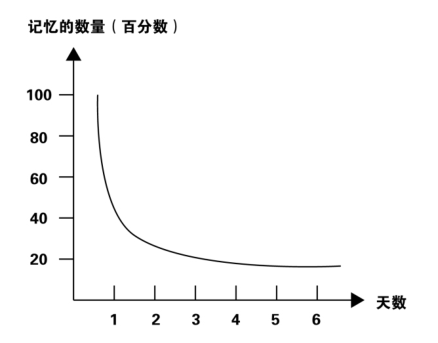
1. Design logic of “i remember” wechat mini program -- Ebbinghaus forget- ting curve German psychologist H. Ebbinghaus found that forgetting starts immedi- ately after learning, and the process of forgetting is not even. The forgetting speed is fast at first, and gradually slows down later. He believed that “retention and forgetting are functions of time”. He used nonsense syllables (syllables composed of several syllabic letters that can be pronounced but have no content meaning, i.e. are not words) as memory materials and coun- ted the number of retention and forgetting by economizing method. Based on his experimental results, he plotted a curve describing the process of forget- ting, known as the Ebbinghaus curve of memory forgetting (Figure 1). The logic behind the development and design of “Love Kee” wechat mini pro- gram is to counter Ebbinghaus forgetting curve and help users to remember through scientific repetition.
2. “i remember”wechat mini program design architecture and page display (1) System functional structure design Based on the principle of user experience, wechat mini programs should have clear functional modules and clear logical hierarchy to serve the main needs of users. First of all, the user groups and usage scenarios of “Aiji” wechat mini program are clearly defined. The user groups are college students studying design majors and college students preparing for exams. The usage
Figure 1: Ebbinghaus curve of memory.
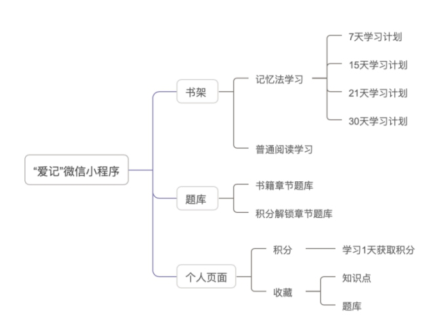
scenarios are used frequently before exams, in the classroom or before going to bed. Make clear its main functional modules: bookshelf page, question bank page, personal page. The system hierarchy diagram is shown in Figure 2. The user’s use process, first from the shelf to choose the need to memorize the book, then choose the memory plan, according to the plan to complete the learning task; Question bank to meet the needs of users to achieve memory through topic training; The personal page is mainly used to check the colle- ction of knowledge points and questions in the question bank for repeated learning and memory, as well as to check the score.
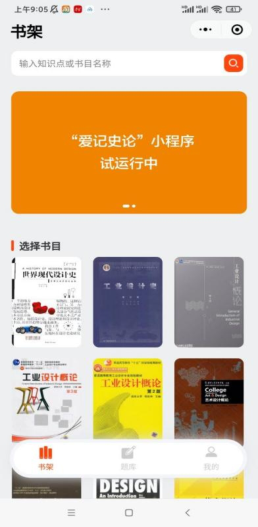
(2) Bookshelf page The shelf module is the user’s first selection module, through which the target books are selected. The display of the bookshelf is shown in Figure 3. After selecting the book to be studied, the user can start to study and enter the learning interface. The knowledge points of the book are displayed in the form of cards, which can contain a knowledge point or a question. To increase
Figure 2: “i remember” system hierarchy.
Small Program Design of Learning Tools 119
Figure 3: Bookshelf page.
user participation and interaction based on the principle of user experience, you can modify the card and set the card deck parameters. Modify the card: Users can modify the content of the card, such as adding notes. Set deck parameters: you can modify the name of the deck, the cover picture, as well as the number of new cards that the deck learns daily, the number of reviews, etc.
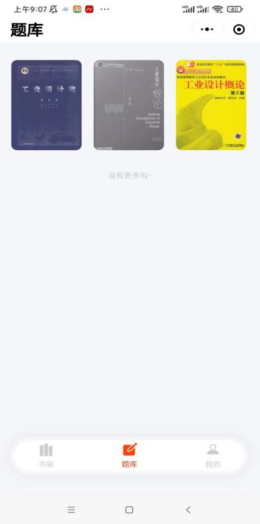
(3) Question bank page After completing knowledge points, users hope to strengthen training by doing questions, so they create exercise question banks corresponding to books on the bookshelf to strengthen understanding and memory of know- ledge points through exercise training. Users can choose the content of books they have mastered to practice and consolidate knowledge points. After ente- ring the question bank, its display form is still in the form of cards, which is consistent with the display form of book knowledge points.
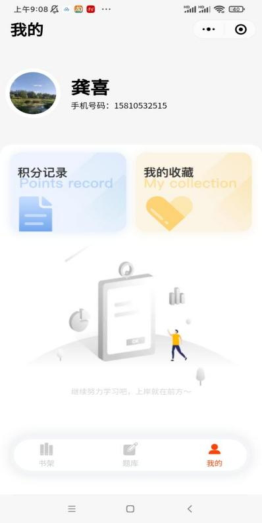
(4) Personal page The personal page contains the display of points and collection. From the perspective of function, when users encounter unfamiliar knowledge points or error-prone problems, they provide the collection function. After clicking the collection, it will be displayed in the collection of the personal page.
Points recording function: Set up the learning points system, study one day according to the plan to obtain the corresponding points, points can unlock the question bank book exercises, so as to improve the enthusiasm of users, but also to learn the knowledge points through exercises to strengthen and
consolidate. My collection: In the process of learning, users can put their tem- porary difficult to understand, difficult to remember the knowledge points collection, and then at any time can learn the collection of knowledge points in “My collection”, so that users can learn quickly and conveniently.
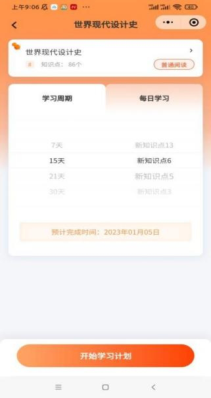
(5) Program operation interface After logging in the system, enter the home page of the applet first, as shown in Figure 2. Select a book knowledge point, set the learning cycle and daily learning knowledge points, you can start to learn, as shown in Figure 4.
3. UI design based on user experience principles (1) Consideration of interface color emotion First of all, it is clear that the audience of the small program is college students. According to the color research and color properties of similar pro- ducts, the color can be selected as follows: Blue green system, orange yellow, according to the research, some word memory software choose blue green system, give a person with a calm feeling, suitable for learning software, and the characteristics of memory itself needs to mobilize the interest and enthu- siasm of the student group, so choose bright and lively orange system in the design, in order to stimulate the user’s brain activity.
(2) Consideration for the simplicity of the interface The simplicity of the program interface is equivalent to the requirement that the program must have clear functions, so that users can easily operate, The core purpose of simplicity is to serve users. In the design, we should put ourselves in the user’s position to think about the problem, according to the
Figure 4: Question bank page.
Small Program Design of Learning Tools 121
Figure 5: Personal page.Figure 6: Program operation interface.
user’s needs to design. At the same time, it should be “simple but not simple”. If the arbitrary and simple “less” method is adopted, it may not be worth the gain. A good grasp of the “less is more” and the concept of minimalism, can reflect the designer’s “real kung fu”. This requires the following two aspects: The icon design need to be clear and concise.
For icons and graphic elements design, the information should be conveyed clearly and the graphic style should be concise and beautiful. In the process of icon design, the complex concrete cultural elements should be refined into simple and abstract symbol style as far as possible, so that the information can be quickly remembered, accepted and recognized by users. When a variety of different elements are used, the symbol style and style of each icon should also be kept unified, such as the proportion of white space and line thickness: the appearance of elements with the same or similar functions should be similar, on the contrary, the appearance should be different.
The layout need to be simple, reasonable and comfortable. Clever layout can reduce the cognitive burden of users and improve the efficiency of decision-making. In the layout design of “i remember” small program interface, can be combined with user habits, visual display of gra- phic information. At the same time, the elements on the screen should be properly arranged to ensure reasonable visual level, appropriate spacing spa- cing, and simplified modules, so as to help others understand the designed interface more quickly and simply (Maeda J., 2006).
(3) Consideration of interface consistency If the interface elements lack consistency, it will make the interface look disorganized and disorganized, and even make the user doubt the reliability of the product, or lose confidence in the product. Consistent UI design allows users to quickly recognize and become familiar with your design patterns, and on this basis quickly adapt to the overall experience.
The overall design style pays attention to unity and specification on the basis of simplicity, each element should echo each other, pay attention to the construction of component library and design specification, including color specification, text specification, spacing specification, spacing card specification, local specification, reduce maintenance iteration cost, ensure the uniformity of design output results, in order to bring users a clean and comfortable experience.
Background Management System Realization As a complete application, all need a background management system, ope- rators or administrators need to manage the data in the application, and they often do not know the technology, do not know how to operate the database. Therefore, it is necessary to provide background administrators with a mana- gement system with an interface, in order to facilitate their management and analysis of data in the application. As a complete project, the user experience of background management system is a very important content.
The background management system of this system adopts the architecture of the separation of the front and back ends. In order to build the front end of the background system faster, this paper uses the Vue-Admintemplate, which is a ready-made front end template of the background management system. The template is based on the vue. The technology used for the back end is Koa2, which is a node.js based framework.At the same time, the system also needs to docking small program cloud development, this paper takes HTTP API way in the background to achieve and small program cloud development
Small Program Design of Learning Tools 123
docking. This way is one of the five basic capabilities of small program cloud development, through this ability to call the backend of the small program cloud development in the cloud function, cloud database, and cloud storage.
The background management system of this system mainly includes the following functions: (1) administrator account management, administrator login through the user password, login successfully into the management page; (2) User management, the administrator can add, delete, modify and check the user authorization status; z User vocabulary list management, click the user from the user management page into the corresponding user vocabu- lary list management page, the page lists all the historical words of the user and all the information of the corresponding vocabulary, the administrator can be how to delete the vocabulary list, can modify the content of the voca- bulary and the vocabulary display state and complete state; { User statistics management, click the user statistics link from the user management page, you can view the user vocabulary information statistics, the administrator can add, delete, modify and check the user statistics.
CONCLUSION
This system preliminarily realizes the purpose of pushing the content to the user according to the law of the curve of memory forgetting. Based on the wechat small program platform, it can improve the convenience and faci- litate the use of users. Gaining points through daily learning progress and completion can help improve users’ learning interest and enthusiasm, create a competitive atmosphere, so that a large number of users can actively par- ticipate in the same learning task, this function is especially suitable for the relationship between teachers and student groups. This system helps users to avoid the tedious operation of content marking review time, and greatly redu- ces the restriction of the environment, so that the review and learning become more free and efficient. The small program has been successfully online, and can run normally for a long time, to achieve the expected effect, has a certain practical value, the follow-up will continue to update and improve.
ACKNOWLEDGMENT
The authors would like to acknowledge.
REFERENCES
Anderson, R. I., Ashley, J., Herrmann, T., Miller, J., Nieters, J., Eves, S. S., & Watson, S. T. (2007, April). Moving ux into a position of corporate influence: whose advice really works?. In CHI’07 Extended Abstracts on Human Factors in Computing Systems (pp. 1905–1908). Alves, R., Valente, P., & Nunes, N. J. (2014, October). The state of user expe-
rience evaluation practice. In Proceedings of the 8th Nordic Conference on Human-Computer Interaction: Fun, Fast, Foundational (pp. 93–102). Ben Shneiderman, (2009) Designing the User Interface Strategies for Effectve Human-Computer Interaction M. Addison Wesley.
Brhel, M., Meth, H., Maedche, A., & Werder, K. (2015). Exploring principles of user-centered agile software development: A literature review. Information and software technology, 61, 163–181. Buchinger, S., Kriglstein, S., Brandt, S., & Hlavacs, H. (2011). A survey on user
studies and technical aspects of mobile multimedia applications. Entertainment Computing, 2(3), 175–190. Caballero, L., Moreno, A. M., & Seffah, A. (2016). How agile developers integrate user-centered design into their processes: a literature review. International Journal of Software Engineering and Knowledge Engineering, 26(08), 1175–1201. Coutaz, J. (2010, June). User interface plasticity: Model driven engineering to
the limit!. In Proceedings of the 2nd ACM SIGCHI symposium on Engineering interactive computing systems (pp. 1–8). Donald A. Norman. (2002), The Design of Everyday Things. Basic Books. Ferreira, J., Noble, J., & Biddle, R. (2007, August). Agile development iterations and UI design. In Agile 2007 (AGILE 2007) (pp. 50–58). IEEE. Garcia, A., Silva da Silva, T., & Selbach Silveira, M. (2017). Artifacts for agile user-
centered design: a systematic mapping. Gerea, C., & Herskovic, V. (2015, November). Measuring user experience in latin america: an exploratory survey. In Proceedings of the latin American conference on human computer interaction (pp. 1–4). Guerrero-Garcia, J., Gonzalez-Calleros, J. M., Vanderdonckt, J., & Munoz-Arteaga,
J. (2009, November). A theoretical survey of user interface description languages: Preliminary results. In 2009 Latin American Web Congress (pp. 36–43). IEEE. Hassenzahl, M. (2018). The thing and I: understanding the relationship between user and product. Funology 2: from usability to enjoyment, 301–313. Hussain, J., Khan, W. A., Afzal, M., Hussain, M., Kang, B. H., & Lee, S. (2014).
Adaptive user interface and user experience based authoring tool for recommenda- tion systems. In Ubiquitous Computing and Ambient Intelligence. Personalisation and User Adapted Services: 8th International Conference, UCAmI 2014, Belfast, UK, December 2-5, 2014. Proceedings 8 (pp. 136–142). Springer International Publishing. J. Preece, Y. Rogers, H. Sharp, (2015), Interaction Design: Beyond Human-Computer Interaction, fourth ed., Wiley, Chichester. Jacob Nelson, (2004), Usability engineering, China Machine Press: Beijing. Kashfi, P., Nilsson, A., & Feldt, R. (2017). Integrating User eXperience practices
into software development processes: implications of the UX characteristics. PeerJ Computer Science, 3, e130. Law, E. L. C., Van Schaik, P., & Roto, V. (2014). Attitudes towards user experience (UX) measurement. International Journal of Human-Computer Studies, 72(6), 526–541. Maeda J.2006, The laws of simplicity. MIT press. Nebe, K., & Baloni, S. (2016). Agile human-centred design: a conformance che-
cklist. In Human Interface and the Management of Information: Information, Design and Interaction: 18th International Conference, HCI International 2016 Toronto, Canada, July 17-22, 2016, Proceedings, Part I 18 (pp.442–453). Springer International Publishing. Ni Zhang, (2019), Design and development of mobile learning platform based on wechat mini program, Computer knowledge and technology.15(04), 94–98. Phones. Mobile HCI’05. Pillay, N., & Wing, J. (2019, March). Agile UX: Integrating good UX develo-
pment practices in Agile. In 2019 Conference on Information Communications Technology and Society (ICTAS) (pp. 1–6). IEEE.
Small Program Design of Learning Tools 125
Rosenberg, D. (2019). The business of UX management. Interactions, 26(3), 28–35. Seott Weiss, (2005) Handheld Usability: Design, Prototyping, &Usability Testing for Mobile. Sheng Long, (2012), A comparative study of interaction design between traditio-
nal computer and mobile device, Wuhan: Huazhong University of Science and Technology. Wright, P., & McCarthy, J. (2010). Experience-centered design: designers, users, and communities in dialogue. Synthesis lectures on human-centered informatics, 3(1), 1–123. Ye Xu, Chao Jiu, (2021), Wechat small program design based on user experience,
Wireless interconnection technology. OCT, 12, 50–51. Yuanbo Sun, (2010), Human factor engineering foundation and design, Beijing: Beijing Institute of Technology Press.
LISTED IN THE AHFE DIGITAL BOOKSTORE CATALOGUE
Explore the complete digital volume
Usability and User Experience
Read this individual research paper free through the original publisher, or explore the full digital proceedings book.
ISBN 978-1-958651-86-5
Explore this ISBN in the AHFE Bookstore ↗Listed in the July 2026 bookstore catalogue; search by ISBN to confirm current availability · Digital book purchase optional