Vera Marie Memmesheimer, Ian Thomas Chuang, Bahram Ravani, Achim Ebert (2024). Mixed Reality Handheld Displays for Robot Control: A Comparative Study. In: Human Factors and Systems Interaction. AHFE Open Access, vol. 154, pp. 321–332. https://doi.org/10.54941/ahfe1005380
Robotic systems for several applications from healthcare to space explorations are being developed to handle different levels of autonomy – from working independently to working in collaboration with or under control by human operators. To ensure optimal human-robot cooperation, appropriate UIs are needed. In this context, applying Mixed Reality handheld displays (MR-HHDs), an ubiquitous tool for virtually augmenting reality, seems promising. As existing MR-HHD-UIs for robot control employ fatigue-prone and view-obstructing touch input, we propose controlling a robot arm via an enhanced MR-HHD-UI based on peripheral touch and device movement. Our detailed, comparative user study on usability and cognitive load demonstrates that the proposed MR-HHD-UI is a powerful tool for complementing the strengths of robots and humans. In our experiment, the MR-HHD-UI outperformed a Gamepad- and Desktop-UI in terms of temporal and cognitive demands and was rated as the preferred UI.
While robots can increase productivity and prevent errors by continuous, reliable, and precise task completion in several domains including health- care, home-care and space exploration, leveraging their full potential requires humans for complex task planning, supervision, and maintenance. Hence, the integration of user interfaces (UIs) that streamline control for non-experts and avoid unnecessary complexities is vital. Well-established UIs such as Gamepad- or Desktop-UIs require users to decompose high-level tasks, such as picking and placing objects, into detailed instructions that can be inter- preted by robot applications. In this context, applying Mixed Reality (MR) seems promising (Suzuki et al., 2022). Augmenting the robot’s operating envi- ronment virtually, can provide a preview before commands are executed and avoid the need for the operator to shift focus. Handheld displays (HHDs) like tablets provide an ubiquitous access to MR. Previous research on MR- HHDs for robot control mainly employs touch input which requires holding the HHD with one hand, see for example (Chen et al., 2021; Frank et al., 2017a; Kapinus et al., 2019). The HCI community, however, deems this
approach unfavorable for MR where fatigue and scene occlusion are likely to occur (Goh et al., 2019) and proposed mapping the HHD’s movement to virtual objects as an alternative object manipulation technique (Blattger- ste et al., 2021; Grandi et al., 2018; Marzo et al., 2014; Memmesheimer et al., 2023; Mossel et al., 2013). Yet such device-based interaction has not been applied for human-robot interaction (HRI). Addressing this gap, we developed a device-based MR-HHD-UI for robot control and compared it to Gamepad- and Desktop-based input with respect to usability and cognitive load.
BACKGROUND AND RELATED WORK While HHDs are ubiquitous in today’s technology domain, developing intu- itive interaction techniques for MR applications that integrate real with virtual objects is not straightforward. Goh et al. (2019) distinguish touch- , gestures-, and device-based input. However, common touch gestures like drag-and-drop are deemed unfavorable in MR where HHDs have to be held up high such that the device camera can capture the scene: In this situation, the arm holding the HHD is likely to experience fatigue while the hand per- forming touch gestures occludes the scene. In contrast to touch-input, mid-air gestures support 3D input but they still suffer from occlusion and fatigue. Device-based input solves these issues as the HHD’s movement is mapped to virtual objects and the HHD can be held with two hands.
Previous research on MR for HRI considered head-mounted displays (Chan et al., 2020; Park et al., 2021; Rudorfer et al., 2018; Tsamis et al., 2021) and HHDs (Cao et al., 2019; Frank et al., 2017b; Fuste et al., 2020). These approaches allow defining points in space for task and path planning (Cao et al., 2019; Chan et al., 2020; Fuste et al., 2020), controlling the robot by manipulating virtual replications of physical objects (Frank et al., 2017b; Park et al., 2021; Rudorfer et al., 2018), or displaying the robot’s intended movement as virtual augmentations (Tsamis et al., 2021). Exist- ing MR-HHD-UIs for robot control employ touch input. For instance, Chen et al.’s (2021) MR-HHD-UI allows defining target positions and path tra- jectories via touch-sliders and drag-and-drop touch-gestures. Kapinus et al. (2019) enable programming a robot to perform complex processes by letting users connect virtual pucks through a touch-UI: Real-world objects are over- laid with invisible bounding boxes, allowing selection by touching the object on the HHD’s screen. Frank et al. (2017a) augmented a workspace with vir- tual replications of real-world objects that can be manipulated by tapping, dragging, and rotating their fingers on the HHD’s screen. In (Chacko and Kapila, 2019) a smartphone can be moved to align a cross-hair with start and end locations that have to be marked subsequently via button clicks. How- ever, this work lacks a comparative evaluation with non-MR-UIs as well as virtual replications of scene objects which we consider to be one of the key benefits of MR as it allows detecting misplacements prior to execution which is crucial when dealing with differently sized objects.
Suzuki et al. (2022) conducted a very detailed survey on the application of virtual augmentations in the context of robotics. They reviewed previous
Mixed Reality Handheld Displays for Robot Control: A Comparative Study 323
research according to the (1) approach to augmenting reality in robotics (i.e., hardware and location of virtual augmentations), (2) the augmented robot’s characteristics, (3) the virtual augmentation’s purpose and benefits, (4) the type of information that they provide, (5) how this information is presented (i.e., design components), (6) the level of interactivity and interaction modal- ities, (7) domains for application, and (8) evaluation strategies. Considering their taxonomy, our MR-HHD-UI addresses the followings: It (1) augments surroundings with a HHD (a category which was only addressed by 6% of the papers they reviewed), (2) uses a tabletop-size robotic arm which is oper- ated by a single, co-located user, supports (3) robot control by (4) virtual augmentations that display the object’s current or target location, it (5) uses spatial references and visualizations to display locations combined with vir- tual replications of scene objects, it (7) is applicable to any domain requiring pick and place operations, and it was (8) evaluated in a comparative user study. The only aspect which cannot be clearly described concerns (6) the interaction paradigm (i.e., device-based interaction) which emphasizes the relevance of the research gap addressed in our paper.
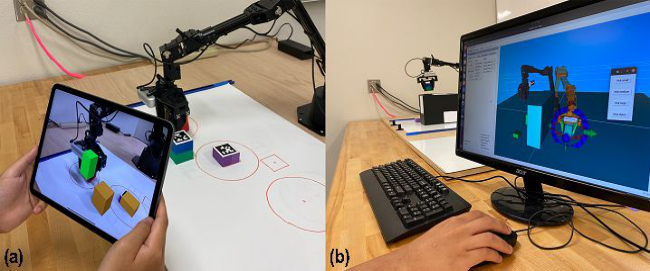
Figure 1: (a) Task 1a completed with the MR-HHD-UI: The large object is placed in its target position; the small and medium object are still in their starting positions. (b) Task 2 completed with the Desktop-UI: The medium object is moved above the obstacle box.
EXPERIMENTAL DESIGN AND PROCEDURE We conducted a study with 20 participants (13 males, 7 females; 14–59 years old) to compare an enhanced MR-HHD-UI to two well-established UIs (i.e., Gamepad- and Desktop-UI) with respect to usability and cogni- tive load. Prior to our study, the participants had different experiences with MR, robotics, gamepads, and HHDs. Following a within-subject design, all participants completed the tasks with the three UIs. We assigned different starting conditions to avoid learning effects: Participants started either with MR-HHD or non-MR-HHD input. Within the non-MR-HHD category we further randomized between Gamepad- and Desktop-UI. Before completing the tasks with each UI, video tutorials were shown that could be replayed as often as needed. After task completion with each UI, participants answered a questionnaire. This procedure was repeated for all three UIs.
In the first task, participants were asked to sort three foam boxes with different heights (small: 2.5cm, medium: 5cm, large: 7.5cm; all: width = length = 5cm) from large to small (front to back). Initially, the boxes were placed in the following order: medium, small, large (front to back); starting positions were marked as squares and target locations as cir- cles (Fig. 1(a)). To complete the task, participants had to translate the large (Task 1a), small (Task 1b), and medium (Task 1c) object to their target loca- tions. The distances from start to target locations were 31.5cm for the large, 12cm for the medium, and 21cm for the small object. A task was successfully completed if the box was placed upright and touched the target area.
In Task 2 (Fig. 1(b)), all objects were initially placed on the left side of an obstacle box and participants had to move the medium box to the right side of the obstacle box (28cm x 10.5cm x 18.5cm). The task was successfully completed if the medium box was placed upright on the other side of the obstacle box.
APPARATUS AND IMPLEMENTATION To select an object with the MR-HHD-UI the HHD must be moved such that the object’s virtual replication appears in the screen’s center and turns green. Similar to the interaction technique called Move in (Memmesheimer et al., 2023), the selected object can then be translated in three dimensions by applying peripheral touch with the left thumb while moving the device. To do so, we update the virtual object’s position in each frame by adding the translation vector of the HHD’s movement while touch is applied. As the object is not attached to the HHD but manipulated relative to the object’s position, the object can be easily manipulated from a distance. Manipulation stops as soon as left-thumb-touch is released and the object returns to its original color once it is outside the screen’s center (i.e., it is unselected). The user can then click the confirm or repeat button that appear on the screen’s left side. Upon confirmation, the object’s id and new position are sent to the robot which picks up the desired object and places it in the right spot.
For the Gamepad-UI, an Xbox 360 controller with labelled buttons was connected to the robot computer. The robot’s end effector can be moved to the left, right, back, and front in real time via the left joystick on the con- troller and the controller’s left and right trigger can be used to move the robot arm up and down. The gripper can be opened and closed via buttons on the controller’s right side.
The Desktop-UI consisted of a custom Python GUI and RViz windows displaying a 3D model of the robot arm. While picking the object is semi- automated via button click, placing the object in a new location requires adjusting the robot’s end effector by manipulating the respective arrows (up/- down, left/right, back/front) and circles (yaw, pitch, roll) in RViz. At any time, the robot can be commanded to move to the specified target position via but- ton click. Once the robot is in its desired position, the gripper can be opened via button click too.
Mixed Reality Handheld Displays for Robot Control: A Comparative Study 325
Depending on the UI experimented with, we combined and used different frameworks and libraries to control the robot’s movement and perception. For all UIs we used the 6DOF robot arm, ViperX 300, running ROS Noetic on an Ubuntu PC. The arm is controlled using ROS packages from Interbotix. These packages include motor drivers, 3D and inertial models, and gamepad teleoperation support for the arm. The MR-HHD- and Desktop-UI further use the framework MoveIt to perform motion planning of the robot arm. For controlling the arm and gripper with the Gamepad-UI, Interbotix’s ROS package for reading gamepad inputs is used to map user input via the Xbox 360 controller to the respective robot commands. Since the MR-HHD- and Desktop-UI require scene capturing, the robot was equipped with an Intel RealSense D435i camera which is used to detect the pose of foam boxes of different sizes equipped with AprilTag markers that were placed within the scene (70cm x 60cm). Images from the RealSense camera were collected via the Intel RealSense ROS wrapper and further processed with the ROS package apriltag_ros, so that objects can be identified via their unique April- Tag and pose detection can be performed. Upon detection of objects by their attached AprilTag, they are added to the planning scene in MoveIt. With the Desktop-UI, the user can then command the robot to grasp and release objects via button clicks in the GUI. MoveIt then plans and executes a trajectory for the robot to complete the action and executes Interbotix’s motor controllers. To move the object to a new location the user has to adjust the pose of the robot’s 3D model in RViz accordingly and click a button which commands the real robot to the specified pose. The MR app which is running independently on the Apple iPad Pro (11”, 3rd Gen.) was developed in Unity using ARKit within the AR Foundation API and deployed to the iPad via XCode. In con- trast to the Desktop- and Gamepad-UI, this requires wireless communication which was established as follows. We used Flask, a Python web framework, on the robot’s side to listen and respond to UnityWebRequests, sent by the iPad app. The virtual scene object replications in the MR app were named according to the identifiers used by the robot app. Upon launch, the iPad app sends a GET request to the robot app asking for the objects’ size, position, and orientation. The robot app responds with a list of objects and their requested data calculated through AprilTag detection. Since the iPad app and the robot app rely on different coordinate systems we defined a fixed launch position for the iPad. Considering the fixed offset between this launch position and the origin of the robot’s coordinate system, we transform the scene objects’ positions in the robot’s coordinate system to the respective coordinates in the iPad’s coordinate system. The iPad then adapts the size, orientation, and position of the respective objects according to the data received from the robot. After this calibration phase, the iPad can be moved independently in space and the user can start selecting and translating objects to control the robot. The robot app transforms received coordinates for the target location back to the respective point in the robot’s coordinate system and executes the task using MoveIt’s motion planning software and Interbotix’s hardware controllers.
RESULTS
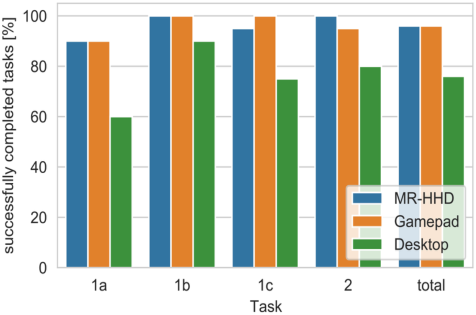
Effectiveness We compared the effectiveness of the three UIs by the percentage of success- fully completed tasks (Fig. 2). While available MR technologies are known to provide insufficient real-time tracking (Suzuki et al., 2022) our work here is focused on applying an advanced MR-HHD interaction paradigm to robot control rather than on improving display and tracking technologies. There- fore, we considered a task to be successfully completed when the object was placed upright within its target area (radius = 8cm). For the MR-HHD- and Gampepad-UI 96% of all tasks were completed successfully whereas only 76% of the tasks were completed successfully with the Desktop-UI.
Figure 2: Effectiveness assessed via success rates.
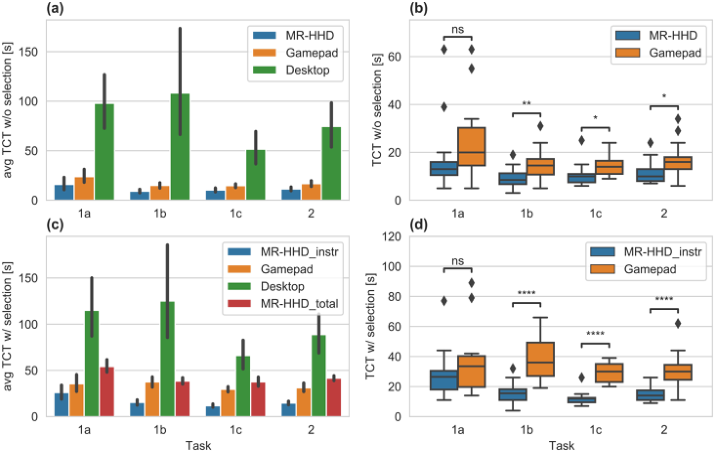
Efficiency To evaluate efficiency, we compared task completion times (TCTs) of success- ful tasks. In this context, the different workflows of the three UIs have to be considered. With the MR-HHD-UI, input is provided prior to robot execu- tion, with the Gamepad-UI robot execution occurs during input, and with the Desktop-UI input and robot execution occur alternately. To maintain com- parability when analyzing TCTs, we considered the time spans during which user input was required. For each task and UI we measured the time needed to instruct the robot to translate the object with (TCTw/_sel) and without (TCTw/o_sel) selecting the object.
Fig. 3(a)+(c) show the average TCTs for all successfully completed tasks and UIs and indicate that both the MR-HHD- and Gamepad-UI clearly out- performed the Desktop-UI. Furthermore, we measured lower average TCTs for the MR-HHD-UI compared to the Gamepad-UI. The boxplot diagrams in Fig. 3(b)+(d) show the pairwise comparison of TCTs with the MR-HHD- and Gamepad-UI. Paired samples t-tests with Bonferroni correction showed sig- nificantly lower TCTs of Tasks 1b, 1c, and 2 for the MR-HHD-UI compared to the Gamepad-UI. Regarding the MR-HHD-UI TCTsw/_sel we considered
Mixed Reality Handheld Displays for Robot Control: A Comparative Study 327
both the time needed to instruct the robot (MR-HHD_instr) and the total time for user input and robot execution (MR-HHD_total). While the average total TCTsw/_sel for the MR-HHD-UI were higher than for the Gamepad-UI, they are still lower than for the Desktop-UI. Furthermore, the robot moved at rather low speed while executing the commands from the MR-HHD. Thus, MR-HHD_total could be easily reduced by accelerating the speed at which the robot moves. As our paper is mainly focused on comparing the usabil- ity of different UIs for robot control, we consider the MR-HHD_instr to be more representative than MR-HHD_total for comparing TCTsw/_sel.
Figure 3: TCTs without (a)+(b) and with selection (c)+(d); (a)+(c): avg TCTs and 95% confidence intervals for successful tasks; (b)+(d): paired samples t-tests with Bon- ferroni correction comparing successful MR-HHD and Gamepad tasks, alternative hypothesis: µTCT (MR-HHD) < µTCT (Gamepad); * p ≤.05,** p ≤.01, *** p ≤.001, **** p ≤.0001.
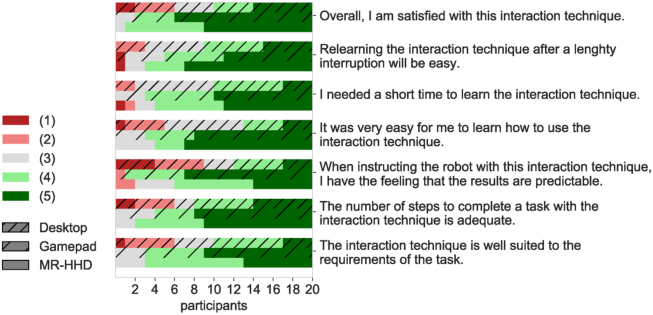
User Satisfaction For each UI, participants had to rate their agreement with seven statements that are shown in Fig. 4. Again the Desktop-UI was rated worst and the MR- HHD- and Gamepad-UI received similar higher ratings. While the average rating for the Gamepad-UI (4.41) was slightly better than for the MR-HHD- UI (4.29), the MR-HHD-UI was rated slightly better regarding the number of steps to be performed for task completion and the ease with which the technique can be relearned after a lengthy interruption. At the end, the three UIs had to be ranked using scores from 1 (best) to 3 (worst). Overall, the MR- HHD-UI was rated as the favorite interaction technique (1.45), followed by the Gamepad-UI (1.7), and Desktop-UI (2.85).
Figure 4: User satisfaction assessed via agreement with seven statements from 1 (predominantly disagree) to 5 (predominantly agree).
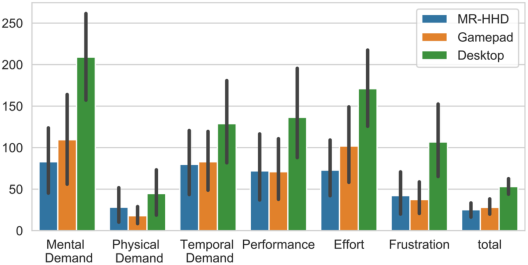
Cognitive Load The weighted NASA TLX rankings for all UIs were computed according to (NASA TLX, 2024). As shown in Fig. 5 the total weighted workload for the MR-HHD-UI (25.22) was slightly lower than for the Gamepad-UI (28.06). The highest workload was experienced while using the Desktop-UI. Consid- ering Grier’s (2015) meta-analysis of NASA TLX scores, the MR-HHD-UI resulted in a workload which is lower than in at least 90% of the studies reviewed, while the workload measured for the Gamepad-UI is only lower than in at least 80% of the studies reviewed. Furthermore, the MR-HHD- UI evoked less mental demand and effort than the Gamepad-UI. The higher physical demand measured for the MR-HHD-UI seems reasonable as the HHD is moved while controlling the robot.
Figure 5: Average weighted NASA TLX ratings and 95% confidence intervals.
Further Observations To compare the intuitiveness of the MR-HHD-UI and the Gamepad-UI, we conducted paired samples t-tests with Bonferroni correction and alternative
Mixed Reality Handheld Displays for Robot Control: A Comparative Study 329
hypothesis: µTCT (MR-HHD) < µTCT (Gamepad) for groups of participants without previous Robotics- (n = 14), MR- (n = 16), and Gamepad-experience (n = 5). We obtained significantly lower MR-HHD- than Gamepad-UI TCTsw/o_sel for the following groups of participants and tasks. Participants without MR-experience (Task 1b: p≤.01; Task 2: p≤.05), without Robotics- experience (Task 1b: p≤.05), and without Gamepad-experience (Task 1c: p≤.05). Furthermore, significantly lower MR-HHD- than Gamepad-UI TCTsw/_sel were obtained for participants without MR-experience (Tasks 1b, 1c, 2: p≤.0001), without Robotics-experience (Tasks 1b, 1c: p≤.0001; Task 2: p≤.001), and without Gamepad-experience (Tasks 1b, 1c: p≤.01). Regard- ing user satisfaction, participants without Gamepad-experience rated the MR-HHD-UI (4.6) better than the Gamepad-UI (4.29). The effect that the MR-HHD-UI was rated better than the Gamepad-UI regarding the number of steps that have to be performed and the expected time needed to relearn the interaction technique was amplified for participants without experience in robotics or MR. Furthermore, we found increasing differences between the MR-HHD-UI’s and Gamepad-UI’s NASA TLX for participants that had no experience with robotics or MR. A particularly large discrepancy between the MR-HHD-UI’s workload (18.6) and the Gamepad-UI’s workload (38.4) was observed for participants without prior experience with Gamepads. Thus, we rate the MR-HHD-UI to be a highly efficient robot control tool especially for unexperienced users.
CONCLUSION AND OUTLOOK In this paper, we apply an enhanced MR-HHD-UI for robot control in pick and place tasks and compare it to a Gamepad- and Desktop-UI. Our study showed that the MR-HHD-UI required on average less cognitive and tem- poral effort than the Gamepad- and Desktop-UIs. These saved efforts can become crucial for enhancing productivity and reduce failure in complex real-world tasks, that are likely to exceed a user’s cognitive and temporal capacities. Since the MR-HHD-UI delivered a particularly high success rate and was rated as the preferred UI, we consider it as a powerful tool that suc- cessfully combines the capabilities of humans and robots: users manage task planning while the robot handles repetitive and complex tasks like optimal path computation and executing robot movements.
Due to our robot’s limited reachability, only small-scale translations were performed in our study. However, our MR-HHD-UI can be easily extended to large-scale manipulations and rotations with the method Move’n’Hold pre- sented by Memmesheimer et al. (2023). Using Move’n’Hold the user can first apply left-thumb-touch to map device movements to objects like in our study and then add right-thumb-touch to continue this translation automatically (i.e., without moving the device). The same interaction paradigm is provided for rotations: The HHD’s rotation is mapped to the object while left-thumb- touch is active and continuous rotations are started by right-thumb-touch. In this way, Move’n’Hold seeks to reduce physical effort during large-scale manipulations and to reduce cognitive effort when switching between transla- tion and rotation. The target positions that are currently exchanged between
the iPad and the robot can be easily replaced with quaternions describing the target orientations such that our MR-HHD-UI can also be used to command the robot to perform object rotations.
Moreover, we believe that the MR-HHD-UI is also useful for introducing novices to robotics as it allows them to perform high-level tasks and learn how they are executed by a robot. Improvements in display and tracking technologies, as mentioned in (Suzuki et al., 2022), are crucial for deploy- ing MR-based robot control in real-world settings. We observed that virtual augmentations tend to drift in small settings with featureless surfaces and hence encourage researchers in this field to further investigate how advanced scene understanding and calibration can help improving localization in such settings. Extending our MR-HHD-UI to other categories of Suzuki et al.’s (2022) taxonomy such as remote operation and the consideration of other robots are further interesting topics for future research.
ACKNOWLEDGMENT
This work was funded in part by the Deutsche Forschungsgemeinschaft (DFG, German Research Foundation, #252408385 – IRTG 2057, at RPTU Kaiserslautern-Landau and UC Davis) and by the NASA HOME program at UC Davis. We thank S. Schwenkreis (for supporting the data analysis), K.J. Klingshirn (for supporting the development of the iPad app), and D. Rojas (for supporting the development of the robot app and the experimental design).
REFERENCES
Blattgerste, J., Luksch, K., Lewa, C., Pfeiffer, T. (2021). TrainAR: A Scalable Interaction Concept and Didactic Framework for Procedural Trainings Using Handheld Augmented Reality, Multimodal Technologies and Interaction Volume 5, Issue 7. doi: 10.3390/mti5070030. Cao, Y., Xu, Z., Li, F., Zhong, W., Huo, K., Ramani, K. (2019) “V. Ra: An In-Situ
Visual Authoring System for Robot-IoT Task Planning with Augmented Reality”, Proceedings of the 2019 on Designing Interactive Systems Conference (DIS ‘19), pp. 1059–1070. doi: 10.1145/3322276.3322278. Chacko, S. M., Kapila, V. (2019) “An Augmented Reality Interface for Human- Robot Interaction in Unconstrained Environments”, 2019 IEEE/RSJ International Conference on Intelligent Robots and Systems (IROS), pp. 3222–3228. doi: 10.1109/IROS40897.2019.8967973. Chan, W. P., Hanks, G., Sakr, M., Zuo, T., Machiel Van der Loos, H. F., Croft, E.
(2020) “An Augmented Reality Human-Robot Physical Collaboration Interface Design for Shared, Large-Scale, Labour-Intensive Manufacturing Tasks”, 2020 IEEE/RSJ International Conference on Intelligent Robots and Systems (IROS), pp. 11308–11313. doi: 10.1109/IROS45743.2020.9341119. Chen, L., Takashima, K., Fujita, K., Kitamura, Y. (2021) “PinpointFly: An Egocentric Position-control Drone Interface using Mobile AR”, Proceedings of the 2021 CHI Conference on Human Factors in Computing Systems (CHI ‘21), Article 150, pp. 1–13. doi: 10.1145/3411764.3445110.
Mixed Reality Handheld Displays for Robot Control: A Comparative Study 331
Frank, J. A., Moorhead, M., Kapila, V. (2017a). Mobile Mixed-Reality Interfaces That Enhance Human–Robot Interaction in Shared Spaces, Frontiers in Robotics and AI Volume 4 Article 20. doi: 10.3389/frobt.2017.00020. Frank, J. A., Krishnamoorthy, S. P., Kapila, V. (2017b). Toward Mobile Mixed-
Reality Interaction With Multi-Robot Systems, IEEE Robotics and Automation Letters Volume 2, No. 4, pp. 1901–1908. doi: 10.1109/LRA.2017.2714128. Fuste, A., Reynolds, B., Hobin, J., Heun, V. (2020) “Kinetic AR: A Framework for Robotic Motion Systems in Spatial Computing”, Extended Abstracts of the 2020 CHI Conference on Human Factors in Computing Systems (CHI EA ‘20), pp. 1–8. doi: 10.1145/3334480.3382814. Goh, E. S., Sunar, M. S., Ismail, A. W. (2019). 3D Object Manipulation Techniques in
Handheld Mobile Augmented Reality Interface: A Review, IEEE Access Volume 7, pp. 40581–40601. doi: 10.1109/ACCESS.2019.2906394. Grandi, J. G., Debarba, H. G., Bemdt, I., Nedel, L., Maciel, A. (2018) “Design and Assessment of a Collaborative 3D Interaction Technique for Handheld Augmented Reality”, 2018 IEEE Conference on Virtual Reality and 3D User Interfaces (VR), pp. 49–56. doi: 10.1109/VR.2018.8446295. Grier, R. A. (2015) “How High is High? A Meta-Analysis of NASA- TLX Global Workload Scores”, Proceedings of the Human Factors and Ergonomics Society Annual Meeting Volume 59, Issue 1, pp. 1727–1731. doi: 10.1177/1541931215591373. Kapinus, M., Beran, V., Materna, Z., Bambušek, D. (2019) “Spatially Situated
End-User Robot Programming in Augmented Reality”, 2019 28th IEEE Interna- tional Conference on Robot and Human Interactive Communication (RO-MAN), pp. 1–8. doi: 10.1109/RO-MAN46459.2019.8956336. Marzo, A., Bossavit, B., Hachet, M. (2014) “Combining Multi-Touch Input and Device Movement for 3D Manipulations in Mobile Augmented Reality Environ- ments”, Proceedings of the 2nd ACM Symposium on Spatial User Interaction (SUI’14), pp. 13–16. doi: 10.1145/2659766.2659775. Memmesheimer, V. M., Klingshirn, K. J., Ravani, B., Ebert, A. (2023) “Move’n’Hold:
Scalable Device-Based Interaction for Mixed Reality Handheld Displays”, Pro- ceedings of the European Conference on Cognitive Ergonomics (ECCE ‘23), Article 13, pp. 1–8. doi: 10.1145/3605655.3605656. Mossel, A., Venditti, B., Kaufmann, H. (2013) “3DTouch and HOMER-S: Intuitive Manipulation Techniques for One-Handed Handheld Augmented Reality”, Pro- ceedings of the Virtual Reality International Conference: Laval Virtual (VRIC’13), Article 12, pp. 1–10. doi: 10.1145/2466816.2466829. NASA TLX paper and pencil version instruction manual (2024), accessed Jan 2,
2024. https://humansystems.arc.nasa.gov/groups/tlx/tlxpaperpencil.php Park, K.-B., Choi, S. H., Lee, J. Y., Ghasemi, Y., Mohammed, M., Jeong, H. (2021).
Hands-Free Human–Robot Interaction Using Multimodal Gestures and Deep Learning in Wearable Mixed Reality, IEEE Access Volume 9, pp. 55448–55464. doi: 10.1109/ACCESS.2021.3071364. Rudorfer, M., Guhl, J., Hoffmann, P., Krüger, J. (2018) “Holo Pick’n’Place”, 2018 IEEE 23rd International Conference on Emerging Technologies and Factory Automation (ETFA), pp. 1219–1222. doi: 10.1109/ETFA.2018.8502527.
Suzuki, R., Karim, A., Xia, T., Hedayati, H., Marquardt, N. (2022) “Augmented Reality and Robotics: A Survey and Taxonomy for AR-enhanced Human-Robot Interaction and Robotic Interfaces”, Proceedings of the 2022 CHI Conference on Human Factors in Computing Systems (CHI’22), Article 553, pp. 1–33. doi: 10.1145/3491102.3517719. Tsamis, G., Chantziaras, G., Giakoumis, D., Kostavelis, I., Kargakos, A., Tsakiris, A.,
Tzovaras, D. (2021) “Intuitive and Safe Interaction in Multi-User Human Robot Collaboration Environments through Augmented Reality Displays”, 2021 30th IEEE International Conference on Robot & Human Interactive Communication (RO-MAN), pp. 520–526. doi: 10.1109/RO-MAN50785.2021.9515474.
LISTED IN THE AHFE DIGITAL BOOKSTORE CATALOGUE
Explore the complete digital volume
Human Factors and Systems Interaction
Read this individual research paper free through the original publisher, or explore the full digital proceedings book.
ISBN 978-1-964867-30-4
Explore this ISBN in the AHFE Bookstore ↗Listed in the July 2026 bookstore catalogue; search by ISBN to confirm current availability · Digital book purchase optional