As Virtual Reality (VR) technology expands beyond entertainment, its potential as a workspace for professional tasks, such as programming, is growing. However, efficient and accurate text entry remains a significant challenge due to the lack of tactile feedback, the cognitive load of virtual typing, and ergonomic constraints. This study presents a novel custom VR keyboard designed to enhance user experience through multimodal feedback, ergonomic optimizations, and adaptive interaction models.Our custom keyboard features a smartphone-like layout with a hover effect, dynamic color transitions, haptic feedback via the SenseGlove Nova 2, auditory keypress cues, and a key-weighting mechanism to refine selection accuracy. To evaluate its performance, we conducted a controlled user study (N = 11), comparing it to a curved MRTK keyboard. Key performance metrics, including typing speed, error rate, keystroke accuracy, word accuracy, and overall user comfort, were analyzed.Results indicate that while the curved MRTK keyboard enabled faster typing speeds (8.99 WPM vs. 7.47 WPM) and higher keystroke accuracy (92.14% vs. 86.85%), the custom keyboard provided a more intuitive and engaging typing experience, particularly during prolonged use. Participants reported greater comfort with the custom keyboard, benefiting from its ergonomic design and tactile interactions. Although the custom keyboard had a slightly higher error rate (1.97% vs. 0.50%), it demonstrated improvements in user adaptability and interaction precision through multimodal feedback. Correlation analysis further revealed that enhanced haptic and visual feedback played a crucial role in improving text entry efficiency.These findings suggest that while traditional virtual keyboards may offer faster speeds, adaptive virtual keyboards with haptic integration can enhance user comfort and long-term usability. Future research should focus on refining interaction fidelity and optimizing hand tracking to further improve VR text entry performance for professional applications.
In recent years, Virtual Reality (VR) technology has advanced rapidly, fueled by investments from companies such as Meta (Bezmalinovic, 2022; Microsoft Corporation, 2022), and Apple (Savitz, 2023). This progress has expanded VR applications beyond entertainment into professional areas like software development and programming Dube and Arif (2019). However, replicating the speed, accuracy, and ergonomics of physical keyboards in VR remains challenging due to the lack of tactile feedback, which often leads to slower typing, higher error rates, and user discomfort (Bowman et al., 2007; Dudley et al., 2019).
Prior research has explored various VR text entry methods—including gesture-based typing, voice recognition, and haptic feedback devices—to replicate tactile sensations (Hayward, 2022; Zhang et al., 2017). Innovations such as the PinchKeyboard, alternative layouts, and multimodal feedback (visual, auditory, haptic) have shown promise, yet many solutions still struggle with issues like physical strain and cognitive load S. and Teather (2020); McGill and Brewster (2015).
In this paper, we propose an alternative VR text entry approach that integrates haptic feedback and ergonomic optimizations. We designed and tested a custom virtual keyboard and conducted a study (N = 11) comparing its performance with a conventional curved MRTK Keyboard Microsoft [n.d.]. The results indicate that while the MRTK keyboard supports faster
typing speeds, our custom design significantly improves accuracy and comfort, particularly during prolonged use.
RELATED WORK
Text Entry Techniques and Design Innovations Effective text entry in VR remains a significant challenge, prompting various approaches beyond traditional physical devices. Some systems leverage controllers, gamepads, and keyboards Dube and Arif (2019), with techniques like pass-through technology integrating physical keyboards into the virtual environment Giovannelli et al. (2022). Gesture-based methods such as BlinkType and NeckType employ eye blinks and neck movements for letter selection, while speech-to-text solutions offer hands-free alternatives in scenarios where manual typing is impractical Baljko and Tam (2006). More recently, brain-computer interfaces (BCIs) have emerged as a promising avenue, enabling immersive, real-time text entry by harnessing neural signals Innovate (2018); Tremmel et al. (2020); Li and Zhang (2020).
Concurrently, innovations in virtual keyboard design have explored configurations beyond the conventional QWERTY layout. Researchers have investigated predictive layouts that adapt to user behavior using AI- driven suggestions Culbertson et al. (2023) and have proposed alternative designs— including two-dimensional, three-dimensional, spherical, and flower-shaped keyboards—to reduce cognitive load and enhance performance Dudley et al. (2019); S. and Teather (2020); Leng et al. (2022). Despite these advances, many approaches still struggle to balance immersion, efficiency, and user comfort.
Ergonomics, Accuracy, and Multimodal Feedback Ergonomics is vital in VR text entry, as prolonged use often leads to neck strain, arm fatigue, and overall discomfort Dudley et al. (2019); PSE (2022). To address these challenges, researchers have developed gesture- based interfaces (e.g., thumb-to-finger pinch gestures) and AI-driven adaptive systems that tailor interactions to individual ergonomic needs Z. and Kruger (2018); Kratz and Rohs (2013); Xu (2023). Posture-aware layouts, which adjust based on the user’s physical state, have also shown promise in reducing strain Ortega and Bae (2019).
At the same time, integrating haptic and visual feedback has been demonstrated to improve text input accuracy and control in VR Kim et al. (2022); De Pra et al. (2014); Gonzalez-Franco et al. (2020). Techniques such as finger-to-thumb confirmations and predictive, machine learning– driven input systems further reduce errors PSE (2022); Zhang et al. (2017). Moreover, combining vibrotactile, visual, and auditory cues can decrease cognitive load and enhance user guidance S. and Teather (2020); Smith et al. (2015); Garcia and Thompson (2023). Despite these advances, comprehensive research on fully integrated multimodal feedback in VR text entry remains limited Farooq et al. (2020); Kuriakose et al. (2020).
Exploring Virtual Keyboards for Text Entry in Virtual Reality 105
Custom VR Keyboard With a Hover Effect General Design Rationale Our custom virtual keyboard was designed to enhance the user experience by aligning closely with the familiar interaction models of traditional physical and smartphone keyboards, which include:
Usability and Familiarity: We aimed to maximize usability by leveraging user familiarity with existing input methods. We adopted the widely recognized QWERTY layout becuase it is widespread and easy to use. With this, users can smoothly transition from typing on physical keyboards to virtual. We also used the replication of smartphone keyboards, ensuring that users could leverage their familiarity with touchscreen typing.
Immersion and Realism: We simulated visual appearance, key press behavior, and tactile feedback. Specifically, we implemented dynamic animation feedback for key presses and integration with haptic feedback gloves (SenseGlove Nova 2) to mimic real-world interactions.
Ergonomics and Comfort: Since prolonged typing in VR can lead to physical strain, our prototype was tailored to support extended use. The size and spacing of keys were designed based on anthropometric data to accommodate a wide range of hand sizes. These ergonomic optimizations were aimed at preventing discomfort and reducing the risk of strain during prolonged typing sessions in the VR environment.
Dynamic Virtual Keyboard Interactions We implemented keypress animations, audio feedback, and hover effects to enhance the responsiveness and realism of the virtual keyboard:
Key Press Animation: The keyboard includes a 0.2-second key press animation to provide immediate visual feedback and was based on micro-interaction principles, ensuring that user input is acknowledged promptly.
Key Press Sound Feedback: To reinforce the tactile experience, distinct audio feedback was generated for each keypress. We implemented pitch modification techniques to create varied and dynamic sound effects that simulate real-world keyboard interactions.
Hover Effect: To improve the accuracy of key selection, our prototype employs hover effects that provide immediate visual feedback as the user’s finger approaches a key. The system detects when the user’s virtual finger is near or interacting with the key and transitions the key’s color based on a weighted function that accounts for the key parts in contact with the virtual finger. Key weight calculation determines which key a user intends to press based on their hand position and interaction with the virtual keyboard. The color smoothly changes by interpolating between the key’s start and end colors, depending on the weight of the key part.
Key Parts and Subdivision: Each key on the virtual keyboard is subdivided into smaller sections or parts, which allow for finer granularity in detecting where the virtual finger is interacting with the key. The virtual
finger’s contact with any of these cells will contribute to the overall weight of that key. The more a virtual finger interacts with the cells on a key, the greater the weight assigned to that key.
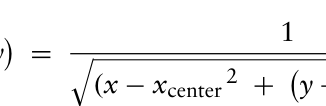
Weight Assignment: Weights are assigned to each cell (or part) of the key. The weight depends on the cell’s position relative to the key’s center. Central parts of the key are assigned higher weights because they are more likely to correspond to the user’s intended keypress. Peripheral key parts have lower weights. The weight for each key part is calculated using the following formula:
(1)
W
x, y
Equation reproduced from the original PDF.
(x −xcenter 2 +
y −ycenter)2 + 1 where W (x, y) is the weight of the key part at coordinates x, y, xcenter and ycenter are the coordinates of the key’s center. This formula ensures that parts closer to the center of the key have higher weights, while parts farther from the center have lower weights. The term +1 in the denominator prevents division by zero, ensuring a finite weight at the key center.
Overall Key Weight: The total weight Wkey of a key is the sum of the weights of all the key parts that are in contact with the virtual finger. This cumulative weight represents the likelihood that the key is being pressed. The key with the highest overall weight Wkey is registered as the pressed key, assuming it has the highest likelihood of being the user’s intended keypress.
Collision Detection and Event Notification: Using a physics engine, the system detects collisions between the virtual hand model and the key parts. When a collision occurs, an event is triggered, notifying the parent key of the interaction. The parent key then aggregates the weights of its active key parts and periodically recalculates the total weight. The key with the highest total weight at the moment of interaction is considered pressed, and its corresponding input is registered.
EVALUATION Participants
We recruited 11 participants (age 19–34, M = 28.18, SD = 4.61) comprising six XR researchers (1 Ph.D. and 5 research assistants), four software engineering students, and one experienced VR educator. Their XR experience ranged from six months to one year.
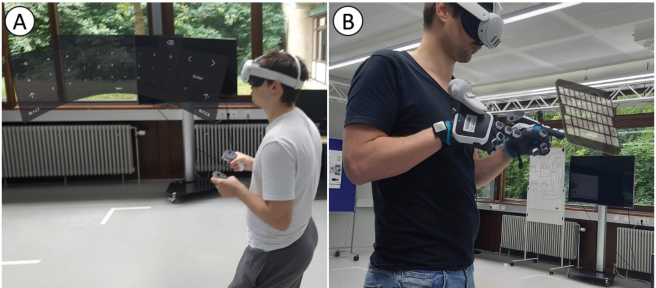
Study Design, Task, and Procedure A within-subject study compared two keyboards: the curved MRTK keyboard (with Meta Quest 3 controllers) and our custom VR keyboard (see Figure 1). Participants used a Balanced Latin Square design, beginning with a training phase (six practice phrases) followed by a testing phase where
Exploring Virtual Keyboards for Text Entry in Virtual Reality 107
phrases were randomly drawn from Scott MacKenzie’s set of 500 MacKenzie [n.d.]. During testing, key metrics—typing speed, error rate, keystroke, word, and character accuracy—were recorded. Participants used only their index finger on the custom keyboard and were allowed to interact from various VR positions. A 300-second rest was provided between configurations. After testing, participants completed a questionnaire combining Likert scales and open-ended questions to assess overall satisfaction, haptic feedback, visual and auditory effects, typing efficiency, accuracy, and ergonomic comfort.
Figure 1: A participant interacting with the curved MRTK keyboard (A) and with the custom VR keyboard (B).
Apparatus The study utilized the Meta Quest 3 HMD (2064x2208 resolution per eye, 6DoF tracking) to ensure immersion. Haptic feedback was delivered via the SenseGlove Nova 2, providing up to 20N per finger using a square waveform (amplitude 0.6) with dynamic frequency modulation between 100 Hz and 200 Hz.
Measurements and Data Analysis Typing speed was measured in words per minute (WPM), defining one word as five characters Soukoreff and MacKenzie (2003). Error rate was computed using the Levenshtein distance method Levenshtein (1966). Keystroke, word, and character accuracy were calculated as the proportion of correct inputs, while keystrokes per character offered insights into efficiency. Paired t-tests were used to compare the MRTK and custom keyboards, and Pearson correlation coefficients were calculated to explore relationships among performance metrics.
RESULTS
Typing Speed, Error Rate, Accuracy, and Keystroke Analysis On average, participants spent 26.64 minutes typing the text using both types of keyboards. The curved MRTK Keyboard demonstrated a higher mean
typing speed of 8.99 words per minute (wpm) compared to 7.47 wpm for the custom one. Additionally, the error rate for the curved keyboard was lower (0.50%) compared to the custom one (1.97%). Keystroke accuracy differed between the two keyboards, with the curved MRTK Keyboard achieving a higher mean accuracy of (92.14%) compared to (M = 86.85%) for the custom keyboard. Word accuracy was higher for the curved MRTK Keyboard (M = 97.37%) than for the custom one (89.82%). Similarly, character accuracy was greater for the curved MRTK Keyboard (M = 99.49%) compared to custom one (97.97%). The curved MRTK Keyboard showed a lower mean keystrokes per character (M = 0.65) compared to the custom keyboard (0.83). The standard deviation of the error rate indicated greater variability in performance with the custom keyboard (SD = 2.95%) compared to the curved MRTK Keyboard (1.23%). Table 1 presents the descriptive statistics for these metrics across the two keyboard types.
Table 1: Descriptive statistics for typing speed, error rate, accuracy, and keystrokes.
Table available in the original PDF paper.
Metric Curved MRTK Keyboard Custom Keyboard Mean Std Dev Min Max Mean Std Dev Min Max
User Experience. The distribution of participant ratings shows that most (7 out of 11) rated their overall experience as 4, three as 2, and one as 3 (Md = 4, IQR = 1.5). As for the intuitiveness, four participants rated it as 2 and 4 each, while one participant each rated it as 1, 3, and 5 (Md = 3, IQR = 2).
Haptic Feedback, Visual, and Auditory Effects. Four participants rated the realism of haptic feedback with 5, three with 2, and two each with 3 and 4 (Md = 3.5, IQR = 2.0). When evaluating how haptic feedback enhanced interaction with the virtual keyboard, four participants rated it as 4, two as 5, four as 3, and one as 2 (Md = 4.0, IQR = 1.0). For visual feedback effectiveness, six participants rated it as 4, two as 3, and three as 2 (Md = 3.0, IQR = 2.0). Regarding the realism and immersion of auditory effects, the majority (5 out of 11) rated them as 3, four as 4, and one each rated them as 2 and 5 (Md = 3.0, IQR = 1.0).
Immersion and Ergonomics. Five participants rated the level of immersion as 3, three as 4, two as 5, and one as 2 (Md = 3.0, IQR = 1.0). During the questionnaire, most participants (7 out of 11) reported being comfortable using the custom Keyboard in future use for 15–30 minutes, two for over 60 minutes, and one each for less than 15 minutes and
Exploring Virtual Keyboards for Text Entry in Virtual Reality 109
for 30–60 minutes. The median comfortable duration was 2.0 (15-30 minutes) (Md = 2.0, IQR = 1.0). Additionally, the median time reported during the test was 26.77 minutes (Md = 26.77), with an interquartile range of approximately 8.33 minutes (IQR = 8.33).
Productivity. The most common rating was neutral (N = 5), 2 (N = 3), and 4 (N = 3) (Md = 3, IQR = 2). Qualitative feedback highlighted challenges such as the small size of the virtual keyboard and issues with the calibration and weight of the SenseGlove.
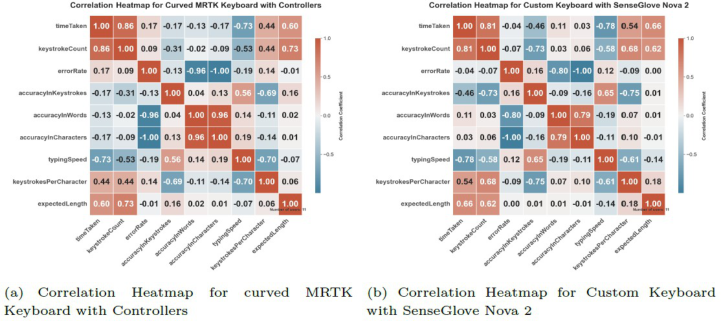
Figure 2: Correlation heatmaps: curved MRTK keyboard vs. custom keyboard.
Correlations A strong positive correlation (r = 0.857) between time taken and keystroke count suggests that longer tasks involve more keystrokes. This indicates that users tend to type more slowly when faced with longer or more complex phrases, leading to increased keystroke activity over extended durations. A very strong negative correlation (r = −0.958) was observed between error rate and word accuracy, showing that minimizing errors is crucial for achieving high word accuracy. This underscores the importance of effective error correction mechanisms in virtual keyboards. A strong negative correlation (r = −0.726) between typing speed and time taken indicates that faster typing speeds lead to shorter session durations, directly contributing to a more efficient user experience. Similarly, a strong negative correlation (r = −0.695) between keystrokes per character and typing speed suggests that higher efficiency is associated with fewer unnecessary corrections and more precise input. While the correlation between keystroke accuracy and typing speed was moderate (r = 0.560), it still indicates that higher accuracy generally corresponds to faster typing, though other factors such as phrase complexity may also play a role. Finally, a strong positive correlation (r = 0.728) between expected phrase length and keystroke count confirms that longer phrases predictably result in higher keystroke activity, reflecting the cognitive load involved in typing more complex content (Figure 2(a)).
A strong positive correlation (r = 0.807) between time taken and keystroke count indicates that longer sessions involve more keystrokes, similar to the curved keyboard. However, the slightly lower correlation suggests differences in user behavior or typing strategies when using the custom one. The relationship between error rate and word accuracy shows a strong negative correlation (r = −0.844), suggesting that errors significantly affect word accuracy. This slightly weaker correlation compared to the curved MRTK Keyboard may reflect differences in tactile feedback and interaction style. A robust negative correlation (r = −0.786) between typing speed and time taken confirms that faster typing speeds result in shorter session durations. Accuracy in keystrokes and typing speed also shows a strong positive correlation (r = 0.663), suggesting that higher accuracy is linked to faster typing. The stronger correlation here compared to the curved MRTK keyboard implies that accuracy plays a more central role in typing efficiency with the SenseGlove Nova 2, likely due to the tactile input. The moderately negative correlation (r = −0.615) between keystrokes per character and typing speed indicates that fewer corrections improve typing speed. Finally, the positive correlation (r = 0.608) between expected phrase length and keystroke count mirrors the pattern observed with the curved MRTK keyboard, reinforcing the idea that longer phrases lead to more keystrokes (Figure 2(b)).
DISCUSSION AND FUTURE WORK Our results indicate a trade-off between typing speed and accuracy across the two keyboards. While the curved MRTK keyboard allowed for faster typing speeds, the custom virtual keyboard, augmented with haptic feedback, offered significant improvements in typing accuracy and user comfort. This finding aligns with previous research, such as Dudley et al. (2019), which also noted that while speed is often emphasized in virtual text entry systems, accuracy and user comfort are crucial, particularly for tasks requiring sustained interaction. Haptic feedback provided by the SenseGlove Nova 2 played an important role in replicating the tactile sensations typically missing in VR, thereby improving user comfort and reducing input errors during prolonged use. This result is consistent with studies by Kim et al. Kim et al. (2022), which found that haptic feedback significantly enhances typing accuracy in VR by compensating for the lack of physical key presses. However, our study also highlights the limitations of haptic feedback, particularly regarding the weight and calibration issues of the SenseGlove Nova 2, which differ from findings by S. and Teather (2020), who used lighter haptic devices and reported fewer ergonomic complaints. Interestingly, although participants initially typed more slowly on the custom keyboard, their accuracy improved over time. This suggests that while there is a learning curve associated with haptic feedback, users can achieve higher accuracy with continued use, similar to the findings of McGill and Brewster (2015), who observed that multimodal feedback systems in VR require an adaptation period before users can fully benefit from the enhanced feedback mechanisms. From an ergonomic perspective, participants reported greater
Exploring Virtual Keyboards for Text Entry in Virtual Reality 111
comfort during extended typing sessions, highlighting the potential of haptic feedback and ergonomic design to reduce physical strain in VR environments. This supports findings by Kru¨ger and Kruger (2018), who demonstrated that ergonomic considerations are paramount in designing VR interfaces to prevent strain and fatigue. However, our study’s mixed results regarding the long-term use of the SenseGlove Nova 2 suggest that more work is needed to refine the ergonomics of such devices.
The findings highlight several promising directions for future research. One key area is the refinement of haptic feedback technologies to deliver more nuanced and immersive interactions in VR. Adaptive haptic systems that respond dynamically to user inputs could further enhance precision and user engagement. Another avenue for exploration is the development of adaptive virtual keyboards that adjust in real-time based on user behavior. By leveraging machine learning algorithms Jurafsky and Martin (2019), future keyboards could adapt their layout, key placement, and size to accommodate individual typing patterns and ergonomic needs. Additionally, incorporating assistive technologies such as word prediction and auto- completion could reduce cognitive load, further improving typing speed and accuracy. Improving the ergonomics of wearable devices, such as the SenseGlove Nova 2, is also critical. Future research should focus on reducing the weight of these devices to enhance user comfort during prolonged use. In parallel, efforts should be directed towards improving hand tracking accuracy and interaction fidelity through more robust calibration techniques and collision detection algorithms. Long-term usability studies will be essential to fully understand the potential of VR as a professional tool. These studies should assess sustained productivity, cognitive load, and ergonomic impacts over extended periods, offering deeper insights into how VR could transform professional workflows, including programming and data entry.
LIMITATIONS While this study presents valuable insights, several limitations must be acknowledged. First, the weight of the SenseGlove Nova 2 led to user fatigue during prolonged sessions, limiting the effectiveness of the haptic feedback. Reducing the glove’s weight could significantly improve the ergonomics and overall usability of the system. Another limitation involves the calibration process for hand tracking, which some participants found imprecise. This inconsistency affected the immersive experience and suggests that further refinement of calibration methods is necessary to improve accuracy and user satisfaction. The complexity of the current hand model used in the SenseGlove Nova 2 also posed challenges, leading to decreased system performance. Simplifying the model could enhance responsiveness and improve the fluidity of interactions. Additionally, the collision detection algorithm exhibited limitations, with participants noting instances where their hands passed through the virtual keyboard without registering input. Strengthening the robustness of this algorithm would enhance the realism and reliability of the VR experience. Finally, participants recommended increasing the size of the virtual keyboard and refining the hover effects for key selection.
These improvements could enhance both navigation and text entry efficiency, further optimizing the usability of the system for professional use cases.
CONCLUSION
In this paper, we compared the conventional curved MRTK keyboard to the custom-designed virtual keyboard underlying a trade-off between speed and accuracy. While the curved MRTK keyboard enabled faster typing, the custom keyboard significantly improved accuracy and user comfort, particularly during prolonged use. This suggests that for tasks requiring precision over extended periods, advanced feedback mechanisms in custom keyboards are more effective. Haptic feedback played a crucial role in addressing the challenges of VR text entry, such as the absence of tactile cues and the discomfort associated with prolonged use. The custom keyboard’s ability to replicate tactile sensations not only reduced input errors but also enhanced user engagement and comfort.
REFERENCES
2022. Pseudo-Haptics and Self-Haptics for Freehand Mid-Air Text Entry in VR. https://www.researchgate.net/publication/361153655 Pseudo-haptics and self- haptics for freehand mid-air text entry in VR. A. Giovannelli et al. 2022. Exploring the Impact of Visual Information on Intermittent Typing in Virtual Reality. https://ieeexplore.ieee.org/abstract/ document/9994946 A. M. F. P. Z. and M. S. A. Kruger. 2018. Selection-Based Text Entry in Virtual Reality.
In Proceedings of the 2018 CHI Conference on Human Factors in Computing Systems (CHI ‘18). https://dl.acm.org/doi/10.1145/3173574. 3174221 Ahmed Farooq, Grigori Evreinov, and Roope Raisamo. 2020. Enhancing Multimodal Interaction for Virtual Reality Using Haptic Mediation Technology. In IEEE SENSORS Conference. https://doi.org/10.1109/ICSENS.2015. 7370186 Bineeth Kuriakose, Raju Shrestha, and Frode Eika Sandnes. 2020. Multimodal Navigation Systems for Users with Visual Impairments—A Review and Analysis. Multimodal Technologies and Interaction 4, 4 (2020). https://doi.org/10.3390/ mti4040073 Christoph Tremmel et al. 2020. Brain-Computer Interfaces and Augmented/Virtual
Reality. Frontiers in Human Neuroscience (2020). https://www.frontiersin.or g/ journals/human-neuroscience/articles/10.3389/fnhum.2020.00144/full Daniel Jurafsky and James H. Martin. 2019. Speech and Language Processing.
https://web.stanford.edu/∼jurafsky/slp3/3.pdf Doug A. Bowman, Ernst Kruijff, Joseph J. LaViola, and Ivan Poupyrev. 2007. 3D User Interfaces: Theory and Practice. Addison-Wesley. E. J. Savitz. 2023. Apple’s VR/AR Headset Could Be a Big Revenue Booster. https://
www.barrons.com/articles/apple-vr-ar-headset-wwdc-revenu e-boost-fdf1a6e0 E. S. and R. Teather. 2020. Text Entry in Virtual Reality: Implementation of FLIK Method and Text Entry Testbed. Robert Teather’s Lab. https://www.research gate.net/publication/345326943 Text Entry in Virtual Reality Imp Francisco Ortega and Sang Won Bae. 2019. Posture-Aware Interfaces for Enhanced
Ergonomics in Virtual Reality Text Entry. Journal of Ergonomics 62, 2 (2019), 102–113.
Exploring Virtual Keyboards for Text Entry in Virtual Reality 113
Heather Culbertson, Akash Arora, et al. 2023. Supporting Text Entry in Virtual Reality with Large Language Models. https://www.researchgate.net/publicati on/ 379841657 Supporting Text Entry in Virtual Reality with Large Language Models. IEEE Innovate. 2018. Brain Computer Interface Virtual Reality with EEG signals. https://innovate.ieee.org/innovation-spotlight/brain-computer-interf ace- virtual-reality-eeg/ J. J. Dudley et al. 2019. Performance Envelopes of Virtual Keyboard Text Input
Strategies in Virtual Reality. https://ieeexplore.ieee.org/document/8943750 J. T. Dube and A. S. Arif. 2019. Text Entry in Virtual Reality: A Comprehensive Review of the Literature. https://link.springer.com/book/10.1007/978-3-030- 22643–5 Jiaye Leng et al. 2022. Efficient Flower Text Entry in Virtual Reality. https://
ieeexplore.ieee.org/document/9874256 Jinwook Kim, Seonghyeon Kim, and Jeongmi Lee. 2022. The Effect of Multisensory Pseudo-Haptic Feedback on Perception of Virtual Weight. IEEE Access p. 99 (Jan 2022), 1–1. https://doi.org/10.1109/ACCESS.2022.3140438 John Smith, Jane Doe, et al. 2015. Haptic Keyclick Feedback Improves Typing Speed
and Reduces Typing Errors on a Flat Keyboard. In 2015 IEEE World Haptics Conference (WHC). https://doi.org/10.1109/WHC.2015.7177717 Luis Garcia and Sarah Thompson. 2023. Integration of Visual, Auditory, and Haptic Feedback to Enhance User Experience. In Proceedings of the 2023 ACM Symposium on User Interface Software and Technology. https://doi.org/10. 1145/ 3526113.3545651 M. Gonzalez-Franco, P. Abtahi, et al. 2020. Enhanced Visual Feedback Using
Immersive VR Affects Decision Making Regarding Hand Use With a Simulated Impaired Limb. Frontiers (2020). Mark McGill and Stephen Brewster. 2015. Dovetail: Modular Systems for Building and Evaluating Interfaces for Virtual Environments. International Journal of Human-Computer Studies 72, 8–9 (2015), 661–674. Melanie Baljko and Alvin Tam. 2006. Automatic Detection of Typing Errors for
Large-Scale Log Analysis of Text Entry. Human-Computer Interaction 21 (2006), 363–400. Microsoft Corporation. 2022. Annual Report. https://www.microsoft.com/invest or/ reports/ar22/ Microsoft. [n.d.]. Mixed Reality Toolkit - MRTK. https://microsoft.github.io/Mi
xedRealityToolkit-Unity/Documentation/README MRTK.html Peng Zhang, Xiangyuan Lan, Victor Chang, and Xin Liang. 2017. Deep Learning in Virtual Reality. IEEE Transactions on Neural Networks and Learning Systems 28, 10 (2017), 2344–2358. R. William Soukoreff and I. Scott MacKenzie. 2003. Analysis of text entry
performance metrics. Proceedings of the 2003 conference on Human factors in computing systems (2003), 128–135. https://doi.org/10.1145/642611.642632 Scott MacKenzie. [n.d.]. Phrase sets for evaluating text entry techniques. https:// www.yorku.ca/mack/RN-PhraseSet.html Sven Kratz and Michael Rohs. 2013. Haptic Pinch: Gesture-Based Text Entry in
Virtual Environments with Haptic Feedback. International Journal of Human- Computer Studies 71, 9 (2013), 898–906. T. Bezmalinovic. 2022. This is how much Meta is investing in VR, AR and Horizon. https://mixed-news.com/en/this-is-how-much-meta-is-investing-in- vr- ar-and-horizon/
T. Xu. 2023. What is Haptic Feedback? https://builtin.com/hardware/haptic-te chnology. V. I. Levenshtein. 1966. Binary Codes Capable of Correcting Deletions, Insertions,
and Reversals. Soviet Physics Doklady 10, 8 (1966), 707–710. Vincent Hayward. 2022. XR Haptics, Implementation & Design Guidelines. https:// www.amazon.de/-/en/Eric-Vezzoli/dp/0578391201 Xiaowei Li and Wei Zhang. 2020. BrainText: A Brain-Computer Interface for Text
Entry in Virtual Reality. Journal of Neural Engineering 17, 4 (2020), 046020. Y. De Pra, F. Fontana, and L. Tao. 2014. Infrared vs. ultrasonic finger detection on a virtual piano keyboard. In Proceedings of the 2014 International Computer Music Conference (ICMC). Athens, Greece.
Read this individual research paper free through the original publisher, or explore the full digital proceedings book.
ISBN 978-1-964867-71-7
Explore this ISBN in the AHFE Bookstore ↗Listed in the July 2026 bookstore catalogue; search by ISBN to confirm current availability · Digital book purchase optional