Michael Jenkins, Daniel Ferris, Sean Kelly (2025). Enabling and Advancing Adaptive HMI Ecosystems for Highly Configurable Multimodal Smartphone Control. In: Human-Computer Interaction & Emerging Technologies. AHFE Open Access, vol. 195, pp. 220–229. https://doi.org/10.54941/ahfe1006240
In modern professional and operational environments, the increasing reliance on smartphone-based applications for mission-critical tasks has heightened the need for adaptive and efficient human-machine interfaces (HMIs). Many current smartphone interfaces, however, are limited in their flexibility to accommodate diverse input modalities (i.e., beyond the native touchscreen) or to adapt effectively to dynamic and high-stakes contexts. These limitations become especially evident in scenarios where operators must seamlessly switch between multiple control mechanisms—such as gestures, voice commands, or touch inputs—without sacrificing responsiveness or accuracy. Furthermore, most commercially available HMI solutions are designed with standardized user interactions in mind, which may hinder their usability for individuals with specific accessibility needs or for users working in constrained environments. This lack of adaptability can compromise an operator’s ability to interact quickly and accurately with necessary applications, potentially impacting job or task outcomes. The need for a more flexible, multimodal HMI ecosystem has never been greater, especially as smartphone use expands across professional, industrial, and defense sectors where varied input mechanisms could be leveraged to enhance productivity and effectiveness.To address these limitations in smartphone HMI, our team is developing "THALAMUS". The THALAMUS solution introduces a highly adaptable framework that allows for flexible, multimodal interaction with Android-based applications, empowering users to operate their devices through various input mechanisms without needing software-level integration with each application. THALAMUS leverages a customizable, invisible grid system on the touchscreen, enabling users to map inputs from diverse HMI peripherals—such as gesture gloves, voice commands, and body-worn controllers—onto specific areas of the screen. This feature, combined with an ability to detect the active app and its state, allows THALAMUS to seamlessly transition between different grid configurations, tailoring its response to specific user and app requirements in real time. By enabling device-wide interaction customization, THALAMUS creates an “HMI amplifier” effect, allowing operators to integrate multiple control methods across any application without the need for modification, making it adaptable for a wide range of operational needs.The versatility of THALAMUS is particularly significant for professional and defense applications where hands-free, rapid, and reliable smartphone interaction is essential. In military environments, for instance, THALAMUS could enable operators to interact with situational awareness applications or communication systems using only voice or gesture controls, minimizing heads-down time and improving situational awareness. In other high-stakes contexts, such as healthcare or logistics, THALAMUS can enhance accessibility by allowing professionals to configure interaction methods based on immediate situational needs or individual ergonomic constraints. For accessibility-focused applications, THALAMUS’s customizability allows users to establish personalized controls, supporting users with unique physical or cognitive needs and enabling greater digital inclusivity.THALAMUS promises a foundational platform for multimodal HMI ecosystems, allowing diverse input devices to coalesce within a unified smartphone interaction framework. As an adaptable layer for managing multiple input modes, it facilitates highly configurable control environments that can evolve with emerging HMI peripherals, supporting future innovation in control modalities. THALAMUS thus represents an essential step toward more intelligent, adaptive HMI solutions, allowing device manufacturers and software developers to create tailored, mission-aligned user interfaces for varied operational communities. Ultimately, THALAMUS not only enhances immediate usability but also establishes a scalable and flexible framework for future multimodal HMI ecosystem development across professional and operational domains.
Modern smartphones and tablets have become essential tools in various professional and operational domains, thanks to their intuitive multitouch interfaces. These touchscreen controls are highly effective in many applications, offering precise and responsive input mechanisms. However,
Enabling and Advancing Adaptive HMI Ecosystems 221
their utility diminishes in scenarios where the touchscreen is inaccessible— such as when users are wearing gloves or personal protective equipment (PPE)—or inconvenient to use—such as when hands are occupied with other critical tasks. These limitations become especially problematic in high-stakes settings like construction sites, industrial maintenance, aviation ground operations, and military environments, where operators often rely on mobile devices for task management, data entry, and communication but require alternative input methods to maintain efficiency and safety.
To overcome these challenges, many professionals turn to third-party Human-Machine Interface (HMI) peripherals, such as controllers, wearable or mounted keyboards, gesture-based devices, or voice command systems. While these peripherals offer alternative input solutions, they introduce another challenge: integration. For an HMI peripheral to function with a specific application, developers must write custom software to map the peripheral’s inputs (e.g., button presses, gestures) to application functions. This approach not only demands significant development resources but also limits scalability, as every new peripheral or app update may necessitate further coding. Moreover, these solutions often provide only a single generalized functionality mapping, failing to account for individual user preferences, physical constraints, or task-specific needs. For instance, one user may require specific input mappings to accommodate a unique workflow, while another may face environmental or physical constraints (e.g., limited dexterity, restricted access to certain peripherals) that demand entirely different configurations. This lack of flexibility significantly undermines the usability and effectiveness of existing solutions. Consequently, organizations in dynamic or resource-constrained environments often find it impractical to adopt these tools, even when they could enhance operational efficiency and usability.
THALAMUS addresses this challenge by introducing a no-code mechanism that empowers users to create their own 1:1 mapping between third-party HMI peripherals and touchscreen functionality. Using its graphical user interface and the Universal Touchscreen Translation Layer (UTTL) slicer grids, THALAMUS enables users to define how inputs from peripherals like gesture controllers, gamepads, or voice command systems correspond to touchscreen actions. For example, a worker on a construction site could map specific buttons on a controller to emulate touchscreen inputs on a tablet for specific onscreen functionality, enabling seamless interaction without removing their gloves or putting down their tools. By removing the need for app-level software integration, THALAMUS provides a universal, scalable solution for enabling multimodal interaction across diverse operational contexts.
By bridging the gap between third-party HMI peripherals and touchscreen functionality, THALAMUS establishes a scalable framework for adaptive interaction in environments where touchscreen use is limited. It empowers users to configure their devices to meet their unique operational needs, enhancing accessibility and usability in scenarios where traditional touchscreen inputs fail. This paper explores the design and capabilities of THALAMUS, presenting it as a transformative solution for advancing
human-machine interaction and enabling seamless, multimodal control ecosystems.
PROBLEM CHARACTERIZATION Touchscreen-based interactions, while ubiquitous and effective in many scenarios, face significant limitations in environments where users wear personal protective equipment (PPE) or have their hands actively engaged in other tasks. PPE, such as gloves used in construction, industrial maintenance, or hazardous material handling, can inhibit the capacitive sensing required for touchscreen operation, making it difficult or impossible to interact with applications. Similarly, professionals in roles such as aviation ground operations or military fieldwork often find their hands occupied with critical tools or equipment, leaving them unable to engage directly with touchscreen controls when needed. These constraints disrupt workflows, increase cognitive load, and force users to find workarounds that can introduce inefficiencies or errors. Despite these challenges, current HMIs for smartphones and tablets remain heavily reliant on touchscreen interaction, failing to adapt to the specific constraints or operational realities faced by users in these demanding environments. This highlights the critical need for an adaptable interface solution that integrates seamlessly with alternative input modalities to enhance usability and efficiency in constrained scenarios.
HMI peripherals offer promising alternatives to touchscreen interaction but face critical barriers due to the dependency on app-level software integration. Current systems require developers to create bespoke mappings between a peripheral’s inputs and application-specific functionalities. This approach inherently ties the functionality of the peripheral to the software architecture of individual applications, necessitating extensive knowledge of APIs and source code. Furthermore, this model introduces maintenance challenges, as updates to either the application or the peripheral often require revisiting the integration process to ensure continued compatibility.
A significant technical limitation of this approach lies in its rigidity. App-level integrations are typically designed to offer a single, generalized mapping of inputs, which fails to account for variability in user workflows, environmental constraints, or evolving task requirements. For example, in dynamic operational settings, different users may require distinct mappings for the same peripheral due to their unique task flows or physical constraints. Similarly, introducing a new peripheral into an ecosystem often demands considerable development resources, making this approach impractical for large-scale or rapidly changing environments. These challenges necessitate a paradigm shift toward systems that decouple peripheral functionality from app-specific integration, enabling broader usability and adaptability with minimal configuration effort.
THALAMUS OVERVIEW THALAMUS is a software system that helps users control smartphones and tablets with external devices like game controllers, gesture tools, or voice
Enabling and Advancing Adaptive HMI Ecosystems 223
commands that are Human-Interface Device (HID) standards compliant (Abzarian et al., 2021; Bergman et al., 2001; Hopkins, Lattimer, Graff, 2024). It allows people to set up their own custom controls without needing to modify the apps they use. By creating a bridge between these devices and touchscreen functions, THALAMUS makes it easier to work in situations where touchscreens are not practical, like when wearing gloves or using both hands for other tasks.
The design of THALAMUS is guided by three overarching goals: adaptability, scalability, and user-centric configurability. These principles underpin the system’s ability to address the challenges of existing HMI solutions and support diverse operational and professional environments. The primary aim is to create a universal framework that bridges the gap between touchscreen functionality and third-party HMI peripherals, enabling seamless, multimodal control over Android-based applications. By prioritizing adaptability, THALAMUS ensures compatibility with a wide range of input devices and operational scenarios, offering a flexible solution that evolves with user needs and technological advancements.
The intended workflow designed for THALAMUS is for a user to initially configure Universal Touchscreen Translation Layer (UTTL) “slicers.” Slicers are unique virtual grids for the smartphone’s touchscreen that the user defines by adding/removing new rows/columns and adjusting their height/width such that distinct cells in the grid align with functionality on the screen the user wants to activate. This can be done on a per application basis (e.g., one Slicer for a single application) or a per-application-per-view (e.g., a UTTL group with different Slicers for different application states so that control options adapt as on-screen navigation / interaction points change with app usage). As each slicer is created, the system registers what app is active, and captures a screenshot of the GUI of that app itself. This is done so that the THALAMUS app can detect: (1) when the target app is active to know what UTTL group to use, and what slicer in the case where only a single slicer is defined for the app; and, for cases where an app has more than one slicer, (2) to provide an image set for the THALAMUS app to match against when the app is active to know which slicer to apply. Once any given slicer is created, the THALAMUS app allows the user to assign a HMI input commands to any cell of the slicer grid.
The current THALAMUS prototype represents a robust software-based solution designed to enable seamless integration of third-party HMI peripherals with Android-based smartphones and tablets. In its current form, we have prioritized development of the foundational capabilities to enable early testing and evaluation of the system. For example, THALAMUS fully adheres to the Human Interface Device (HID) class definition, ensuring compatibility with a wide range of compliant peripherals, such as keyboards, game controllers, gesture gloves, and body-mounted devices. Its modular input-handling architecture processes HID device reports and descriptor parsing in real-time, maintaining low-latency performance while handling diverse input formats. The system dynamically recognizes HID peripherals and allows users to map their inputs to touchscreen actions via the UTTL interface.
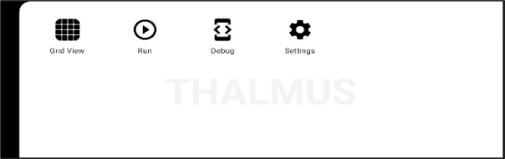
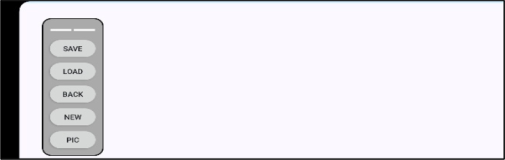
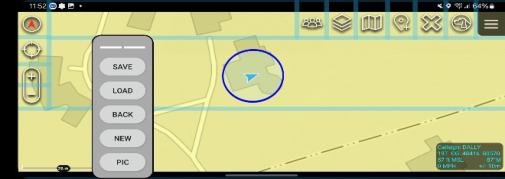
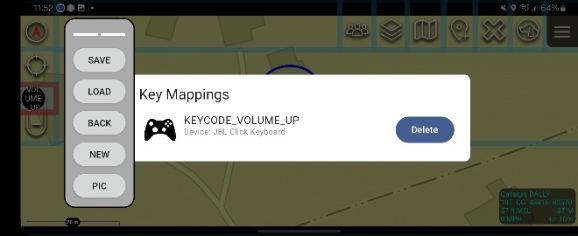
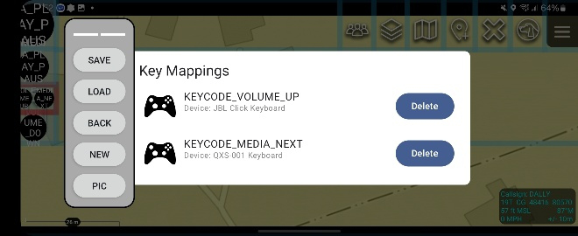
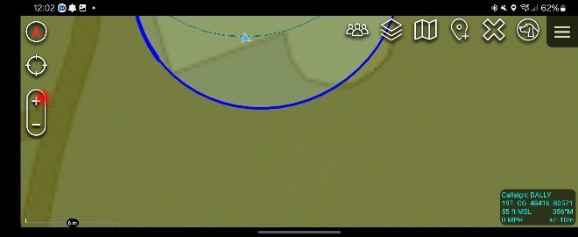
The UTTL has been fully developed to overlay customizable grids on the device’s touchscreen, dividing it into virtual cells (slicer grids) that users can configure for specific applications. Slicer grids are adaptable to each app’s GUI, enabling seamless transitions between different grid layouts based on the active app and its current screen state. This implementation also ensure that by using the UTTL interface, users can assign peripheral inputs (e.g., button presses, joystick movements) to individual slicer grid cells without requiring programming expertise. This empowers users to design input mappings that accommodate unique workflows, ergonomic constraints, and task-specific demands, making THALAMUS highly adaptable to diverse operational scenarios. Figures 1 through 6 provide screenshots of the current prototype in the context of a normal user workflow through the system from Slicer creation to third-party app usage.
Figure 1: The THALAMUS main menu presents the two main user options: (1) Grid View – for creating new Slicer grids; and (2) Run – to background the THALAMUS app and start using it for third-party app control.Figure 2: Within the Grid View, users are able to create, save, and load new Slicer grids using a floating on-screen menu. This process starts with the user capturing a screenshot, via the PIC button, that becomes the background state for the Slicer being created.Figure 3: During creation of a grid, the user has multitouch interactions (e.g., drag the finger on the screen horizontally or vertically to place a new line) to create a grid (shown with the transparent blue color in the image) that aligns a unique cell with any interaction points they want to define.
Enabling and Advancing Adaptive HMI Ecosystems 225
Figure 4: To map an HMI peripheral input, the user double taps the cell to map to, and a listener dialogue opens. Any HID input from a connected device is mapped to the cell.Figure 5: Users have the ability to map any number of devices and device inputs to a single cell, allowing for multimodal interaction designs that can adapt to a user’s preferences or environmental context.Figure 6: After a Slicer grid is created, the user can return to the THALAMUS menu and select the run button to background the app on the smartphone. The Slicer grids then activate when the app detects on an onscreen state that aligns with a created Slicer grid. The red dot in the image provides visual feedback to the user that an input device has activated that region of the touchscreen successfully.
INITIAL PROTOTYPE PERFORMANCE EVALUATIONS Initial prototype testing methodologies were aligned to a series of user acceptance criteria for a set of key performance indicators (KPIs) ensuring the fundamental HID integration capabilities of THALAMUS meet initial targets for real-world use cases. These KPIs focused on: Peripheral Compatibility,
Input Recognition Accuracy, Latency in HID Input Processing, User Mapping Flexibility, and Power Consumption. While the results provided only cover an initial prioritized set of KPIs evaluated in controlled settings, they demonstrate that THALAMUS not only meets but often exceeds the required performance criteria, establishing it as a robust platform for multimodal HMI peripheral integration.
As the testing results below attest, the initial prototype performance evaluations demonstrate that THALAMUS not only meets but exceeds its targeted KPIs, establishing its feasibility as a robust, adaptable platform for HMI peripheral integration. These results provide a strong foundation for further development and testing in more operationally representative scenarios.
Peripheral Compatibility
Threshold: Support for at least 5 commercial off-the-shelf (COTS) HID- compliant HMI peripherals.
Objective: Support for at least 10 COTS HID-compliant HMI peripherals.
Results – Objective Performance Met. THALAMUS has been successfully tested with 13 HID-compliant peripherals, demonstrating robust compatibility across a diverse range of devices.
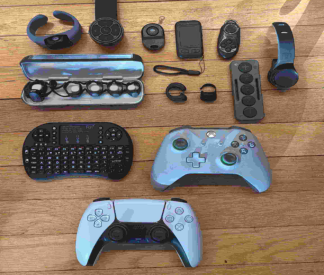
Testing Methodology Testing involved connecting a range of HID-compliant devices, including keyboards, game controllers, gesture gloves, and body-mounted devices, to THALAMUS-enabled Android smartphones. Each peripheral was tested for compatibility by verifying initial recognition, communication via standard HID protocols, and the ability to transmit input data. Testing was conducted across different device brands and models to ensure broad compatibility, with each device evaluated for stable input handling over multiple interaction sessions. Figure 7 shows a photo the primary devices tested, and noting additional devices were tested by our engineering team that are not included here / were not included in our formal testing efforts.
Figure 7: Set of HMI peripherals used for initial THALAMUS testing.
Enabling and Advancing Adaptive HMI Ecosystems 227
Input Recognition Accuracy
Threshold: 95% accuracy in recognizing and mapping HID inputs.
Objective: 99% accuracy in recognizing and mapping HID inputs.
Results – Objective Performance Met. Controlled benchtop testing of 100+ commands across 10 peripherals resulted in a 100% detection accuracy rate.
Testing Methodology A controlled benchtop setup was used to test input recognition across 10 HID peripherals. Each device was connected to the THALAMUS system, and a predefined set of 10 input commands per device was issued. The system logged each input’s detection and successful mapping to an associated slicer grid cell. Repeated trials were conducted to evaluate consistency, with 100+ total commands tested to ensure statistical reliability. Results were validated by comparing the logged inputs to expected mappings, achieving a 100% detection and mapping accuracy rate.
Latency in HID Input Processing
Threshold: Less than 75 milliseconds latency.
Objective: Less than 20 milliseconds latency.
Results – Objective Performance Met. Testing resulted in 2–8 ms response time from the HID event being received by the app from the Android OS to the on-screen THALAMUS touch event being executed.
Testing Methodology Latency was measured by reviewing engineering logs for three key events: (1) when the HID peripheral issued a command, (2) when the Android OS processed the HID input, and (3) when THALAMUS executed the corresponding on-screen touch event. High-resolution logging tools were used to capture these timestamps under both static and dynamic use cases. Testing spanned 10 HID peripherals and included single-command and continuous-command scenarios, ensuring reliability across device types and input methods. Results consistently showed a response time of 2–8 milliseconds, significantly exceeding the objective criterion of less than 20 milliseconds latency.
User Mapping Flexibility
Threshold: Users can map 3 inputs per HMI device.
Objective: Users can map all HMI inputs (100% coverage).
Results – Objective Performance Met. Across 10 devices tested, all binary inputs were successfully mappable to THALAMUS Universal Touchscreen Translation Layer (UTTL) slicer cells.
Testing Methodology The mapping functionality was evaluated by connecting 10 HID devices to THALAMUS and testing each device’s binary input capabilities. For each device, all available input types (e.g., button presses, joystick movements)
were mapped to UTTL slicer grid cells using the THALAMUS user interface. Mapping accuracy and user flexibility were assessed by manually verifying that each input was correctly assigned to the appropriate grid cell and that mappings could be reconfigured without errors. Repeatability was ensured through multiple remapping cycles for each device.
Power Consumption
Threshold: THALAMUS increases battery usage by less than 5%.
Objective: THALAMUS increases battery usage by less than 2%.
Results – Objective Performance Met. Testing under idle and active conditions revealed a battery usage delta of <2%, meeting the objective criteria.
Testing Methodology Battery consumption tests were conducted under controlled conditions, comparing baseline EUD usage to usage with THALAMUS enabled. Two scenarios were tested: idle mode, where the EUD remained on but inactive, and active mode, where users interacted with test applications while THALAMUS was running. Battery levels were monitored over fixed time intervals, and consumption was calculated as a percentage of total battery capacity. Data was collected from the same Android device to ensure consistency, with delta values between THALAMUS-enabled and baseline conditions consistently falling below 2%.
CONCLUSION
As we advance the development of THALAMUS, our efforts will focus on three primary fronts to enhance its functionality and scalability. First, we aim to improve the quality of life (QOL) features within the current application. This includes integrating default grid configurations for popular applications to streamline the user setup process and introducing a universal lockout mechanism to allow users to disable THALAMUS functionality quickly and universally when necessary. These updates are designed to enhance usability and align with user feedback, ensuring the system remains intuitive and practical for diverse operational needs.
Second, we will initiate development efforts toward incorporating AI/ML- based automated contextual GUI detection capabilities. This enhancement will allow THALAMUS to dynamically recognize application states and GUI changes, enabling more seamless adaptation of grid configurations. By leveraging machine learning to infer user intent and operational context, this capability will further reduce cognitive load and interaction complexity, advancing THALAMUS as a truly intelligent HMI solution.
Finally, our next phase includes planning and executing the first formal prototype testing with representative end users. This testing will evaluate THALAMUS in operationally relevant environments, providing key insights into its performance and usability under real-world conditions. Results from this testing phase will be presented on the accompanying poster at the Applied Human Factors and Ergonomics (AHFE) conference event, where we aim to
Enabling and Advancing Adaptive HMI Ecosystems 229
gather feedback and engage with the HCI community to refine and expand THALAMUS’s capabilities.
THALAMUS has already demonstrated significant contributions to advancing adaptive HMI systems by offering a scalable and flexible solution for multimodal interaction. Its ability to bridge the gap between third-party peripherals and touchscreen functionality has the potential to transform professional and operational environments, enhancing accessibility, efficiency, and situational awareness. As we continue to innovate, THALAMUS remains poised to redefine human-machine interaction in dynamic and high-stakes contexts.
ACKNOWLEDGMENT
Portions of this work and efforts depicted were sponsored by AFWERX, a component of the Air Force Research Laboratory (AFRL).
REFERENCES
Abzarian, David, et al. (2021) HID Usage Tables for Universal Serial Bus (USB).
Universal Serial Bus (USB) Website: https://www.usb.org/sites/default/files/hut1_ 22.pdf. Bergman, Mike, et al. (May 27, 2001) Universal Serial Bus (USB) Device Class Definition for Human Interface Devices (HID). Universal Serial Bus (USB) Website: https://www.usb.org/sites/default/files/hid1_11.pdf. Hopkins, M., Lattimer, Bill, Graff, Eliot. (October 22, 2024) Develop Windows
device drivers for Human Interface Devices (HID). Microsoft Learn Website: http s://learn.microsoft.com/en-us/windows-hardware/drivers/hid/.
Read this individual research paper free through the original publisher, or explore the full digital proceedings book.
ISBN 978-1-964867-71-7
Explore this ISBN in the AHFE Bookstore ↗Listed in the July 2026 bookstore catalogue; search by ISBN to confirm current availability · Digital book purchase optional