Shreyas Aswar, Andrew Weakley, Priyanka Koppolu, Sarah Tomaszewski Farias, Alyssa Weakley (2026). A Plug-and-Play Desktop System for Remote Care of Older Adults with Alzheimer's Disease. In: Human Factors in Aging and Special Needs. AHFE Open Access, vol. 214, pp. 85–95. https://doi.org/10.54941/ahfe1007576
Family members of individuals with Alzheimer’s disease and related dementias (ADRD) frequently provide care from a distance to support their loved one’s desire to age-in-place. To meet the needs of remote care dyads, we previously developed a multifunction daily management web application for collaborative use by care receivers and caregivers. However, even thoughtfully designed applications offer limited benefit when obscured behind forgotten passwords, complex navigation, and unreliable hardware. Moreover, scalable remote care requires streamlined setup, automated recovery, and remote monitoring capabilities. To address these challenges, we developed a plug-and-play system designed for seamless, persistent access. This solution involved two key steps: (1) selecting user-friendly hardware and (2) optimizing the operating system (OS), firmware, and web browser. Hardware selection was informed by usability testing with older adults with cognitive impairment. System optimization was achieved through a series of automated PowerShell scripts. We field-tested the system in four homes over four weeks. Participants reported high satisfaction with the system’s appearance and automatic login functionality, emphasizing relief at not needing to remember credentials or navigate to the application. Concerns about continuous power usage emerged and will inform future refinements. This pilot demonstrates the feasibility, acceptability, and technical viability of a self-maintaining, plug-and-play desktop infrastructure to support remote caregiving for individuals with ADRD aging in place.
Individuals with Alzheimer’s disease and related dementia (ADRD) experience cognitive dysfunction impacting their ability to age-in-place, defined as aging in one’s home and community for as long as possible and delaying relocation to a long-term care facility (Bigonnesse & Chaudhury, 2020). Aging-in-place is a strongly held desire for 75–90% of older adults in the United States and other regions (Binette & Farago, 2024; Cutchin & Rowles, 2024). To assist individuals with ADRD maintain independence at home, family members (e.g., adult children) often take on informal caregiving roles (Luiches, Goossensen, & der Meide, 2021; Nizarl, Joe, Kin, & Fazli Khalaf, 2022). However, due to globalization and competing priorities (work, child rearing), these caregivers require solutions that allow them to provide care remotely.
To support both individuals with ADRD and their remote caregivers (i.e., care dyad) we developed the web-based application (app), Interactive-Care (I-Care). I-Care is a multifunction daily management and communication tool for dyad collaborative use (Weakley et al., 2025; Pimento et al., 2024). The I-Care platform consists of 5 main functions including: (1) a Home page consisting of a photo album, the current weather, and upcoming events; (2) a Calendar page with step-by-step guided workflow for entries; (3) a To-Do page with two customizable lists; (4) a Messaging page with simplified synchronous and asynchronous communication options including video chat; and (5) a Notes page.
Critically, a user-centered approach was taken throughout the design and development of I-Care. For example, we conducted focus groups, interviewed and received feedback from subject matter experts, and conducted a rigorous iterative co-design process with individuals living alone with moderate cognitive impairment (Weakley et al., 2025). This resulted in the demonstrated ability of participants to independently carry out key tasks within I-Care (e.g., set calendar reminders). Furthermore, participants endorsed high levels of satisfaction, intention to continue to use, and low concerns regarding privacy and security.
In addition to developing an accessible user interface (UI) and experience (UX) that aligns with the care dyads’ needs, careful consideration must be given to how, when, and on what device(s) users will engage with I-Care. Thus, hardware components and the operating system configuration must align with engagement goals and promote real-world uptake and adherence. For example, a well-liked and carefully designed application provides little benefit if it remains obscured behind a closed laptop, requiring recall of login information, and confusing navigation requirements. Furthermore, for our particular use case (i.e., remote care), streamlined set-up coupled with remote system monitoring and troubleshooting capabilities are a necessity for adoption and scalability. This technical paper focuses on the design process of a plug-and-play system involving (1) selecting user-friendly hardware and (2) optimizing the operating system (OS), firmware, and web browser.
METHODS
Selecting User-Friendly Hardware Development of I-Care was predicated on evidence-based cognitive rehabilitation tools for individuals with ADRD, including prominently displayed dry-erase whiteboards which have shown to improve awareness and reduce reliance on caregivers (Ames, O’Brien, & Burns, 2017; Regan, Wells, & O’Halloran, 2020). Our initial aim was to simulate a digital whiteboard by having I-Care displayed at all times on a large (17.3 inch) touch screen tablet (Samsung Galaxy View 2) with a wireless bluetooth connected slim keyboard. In order to meet our requirements, we configured the tablet in ‘kiosk mode’ which locks the device into a single app, hides the web browser address bar, and prevents access to web browsing, other apps, and device functions. Additionally, we adjusted power settings to prevent the computer from turning off. These modifications allowed I-Care to stay on
A Plug-and-Play Desktop System for Remote Care of Older Adults 87 and accessible at all times. We also placed the tablet in a high-traffic location where it could be viewed multiple times a day (e.g., dining room). These configurations promote I-Care use, eliminates the need to remember login information, reduces cognitive load, and mirrors effective components of the traditional whiteboard.
We tested our initial system set-up with 2 older adults with memory impairment. While the users appreciated the appearance of the tablet, clear usability issues were discovered. Specifically, users had notable difficulty interacting with the capacitive tablet touchscreen. This challenge has also been explored in the literature with authors citing effects of age-related physiology (e.g., skin dryness) and cognitive decline as explanations of touchscreen manipulation challenges (Baringer, Souders, & Mintz, 2023; Wilson, Byrne, Rodgers, & Maden, 2022). Participants also had trouble using the bluetooth keyboard, particularly with recalling the necessity of a key strike to activate it, resulting in typing before the keyboard is enabled. Additional issues included the keyboard running out of battery and becoming misplaced.
To address these hardware challenges, we transitioned away from the sleek tablet to a more familiar desktop computer set-up. To minimize wires, we selected the 20.7 inch HP All-In-One 21-B0024 computer with an integrated webcam. Our original 2 pilot users had an immediate positive response to the hardware switch. A third user who was enrolled to test the usability of the I-Care web-app also expressed a high level of satisfaction and usability with the new computer. We also replaced the wireless keyboard with a slim, tenkeyless keyboard with high-contrast and large print keys, which improved ergonomics and accessibility, respectively. As we moved away from touchscreens due to accessibility challenges, we provided a wired mouse. Despite prior experience with computers, users demonstrated difficulty with recalling where to click on the mouse, locate the cursor, and adapt to the cursor speed. Indeed, prior work has discovered reduced ability to use a computer mouse with cognitive decline (Gledson et al., 2016; Seelye et al., 2015). To address these challenges, we placed a hole punch reinforcement sticker (used in three-ring binders) on the left button to direct users attention. We also increased the cursor size and slowed the speed/sensitivity in computer settings. These modifications proved efficacious.
Although users were satisfied with the computer appearance and usability, we found undesirable lag time on start-up and when executing key I-Care functions (e.g., video chat). Therefore, we selected the STGSivir 22 inch all- in-one computer with Core i5, 16 GB RAM, and 512 GB SSD, which had superior specifications to be used in the current deployment.
SYSTEM DESIGN AND ARCHITECTURE To accomplish our goals of creating a digital whiteboard, we transformed a standard Windows PC into a self-maintaining kiosk through a two-stage automated installation approach. The first installation script begins by removing any previous installations—a critical step that prevents conflicts from partial deployments or older versions that might interfere with the current system. It then detects and installs Python 3.9 or higher, the runtime
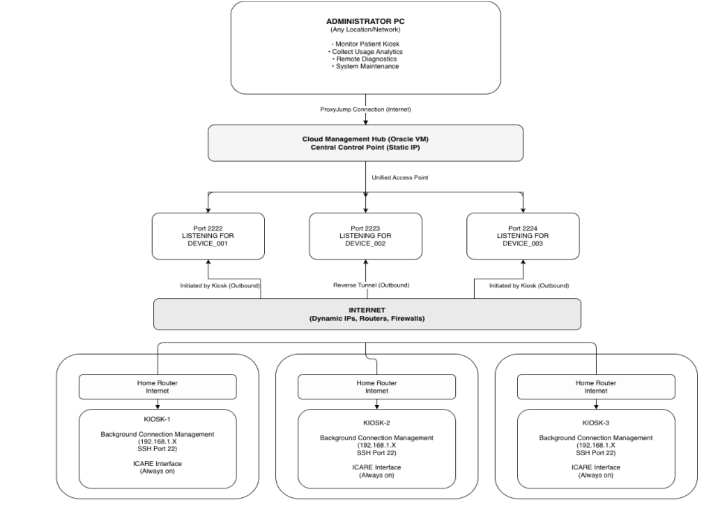
dependency for all monitoring scripts, using either online downloads from the official Python repository or offline installers that are bundled with the deployment package. This dual-mode installation capability is essential because home environments often have internet restrictions and/or unreliable residential connections. The script installs three critical Python packages: psutil for system monitoring, paramiko for SSH operations, and requests for network communication—with automatic fallback to pre-packaged offline wheel files if internet installation fails. Windows’ built-in OpenSSH Server is enabled through the DISM command-line tool, providing the local SSH endpoint that will serve as the target for incoming reverse tunnel connections (see Figure 1). A standardized directory structure is created with appropriate permissions to house all runtime scripts, log files, and configuration data, ensuring consistent file locations across kiosks. Runtime scripts are downloaded from a central GitHub repository with fallback to bundled local copies, and finally an interactive configuration wizard generates a device- specific JSON file capturing the unique device ID, assigned tunnel port number, patient-specific display schedule, and kiosk web application URL.
Figure 1: Reverse SSH tunnel network architecture for remote management.
The second installation script configures the user environment and automation layer that enables unattended operation. It creates a dedicated “I-Care” user account with administrator privileges—required for monitoring Windows services—along with a non-expiring password to prevent lockout and automatic login enabled to eliminate boot-time authentication barriers. While automatic login creates an obvious security trade-off by allowing anyone with physical access to use the computer, we mitigate this through
A Plug-and-Play Desktop System for Remote Care of Older Adults 89 SSH key-based remote authentication and the assumption that kiosks reside in private homes with limited physical access by unauthorized individuals. The script generates RSA-4096 SSH keys for passwordless remote access with restrictive file permissions ensuring the private key is readable only by the I-Care user. Two Python monitoring scripts are registered as Windows Services using NSSM, a third-party utility that wraps arbitrary executables as services—necessary because Windows’ native service creation requires compiled executables, not Python scripts.
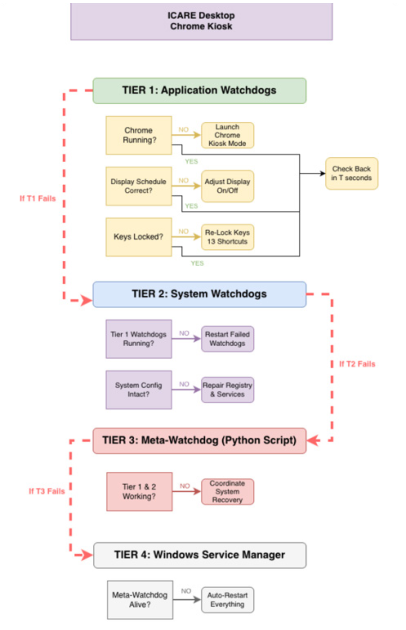
Three scheduled tasks are created to launch ‘watchdog’ scripts (see Figure 2) immediately at user login: one maintains the reverse SSH tunnel, another monitors Chrome process health, and the third manages display power scheduling. The latter allows screen disablement based on a user’s preferred sleep-wake cycle while still allowing the computer to run I-Care in the background. Importantly, the screen can be activated during downtime with keyboard/mouse activity, with return to ‘dark mode’ after 5 minutes of non-use. Each scheduled task uses a VBScript wrapper that launches the corresponding PowerShell script in completely hidden mode, solving a Windows quirk where PowerShell’s -WindowStyle Hidden parameter doesn’t work reliably from Task Scheduler and console windows still flash briefly during startup.
Figure 2: I-care watchdog architecture: Monitoring and recovery.
The kiosk lockdown implements multiple defensive layers. We apply 28 Chrome policies through Windows registry modifications to disable features that could confuse users or provide escape routes (e.g., incognito mode). Thirteen keyboard shortcuts were disabled through additional registry modifications to prevent system-level escapes. Taskbar icons were also hidden to prevent accidental network disconnection and to reduce visual clutter. A watchdog script polls every 5 seconds for Chrome’s existence in the process list, automatically relaunching it within 5 seconds if it crashes due to memory exhaustion, GPU driver failures, or Windows updates. This rapid polling interval was chosen to balance CPU overhead against recovery time.
Remote access through NAT traversal represents one of the system’s most critical technical achievements. Home kiosks reside behind consumer routers that block incoming connections, lack static IP addresses, and cannot be safely reconfigured remotely without risking complete loss of access. We employ reverse SSH tunneling where each kiosk initiates an outbound SSH connection to an Oracle Cloud VM with a known public IP address, establishing a tunnel that forwards a unique port on the cloud VM back to the kiosk’s local SSH server. Administrators connect first to the cloud VM and then jump through the established tunnel to reach the specific kiosk. A PowerShell script maintains this tunnel: if the connection drops due to network issues, it automatically reconnects after a 10-second delay, and SSH keepalive packets are sent every 60 seconds to detect failed connections even during idle periods. This approach provides security benefits over direct internet exposure because the kiosk’s SSH server never faces the public internet, access control centralizes on the cloud VM, and all connections effectively require two-factor authentication.
The monitoring architecture implements a three-tier watchdog system where each tier monitors the tier below, preventing single points of failure. Application watchdogs implemented as PowerShell scripts monitor critical applications and system functions including Chrome process health and display power management. System agents implemented as Python services monitor system health by collecting CPU, RAM, and disk metrics every 5 minutes, tracking network connectivity, and verifying that Windows services and scheduled tasks remain in their configured state—when configuration drift is detected, such as Windows updates disabling custom scheduled tasks, the agent automatically repairs the system state from the authoritative configuration file. A meta-watchdog supervising service monitors all Tier 1 and Tier 2 components and restarts any that fail, while Windows Service Manager itself is configured with automatic restart policies to recover the meta-watchdog if it crashes. All components write to centralized log files with 3-generation rotation at 10MB each to prevent disk exhaustion while retaining approximately 30MB of history per component, and logs are uploaded hourly to the Oracle Cloud VM via SCP for remote diagnostics, though this currently experiences timeout issues on slow residential internet connections.
Evaluation We deployed our hardware and operating system configuration in 4 residences of older adults with mild-moderate cognitive impairment (age
A Plug-and-Play Desktop System for Remote Care of Older Adults 91 M = 84, SD = 4.24; education M = 15.5, SD = 2.52; 50% non-hispanic white; 100% female). Familiarity with technology ranged from very low to moderate. Participants lived alone with the exception of one participant who lived with her spouse but received remote assistance from her daughter. Participants lived in single family homes in the community; however, one participant relocated to an assisted living facility primarily secondary to loneliness. Participants were interviewed once a week for 4 weeks to gain their opinions and perspectives regarding the computer hardware, operating system configuration, and ease of use. All participants were able to provide their own written consent and this study was approved by University of California, Davis Institutional Review Board.
RESULTS
Aesthetically, the hardware selected was viewed as acceptable by all participants. Participants endorsed liking the appearance of the computer system, having no concern about its size or color (silver monitor with black keyboard/mouse). One user expressed interest in having a touch screen monitor. Participants appreciated the accessibility features of the keyboard (high-contrast, large print), mouse (circle on right button), and monitor (cursor size and speed). Some participants stated they prefer wireless keyboard/mouse but agreed to use wired options to limit possible loss of function. Given the appearance of a typical computer, however, participants expressed confusion as to why kiosk mode limited their ability to access typical computer functions (e.g., web browsing, game playing).
Regarding functionality, dyads appreciated the plug-and-play nature of the machine. They – as well as their caregivers – were relieved to learn that they would not need to recall login information or how to navigate to I-Care, particularly if the computer lost power. One participant moved during the study and their remote caregiver was able to set-up and connect the computer to wifi in the new location with minimal directions independently.
Concerns endorsed included worry that leaving the computer on would be “harmful,” leading to participants unplugging the computer. This issue was addressed by placing a note on the power cord reminding the user to leave the computer plugged and reassuring them that doing so would not be harmful to the computer. Another user expressed concern that leaving the computer on would negatively impact their electric bill. At some point during the deployment, all participants unplugged their computer. Although the system was configured to automatically log them back into I-Care, we found the system stalled at the sign-in page on occasion.
DISCUSSION
While simplified UI/UX applications and captive touch screen tablets have been tailored for older adults with cognitive impairment (Kiselica, Hermann, Scullin, & Benge, 2024; Raghunath et al., 2019; Tak, 2021; Yu et al., 2026), this study is the first to evaluate the development, feasibility, and acceptability of a plug-and-play consumer computer solution. This system
accommodates the cognitive and physical requirements of individuals with ADRD thereby enabling independent engagement with a remote caregiving and daily management tool. This system was designed not only to host the I-Care web app, but to eliminate common barriers to sustained use—logins, navigation complexity, software drift, hardware misplacement, and remote troubleshooting limitations—that frequently undermine digital health interventions in real-world home environments.
This pilot deployment demonstrated feasibility and high acceptability of the plug-and-play configuration among older adults with mild-to- moderate cognitive impairment. Participants endorsed strong satisfaction with the physical appearance of the all-in-one desktop and keyboard/mouse accessibility features. Importantly, users expressed relief that they did not need to remember usernames or passwords and that the system automatically returned to I-Care upon power restoration. This directly addresses a well- documented breakdown point in technology adoption among individuals with ADRD: the cognitive burden associated with authentication and navigation (Kiselica et al., 2024).
From a systems standpoint, the multi-tier watchdog architecture functioned as intended in most scenarios. Chrome kiosk relaunch occurred within seconds of crashes, and reverse SSH tunnels successfully re-established connectivity following transient network interruptions. Logging confirmed that automated service restarts prevented prolonged downtime. These findings suggest that automated state monitoring and self-repair mechanisms are not merely technical enhancements but foundational requirements for ADRD caregiving systems that require minimal maintenance and remote maintenance/troubleshooting. However, we also observed failure modes that provide critical insight for future iterations. Despite configuration for automatic login, power-loss events resulted in stalling on I-Care sign-in. This suggests a need for a more reliable approach such as hard-coding the I-Care logins within the script. Furthermore, residential internet variability contributed to intermittent delays in log uploads and reverse tunnel reconnection, underscoring the importance of asynchronous strategies.
Regarding hardware lessons learned, our transition from a large touchscreen tablet to a traditional all-in-one desktop underscores the importance of familiarity and physical ergonomics in dementia-friendly technology design. Although tablets are often perceived as intuitive, our findings align with prior literature documenting touchscreen manipulation challenges in older adults with cognitive impairment. In contrast, the desktop format – paired with targeted accessibility modifications such as enlarged cursors, slowed mouse speed, and a tactile cue on the primary mouse button – proved usable and acceptable. Interestingly, the familiar appearance of a standard Windows desktop also created confusion when kiosk restrictions prevented typical computer activities. This tension reflects a broader design tradeoff: the more a system resembles a general-purpose computer, the stronger the expectation of unrestricted functionality. Future iterations may benefit from visual framing cues that clarify its dedicated purpose (e.g., branded casing or modified desktop shell) to reduce confusion.
A Plug-and-Play Desktop System for Remote Care of Older Adults 93 A recurring concern among participants involved leaving the computer powered continuously. Some worried about hardware damage and others expressed concern about electricity costs. These perceptions led all participants to unplug the system at least once. Future work should quantify real-world energy usage and communicate this transparently to users and caregivers to assess acceptability. Integrating low-power modes, smart plugs for remote power cycling, or occupancy sensors (Weakley, Dong, Brown, & Pan, 2025). to modulate screen activation may reduce perceived and actual energy burden.
Limitations of this feasibility pilot included a small, demographically homogeneous sample (all female; 50% White), limiting generalizability. The deployment duration (4 weeks) does not capture long-term adherence, hardware durability, or progressive cognitive decline effects. Additionally, we did not formally quantify system uptime, crash frequency, or energy consumption, which would strengthen objective evaluation of technical performance. Because this was a feasibility study with care receivers, caregiver perspectives were not systematically analyzed, though anecdotal feedback suggested strong appreciation for simplified setup and reduced troubleshooting burden. Future trials will incorporate objective outcomes and system telemetry metrics.
CONCLUSION
This study demonstrates that transforming an all-in-one desktop computer into a self-maintaining, kiosk-locked, remotely manageable system is feasible and acceptable for older adults with cognitive impairment. This work contributes to a growing body of digital health research focused on supporting aging-in-place among individuals with ADRD. However, most prior efforts have emphasized interface simplification rather than infrastructure resilience. Our findings suggest that backend automation, remote access through NAT traversal, configuration drift detection, and multi-layered watchdog systems are equally critical determinants of sustained real-world usability. The reverse SSH architecture in particular represents a scalable model for remote device fleet management without requiring router reconfiguration or exposing devices directly to the public internet. By centralizing authentication and maintaining outbound-only connections, this approach enhances security while preserving remote troubleshooting capability – an essential requirement when supporting geographically distributed care dyads. Overall, our plug-and-play system architecture may serve as a foundational platform for scalable, home-based digital health interventions that support autonomy, reduce caregiver burden, and promote aging-in-place for individuals living with ADRD.
ACKNOWLEDGMENT
The authors would like to acknowledge the participants who provided invaluable guidance and suggestions. Funding sources: University of California, Davis Healthy Aging in a Digital World Initiative and NIH/NIA K23AG080152.
REFERENCES
Ames, D., O’Brien, J. T., & Burns, A. (2017). Psychological approaches for the practical management of cognitive impairment in dementia. In Dementia (pp. 299–304). CRC Press. Baringer, K., Souders, D., & Mintz, A. (2023, September). Older adults
disproportionately hindered by touch screen interfaces in driving tasks. In Proceedings of the Human Factors and Ergonomics Society Annual Meeting (Vol. 67, No. 1, pp. 14–17). Sage CA: Los Angeles, CA: SAGE Publications. Bigonnesse, C., & Chaudhury, H. (2020). The landscape of “aging in place” in gerontology literature: Emergence, theoretical perspectives, and influencing factors. Journal of Aging and Environment, 34(3), 233–251. Binette, J., & Farago F. (2024). 2024 home & community preferences among adults
18 and older. AARP Research, Washington, DC. Cutchin, M., & Rowles, G. D. (Eds.). (2024). Handbook on Aging and Place. Edward Elgar Publishing. Cheltenham, UK. Gledson, A., Asfiandy, D., Mellor, J., Ba-Dhfari, T. O. F., Stringer, G., Couth, S.,
... & Sawyer, P. (2016, October). Combining mouse and keyboard events with higher level desktop actions to detect mild cognitive impairment. In 2016 IEEE International Conference on Healthcare Informatics (ICHI) (pp. 139–145). IEEE. Luichies, I., Goossensen, A., & der Meide, H. V. (2021). Caregiving for ageing parents: A literature review on the experience of adult children. Nursing ethics, 28(6), 844–863. Nizarl, K., Joe, O., Kin, T., & Fazli Khalaf, Z. (2022). Adult children as caregivers:
Preliminary study on the experiences and coping strategies of adult children as primary caregivers of parents with Alzheimer’s disease in Malaysia. Global Journal of Health Science, 14(12), 18–27. Pimento, S., Agarwal, H., Minor B., Karia, S., Cook., D., Schmitter-Edgecombe, M., Tomaszewski Farias, S., Lorabi, R., Weakley, A. (2024). Interactive-Wear: An intelligent watch application to aid memory for intentions and everyday functioning in older adults with cognitive impairments. Paper Published in IEEE’s Inaugural International Conference on Artificial Intelligence in Medicine, Health, and Care conference proceedings. Raghunath, N., Dahmen, J., Brown, K., Cook, D., & Schmitter-Edgecombe, M.
(2019). Creating a digital memory notebook application for individuals with mild cognitive impairment to support everyday functioning. Disability and Rehabilitation: Assistive Technology, 15(4), 421–431. Regan, B., Wells, Y., & O’Halloran, P. (2020). “I’m more aware now”: Perspectives from people with mild cognitive impairment (MCI), supporters and counselors about the MAXCOG cognitive rehabilitation intervention. Aging & Mental Health, 24(6), 965–970. Seelye, A., Hagler, S., Mattek, N., Howieson, D. B., Wild, K., Dodge, H. H., &
Kaye, J. A. (2015). Computer mouse movement patterns: A potential marker of mild cognitive impairment. Alzheimer’s & Dementia: Diagnosis, Assessment & Disease Monitoring, 1(4), 472–480. Tak, S. H. (2021). In quest of tablet apps for elders with Alzheimer’s disease: A descriptive review. CIN: Computers, Informatics, Nursing, 39(7), 347–354. Weakley, A., Dong, L., Brown, B., & Pan, S. (2025) Vibration sensing – A novel
approach to detecting activities of daily living. Presented at the Alzheimer’s Association International Conference meeting, Toronto, Canada.
A Plug-and-Play Desktop System for Remote Care of Older Adults 95 Weakley, A., Pimento, S., Gohil, A., Hegde, P., Koppolu, P., Agarwal, H., Yadav, P.,
Weakley, A. T., & Tomaszewski Farias, S. (2025). Promoting Autonomy in Older Adults with Cognitive Impairment: Co-Designing an Interactive Calendar for Memory Support. Paper published in 2025 International Conference on Human Factors in Design, Engineering, and Computing (AHFE) conference proceedings. Wilson, S. A., Byrne, P., Rodgers, S. E., & Maden, M. (2022). A systematic review of smartphone and tablet use by older adults with and without cognitive impairment. Innovation in Aging, 6(2), igac002. Yu, M., Shi, L., Wang, B., He, C., Cheng, S., Zhang, T., & Liu, Q. (2026). A Thematic
Review of Interactive Interface Design in Intelligent Assistive Technology for Older Adults with Alzheimer’s Disease: Five Key Dimensions of Interaction. International Journal of Human–Computer Interaction, 1–31.
LISTED IN THE AHFE DIGITAL BOOKSTORE CATALOGUE
Explore the complete digital volume
Human Factors in Aging and Special Needs
Read this individual research paper free through the original publisher, or explore the full digital proceedings book.
ISBN 978-1-964867-90-8
Explore this ISBN in the AHFE Bookstore ↗Listed in the July 2026 bookstore catalogue; search by ISBN to confirm current availability · Digital book purchase optional