Mayra Carrión-Toro, David Morales-Martínez, Marco Santórum, Lisbeth Romo, Karen Santórum (2026). A Sustainable Assistive Technology for Children With Visual Impairments. In: Human Factors in Design, Engineering, and Computing. AHFE Open Access, vol. 238, pp. 122–133. https://doi.org/10.54941/ahfe1008247
Access to printed educational materials remains a significant challenge for children with visual impairments, particularly during the early stages of Braille literacy and foreign-language learning. This paper presents LIBRA (LEGO Interactive Braille Assistant), an exploratory assistive prototype designed to transform short printed English texts into embossed Braille while providing complementary auditory feedback. The system combines LEGO Mindstorms with an external processing module to perform optical character recognition, text processing, Braille generation, and audio output. LIBRA was developed using the iPlus methodology and iterative prototyping, with requirements focused on tactile interaction, Braille representation, auditory feedback, and adjustable learning support for children aged 7 to 10. The prototype was evaluated in terms of Braille output, processing performance, interaction, and perceived usability. The evaluation involved 25 participants with training in usability and accessibility and experts in assistive technologies and visual impairment. The results showed an average SUS score of 81%, together with evidence of functional feasibility and positive perceptions of the tactile and auditory interaction. The study contributes an exploratory, low-cost approach for integrating printed-text recognition, Braille embossing, and auditory support into an educational assistive system, providing a basis for future validation with children with visual impairments.
Access to appropriate learning materials is fundamental during the early stages of literacy development. For children with visual impairments, however, educational content is frequently provided in formats that are not directly accessible through vision, creating additional challenges when printed materials are used in the classroom. This limitation is particularly relevant during Braille literacy and foreign-language learning, where learners need to associate textual information with tactile representations and, in some cases, pronunciation and repeated practice. Worldwide, approximately 285 million people live with visual impairments, including 39 million who are blind (Yang et al., 2021), a condition that restricts autonomy and participation in learning and daily activities.
A Sustainable Assistive Technology for Children With Visual Impairments 123 Braille remains an essential medium for literacy among people with visual impairments because it provides direct access to written language through tactile representation. However, producing Braille versions of printed educational materials can require specialized equipment, time, and additional resources. Digital alternatives such as refreshable Braille displays and screen readers provide valuable access to electronic content, but they do not necessarily address situations in which learning materials are available primarily in printed form. These limitations motivate the development of complementary solutions capable of transforming printed information into accessible tactile and auditory representations.
A complementary approach is therefore to integrate printed-text recognition with tactile and auditory output within a single interactive system. Such integration can reduce the separation between obtaining textual information and accessing its Braille representation, while auditory feedback can provide additional support for pronunciation and language practice. For children beginning Braille literacy, this combination may facilitate interaction with short learning materials without requiring continuous visual assistance. From a technological perspective, an exploratory prototype can also serve to investigate the feasibility of integrating these functions using modular and relatively accessible components.
In response to this challenge, this paper presents LIBRA (LEGO Interactive Braille Assistant), an exploratory assistive prototype designed to convert short printed English texts into embossed Braille and complementary speech output. The system combines optical character recognition, text processing, Braille embossing, and auditory interaction to support early Braille literacy and English language learning. The prototype was developed using the iPlus methodology and iterative prototyping, with emphasis on tactile interaction, accessible feedback, and adaptability of the learning process. The study evaluates the functional behavior and perceived usability of the prototype and discusses its potential and limitations as an early-stage educational assistive technology.
BACKGROUND AND RELATED WORK Role of Information Systems in Visual Impairment Education
Visual impairment, encompassing blindness and low vision, affects a significant proportion of the global population and entails profound social, economic, and educational consequences. According to the World Health Organization (WHO), approximately 2.2 billion people worldwide experience some degree of near or distance vision impairment, with at least one billion cases remaining preventable or untreated due to limited access to timely healthcare and preventive services (World Health Organization, 2019). For children, early visual impairment is particularly critical, as it is associated with developmental delays and persistent academic gaps, especially in literacy-related skills (World Health Organization, 2019; Veldhorst et al., 2023; Alvarez-Peregrina et al., 2020).
Research indicates that these educational disparities are largely driven by the absence of incidental exposure to written text, such as signs, labels, or printed materials, that naturally reinforces literacy acquisition in sighted
children (Sun and Xi, 2025). Although children with visual impairments may employ similar phonological strategies, their opportunities to consolidate reading skills are significantly constrained by the scarcity of accessible learning environments and adapted materials (Loh et al., 2024).
Within this context, Information Systems Engineering (ISE) plays a pivotal role in promoting educational inclusion. Beyond traditional priorities of efficiency and functionality, inclusive ISE requires a shift toward user- centered and socially responsible design approaches (Vimalan et al., 2024). Information systems must therefore actively transform educational content into accessible formats aligned with users’ sensory and cognitive needs, integrating accessibility standards, participatory design methodologies, and adaptable low-cost technologies. Embedding accessibility into the foundations of information systems is essential to reduce the digital divide and ensure equitable access to knowledge for children with visual impairments.
Braille and Assistive Technologies: Advances and Persistent Gaps Braille remains a fundamental tactile system for literacy and autonomy among people with visual impairments. Based on six-dot cells representing letters, numbers, and symbols, it continues to play a central role in educational contexts despite the expansion of digital technologies (Mukherjee et al., 2025). To support braille-based access to information, a range of devices has emerged, including traditional braille embossers for printed materials and electronic solutions such as refreshable braille displays and braille readers for digital content (Qiu et al., 2024).
Despite these advances, the widespread adoption of braille-based technologies remains limited. Many devices are prohibitively expensive, restricting access to well-resourced institutions or high-income users (Nayar et al., 2021). In addition, existing solutions often lack adaptability to dynamic educational settings and typically focus on tactile output alone, with limited integration of auditory feedback that could reinforce language learning and pronunciation (Tipi, 2023).
These limitations are especially pronounced in low-resource contexts, where financial constraints and limited availability of specialized equipment continue to hinder literacy and educational inclusion for children with visual impairments (Kana and Hagos, 2025). Consequently, there is a clear need for affordable, adaptable, and multimodal braille-based solutions capable of extending the educational potential of braille within contemporary learning environments.
Assistive Technologies and Accessible Prototyping Platforms Assistive technologies (AT) encompass devices, software, and systems designed to transform information into accessible formats, thereby supporting the autonomy, learning, and social participation of people with visual impairments (Kisanga and Kisanga, 2022). Over recent decades, solutions such as braille embossers, refreshable braille displays, and screen- reading systems have significantly expanded access to digital content and communication. Devices like the Orbit Reader 20 combine portability with braille reading and
A Sustainable Assistive Technology for Children With Visual Impairments 125 note-taking functionalities, while other approaches integrate tactile and auditory feedback to improve reading accuracy and comprehension in digital environments (Orbit Research, 2025; Chen et al., 2024; Aqel et al., 2019).
Despite these advances, substantial limitations remain, particularly in educational contexts and low-resource settings. Most assistive technologies are costly, rely on proprietary hardware, and focus primarily on digital text, offering limited support for printed educational materials that remain prevalent in classrooms (Jadhav et al., 2020; Nayar et al., 2021). Furthermore, truly multimodal solutions that effectively combine tactile and auditory feedback are still scarce, restricting opportunities for inclusive literacy and language learning, especially for children in developing regions (Tipi, 2023; Kana and Hagos, 2025). These constraints highlight the need for affordable, adaptable, and context-aware alternatives.
Educational robotics platforms provide programmable controllers, mechanical components, sensors, and actuators that can be combined to construct interactive prototypes. LEGO Mindstorms is particularly suitable for exploratory development because its modular components can be assembled, modified, and reused during successive design iterations. Previous studies have demonstrated the use of LEGO-based systems in inclusive and assistive applications, supporting the development and evaluation of interactive solutions without requiring specialized manufacturing infrastructure (Arshad et al., 2020; Kolne et al., 2021). In the present study, the relevance of LEGO Mindstorms lies primarily in its role as a prototyping platform, rather than as the final hardware for deployment.
Accordingly, LIBRA uses LEGO Mindstorms as the physical and interaction layer for an integrated printed-text accessibility process. An external processing module performs optical character recognition and text processing, while the LEGO-based mechanism supports tactile interaction and Braille embossing. Auditory output complements the tactile representation by providing access to pronunciation and repeated language exposure. This configuration allows the feasibility of combining printed-text recognition, Braille generation, and auditory feedback to be explored within a single educational assistive prototype. The resulting system is therefore conceived as a proof of concept whose main contribution is the integration of these functions for early Braille literacy and English-language learning, rather than the development of a deployable commercial assistive device.
MATERIALS AND METHODS
The development of the LEGO Interactive Braille Assistant (LIBRA) followed a hybrid methodological approach combining the iPlus methodology, the Scrum framework, and iterative prototyping. iPlus was used to structure the identification and refinement of educational and accessibility requirements, while Scrum organized implementation into successive development cycles. The process focused specifically on the requirements of an educational assistive system, including printed-text recognition, Braille representation, tactile interaction, auditory feedback, and support for early English- language learning.
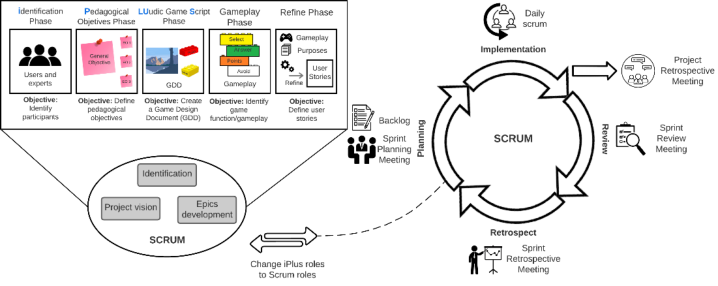
Designing With iPlus Methodology iPlus is a user-centered methodology originally developed for serious game design and later extended to interactive systems, see Fig. 1. Its main contribution is the early integration of stakeholder perspectives, including end users, domain experts, and pedagogical specialists (Carrión Toro, 2022). In this study, iPlus was combined with Scrum to support iterative development, prioritizing three phases: identification, pedagogical objective definition, and refinement.
Figure 1: iPlus methodology-SCRUM integration.
Identification Phase: This phase focused on identifying barriers related to the use of printed educational materials by children with visual impairments, with particular attention to early Braille literacy and foreign-language learning. Discussions with the product owner and relevant stakeholders identified the need for a system capable of acquiring short printed texts and providing both tactile and auditory representations. These requirements led to the definition of LIBRA as a prototype integrating printed-text recognition, Braille embossing, and auditory feedback. Technical, pedagogical, and accessibility perspectives were considered during the formulation of the initial requirements.
Pedagogical Objectives Phase: Pedagogical objectives were defined through a participatory process involving the product owner and pedagogical experts. The general objective was to develop a prototype capable of transforming short printed English texts into embossed Braille and complementary audio output to support early Braille literacy and English-language learning. Specific objectives addressed the integration of OCR, tactile text representation, auditory pronunciation and repetition, and adjustable interaction parameters. These objectives established the relationship between the prototype’s technical functions and its intended educational use.
Refinement Phase: In this phase, the proposed requirements and design concepts were reviewed, prioritized, and formalized into epics and user stories in collaboration with the product owner. Nonviable concepts were discarded, and the selected requirements were organized into a Scrum backlog. Particular attention was given to the interaction between OCR, Braille embossing, tactile
A Sustainable Assistive Technology for Children With Visual Impairments 127 controls, and auditory feedback. Accessibility and pedagogical considerations were incorporated into the refinement process to maintain traceability between the identified needs and the implemented functionalities.
Implementation The implementation of LIBRA was organized into three Scrum sprints, with each sprint addressing a progressively broader set of system functionalities. The development sequence moved from the Braille embossing mechanism to printed-text recognition and finally to the integration of tactile and auditory interaction. This structure allowed individual components to be implemented and tested before their integration into the complete prototype.
The first sprint focused on implementing the Braille printing mechanism using LEGO Mindstorms EV3. A mechanical structure with three calibrated motors was developed to control dot embossing and paper movement along the X and Y axes. A Braille dictionary programmed in Python using the “ev3dev2” library enabled the translation of plain text into six-dot Braille patterns. Early testing employed predefined text files, allowing iterative calibration of motor timing, print-head alignment, and embossing accuracy. Basic auditory prompts were incorporated to provide non-visual feedback on system status, resulting in a functional and accessible Braille printing module.
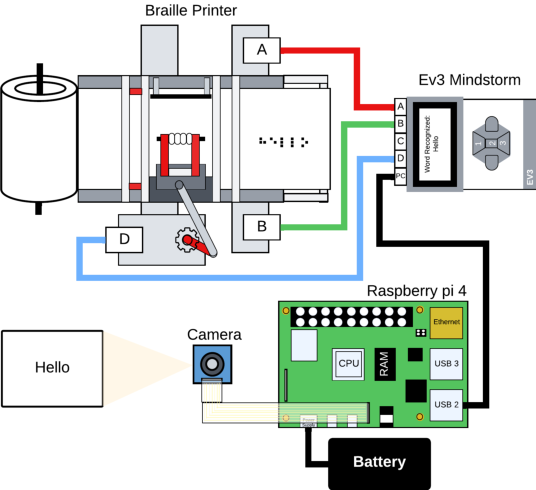
The second sprint extended the system by integrating a text capture and recognition pipeline. A Raspberry Pi 4 was added to handle OCR processing, while the EV3 brick remained responsible for motor control and user interaction (Fig. 2). System functions were mapped to physical EV3 buttons, enabling image capture, Braille printing, and audio playback through an intuitive, non-visual interface designed to support autonomous use.
The Raspberry Pi, powered by an external battery and running Raspberry Pi OS, was configured with a CSI camera for real-time image capture. Image quality was optimized using “libcamera”, “picamera2”, and “cv2”, while EasyOCR (English) performed local text recognition. The recognized text was transferred to the EV3 brick via SSH over USB, enabling offline, secure, and efficient processing through a clear division of responsibilities between OCR and motor control.
Auditory feedback was implemented using the ev3dev2.sound library to provide spoken system prompts and on-demand repetition of recognized text. This functionality was incorporated to complement the tactile representation with pronunciation and repeated auditory exposure, particularly for the intended foreign-language learning context.
The third sprint focused on integrating the previously developed components into a complete LIBRA workflow. The integrated sequence included text capture, OCR processing, text transfer, Braille embossing, and auditory feedback. Physical EV3 controls were used to coordinate the interaction sequence, allowing the system to be operated without relying on a visual interface. The integrated prototype was subsequently prepared for functional and usability evaluation.
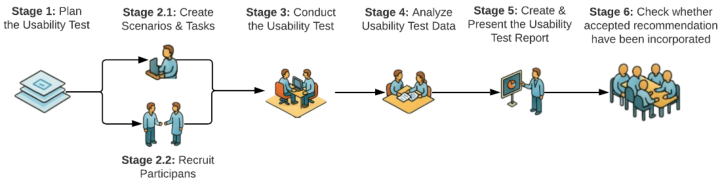
EVALUATION The usability evaluation of the LIBRA prototype was conducted following the protocol proposed by Abhay Rautela (Rautela, 2018), see Fig. 3, using the System Usability Scale (SUS) as the primary assessment instrument. The SUS is a widely recognized tool for evaluating perceived usability in both physical and digital interactive systems. It consists of ten questions rated on a five- point Likert scale ranging from “Strongly disagree” to “Strongly agree”. This standardized format allows for the systematic assessment of user perceptions across different usability dimensions.
Figure 3: Evaluation protocol.
A total of twenty-five participants took part in the evaluation, including students trained in usability and accessibility and experts in visual impairment and assistive technologies. The participant profile was selected to obtain complementary perspectives on the interaction, accessibility, and technical behavior of the prototype. As LIBRA represents an early-stage exploratory prototype, the evaluation focused on perceived usability and initial interaction characteristics rather than on establishing generalizable evidence for the target population (Nielsen and Landauer, 1993).
A Sustainable Assistive Technology for Children With Visual Impairments 129 Participants provided informed consent and received task guidelines describing the main functions of LIBRA. Each participant individually interacted with the prototype and completed a predefined sequence involving printed-text capture, OCR-based text recognition, Braille embossing, and auditory playback. The interaction was performed using the physical controls and auditory and tactile feedback provided by the prototype, without relying on a visual user interface. After completing the tasks, participants answered the System Usability Scale (SUS) questionnaire (Table 1).
Table 1: System usability scale (SUS) questionnaire items.
Table available in the original PDF paper.
SUS Questions
1. I think that I would like to use this device frequently.
2. I found the device unnecessarily complex.
3. I thought the device was easy to use.
4. I think that I would need the support of a technical person to be able to use this device.
5. I found the various functions in this device were well integrated.
6. I thought there was too much inconsistency in this device.
7. I would imagine that most people would learn to use this device very quickly.
8. I found the device very cumbersome to use.
9. I felt very confident using the device.
10. I needed to learn a lot of things before I could get going with this device.
SUS responses were analyzed following the standard scoring procedure, adjusting positively worded items (xi – 1) as and negatively worded items as (5 – xi) to mitigate response bias. The final SUS score was calculated by summing all adjusted item scores and normalizing the result to a 0–100 scale using Equation 1, where higher values indicate better perceived usability.
10
=
Equation available in the original PDF paper.
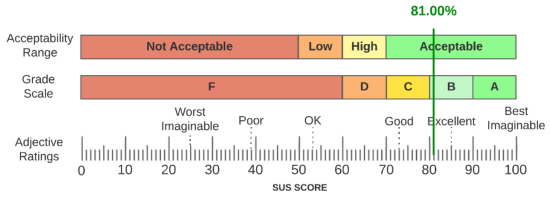
Individual scores were averaged to obtain an overall usability rating, which was interpreted using Bangor’s adjective rating scale (Bangor et al., 2009), ranging from “poor” to “excellent.” The evaluation combined quantitative SUS results with qualitative feedback collected during user interaction, enabling a comprehensive assessment of LIBRA’s usability, accessibility, and intuitiveness as an assistive educational tool, as well as the identification of strengths and areas for improvement.
RESULTS AND DISCUSSION
The SUS evaluation yielded an average score of 81%, corresponding to an “Excellent” adjective rating according to Bangor’s scale (Fig. 4). This result indicates a positive perception of LIBRA’s usability during interaction with the prototype. In particular, the evaluation suggests that participants were able to interact with the physical controls and understand the auditory feedback required to complete the printed-text-to-Braille workflow. These
findings provide initial evidence that the interaction design was suitable for the exploratory prototype and support further refinement of the proposed multimodal approach.
Despite the positive usability results, participants identified areas for improvement, including the prototype’s bulky structure, response time between image capture and Braille output, and the depth of Braille embossing, all of which may affect ergonomics and tactile readability. These observations provided valuable guidance for refining both performance and user experience.
Figure 4: SUS score in the Bangor scale.
LIBRA was intentionally conceived as an exploratory proof of concept rather than a deployable product, aimed at understanding interaction requirements and evaluating low-cost, modular mechanisms for tactile– auditory learning. Consequently, aspects such as robustness, printing speed, and portability require further optimization before large-scale adoption. In addition, while the evaluation involved accessibility-trained users and experts, it did not include children with visual impairments. This early-stage choice enabled expert-informed feedback, but future studies must incorporate real end-users to fully assess pedagogical impact and long-term acceptability.
The results nevertheless indicate that the combination of tactile controls, Braille embossing, and auditory feedback provides a promising interaction model for educational assistive applications. In particular, integrating OCR- based text acquisition with tactile and auditory output allows the same printed content to be accessed through complementary modalities. This configuration is relevant to the intended use of LIBRA in early Braille literacy and English-language learning, although its educational effectiveness remains to be established through studies involving the target population. From a development perspective, the modular prototype also provides a basis for investigating alternative mechanical and computational configurations with greater portability, processing performance, and scalability.
CONCLUSIONS AND FUTURE WORK This study presented the design and evaluation of LIBRA (LEGO Interactive Braille Assistant), an exploratory assistive prototype designed to improve access to short printed educational materials for children with visual impairments. The system integrates optical character recognition, Braille
A Sustainable Assistive Technology for Children With Visual Impairments 131 embossing, and auditory feedback into a modular architecture, providing a multimodal workflow for transforming printed English text into tactile and auditory representations. The prototype demonstrates the technical feasibility of integrating these functions within an accessible development platform.
The application of the iPlus methodology provided a structured process for identifying and refining requirements related specifically to Braille interaction, printed-text recognition, auditory feedback, and early English- language learning. The usability evaluation resulted in an average SUS score of 81%, indicating a positive perceived usability of the prototype. Participants particularly valued the tactile interaction and auditory feedback, while also identifying limitations related to physical dimensions, processing time, and Braille embossing depth. These findings provide specific directions for subsequent design iterations.
From a technical perspective, the combination of LEGO EV3 and Raspberry Pi enabled the integration of mechanical control, image acquisition, OCR processing, Braille generation, and auditory interaction within a single prototype. However, the current hardware configuration remains bulky and requires further optimization before practical deployment. In addition, the evaluation did not include children with visual impairments from the intended target population; consequently, the current findings cannot be interpreted as evidence of educational effectiveness or learning gains.
Future work will focus on reducing the physical size of the prototype, improving Braille embossing consistency and processing speed, and evaluating alternative low-cost hardware architectures that could increase portability and scalability. Further studies should involve children with visual impairments and educational professionals in authentic learning environments to assess Braille readability, interaction over extended periods, pronunciation support, learning outcomes, and long-term acceptance. Additional research may also explore multilingual OCR, adaptive auditory feedback, and configurable learning activities. These developments will help determine whether the proposed OCR- to-Braille-and-audio approach can evolve from an exploratory prototype into a practical educational assistive technology.
ACKNOWLEDGMENT
The authors wish to acknowledge the contribution of the “Laboratorio de Investigación de Sistemas de Información e Inclusión Digital” - LudoLab https://ludolab.epn.edu.ec/ (accessed on 08 September 2026) for its support in the research and publication of this article.
REFERENCES
Alvarez-Peregrina, C., Sánchez-Tena, M., Andreu-Vázquez, C. and Villa-Collar, C. (2020), ‘Visual health and academic performance in school-aged children’, International Journal of Environmental Research and Public Health 17(7). Aqel, M. O., Issa, A., Harb, A. and Shehada, J. (2019), Development of vibro-tactile
braille display and keyboard, in ‘2019 International Conference on Promising Electronic Technologies (ICPET)’, pp. 28–33.
Arshad, N. I., Hashim, A. S., Mohd Ariffin, M., Mohd Aszemi, N., Low, H. M. and Norman, A. A. (2020), ‘Robots as assistive technology tools to enhance cognitive abilities and foster valuable learning experiences among young children with autism spectrum disorder’, IEEE Access 8, 116279–116291. Bangor, A., Kortum, P. and Miller, J. (2009), ‘Determining what individual sus scores
mean: Adding an adjective rating scale’, Journal of usability studies 4(3), 114–123. Carrión Toro, M. d. C. (2022), iPlus una metodología centrada en el usuario para el diseño de juegos serios., PhD thesis, Escuela Politécnica Nacional. Chen, D., Zhang, Y., Hu, X., Chen, G., Fang, Y., Chen, X., Liu, J. and Song, A. (2024),
‘Development and evaluation of refreshable braille display and active touch- reading system for digital reading of the visually impaired’, IEEE Transactions on Neural Systems and Rehabilitation Engineering 32, 934–945. Jadhav, V., Chambers, D. and Tatpuje, D. (2020), Low-tech assistive technology to support students with disability in low-income countries, in ‘Assistive Technology to Support Inclusive Education’, Emerald Publishing Limited. Kana, F. Y. and Hagos, A. T. (2025), ‘Factors hindering the use of braille for instruction
and assessment of students with visual impairments: A systematic review’, British Journal of Visual Impairment 43(2), 396–406. Kisanga, S. E. and Kisanga, D. H. (2022), ‘The role of assistive technology devices in fostering the participation and learning of students with visual impairment in higher education institutions in Tanzania’, Disability and Rehabilitation: Assistive Technology 17(7), 791–800. Kolne, K., Bui, S. and Lindsay, S. (2021), ‘Assessing the environmental quality of an
adapted, play-based lego® robotics program to achieve optimal outcomes for children with disabilities’, Disability and rehabilitation 43(25), 3613–3622. Loh, L., Prem-Senthil, M. and Constable, P. A. (2024), ‘A systematic review of the impact of childhood vision impairment on reading and literacy in education’, Journal of optometry 17(2), 100495. Mukherjee, S., Babu, B. P. and Khan, F. (2025), A haptic braille learning application,
in ‘2025 International Conference on Sensors and Related Networks (SENNET) Special Focus on Digital Healthcare (64220)’, pp. 1–6. Nayar, P. D., Senjam, S. S., Christy, B., Varughese, S., Murthy, G. V. S., Vashist, P. and Gupta, V. (2021), Low Vision, Vision Rehabilitation, and Assistive Technology, Springer Singapore, Singapore, pp. 267–287. Nielsen, J. and Landauer, T. K. (1993), A mathematical model of the finding of
usability problems, in ‘Proceedings of the INTERACT’93 and CHI’93 conference on Human factors in computing systems’, pp. 206–213. Orbit Research (2025), ‘Orbit reader 20 – braille display’, https://www.orbitresea rch.com/shop/. Accessed: Sep. 30, 2025. Qiu, H., Fan, W., Li, L., Liu, Z., Zhang, W., Chen, J. and Zeng, R. (2024), An
innovative ai and iot-based braille system for smart living, in ‘2024 IEEE International Conference on Smart Internet of Things (SmartIoT)’, pp. 399–406. Rautela, A. (2018), ‘Cone trees - the usability testing process’, https://medium.
com/conetrees/the-usability-testing-process-diagram-cone-trees-c77941edfeeb. Online; accessed 10 October 2025. Sun, H. and Xi, Y. (2025), ‘Reading roots of resilience: the role of childhood reading environments in closing the educational gap in later-life cognitive functioning’, The Journals of Gerontology: Series B 80(8), gbaf128. Tipi, S. K. (2023), ‘How screen readers impact the academic works of college
and graduate students with visual impairments’, Sakarya University Journal of Education 13(3), 416–434.
A Sustainable Assistive Technology for Children With Visual Impairments 133 Veldhorst, C., Vervloed, M., Kef, S. and Steenbergen, B. (2023), ‘A scoping review of
longitudinal studies of children with vision impairment’, British Journal of Visual Impairment 41(3), 587–609. Vimalan, N., Zimmer, M. P. and Drews, P. (2024), ‘Fostering inclusivity–towards principles for inclusive information systems design’, Wirtschaftsinformatik 2024 Proceedings. World Health Organization (2019), ‘World report on vision’, https://iris.who
.int/bitstream/handle/10665/328717/9789241516570-eng.pdf?sequence=18. Accessed: Sep. 30, 2025. Yang, W., Huang, J., Wang, R., Zhang, W., Liu, H. and Xiao, J. (2021), ‘A survey on tactile displays for visually impaired people’, IEEE Transactions on Haptics 14(4), 712–721.
SEARCH THE AHFE DIGITAL BOOKSTORE BY ISBN
Explore the complete digital volume
Human Factors in Design, Engineering, and Computing
Read this individual research paper free through the original publisher, or explore the full digital proceedings book.