Xiaolong Wu, Young Mi Choi (2021). Testing the Cognitive Load of Gesture Interaction on Drivers When Performing Tertiary Tasks. In: Advances in Human Aspects of Transportation: Part I. AHFE Open Access, vol. 15. https://doi.org/10.54941/ahfe100660
With the development of the car industry, more and more electronic devices have been used in automobiles in order to provide greater functionality and improve the driving experience. However, performing tertiary tasks such as changing songs on an in-car mp3 player or resetting a navigation system while driving increases visual interaction and cognitive load for drivers. In order to provide drivers a better interactive control, different kinds of control modalities such as touch display and gesture control have been developed, yet no research has been done in terms of reducing users’ cognitive load. This paper hypothesizes that using air gesture control to perform secondary tasks will reduce driver’s cognitive load. An experiment will be performed with a driving simulator to compare the cognitive load on a driver among a new gesture-based interface, a multi-touch based interface, and a tactile interface. Cognitive load will be measured through the change of the pupil diameter of the driver and gathered via a remote eye tracking system. The effectiveness, efficiency, and the users’ satisfaction towards each interface will be measured.
With the development of technology, people’s viewpoints of automobile shift from mainly a way of transportation to considering a vehicle as a space in which a driver can still perform daily activities besides driving, such as communicating with other people, interacting with electronic devices, and enjoying entertainment. However, there are many activities that require lots of attention and focus to perform. Because of the limitation of human’s capacity of processing multiple tasks, it will lead to danger if the driver does them while controlling the vehicle. Basically there are mainly two causes that will easily leads to accident while driving. One is the loss of visual focus. If a driver does not look at his front window all the time, there is a high possibility that he will hit other vehicles or run into other lanes, especially in high speed. That’s why texting messages with mobile phones while driving has been forbidden in 38 states in US. The second one is having great cognitive workload while driving. Since people can’t process multiple tasks at the same time, driver will not react as quickly as possible in an emergency if he is busy thinking or performing some other tasks. This is because the higher the cognitive load is, the less possible that user can finish a given task without errors. According to Palinko (2010) if something requires 15 seconds to operate in stationary environment, it should not be allowed while driving.
Human Aspects of Transportation I (2021)
LITERATURE REVIEW
Previous Work Bellotii (2005) has compared a haptic-based force feedback interface with a touch-based interface. The result has shown that the manipulation of the touch-based interface requires higher eye glance frequency, and the subjects tended to prefer tactile interface. In order to further reduce the visual distraction, speech recognition and gesture recognition are both introduced. However, even though the speech recognition technology is hand free and eye free, since it generates a large amount of cognitive load on the user, Bach (Jæger,2008) stated that gesture recognition is more suitable for in car usage. Therefore, he has conducted an experiment to compare gesture-based interface with touch-based interface and tactile-based interface. The tactile interface was a common radio controller that contained several buttons, such as back and force, play and stop, around the display. The touch screen based interface utilized single touch system, and it has the same functions as the tactile interface. As for the gesture-based interface, several gestures are predefined in the system, for instance, tapping triggers play and pause, one finger moves up/down triggers volume up and down, and one finger moves left and right indicates jump to the previous/next song. The experiment was setup in both a real car environment and a car simulator. The primary task (driving) performance, secondary task performance, and their eye glance behavior were measured. The result has indicated below. In the primary task, two parameters were examined. One is the lateral control (lane excursions, steering wheel input, etc) and the other one is the longitudinal control (speed maintenance, acceleration). The tactile interaction resulted in significantly more lateral control errors than touch interaction and gesture interaction, while the longitudinal control errors remained the same. As for the secondary task, eye glance times, task completion time and error times were examined. The result has shown that gesture interaction generated significant less eye glance times than the other interactions. And in terms of satisfaction, subjects preferred gesture control to the other interactions since it is intuitive and easy to use. Overall, Bach made the conclusion that tactile interaction was proven to be less intuitive and less efficient, along with highest average task completion times, the most eye glances, and the highest number of in- complete assignments. Touch interaction was proven to be the fastest and easiest way of interaction.
However, even though Bach’s experiment has compared the three interfaces and resulted in a conclusion, there are still some remaining limitations and issues. For instance, there is a big input difference among those three interactions, such as the subject used finger movement to trigger the change of the volume in the gesture interaction while he tapped on the screen to perform the same task. Besides, with the development of the technology, single touch screen has been replaced with a multiple touch display; some of the tactile controllers have been located on the steering wheel.
A new comparison among gesture interaction, touch interaction, and tactile interaction needs to be conducted.
Gesture Interaction According to Pickering (2007), for gesture control, there are three main kinds of control interface. The Natural hand gesture interface makes use of natural mapping and requires no learning curve, so it is believed to generate the minimum cognitive load on users. However, the usage of the natural hand gesture interface is limited since it can only be mapped to something we are faced with in our daily life. For controlling things that are more complicated, the symbolic hand gesture interface is introduced. The advantage of the symbolic gesture control interface is that it is in natural form and easy to learn; it is a direct interaction and it can define both the action and its parameter by one behavior. Nevertheless, the complicating factor of using the symbolic gesture interface for in-car use is that users have to pre-memorize all the gesture commands before starting to use them. And as the command complexity increases, the number of gestures for users to remember also increases, which will be a big challenge. The Sign language hand gesture interface itself is used to express semantic information so it can be used for a low level continuous speech. However, it requires a long learning curve so it is not suitable for in-car use. As for the gesture control application, there are five domain classifications: the pre-emptive gesture refers to a situation when users’ hands move towards one item, the function of the item will be initiated; the function associated gesture means one particular gesture is linked to one function; the Context sensitive gesture always refers to a simple ”yes” or “no” command; the Global shortcut gesture can be used to save visual workload; and the natural dialogue gesture relies heavy on the recognition of gestures that can interpret user’s intent.
Human Aspects of Transportation I (2021)
Gesture Recognition For hand gesture recognition, it usually consists of two steps; a camera tracks the movement of hand/elbow/finger/arm, then a computer compares the captured image/video with the predefined gestures in its database. If the comparison is successful, it will trigger subsequent actions. Basically there are two means of detecting gestures (Naik, 2012) one is using a device-based approach and the other is using a vision-based approach.
The device-based gesture utilizes sensors, such as accelerometer and gyro on a user’s hand/body to directly track people’s motion, and touch sensors detect a user’s finger tap. Then the sensors send the data back to the computer to analyze through connected wires. The advantage of using device-based technology is that it makes it easier to collect data. However, since the device is connected through wires, which greatly restricts a user’s hands movement, the device does not gain high users’ acceptance. In order to solve this problem, Lee (Lee, 2004) did a project in which wireless gloves were used. There were sensors counting the index of the fingers a user used, which allowed the user to tap to trigger commands. Also, there was a small LCD panel on the back of the hand of each user to indicate the system feedback. The left hand glove was in charge of the device’s selection commands. Different finger tapping was linked to different devices, such as a mobile phone and a navigator. The right hand glove worked for function selecting. Tapping was also used in the right hand to control functions, such as play and pause. Once some action has been conducted, the LCD panel will indicate which command the user did, and also the glove itself will slightly vibrate. After conducting user evaluation, the author stated that even though the LCD panel was preferred by users since they did not need to make great eye movement, the effectiveness, learnability and potential distraction were also questioned by participants. Moreover, users found that wearing gloves on both hands while driving was inconvenient and uncomfortable.
Compared with the device-based technology, the vision-based technology is a non-intrusive way that enables users to interact with electronic devices. Cameras are used to recognize hand poses and movements instead of letting the user wear some devices directly. The advantage of the vision-based technology is that it frees a user’s hands and makes the interaction process more natural. However, one difficulty of the vision-based technology is the placement of cameras, because cameras need to capture and recognize the hand movement since the visibility of hand movement should be maximized for robust recognition. Another challenge for hand tracking is the background color and light because basically a computer recognizes a user’s hands by detecting color. If the light is too dark and the background color is too confusing, it’s difficult for the computer to differentiate between the hands and the environment. In order to overcome this challenge, Yang (Yang,2012) used a depth-based camera instead of a RGB color-based one in his project to avoid background colors and lights interruptions. The hand tracking was initialized by the detection of a wave motion, and then a depth camera was used to track the depth of user’s elbow/hand/arm. After doing simple control tests such as volume up/down, play/stop, the author made the conclusion that vision- based technology was effective and promising. However, for in-car use, since in car space is limited, it’s difficult for a user to make a big hand movement, such as a wave. Also these kinds of actions create force to user themselves which may lead to the variance of the steering wheel or at least it creates distraction. Even though the main advantage of gesture control over physical touch panel or button is that it doesn’t require physical space and eye contact, which is proven to be effective in doing simple control commands, however, since there are lots of in car applications that use hierarchical menus to help reduce cognitive load, it is difficult for a user to use gestures to select through menus without eye contacting.
In Zobl’s project (Zobl, 2004), a driver help assistant called “GeCom” was developed to control typical in-car devices, such as radio, CD players and navigation systems. In order to provide feedback, a 10* inch display was mounted in the mod console. 11 gesture classes and 4 hand poses were pre-defined in the system. The hand poses were used for switching between different tasks and the hand gestures were used to perform detail commands. Both visual and acoustic feedbacks were provided based on users’ gestures. The result turned out that the gesture recognition system worked well when it was tested by a single user. However, even though feedback is of great importance in the human computer interaction process, visual feedback definitely increases the distraction for a driver to some extent. Therefore, finding a way to provide proper feedback through other modalities needs to be tested.
Measurement of Cognitive Load There are three ways of measuring driver’s cognitive load. The first one is performance, which refers to how drivers perform certain tasks, such as lane departure, steering wheel variance and visual attention on the road. The second
Human Aspects of Transportation I (2021) one is physiology data, which means heart-rate variability, pupil dilation. The third one is user’s subjective evaluation. However, since there are many rapid changes of cognitive load during driving, it’s difficult for a driver to evaluate it. In order to better measure the cognitive load changes during driving, several studies hypothesized that the measurement of a driver’s pupil metric data is related to the changes of the cognitive loads. Iqbal (Iqbal, 2011) conducted an experiment in which participants did some driving tasks in front of a computer screen, wearing a head mounted device. He found out that the percent change of the pupil size was correlated to the mental difficulty of the task. Schwalm (2011) also did a project with a head mounted device to test the relationship between pupil size and physical related task. The result showed that they correlated very well. In order to reduce the interference that head mounted devices brought to participants, Palinko (2010) did an experiment in which a remote eye-tracking system was used to detect the diameter of drivers’ pupil. During driving in high fidelity simulator, drivers were given two spoken related tasks, one was a yes/no questions and the other one was ”a version of last letter word game, ” the result showed that there was a correlation between the diameter of the driver’s pupil and the changes of the cognitive load. Similarly, Kun (2011) did a project to find a way examine the cognitive load that speech control creates on drivers. A “Taboo” word game that required one person to guess a word based on the other person’s description was given to the driver and another participant. The cognitive load was also measured by pupil size. The result showed that pupil diameter could be used to identify changes in cognitive load during a dialogue. Therefore, using a remote eye tracking system has been proved to be a viable way for measuring cognitive load in a simulated environment.
As for detecting which tasks increase driver’s cognitive load, Lamble (1999) did an experiment during which a speaking related task and one cognitive-related task were given to the driver in real time driving. In the experiment, driver’s main task was to follow a lead car. In the meantime, the driver was asked to dial three integers on the phone (visually related) and then did a simple math calculation task (requires cognitive input but no visual workload). The result turned out that both non-visual tasks and visual tasks impair driver’s detection of road condition. For instance, driver’s brake reaction time increased by 0.5s and the time-to-collision increased by 1s.
As for visual interference, Wierville (1993) claimed that besides driving which is the main task for driver, there are five categories for in-car secondary tasks. Manual Only task and Manual Primary task stand for the tasks that require no or only a few visual inputs; the tasks’ completion mainly relies on hand work, such as sounding horn and manipulating rotary button. Visual Only and Visual Primary tasks refer to the tasks that require no or only a few manual control, but lots of visual input, for instance, looking at the navigator or selecting menu on touch screen. The fifth one is visual-manual task that requires both visual and manual input for finishing one task. In order to detect the main factors of car accident, Virginia Technology Transportation Institute did an experiment that monitored 100 cars for 13 month and found out that mobile phones, navigation system, and other in car control devices that required visual input were most correlated to car accident.
However, even though doing other tasks besides driving is to some extent distracting, interacting with electronic devices sometimes is essential, for example, looking at a navigator. Moreover, interacting with entertaining devices improves the user experience of driving and reduces the boring time, such as playing an mp3 player and changing the climate. Therefore, finding a way of interacting with electronic devices that requires less cognitive workload is of great importance.
In order to reduce the cognitive loads that are caused by interaction, each possible in-car modality has been evaluated (Muller, 2011). For eye tracking systems, whenever a user wants to perform a certain action, he only needs to gaze at the system and then it will locate the object and perform the action. Since these actions are natural human behaviors, the system requires only a few cognitive loads. However, gazing only helps the computer to locate the object that a user wants to manipulate. Without other sensors detecting a user’s intent, it’s difficult for the computer to perform an accurate action that perfectly meets the user’s demand. As for voice controls, nowadays, since the correctness of voice recognition has been improving significantly and it does not require hand manipulation, this technology is gaining popularity. However, it is easy for voice control to do one action, but it is difficult to make computers understand some subtle commands, for instance, ”open the window slightly.” Computers will be confused by the modifier “slightly.” Also, it is difficult to undo an action since it requires the computer to take the whole context into consideration when it performs tasks. Moreover, even though voice control creates no visual distractions, there is also no visual feedback. Users may be confused by whether their intent has been executed. As for touch screens, a hierarchical menu effectively helps users reduce cognitive loads. But there is no visual feedback and users are not able to look at the screen for a long period of time while driving. Conventional manual buttons provide forceful feedback while they do not require any visual input, so they are suitable for in-car use. The only complicating factor with button controls is that a user needs to locate the physical button by hand Human Aspects of Transportation I (2021) searching. Now automotive manufacturers have put buttons on the steering wheel, which greatly reduces the time a user needs to locate the button. However, since the space of the car interior is limited, the quantity of the physical buttons is also limited. Therefore, given the in- car space, only the essential and important control buttons are provided as physical buttons and are placed near the driver’s hand. Buttons that are in charge of secondary or tertiary tasks are always placed far away from the driver, and since most of those tasks require more than one step to finish, they are usually provided in a selective menu hierarchy, which requires more visual attention than a single physical button. In order to save space, contact-based gesture has been developed. The driver interacts with the selective menu on a touch pad or touch panel. The advantage of the contact -based gesture control is that it is easy for a user to type alphanumeric characters. However, it requires visual input and its performance is based on the driver’s hand-using preference. Therefore, non-contact gestures have also been developed. The advantage of non- gesture control is that it does not require physical spaces to place buttons; users can perform their actions wherever they desire. However, the complicating factor of non-gesture control is that the user needs to know the commands before doing the action. Also there is no visual feedback.
METHODOLOGY
This paper aims at finding a way of creating the least cognitive load on drivers, by comparing the newly designed gesture interface with a new multi-touch-based interface and the traditional tactile-based interface.
Gesture Interaction Hand Gestures will be captured by a leap motion, a small depth camera-based device that can be put in the environment. Since the leap motion is only 3*1.2*0.5 inch (Figure 1), it can be located around the users and being invisible to the users. Leap Motion is able to detect hand gestures around 3 feet hemispherical area, which is big enough for the in-car gesture control usage. Because leap motion is only an image-capturing device, a computer will be connected to it.
Figure 1. leap motion device
Figure available in the original PDF paper.
The application is programmed in java. The leap motion captured all the hand movement, and save them as frames. The computer compares each frame with the predefined gestures, and then it will react based on the comparison result.
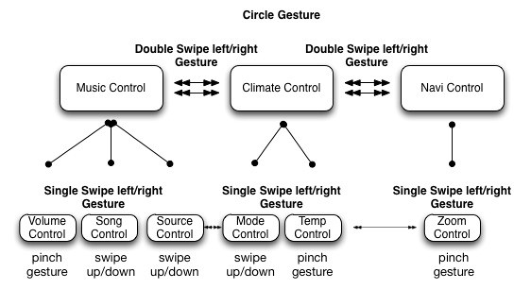
Since the interaction process should require as few eye glances as possible, while the user should be able to know which stage he is in, a paralleled design feature has been utilized. There are three main functions drivers want to interact with while driving- music control, climate control and navigator control. And inside each function above, there are several detailed functions, such as, for music control, drivers may need to change the volume, skip the current song, and change the music source. Therefore, all these detailed functions have been designed in the same level, and the user can use swipe left/right gesture to go through all these functions, in addition, each function provides voice notification about what function it is. As for gesture selection, in order to reduce the learning curve, swipe, circle and pinch gestures are utilized. Regularly, swiping left/right once enables the user to switch one detailed function to the next, however, in order to save the swiping time, the user could switch directly from music Human Aspects of Transportation I (2021) control to climate control by swiping twice quickly. The circle gesture will control the switching on/off function. The workflow chat is shown in Figure2.
Figure 2: gesture interaction workflow
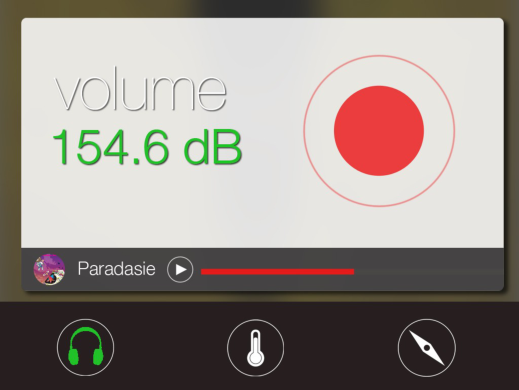
To ensure the consistence of the data, the multi touch interaction, which runs on an iOS device, has the same workflow as the one in the gesture interface. The multi touch interface is tested on iPad2, and the display is shown in Figure 3.
Figure 3: touch interaction interface
The iPad application utilized the same gesture, the only difference between the gesture interface and touch interface is that it requires users’ fingers to touch the screen.
As for the tactile interface, a real car control will be utilized; buttons and controllers will be located on the steering wheel and the dashboard. A driving simulator will be setup. Participants will be asked to perform a series of secondary tasks including selecting and playing one piece of music with an audio player, resetting a navigation system with both of the interfaces. The driving performance will be measured by the driving system; task performance will be measured by completion time and the correctness of the tasks; cognitive load will be measured by the change of the pupil diameter, through a remote eye tracking system. Subjective responses will also be collected after the test.
Human Aspects of Transportation I (2021)
FUTURE WORK
Subjects’ driving performance, secondary task performance, changes of the pupil, eye glance times, and their opinion towards those interactions will be measured in the experiment. The driving performance will be judged according to whether the participant’s vehicle keeps staying in the required lane and whether it follows the leading vehicle. The secondary task performance refers to how long it takes the user to finish the given tasks, and the error times of the tasks. The change of the pupil will be used to detect the cognitive load on the user when the user is performing the given secondary tasks. The User’s subjective view towards the secondary task will be collected through a questionnaire after the experiment.
REFERENCES
Bellotti, F., De Gloria, A., Montanari, R., Dosio, N., & Morreale, D. (2005). COMUNICAR: designing a multimedia, contextaware human-machine interface for cars. Cognition, Technology & Work, 7(1), 36-45. Iqbal, S. T., Ju, Y. C., & Horvitz, E. (2010, April). Cars, calls, and cognition: Investigating driving and divided attention. In
Proceedings of the SIGCHI Conference on Human Factors in Computing Systems (pp. 1281-1290). ACM. Jæger, M. G., Skov, M. B., & Thomassen, N. G. (2008, April). You can touch, but you can't look: interacting with in-vehicle systems. In Proceedings of the SIGCHI Conference on Human Factors in Computing Systems (pp. 1139-1148). ACM. Kun, A. L., Medenica, Z., Palinko, O., & Heeman, P. A. (2011). Utilizing pupil diameter to estimate cognitive load changes
during human dialogue: A preliminary study. In Workshop on Cognitive Load and In-Vehicle Human-Machine Interaction, Salzburg Austria. 13. Graham, Robert, and Chris Carter. "Comparison of speech input and manual control of in-car devices while on the move." Personal Technologies 4.2-3 (2000): 155-164. Lamble, D., Kauranen, T., Laakso, M., & Summala, H. (1999). Cognitive load and detection thresholds in car following situations: safety implications for using mobile (cellular) telephones while driving. Accident Analysis & Prevention, 31(6), 617-623. Lee, S., & Hong, S. H. (2005). Design of an integrated wearable multimedia interface for in-vehicle telematics. In Advances in
Multimedia Information Processing-PCM 2004 (pp. 113-120). Springer Berlin Heidelberg. Muller, C., Weinberg, G., & Vetro, A. (2011). Multimodal input in the car, today and tomorrow. IEEE MultiMedia, 18(1), 98-
103. Naik, S. (2012). A Study on Automotive Human Vehicle Interaction Using Gesture Recognition Technology. International Journal, 1(2). Palinko, O., Kun, A. L., Shyrokov, A., & Heeman, P. (2010, March). Estimating cognitive load using remote eye tracking in a
driving simulator. In Proceedings of the 2010 Symposium on Eye-Tracking Research & Applications (pp. 141-144). ACM. Pickering, C. A., Burnham, K. J., & Richardson, M. J. (2007, June). A research study of hand gesture recognition technologies and applications for human vehicle interaction. In 3rd Conf. on Automotive Electronics. Schwalm, M., Keinath, A., & Zimmer, H. D. (2008). Pupillometry as a method for measuring mental workload within a
simulated driving task. Human Factors for assistance and automation, 1-13. Wierwille, W. W. (1993). Visual and manual demands of in-car controls and displays. Automotive ergonomics. Yang, C., Jang, Y., Beh, J., Han, D., & Ko, H. (2012, January). Gesture recognition using depth-based hand tracking for contactless controller application. In Consumer Electronics (ICCE), 2012 IEEE International Conference on (pp. 297-298). IEEE. Zobl, M., Nieschulz, R., Geiger, M., Lang, M., & Rigoll, G. (2004). Gesture components for natural interaction with in-car
devices. In Gesture-Based Communication in Human-Computer Interaction (pp. 448-459). Springer Berlin Heidelberg.
Human Aspects of Transportation I (2021)
LISTED IN THE AHFE DIGITAL BOOKSTORE CATALOGUE
Explore the complete digital volume
Advances in Human Aspects of Transportation: Part I
Read this individual research paper free through the original publisher, or explore the full digital proceedings book.
ISBN 978-1-4951-2097-8
Explore this ISBN in the AHFE Bookstore ↗Listed in the July 2026 bookstore catalogue; search by ISBN to confirm current availability · Digital book purchase optional