Cristiane Moriguchi, Fabiana Foltran, Josiane Gonçalves (2022). Worker’s Perception on Ergonomic Workstation Analysis: A Descriptive Study of L-Shaped Desk Usage. In: Advances in Ergonomics In Design, Usability & Special Populations: Part II. AHFE Open Access, vol. 19. https://doi.org/10.54941/ahfe1001218
Ergonomic conditions and workers comfort during L-shaped desk usage in an occupational environment has not been extensively studied in the literature. Thus, the objective of this study was to describe how workers have spontaneously positioned their VDUs on L-shaped desks and to analyze related ergonomic aspects of the workstation and the worker’s comfort. Thirteen females and one male VDU worker were observed by a physiotherapist ergonomist during their working time and their comfort was evaluated when using the desk on an 11 point scale. Eight workers positioned the VDU on the concave edge of the desk and seven of them reported high levels of comfort. The main reason for workers positively evaluating this desk was the extra space provided by the desk, which increases the working area in relation to the traditional ones. Workers who evaluated their comfort as lower than 7 (n=6) usually maintained the VDU either on the straight part of the desk or on an intermediate area between the concave and the straight part of the desk (n=5). Observations performed during work revealed the need for environmental, organizational and ergonomic rearrangements of the workstation aiming to prevent musculoskeletal disorders among workers who use L-shaped desks.
Static overload on shoulder muscles is one of the main causes of trapezius and cervical myalgia among VDU workers. Static muscle contraction is maintained during computer work for positioning the upper arms for keyboard and mouse use, which involve precise movements and upper arm stability (Carter and Banister, 1994). According to the Cinderella hypothesis described by Sjøgaard and Jensen (2000), fibers of lower threshold are recruited first and remain active till the muscle reaches a complete state of rest. This stereotyped and continuous activity pattern was physiologically related with the kinetics of the work requirements and could lead to musculoskeletal disorders (Sjøgaard and Søgaard, 1998).
Ergonomic interventions for reducing static overload on shoulder muscles have provided forearm support to allow forearms to rest on the work surfaces instead of being held by shoulder muscle contraction. Curved desk design is one option to increase the area for upper arm weight loading (Delisle et al., 2006; Dumas et al., 2008; Rempel et al.,
Edited by T. Ahram, W. Karwowski and T. Marek
2006;). Straker et al. (2009) compared curved and traditional desks in laboratory tests to evaluate muscle activity during different desk design use and identified higher levels of trapezius activation during curved desk use. Delisle et al. (2006) also compared the effect of forearm support provided by a curved desk and by a chair’s armrest during 20 minute tasks. This comparison has shown similar trapezius activation for both supports. A desk attachment board was also developed and tested by Dumas et al. (2008). Workers used the desks in a work environment to become familiar with the new desk. However, the postural and muscle activity during desk use was evaluated at the laboratory. Thus, most of the tests reported were carried out to explore the effect of armrest on muscular activity, and have been performed in a laboratory.
Rempel et al. (2006) performed a one year follow-up study testing four different ergonomic interventions: ergonomic training, trackball and ergonomic training, forearm support attached to the edge of the desk and ergonomic training, and all interventions together. The results showed a positive effect of forearm support on neck/shoulder pain and on the incidence of disorders diagnosed by physical evaluation. Nevala-Puranen et al. (2003) also provided concave worktables in the workplace and also observed a reduction in the trapezius muscle activity when using the new worktable. Although both studies have developed the ergonomic intervention in the work environment, the assessed outcomes were related to posture, muscle activity, pain symptoms and disorders diagnosis. Smellie (2003) assessed ergonomic adjustment of office workers in relation to anthropometric characteristics while using curved desks using the VDU exclusively positioned at the concave edge of the desk. In none of the studies were allowed for workers freely choose the position of the VDU on the table. The equipment was already put in place and remained in this position.
To the author’s knowledge, no study evaluating workers usage and different VDU positions above the desks when L-shaped desks are provided is available in the literature. Studies on this background could provide useful information concerning the variability adopted by workers when using the L-shaped desks at work. Thus, the objective of this study was to describe how workers have spontaneously positioned their VDU on L-shaped desks and to analyze related ergonomic aspects of the workstation and the worker’s comfort.
METHODS
Subjects Fourteen workers, one male and thirteen females, participated in this study. Participant characteristics were: mean age of 29±5 years, mean height of 1.65±0.1m, mean weight of 70.5±9.3kg and mean work experience of 29±23 months.
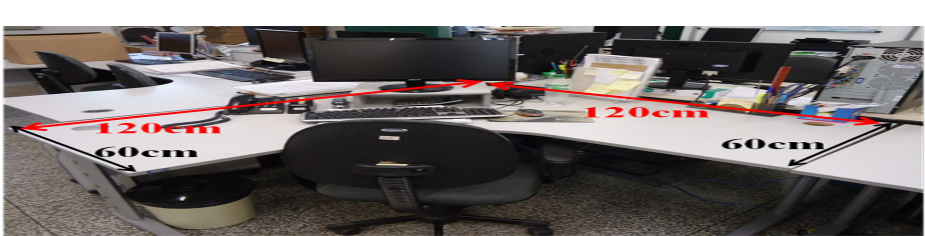
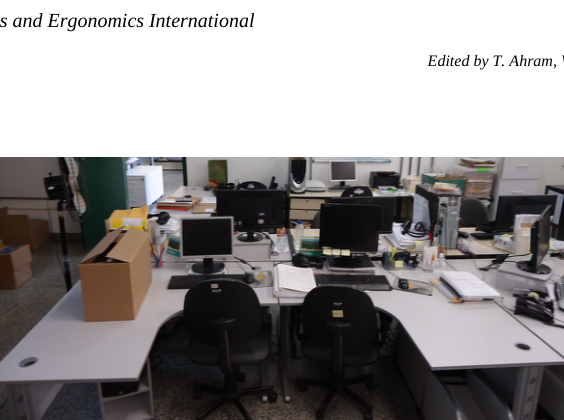
Workers from a university section of a distance education module who used L-shaped desks (see Figure 1 for desk description) during work were invited to participate in the present study. Only two workers did not agree to participate, which resulted in a participation rate of 87.5% in the sector. All workers who took part in the study signed a formal agreement and were informed about the study´s objectives and procedures.
Figure 1. Layout of L-shaped desk.
Edited by T. Ahram, W. Karwowski and T. Marek
Procedures Workers were instructed to perform their regular work during research assessment. At least three pictures were recorded from each worker to assess the worker´s lateral, superior and posterior plane. Workers were observed for one hour by a physiotherapist ergonomist and, based on the physiotherapist´s observations and on the pictures, the position of the VDU and the keyboard (VDU-key) on the desk, trunk posture and the symmetry of upper arms weight loading above the desk were determined.
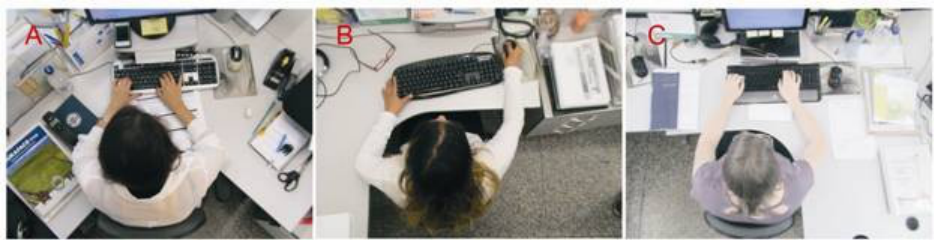
The VDU-key position was classified into three categories according to the VDU-key position above the desk: 1) VDU-key positioned on the concave edge (Figure 2A), 2) VDU-key positioned on the desk straight part (Figure 2B), or 3) VDU-key positioned on the intermediate space between the concave and the straight areas of the desk, i.e. the keyboard is not totally positioned on the straight area of the desk (Figure 2C). The main difference between the VDU-key positioned category on the straight area and on the intermediate space is their distance from the edge of the desk. For the straight category, the VDU-key is almost on the edge of the desk and worker would be able to use the desk as a traditional desk (rectangular) (Figure 2B), and on the intermediate space, since the VDU-key is not on the edge of the desk, the worker will have one upper arm entirely supported by the desk and the other only partially supported.
Figure 2. Different VDU and keyboard positions on the L-shaped desk. A) VDU and keyboard on the concave edge of the desk. B) VDU and keyboard on the straight part of the desk. C) VDU and keyboard on the intermediate space between the concave and straight part of the L-shaped desk.
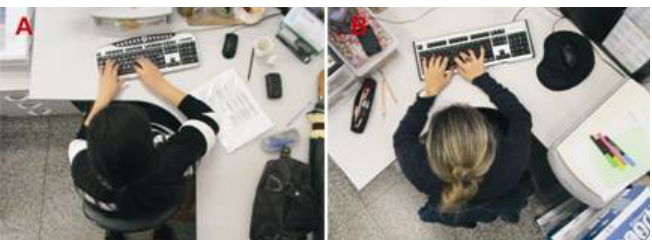
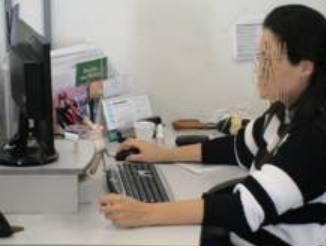
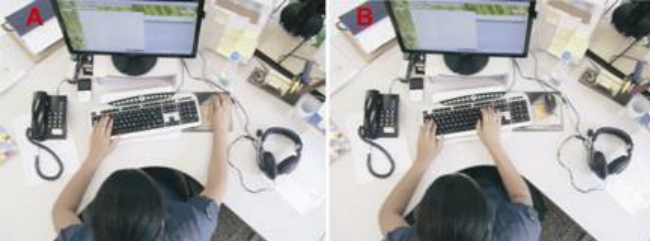
Upper arm weight loading on the desk was classified as asymmetrical (Figure 3A) or symmetrical (Figure 3B) in relation to the upper arm area in contact with the desk surface. In Figure 3A, the worker´s entire right forearm was in contact with the desk surface, but only the distal part of the left forearm was in contact with the desk. In Figure 3B, both forearms were in contact with the desk surface.
Edited by T. Ahram, W. Karwowski and T. Marek
Figure 3. Forearm weight loading on desk surface. A) Asymmetrical forearm weight loading. B) Symmetrical forearm weight loading.
The workers´ trunk postures were classified as neutral, laterally flexed and/or rotated.
Workers were asked to evaluate their comfort when using the L-shaped desk on an analogical 11 point scale, considering 0 as no comfort at all and 10 very comfortable and to justify their answer. Workers who did not position the VDU-key on the desk concave edge were asked why they are not using the concave edge for VDU tasks. A qualitative approach of workers’ answers was also performed during this unstructured interview.
Data Analysis Data were analyzed descriptively by the proportion of workers in each of the classification for the VDU-key position, asymmetrical trunk posture and upper arm weight bearing. The comfort rate was presented by the mean and standard deviation.
Reasons given by the workers influencing their comfort level were presented descriptively.
Contingency tables (2x2 categories) were made. The association between VDU-Key position above the desk and the level of comfort, upper arm weight load symmetry and trunk posture were performed by Fischer’s Exact Test.
RESULTS
Eight workers (57%) positioned the VDU on the concave edge of the desk, three workers (21%) positioned the VDU on the straight area of the desk and three (21%) positioned the VDU in between these two conditions.
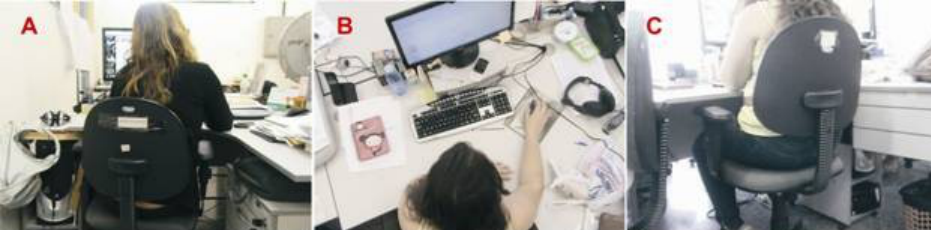
Only two workers presented non-neutral trunk posture, one worker presented lateral flexion of the trunk (Figure 4A) and the other one presented trunk rotation (Figure 4B and C). The top view of Figure 4B shows the worker´s upper trunk turned to the concave edge of the desk, however the chair is parallel to the straight part of the desk due to the CPU and drawers under the desk (Figure 4C), which leads to trunk rotation. Figure 4B also reveals that the VDU and keyboard were not in front to the worker. Other workers presented slight trunk inclination and were not classified as awkward postures by observation.
Edited by T. Ahram, W. Karwowski and T. Marek
Figure 4. Trunk awkward postures. A) Lateral flexion while VDU and keyboard were positioned on the straight area of the desk.
B) Trunk rotation while using the VDU and keyboard on the intermediate area of the desk. C) The same worker in Figure B is shown in Figure C, but with her back to us so that the CPU and the draws under the desk are shown.
The mean of reported comfort was 7.0±1.4. Five workers evaluated the desk as comfortable (level of comfort higher than 7) and justified their answer saying there were advantages: there is enough room to organize materials and the way the material is arranged is closer to the body due to the desk curved design.
Three workers evaluated their comfort level as 7, but when asked to justify their level of comfort they presented desk limitations: 1) difficulty in organizing the materials on the desk (Worker VI and VIII) and 2) upper arm weight loading is not comfortable (Worker VI and VII). One worker (Worker VII) who complained about the upper arm weight loading justified that it is not comfortable to have all forearms supported by the desk surface and the other one (Worker VI) justified that the desk did not allow good support for the upper arms, whose case was not having upper arm support during the whole task performance.
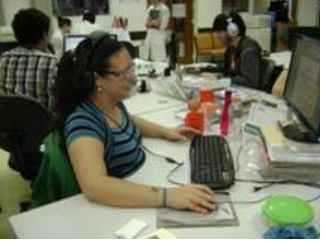
Six workers evaluated the comfort as low (lower than 7). The most frequent complaint (n = 3) was related to the position that worker presented in relation to other workers and to the door (Worker IX, X and XI). If workers used the concave edge of the desk, they had their back positioned to the workers at their side and, in some cases, workers also had their backs positioned to the door (Figure 5).
Figure 5. Workers had their back to each other when two desks were put together.
One worker (Worker IX) complained that a concave edge desk is not advantageous for working in pairs and it also makes it difficult to look at the computer screen of the person you are working with (Figure 5). Another complaint is that the space between the workers is reduced when the desks are put side by side as in Figure 5 (if the 2 workers pushed their chair backwards, they would knock into each other).
The space is still more reduced if the workers used the desk on the straight edge as in Figure 6 to work in pairs, according to Worker IX.
Edited by T. Ahram, W. Karwowski and T. Marek
Figure 6. Workers positioned very close to each other for working in pairs.
Another arrangement that the workers made in relation to one another is when one worker was in front of the other. This position is also not advantageous for pair work, which requires looking at two workers´ screens at the same time. The situation of one worker being in front of the other can be seen in the background in Figure 5 (two people wearing grey shirts).
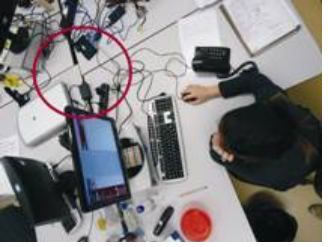
There was no consensus regarding the available area offered by the desk surface between workers who reported lower levels of comfort: three workers mentioned the lack of space/difficulty to organize materials on the desk (Workers X, XI and XIII) and one mentioned the useless area on the opposite side of the concave edge (Worker IX). This worker (Worker IX) reported that when 4 L-shaped desks are grouped, this unnecessary area could be easily detected, since all useless areas are joined (Figure 7). A worker argued that this area may have been important before liquid crystal screen monitors were available, but nowadays this room is not justified. According to Worker IX, it is not tenable to have useless areas when workers have to work very close to others and not have space to arrange personal belongings.
Figure 7. Unnecessary area (red circle) when four L-shaped desks are grouped.
Other complaints presented by Worker XI were related to the difficulty in leaving the desk, which requires spinning the chair due to the curved shape of the desk. In case the chair does not have wheels, this task could be challenging. She also complained that the desk was pushing on her back. This inconvenience was due to the VDU-key position in the intermediate space between the concave and straight areas of the desk (Figure 3A).
Another constraint mentioned by the workers is the position of the desk in relation to the environment. In the case of the desk being pushed up against the wall, workers positioned the centre of the desk curve turned towards the work environment and not the wall. In this case, if the worker chooses to position the VDU and the keyboard on the
Edited by T. Ahram, W. Karwowski and T. Marek
concave edge of the desk, she might be turned to the wall, which would restrain her social communication. Thus, workers close to the wall do not use the desk on the concave edge (Figure 8).
Figure 8. Worker close to the wall. VDU positioned in the intermediate area between the concave and straight edge of the desk to avoid staring at the wall.
Other complaints were the feeling of being in an awkward posture (Worker XII), although not confirmed by observation. One worker did not justify her low level of comfort, but just mentioned that she preferred a rectangular desk (Worker XIV).
Seven workers presented symmetrical upper arm weight loading (six workers positioned the VDU and Keyboard on the concave part of the desk and one worker in the intermediate part of the desk), five workers presented asymmetrical upper arm loading (two workers positioned the VDU and keyboard at the intermediate part of the desk and three positioned the VDU and keyboard at the straight part of the desk). These data can be seen in Table 1.
Table 1. VDU-Key position, symmetry of upper arm support, trunk posture, comfort level and main complaints of workers.
Table available in the original PDF paper.
Worker VDU-key Upper arms
Comfort
Complaints
position support
Trunk posture level
I Concave edge symmetric neutral 9 None II Concave edge asymmetric neutral 9 None
III Intermediate asymmetric neutral 8.5 The concave edge must be on her right, otherwise she would not have space for the mouse (Figure 3A)
IV Concave edge symmetric neutral 8 None V Concave edge symmetric neutral 8 None
VI Concave edge asymmetric neutral 7 Uncomfortable forearm support, difficult to organize materials
VII Concave edge symmetric neutral 7 Uncomfortable forearm support VIII Concave edge symmetric neutral 7 Difficult to organize materials
IX Intermediate symmetric rotated 6 Back to other workers, unfavorable to work in
Edited by T. Ahram, W. Karwowski and T. Marek
pairs, unnecessary space
6 Back to other workers, lack of space
X Straight edge asymmetric Lateral flexion XI Intermediate asymmetric neutral 5 Back to other workers, lack of space, difficult to
leave the desk, trunk in contact to desk edge XII Concave edge symmetric neutral 6 Feeling of awkward posture
XIII Straight edge asymmetric neutral 6 Lack of space XIV Straight edge asymmetric neutral 6 Non justified
Two workers presented symmetrical upper arm weight loading while using the mouse (Figure 9A) but when using the keyboard the right upper arm was not supported (Figure 9B) (both workers positioned the VDU and keyboard on the concave edge of the desk).
Figure 9. A worker who presented partial time with symmetrical and partial time with asymmetrical upper arm weight loading on the desk. A) Symmetrical forearm weight loading on the desk while using the mouse. B) Asymmetrical forearm weight loading while using the keyboard
Only the position of the VDU and keyboard above the desk was statistically associated to the comfort level (p=0.026). Most of workers who positioned the VDU and the keyboard on the concave desk reported levels of comfort higher or equal to 7 and most of workers who positioned the VDU and the keyboard on the straight or intermediate space of the desk reported comfort levels lower than 7 (Table 1).
The symmetry of upper arms was also associated to the VDU-key position above the desk (p=0.05). Six from the eight workers who positioned the VDU-key on the concave edge presented symmetrical upper arm support, and five from the six workers who positioned the VDU-Key on the other part of the desk presented asymmetrical upper arm support.
Workers who did not use the concave edge for VDU tasks chose the VDU alternative position on the desk to avoid having their back to the workers they usually work with (Workers III, IX, X, XI). Another two workers (Workers XIII, XIV) did not use a concave edge due to short cables that limited this arrangement of the VDU-key on the desk.
DISCUSSION
The VDU-key position on the desk was the only factor associated with levels of comfort. Considering the concept of
Edited by T. Ahram, W. Karwowski and T. Marek
comfort proposed by Looze et al. (2003), comfort while sitting is related to a feeling of relaxation and well-being, which are of great interest to ergonomic interventions. Taking into account that higher levels of comfort were associated to the concave edge of the VDU key position, it is reasonable to accept this position as a recommendation to workers. However, according to the present results, the position of the VDU and keyboard on the L-shaped desk varied between workers: eight workers positioned the VDU-key on the concave edge and six workers positioned the VDU-key on the straight edge and between these positions. Thus, the acquisition of the L-shaped desk itself is not a guarantee of an improvement to workers comfort if they were not instructed to position the VDU-key on the concave edge. For better results, acquiring furniture could be associated to appropriate ergonomic training, which could include ergonomic recommendation regarding sitting posture, furniture and monitor height adjustment, mouse position close to the body, using forearm support, adequate VDU-eye distance (Rempel et al., 2006, Nevala-Puranen et al., 2003) and VDU-key position on the desk.
Using straight and intermediate areas of the desk would not be a problem if workers changed the position of the VDU-key through the 3 possible positions (straight, concave or intermediate). Indeed, this variation on the VDU- key position would increase the posture variability during office work, which would be beneficial to workers. However, workers usually maintain the same VDU-key position. In this case, ergonomic training to induce the use of the concave edge seems to be necessary for higher levels of workers´ comfort.
Workers´ demands and interaction during work performance also need to be considered to favor the VDU-key position on the concave edge of the desk. Physical workstation conditions provided by L-shaped desks while using the concave edge did not allow workers either to work in pairs or see a screen from a colleague. For working in pairs, workers should be beside each other and use the straight part of the desk. In this position, the workers are right next to each other minimizing their comfort.
Considering this, L-shaped desks for workers who often work in pairs might require longer straight parts to offer larger spaces between the workers. If a straight part is going to be used for VDU-tasks, the straight part could also be deeper. Another limitation of this arrangement in pairs is that if the worker is right handed and she/he is on the left of the co-workers, she/he will have a narrower area to use the mouse, as can be seen in Figure 2B, since her co- worker desk will be just by her side. Thus, the rectangular desks could be a better choice for workers´ comfort while working in pairs if the L-shaped desk design could not be changed in order to facilitate working in pairs.
Another main issue was the workplace restriction of way the VDU was positioned on the concave edge. Using L- shaped desks should be part of the organizational planning of the workplace. The following should be offered to the workers: long enough cables for equipment so that it can be positioned anywhere; space for workers´ legs under the table; cupboards to put personal belongings and safes for documents. The desk arrangements need to consider the position of the doors and walls in the work environment to avoid the worker staring at the wall or having his/her back to the door, as well as considering light avoiding glare on the screen.
The symmetry of forearm support on the desk has also varied between workers (only seven workers presented symmetrical forearm supports). This fact hinders the main ergonomic advantage of the L-shaped desk which is to provide extra area for forearm support on the desk (Straker et al., 2008), aiming at reducing the static overload on the trapezius (Rempel et al., 2006; Delisle et al., 2006). Considering that the VDU-key position on the concave edge was also significantly associated with the upper arm support symmetry, this arrangement of the VDU-key needs to be adopted to ensure ergonomic advantages of L-shaped desks. Another important consideration for upper arm support symmetry is to have the body close to the desk edge to avoid having the upper arms without any support during keyboard use, such as in Figure 9.
The two workers who had non-neutral trunk posture positioned the VDU-key on the straight edge and on the intermediary area of the desk. Although there were study limitations to evaluate the trunk posture, non-neutral posture were observed only among workers who did not position the VDU-key on the concave edge. The asymmetrical upper arm support on the desk could also be related to trunk lateral flexion. However, it was not possible to identify that by means of observational methods. Thus, direct measurements of posture exposure need be performed to verify the postural risk factors while using L-shaped desks with different VDU-key positions on the desk.
The desk restrictions presented by workers that reported low levels of comfort need be taken into account. Some of
Edited by T. Ahram, W. Karwowski and T. Marek
the complaints related to the lack of the space, the awkward posture and the restriction between the desk and the trunk (Worker XI) could be solved by using the concave edge for VDU-key tasks. Whether workers use the concave edge for VDU-key tasks, straight edges will be free for material disposal and workers will have more space for VDU-key tasks, since the desk concave part is deeper than the straight part (Figure 1). The concave edge requirement of higher levels of trunk rotation to leave the desk, which is boredom according to one worker, suggests the need for an office swivel chair if the worker has to leave the desk frequently.
Adjusting desk design due to the evolution of VDU dimensions is an important issue raised by Worker IX, mainly when workers refer to not having the minimum space for individual comfort. The design of desks needs to be frequently checked in relation to worker devices to avoid a useless area behind the VDU. This report also shows that acquiring new furniture design, even when it provides wider areas for work performance, does not lead to worker perception of extra space if the workers are positioned too close to each other. Thus, the furniture should be physically planned to avoid lessening the positive ergonomic results due to a lack of space in the environment.
The main recommendations suggested by the results are presented in the following box (Box 1).
Box 1. Main recommendations for L-shaped desk usage.
Main recommendations for favoring the VDU-key position on the concave edge of the desk:
- Favorable environmental and physical workstation conditions;
- Organizational planning of the desks´ position favoring worker communication;
- Ergonomic training;
- Office swivel chair;
- Desk layout adjustment for work in pairs and according to workstation devices.
Study limitations Worker posture assessment was performed for a short period of time and by observation, which could limit the conclusions regarding workers´ exposure to awkward postures. Postural assessment by direct methods for longer periods of time should be performed for this purpose in the future, which could include upper arm abduction and trunk lateral flexion evaluation.
CONCLUSIONS
The present study identified that workers presented variations regarding VDU-key position on L-shaped desks in an occupational environment. The VDU-key position was associated to forearm support symmetry and comfort levels, in such a way that workers who did not use the concave edge of the desk for VDU tasks did not benefit from the extra space provided by the L-shaped desks for upper arm weight bearing and reported lower levels of comfort. The arrangement of L-shaped desks in the occupational set should be physical and organizationally planned. Ergonomic training should also be provided to favor the use of a desk concave edge to improve workers comfort when using L- shaped desks.
Edited by T. Ahram, W. Karwowski and T. Marek
REFERENCES
Carter, J.B., Banister, E.W. (1994). Musculoskeletal problems in VDT work: a review. Ergonomics, 37(10), 1623-1648. doi: 10.1080/00140139408964941. Delisle, A., Lariviere, C., Plamandon, A., Imbeau, D. (2006). Comparison of three computer office workstation offering forearm
support: impact on upper limb posture and muscle activation. Ergonomics, 49(2), 139-160. doi: 10.1080/10610270500450739. Dumas, G.A., Upjohn, T.R., Leger, A., Delisle, A., Charpentier, K., Plamondon, A., Salazar, E. (2008). Effect of a desk attachment board on posture and muscle activity in women during computer work. Ergonomics, 51(11), 1735-1756. doi: 10.1080/00140130802277539. Loose, M.P., Kuijt-Evers, L.F.M., van Dieen, J. (2003). Sitting comfort and discomfort and the relationship with objective
measures. Ergonomics, 46(10), 985-997. doi: 10.1080/0014013031000121977. Nevala-Puranen, N., Pakarinen, K., Louhevaara, V. (2003). Ergonomic intervention on neck, shoulder and arm symptoms of newspaper employees in work with visual display units. International Journal of Industrial Ergonomics, 31(1), 1-10. doi: 10.1016/S0169-8141(02)00102-6. Rempel, D.M., Krause, N., Goldberg, R., Benner, R., Hudes, M., Goldner, G.U. (2006). A randomized controlled trial evaluating
the effects of two workstation interventions on upper body pain and incident musculoskeletal disorders among computer operators. Occupational Environment Medicine, 63(12), 300-306. doi: 10.1136/oem.2005.022285 . Sjøgaard, G., Jansen, B.R. (2000). “Muscle pathology with overuse”, in: Chronic musculoskeletal injuries in the workplace, Ranney, Don (Ed). pp. 16-40. Sjøgaard, G., Søgaard, K. (1998). Muscle injury in repetitive motion disorders. Clinical Orthopedic Related Research, 351, 21-
31. Smellie, S. (2003). The limitations of a standard workstation for its user population. Clinical Chiropractic, 6(3-4), 101-108.
doi:10.1016/S1479-2354(03)00043-9. Straker, L., Pollock, C., Burgess-Limerick, R., Skoss, R., Coleman, J. (2008). The impact of computer display height and desk design on muscle activity during information technology work by young adults. Journal of Electromyography and Kinesiology, 18(4), 606-617. doi: 10.1016/j.jelekin.2006.09.015. Straker, L., Burgess-Limerick, R., Pollock, C., Maslen, B. (2008). The influence of desk and display design on posture and
Advances in Ergonomics In Design, Usability & Special Populations: Part II
Read this individual research paper free through the original publisher, or explore the full digital proceedings book.
ISBN 978-1-4951-2107-4
Explore this ISBN in the AHFE Bookstore ↗Listed in the July 2026 bookstore catalogue; search by ISBN to confirm current availability · Digital book purchase optional