Laura Huisinga (2022). User Experience of Social Web-based Virtual Reality for the Hybrid and Blended Learning Classroom. In: The Human Side of Service Engineering. AHFE Open Access, vol. 62, pp. 55–60. https://doi.org/10.54941/ahfe1002541
The use of social webVR for a classroom can offer a collaborative real-time environment that bridges the gap between virtual video conferences and gaming platforms. This paper examines how to use social webVR in a virtual classroom. It addresses some of the unique UX challenges of designing for a social VR classroom space. Finally, it will address access to the virtual environment through multiple devices, including an Oculus HMD, laptop, tablet, and smartphone. Social web-based VR offers promising potential. Designing a human-centered virtual environment and considering all participants' total user experience is critical to a successful learning tool. Future virtual environments could replace the physical classroom in some cases. This paper is not about replacing the physical classroom experience but how social VR can add to the experience in a hybrid or blended learning environment where students are not always in a physical classroom 100% of the time.
The use of social, web-based virtual reality (VR) or multi-player virtual rea- lity allows for the interaction of multiple participants synchronously. The ability of synchronous virtual interaction allows for the immersion of multi- ple participants like a class to interact in real-time regardless of their location. While video conferencing can also create real-time interactions, students can engage differently via avatars in an immersive virtual environment (VE) with each other. Using a Virtual Environment can allow for actionable immersion and motivation through embodied, concrete learning, as well as situational learning (Cecotti, Day-Scott, Huisinga, and Gordo-Pelaez, 2020 p.16).
Web-based virtual reality allows access via any browser with an inter- net connection. Web-based VR can be accessed via smartphones, tablets, computers, and both tethered and untethered HMDs. While this allows for maximum flexibility of devices, it limits the number of people that can parti- cipate simultaneously and how much content/data can be shared via the web. Additionally, depending on the device and internet speed, some students may experience loading issues.
phenomenon both as an instructor with distracted students and as a distra- cted zoom participant. During a VE learning study conducted in 2020 students reported being distracted more easily while using zoom compared to a VE (Won, Bailey, and Yi, 2020 p.379). The temptation is often too great to resist, especially if your camera is off. Social contracts around the poli- teness of using active listening to give the speaker visual cues dictate that a listener would be looking at the speaker and occasionally nodding. While this does not mean that a listener is indeed listening, it makes the speaker feel like they are. When students are immersed in a virtual environment, working on other projects simultaneously is more challenging. Research shows that humans take longer and make more errors when multitasking or engaging in rapid task switching (Spink, Cole, and Waller, 2008). This removal of the temptation to multitask encourages the students to actively participate in the learning experience at hand.
Using Social Web-Based VR in a Virtual Classroom This paper focuses on using Mozilla Hubs Social Web-based VR in interactive multimedia design classes. A virtual environment creates a space for socializa- tion, critique, discussion, presentation, small group interaction, and Q&As. While VE can be asynchronous, its power is in the social interactions created with synchronous interaction. The ability to simulate spatial understanding while interacting with a group of people allows for sub conversations and multiple conversations simultaneously, just like in a large room with small groups of people talking. This interaction cannot currently be replicated in a video conference call. Social VR allows for the organic nature of conversa- tion where you talk with those closest to you in the VE and hear a titbit from across the room and interject (Huisinga, 2021).
Using a VE for a classroom allows for multiple connected rooms for synch- ronous meetings and asynchronous viewing of resources. With a physical classroom, you are generally limited to one room, and it is shared with other classes. This limits what can be left up in the classroom and when the stu- dents can access it. By creating a virtual classroom space, students can drop in anytime to view resources or meet up with other students. While a virtual classroom could be used exactly like a physical classroom to deliver lectures, there are more engaging ways to use the space to promote active learning. By breaking up lectures into short ten-minute mini-lectures, you can create a lecture viewing room for students to visit when needed or a list of links so they can view the lectures outside of the VE. This allows the virtual classroom to be an active space for discussions, student presentations, and Q&A ses- sions. Incorporating other collaborative tools like google slides, jam boards, or miro boards allows for increased collaboration.
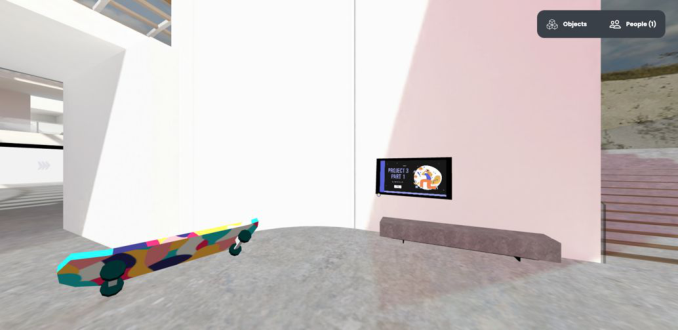
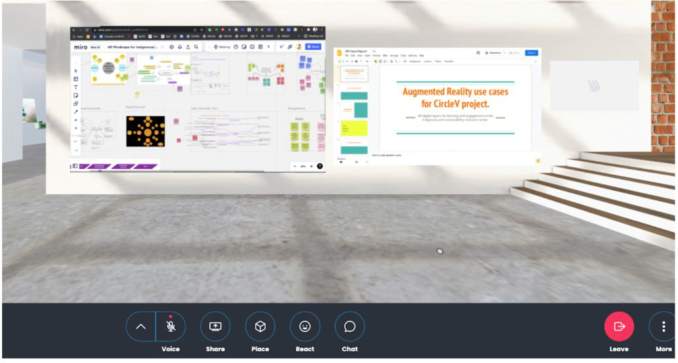
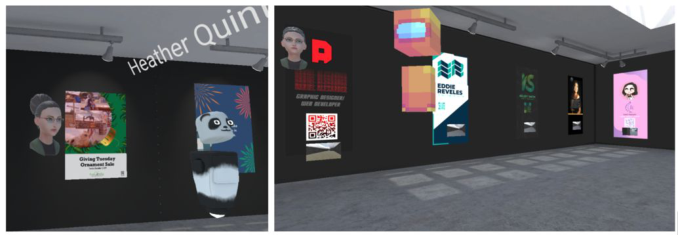
I set up virtual classroom space for GD159 Immersive Design in the Inte- ractive multimedia track of our Graphic Design BFA program at Fresno State University. Students used the space to showcase some of their finished proje- cts, present a presentation and interact with each other. Figures 1-4 show the virtual classroom created with Mozilla Hubs.
In Mozilla Hubs there are standard avatars or you can import or customize one. These avatars allow students to create something individual while also
User Experience of Social Web-Based Virtual Reality 57
Figure 1: Student presentation slides and 3D model of a skateboard.
Figures 2 and 3: Additional student presentation slides and 3D models from Immersive Design class fall 2021.
Figure 4: Resource wall for a collaborative class project. Showing Miro board and collaborative google slide show.
remaining off-camera. While most of the stock avatars for Mozilla Hubs are robots or animals, you can also import more humanoid avatars using tools like Ready Me Player. None of these Avatars are full-body and do not add
58 Huisinga
facial expression, but they move their mouths when speaking. During the 2021 BFA show conducted in Mozilla Hubs, the students had conversations on discord about what avatar they would choose to represent themselves or what their avatar would wear. Customizing an avatar is an important UX component to feeling comfortable in a virtual classroom. The avatar’s ability to communicate is also essential; even without facial expressions having the mouth move is important. A study comparing desktop and Head-Mounted Displays (HMD) lectures found that students wanted to see detailed avatars of the teacher to better engage with them (Yoshimura, and Borst, 2020).
Mozilla Hubs allows for the use of your camera to stream your face like a video call inside the VE. A video call can be helpful if you are delivering a short lecture to switch from your avatar to your camera mode so students can see the instructor’s facial expressions.
UX Challenges of Designing for a Social VR Classroom Some students may feel simulator sickness when using an HMD. Therefore, it is very important to have other options to participate with a HMD or a desktop/tablet. The use of Web-based VR allows for this flexible access via multiple devices.
Basic hardware needs are often an issue for students. They need a device with enough processing power, a stable internet connection, and good headphones with a microphone.
Many students struggle with old laptops/phones, insufficient processing power, unstable internet, or slow internet connections. Even after two years of remote learning, not all students have high-quality headphones with micro- phones. When the basic infrastructure to use web VR is compromised or lacking, a poor user experience is inevitable. This digital divide creates vastly different experiences for the students who can afford the latest devices with access to high-speed internet vs. a student using an older device or a lower quality new device without enough processing power and unreliable slower connection to the internet. Communication is critical in the learning space, and if a student feels they cannot communicate because of a tech issue, it will affect their ability to learn, actively participate and create feelings of isolation.
Fear of using unknown technology can be an issue for some students, but generally, this is more of a fear of things “going wrong” or “not being able to connect.” When students have access to the hardware and stable internet, fear of new tech is quickly overcome. However, when insufficient hardware or unstable connections fail, their fears are played out and reinforced through the negative user experience. Mozilla Hubs works as a low barrier VE, but onboarding is still helpful for first-time users.
Mitigating Challenges, and Accessing the Virtual Environment The biggest challenges and pain points come back to insufficient tech or con- nectivity. Many of these issues are solved by providing students with access to the tech they need, such as HMD/Tablets/Laptops and Hot spots or access to locations with high-speed internet.
User Experience of Social Web-Based Virtual Reality 59
Figure 5: Avatar for Dr. Laura Huisinga and students during the 2021 BFA show. Avatar created with ready player Me (https://blog.readyplayer.me/mozilla-hubs-custom-3d- avatar/).
One of the benefits of a virtual classroom using Web-based VR is that you can join from anywhere and do not need to travel to a specific physical location. However, this can also be an issue. If possible, create space to use HMD in the library with access to consistent high-speed internet. Small study rooms are a great place for students to join a virtual class if they are already on campus. Another option is the use of Immersive Physical space like a three- sided cave or large interactive screen where a group of students could be physically together navigating the virtual space and meeting up with other students off-campus.
After making sure students have access to the hardware and connectivity they need. Focus on what content to include in the room and how you will use the room. The more items in the room, the slower the room will be. Limiting non-essential models and large files will help students use phones or tablets. Also, the more people you have in a room can affect students on lower-powered devices. Hubs rooms allow a maximum of 24 people in a room. Breaking larger classes up into smaller groups can help enhance the experience.
CONCLUSION
To conclude, the use of social Web-based VR can be a great addition to a fully online class or a blended/hybrid class. At this point, VE are not a perfect replacement for physical classrooms due to uneven access to hardware and connectivity. This article is not about replacing the physical classroom expe- rience but how social VR can add to the experience in a hybrid or blended learning environment where students are not always in a physical classroom 100% of the time. Creating ways to increase interaction, motivation, and engagement through a virtual classroom online class can break away from relying heavily on video-based interactions to a more game-based interaction. Social web-based VR moves the classroom experience into the edutainment realm. As this technology continues to improve, social web-based VR could mirage the benefits of remote learning with the benefits of physical classroom interactions.
60 Huisinga
ACKNOWLEDGMENT
The authors would like to acknowledge all of my design students who put up with me springing new tech on them thought the semester and work with me to find out all the pain points of using that tech in the classroom.
REFERENCES
Cecotti, H., Day-Scott, Z., Huisinga, L. and Gordo-Pelaez, L., 2020, June. Virtual reality for immersive learning in art history. In 2020 6th International Conference of the Immersive Learning Research Network (iLRN) (pp. 16–23). IEEE. Eriksson, T., 2021, May. Failure and success in using mozilla hubs for online tea-
ching in a movie production course. In 2021 7th International Conference of the Immersive Learning Research Network (iLRN) (pp. 1–8). IEEE. Huisinga, L., 2021, July. Virtual Exhibit Design: The UX of Student BFA Design Shows in Social VR. In International Conference on Applied Human Factors and Ergonomics (pp. 240–246). Springer, Cham. Spink, A., Cole, C. and Waller, M., 2008. Multitasking behavior. Annual review of
information science and technology, 42(1), pp. 93–118. Won, A.S., Bailey, J.O. and Yi, S., 2020, June. Work-in-progress—learning about virtual worlds in virtual worlds: How remote learning in a pandemic can inform future teaching. In 2020 6th International Conference of the Immersive Learning Research Network (iLRN) (pp. 377–380). IEEE. Yoshimura, A. and Borst, C.W., 2020, January. Evaluation and comparison of
desktop viewing and headset viewing of remote lectures in vr with mozilla hubs. In International Conference on Artificial Reality and Telexistence, and Eurographics Symposium on Virtual Environments (ICAT-EGVE), 2020.
LISTED IN THE AHFE DIGITAL BOOKSTORE CATALOGUE
Explore the complete digital volume
The Human Side of Service Engineering
Read this individual research paper free through the original publisher, or explore the full digital proceedings book.
ISBN 978-1-958651-38-4
Explore this ISBN in the AHFE Bookstore ↗Listed in the July 2026 bookstore catalogue; search by ISBN to confirm current availability · Digital book purchase optional