Yu-Hung Chien (2024). Heuristic Evaluation of Interactive Flat Panel for Interactive Teaching. In: Usability and User Experience. AHFE Open Access, vol. 156, pp. 129–134. https://doi.org/10.54941/ahfe1005422
It is vital to give teachers interactive flat panels (IFPs) with well-designed applications for creating technology-mediated interactive instruction while making learning more attractive to students. We collaborated with BenQ to evaluate and identify potential usability issues of IFPs and suggested possible solutions that could best enhance current IFP-based interactive teaching. We recruited two college lecturers and 15 K 12 teachers as teaching experts to participate in a 54-h hands-on empowerment course to examine the usability of IFPs. We used the applications (Uni UI, EZWrite 6, and InstaShare 2) built in the BenQ 86' IFP to develop the interactive learning content for the course. Observation, user testing, and questionnaires were used in this study, and further analysis found 35 usability issues and solved them sequentially. The questionnaire data identified in-service technology teachers' perceptions of IFP-based interactive teaching, its impact on students, and the challenges experienced during implementation. The results showed that various improvements were required to promote IFP-based interactive education and prepare interactive teaching lessons. These findings will assist educational institutions worldwide in planning future educational technology policies and understanding teachers' needs to improve IFP-based interactive teaching.
There is an increasing worldwide trend toward technology-mediated learn- ing to expose students to technology-enhanced interactive learning (Gauthier et al., 2022). Interactive flat panels (IFPs) may be a stand-alone solution to transition technology-mediated interactive learning from traditional educa- tion (Trafera, 2024). IFPs can record and share classes so the students can review the class at any time. The multi-touch points of IFPs allow more than one student at a time to interact with teachers and students on IFPs. The panels allow easier access to new resources and make instruction more flexible regarding space, content, resources, and strategies (Promethean, 2024). In Taipei, the capital of Taiwan, the Education Bureau has prepared a budget of NTD 200 billion to install IFPs in every class. It is vital to give teachers IFPs with well-designed applications for creating technology- mediated interactive instruction while making learning more attractive to students.
Amongst all learning fields, the technology teacher firstly adopted IFPs to switch from traditional blackboard teaching to IFP-based interactive teach- ing. We have developed technology course with interactive applications in IFPs for their empowerment training and conducted a heuristic evaluation within the course to identify potential usability issues of IFPs and to sug- gest possible solutions that could best enhance current IFP-based interactive teaching.
METHODS
We introduced participants, empowerment course, and evaluation procedure as the following.
Participants Two college lecturers and 15 in-service middle school teachers participated in this study. The 15 teachers were in different learning domains (one physi- cal education teacher, one adjustment teacher, one technology teacher, two Chinese teachers, four science teachers, two design and art teachers, two information technology teachers, one music teacher, and one special edu- cation teacher). They participated in this empowerment training program to obtain advanced certificates for teaching the learning domain of technol- ogy. Amongst the teachers, six teachers had previous experience in IFP-based interactive teaching.
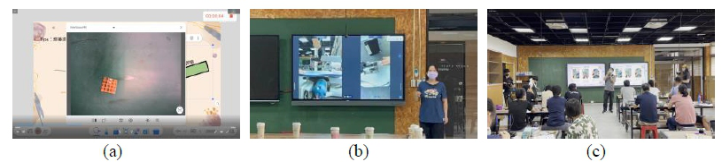
Empowerment Course The empowerment course was a 54-h program. Two college lecturers devel- oped three empowerment training contents (4-h wooden omamori, 8-h cloud light, and 36-h automata) using the interactive applications of Uni UI (2024), EZWrite 6 (2024) and InstaShare 2 (2024). They then delivered the training contents with the BenQ 86’ IFP. The remaining 6-h were for the 15 in-service teachers to use the above-mentioned interactive applications to create their teaching content. Figure 1 shows the actual situation during the class: (a) a college lecturer used EZWrite 6 and a physical projector to demonstrate welding techniques and use the IFP to record a video; (b) a college lecturer used InstaShare 2 to project the screen of the teacher operating the wire saw machine to the IFP; (c) during the class, BenQ usability team observed the class to find interactive teaching problems, and two cameras recorded the interaction between college lecturers and in-service teachers in the class as well. Table 1 introduces the three empowerment training and the interacting teaching content.
Procedure During the 54-h empowerment training, eight BenQ user experience team engineers took turns staying at the back of the classroom to observe, record, and solve the problems encountered when the educators interacted with the 15 in-service teachers in class by using the IFP. In addition, two photographers recorded the whole teaching process for a subsequent usability evaluation.
Heuristic Evaluation of Interactive Flat Panel for Interactive Teaching 131
After the 54-h empowerment training, the 15 in-service teachers responded to a 12-item 5-point important-performance questionnaire (Han & Lee, 2012; Lee et al., 2013; Park et al., 2016; Shin & Han, 2011). Q1–2 focused on in-service teachers’ perceptions of IFP-based interactive teaching itself, Q3–4 focused on in-service teachers’ perceptions of the impact of IFP-based interactive teaching on students, Q5–8 focused on in-service teachers’ per- ceptions of challenges when implementing IFP-based interactive teaching, and Q9–12 focused on in-service teachers’ opinions regarding the IFP-based interactive teaching course.
Figure 1: Actual situation during the class.Table 1. The brief description of the three training contents.
Table available in the original PDF paper.
Name Wooden omamori Cloud light Automata A cloud light hands-on activity was used to teach the in-service teachers the electronic circuits, electronic components, electric meters, and the usage of welding tools.
The in-service teachers learned engineering design, 3D software OnShape, and the concept of mechanism and structure to create storytelling automata toys.
Description In hands-on courses, the in-service teachers learned how to use and maintain power tools, including wire saw machines, drill machines, and sand mills, to make their own designed wooden omamori.
Hands-on activities Interactive teaching content
1. The educators used Uni UI to annotate content displayed from students’ devices on the screen of IFPs. 2. The functions of EZWrite 6, namely calculator, drawing tools, timers, ran- dom grouping tools, screen splitting tools, and post-it notes, were used to create multiple interactions between college lecturers and in-service teachers. 3. InstaShare 2 displayed IFPs’ content on students’ hand-held devices and vice versa. College lecturers also used InstaShare 2 to demonstrate welding tools, wire saw machines, drill machines, and sand mills. App & tools EZWrite 6, InstaShare 2, OnShape, IFP, physical projector, welding tools, wire saw machines, drill machines, and sand mills.
132 Chien
RESULTS AND DISCUSSION
We evaluated IFPs’ usability issues using the heuristic evaluation methods of observation, user testing, and questionnaires.
Observation and User Testing During the 54-h empowerment training, two college lecturers created the interactive learning content and interacted with the 15 in-service teachers. The eight user experience engineers observed, solved, and recorded 35 sig- nificant issues. Five of them were related to InstaShare 2 (sample issue: the educators cannot zoom in on the screen of the physical projection with one hand while demonstrating welding technique), two were related to IFP itself (sample issue: it was a complicated process to connect WIFI to the IFP and all the in-service teachers’ hand-held devices), and 28 were related to EZWrite 6 (sample issue: the educators cannot change the color of solid geometry graphs, rulers’ units, countdown sound, finding audio file uploaded from cloud to the IFP, etc.).
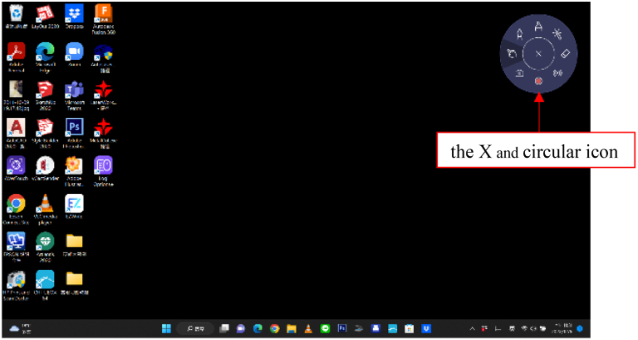
Figure 2 shows a usability issue related to EZWrite 6. It shows that when the user minimizes EZWrite 6, there is a circular icon that continues to provide the user with various functions such as drawing, highlighting, and recording. When users want to maximize EZWrite 6, they must press the X in the middle of the circular icon to restore the maximum. The user would hesitate to press the X because of being afraid that the entire EZWrite 6 would be shut down. Consequently, the multiple functions of the whole circular icon were removed in the later version of EZWrite 6, and users have to click the icon of EZWrite 6 on the toolbar at the bottom of the screen to restore the maximum.
Figure 2: Usability issue related to EZWrite 6.
Most usability issues were related to the interactive whiteboard EZWrite 6. EZWrite 6 was the primary application used frequently in creating teaching content and replacing blackboards and most teaching tools. The issues found in this study were not noticed by the user experience team before. Eventually,
Heuristic Evaluation of Interactive Flat Panel for Interactive Teaching 133
engineers solved all the problems found in this study sequentially, and the applications were improved gradually.
Questionnaire
Table 2 shows the total mean scores for the four dimensions. Regarding the in-service teachers’ perception of the ‘importance’ of IFP-based interactive teaching for the eight questions, all scores were > 4.0. In contrast, in the in-service teachers’ perception of the ‘performance’ of IFP-based interactive teaching for the eight questions, the mean scores of Q5, Q6, and Q8 were < 4.0. The three questions belong to the challenges of implementing IFP- based interactive teaching. It means that the in-service teachers considered IFP-based interactive teaching necessary. Still, they needed the support of administration and finance from the school to ready their interactive teaching by using IFPs. Q7 was a reverse-coded item in the challenges of implementing IFP-based interactive teaching; it shows the teachers felt a high workload in implementing IFP-based interactive teaching.
Consequently, the teaching environment has been changing faster and faster. It is difficult for teachers to keep pace with the changing teaching envi- ronment, but they are still willing to face the challenges and learn actively. However, preparing lessons and making teaching materials may take some time and effort, and the equipment and resources of each school are differ- ent. The Education Bureau must review various needs and provide relevant equipment and software.
Table 2. Mean scores of important-performance questionnaire used in this study.
Table available in the original PDF paper.
Mean (SD) Question Importance Performance
Perceptions of IFP-based interactive teaching
4.40 (.63) 4.53 (.52)
Q1. Implementation of IFP-based interactive teaching
4.20 (.77) 4.47 (.64)
Q2. Recommendation of IFP-based interactive teaching to colleagues Impact of IFP-based interactive teaching on students Q3. Students’ learning motivation 4.00 (.93) 4.00 (.88) Q4. Students’ learning interest 4.00 (.88) 4.07 (.96) Challenges when implementing IFP-based interactive teaching
Q5. Support of administration and finance 4.67 (.62) 3.73 (1.28) Q6. Lesson readiness 4.60 (.83) 3.47 (1.00) Q7. Workload (reverse coded item) 4.53 (.52) 4.27 (.70) Q8. Use of new equipment and media 4.73 (.46) 3.33 (.90) Opinions of the IFP-based interactive teaching course 4.60 (.51) 4.40 (.63) Q9. Provision of empowerment training in IFP-based interactive teaching strategy
4.60 (.51) 4.60 (.51)
Q10. Promotion of empowerment training 4.47 (.49) 4.47 (.64) Q11. Appropriate content of empowerment training Q12. Length of empowerment training. 4.53 (.64) 4.47 (.63)
134 Chien
CONCLUSION
In order to improve the learning experience and effectively engage students, it is essential to provide teachers with IFPs and well-designed applications for technology-mediated interactive instruction. We conducted the present using observation, user testing, and questionnaires in an IFP-based course. We dis- covered 35 usability issues with IFPs and discussed possible solutions. Addi- tionally, we shared insights into this teaching approach with students and discussed the challenges faced during its implementation. The results high- lighted the need for various improvements to promote IFP-based interactive education and facilitate the creation of interactive teaching materials.
These findings have significant implications for educational institutions worldwide, helping them to develop future educational technology poli- cies and better understand teachers’ requirements for enhancing IFP-based interactive teaching.
ACKNOWLEDGMENT
This work was financially supported by the Ministry of Science and Technol- ogy, Taiwan, under grant number MOST 111-2410-H-003-060-MY2 and NSTC 111-2622-H-003-004.
REFERENCES
EZWrite 6 (2024). https://www.benq.com/en-ap/business/ifp/ezwrite-6.html. Gauthier, A., Porayska-Pomsta, K., Dumontheil, I., Mayer, S., & Mareschal, D. (2022). Manipulating interface design features affects children’s stop-and- think behaviours in a counterintuitive-problem game. ACM Transactions on Computer-Human Interaction, 29(2), 1–22. Han, H., & Lee, H. (2012). A study on the teachers’ perceptions and needs of
STEAM Education. Journal of Learner-Centered Curriculum and Instruction, 12(3), 573–603. InstaShare (2024). https://www.benq.com/en-ap/business/ifp/instashare.html. Lee, J. W., Park, H. J., & Kim, J. B. (2013). Primary teachers’ perception analysis on development and application of STEAM education program. Journal of Korea Society of Elementary Science Education, 32(1), 47–59. Park, H., Byun, S. Y., Sim, J., Han, H. S., & Baek, Y. S. (2016). Teachers’ per-
ceptions and practices of STEAM education in South Korea. Eurasia Journal of Mathematics, Science and Technology Education, 12(7), 1739–1753. Promethean (2024). How interactive flat panels untether teachers and enable more flexible learning, https://www.prometheanworld.com/resource-center/articles/h ow-interactive-flat-panels-untether-teachers-and-enable-more-flexible-learning/. Shin, Y., & Han, S. (2011). A study of the elementary school teachers’ perception in
STEAM (Science, Technology, Engineering, Arts, Mathematics) education. Journal of Korea Society of Elementary Science Education, 30(4), 514–523. Trafera (2024). 4 reasons to add interactive flat panels to your class- rooms, https://www.trafera.com/blog/4-reasons-to-add-interactive-flat-panels-t o-your-classrooms/. Uni UI (2024). https://www.benq.com/en-us/education/software/uni-ui.html.
LISTED IN THE AHFE DIGITAL BOOKSTORE CATALOGUE
Explore the complete digital volume
Usability and User Experience
Read this individual research paper free through the original publisher, or explore the full digital proceedings book.
ISBN 978-1-964867-32-8
Explore this ISBN in the AHFE Bookstore ↗Listed in the July 2026 bookstore catalogue; search by ISBN to confirm current availability · Digital book purchase optional