Gao Songfeng, Bian Wenjing (2021). Research based on the iOS Platform on the Interface Design of Comprehensively Informationized Teaching System. In: Advances in Affective and Pleasurable Design. AHFE Open Access, vol. 14. https://doi.org/10.54941/ahfe100561
This paper introduces the UI interface design and its application based on the iOS platform of comprehensively informationized teaching system. On the basis of typical examples of interfaces, results of user’s questionnaire and relevant theories, this paper attempts to present the UI interface in detail through the stages of discussion, design and implement. Meanwhile, in order to find balance between theoretical strictness and practical effectiveness, this paper will make every effort to point out the improvement methods and put forward solutions to the defect, according to the analysis of design under usability experience criterion.
IOS PLATFORM AND TEACHING SYSTEM Introduction to iOS platform
iOS is a mobile operating system developed and distributed by Apple Inc. Originally unveiled in 2007 for iPhone, it has been extended to support other Apple devices such as iPod Touch (September 2007), iPad (January 2010), iPad Mini (November 2012) and second-generation Apple TV (September 2010). Like with Mac OS X, it shares Darwin foundation, and therefore belongs to the same class of commercial UNIX operating system. Originally called iPone OS, iOS was renamed as iOS at WWDC conference in June7, 2010.
Interface Design based on the iOS Platform There are two ways to design interface on the iOS platform. One way is using nib file or storyboard file. You can directly drag widgets to specified location in the corresponding graphical interface, such as UIView, UIKit (including UIButton, UILabel, UITextView etc.). Another way is using codes. You can also write codes to generate the appropriate widgets in the .m file by iOS class library.
It’s worth mentioning that Apple Inc. introduced storyboard in iOS 5.0 to support and improve the UI interface design. Compared with the traditional nib file, storyboard breaks the form that a .xib must correspond to a ViewContoller. Instead, storyboard takes all the nib files and organizes them into MainStoryBoard.storyboard. Meanwhile, jumping among pages can also be done on the storyboard, which accords more with the idea of MVC. However, it also has certain requirements to developers. For example, view must be managed through
ViewController which is not conducive to developments by more than one person at the same time.
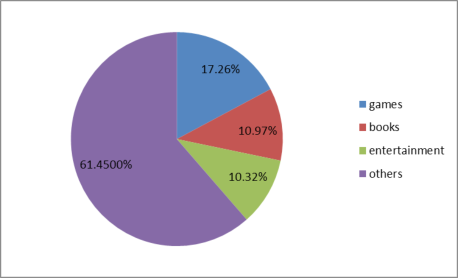
UI Interface Design of Teaching Software on the iOS Platform Apple Inc. announced that, by February 2012, App Store has the largest number of game applications, reaching 95,324 and accounting for 17.26%; book applications, amounting 60,604 and accounting for 10.97 %, came in second. Entertainment applications ranked third, accounting for 10.32% (Figure 1.1). It can be clearly seen from the number of book applications that teaching Apps on the iOS platform occupy an important position.
Figure1. 1 pie chart of application amount and ratio in App Store
As a supplementary tool, teaching software plays a necessary role in the teaching and learning process, and friendly interface can make teaching software more efficient. Therefore, UI interface design of teaching system not only should the follow general requirements of software design, but also should meet some special needs:
1. Educational software mainly caters to teachers and students, and their physical and mental characteristics are the fundamental points. So the combination and structure of interface design should be reflected in the level;
2. The design need to closely connect “teaching” and “learning”, and its elements should fully reflect teaching strategies;
3. The “level” of design form is changeable. Interface’s framework should not only accords with aesthetic tendencies of teachers and students, but should also pay attention to knowledge.
THE INTERFACE DESIGN OF COMPREHENSIVELY INFORMATIONIZED TEACHING SYSTEM Introduction to Comprehensively Informationized Teaching System
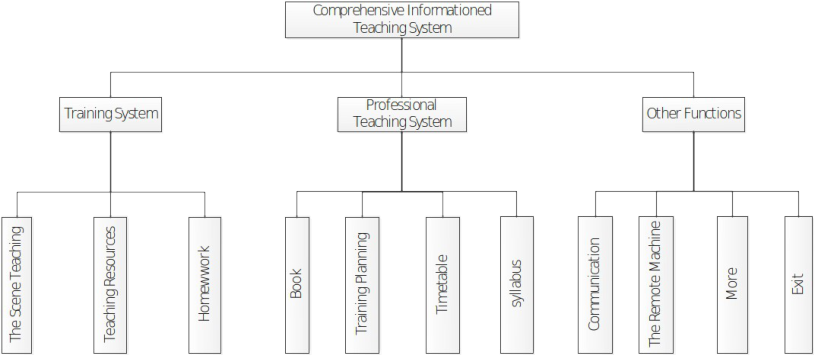
The iOS Client of comprehensively informationized teaching system mostly caters to the majority of students and employees who receive training. Further, its main function is cooperating with server based on .Net platform and finally implementing the auxiliary teaching between teachers and students. The system consists of training system, professional teaching system and other functions (Figure 2.1).
Figure2. 1 Foundational Structure of System
The Ideas and Projects of UI interface Design Nowadays, with the popularity of GUI and human-computer interaction concept, UI interface is not a simple visual design or presentation of information, but is the Apps’ first impression for users. Therefore, friendly, beautiful and efficient interface can absolutely attract users’ attention and thus becomes helpful to the application.
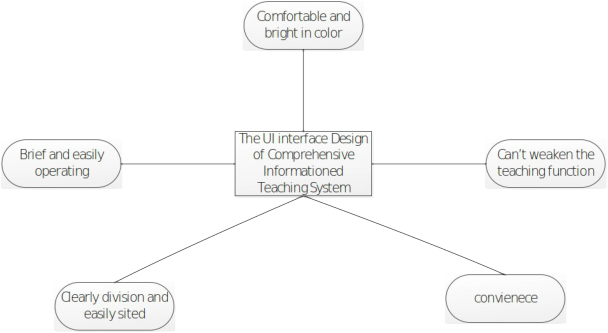
For the design of UI interface based on comprehensively informationized teaching system, this paper takes the functions and user groups into consideration. Combined common requirements with special needs of teaching software, this paper comes up with following requirements for the design of UI interface after researches among certain users (Figure 2.2).
Figure2. 2 the requirements of the interface design
Considering the users’ requirements and the actual situation of the system, the initial idea of this paper was dividing UI interface into three parallel modules according to the Client’s main functions. In order to realize the shift among sub-functions, specific contents are then added to their corresponding modules. Based on ideas above, this paper came up with some programs as alternatives:
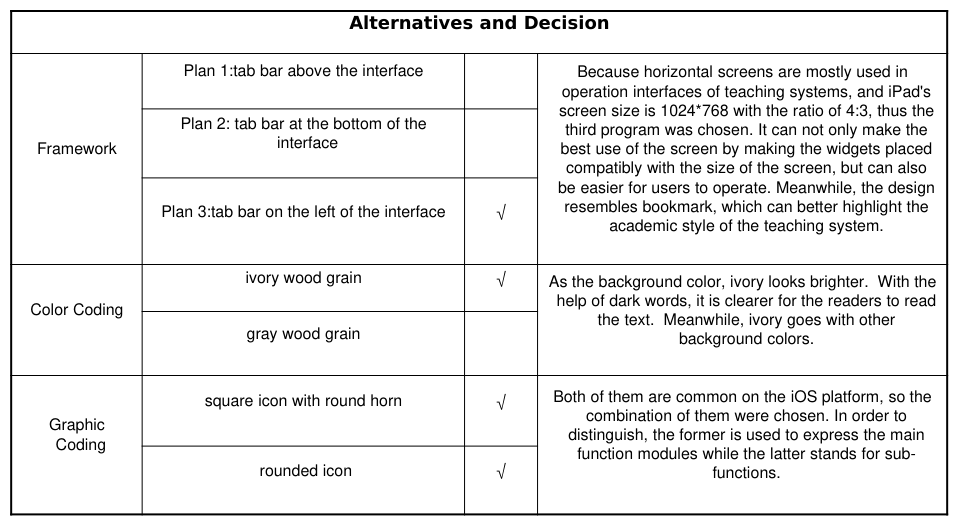
1. In terms of the framework design, most of the existing mature frameworks use the tab bar to shift among functions. Thus, this paper mainly proposed three plans:
Plan 1: Similar to web browsers, the framework puts the tab bar above the interface in order to shift among functions; Plan 2: Similar to iOS, the framework puts the tab bar at the bottom of the interface;
Plan 3: Employing the vertical tab bar and making the shifts labels on the left side of the interface.
2. In terms of the color coding, on one hand, designers should attach more importance to the smartness of colors rather than the excessiveness, avoiding distracting users’ attention. On the other hand, due to the color white, whose RGB value is (255,255,255), is used as the background color in the .Net platform, while the color gray, whose RGB value is (192,192,192), is employed in the Android platform, light color are thus chosen as the main color of the teaching system for keeping the uniformity between multiple platforms. Finally, two plans were proposed: ivory wood grain background and khaki wood grain background (Figure 2.3).
Figure2. 3 Background color of the system 3. In terms of graphic design, square icons with round horn and round icons are the key of choice.
The implementation of the UI interface After a detailed analysis of the alternatives above, the following plan was chosen on the basis of aesthetics and functions (Table 2.1):
Table 2. 1 the choices of the UI interface design Alternatives and Decision
In the actual implementation phase of design, the personalized interface directly drawn and set by Nib file (including three parallel functional modules and some sub-view) was chosen, according to the interface design approach offered by iOS platform. Meanwhile, generating the framework and universal interface by codes was chosen. Such design provides great convenience for further developments and maintenance.
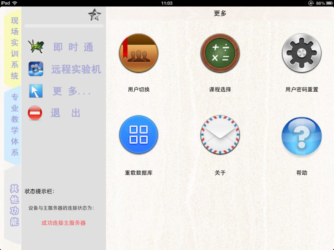
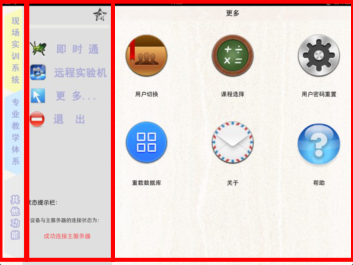
The Main Design Plan of Teaching System The design of UI interface of Comprehensively Informationized Teaching System (Figure 2.4) mainly takes user requirements into consideration and employed theories about user human-computer interaction and usability.
Firstly, its framework adopts vertical tab bar which is popular in many mainstream Apps. This design can not only provide enough space for illustrating functions, but can also make the interface more integral. Meanwhile, the division of interface modules is clearer: section A is used to shift functions, while section B is navigation bar corresponding to module, and section c is the area to operate sub-functions. Meanwhile, the area was divided by the complexity and frequency of operation, following the proportion parameter of 1:5:15.
Secondly, in terms of the color coding, the ivory was chosen as the background color and the dark or light color was chosen as text and pictures’ foreground color. Such colors form a bright contrast.
Finally, the combination of square icon with round horn and round icon was chosen, which is in accordance with iOS in graphic coding. The square icon with round horn is used to express the main functions, and the rounded icon stands for sub-functions. Moreover, attentions were paid to the icons’ metaphorical function. In other words, users can understand the functions of the icons without explanations. What’s more, to avoid misunderstanding resulted from inappropriate illustrations of icons, simple title were employed to explain the function of the icons. Notably, the system development follows the idea of backward compatibility, thus the interface’s style is still the “materialized” style before iOS 7.0.
Figure2. 4 the UI interface of system
On the other hand, considering the problem of human-computer interaction, the system uses many information tips to communicate with users when interface shifts, waits and so on. Meanwhile, the highlight of this system is waking up the screen by pressing the suspended button (Figure 2.5) which was chosen to control video in training system module. This design makes it more interesting to operate. Moreover, clear explanations can also help users to find the corresponding operation easily.
A B C
Figure 2. 5 suspended button
THE ANALYSIS OF THE UI INTERFACE Analysis of Usability
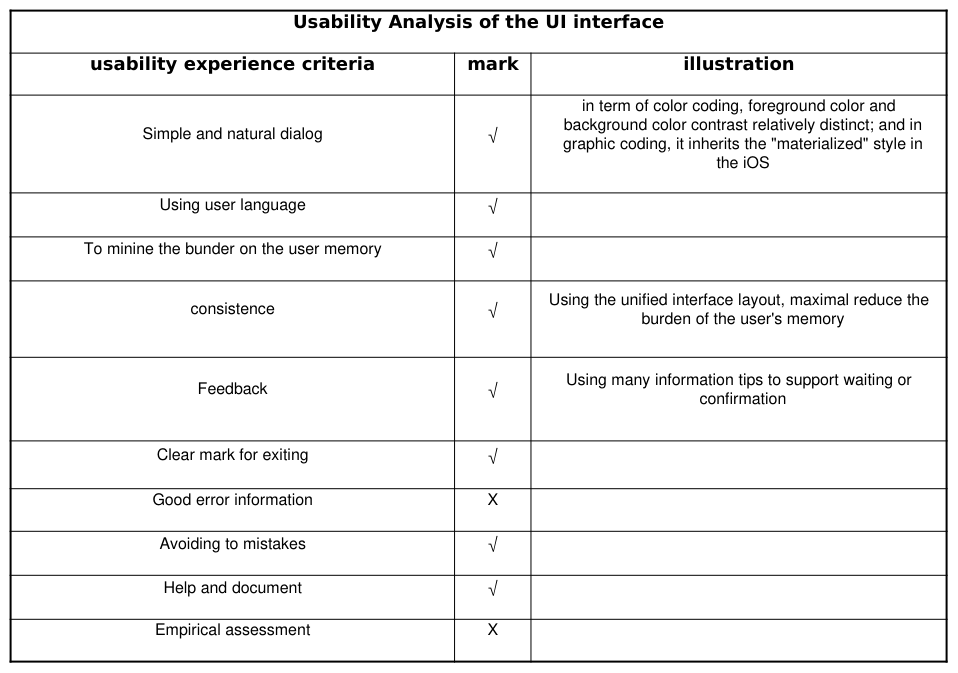
Analysis of usability for UI interface design mainly refers to usability experience criteria in Usability Engineering (Table 3.1).
Table 3. 1 Analysis of Usability of the system interface Usability Analysis of the UI interface usability experience criteria mark illustration
Improvement The results of the usability analysis of system interface showed that the teaching system still has something to be improved. For example, in terms of color coding, since there is no professional coding design, there may be some errors that have an impact on aesthetics. Moreover, in terms of the whole design style, Apple Inc. introduced a new iOS 7.0 which successfully transformed from “materialized” to “flatten”. Therefore, the UI interface design will be adjusted at the later stage. Finally, considering the influence of the human-computer interaction, it should be paid attention that the exit function of the function is quiet covert and there was no uniformed exit logo.
CONCLUSION
A growing number of European and American countries, especially America, the birthplace of Apple Inc., become trying to use handheld mobile devices to assist teaching, which is widely accepted by students. Taking the market into consideration, iOS technology with high proportion of 62.6%among equivalent products has its advantages; and in teaching field, applying mobile devices with the iOS platform has become one of the five teaching tasks. As a result, a friendly and efficient UI interface plays an important role.
REFERENCES
Feng Chong. (2012), “The Attention Design of Interface Design and Research on Mobile Device Interface of the iOS Platform”, Beijing Jiaotong University. Gu Jianan. (2010), “The Studies about Interface Design of Handheld Mobile Equipment Based on User Experience”, Hefei
University of Technology Jakob Nielsen. (2004), “Usability Engineering” Jin Ying. (2012), “Smart Phone Music Player Software Interface Design ---Take Shandong iOS Music Player Software Interface Design as an Example”, East China University of Technology Li Jing. (2003), “User Interface and Implementation of Sticker Paradise System Based on iOS”, South China University of
Technology Lin Guangcheng. (2005), “The Research of Human-Computer Interface Design in the Education Software”, Capital Normal University Lin Jiyun. (2012), “Design and Implement of lottery System Based on Android and iOS”, South China University of Technology Liu Chao. (2010), “Interaction Design of Mobile Terminal Based on Metaphor”, Beijing University of Poster and
Telecommunications Liu Tingting, Zhao Yiming, Lu Jing. (2007), “The Analysis and Research for the Human-Computer Interface of the Remote Teaching System”, Fujian Computer Liu Ye. (2011), “Interaction Design Strategy of Applied Software Based on iOS”, Informatization Research Lu Jinman. (2011), “The User Interface Design and Application for Teaching Software Based on the Small Screen”, Shandong
Normal University Tong Yijie. (2006), “The Element Analysis of Information Transmission in Interface Design”, Wuhan Technology University Wang Chuanlong. (2013), “Research on User Interfaces of Handheld Devices’ Operation Systems Based on GOMS Model – according to the iOS call interface”, Wuhan Textile University Yin Fubin, Qi Chunli, Li Xiaoli. (2013), “The Analysis of iOS technology in the Education Area”, Industry and Information
Technology Education
LISTED IN THE AHFE DIGITAL BOOKSTORE CATALOGUE
Explore the complete digital volume
Advances in Affective and Pleasurable Design
Read this individual research paper free through the original publisher, or explore the full digital proceedings book.
ISBN 978-1-4951-2109-8
Explore this ISBN in the AHFE Bookstore ↗Listed in the July 2026 bookstore catalogue; search by ISBN to confirm current availability · Digital book purchase optional