Euichul Jung, Young Joo Jang, Whang Jae Lee (2021). Study on Preferred Gestural Interaction of Playing Music for Wrist Wearable Devices. In: Advances in Affective and Pleasurable Design. AHFE Open Access, vol. 14. https://doi.org/10.54941/ahfe100581
Recently, many gesture-based interactive devices have been developed. Gesture is one of the most intuitive and natural ways to communicate each other, so gesture recognition technology is becoming huge issues in interaction design. Wrist wearable devices such as smart watches, Nike FuelBand, and Samsung Galaxy Gear are vitalized on the market, and there are attempts to control the wrist wearable devices with gestural interaction. In order to design more user-centered devices, development of gesture standards which gesture is appropriate for which operation becomes very important. In particular, there are two different situations gesture interaction is required: 1) people control objects that exist around then such as TV and vehicle, and 2) people control objects put on their body such as smart watch. This paper assumes that the two different situations may require different gesture interactions. The goal of this paper is to reveal preferred gesture interaction for wrist wearable devices. The function of playing music is selected for the experiment because it is most common and popular function on almost all digital devices. This paper consists of three parts: 1) collect existing gesture signal conventions and categorize them, 2) conduct a survey to find out preferred gestures for each function of playing music in two different situations, and 3) analyze the result for defining the most preferred gesture interactions and considering rationales for designing gesture interaction for wrist wearable device.
As diverse technologies develop rapidly, recently many gesture-based interactions have been applied to electronic devices. Quick and easy gesture interaction becomes one of the most intuitive and natural ways to communicate each other. Gesture controlled user interface (GCUI) now provides realistic and affordable opportunities such as the possibility of eyes free interaction which require less attention to the screen (Bhyiyan et al, 2011). Moreover, interests in wrist-based technology accessories such as Jawbone UP, Pebble, Galaxy Gear, or Nike FuelBand are high and rising. As the result, the gestural interactions start to be applied to the wrist wearable devices. For example, MYO is the motion and gesture controlled armband bracelet using arm muscle activity and EMG (electromyography) signals to control digital devices over Bluetooth. In the active movement of applying gestural interaction on the wrist wearable devices, many researchers attempt to effectively build the standards of gesture interaction with many resources from various devices and materials. Song, Hae-Won (2012) drew sets of gestures in manipulating music players, and Yoo, Seoung Hun (2012) tested two different types of display code gestures: verbal code-base and spatial code-based gestures focusing on gesture UX design for tablet devices.
STUDIES ON GESTURE INTERACTION Gesture and Gesture Interaction
Gesture is a motion of the body that contains information (Buxton, 2007). Gestures are naturally used among contexts and cultures, intimately related to communication. For example, people move hand up and down with the rhythm of speech, or there are different significant gestures that contain meanings and symbols such as peace sign. Gesture interaction enables the easy control without the limitation of the distance between the user and the device, and it has the advantage to support the direct manipulation more cognitive and ergonomic way from 2D surface to 3D space. The ideal goal of the gesture design is to reflect the user’s unconscious and natural action, so no extra learning exists. The approaches of studying gestures have to be user-defined and human-centered, start from the users. The preceding research, ‘Towards designing more intuitive touchless operation based on hand gestures,’ Kim and Song (2012) conducted a study to draw the four non-touch gesture sets for manipulating music players. The set of gestures were based on users’ stereotypes, icons’ shape, direction of physical movements, and character shape of function names, and the following experiment was performed to verify the gestures. As the result, the study shows that designing the gesture based on stereotypes and directions of physical movements is intuitive and effective. Recently, the conditions using non-touch gesture are divided broadly into controlling the device in front of smart TV or the wearable device worn on the one’s wrist. In the process of designing non-touch based interaction, it is a critical point to figure out if people use the same gesture to each function in two different situations: 1) people control objects that exist around then such as TV and vehicle, and 2) people control objects put on their body such as smart watch.
Goal and Hypothesis . At this point, this study conducted a survey to identify the preference of the gesture in two different situations, 1) Controlling the TV with gesture 2) Controlling the wrist wearable device with gesture, aiming to build the gesture standards that suggests the design direction of the non-touch gestures in operating various devices.
The purpose of the study is to figure out ‘the most intuitive gestural interaction that corresponds to the basic function of playing music with general wrist digital device.’ It is hypothesized that, people use the same gesture on each function in two different situations, controlling the TV and wrist wearable device,
METHODS
Designing an Experiment To verify the hypothesis, the research was conducted in the following process.
Step 1: List the basic functions of the Music player There are 9 different functions in the music player; ‘power on’, ‘play’, ‘pause’, ‘volume up’, ‘volume down’, ‘next song’, ‘previous song’,’ rewind’, ‘fast forward.’ ‘Volume up’ and ‘Volume down’ are considered as one function because the result came out as the same gesture with opposite direction. As the result, 6 functions were ready for the next step.
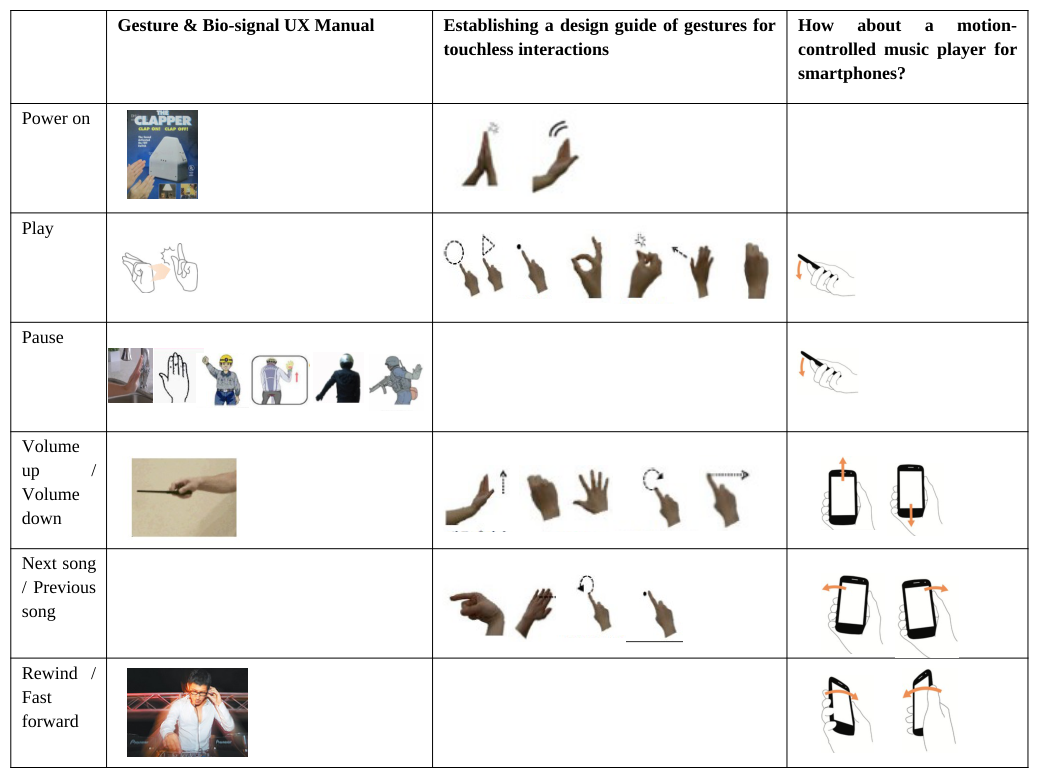
Step 2: Analyze three preceding researches and extract different set of gestures used for controlling music player a) Gesture & Bio-signal UX Manual, Yonsei University HCID Lab., Samsung Project, 2013
- The purpose of the project was to build the UX scenarios based on the data and context collected from the bio-signal equipped in wearable devices. In the process of the research, ‘gesture and bio manual’ was established for 42 different functions based on the gestures used in other wearable devices and conventional gestures such as driving signal, scuba diving signals, and military signals.
b) Establishing a design guide of gestures for touchless interactions, Song, Hae-Won, 2012 The study established a gesture dictionary, mapping intuitive gestures onto each operation through focus group interview, survey, and user participatory design. It became a design guideline of gestures for touchless interactions.
c) How about a motion-controlled music player for smartphones?, Jang, Yung-joo, 2012 It was the project to develop a concept for motion-based interaction using the wearable smartphones. Pilot survey was conducted from 7 people to figure out the gesture for different functions of a motion-controlled music player.
Set of gestures collected from three preceding researches were mapped onto each functions of music player (see Table 1).
Table 1: List of gestures mapping onto different functions of music player Gesture & Bio-signal UX Manual Establishing a design guide of gestures for touchless interactions
As the result, functions with high frequency, ‘Play’, ‘Pause’, ‘Volume up/down’, and ‘Next song/Previous song’ were selected. In designing the survey questions, choices of gestures for each function were firstly listed from three preceding researches (Table 1), and the gestures frequently used and easy to make were sorted out form the choices.
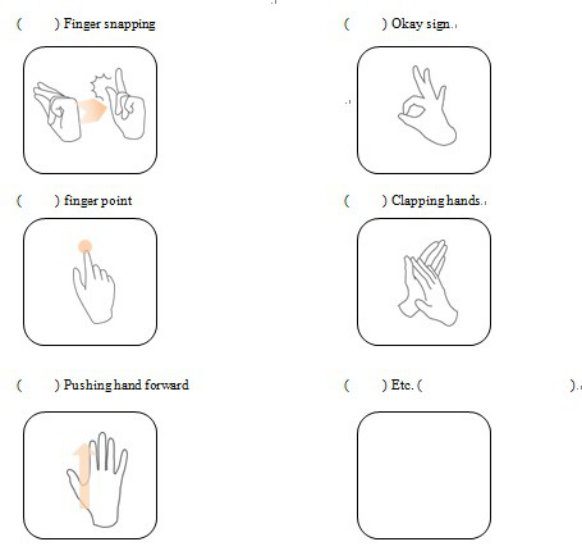
For ‘Play & Pause,’ which implies the meaning of start and end, ’ Finger snapping’, ‘Okay sign’, and ‘clapping hands’ were chosen from first two preceding studies. ‘Finger point’ was also selected because the action was derived from pushing play button in touch-based interaction, and ‘Pushing hand forward’ was also selected from the study of motion-controlled music player for smartphones. Choices such as ‘Drawing triangle’ or ‘Clenching fist’ were excluded because they are unacquainted or better fit to other function. For ‘Volume up / down,’ choses were ‘Move hand up/down’, ‘Spin the index finger’, ‘Grip and turn right/left’, ‘Spread out the hand’, and ‘Move to right/left,’ mostly derived from the conventional gestures meaning something going up/down or smaller/bigger. Lastly, ‘Move to right/left’, ‘Turn hand and snap’, and ‘Move index finger right/left’ were chosen from the preceding studies for ‘Next song / Previous song.’
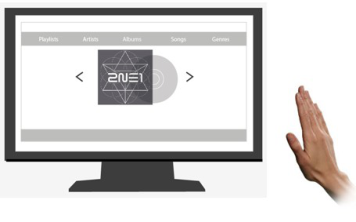
Survey The questionnaire consists of two sections: in each section, respondents are situated to control a music player with hand-gesture either on Smart TV or on the wrist wearable device with gesture interaction.
Figure 1. Two different situations
In each situation, respondents can choose the gestures that most naturally correspond to four function up to three options in order of their preference (1 means most natural).
Figure 2. Gestures for play function
To verify the concept, the survey was conducted through questionnaires and focus group interview. In total, 7 people participated, 5 men and 2 women. Most of them were interested in gesture interaction, and they frequently use their smart-phone.
Results
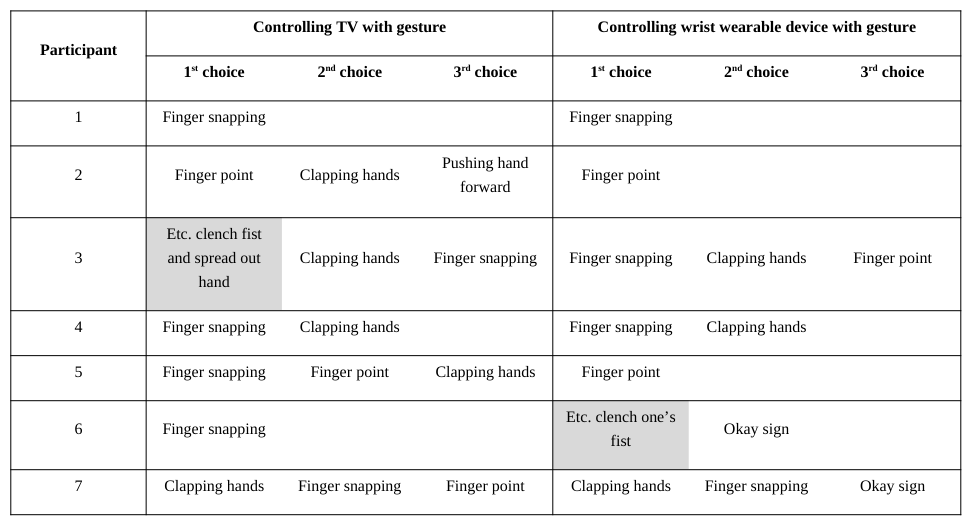
The result of the survey is summarized in tables below, and each table stands for different functions.
Mapping gestures for the function ‘play,’ the participants chose ‘Finger snapping’ as their first choice for both situations (See Table 2.1). In the situation controlling TV with gesture, 3 out of 7 participants chose ‘Finger snapping’ for their first choice, and 3 out of 7 chose ‘Clapping hands’ for their second choice. Similarly, in the situation controlling wrist wearable device with gesture, 3 out of 7 chose ‘Finger snapping’ as their first choice, and 2 out of 7 chose ‘Clapping hands’ for their second choice. Participant 1, 2, 4, 7 chose to use the same gesture in both situations, and participant 3, 5 also chose the same gesture as their second choice. This result shows the desire to use the same gesture for both situations.
In the focus group interview, participant 6 said that he might clench his fist to play the song with wrist wearable device because he imagines controlling the device himself outside. Moreover, it is an interesting point that the result came out from ‘play’ and ‘pause’ were exactly same.
Table 2. 1 Frequency of gestures on Play & Pause Controlling TV with gesture Controlling wrist wearable device with gesture
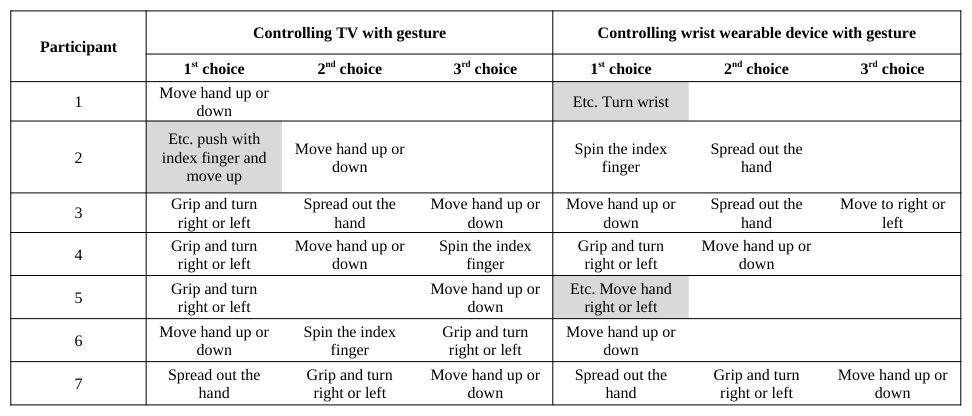
Mapping gestures for the function ‘Volume up/down,’ the participants chose ‘Grip and turn right or left’ for controlling TV but ‘Move hand up or down’ for controlling wrist wearable device (See Table 2.2). The result shows the difference in association with physical experience in two situations. It is common ways for a user to control remote control device of television, so they are used to interact physically with the controller, hold, touch, and act. Those experience make users to remind about turning the volume knob of the old radio when they are controlling TV. However, in the situation wearing the wrist wearable deive, there is no intuitive physical experience, so participants simply associate with up or down direction which explains the different results.
Table 2. 2 Frequency of gestures on Volume up / down Controlling TV with gesture Controlling wrist wearable device with gesture
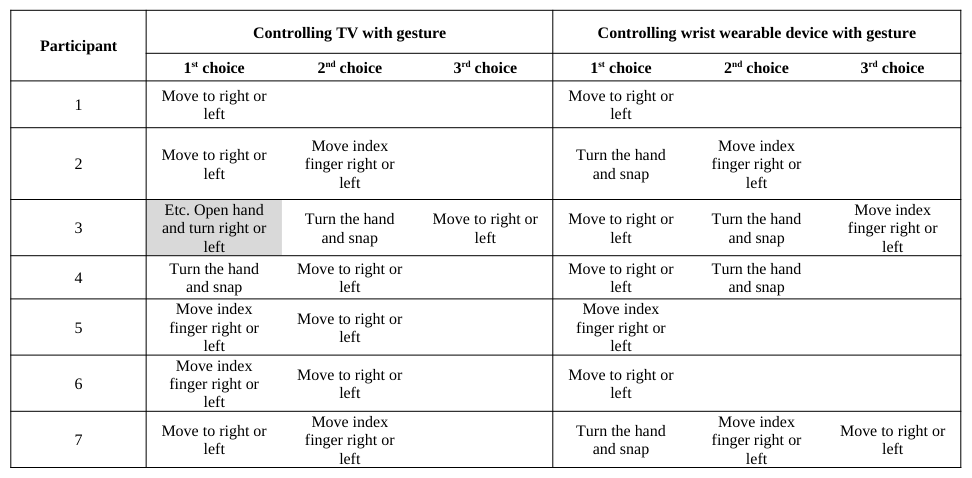
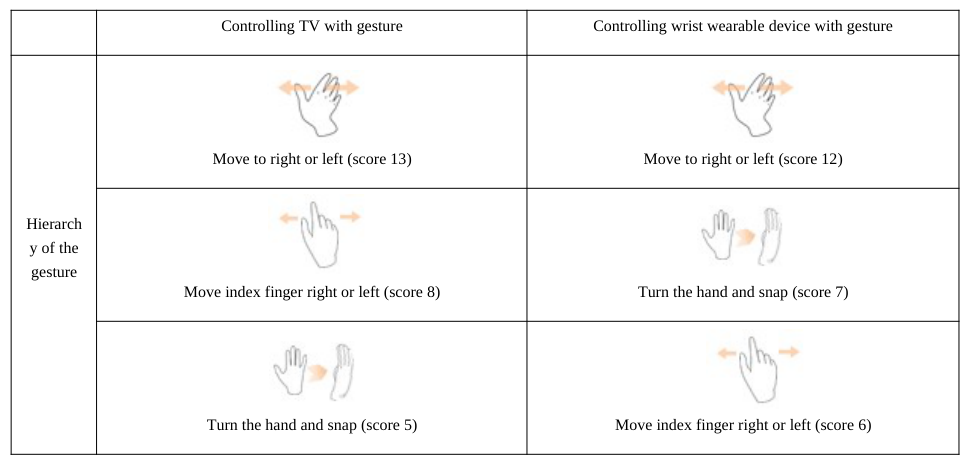
‘Move to right or left’ was relatively high in frequency for the function ‘Previous song/Next song’ (See Table 2.3). The gesture was selected frequently especially in controlling wrist wearable device, which suggest the preference to perform gestures with minimum movement that propose the direction.
Participant 1, 2, and 3 chose different gestures for two situations. They explained that gestures in controlling TV have more depth and freedom to act, while in controlling wrist wearable device, gesture become smaller but delicate.
Table 2. 3 Frequency of gestures on Previous song/ Next song Controlling TV with gesture Controlling wrist wearable device with gesture
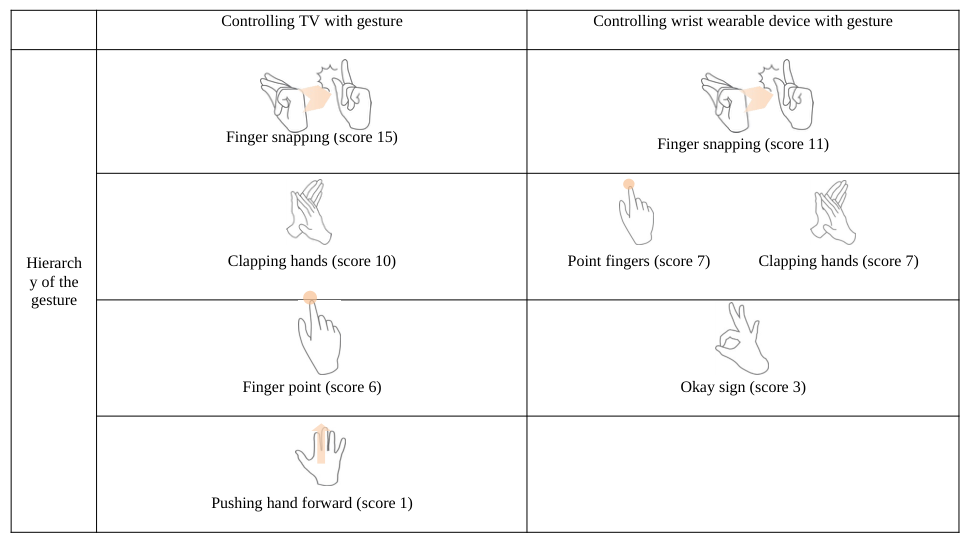
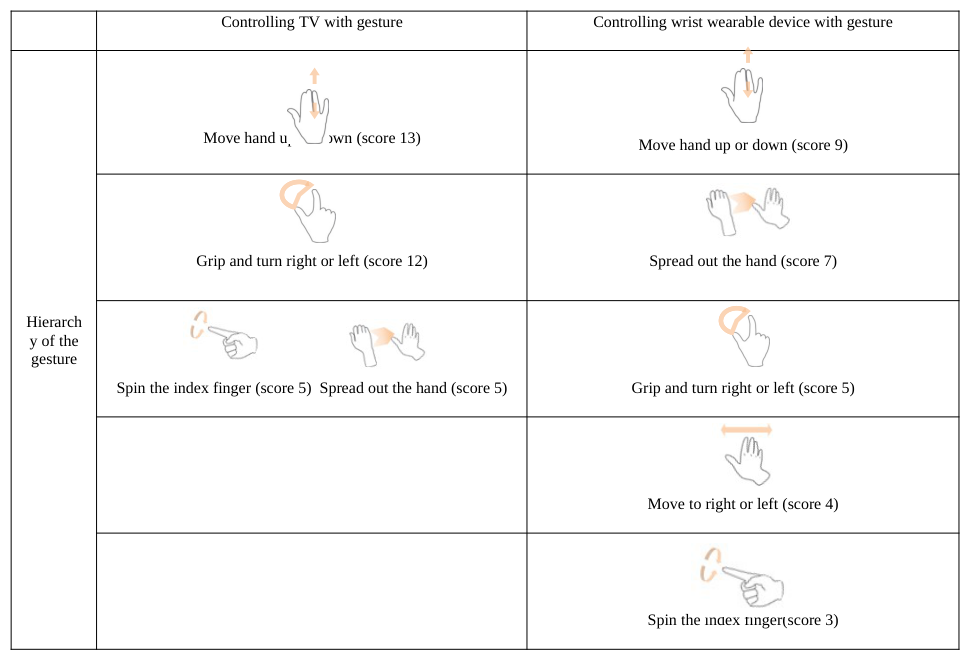
To see the hiererchy of the preference of gestures for each functions, each choice of gesture were scored by number(See Table 3.1, 3.2, 3.3). The first choice gets score 3, the second gets score 2, and the third gets score 1. As the result, the most preferred gesture for ‘Play and Pause’ was ‘Finger snapping’, ‘Volume up/down’ was ‘Move hand up or down’, and ‘Previous song / Next’ song was ‘Move to right or left’ for both situations.
Table 3. 1 Hierarchy of the preference of gesture on Play / Pause Controlling TV with gesture Controlling wrist wearable device with gestureTable 3. 2 Hierarchy of the preference of gesture on Volume up / down Controlling TV with gesture Controlling wrist wearable device with gestureTable 3. 3 Hierarchy of the preference of gesture on Previous song / Next song Controlling TV with gesture Controlling wrist wearable device with gesture
CONCLUSIONS
From the pilot survey, some insights were drawn tentatively. There are no big differences of using gestures between conventional gestures for communicating with others and gestures for controlling digital devices. People seem to prefer habitual gestures for similar situation. The participants answered the same gesture for two different situations: controlling the TV and wrist wearable device. As the pilot survey was conducted, some issues on questionnaire were found. The participants seem not to recognize the differences of two situations as they make answers for the survey. So, the new survey form was developed to solve the issues as shown in Figure 3.
The posture of hands for wrist wearable devices is different from the posture for TV control. The updated questionnaire describes the context of controlling functions in wrist wearable devices. Through this research, the research question will be explored again to design gesture interaction methods for wrist wearable devices: 1) gesture differences among gesture for convention hand signals, touch operations, gestures for screen-based devices such as TV, and gestures for wrist wearable devices.
Figure 3. Survey form for wrist control devices
Figure available in the original PDF paper.
REFERENCES
Booher, H.R., Minninger, J. (2003), “Human systems integration in army systems acquisition”, in: Handbook of human systems integration, Booher, Harold (Ed.). pp. 663-698 Bhyiyan, M. Picking, R. (2011), “A Gesture Controlled User Interface for Inclusive Design and Evaluative Study of Its
Usability”, Journal of Software Engineering and Applications Volume 4. pp. 513-521 Buxton, B (2007), “Sketching user experiences”, san Francisco, CA: Morgan Kaufmann Publishers Inc. Chapanis, A. (1996), “Human factors in systems engineering”. Wiley Series in Systems Engineering and Management. Andrew Sage, series editor. Hoboken, NJ: Wiley. Folds, D. Gardner, D., Deal, S. (2008). “Building Up to the Human Systems Integration Demonstration”, INCOSE INSIGHT
Volume 11 No. 2. Friedenthal, S. Moore, A. Steiner, R. (2008), “A Practical Guide to SysML: The Systems Modeling Language”, Morgan Kaufmann; Elsevier Science. Kim, H. Song, H. (2011), “Towards designing more intuitive touchless operations based on hand gesture”, Journal of Korean
Society of Design Service Volume 25 No. 1. Kim, J. (2013), “Interaction Design for a Spherical Display Using Gesture-based Natural User Interface”, master dissertation, KAIST. Song, H. (2012), “Establishing a design guide of gestures for touchless interaction”, master dissertation, Seoul National
University of Science and Technology. Taubman, P. (2008), Top Engineers Shun Military; Concern Grow. The New York Times Website: Yeoun, M. (2006), “The Generation Division in Use Inclination about Products’ Interaction and understanding the generations”, Journal of Korean Society of Design Science Volume 21 No. 3. Yoo, S. (2013), “An Exploratory Research on the Correlation between the Perception of Gesture UX(Airtouch UX) Design and
Display Code”, Archives of Design Research Volume 26 No.2. pp. 215-233
LISTED IN THE AHFE DIGITAL BOOKSTORE CATALOGUE
Explore the complete digital volume
Advances in Affective and Pleasurable Design
Read this individual research paper free through the original publisher, or explore the full digital proceedings book.
ISBN 978-1-4951-2109-8
Explore this ISBN in the AHFE Bookstore ↗Listed in the July 2026 bookstore catalogue; search by ISBN to confirm current availability · Digital book purchase optional