Robin Vivian, David Bertolo (2022). Definition of tactile interactions for a multi-criteria selection in learning geometry application. In: Usability and User Experience. AHFE Open Access, vol. 39, pp. 420–427. https://doi.org/10.54941/ahfe1001737
The commercial success of tablets requires researchers in human-computer interaction to imagine new ways to interact with tactile surfaces. Today, we can use it in an individual way (Wellner 1993), in groups (Martinet et al. 2010), as part of multi-display environments (Forlines et al 96), and for fun and entertainment (Wilson, 2005). These devices provide interaction techni- ques that are often intuitive and easy to use in 2D. However, manipulation of objects in 3D is still a challenge. Manipulations in 2D have been defined very simply (selection, moving, designation). Things become more complex when we needed to perform manipulations in space. In a 3D environment, widgets (Morris et al. 2006) have been largely used to make 3D manipulation easier. Moscovich (Moscovich, 2009) had shown how to design touchscreen widgets that respond to a finger’s contact area. Designating an object in 2D or 3D is relatively simple. A user would naturally choose a direct touch on
Definition of Tactile Interactions for a Multi-Criteria Selection 421
an object. Selecting a group of objects can be done either by increasing tou- ches or by drawing an area around a group of objects (the lasso technic or selection box). Both approaches seem to meet all the needs and few works propose solutions for more complex designations. For example, what gram- mar of gestures to select all objects with the same geometric shape? What grammar of gestures to select objects with the same color? This paper propo- ses to explore innovative and intuitive solutions to provide simple solutions to a problem that can be complex.
Related Works Multi-touch surface computing provides a set for interactions that are clo- ser analogs to physical interactions. Building natural and intuitive gestures is sometimes a difficult problem. Sometimes the gesture is not natural. How to define a gesture to move an object in a virtual world along 3 directions with only one hand? (Bertolo et al. 2013 b) or two-handed (Martinet et al. 2010). When you have only one hand to point, to move, and to turn an object, your possibilities to interact with its entity are poor. In 2009 Moscovich (Moscovich, 2009) shows how to design touchscreen widgets that respond to a finger’s contact area and gives limitations on the design of interactions based on sliding Widgets. Imagining new interactions (grammar of gestures) became a necessity. Schmidt (Schmidt et al. 2008). present an interface for 3D object manipulation in which standard transformation tools are replaced with transient 3D widgets invoked by sketching context-dependent strokes. Many works try to define affording gestures that reduce learning and memo- rization of the interaction. Understanding users’ mental models will improve a better knowledge of relationships between technology and users. From an analysis of people collaborating around a drawing table, Tang (Tang 1991) observes that gestures appear as an element of simulation for operations, referring to an area of interest in connection with users.
Some studies focus more specifically on handling objects in a workspace in 3D. Gestures are more complex and less intuitive. It is common to incor- porate the users to involve the input systems and mainly grammars gestures (User-centered design). Cohé (Cohé, Hachet. 2012) conducted a user study to better understand how non-expert users interact with a 3D object from tactile inputs. Users defined gestures to perform rotations, scaling, and trans- lations (RST) of a cube displayed on the screen. Their study shows a wide disparity for gestures suggested by users. The most suggested gesture by users represents only 17.9% of proposals. The sixth gesture gets even 8.6% of suggestions. In 1986, Bier (Bier, 1987) introduces two classes (two widgets): “anchors” and “end condition” to precise placement of shapes relative to each other. Since this first definition and tactile interface building, widgets used in 3D manipulation are in rapid succession. But, when you use your finger to point, to move, and to turn, your possibilities to interact with an entity are reduced. Some studies explore multi-touch controls to manipu- late several degrees of freedom at the same time. Hancock (Hancock et al. 2009) (Hancock et al. 2019) proposed to use from one to three fingers to handle objects in shallow depth. Martinet (Martinet et al. 2010) explored the
422 Vivian and Bertolo
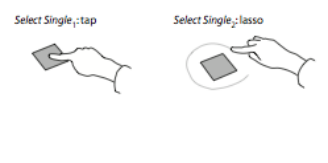
Figure 1: Wobbrock’s propositions for select single or select group.
design of free 3D positioning techniques for multi-touch displays to exploit the additional degrees of freedom provided by multi-touch technology. Their contributions are twofold: in a first time an interaction technique to extend the standard four viewports technique found in commercial CAD applicati- ons by adding a teleportation system, and in a second time, they introduce a technique designed to allow free 3D positioning with a single view of the scene: The Z-technique. From a short preliminary study, Cohé (Cohé et al. 2011), shows that selection of the DOF controls is difficult as soon as the graphical elements project close to each other on the screen. They note that it is difficult to control all the DOF when they are displayed at the same time. They propose an alternative approach and build a tBox controlled with a finger. User-centered design is a way of designing human-computer interfa- ces. But you have a gap between users and designers. Users’ behaviors are often complex to develop and often inefficient for design. Foley (Foley et al.) observes that a user-computer dialogue is at the beginning of all languages of inputs and outputs. As in speech recognition, feedback is inevitable to develop an exchange between two entities (humans or not). In its work on user-defined gestures, Wobbrock (Wobbrock et al. 2009) tries to control this feedback to prevent revision by the user of his mental model. Participants perform a gesture to pan a field of objects after a learning animation. The initial hypothesis is that any action or command cannot be performed by a gesture. “So what is the right number of gestures to employ?” He developed a field experience with 20 participants. They presented to users a set of acti- ons, such as Cohé (Cohé, Hachet 2012) a set of 27 commands and then asked them to imagine the corresponding gesture.
PROBLEMS WITH CURRENT SOLUTIONS With a small number of objects or in specific situations the problem of multi- selection is always simple. The gesture created, to solve this problem, are easy to understand, simple to realize, and very efficient. The two main options use a lasso or a designation by multi-touch (Figure 1).
These object selection gestures are often presented as effective and affor- dable solutions, but they are not suitable when complexity increases. They do not answer the following questions
How select all the squares/cubes/circles?
How select all red objects?
How select all wired objects?
Definition of Tactile Interactions for a Multi-Criteria Selection 423
Creation and suppression of solids with tangible objects
Selection
Translation
Duplication
Manipulation of a net of a polyhedron
Rotation
Changing the position of observer with gyroscopic sensor and video camera metaphor.
PROPOSITIONS FOR MULTI-SELECTION
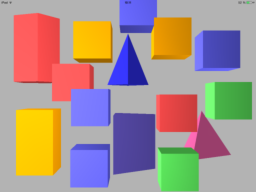
Figure 2 shows a simple example of problematic. Imagine that the user wishes to select all blue cubes or all parallelograms of different colors (green, red, yellow, and blue). Using Lasso technic or selecting one by one objects is dif- ficult indeed impossible. We can also argue by subtraction. How to select all objects except the pyramids or all green cubes except the one in the bottom left corner?
The generalization of the problem is how to introduce a parameter like a number, color, form, representation indeed position in a tactile selection
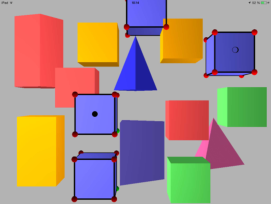
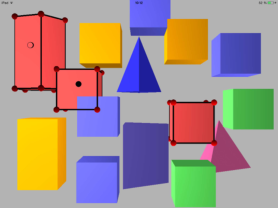
Selecting all Same Forms To select objects with the same shape (not necessarily the same color) you must apply the same interaction of selection on the two objects (Long touch on one and a tap on the other one). Figure 4 shows for example how to select all colored cubes.
Definition of Tactile Interactions for a Multi-Criteria Selection 425
Figure 5: Gesture to select all red objects.Figure 6: Gesture to select all objects.
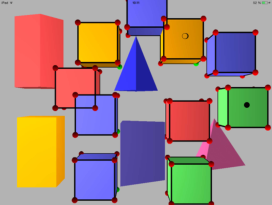
Selecting all Same Colors Similarly, we can select all objects with the same color (whatever their form or modeling). Figure 5 presents the selection of red objects.
Selecting all Objects There is still a function that is the selection of all objects. When the action involves two unrelated objects, interaction must be applied for all objects of 3D space. A long touch on an object and a tap on another one (having no common features) will select all elements (Figure 6).
Unselect One Object from the Selection Sometimes it’s necessary to realize an incomplete selection. For example, we need to delete all green cubes except the cube localized at the left-down corner. The intuitive step is:
Selection all objects
Unselect one cube (left-down corner)
Delete all selected cubes.
From a selection mode, an object has two states. On one hand a state is “selected” on other hand an “unselected” state (it’s a binary state).
⊙(blue cube) +
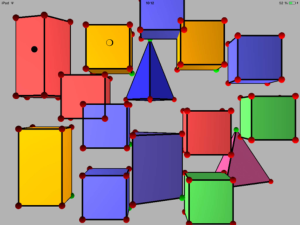
(blue cube): It’s interaction to do to select all objects. This final state is shown (Fig. 7a) by a symbolic red vertex on all green cubes.
426 Vivian and Bertolo
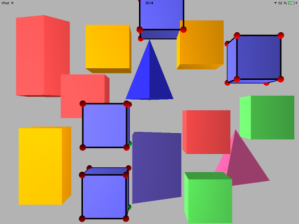
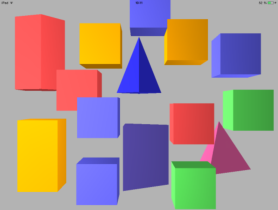
Figure 7: a) All blue cubes selected. b) Only one cube unselected (at right).Figure 8: Back to start situation.
(blue cube): a tap on a selected cube changes his state only. All similar objects stay selected, and we can manipulate them in only one interaction (Fig. 7b).
A long touch on an empty space unselecting all objects (Figure 8).
a Bertolo D., Vivian R. and Dinet J, “Proposition and evaluation for a categorization of interactions in 3D geometry learning context”, International Journal of Advanced Computer Science, Vol. 3, n°12, December 2013, pp. 1–8.
Definition of Tactile Interactions for a Multi-Criteria Selection 427
b Bertolo D., Vivian R. and Dinet J, “A set of interactions to rotate solids in 3D geometry context”, CHI’13 Extended Abstracts, ACM SIGCHI Conference on Human Factors in Computing Systems Proceedings, 2013, April 27–May 2, Paris, France. c Bertolo D., Vivian R. and Dinet J, “A set of interactions to help to resolve 3D
geometry problems”, Science And Information Conference 2013, October 7–9, 2013, London, UK. Bier E. A. “Skitters and jacks: interactive 3d positioning tools,” in I3D ‘86: Proceedings of the 1986 workshop on Interactive 3D graphics, ACM, 1987, pp.183–196 Cohé A., Décle F. and Hachet M. tBox: A 3D Transformation Widget designed for
Touch-screens CHI 2011 Canada 3005–3008. Cohé A. Hachet M. Understanding User Gestures for manipulating 3D objects from touchscreen inputs Graphics Interface Conference Toronto 2012 Foley, J.D., van Dam, A., Feiner, S.K. and Hughes, J.F. (1996) The form and content of
user-computer dialogues. In Computer Graphics: Principles and Practice. Reading, MA: Addison-Wesley, 392–395. Forlines, C., Esenther, A., Shen, C., Wigdor, D. and Ryall, K. (2006) Multi-user, multidisplay interaction with a single-user, single-display geospatial application. Proc. UIST ‘06. New York: ACM Press, 273–276. Hancock M., Ten Cate T., and Carpendale S. Stickytools: Full 6DOF force-based
interaction for multi-touch tables. In Proc. ITS, pages 145–152, 2009. Hancock M., Carpendale S., Vernier F. Wigdor D, Shen C. Rotation and translation in Proceedings of the SIGGHI conference on human-computers system pp. 79–88 206 Kammer D., Wojdziak J., Keck M., Taranko S. Towords a formalization of multi-
touch gesture ITS’10 novembre 7–10 2010 Saarbrücken. Martinet A., Casiez G., and Grisoni L. The design and evaluation of 3d positioning techniques for multi-touch displays. In 3D User Interfaces, 2010 IEEE Symposium, 115 –118 Morris, M.R., Huang, A., Paepcke, A. and Winograd, T. (2006) Cooperative gestures:
Multi-user gestural interactions for co-located groupware. Proc. CHI ‘06. New York: ACM Press, 1201–1210. Moscovich T., “Contact area interaction with sliding widgets,” in UIST ‘09: Proceedings of the 22nd annual ACM symposium on User interface software and technology ACM, 2009, pp. 13–22 Schmidt R., Singh K., and Balakrishnan R., “Sketching and composing widgets for
3d manipulation,” Computer Graphics Forum, Proceedings of Eurographics 2008, 2008, pp. 301–310. Tang, J.C. (1991) Findings from observational studies of collaborative work. Int’l J.
Man-Machine Studies 34 (2), 143–160. Wellner, P. (1993) Interacting with paper on the DigitalDesk. Communications of the ACM 36 (7), 87–96. Wilson, A.D. (2005) PlayAnywhere: A compact interactive tabletop projection-vision
system. Proc. UIST ‘05. New York: ACM Press, 83–92. Wobbrock J. Ringel Morris M. and Wilson A.: User-defined gesture for surface computing. CHI 2009 Boston.
LISTED IN THE AHFE DIGITAL BOOKSTORE CATALOGUE
Explore the complete digital volume
Usability and User Experience
Read this individual research paper free through the original publisher, or explore the full digital proceedings book.
ISBN 978-1-958651-15-5
Explore this ISBN in the AHFE Bookstore ↗Listed in the July 2026 bookstore catalogue; search by ISBN to confirm current availability · Digital book purchase optional