Karl Proctor, Lee Skrypchuk, Daniel Clifton, Mutlu Isik (2022). Methods to Promote Increased Usage of Voice Interaction in a Vehicle. In: Usability and User Experience. AHFE Open Access, vol. 39, pp. 10–18. https://doi.org/10.54941/ahfe1001685
As in-vehicle infotainment systems become increasingly complex, and as manufacturers increasingly move functions and features into the in-vehicle screen, interacting with these systems is resulting in increased demand, eyes-off-the-road time, and task completion time. To combat this complexity, some manufacturers have incorporated voice assistants into their vehicles, allowing drivers to speak to their vehicles to perform tasks rather than use touch. However, these assistants currently offer a limited feature set, and are generally passive, requiring manual activation. Here we outline early, but on-going work looking at techniques that can be used to nudge users towards using voice. Participants were presented with 6 prototype in-vehicle infotainment systems (IVIS), which varied in terms of how they nudged participants towards using voice and asked to perform a series of representative in-vehicle tasks. Data shows the most effective method for nudging was automatic activation of the voice assistant when opening the appropriate app, with participants using voice 60% of the time.
Over the last decade, with the aid of more powerful processors, always-on internet devices, and cloud computing, the development of current genera- tion natural language speech interfaces has been made possible (Herschberg & Manning, 2015; European Commission, 2018; Hoy, 2018; Rzepka, 2019; Terzopoulos & Satratzemi, 2020). The first readily available cur- rent generation speech interface is generally seen to be Apple’s SIRI, which was introduced in 2010 on the iPhone 4 (European Commission, 2018; Hoy, 2018; Rzepka, 2019). At the time this was a stand-alone app, before being integrated into iOS in 2011. Microsoft followed in 2013 with Cor- tana, Alexa in 2014, and Google’s assistant in 2016 (Hoy, 2018). These assistants have evolved from their simple question and answer predecessors into today’s sophisticated assistants that are capable of a more natural and interactive speech style (Rzepka, 2019) through natural language processing (Herschberg & Manning, 2015; Hoy, 2018).
The increased adoption & penetration of home assistants resulted in an estimated market value of US$12b in 2019, with this value set to treble to US$ 35.5b by 2025 (Statistica, 2019). In recent surveys, both PWC and Microsoft found 90% of respondents to be familiar with voice assistants to some degree.
Methods to Promote Increased Usage of Voice Interaction in a Vehicle 11
Of this 90%, between 69% & 72% reported using a voice agent at some point in the past, with 57% to 72% having done so on their smart phone (PWC, 2019; Microsoft, 2019).
Automotive Smart Assistants As vehicles and their associated interfaces become increasingly sophisti- cated, with more and more features being added to increasingly larger touch-screens, increased driver demand is a significant concern for OEMs, researchers, law-makers, and consumers alike (Baron & Green, 2006). Motor vehicles have traditionally had physical buttons and switches as the primary interaction method, and so using a digital assistant to control these via speech hasn’t been possible. Over the last few years, however, we have seen a signifi- cant increase in the digitisation of vehicle controls, with features increasingly being moved to a central touch screen as OEMs work to provide ‘clean’, simple cabins for their customers, and to reduce production costs. A good example of this is the Tesla Model 3, which has moved almost all controls into a large centre-mounted screen.
When interacting with a vehicle’s controls using speech, consistent impro- vements in driving performance and reductions in cognitive load are observed (Zheng, et al., 2008; Ranney, et al., 2005; Itoh, K.; Miki, Y.; Yoshitsugu, N.; Kubo, N.; Mashimo, S., 2004; Gärtner, et al., 2001). However, the effecti- veness of these interactions depends significantly on the capabilities of the assistant used, with early vehicle assistants often exhibiting poor usability, for example through poor recognition and rigid syntax. Despite these early usability problems however, recent data is positive, with 75% of consumers reporting that they would be willing to use speech in a vehicle if the experience were more positive (Capgemini, 2019).
More recently, advances in phone projection technologies (for example Apple CarPlay and Android Auto), have brought capable speech intera- ction to the vehicle, albeit with a limited feature set at present. Adoption of this technology is rising quickly, with CarPlay being significantly ahead of Android Auto in North America (Voicebot, 2020). This suggests that consu- mers are becoming increasingly comfortable using voice assistants, are more likely to use them compared to the past, and that usage will only continue to increase (Voicebot, 2020). Further, utilising phone projection can give the illusion of using an embedded HMI with an embedded assistant, when the projected assistants in fact have little, if any, control over vehicle functions. However, this is a gap in the market that Amazon have seen and have been quick to address with two approaches: Alexa Auto SDK, and Alexa Custom Assistant.
The Alexa Auto SDK is the full, familiar Alexa experience, but natively embedded in the vehicle. This allows greater control over the vehicle than seen with phone projection, such as the control of smart home devices, and even the ability to control aspects of their vehicle from their home (e.g. cabin pre-conditioning) (Amazon, n.d.).
Announced in January 2021, the Alexa Custom Assistant (Amazon, 2021) is similar to the SDK in that it gives manufacturers the ability to natively
embed Alexa into their vehicles, but Amazon also white label this assi- stant, allowing manufacturers to brand it as their own assistant rather than as Alexa. The advantage here is a more tailored, and deeply embedded experience compared to the Alexa SDK.
CURRENT WORK Most currently available speech interfaces are generally passive systems that are activated by the user, either through the pushing of a dedicated button, or via a wake-up-word (WuW). This means that it can sometimes be easier and faster for the user to use touch rather than activate the digital assistant. This paper reports a first-step in investigations into different methods of prom- pting users towards using speech rather than touch. The research question here is; Is it possible to nudge participants towards using voice rather than visual-manual interaction?
Concepts Used All concepts were presented on a 12.5” 2020 iPad Pro, and simulated an 11.5”screen as presented in current Jaguar Land Rover vehicles. Six concepts were used, with each concept differing in terms of the type of nudge presented to participants.
Concept 1 presented participants with a text box at the top left-hand side of the screen, and the speech icon was highlighted with a teal-coloured background as the app was opened. Wording in the text box was “Did you know that many functions here can be accessed using voice?”
Concept 2 automatically activated the speech system as the app was ope- ned and asked “What would you like to do?”. Visual indication of the active status of the speech system was also given through a full-width teal bar covering approximately 10% of the height of the screen
Concept 3 allowed participants to complete the required task, but then presented an audible message once they closed the app (“did you know that you can change <task> using voice?”). However, the speech system was not active
Concept 4 presented users with the speech icon set against a teal-coloured background next to the app. The speech system was not active at this point.
Concept 5 was the same as concept #4 except for the addition of a text box that gave 3 examples of commands that could be used (“Set <app function> to…”, “High…”, “Low”, “I’m cold”)
Concept 6 presented participants with the speech icon surrounded by a teal-coloured box in the middle of the app control itself (e.g. temperature controls).
Tasks Presented Participants were presented with a total of six typical in-vehicle tasks, with each task being performed twice. The six tasks presented were:
1) Set the driver’s temperature to 25.5° (start temperature of 18°)
Methods to Promote Increased Usage of Voice Interaction in a Vehicle 13
2) Set the driver’s temperature to LO (start temperature of 23ׄ°) 3) Set the driver’s fan speed to max (start fan speed of 3, max fan speed of 7) 4) Set the driver’s temperature to 19° (start temperature of 18°) 5) Set the driver’s heated seat to max heat 6) Set the fan speed to auto Due to time constraints, it was not possible to have all six tasks performed for each of the six concepts. Therefore, each concept had two tasks allocated, with each task being presented on two different concepts. Table 1 outlines which tasks were performed for each concept. The presentation of concepts and tasks was randomized.
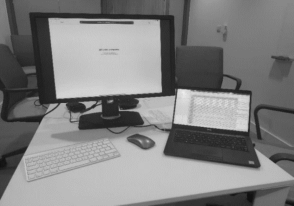
Experimental Set-Up All concepts were prototyped in Proto.io, exported as HTML into a custom tool that Jaguar Land Rover use for both moderated and unmoderated user trials, and then presented on a 2020 12.5” Apple iPad Pro using the Safari Web browser. The concepts were formatted such that they were representative of the 11.5” screen currently fitted to some Jaguar Land Rover vehicles. This iPad was connected to an external monitor via a USB-C to HDMI dongle, which mirrored the iPad screen to the external monitor. A Bluetooth keybo- ard and mouse were connected to the iPad to allow the moderator to control the iPad throughout the trial. The moderator’s set-up is shown in Figure 1 (left).
Participants were seated in front of, and to the right of, the moderator (Figure 1, right). The iPad was mounted directly in front of the participant using a Ram Mount stand attached to the table, at approximately chest hei- ght. Participants were free to move the iPad to a more comfortable position if needed.
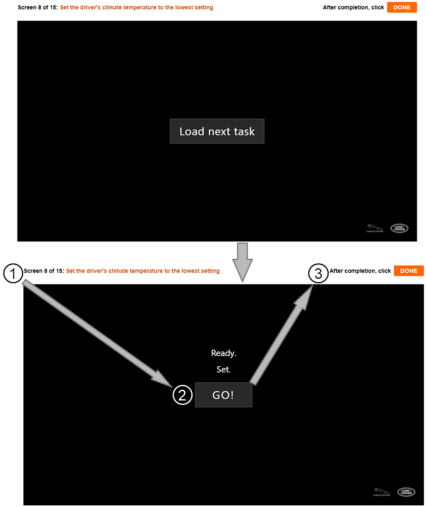
Experimental Procedure 16 participants were recruited for this trial (six female). All appropriate GDPR and ethical approvals were given before recruitment began. Partici- pants were presented with an overview of the trial, and subsequently provided consent prior to trial start. Total trial time was approximately 40 minutes. Once the trial had started, participants were presented with two screens
Figure 1: Testing Set-up for the Moderator (Left) and Participant (Right).Figure 2: Screens as Presented to Participants (arrows show interaction steps).
during the trial (Figure 2). Screen one displayed a “Load Next Task” but- ton, screen two presented the task (1), and a “Go” button (2). Once “Go” was touched, this was replaced with the prototype UI (not shown in this paper). Participants completed the required task, then touched the “Done” button (3) in the top right-hand corner. Following this, they answered two questions relating to the pleasantness and usefulness of their experience with that concept. Once the participant submitted their answers, the “Load Next Task” button was once again shown, and the process repeated. This sequence was completed a total of twelve times, with a short break mid-way through. Finally, participants were asked to complete the System Usability Scale (SuS) after which the trial ended.
During the initial briefing, participants were informed that they would be interacting with a series of fully working prototype infotainment systems, and that they were free to interact with them through touch or voice using a WuW
Methods to Promote Increased Usage of Voice Interaction in a Vehicle 15
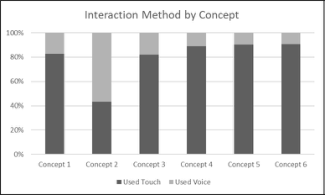
Figure 3: Interaction Method by Concept (Left) and by Task (Right).
(“Hey Jaguar”). While the concepts were interactive to touch, they were not able to respond to verbal input from the participant, so if the participant chose to use voice to interact, then the moderator touched one of eight keys on the Bluetooth keyboard to provide a simulated verbal response. The keyboard was positioned out of sight of the participant, and they were unaware that the moderator was using the keyboard.
RESULTS
All data was exported from the server as CSV files, and then imported & processed in Microsoft Excel. Data shows a clear preference for the use of touch across all concepts (Figure 3, left), except for concept 2 (immediate activation of voice assistant when opening the respective app), which reports the use of voice interaction almost 60% of the time. Interestingly, data from concept 3 shows that voice was used around 20% of the time, even though the prompt to use voice was presented after the task had been completed. Concept presentation was randomised, meaning that experience with earlier concepts positively influenced the use of voice for concept 3, when this was not the first concept presented. 75% of the time, concept 3 was not the first concept presented.
Data for interaction method by task shows a clear preference for the use of voice when tasks involve multiple button pushes/touches, with concept 2 showing voice was used 40% of the time (Figure 3, right).
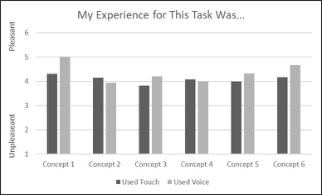
Following each individual task, participants were asked to rate their expe- rience on two bi-polar, five-point scales; pleasant/unpleasant, and useful/not useful. Data for ratings of pleasantness (Figure 4, left) shows overall posi- tive ratings, with slightly higher ratings for voice than for touch, except for concepts 2 & 4.
Interestingly, concept 2 was the most effective concept for nudging par- ticipants towards the use of voice. Anecdotally, comments from several participants suggest that they found concept 2 to be somewhat intrusive as it was unexpected. When looking at ratings of usefulness, data shows higher ratings for voice than for touch for concepts 1 to 4, although once again, all concepts were rated as useful overall (greater than 3).
Figure 4: Ratings of ‘Pleasantness’ (Left), and Usefulness (Right).
DISCUSSION
Overall, findings do suggest that it is indeed possible to nudge users tow- ards using voice rather than touch, with all concepts presented showing the use of voice to interact. Concept 2 was particularly effective, with 60% of participants using voice, despite not being given any explicit instructions to do so.
Highlighting this, we see participants using voice around 20% of the time with concept 3, despite not receiving any verbal or visual prompts until after the requested task had been completed. This carry-over effect does sugge- st/confirm that if presented with a positive experience with voice interaction, users are more willing to continue using them (PWC, 2019; Zheng, et al., 2008; Capgemini, 2019; Bentley, et al., 2018; Business Insider, 2016). Despite some concepts recording the use of voice only around 10% of the time, when this is scaled up to the number of vehicles sold across the world per year, this gives significant numbers of users potentially choosing to use voice rather than visual-manual interaction.
However, while the data from concept 2 is encouraging, it is important to consider firstly the frequency of these interruptions, and secondly to those tasks that would likely benefit the most from this type of nudging. If this type of nudge were presented regularly when a user wanted to interact with the IVIS, it is highly likely that they would become annoyed, and ultimately seek to disable this feature.
It is likely that those tasks that are more complex, more visually deman- ding, or requiring multiple touches, are the ones that would benefit most from nudging, particularly for concept 2. Data shows that Task 1 (set temperature to 25.5°C) recorded the highest average number of clicks (9.8). In fact, to complete this particular task using touch alone needs a total of 16 touches. However, this task can also be completed using a touch-and-slide interaction on the temperature scale, with several participants discovering this intera- ction during testing, resulting in an average number of clicks to complete this task of 9.8.
This user trial was a desktop study, and so was conducted under ‘ideal’ circumstances. Had this been conducted in a moving vehicle, it is a strong possibility that the average number of clicks needed would be higher due to perturbations introduced resulting from movement of the vehicle, an
Methods to Promote Increased Usage of Voice Interaction in a Vehicle 17
assertion supported by in-vehicle testing by Ahmad, Langdon, Godsill, Hardy, Skrypchuk & Donkor (2015).
Moving into real-world uses for these findings, this selective nudging is an approach that is currently being utilised by both CarPlay and Android Auto for certain tasks, namely those that call for multiple clicks (e.g. messaging apps), or those that are visually demanding (e.g. phone call). In addition, when using navigation apps, the user is presented with shortcuts for both Keyboard and voice assistant, giving a choice of interaction method. It is encouraging to see the early findings reported here being applied in real-world interactions, albeit in limited scenarios.
CONCLUSION
Findings reported here show that nudging participants away from visual- manual interaction is possible. Overall, 16 participants were tested in a desktop study and presented with six different concepts that attempted to nudge them towards using speech to interact as opposed to a visual-manual approach. Data shows that all concepts succeeded in nudging participants to one degree or another, but it was the automatic activation of the spe- ech system that proved to be the most effective (Concept 2), with 60% of participants completing this task using voice.
As in-vehicle infotainment systems become increasingly complex, and as vehicle manufacturers move an ever-increasing number of functions into the infotainment screen, users need to be presented with alternative interaction methods than traditional visual-manual (touch). This paper outlines a first step towards this, and although the data is encouraging, more work needs to be done to validate these findings, investigate appropriate frequencies of pre- sentation of voice prompts, and identify those features and tasks that would benefit most from such prompts. In terms of next steps, an in-vehicle trial is currently being planned, in which participants will be presented with four prototype concepts (Concepts 1, 2, and 6, plus one additional concept) while driving a vehicle on a test track. In addition, the tasks to be presented will cover broader range of tasks across several different apps.
ACKNOWLEDGEMENT
The authors wish to express gratitude and thanks to the GDD team at Jaguar Land Rover’s Portland (OR) office; Elizabeth Miller, Tom Egan, and Yalda Ebadi. This work was supported by a UKRI Future Leaders Fellowship [grant #MR/T021160/1].
REFERENCES
Ahmad, B.I., Langdon, P.M., Godsill, S.J., Hardy, R., Skrypchuk, L. and Donkor, R., 2015, September. Touchscreen usability and input performance in vehicles under different road conditions: an evaluative study. In Proceedings of the 7th International Conference on Automotive User Interfaces and Interactive Vehicular Applications (pp. 47–54).
Amazon, 2021. Alexa Custom Assistant. [Online]. Available at: https://amzn.to/3A sbsv1 [Accessed 2nd June 2021]. Amazon, n.d. Alexa Auto SDK. [Online]. Available at: https://amzn.to/3AvcZ3M
[Accessed 27th May 2021]. Baron, A. & Green, P., 2006. Safety and Usability of Speech Interfaces for in-Vehicle Tasks While Driving: A Brief Literature Review Bentley, F., Luvogt, C., Silverman, M., Wirasinghe, R., White, B. and Lottridge, D.,
2018. Understanding the long-term use of smart speaker assistants. Proceedings of the ACM on Interactive, Mobile, Wearable and Ubiquitous Technologies, 2(3), pp. 1–24. Business Insider, 2016. Here’s why people don’t use Siri regularly. [Online] Available at: https://bit.ly/3tYfD0v [Accessed 5th May 2021]. Capgemini, 2019. Voice on the Go: How Can Auto manufacturers Provide a Superior
in-Car Voice Experience. [Online]. Available at: https://bit.ly/3IxWXsI [Accessed 27th May 2021]. European Commission, 2018. The Rise of Virtual Personal Assistants [Online].
Available at: https://bit.ly/3GWQjMd [Accessed 5th May 2021] Gärtner, U., König, W. & & Wittig, T., 2001. Evaluation of Manual vs. Speech Input When Using a Driver Information System in Real Traffic. Aspen, pp. 7–13. Herschberg, J. & Manning, C. D., 2015. Advances in Natural Language Processing.
Science, pp. 261–266. Hoy, M. B., 2018. Alexa, Siri, Cortana, and More: An Introduction to Voice Assistants. Medical reference Services Quarterly, 37(1), pp. 81–88. Itoh, K.; Miki, Y.; Yoshitsugu, N.; Kubo, N.; Mashimo, S., 2004. Evaluation of a
Voice-Activated System Using a Driving Simulator: SAE. Large, D.R., Clark, L., Quandt, A., Burnett, G. and Skrypchuk, L., 2017. Steering the conversation: a linguistic exploration of natural language interactions with a digital assistant during simulated driving. Applied ergonomics, 63, pp. 53–61. Microsoft, 2019. Voice Report: From Answers to Action: Customer Adoption of
Voice Technology and Digital Assistants [Online]. Available at: https://bit.ly/3F XQ2XX [Accessed 2nd June 2021] PWC, 2019. Consumer Intelligence Series: Prepare for the Voice Revoution [Online].
Available at: https://pwc.to/3Arqkd4 [Accessed 2nd June 2021] Ranney, T. A., Harbluk, J. L. & Noy, Y. I., 2005. Effects of voice technology on test track driving performance: Implications for driver distraction. Human Factors, 47(2), pp. 439–454. Rzepka, C., 2019. Examining the Use of Voice Assistants: A Value-Focused Thinking
Approach. Statistica, 2019. Smart Speaker Market Value Worldwide 2014–2025 [Online].
Available at: https://bit.ly/3KFZu5Z [Accessed 2nd June 2021] Terzopoulos, G. & Satratzemi, M., 2020. Voice Assistants and Smart Speakers in Everyday Life and in Education. Infomatics in Education, 19(3), pp. 473–490. Voicebot, 2020. In Car Voice Assistant Consumer Adoption Report. [Online].
Available at: https://bit.ly/32qv8mw [Accessed 2nd June 2021]. Zheng, P., McDonald, M. & Pickering, C., 2008. Effects of intuitive voice interfaces on driving and in-vehicle task performance. IEEE, pp. 610–615.
LISTED IN THE AHFE DIGITAL BOOKSTORE CATALOGUE
Explore the complete digital volume
Usability and User Experience
Read this individual research paper free through the original publisher, or explore the full digital proceedings book.
ISBN 978-1-958651-15-5
Explore this ISBN in the AHFE Bookstore ↗Listed in the July 2026 bookstore catalogue; search by ISBN to confirm current availability · Digital book purchase optional