Qian Chen, Yunfei Chen, Ziyue Huang, Lei Tang (2022). Key Elements of UI Design of Image Editing System Based on CSCW. In: Intelligent Human Systems Integration (IHSI 2022): Integrating People and Intelligent Systems. AHFE Open Access, vol. 22. https://doi.org/10.54941/ahfe1001068
In the post-epidemic era, the application of computer-supported collaborative work (CSCW) in graphics and image software has become increasingly urgent. Collaborative image editing software allows users who are geographically dis-tributed in different locations to view and edit the same shared image object through the network. The interaction of the CSCW system includes human-computer interaction and human-to-human interaction, and human-to-human in-teraction expands the time and space of interaction, and also strengthens the freedom of interaction between user groups. The research object of this article is the interactive key elements of the graphics and image software on the mo-bile terminal in the collaborative editing state, that is, the current operating state of the system and related information. By analyzing the interactive ele-ments of collaborative office software and image and image software on the PC and mobile terminals by competing products, the three key elements of in-teractive design in cscw-based graphics and image software are extracted: edi-tor information, selected status, and Information display location. This paper redesigned these three elements to obtain a high-fidelity model of the graphics configuration of the mobile graphics and image software during collaborative editing operations. Through the usability test and QUIS questionnaire, we verified its usability and got good user satisfaction. Finally, the design guide-lines for the optimal interactive graphics configuration of the mobile graphics and image software in the collaborative editing state are obtained. The interac-tive design guidelines proposed in this paper can be used as a design refer-ence for the collaborative editing image software on the mobile terminal.
Intelligent Human Systems Integration (IHSI 2022): Integrating People and Intelligent Systems https://openaccess.cms-conferences.org/#/publications/book/978-1-7923-8988-7 questionnaire
INTRODUCTION
The sudden epidemic has stimulated the development of collaborative working and co-design related apps. Throughout academic research at home and abroad, there has been little research on the interaction of CSCW-based graphic image software. For the interaction research of CSCW systems, in 1999, Lin Zongkai of the Chinese Academy of Sciences published a paper entitled "Research on the Human-Human Interaction Interface of Co- Editor, a collaborative editing system", in which he proposed the necessity of human-human interaction interface and the importance of "human feeling" in the interaction (Feng Jian, 1999). At this stage, mobile graphics and imaging software (such as beauty and retouching software) has little research into interaction. However, there is a lot of research on the interaction design of other mobile software (games), mainly focusing on interaction behaviour, interaction experience and interaction patterns.
The pain point of CSCW-based graphics and image software is the excessive information load of the interface. The interface needs to display the inherent editing content in addition to the editing position and editing information, etc., which needs to be manipulated collaboratively. This results in a poor visualisation of the information in the interface.
EXPERIMENTAL SAMPLE DESIGN
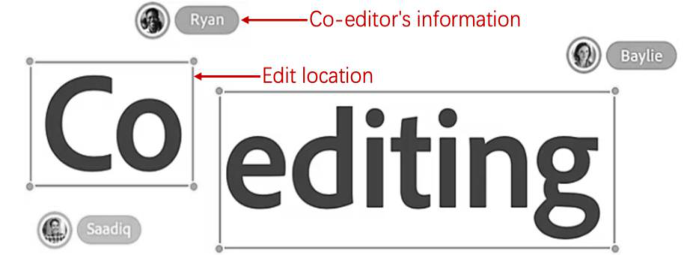
STUDY OF INTERACTION ELEMENTS This paper will focus on human interaction in the collaborative retouching process. The "human sense" refers to the feeling that the operator is working naturally with others through the computer. Human interaction is a new requirement based on CSCW, which extends the time and space for interaction and enhances the freedom of interaction between groups of users. The interaction process requires the provision of information about the current operating state of the system and related information (Liang Xiurong, 2017). The key to interaction design for co-editing images is to answer two questions for the user: (1) who is editing? i.e. the co-editor's information; (2) where is he editing? i.e. the editing location (see Figure 1).
Intelligent Human Systems Integration (IHSI 2022): Integrating People and Intelligent Systems https://openaccess.cms-conferences.org/#/publications/book/978-1-7923-8988-7
Figure 1. Co-editing status of adobe XD
The dimensions of competitive product selection are divided into three categories: the first category is competing products with identical functions, i.e. collaborative design platforms on the pc side (with collaborative editing functions). For example, PS, figma, adobe XD, MasterGo; the second category is the competitor with similar core functions, i.e. mobile retouching software. The third category is the competing products with the same essence of functions, i.e. mobile collaborative office software. In this article, we will take apart the collaborative products and the mobile retouching products respectively.
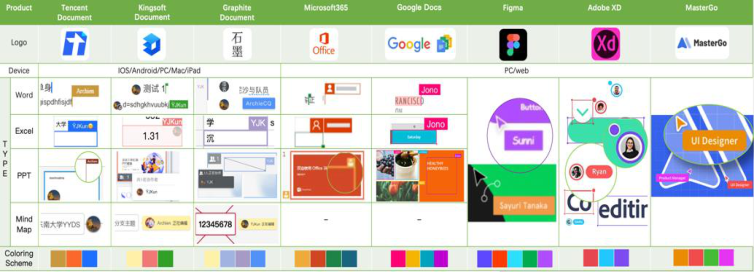
Analysis of Synergistic Products From the first and third categories of competitive products, 27 products were tested in the co-editing state of the interactive interface, from which the most representative five collaborative office software and three collaborative design platforms were selected to analyse their cases in the co-editing state (see Figure 2).
Figure 2. Co-editing status of Competitor
Colour scheme element is ignored here. Manual clustering was used to classify a large number of test samples based on the similarity of their characteristics, extracting the most representative samples from each category and combining them into a set of typical samples.
Intelligent Human Systems Integration (IHSI 2022): Integrating People and Intelligent Systems https://openaccess.cms-conferences.org/#/publications/book/978-1-7923-8988-7
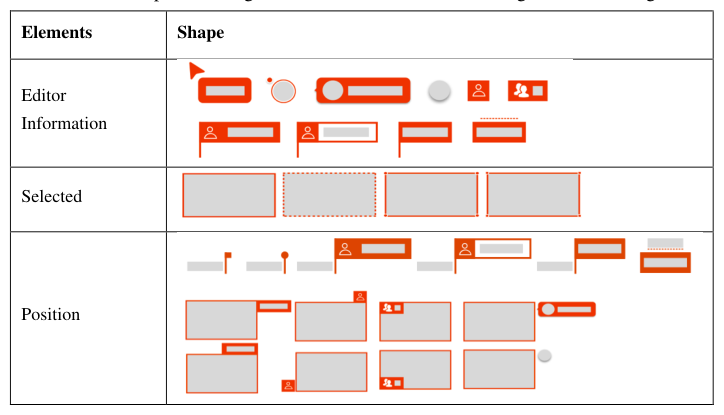
Finally, typical examples of graphical configurations in the co-editing state were extracted (see Table 1), containing the way the editor's information is displayed, the form of the boxed graphics, and the position of the information display.
Table 1: Graphical configuration case of collaborative editing interactive design Elements Shape
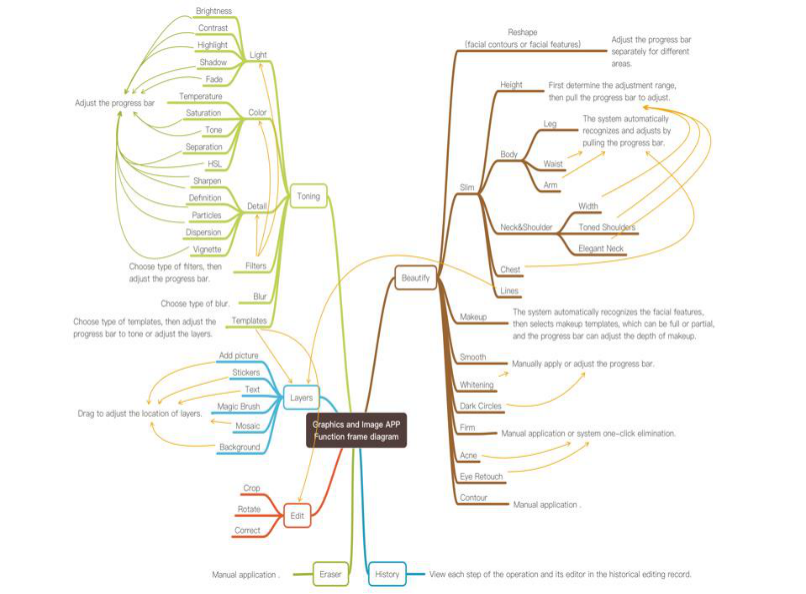
Analysis of Retouching Products on Mobile Nine graphics and images software for mobile were tested from the second category of competing products, and the functional modules were coded one by one and manually clustered to produce a schematic diagram of the product functional framework for graphics and graphics software for mobile (see Figure 3).
Based on the above analysis, the functions of the mobile retouching software can be grouped into four main categories: colour grading, layers, editing and portraits. Interaction design guidelines for collaborative editing: (1) Both colour grading and editing operations are for editing the canvas as a whole. (2) Layer operations and portrait operations are both partial adjustments to the canvas. Therefore, the way of displaying collaborator information in layer operations can be referred to the way of existing collaborative products. (3) In portrait operations, the face or body area can be selected first, and then the collaborator information can be displayed around that area. (4) The history of each operation and the corresponding operator can be viewed. (5) The interface also needs a separate area to view the current information of all participants and to share the collaboration module.
Intelligent Human Systems Integration (IHSI 2022): Integrating People and Intelligent Systems https://openaccess.cms-conferences.org/#/publications/book/978-1-7923-8988-7
Figure 3. Function frame diagram of Graphics and Image APP EXPERIMENTAL PROTOTYPE DESIGN
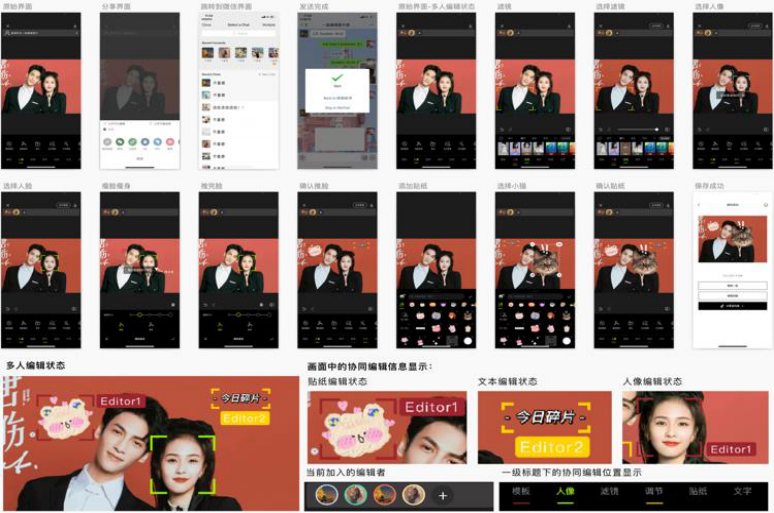
With reference to the interaction elements summarised in the above analysis, the design was reorganised according to the current usage scenario. Finally, a high-fidelity model of the graphics configuration of the mobile graphics and imaging software during co-editing operations was designed. A typical example of the graphic configuration in the co-editing state, including the way the editor's information is displayed, the form of the boxed graphic, and the position of the information display (see Figure 4).
Intelligent Human Systems Integration (IHSI 2022): Integrating People and Intelligent Systems https://openaccess.cms-conferences.org/#/publications/book/978-1-7923-8988-7
Figure 4. Experimental example of key elements of CSCW-based interaction design for graphics and imaging software
EXPERIMENTAL STUDY OF KEY ELEMENTS OF UI DESIGN This experiment will use a combination of usability testing and self-reported metrics questionnaires to explore the usability and user satisfaction of the prototype design. Considering that none of the current mobile retouching software has the ability to operate collaboratively and there is a lack of a control group, a benchmark test is used. The goal of the benchmark usability test is to describe the degree of usability of an application relative to a benchmark goal (Scriven, 1967). A sample size of five people would expose 85% of the discoverable problems (Tullis, 2008), so the experiment was finalised as a small sample experiment with a sample of 12 people. Considering that the target users of retouching software are in the age range of 16 to 35, most of them are female. Therefore, a stratified sampling method was used for the subjects, with eight females, two from each of the age ranges [16,20], [21,25], [26,30], [31,35], and four males, two from each of the age ranges [16,20], [21,25]. None of the subjects had visual or hearing impairments that interfered with normal information access, and all had a habit of using retouching software.
Intelligent Human Systems Integration (IHSI 2022): Integrating People and Intelligent Systems https://openaccess.cms-conferences.org/#/publications/book/978-1-7923-8988-7
EXPERIMENTAL DESIGN The prototype is a high-fidelity set of prototypes based on typical cases of manual clustering and co-editing, combined with the functionality of mobile retouching software. With the help of the "MockingBot" software, the prototype can be used on a test machine (iphone 11) with a click. Participants will use the prototype to perform simulated tasks as required. The entire process is recorded, including the time taken to complete the task and the number of errors made. At the end of use the QUIS (User Interaction Satisfaction Questionnaire) will be completed based on subjective judgement. The questionnaire measures four interface- specific factors (interaction factors, learning factors, system usability, overall impressions) in a hierarchical and ordered manner, each using a 9-point two-level scale.
EXPERIMENTAL PROCEDURE At the beginning of the test, the subject will first read the test instructions. The test machine used was an iphone 11 and the screen was at 100% brightness. The edited image is a photo of a couple and the original interface for the test is the initial image editing interface. The participant has to complete the following 6 steps: (a) find the share button and share the current edit with the WeChat group for collaborative editing. (b) add a "Carmel" filter to the image; (c) click on the yellow box to view the editor's information; (d) slim the face of the person on the right (i.e. push the face once) and click on confirm to complete the edit; (e) add a "Surprised Cat" sticker to the image and click on Confirm to complete the edit; (f) click on the Save button to complete the edit. A researcher will be present in the laboratory to prompt each step. The subject is in a co-editing state throughout the editing process, and the interface shows the interaction of other editors. After completing the test, the participant is asked to fill in a QUIS questionnaire (User Interaction Satisfaction Questionnaire for the mobile retouching software co-editing).
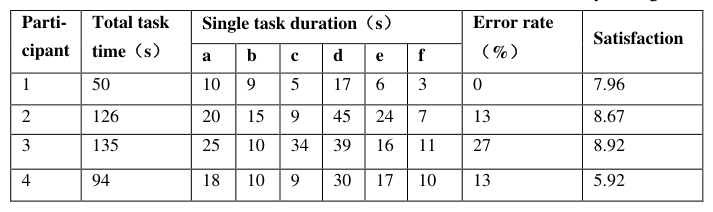
EXPERIMENTAL PROCEDURE A total of 12 subjects, Nos. 1-8 were female, with Nos. 1 and 2 at [16,20], 3 and 4 at [21,25], 5 and 6 at [26,30], and 7 and 8 at [31,35]; Nos. 9-12 were male, with Nos. 9 and 10 at [16,20] and 11 and 12 at [21,25]. The usability test results in terms of total task duration, time spent per operation, error rate, and satisfaction statistics (see Table 2).
Table 2: Statistic of task duration, error rate, and satisfaction of usability testing Parti- Total task Single task duration(s) Error rate cipant time(s) (%) Satisfaction a b c d e f
Intelligent Human Systems Integration (IHSI 2022): Integrating People and Intelligent Systems https://openaccess.cms-conferences.org/#/publications/book/978-1-7923-8988-7
As can be seen from the usability test, the median task duration was 98s, with the longest time spent on the thin face operation. The duration of the operation to view the co-editor's information performs better than expected. The portrait function has the highest error rate, and the screen synoptic information can cause disruptions.
A one-sample t-test of questionnaire satisfaction scores is used to compare the test with a benchmark to determine the usability of the system (Sauro, 2012). When the QUIS satisfaction score is 7, it is actually close to the overall mean QUIS score, which means that it is better than about half of the product usability. As can be seen from Table 4, the satisfaction scores show significance (p<0.05), indicating that the data are reliable. The mean value of satisfaction reached 7.83. proving that the usability of the system is better than the average usability of the product.
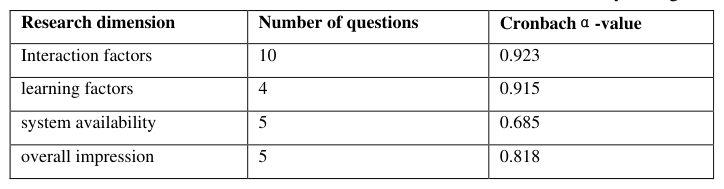
Reliability analysis is used to measure the reliability of the sample responses to this QUIS questionnaire (Sauro, 2012). As can be seen from Table 3 below, the questionnaire data involved four latitudes, of which the alpha coefficients of interaction factor, learning factor and overall impression were all greater than 0.8, indicating that the reliability quality level of the data of these three latitudes was very good and the research data were authentic and reliable. The alpha coefficient for system usability is 0.685, which is also within an acceptable range.
Table 2: Statistic of task duration, error rate, and satisfaction of usability testing Research dimension Number of questions Cronbachα-value
CONCLUSIONS
The experiments in this paper use a clustering method to sample the interactive elements of co-editing: the way the editor information is displayed, the form of the boxed graphics, and the position of the information display. A set of high-fidelity models of the graphical
Intelligent Human Systems Integration (IHSI 2022): Integrating People and Intelligent Systems https://openaccess.cms-conferences.org/#/publications/book/978-1-7923-8988-7 configuration of mobile image software during co-editing operations were obtained by making reference to the functions of mobile software to make adaptations to these modules of information. Users' time to task and number of errors were first recorded through usability testing and compared with benchmark values using a one-sample t-test. The QUIS questionnaire was then used to measure four interface-specific factors in a hierarchical and ordered manner: interaction factors, learning factors, system usability, and overall impressions. Results was also done to prove that the data were true and reliable. The experimental results validate that the interaction model is better than the general product usability. The mean value of users' interaction satisfaction reached 7.83.
REFERENCES
Feng Jian, Lin Zongkai. (1999), “Research on the Human-Human Interaction Interfcace of Coeditor as a Cooperative Editing.” Journal of Computer-Aided Design & Computer Graphics, 03, 34-36. Liang Xiurong. (2017), “Analysis of the characteristics of CSCW technology and its
application.” Science & Technology Information, 12, 22-23. Scriven, M. (1967), “ The methodology of evaluation”, In: Tyler, R. W., Gagne, R.M., Scriven, M. (Eds.). Perspectives of Curriculum Evaluation., pp. 39-83. Rand McNally, Chicago. Tullis, T., Albert, W. (2008), “Measuring the user experience: Collecting, analyzing, and
presenting usability metrics.” Morgan Kaufmann, San Francisco. Sauro, J., J.R. Lewis. (2012), “ Quantifying the user experience: practical statistics for user research.” Morgan Kaufmann, San Francisco.
Intelligent Human Systems Integration (IHSI 2022): Integrating People and Intelligent Systems https://openaccess.cms-conferences.org/#/publications/book/978-1-7923-8988-7
LISTED IN THE AHFE DIGITAL BOOKSTORE CATALOGUE
Explore the complete digital volume
Intelligent Human Systems Integration (IHSI 2022): Integrating People and Intelligent Systems
Read this individual research paper free through the original publisher, or explore the full digital proceedings book.
ISBN 978-1-7923-8988-7
Explore this ISBN in the AHFE Bookstore ↗Listed in the July 2026 bookstore catalogue; search by ISBN to confirm current availability · Digital book purchase optional