Waricha Henchobdee, Sakol Teeravarunyou (2022). The Effect of Mobile User Interface Design on Comic Reading Performance. In: Usability and User Experience. AHFE Open Access, vol. 39, pp. 490–496. https://doi.org/10.54941/ahfe1001746
For decades, the comic industry has continuously reached out to more readers with the help of smartphones. Many comic books have increasingly transformed from physical to digital versions. Even though the size of smartphones nowadays is expanding, the scanned comic pages must fit the screen. The current text and image size are more difficult to read and require users to zoom in or frequently scroll. In this study, researchers wanted to find out how to redesign the online comic format on the phone to be more efficient. The variables were the number of columns, turning page interactions, and navigations with the arrow button and thumbnail. The researchers also recognized the importance of the finger reach area. Twenty subjects who already had the online comic on the phone reading experience participated in this experiment. The results show that the two-column layout satisfies the participants’ reading size the most. Another result shows that scrolling the page is faster than swiping across the screen. Moreover, the participants interacted with the arrow navigation faster than the thumbnail. These results will benefit the future designs of mobile user interfaces to enhance the comic reading performance and pleasure levels.
Since there is the existence of a website where illegally uploads translated scans of a comic book called “scanlation,” the number of printed books sold in over the past few years has started to decline. As it takes time for the publi- shers to translate from the original and publish, they cannot compete with the websites that can upload faster (Srimaneekulroj, 2015). Moreover, aside from the scanlation, the comic application is a new development in the comics industry as it is adapted to the smartphone era. It allows comic authors to upload their comics and reach more readers by providing easy assessments every time and everywhere. Therefore, the market size of online comics is slo- wly taking place and giving users the new experience of reading. Based on the Line Webtoon, an online comic platform, there were 16.8 million Thai users in 2019 after having launched for five years, whose view per day grew conti- nuously by 4,448 percent since 2014 (Bangkok Post, 2019). In the same way with another platform, the Kakao Webtoon, made 10 million bath within the first four days after launching in Thailand in June last year (So-Yeon, 2021). About the target group of online comics, the biggest fan is Generation Z, who
The Effect of Mobile User Interface Design on Comic Reading Performance 491
prefers smartphones over a computer while spending time on their phone for 15.4 hours a week (Owens, 2022). Their attention span average is 8 seconds, shorter than millennials by 4 seconds.
The webcomics optimized themselves to the phone’s scrolling behavior, for instance, the invention of the vertical layout (Faisal et al., 2020). Unlike the comic books that they have to flip left and right or the horizontal arran- gement of comics on a computer screen, smartphones allow users to scroll through its long vertical pages as an infinite canvas experience. Furthermore, this vertical scrolling also reconstructs the reading direction, panel, and gutter on the online comics. However, not every comic web gets this adaptation; it depends on different platform systems and cultures. The transmission of some comics from the printed version to online also creates unwanted events while reading, especially for the scanlation. Generally, the standard size of a comic book is 6-5/8 inches width by 10-1/4 inches height, while the most common diagonal screen size of the phone is 6.1 inches or almost half of the comic book’s dimension. The smaller area provided by the smartphone makes text and images more difficult to read and requires zoom in action, which inter- rupts the reading (Faisal et al., 2020). At the same time, it is also hard for comic artists to publish their online versions in the paper since they have to redesign the overall layout. Likewise, some of the other existing navigations, such as flash transition by clicking on the thumbnail or arrow button, still need reconsideration on their placement to match the user’s finger reach.
Therefore, this research aims to study how to redesign the online comic interface for phone screens by considering readability on the number of columns and turning page interactions.
METHOD
Since the intention of this study is to improve the online comic reading experience, the analysis of study is time on task and satisfaction while reading.
Participants Twenty subjects participated in the experiment. All of them had an experience of cartoon reading on the mobile phone before. Ten are male and the average age is around 24 year old.
Procedure Firstly, the researcher provided the screening session by creating the questi- onnaire to input participants’ age, web comic experience, and eyesight. The participants for this research were Thai people aged between 20 to 29 years old who enjoyed reading an online comic on the phone during their free time. Aside from their age and phone comic reading experience, the researcher recruited only the participants who had 20/20 visual acuity and a phone with a display size of 6.1 inches. Then, the researcher assigned participants to hold a phone and read a comic chapter by chapter using their right hands while recording their phone screens. The researcher thus documented how they read and interacted through those videos. Additionally, it also recorded the
492 Henchobdee and Teeravarunyou
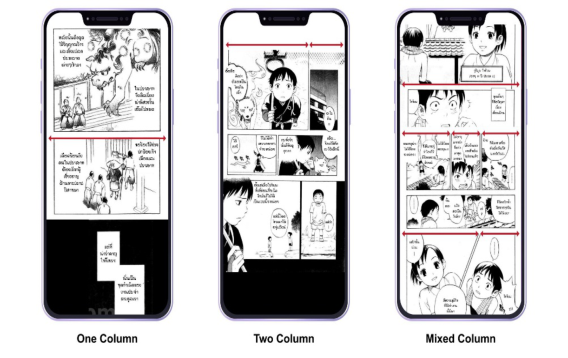
Figure 1: Testing mockup of different column numbers.
error and task time. Each task began with instruction on how the participants could interact within pages before and ended with a SUS rating. About the rating, the researcher used the System Usability Scale – SUS (Lewis, 2018), which tests the usability, to ask their opinion on each task.
There were three experiments in this study. The first experiment was on three types of columns. The content of the three types of columns was different, but it had the same amount of word count with 359 words appro- ximately. This experimental design helped avoid the skipping of content reading, which will occur when readers are reading the repeated content. This data was recorded and analyzed via SPSS. The analysis of the studies involved the use of analysis of variance (ANOVA) models. The second expe- riment was on the turning page interaction, comparing the separating page and scrolling. The analysis of the study was the paired sample t-test. Lastly, the third experiment was the arrow button and thumbnail. The interpretation was also the paired-sample t-test.
Apparatus The researcher chose a printed-based comic to use in the test. The font, gutter size, and word count should be consistent and controlled. The test set consi- sted of 3 sessions: different numbers of comic columns, scrolling/ separated paging, and arrow button/thumbnail.
The existing comic books had three columns as the maximum number (see Figure 1). Therefore, the test sets were started from one, two, and a combination of one to three columns. The researcher used JS Toomtam font, with font sizes of 20, 16, and 14 pixels, respectively. Besides, those layouts were tested with the scrolling and paging interaction.
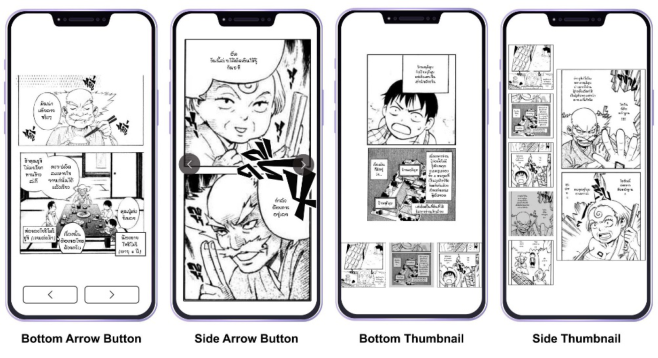
To examine the finger reach area when using the forward/ backward but- tons and the thumbnail, the researcher placed those navigations at the bottom and side of the page (see Figure 2).
The Effect of Mobile User Interface Design on Comic Reading Performance 493
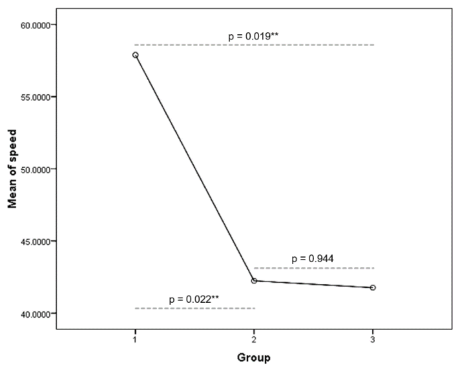
Figure 2: Testing mockup of different placement of navigation button and thumbnail.Figure 3: Task reading time on the scrolling page with one column comic is higher than others. The rest are not significant difference.
RESULTS
Number of Columns on Scrolling Page and Seperated Page There was a significant effect of the number of columns with the scrolling page on comic reading’s speed at the p<.05 level for the three conditi- ons [F(2, 57)=3.801, p= 0.028]. Post hoc comparisons using the LSD test indicated that the mean speed for one column with a scrolling page (M = 57.89, SD = 25.05) was significantly different than the two colu- mns (M = 42.23, SD = 18.13) and mixed columns with a scrolling page (M = 41.76, SD = 19.32). However, the two columns did not significantly differ from the assorted columns (see Figure 3).
494 Henchobdee and Teeravarunyou
Even though reading a one-column layout comic with a scrolling page con- sumes times more than reading a two-column and mixed-column, the SUS score was on the contrary as 78.9, 75.5, and 72 percent, respectively.
For the number of columns on separated page, there was no significant effect of the number of columns with the paging on comic reading’s speed at the p<.05 level for the three conditions [F(2, 57)=1.652, p= 0.201]. The mean speed of the one column, two columns, and varied columns with the paging was 62.54, 48.97, and 47.68 seconds. Meanwhile, the SUS score of these conditions was 54.4, 57.1, and 54 percent, consecutively. Surprisingly, there was no significant difference in the reading speed between the same number of columns in the separated paging and scrolling page.
Arrow Button There was a significant difference in the task time when using the bottom arrow button (M = 43.63, SD = 11.18) and when using the side arrow button (M = 33.49, SD = 12.70) conditions; t(19)=3, p = 0.007.
At the same time, the SUS score of the arrow button was 53.1 percent when placed at the bottom and 59.5 percent when placed at the side of the screen.
Thumbnail There was a significant difference in the time consuming when using the bot- tom thumbnail (M = 73.90, SD = 42.49) and when using the side thumbnail (M = 48.71, SD = 25.55) conditions; t(19) =2.841, p = 0.010.
Likewise, the SUS score of the thumbnail was 42.8 percent when placed at the bottom and 35.9 percent when placed at the screen’s side.
Placement At the bottom of the screen, there was a significant difference in the time consuming when using the arrow button (M = 43.63, SD = 11.81) and when using the thumbnail (M = 73.90, SD = 42.49) conditions; t(19)=−3.224, p = 0.004.
At the side of the screen, there was a significant difference in the time consuming when using the arrow button (M = 33.49, SD = 12.70) and when using the thumbnail (M = 48.71, SD = 25.55) conditions; t(19)=−2.717, p = 0.014.
DISCUSSIONS This study aimed to find how to redesign the online comic format on the phone to be more user-friendly by matching their finger reach and reading experience desire. Since 2013, Neil Cohn tested the relationship between the comics panel and reading path by letting each participant number the panel ordering according to how they read on the different empty-content layout. From his study, those arrangements of the panels have a significant effect on the z-path reading. However, the separation and blockage within the page influence readers to follow the Gestalt groupings instead as it presents the group area in the user’s mind. Despite this, most online comics show one panel at a time where reader cannot see the following panel while reading,
The Effect of Mobile User Interface Design on Comic Reading Performance 495
unlike the paper comics that Cohn investigated before (Johnston, 2017). To improve the online comics reading experience, some researchers use their technique to capture the user’s reading direction and develop their model.
There was research study that investigated on how to use eye-tracking to track the comic reading path on a computer screen and rearrange it on the phone based on that information (Augereau, Matsubara and Kise, 2016). The result shows that users are unhappy with the full page of scanlation on the small screen, yet, reading frame by frame is also boredom. Similar to another study, they use the parameter-optimized panel extraction to break panels and reconstruct them fitting each device (Hung et al., 2019). The dif- ference of their studies is that they apply a transition to each frame to guide readers where to read first. Although many technologies help the research- ers to find a reading path, a variety of comic strips makes the panel itself hard to identify by the system. Therefore, this research chose to examine the comic panel according to the number of columns. The result shows that the two-column layout can satisfy the participants the most among the same interaction, considering their reading speed and SUS score. Since the font size for the two-column is larger than the mixed-column and its image size is slightly changed from the original, it can improve the readability and pre- serve the essence of comic book reading. However, there was a suggestion from the participants that it would be better to increase the font size and the space between the panels. Furthermore, the comic reading experience of each condition is different according to its page interaction.
According to the Software Usability Research Laboratory, the users spent less reading time on the continuous scrolling page than on separate paging when reading an article (Baker, 2003). The participants in the study also com- mented that the content was “too broken up,” and they had to use backward and forwards when pressing the page. However, the scrolling action reduces the user’s ability to understand the content (Sanchez and Wiley, 2009). Sur- prisingly, this research also found that the scrolling page got a better speed and SUS score than separate paging in comic reading. The participants felt that it was smoother when using the scrolling page as they used to it and did not have to wait for image loading. In addition, some participants could focus on reading more with the separate paging, but the unintentional pressing and loss of the zoom position made them prefer the scrolling page instead. More- over, the participants needed some signs to guide their pressing interaction, unlike the scrolling.
In the last task in this research, the researcher asked participants to sea- rch for an assigned page using the arrow button and thumbnail. Notably, the participants could find the page faster using the arrow button as they already knew it. Unlikely, the participants had no clue about the thumbnail, which took some space on the screen and made the comic harder to read. Neverth- eless, both the arrow button and thumbnail were easy to use when placed at the side of the screen. This finding is scarcely different from the thumb zone done before (Hoober, 2013). Based on his research, he chose thumb rather than other fingers to create an approximate reachable area on the phone screen. His diagram shows that the easy and okay zone is at the bottom of
496 Henchobdee and Teeravarunyou
the screen. Consequently, this research lacks the heat map to compare with Hoober’s diagram and confirm the most comfortable specific spot.
CONCLUSION
The two-column scrolling page shows the best result when considering rea- ding speed and SUS score together. It is a better solution to transfer comic books into the phone screen as it does not require much change in the layout and has more space for larger text. Besides, the scrolling page is common to phone applications that do not need any sign to indicate. For searching a particular content within the comic story, using the arrow button is faster and more satisfying than the thumbnail, especially when its placement is at the side of the screen.
REFERENCES
Augereau, O., Matsubara, M. and Kise, K. (2016) ‘Comic Visualization on Smartphones Based on Eye Tracking’, in Proceedings of the 1st International Workshop on CoMics ANalysis, Processing and Understanding. New York, NY, USA: Associa- tion for Computing Machinery (MANPU ‘16). doi: 10.1145/3011549.3011553. Baker, J. R. (2003) ‘The impact of paging vs. scrolling on reading online text
passages’, Usability News, 5(1), pp. 323–327. Bangkok Post (2019) LINE WEBTOON celebrates 5th anniversary. Availa- ble at: https://www.bangkokpost.com/thailand/pr/1810009/line-webtoon-celebra tes-5th-anniversary (Accessed: 24 February 2022). Faisal, D. et al. (2020) ‘Visual Patterns in Webcomic the Beauty of Angel’. Hoober, S. (2013) How Do Users Really Hold Mobile Devices? Availa- ble at: https://www.uxmatters.com/mt/archives/2013/02/how-do-users-really-ho ld-mobile-devices.php (Accessed: 15 February 2022). Hung, S.-H. et al. (2019) ‘Arbitrary Screen-Aware Manga Reading Framework with Parameter-Optimized Panel Extraction’, IEEE MultiMedia, 26(2), pp. 55–65. doi: 10.1109/MMUL.2018.2875859. Johnston, H. (2017) ‘ComiXology and the Future of the Digital Comic Book’, The
iJournal: Graduate Student Journal of the Faculty of Information, 2(2). Lewis, J. R. (2018) ‘The System Usability Scale: Past, Present, and Future’, International Journal of Human–Computer Interaction. Taylor & Francis, 34(7), pp. 577–590. doi: 10.1080/10447318.2018.1455307. Owens, C. (2022) How Technology Preferences of Millennials and Generation Z
Impact Employee Experiences, Speakap. Sanchez, C. A. and Wiley, J. (2009) ‘To Scroll or Not to Scroll: Scrolling, Working Memory Capacity, and Comprehending Complex Texts’, Human Factors. SAGE Publications Inc, 51(5), pp. 730–738. doi: 10.1177/0018720809352788. So-Yeon, Y. (2021) Kakao Webtoon takes the lead in Thailand’s toons, Korea
JoongAng Daily. Available at: https://koreajoongangdaily.joins.com/2021/09/09/ business/tech/Kakao-Kakao-Webtoon-Naver/20210909155800549.html (Acces- sed: 24 February 2022). Srimaneekulroj, K. (2015) Down with comics, Bangkok Post Group. Available at: https://www.bangkokpost.com/life/social-and-lifestyle/664448/down-with-co mics (Accessed: 24 February 2022).
LISTED IN THE AHFE DIGITAL BOOKSTORE CATALOGUE
Explore the complete digital volume
Usability and User Experience
Read this individual research paper free through the original publisher, or explore the full digital proceedings book.
ISBN 978-1-958651-15-5
Explore this ISBN in the AHFE Bookstore ↗Listed in the July 2026 bookstore catalogue; search by ISBN to confirm current availability · Digital book purchase optional