Marcel Saager, Alexander Steinmetz, Jan-patrick Osterloh, Anja Naumann, Axel Hahn (2024). Ensuring Fast Interaction with HMI´s for Safety Critical Systems - An Extension of the Human-Machine Interface Design Method KONECT. In: Intelligent Human Systems Integration (IHSI 2024): Integrating People and Intelligent Systems. AHFE Open Access, vol. 119, pp. 193–203. https://doi.org/10.54941/ahfe1004483
More and more automation of safety-critical transport systems, either in the railway sector, in the aviation sector or in maritime transport, is becoming part of the further development of many systems. However, humans are certainly not being removed from these systems. Their tasks are changing and the question of a human fallback level arises, to ensure the safe operation of autonomous systems. Concepts of this fallback level can be, monitoring centers for autonomous trains, modern control centers for future drone traffic in aviation or remote shore-control centers for autonomous shipping. Because the human factor plays a major role in these applications, it is important to design safety-systems that are used in such a way that HMI can be used easily and efficiently. In order to achieve this, a methodical approach is necessary, which ensures that the human-machine interfaces are designed appropriately during the design process.Design methods for safety-critical systems provide the developers with plenty of support when it comes to the specification of a system, in terms of requirements management, model-based development, validation and verification. However, designing the HMI of these safety-critical systems, is often still a very creative process. Also, the support for analyzing the specified HMI’s, with respect to Human Factors Issues is limited, and often done in separate teams and processes. It is up to the designers to consider standard human factors recommendations and design guidelines, as well as to follow a human-centered design approach. For this reason, Harre developed the KONECT method. The method can be used to develop HMI that are specifically optimized for fast and correct perception during monitoring tasks. The method has been tested in e-mobility and truck platooning applications, as well as for vessel monitoring in maritime environments.Due to the focus on monitoring, the current method is limited to the display of information elements, i.e. fast and correct perception. However, in order to be used in the development of systems, also the interaction with the system has to be possible. The interaction with a system can have a wide range of techniques, from standard GUI elements to more advanced techniques like gesture or speech recognition. Since this, we limit the scope to simple GUI elements, like Textboxes, Buttons, or Dropdowns. In this paper, we will describe this extension, as well as the first evaluation of the extended method. This leads to the following research question:RQ: What interaction elements are there for HMIs and what insights are necessary for them to ensure rapid interaction?Chapter 2 deals with the current design methods being considered for safety-critical systems, including a comprehensive presentation of the KONECT method. Chapter 3 then presents the new insights for interaction insights and elements. These are then integrated into the Idea Box (meaning of this becomes clear in chapter 2). In Chapter 4 a study was set up to validate the new interaction elements and insights. In this study, the subjects take on the role of a designer for remote control systems in the railway sector.
The automation of safety-critical transportation systems, whether in the rail, aviation, or maritime sectors, is becoming part of the evolution of many sys- tems. However, humans are certainly not being removed from these systems. Their tasks are changing, and the question arises of a human fallback level to ensure the safe operation of autonomous systems. Concepts of this fall- back level can be, for example, monitoring centers for autonomous trains, advanced control centers for future drone traffic in aviation, or remote shore control centers for autonomous shipping. Since the human factor plays a major role in these applications, it is important to design the safety systems that will be used in such a way that the human-machine interfaces (HMI)
can be used easily and efficiently. To achieve this, a methodical approach is required to ensure that the HMIs are designed appropriately during the design process.
Design methodologies for safety-critical systems provide developers with a wealth of support for specifying a system in terms of requirements manage- ment, model-based development, validation, and verification. However, the design of the HMI for these safety-critical systems is often still a very creative process. Also, support for human factors analysis of the specified HMIs is limited and often done in separate teams and processes. In general, it is up to the designers to consider standard human factors recommendations and design guidelines and to follow a human-centered design approach. For this reason, Harre developed the KONECT method (Harre, 2019). The method can be used to develop HMIs that are specifically optimized for fast and cor- rect perception during monitoring tasks. The method has been tested in the automotive domain for e-mobility and truck platooning applications (Worte- len et al. 2019) (Ostendorp et al. 2016) (Friedrichs et al. 2016), as well as for ship monitoring in maritime environments (Wortelen et al. 2019). Due to the focus on monitoring, the current method is limited to the display of informa- tion elements, i.e. fast and correct perception. However, in order to be used in system development, it must also be possible to interact with the system. Since a wide range of interaction techniques is not easy to handle, we limit the scope to simple GUI elements, such as text boxes, buttons, or drop-down lists. In this paper we describe this extension and a first evaluation of the extended method. This leads to the research question: What interaction ele- ments are there for HMIs and what insights are necessary for them to ensure rapid interaction?
The following sections we cover the current design methods being consid- ered for safety-critical systems, including a comprehensive presentation of the KONECT method and its extension. Finally, a study is set up to validate the new interaction elements and insights. The paper ends with a conclusion and an outlook.
State of the Art When designing safety-critical systems and their HMIs, decisions should always be clear, well-founded, and traceable. Therefore, a model of the safety- critical system should be used as an input to the design methods, providing a reliable source for decisions in the design process.
Tools for Designing and Prototyping Human-Machine Interfaces There are a lot of tools for designing and prototyping user interfaces, like Sketch, Adobe XD, Balsamiq or Proto.io to name a few. However, these tools are purely for sketching GUIs. The tools neither provide a methodology for guiding the design process in terms of a user-centered approach, nor do they allow evaluation of the created interfaces. In contrast to that, there are tools allowing the analysis of existing prototypes, like PVSio-web (Oladimeji et al. 2014) which uses annotations to existing prototypes, or Spec# (Barnett et al. 2005) or Event-B (Hoang, 2013), using dedicated formal modelling lan- guages to represent the GUI and user interaction. While these allow analysis
Ensuring Fast Interaction With HMI’s for Safety Critical Systems 195
of models, the usability for every-day designers is limited due to the fact that the use of these tools need special training, and are additional effort in their application.
A more sophisticated approach is the model-based design of user inter- faces based on task-models, since these are closer to a user-centered approach. There are tools like MARIAE (Paternò et al. 2011) or UCP (Falb et al. 2013) (Popp et al. 2013) that use descriptive task models like CTT to generate pro- totypes of graphical user interfaces. Drawback of these models are however, that the task models need to be very specific on how the interaction has to be done with the interface, so that the user interface can be generated from default GUI elements. For example, the task “Type Username” results in a text field with the label “Username”. Therefore, these approaches are very limiting with regard to what they can offer. First, they are limited to stan- dard user interface elements, and second the interactions are already defined, which is maybe to limiting for a designer who wants to define the interaction itself.
Designing HMI’s for Fast Perception With the KONECT Method The KONECT method by (Harre, 2019) is directed towards designing effi- cient monitoring Human-Machine Interfaces (HMI), which are optimized for fast and accurate perception. The method proposes a four-step process to derive visual forms for specific information elements, considering the per- ceptual skills of an operator as well as design guidelines. The four steps in the process are as follows:
1. Information Determination: In this step, the information Determina- tion is executed. This is necessary to ensure that the information obtained is needed to complete the task of the human user with the developed HMI. The information elements that are needed for the different tasks of the system’s users are systematically identified. This is done by conducting a task analysis (Annett, 2013) or a work domain analysis. KONECT uses DCOS-XML as modelling language (Osterloh et al. 2013), which itself is built upon Concur- rent Task Trees (CTT, (Paternò, 2004)) for the task modelling aspect. The task model is used to collect information on “Which information is needed” and “Which element has to be interacted with”. This information is needed in the next step.
2. Idea Box Specification: In this step, the core concept of the KONECT method is filled, the Idea Box. The Idea Box is the main input element for the method. The Idea Box is a table with dedicated columns that is filled in for each identified information element. The first and second column iden- tify the “Task” and the “Information Element”. This is directly derived from the prior information determination step. The third column identifies the so called “Insight”. The insights describe how this information is processed by the human operator, i.e. what he needs to do with this information. An exam- ple would be, that the human operator needs to check if the value is okay, or that he needs to perceive the quantitative value for later use. Each insight is associated with a set of visual elements that are best suited for fast percep- tion. For example, the insight “check if the value is ok”, is best attributed by color hue, followed by shape (asymmetry) and some more. The user of
the KONECT method has to determine which attribute is the best way to transport the information, which is done in the fourth column.
The fourth column is a dropdown box with the list of visual attributes. It is important to note that the list is sorted in descending order of the efficiency of the visual attribute. Therefore, the first entry of an Efficiency Ranking is always the most suitable representation type for a corresponding informa- tion/insight, however the user is free to choose how he wants to display the information in his HMI.
3. Glyph Sketching: In the third step, the input from the Idea Box is used to sketch the so called “Glyphs”. A glyph is a visual form that represents one or more information elements. Glyphs should be combined based on the information elements first, then on the tasks that fit together. Often an information element is used in different ways, for example the speed of a vehicle is used to check if the speed is okay, and another time the quantitative value is for performing a certain action. Based on this insights, color and length have been chosen as visual attributes. Since it is the same information, it is displayed in one glyph, where the fill status of a bar combined with the actual value can be used to show the speed, and the color of the bar shows if the value is okay (green color used) or not (red color used).
4. Design Composition: In the last step, the glyphs are combined into a coherent HMI, based on the tasks that have been derived in step one. The goal is to ensure that the overall developed HMI is consistent and unwanted side effects (inconsistencies, clutter, etc.) are eliminated (Harre, 2019). To achieve this, the system is systematically checked against a list of global visual appearance guidelines. KONECT provides three guidelines (consistency, sim- plicity in shapes, and simplicity in colors) for the global visual appearance of an HMI. These guidelines ensure that the different glyphs of the HMI do not hinder each other in their appearance.
INVESTIGATION OF INTERACTION ELEMENTS FOR KONECT-METHOD EXTENSION The KONECT method only offers the possibility of creating HMIs that only allow the user to perform perception or monitoring tasks. This is imple- mented in the KONECT method on the basis of information elements. Now, the KONECT method is extended so that not only the design of HMIs for perception, but also interaction is possible. This chapter explains how the specific interaction elements and associated insights were identified and how they were built into the KONECT method and the software tool. In previous studies ways of extending the KONECT method have been presented (Saager et al. 2022). One of these extensions is the interaction extension, which will be presented in this work.
Investigating Findings for Interaction Elements In order to get a general overview of which interaction components are relevant in relation to desktop applications, various frameworks for the development of desktop user interfaces, like MaterialUI, Bootstrap, JavaFX, Swing, Unity, GTK, and QT, are investigated to see which interaction compo- nents are used in these frameworks. The result of this investigation is a set of
Ensuring Fast Interaction With HMI’s for Safety Critical Systems 197
standard components KONECT should support. In order to work with the KONECT method, a set of Insights and an efficiency ranking for each compo- nent is needed. To define the ranking between the elements, we have chosen to use the Keystroke Level Model (KLM) from Kieras (Kieras, 2001) as a basis for the efficiency ranking, by calculating estimations for the speed of interac- tions. Now, the new insights for interaction will be introduced. Table 1 shows an overview of the new insights with their efficiency rankings, in analogy to the efficiency ranking from previous section. The missing/other entry at the end of each Efficiency Ranking is used if the interaction component finally used is not listed in the Efficiency Ranking.
Table 1. Interaction insights an efficiency ranking.
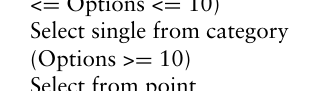
Input time (imprecise) Time-Picker(0), Textfield(1), missing/other(2) Input Time (precise) Textfield (0), Time-Picker (1), missing/other(2) Input complete date Date-Picker(0), Textfield(1), missing/other(2) Input partial Date Textfield (0), Date-Picker (1), missing/other(2) Select single from category (Options < 5) Dropdown(0), Radiobutton(1), Slider (2), missing/other(3) Select single from category (5 <= Options <= 10)
Equation reproduced from the original PDF.
Drag-and-Drop(0), Scrollbar(1), missing/other(2)
Autocomplete(0), Dropdown(1), Slider(2), Radiobutton(3), missing/other(3) Select from point Button/Toggle(0), Textfield(1), missing/other(2) Select from area Drag-and-Drop(0), Textsfield(1), missing/other(2) Change mode Toggle(0), Checkbox/Radiobutton(1), Button(2), missing/other(3) Change modes Button-/Togglegroup(0), Checkbox(1), Button(2), missing/other(3) Change disjunct modes Button-/Togglegroup(0), Radiobutton(1), Button(2), missing/other(3) Change Position Drag-and-Drop(0), missing/other(1) Change zoom (precise) Textfield(0), Slider(1), Dropdown(2), missing/other(3) Change zoom (imprecise) Slider(0), dropdown(1), Textfield(2), missing/other(3) Change view position (one-directional, precise) Scrollbar(0), Drag-and-Drop(1), missing/other(2) Change view position (one-directional, imprecise)
Drag-and-Drop(0), Scrollbar(1), missing/other(2)
Change view position (bi-directional)
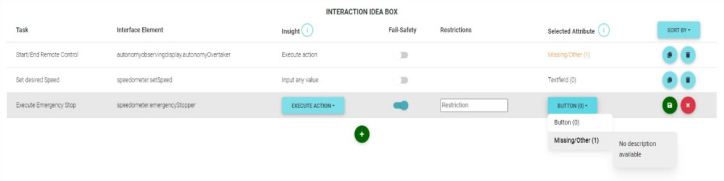
Implications of the Findings for the New Idea Box The Idea Box, as shown in Figure 1, has been extended with the new foundations of the previous chapter.
Figure 1: Interaction Idea Box in the KONECT-tool.
While the original Information Box shows all information elements, the new Interaction Box lists all interaction elements. Like the Information box, the Interaction Box has several columns that must be filled: Information/interaction: Contains the name of the given information/in- teraction and can be renamed.
Insight: The insight to be selected from the list shown in Table 1. The list of insights offered in an Information Box or Interaction Box differ significantly from each other. An insight in an information box always describes how information is to be understood by the viewer, while in an interaction box it describes how an interaction is to be executed.
Selected Attribute: As soon as an Insight is selected, the Selected Attribute is automatically filled with the highest efficiency ranked attribute for this insight, i.e. when the insight “Execute Action” is selected, a “Button” is pro- posed automatically. The user might choose another option afterwards. If a designer does not like the given attribute, he can select another attribute from the list. However, it must be noted that the automatically selected attribute is normally always the best for the given Insight.
Visual Level (Information Box only): describes the cognitive effort required to recognize a selected Insight. The visual level is also predefined for each insight and is automatically inserted by the KONECT tool. During development, care should be taken not to use too many “high-level” insights in order to avoid too high a cognitive load on the user.
Fail-Safety (Interaction Box only): Must be checked should the interaction be one that could result in system critical conditions if executed incorrectly. This is used as a reminder during development that the interaction must be handled with extra care.
Restrictions (optional) (Interaction Box only): In this field, the input options of an interaction can be noted as free text or also in quantity notation (e.g. that the input of a number has a maximum of five digits). This helps in the later design of the HMI to estimate how much space an interaction will eventually occupy.
Evaluation For validating the extension of the KONECT method including the software tool, a study from a designing process of remote-control systems was carried out which is described in this section.
Ensuring Fast Interaction With HMI’s for Safety Critical Systems 199
Use Case Remote Train Operation for Task Model (as Input for KONECT): Train operation is supposed to move from manual control to autonomy in the next few years, so trains would drive their routes without a driver (Singh et al. 2021). It is reasonable to assume that such autonomous trains will still need some kind of control center (Gadmer et al. 2022). As part of the work in these control centers perform remote control in some cases. This may be the case if the autonomy of the train is unable to handle specific situations. Because a formalization of the tasks of a remote operator is necessary for the validation of the KONECT extension, a task model was created from the literature (Brandenburger et al. 2016) (Brandenburger et al. 2020). The decision was made to reduce the task model to the tasks of taking over the remote control and individual operating options for the remote control as shown in Table 2.
Table 2. Description of the tasks.
Table available in the original PDF paper.
Task Description
1. Show Status of Remote Control Here, the user should see whether the autonomous train is driving on its own or whether remote control is currently active. 2. Start/End Remote Control The user should be able to initiate the takeover for remote control, or also end it 3. Monitor Speed The user should always know the speed of the train 4. Set Desired Speed The user should be able to adjust the speed of the train 5. Execute Emergency Stop The user must be able to execute an emergency stop
Study Design and Description The purpose of this study is to determine whether the KONECT extension is usable and how good the first results are. For this the task model that was developed in prior was made available to the participants. The expected result is that the GUIs created with the extension KONECT method are more optimized than GUIs developed without support.
Study design: The participants should ideally have experience in the design of human-machine interfaces. If this is not the case, it was sufficient that the participants had experience with complex interaction possibilities of user software, for example by operating complex systems or playing computer games. The participants were randomly divided into two equal groups. One group had to design a GUI using the KONECT extension, the other group should not use any tools. Both groups of participants were given the task model for this purpose, and the study was done with each participant indi- vidually. Table 2 was given to the participants In addition, the participants that used KONECT were given a training on the KONECT method, the related insights, and the software. To create the design, participants were
not given a time limit. Evaluation Questions: The evaluation should answer two questions:
1. Where the designs with KONECT better than the ones without? 2. Is the web-application usable? In order to answer the first question, all designs are evaluated by a qualified industrial designer. The industrial designer is not told which design was created with and which without KONECT. The industrial designer will rank the designs, which are best suited for the overtaking of the remote control, according to his expertise. In order to answer the second question, the participants who used the KONECT method were also asked to complete a System Usability Scale (SUS) (Brooke, 1986) questionnaire to rate the software.
Study Results and Discussion In the study 16 test persons participated, who are between 24 and 33 years old and a mean age of 26.56. There were four female and twelve male par- ticipants. No participant had domain knowledge or skills in remote control operation. Eight participants (randomly selected) used KONECT, the other eight not.
Before the individual designs were given to the design expert for evaluation, all designs were reviewed and general differences were identified. Overall, it was noticeable that the designs without KONECT used more text and more different colors than the designs created with KONECT.
The design expert evaluated the designs on the basis of good and intuitive interaction and created a ranking list that showed which designs were best suited for performing the tasks from the task model. It was shown that the designs that were created with KONECT were mostly better suited for the performance of the tasks than those without KONECT. This was due to the reduced visual presentation and the increased composition of interaction and perception elements into a glyph.
In the following, a few details on the remarks of the designer are presented, based on the tasks of Table 1.
1. Task Nr. 2: Start/End Remote Control: Design 1 (without KONECT) sets task 1 by performing a button click, which colors a shape that indicates the status of remote control. On the positive hand, a link between information and interaction has been established. However, the interaction path is com- plex, which would probably result in a higher KLM value for the interaction. Design 2 (with KONECT) has implemented a toggle button with state, this is seen as a more comfortable solution. On average, all KONECT designs have a toggle button, which was only occasionally the case with designs without KONECT.
2. Task Nr. 4: Set Desired Speed: Many designs without KONECT have chosen cumbersome ways to set the speed. It was seen that the study partici- pants prefer to set the speed with button clicks (arrow up and down, inspired by a car’s automatic speed control). The designs with KONECT all wanted to set the speed with a slider and also connected this with the speed display. Nevertheless, 3 of the 8 test participants without KONECT also decided to use a slider. The design expert also noted that the sliders implemented are not necessarily the most intuitive operating variant for setting speed. A user
Ensuring Fast Interaction With HMI’s for Safety Critical Systems 201
could just as intuitively understand with arrows (up, down) for setting the speed of the train.
3. Task Nr. 5: Execute Emergency Stop: All participants from all studies implemented the emergency stop in the form of a red button with the words “Stop”.
Since 8 participants used the KONECT method in the software tool, there are 8 completed SUS questionnaires. The mean SUS score is 80.94 (min 62.5, max 92.5), with the individual results of the questionnaires in the upper quar- tiles. In addition, the SUS score can also be evaluated according to Bangor’s Rating Scale (Bangor et al. 2009). The average SUS score of the KONECT application was resulted to 80.94. According to this, the application can be described as good to excellent and is in the 4th quartile ranking.
CONCLUSION AND OUTLOOK This paper presents an overview of how the KONECT design methodology was extended to address not only perceptual (i.e., monitoring) tasks, but also interactions with the system. In addition, a study was conducted to validate the new interaction elements. This resulted in three artifacts:
1. Frameworks were explored and interaction elements were derived and evaluated using the KLM model. These resulting interaction elements were then mapped to insights, so that a statement can now be made about which interaction element is best suited for a particular form of interaction. It should be noted, however, that the KLM assessment is only a starting point. In order to make more informed statements about the suitability of interaction ele- ments for specific insights, further models should be investigated and applied. In addition, the new interaction insight model should be further evaluated.
2. A software prototype was implemented as a web application and eval- uated. The system usability score of the software prototype was good to excellent. Nevertheless, the software prototype will be further developed so that it can also be used for studies in the future. The new Idea Box, which has already been implemented as a prototype, should be evaluated in terms of its handling.
3. A study was carried out as part of the study from the railway sector. This study with test subjects can be seen as a blueprint for other studies. The task model used can be theoretically generalized and applied to other remote- control use cases, for example from the maritime sector or drone control.
Our initial research question “What interaction elements are there for HMIs and what insights are necessary for them to ensure rapid interaction?” has been answered. However, some open points need to be addressed. First of all, further and also more complex interaction opportunities need to be inves- tigated. It should also be possible to enhance the interaction to include haptic interaction. In addition, other models apart from KLM could be consulted to improve the rank of the interaction elements and the resulting insights. The study should also be extended: Other domains, such as aviation (unmanned air taxis/drones) or maritime (maritime autonomous surface ships (MASS)), can also be utilized, requiring new task models. Increasing the number of designers and experts to evaluate the resulting designs would further enhance the study’s validity.
The next stage should be to expand the study and include the use cases mentioned above. In addition, the designs should not only be assessed by experts, but should also be re-implemented and tested in the field with regard to their applicability. In order to decide which of the designs should be re- implemented, however, the opinion of the design experts who are already part of the study is essential.
REFERENCES
Annett, J. (2003). Hierarchical task analysis. Handbook of cognitive task design.
CRC Press Bangor, A., Kortum, P. and Miller, J. (2009). Determining What Individual SUS Scores Mean: Adding an Adjective Rating Scale. Journal of User Experience. Barnett, M., Rustan, K., Leino, M. and Schulte, W. (2005). The Spec# Programming
System: An Overview. In Construction and Analysis of Safe, Secure, and Interop- erable Smart Devices, Gilles Barthe, Lilian Burdy, Marieke Huisman, Jean-Louis Lanet, and Traian Muntean (Eds.). Springer Berlin Heidelberg, Berlin, Heidelberg, 49–69. Brandenburger, N., Hörmann, H.-J., Stelling, D. and Naumann, A. (2016). Tasks, skills, and competencies of future high speed train drivers. Proceedings of the Institution of Mechanical Engineers, Part F: Journal of Rail and Rapid Transit, pp. 1–8. SAGE. DOI: 10.1177/0954409716676509. Brandenburger, N., Thomas-Friedrich, B. and Naumann, A. (2020). Scenarios for
a future control centre workplace in a highly automised railway system. Inter- nal project report Digitalisation and Automation of Railway Systems. German Aerospace Center. Brooke, J. (1986). A ‘Quick and Dirty’ Usability Scale. CRC Press Falb, J., Kaindl, H., Horacek, H., Bogdan, C., Popp, R. and Arnautovic, E. (2006).
A Discourse Model for Interaction Design Based on Theories of Human Com- munication. In CHI ‘06 Extended Abstracts on Human Factors in Computing Systems (Montréal, Québec, Canada) (CHI EA ‘06). Association for Comput- ing Machinery, New York, NY, USA, 754–759. https://doi.org/10.1145/1125451. 1125602 Friedrichs, T., Ostendorp, M.-C., and Lüdtke, A. (2016). Supporting drivers in truck platooning: development and evaluation of two novel human-machine interfaces. In Proceedings of the 8th International Conference on Automotive User Interfaces and Interactive Vehicular Applications, pages 277–284. ACM Gadmer, Q., Pacaux-Lemoine, M.-P. and Richard, P. (2022). Human-Automation -
Railway remote control: how to define shared information and functions? IFAC- PapersOnLine. Harre, M.-C. (2019). Supporting Supervisory Control of Safety-Critical Systems with Rationally Justified Information Visualizations. Dissertation, Universität Olden- burg. Retrieved 16th February 2023 from https://oops.uni-oldenburg.de/id/eprin t/4033 Hoang, T. S. (2013). An Introduction to the Event-B Modelling Method. 211–236. Kieras, D. (2001). Using the Keystroke-Level Model to Estimate Execution Times.
PhD dissertation University of Michigan. Oladimeji, P., Masci, P., Curzon, P. and Thimbleby, H. (2014). PVSio-web: a tool for rapid prototyping device user interfaces in PVS. (01 2014). https://doi.org/10. 14279/tuj.eceasst.69.963.944
Ensuring Fast Interaction With HMI’s for Safety Critical Systems 203
Ostendorp, M.-C., Feuerstack, S., Friedrichs, T. and Lüdtke, A. (2016). Engineering automotive HMIs that are optimized for correct and fast perception. In Proceed- ings of the 8th ACM SIGCHI symposium on engineering interactive computing systems, pages 293–298. ACM. Osterloh, J.-P., Bracker, H., Müller, H., Kelsch, J., Schneider, B. and Lüdtke, A.
(2013). DCoS-XML: A Modelling Language for Dynamic Distributed Coop- erative Systems. In Proceedings of the 11th IEEE International Conference on Industrial Informatics (INDIN). Paternò, F. (2004). ConcurTaskTrees: An engineered notation for task models. The handbook of task analysis for human-computer interaction, 483–503. Paternò, F., Santoro, C. and Spano, L. D. (2011). Engineering the authoring of usable
service front ends. Journal of Systems and Software 84, 10 (2011), 1806–1822. https://doi.org/10.1016/j.jss.2011.05.025. Popp, R., Raneburger, D. and Kaindl, H. (2013). Tool Support for Automated Multi-Device GUI Generation from Discourse-Based Communication Models. In Proceedings of the 5th ACM SIGCHI Symposium on Engineering Interactive Com- puting Systems (London, United Kingdom) (EICS ‘13). Association for Computing Machinery, New York, NY, USA, 145–150. https://doi.org/10.1145/2494603. 2480334. Saager, M., Osterloh, J.-P., Brück, Y. (2022). KONECT: Implementation and
Extension of a Method for the Development of Safety-Critical Human-Machine Interaction Interfaces. International Conference on Applied Human Factors and Ergonomics. Singh, P., Dulebenets, M. A., Pasha, J., Santibanez Gonzales, E. D. R., Lau, Y.-Y. and Kampmann, R. (2021). Deployment of Autonomous Trains in Rail Transporta- tion: Current Trends and Existing Challenges. IEEE Access (Volume: 9). Wortelen, B., Feuerstack, S., Harre, M.-C., Sentürk, S., You, F. and Wang, J. (2019).
Engineering optimized control panel designs for electric driving. In Proceedings of 10TH IEEE International Conference on Cognitive Infocommunications, Naples, Italy, 23–25 October 2019. Wortelen, B., Harre, M.-C., Rousselle, N. and Lüdtke, A. (2019). Towards designing mobile applications for distributed cooperative environments based on enhanced task analysis. In Proceedings of European Conference on Cognitive Ergonomics (ECCE’19), Belfast, Northern Ireland, 10–13 September 2019.
LISTED IN THE AHFE DIGITAL BOOKSTORE CATALOGUE
Explore the complete digital volume
Intelligent Human Systems Integration (IHSI 2024): Integrating People and Intelligent Systems
Read this individual research paper free through the original publisher, or explore the full digital proceedings book.
ISBN 978-1-958651-95-7
Explore this ISBN in the AHFE Bookstore ↗Listed in the July 2026 bookstore catalogue; search by ISBN to confirm current availability · Digital book purchase optional