Anne Sinatra (2024). Usability Heuristic Review of an Intelligent Tutoring System Framework. In: Human Factors and Simulation. AHFE Open Access, vol. 139, pp. 106–113. https://doi.org/10.54941/ahfe1005029
The Generalized Intelligent Framework for Tutoring (GIFT) is an open-source intelligent tutoring system framework software (Goldberg & Sinatra, 2023; Sottilare et al., 2017). GIFT can be used to create tutoring on a topic of the author’s choice, and does not require knowledge of programming to do so. The tutor can be primarily based on slideshows, or it can be more elaborate and include interactive simulations that are incorporated into the software. As GIFT is a research project, the development over the years has mostly been associated with the immediate feature needs to support specific projects. A heuristic review of GIFT’s Authoring tools was conducted and documented in 2016 (Ososky & Sottilare, 2016). However, there are a number of recent features, such as the data extraction tools that were designed for functionality, but have not recently gone through a usability heuristic review. This paper includes an overview of the GIFT data extraction interfaces, and through a usability heuristic review discusses if they align to traditional usability principles such as Nielsen’s 10 usability heuristics (Nielsen, 1994). For those items and interface elements that are inconsistent with general usability principles, suggestions on how to improve them are provided and discussed. The lessons learned and discussed from this paper are applicable for those who are developing similar systems with usability in mind. References:Goldberg, B., & Sinatra, A. M. (2023). Generalized Intelligent Framework for Tutoring (GIFT) SWOT analysis. In Design Recommendations for Intelligent Tutoring Systems: Volume 10-Strengths, Weaknesses, Opportunities and Threats (SWOT) Analysis of Intelligent Tutoring Systems (pp. 9–26). US Army DEVCOM Soldier Center.Nielsen, J. (1994, April). Enhancing the explanatory power of usability heuristics. In Proceedings of the SIGCHI conference on Human Factors in Computing Systems (pp. 152-158).Sottilare, R. A., Brawner, K. W., Sinatra, A. M., & Johnston, J. H. (2017). An updated concept for a Generalized Intelligent Framework for Tutoring (GIFT). GIFTtutoring. org, 1-19.
Intelligent Tutoring Systems (ITSs) provide instruction and feedback that adapt to the learner, and can potentially result in improved learning out- comes. While many ITSs are specifically targeted and built around a specific topic, frameworks exist that include generalizable authoring tools and allow ITSs to be authored in different topic areas. One such framework is the US Army’s Generalized Intelligent Framework for Tutoring (GIFT) (Goldberg & Sinatra, 2023; Sottilare et al., 2017). GIFT includes a set of authoring tools that allows an author to enter their own materials into the system and pro- duce a tutor. GIFT is open-source and has been designed to be flexible, such that it can be used for a number of different uses including as a testbed for research. There is an online Cloud version of GIFT, as well as a downloadable version. GIFT has been used to create a number of different tutors, in many different domains. As GIFT is a research project, features are developed based on current research needs. Due to this, at times features may be developed
Usability Heuristic Review of an Intelligent Tutoring System Framework 107
quickly to address a specific need. While much care went into the original development of GIFT’s authoring tools, there are elements of the authoring tools that were either recently added and have not yet gone through a usabil- ity review process, or that have not yet received interface updates to improve the user interaction with the system.
One area that has been identified as needing improvement with GIFT is that of the data extraction tools (Sinatra, 2023; Sinatra et al., 2023). While GIFT was successfully used for a pilot in a course at an Army Schoolhouse, it was identified that there was still the need to have a researcher familiar with GIFT extract and organize the ITS data that the system output rather than the instructors (Sinatra et al., 2023). User friendly gradebook interfaces would likely reduce the need for an expert in GIFT and allow for instruc- tors to directly interface with the output of the system. However, as GIFT is a generalizable ITS framework there are some challenges in creating a gen- eralizable gradebook that accounts for different learner paths and amounts of remediation regardless of ITS configuration (Sinatra, 2023). Creating a gradebook interface for GIFT is a large undertaking that will require effort and careful consideration. In the near-term, a solution that would assist in improving functionality of GIFT is to examine the current data extraction tools with a usability heuristic review, and determine approaches that could be utilized to facilitate understanding of the system. For the purposes of this paper GIFT serves as an illustrative example, and the process, lessons learned, and outcomes can be applied to additional unique systems.
Benefits of Usability Heuristic Evaluations An initial usability heuristic analysis of GIFT and it’s authoring tools was con- ducted in 2016 (Ososky et al., 2016; Ososky & Sottilare, 2016). Additionally, some of the individual GIFT tools have undergone user feedback evaluations (Goldberg et al., 2021). One tool that has not recently gone through a usabil- ity evaluation is the data extraction tool in GIFT, which is called the Event Reporting Tool (ERT). When GIFT was transitioned from a desktop-based application to also having a Cloud Version available, an abbreviated version of the ERT interface was created, and it has not received any major updates. In 2021, in order to assist in the extraction of data for a study, an additional method of extracting data from shared GIFT courses was created. While the functionality was introduced and can be used, the new process has not gone through a usability analysis, and there are potential challenges introduced based on the current design.
Approaching these tools from the perspective of a usability heuristic review can provide more insight into ways to improve them, and make it easier for individuals to work with them without any external assistance. Nielsen (1994) defined the 10 usability heuristics as follows: 1) “simple and nat- ural dialogue”, 2) “speak the user’s language”, 3) “minimize the user’s’ memory load”, 4) “consistency”, 5) “feedback”, 6) “clearly marked exits”, 7) “shortcuts”, 8) “good error messages”, 9) “prevent errors”, 10) “help and documentation” (Nielsen, 1994, p. 156).
108 Sinatra
These heuristics can be used for the overall design of items that a person will interact with (e.g., an oven, a remote control). However, they are highly applicable to computer-based interfaces that an individual will interact with as well.
Nielsen (2024) further defined the usability heuristics into the follow- ing items, which also tie closely into computer-based system interfaces, as included in the quote below:
“Visibility and System Status”
“Match between system and the real world”
“User control freedom”
“Consistency and standards”
“Error Prevention”
“Recognition rather than recall”
“Flexibility and efficiency of use”
“Aesthetic and minimalist design”
“Help users recognize, diagnose, and recover from errors”
“Help and documentation” (Nielsen, 2024).
Both versions of Nielsen’s principles (Nielsen, 1994; Nielsen, 2024) put an emphasis on the user understanding the system in an easy straightforward way. By implementing a design that is consistent, and understandable by the user it is likely to result in them being able to interact with the system more efficiently, and be more successful in their interactions. The following sec- tion applies Nielsen’s principles (Nielsen, 1994; Nielsen, 2024) to the data extraction tools in GIFT.
USABILITY HEURISTIC EVALUATION When a GIFT course author logs into the Cloud version of GIFT they see a main screen that has course tiles on it. These tiles each represent different courses that have previously been created in GIFT. An example course tile can be seen in Figure 1. From this screen the courses can be run, or edited. Courses can be shared by the author with other GIFT users who can take the course. On the top of this page is a selection option to “Publish Course”. By clicking on the publish course button it opens an interface with a list of all published course data and provides an opportunity to publish a new course. The current section discusses the two different approaches to extracting data in GIFT and the usability considerations associated with them.
Export Data From Course The Cloud version of GIFT is the most commonly used version of GIFT, and has two main ways to extract data. The approach that is used for data extraction varies based on the way that data was collected. GIFT courses can either be shared with learners who have a GIFT account, or they can be “published” which creates a URL that can be provided to learners who do not need to login. If the data it is collected from a published course, then the published course interface will be used throughout the data extraction process. If data is collected through sharing a GIFT course with another user,
Usability Heuristic Review of an Intelligent Tutoring System Framework 109
then the person who created the course will start the data extraction process by using an icon on their main course tiles page (see Figure 1 for an example course tile with the icons visible). The latter of these two options was added quickly to accommodate a research study.
In order to extract data from a GIFT course that has been shared, the user hovers their mouse over the course tile for the shared course, and clicks on the icon that looks like a grid. Additionally, when they hover over this it says “Create Report”, which explains the purpose of the icon to the user in written words (see Figure 1). The use of simple icons and supporting it with written descriptions is in line with the principles of “Consistency and Standards” (similar icons are used throughout the GIFT interfaces), “Recognition rather than recall” (there is a written description when hovered over that assists the user in recognizing the function of the icon), “Aesthetics and minimalist design” (simple icons are used), and “Help and Documentation” (hovering over the icon provides help to the user by explaining the function).
Figure 1: Screenshot of a GIFT course tile with “create report” over the grid symbol.
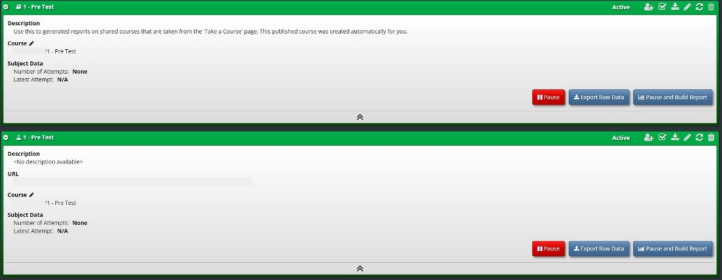
After clicking on the grid icon, the interface that is also used for the publish courses functionality is opened, and there is an entry that the system has created for the data extraction for the specific course. Figure 2 shows an example of two course entries that are expanded. Figure 3 shows the same two course entries collapsed (details are not visible until clicked on).
Figure 2: Screenshot of interface with information expanded.
110 Sinatra
Figure 3: Screenshot of interface with information collapsed.
Figure available in the original PDF paper.
This interface and design can lead to some possible confusion for the user. In Figures 2 and 3 it shows two different lines with the same course name. These are actually different entries. If there is a separate published version of the course it is on a different line than the version that was created by clicking on the grid icon on the course tile (see Figures 2 and 3). There are two ways to tell the version apart: the icon next to the name, and that there is no URL present when it is expanded (see Figure 2). There is a notebook symbol next to the name of a shared course, and there is a scientific flask symbol next to the name on a published course version. However, this information is not explained to the user, and it may not be clear to the user what is duplicate information or unique. This can lead to potential user errors, and confusion about how to download specific data. There also is not a mechanism built into this specific interface to reverse accidental deletion of data. Therefore, it is lacking in “error prevention”, lacking in “help users recognize, diagnose, and recover from errors”, and “consistency and standards”.
While this interface has some concerns, it also has some strong points as well. When the interface is expanded there are written explanations of the GIFT courses they represent, and it also provides a count of how many peo- ple have participated in the course (“visibility and system status”). The same icons that are used throughout the GIFT interfaces also are present (“con- sistency and standards”), and the lines can be expanded or collapsed to help make the interface easier to navigate (“user control freedom”). The main but- tons on the expanded interface are clearly labelled with their functionality (“recognition rather than recall”). When the pause button is pushed it turns the entry red instead of green, which is consistent with the traditional inter- pretation of green as go, and red as stop (“consistency and standards”). There are many elements of the current system which are consistent with usabil- ity principles. However, there would be more benefit from differentiating between entries for courses that are published, and those that are extract- ing data from shared courses. Additionally, providing more opportunities to recover from errors in the system (such as undoing actions/deletions) would help to improve the usability of this interface.
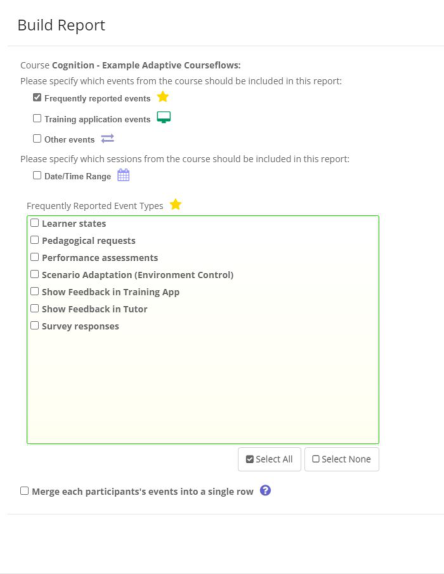
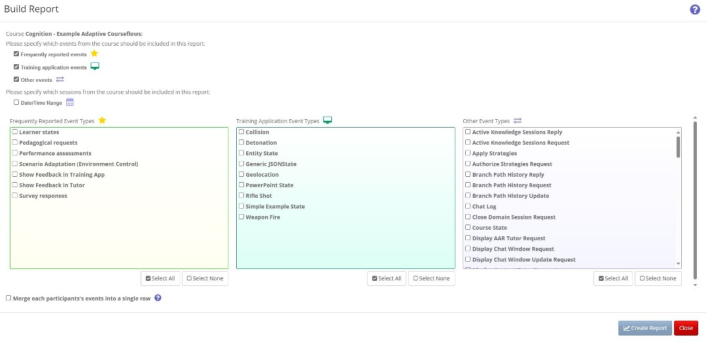
Build Report Tool In the cloud version of GIFT, the initial Build Report interface that the user sees when they click on “Pause and Build Report” in the published course interface (see Figure 2) is shown in Figure 4. An expanded version with all options checked can be seen in Figure 5. As mentioned earlier, this is an abbre- viated version of the downloadable version of GIFT’s ERT. Regardless of the type of course the author is extracting data from (shared course or published course) once they click the “Pause and Build Report”button they will interact with the same Build Report interface.
Usability Heuristic Review of an Intelligent Tutoring System Framework 111
Figure 4: Build report interface in GIFT cloud.Figure 5: Expanded build report interface.
The primary way that the user interacts with the Build Report interface is through checking boxes. When the user puts a check in the box the check remains visible to the user. Additionally, as seen in Figure 5, when the addi- tional event types are selected new interface windows become visible to the user. This is consistent with showing the heuristic of “visibility and system
112 Sinatra
status”to the user. Allowing the user to check boxes which result in the open- ing and closing of expanded windows also is consistent with the heuristic of “user control freedom”. Use of icons can be helpful to the user including next to the Date/Time range function which uses the image of a calendar, which is consistent with addressing “consistency and standards”.
Areas which could use improvement are consistent with the heuristics of “help users recognize, diagnose, and recover from errors”, “help and documentation”, and “match between system and the real world”. The ter- minology that is used throughout the expanded view is not entirely clear to a user that is not a computer programmer or familiar with how the GIFT system is programmed. While there is a help icon next to the “Merge each participant’s events into a single row” text, the other items do not include explanations, therefore this instance is inconsistent with “consistency and standards”, or an earlier version of Nielsen’s usability principles which was “speak the user’s language”. By providing additional explanation about what each of the event types means it could improve the usability of the system, and make it more understandable to the user. Updating the terminology to terms that non-programmers would be more familiar with could also make the interface more user-friendly.
RECOMMENDATIONS BASED ON USABILITY HEURISTIC EVALUATION Based on the usability heuristic review there are some areas that the GIFT data extraction tools excel in, and others that could use improvements to help increase understanding of how to use them. The usability heuristic review identified that there may be some confusion between the data extraction entries for published and shared courses which could lead to potential user errors (“help users recognize, diagnose, and recover from errors”). Addition- ally, there seems to be a mismatch between the terminology used in the Build Report tool, and terminology that the users would likely understand (“con- sistency and standards”; “help and documentation”). There are elements of the data extraction tools that have consistency with the usability principles including that they are consistent with icons (“consistency and standards), often provides explanations by hovering over an icon (“recognition rather than recall”), and allows the user freedom to make different selections (“user control freedom”).
For similar ITS frameworks or computer-based systems it is important to consider how users who are unfamiliar with your system will interact with it, and what can be done to improve it. Using Nielsen’s principles (Nielsen, 1994; Nielsen, 2024) to conduct a usability heuristic review can be benefi- cial to identify both strengths and weaknesses in the current design of the system. Using terminology in your system that is understandable to all users is challenging, but could potentially have a large impact on the usability of the system. Additionally, periodically it may be beneficial to have users who were not part of the development of the system interact with it and see what they find easy to use and what they find difficult to use. GIFT is an example of a system that has been developed with specific functionality in mind, and
Usability Heuristic Review of an Intelligent Tutoring System Framework 113
that went through initial usability reviews. However, as with many other sys- tems, as more features are added to GIFT it could be beneficial to conduct additional usability reviews to help continually improve the user experience and understanding of the system.
ACKNOWLEDGMENT
The research described herein has been sponsored by the U.S Army Com- bat Capabilities Development Command – Soldier Center – Simulation and Training Technology Center. The statements and opinions expressed in this paper do not necessarily reflect the position or the policy of the United States Government, and no official endorsement should be inferred.
REFERENCES
Goldberg, B. S., DeFalco, J. A., Hoffman, M., & Burmester, E. (2021). User feedback on a hybrid team tutoring strategy. In Proceedings of the Challenges and Advances in Team Tutoring Workshop during the Artificial Intelligence in Edu- cation Conference 2021 (pp. 1–9). CEUR-ws.org, online, https://ceur-ws.org/Vol- 3096/. Goldberg, B., & Sinatra, A. M. (2023). Generalized Intelligent Framework for Tutor-
ing (GIFT) SWOT analysis. In Design Recommendations for Intelligent Tutoring Systems: Volume 10-Strengths, Weaknesses, Opportunities and Threats (SWOT) Analysis of Intelligent Tutoring Systems (pp. 9–26). US Army DEVCOM Soldier Center. Ososky, S., Brawner, K., Goldberg, B., & Sottilare, R. (2016, September). GIFT Cloud: Improving usability of adaptive tutor authoring tools within a web-based application. In Proceedings of the Human Factors and Ergonomics Society Annual Meeting (Vol. 60, No. 1, pp. 1389–1393). Sage CA: Los Angeles, CA: SAGE Publications. Ososky, S. J., & Sottilare, R. (2016). A heuristic evaluation of the generalized intel-
ligent framework for tutoring (gift) authoring tools (p. 0050). US Army Research Laboratory. Nielsen, J. (1994, April). Enhancing the explanatory power of usability heuristics. In Proceedings of the SIGCHI conference on Human Factors in Computing Systems (pp. 152–158). Nielsen, J. (2024, January 30). 10 Usability Heuristics for User Interface Design.
Nielsen Norman Group. https://www.nngroup.com/articles/ten-usability-heurist ics/ Sinatra, A. M. (2023, July). Considerations for developing a generalized gradebook for an open-source intelligent tutoring system framework. In International Con- ference on Human-Computer Interaction (pp. 162–173). Cham: Springer Nature Switzerland. Sinatra, A. M., Robinson, R. L., Goldberg, B., & Goodwin, G. (2023, October).
Impact of engaging with intelligent tutoring system lessons prior to class start. In Proceedings of the Human Factors and Ergonomics Society Annual Meet- ing (p. 21695067231192709). Sage CA: Los Angeles, CA: SAGE Publications. Sottilare, R. A., Brawner, K. W., Sinatra, A. M., & Johnston, J. H. (2017). An updated concept for a Generalized Intelligent Framework for Tutoring (GIFT). GIFTtutor- ing.org, 1–19.
LISTED IN THE AHFE DIGITAL BOOKSTORE CATALOGUE
Explore the complete digital volume
Human Factors and Simulation
Read this individual research paper free through the original publisher, or explore the full digital proceedings book.
ISBN 978-1-964867-15-1
Explore this ISBN in the AHFE Bookstore ↗Listed in the July 2026 bookstore catalogue; search by ISBN to confirm current availability · Digital book purchase optional