Harish Kambampati, Damon Berry, Julie Doyle, Orla Moran, Jonathan Turner, Michael Wilson, Suzanne Smith, Dympna O’Sullivan (2025). A Monitoring Automation Recipe Cookbook: Simple Open-Source Solutions for Home-Based Support of People Living with Dementia and Their Caregivers. In: Accessibility, Assistive Technology and Digital Environments. AHFE Open Access, vol. 162, pp. 50–61. https://doi.org/10.54941/ahfe1006012
Activities of Daily Living (ADLs) are vital to maintaining quality of life among People Living with Dementia (PLwD), whose cognitive impairment often impacts independence in daily activities. This paper presents smart home automation "recipes" that can assist ADLs, particularly bathing—safely one of the most complex due to safety risks like falls and burns. The automation recipes incorporate open-interface sensors, motion detection, and real-time alerts, with features targeted at dementia progression stages.Interventions at early stages include voice reminders and water temperature automatic adjustments; middle-stage features include safety reminders, activity-based inactivity detection, and water shut-off; caregiver-aided monitoring forms the interventions at late stages. The ergonomically and cognitively designed intuitive dashboard of the system allows caregivers to easily select and customize automation sequences based on special needs.Central design elements—e.g., large touch-sensitive buttons, high contrast screens, and voice-controlled commands—encourage use by both caregivers and PLwD. By facilitating safer, more independent bathing and reducing the need for constant supervision, the system reduces caregiver burden. Human factors and ergonomics are central to making such solutions practical, accessible, and effective for dementia care in the home.
Dementia is a neurodegenerative condition that progressively affects a patient’s cognitive abilities, such as memory, reasoning, and daily activities. As the disease progresses, patients will often be unable to engage independently in activities of daily living, such as bathing, which poses hygiene problems, risks to safety, and more dependence on caregivers (Alzheimer’s Association, 2023). Maintaining independence is important
A Monitoring Automation Recipe Cookbook: Simple Open-Source Solutions 51
in retaining dignity, wellbeing, and the quality of life of the persons with dementia; nevertheless, such cognitive decline has brought with it certain difficulties, which support technologies for such tasks can assist with, not only the independent lives of persons suffering from dementia but also lighten the burden on their caregivers.
The integration of smart home technologies into supporting People Living with Dementia (PLwD) to perform Activities of Daily Living (ADLs) is promising (Smart Home World, 2023). Sensors, automation systems, and real-time notifications can build an environment that is much safer and supportive for patients’ independence. Special attention should be given to bathing because of the complexity of the task and possible accidents, such as slips, falls, or hot water burns (Journal of Geriatric Technology, 2022), and this ADL is used as an exemplar of our work. This paper proposes customized ADL automation recipes depending on the stage of dementia and proposes a new solution for monitoring of bathing in order to increase safety and comfort for the PLwD (Smith & Taylor, 2021).
METHODOLOGY
A systematic methodology has been developed for designing ADL bathing recipes in order to address the unique needs of PLwD (Brown, H. 2023). This process begins with a needs assessment, such as determining the problems that PLwD experience with bathing, which may include slipping hazards, prolonged exposure to water, or failure to complete the activity (Smith & Taylor, 2021). Based on these findings, sensor selection aims at mitigating these challenges through motion sensors in the detection of presence and inactivity and water leak sensors addressing the safety concerns related to detection of wet surfaces (Patel, 2022). The next step automation configuration, involves the creation of automations that trigger specific actions when sensors detect predefined conditions, such as turning on lights when motion is detected or activating extractor fans when humidity exceeds a certain threshold (Journal of Geriatric Technology, 2022). The third step is automation recipe adaption. With early-stage dementia solutions emphasizing prompts and reminders, while late-stage dementia recipes focus on safety and caregiver intervention (Smart Home World, 2023) (Brown, 2023). Finally, safety and feedback mechanisms are incorporated to ensure timely caregiver responses through real-time alerts and notifications, while manual overrides are included for emergencies to enhance reliability (World Health Organization, 2023).
Creating General ADL Bathing Automation Recipes Dementia affects individuals differently depending on the type and stage of the disease and on the individual. Customizing automation recipes ensures that solutions remain effective and appropriate. Later stage recipes assume that earlier stage recipes have been implemented. Below is a detailed exploration of dementia stage-specific automation recipes for bathing safety (see Table 1).
Early-Stage Dementia Recipe Objective: Foster independence while ensuring safety.
Setup: Install motion sensors in the bathroom and connect them to smart lights and a voice assistant. Use compatible smart humidity sensor to monitor air moisture levels (World Health Organization, 2023).
Automation: When motion is detected, turn on the bathroom lights. The voice assistant provides gentle reminders such as ‘Remember to use the soap’ or ‘Turn off the water when done.’ If humidity exceeds safe levels, an alert is sent to the caregiver (Patel, 2022).
Trigger: Motion detected or high humidity. Actions: Activate lights, provide verbal cues, and notify caregivers as needed.
Early to Middle Stage Dementia Recipe Objective: Prevent safety risks from water leaks or prolonged bathroom stays.
Setup: Combine motion sensors, water leak detectors, and smart notification systems (Smith & Taylor, 2021).
Automation: If water presence is detected on the floor, the voice assistant issues a verbal warning like Floor is wet!’ If the PLwD stays in the bathroom without activity, an alert is sent to the caregiver (Brown, 2023).
Trigger: Water on the floor or prolonged inactivity. Actions: Voice warnings, send alerts, and optionally shut off water valves.
Setup: Motion sensors are paired with occupancy timers and caregiver call buttons (Patel, 2022).
Automation: If no motion is detected in the bathroom after entry, the system notifies the caregiver (Smart Home World, 2023).
Trigger: Inactivity or manual request. Actions: Caregiver notifications and optional intercom support for two- way communication.
Middle to Late-Stage Dementia Recipe Objective: Minimize safety risks related to temperature changes or falls.
Setup: Install thermostats with temperature monitoring and smart water shutoff systems. Include fall detection sensors (World Health Organization, 2023). Automation: If water temperature exceeds a safe threshold, the thermostat shuts off hot water and alerts the caregiver. If a fall is detected, an emergency message is sent immediately (Patel, 2022).
Trigger: Unsafe temperature or fall detection. Actions: Turn off water, send emergency alerts, and provide caregiver access to bathroom cameras (privacy compliant).
A Monitoring Automation Recipe Cookbook: Simple Open-Source Solutions 53
Late-Stage Dementia Recipe Objective: Provide maximum safety and immediate caregiver response.
Setup: Integrate motion sensors, caregiver call buttons, and smart monitoring systems (Brown, 2023).
Automation: If the patient remains inactive, an immediate alert is triggered. The system also monitors unusual behaviour, such as rapid motion or distress sounds, and activates emergency protocols (Smith & Taylor, 2021).
Trigger: Inactivity or distress signals. Actions: Immediate caregiver alerts, activate intercoms for caregiver- patient communication, and ensure rapid intervention.
Table 1: The following table summarizes general automation recipes for addressing bathing challenges.
Voice Reminders or Emergency Notifications to User and Caregiver
Motion Sensor, Lights
Early Stage Recipe 1
Turn on bathroom lights,
Detects user presence in the bathroom
Motion detected in the bathroom
User: Voice assistant reminders (e.g., ‘Please use soap.
Gentle verbal prompts Automated lighting adjustments for mood enhancement.
Early Stage Recipe 2
Detects water leaks or high humidity
Water Leak Sensor, Humidity Sensor, Motion sensor
Water leak detected or humidity exceeds threshold
Voice assistant warns about water on the floor or gives humidity warning, send alert to caregiver
User: Voice assistant warning (‘Water detected on the floor, please be careful’). Caregiver: Alert sent to caregiver’s phone or app if water or high humidity is detected.
Automated warning alerts to caregiver via phone or app. Automated shutoff of water in case of significant leaks. Option for patient to request assistance via voice.
Middle Stage Recipe 3
Motion Sensor Monitors bathroom presence and duration
Prolonged bathrooms stay or no motion detected after a set time
Send a notification to the caregiver, voice assistant gives reminders to complete bathing steps
User: Voice assistant reminders (‘Please finish your bath,’ ‘You’ve been in here for a while, are you okay?’). Caregiver: Notification if no motion is detected for a set time (e.g., 20 minutes), alerting that the patient may need assistance.
Automatic timer-based reminders for timely bathing. Increased alert sensitivity to inactivity (e.g., after 20 minutes of no movement). Real-time tracking of patient’s bathroom duration via mobile app for caregivers.
Continued
Table 1: Continued Dementia Stage Sensor Type Automation Example
Voice Reminders or Emergency Notifications to User and Caregiver
Detects water on the floor
Middle Stage Recipe 4
Water detected while user is present
Water Leak Sensor, Humidity Sensor, Motion sensor
Voice assistant provides a warning to avoid slips, alert sent to caregiver
User: Voice assistant warning (‘Be careful, there’s water on the floor’). Caregiver: Alert sent to caregiver if water is detected on the floor while the user is in the bathroom.
Floor wetness detection. Alerts for potentially hazardous floor conditions (e.g., water detected near the door). Smart floor mats to prevent slipping, with pressure-sensitive capabilities.
Late Stage Recipe 5
Motion Sensor, Caregiver Call Button
Immediate alert sent to caregiver for assistance
Notifications sent when user fails to respond to verbal cues.
Monitors bathroom entry and prolonged stay
Prolonged stay or inactivity in the bathroom
User: Voice reminder (‘Are you okay? Please press the button if you need help’). Caregiver: Immediate alert sent if prolonged inactivity or no response is detected in the bathroom, prompting urgent action. Late Stage Recipe 6
Detects unsafe temperature or user distress
Rapid temperature changes or unusual bathroom activity
Thermostat (Temperature Monitoring), Water leak sensor, Motion Sensor, Pressure mats
Turn off hot water if temperature exceeds a safe limit, alert caregiver of potential distress
User: Voice reminder Caregiver: Immediate notification to the caregiver if unsafe is detected, along with potential distress signals from the user.
Integration with fall detection sensors to identify potential falls due to sudden temperature changes. Alerts sent to a smart watch or phone if the patient shows signs of distress (e.g., elevated heart rate, rapid movement).
ACTIVITIES OF DAILY LIVING (ADL) – DEVELOPING AUTOMATION RECIPE BOOK Activities of Daily Living (ADL) - Automation Recipe Book, a digital platform aimed at assisting caregivers and individuals in integrating smart home automation into daily living activities. The interface is designed with a clean layout, making navigation user-friendly. It follows the knowledge gained from codesign sessions with PLwD and their carers performed as part of our work (Wilson et al., 2024).
HOME PAGE OF THE AUTOMATION RECIPE BOOK
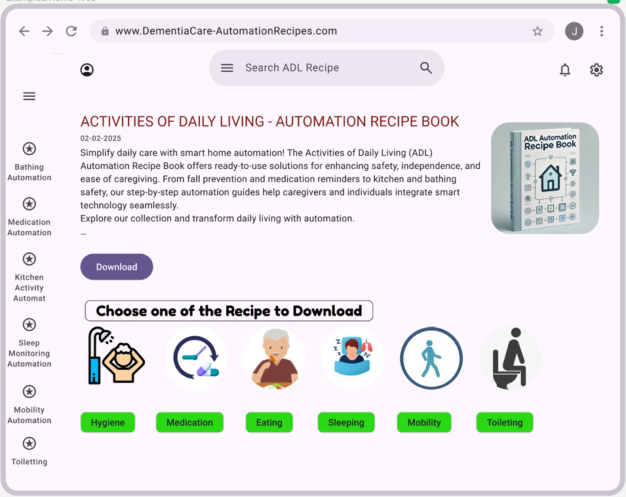
Figure 1 shows the home page of the automation recipe book. At the top of the page, there is a search bar labeled “Search ADL Recipe,” enabling users
A Monitoring Automation Recipe Cookbook: Simple Open-Source Solutions 55
to quickly find specific automation recipes, searching by dementia stage by task or by rooms. Below the search bar, the digital interface features a title and introductory text that explains the purpose of the platform. It highlights how the Automation Recipe Book provides ready-to-use smart solutions for improving safety, independence, and caregiving ease. The description mentions key aspects of automation, including fall prevention, medication reminders, and enhanced safety in kitchen and bathroom environments.
Figure 1: Home page of automation recipe book.
A prominent download button is placed below the introduction, encouraging users to access the automation recipes. The main interactive section follows, prompting users to “Choose one of the Recipes to download into the Home Assistant (Home Assistant Automations, 2024).” This section features icons, each representing a different daily living activity that can be automated: Hygiene (depicted by a showerhead and a person washing their hair) Medication (represented by a pill and a glass of water) Eating (illustrated by an elderly person eating a meal) Sleeping (depicted with an individual sleeping and snoring) Mobility (shown with a walking figure) Toileting (represented by a toilet icon). On the left side of the screen, a vertical navigation menu lists categories of automation, including Bathing Automation, Medication Automation, Kitchen Activity Automation, Sleep Monitoring Automation, Mobility Automation, and Toileting. This sidebar provides users with quick access
to different automation guides, ensuring a structured and seamless browsing experience and it is present on all screens for fast access to recipes.
Additionally, the right side of the page features a 3D book mockup of the “ADL Automation Recipe Book,” reinforcing the website’s branding and encouraging users to explore its content.
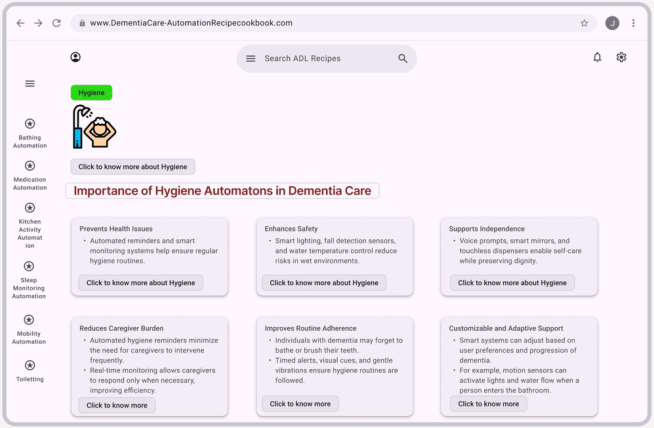
If the user selects, for example, the Hygiene icon, they are taken to a dedicated ‘Hygiene’ page (see Figure 2), which provides additional information on the importance of hygiene in dementia care. The screen also explains how automated reminders, smart sensors, voice prompts, and adaptive technologies help individuals with dementia maintain hygiene routines while ensuring their dignity and well-being.
Figure 2: Home page of automation recipe book.
AUTOMATION SETUP GUIDE
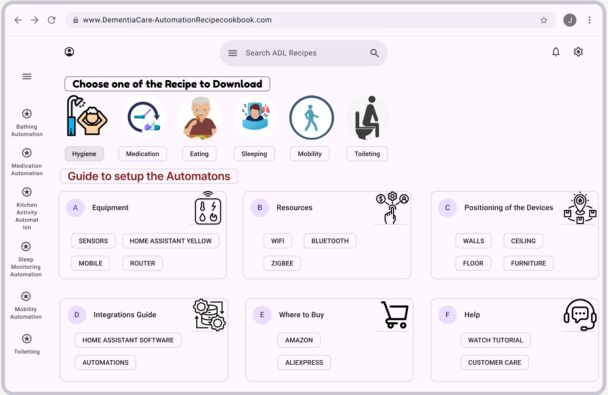
Figure 3 illustrates a step-by-step guide for setting up automation systems, ensuring the seamless integration of smart technology for caregiving purposes. This section is designed to provide users with all the necessary information to install and configure automation solutions effectively.
At the top of the page, the same interactive section from main screen (see Figure 2) appears, allowing users to choose a recipe to download. Below this, a new section titled “Guide to Setup the Automatons” is prominently displayed in bold red text, helping users navigate the setup process.
The guide is structured into six key components, each represented by a labeled section with icons: Equipment: This section lists the essential hardware components required for automation, including:
A Monitoring Automation Recipe Cookbook: Simple Open-Source Solutions 57
Sensors (for detecting motion, temperature changes, water leaks, etc.)
Home Assistant Yellow (Home Assistant Yellow. 2025), a hub for managing smart automation
Mobile Devices, such as smartphones, (used for controlling and monitoring automations)
Routers (for enabling WiFi and connectivity between devices).
Resources: This section details the wireless communication protocols used in automation, such as:
WiFi (standard internet connectivity)
Bluetooth (for short-range device communication)
Zigbee (a low-power, high-efficiency wireless standard for smart home automation).
Figure 3: Automations setup guide.
Positioning of the Devices: To ensure maximum efficiency, this section guides users on where to place smart automation devices:
Walls (for motion sensors and smart switches)
Ceiling (for cameras and overhead motion detectors)
Floor (for water leak sensors and pressure sensors on the mats)
Furniture (for pressure sensors to detect occupation).
Integrations Guide: This section focuses on software integration, guiding users on how to link hardware components with home automation software. It provides details on:
Home Assistant Software (an open-source platform for managing automations)
Automations (pre-configured workflows for different activities).
Where to Buy: This section directs users to trusted marketplaces where they can purchase the required equipment, listing:
Amazon
AliExpress.
Help Section: This provides user support options, including:
Watch Tutorial (video guides on setting up automations)
Customer Care (contact options for troubleshooting and assistance).
The structured format of this guide ensures that users can follow a logical and easy-to-understand process to implement automation solutions effectively.
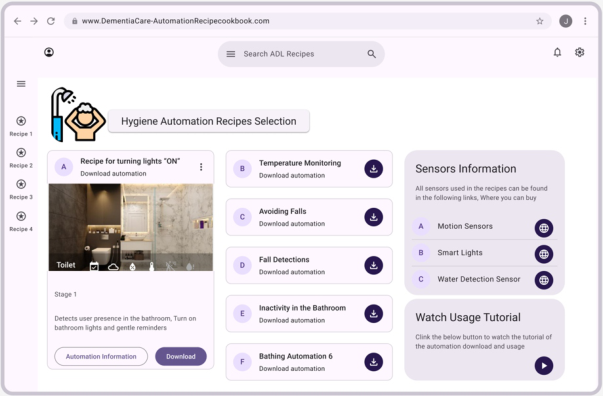
HYGIENE AUTOMATION RECIPES SELECTION Once the user finishes the guide to setup page, later the screen gives recipe selections download options (see Figure 4) which focuses specifically on hygiene Automation Recipes, a category within the automation guide designed to enhance safety, accessibility, and comfort in the bathroom.
At the top of the page, the Hygiene automation icon (a showerhead with a person washing) is prominently displayed, followed by the title “Hygiene Automation Recipes Selection.” This section provides multiple automation options tailored for bathroom environments.
Figure 4: Hygiene automations recipes selection.
The primary section is divided into two main columns: Recipe Selection (Left Panel): This section displays various automation recipes available for download. One highlighted example is the “Recipe for Turning Lights ON”, which detects user presence in the bathroom and automatically activates bathroom lights and gentle reminders to assist the
A Monitoring Automation Recipe Cookbook: Simple Open-Source Solutions 59
user. A corresponding image of a modern bathroom is shown alongside the description. The stage-based breakdown indicates how the automation works step by step.
Additional Bathing Automation Options (Right Panel): This section lists more downloadable automation options, including:
Temperature Monitoring (ensuring water is at a safe temperature)
Avoiding Falls (using motion sensors and smart alerts)
Fall Detections (triggering emergency responses when falls occur)
Inactivity in the Bathroom (detecting when a person has been motionless for a prolonged period).
To further assist users, a Sensors Information section is included on the right, providing details on the types of sensors used for bathing automation, such as:
Motion Sensors
Smart Lights
Water Detection Sensors.
A ‘Watch Usage Tutorial’ section is also available, linking users to instructional videos on how to download and use these automation recipes.
SELECTED AUTOMATION RECIPE SCREEN The digital interface displays an active automation recipe titled “Bathing Recipe”, which is toggled on, indicating it is enabled. A key feature shown is a recipe for turning lights “ON”, which automatically detects user presence in the bathroom and activates the lights while providing gentle voice reminders through a virtual assistant. The Event & Actions panel further details the automation’s components, including an active motion sensor, lights control, and a water safety status. Additionally, a Voice Reminders section indicates that notifications via Google Assistant can be sent to PLwD and caregivers, or family members receives via notification is enabled in this instance. The left sidebar lists multiple automation recipes, suggesting that the platform supports various routines beyond bathing assistance. Overall, the system aims to enhance independence, safety, and caregiver support by automating essential aspects of daily living, making it particularly beneficial for individuals with dementia.
These screens collectively illustrate a well-structured digital platform for Automation recipes in caregiving. Figure 1 (homepage) introduces users to the concept of automation recipes for daily activities. Figure 2 (setup guide) provides a detailed roadmap for implementing these automation systems. Figure 3 (bathing automation) highlights a particular use case, demonstrating how automation recipes can enhance safety and accessibility in bathrooms. Finally, Figure 4 illustrates chosen automation recipe for specific use case.
By providing clear instructions, categorized options, and step-by-step guides, the ADL Automation Recipe Book serves as a comprehensive resource for integrating assistive technology into caregiving practices, ensuring greater independence and safety for individuals requiring support.
DISCUSSION AND CONCLUSION This proof-of-concept study investigates the feasibility of home monitoring of Activities of Daily Living through use of an automation cookbook, using the example of bathing routines. The system will integrate sensors with Home Assistant software to address critical safety concerns while improving the quality of life for PLwD and reduced burden for Care givers.
Consideration of human factors and ergonomics principles to ensure that automation is based on users’ physical and cognitive abilities is crucial in ensuring that accessibility, safety, and efficiency can be realized. With this system, automation recipes can be downloaded directly into Home Assistant, thereby making them more independent. The system minimizes risks while supporting natural user behaviour and allows patients to perform personal hygiene care and other daily activities with more confidence and autonomously. Real-time notifications and intelligent automation reduce the cognitive and physical burden on caregivers, increasing their productivity while reducing stress and fatigue. This will also make caregiving more sustainable. The interaction with the system is intuitive; due to its human- centered design based on the work of (Wilson et al., 2024). It will be accessible to a wide range of technological competencies in PLwD and caregivers.
However, it is a proof of concept, and several things are to be considered for further implementation. The assessment of the adaptability of automated solutions across different home environments and user needs will be highly relevant. From the ergonomic point of view, accessibility, ease of installation, and user-friendly interfaces will be paramount. This also includes raising awareness about privacy issues with sensors and data management to comfort the patient and adhere to data protection policies.
In conclusion, the merging of automation with human factors and ergonomics in ADLs offers a promising approach to improve safety, autonomy, and overall well-being in home care environments. Because this aligns automation with users’ physical and cognitive capabilities, the immediate usability benefits extend to lay the foundation for wider applications in health care. Further research in this aspect will be necessary for the tuning of these systems to better serve the needs of patients and their caregivers, thereby balancing technological innovation with human-centered care.
ACKNOWLEDGMENT
This material is based on works supported by Research Ireland under Grant no 22/NCF/OT/1124119/FFP/6917 and ADAPT Centre’s 13/RC/2106_P2.
REFERENCES
Alzheimer’s Association. (2023). “Dementia Care Strategies.” Brown, H. (2023). “Understanding the Challenges of ADL Management in Dementia Patients.” Caregiver Insights Journal, 10(1), 23–35. Home Assistant: Automations in Home Assistant. Retrieved from https:// www.home-assistant.io/docs/automation/ (2024).
A Monitoring Automation Recipe Cookbook: Simple Open-Source Solutions 61
Home Assistant: Home Assistant Yellow. Retrieved from https://www.home- assistant.io/yellow/ (2025). Journal of Geriatric Technology. (2022). “Integrating IoT Solutions in Dementia Care.” Patel, L. (2022). “IoT Applications in Dementia Care: A Comprehensive Review.”
International Journal of Healthcare Innovations, 5(2), 78–91. Smart Home World. (2023). “The Role of Automation in Elderly Care.” Smith, J., & Taylor, R. (2021). “Advances in Smart Home Technology for Aging Populations.” Aging and Technology Review, 12(4), 45–59. Wilson, M., O’Sullivan, D., Turner, J., & Doyle, J. (2024). “Iterative co-design of
an activity-planning mobile app for people living with early-stage dementia.” In Human aspects of IT for the aged population: 10th International Conference, ITAP 2024, held as part of the 26th HCI International Conference, HCII 2024, Washington, DC, USA, June 29–July 4, 2024, proceedings, part II, 132–148. World Health Organization. (2023). “Global Dementia Report: Technological Innovations in Care.” Geneva, Switzerland.
LISTED IN THE AHFE DIGITAL BOOKSTORE CATALOGUE
Explore the complete digital volume
Accessibility, Assistive Technology and Digital Environments
Read this individual research paper free through the original publisher, or explore the full digital proceedings book.
ISBN 978-1-964867-38-0
Explore this ISBN in the AHFE Bookstore ↗Listed in the July 2026 bookstore catalogue; search by ISBN to confirm current availability · Digital book purchase optional