Ren-Liu Jang, Fukai Sung (2018). Effects of Game-Setting on Wrist Motion and Muscle Fatigue. In: Advances in Physical Ergonomics and Human Factors: Part I. AHFE Open Access, vol. 1. https://doi.org/10.54941/10040
Playing on-line games is one of the popular entertainments in the world. Players often need to respond to the tasks required in the game by moving the mouse as fast as possible and clicking the button on the mouse at the precise place on the screen. The purpose of this study was to investigate the effect of duration of playing time associated with the mode of the difficulty of the game on wrist motion and physical fatigue. Ten college students were participated in the experiment. Four combinations of experiments were tested: 2 durations (60/90 minutes) and 2 modes (difficult/easy) of the game. EMG median frequency was measured to determine the degree of fatigue of the muscles used. The positions of wrist in radial/ulnar plane were recorded using electrogoniometer. A subjective evaluation was used to measure the discomfort in wrist, arm, shoulder and neck after the experiment. The result showed that most of the time the wrist position was below 15 degrees in both radial and ulnar plane. The clicking number of left button of the mouse and the total distance of cursor moved were statistically significant between the game modes. There was statistically significant difference for change in median frequency in the difficult mode in extensor digitorum communis (EDC).
Playing PC games is one of the popular entertainments in the world. Players very often play several hours and have fun through the achievement such as the completion of mission, advance to higher levels, or being the champion in the competition. In the game, the players watched the screen, identified the targets, made the decision, and then executed the action. Most of the time, the players need to learn to quickly identify the targets and simultaneously to respond and take actions. Therefore, how to successfully execute the actions in time becomes critical, and can affect how fun the player will have.
Mouse and keyboard are the common controllers while playing the PC game. Two kinds of games use the mouse as the controller: shooting game and strategy game. For example, in the shooting game, the player identified the enemies, and recognized the threat of them, used the mouse to aim the targets and click the left button on the mouse to eliminate the enemies so that the player can complete the mission and advance to the next level. The critical moment in the game was very often decided by the precision of the movement which was done by controlling the mouse well. Then, quick hand movement becomes critical in winning the game. When the mode of the game is easy, the players have enough time to eliminate the enemies. However, when the game is advanced to the difficult mode, the player will suffer the shortage of response time which forces the player to move the mouse around more frequently. Because players often play the game several hours, such high frequency of movement on the wrist could cause the player’s discomfort on the wrist.
No study concerns the effect of playing PC game in wrist motion using the mouse for hours. However, many studies indicated the development of musculoskeletal discomfort and injury were related to computer use at work. Bergqvist et al. (1995) found that prolonged or repetitive exposure to postures involving deviation from neutral joint positions was associated with development of musculoskeletal discomfort and injury. Some studies found that the prevalence of neck and upper extremity complaints among computer users is high (Karlqvist et al., 1996; Punnett and Bergqvist, 1997). Studies have shown that factors such as repetitive movements, fixed postures, insufficient recovery time, and muscular fatigue increase the risk of developing musculoskeletal symptoms (Tittiranonda et al., 1999; Jensen, 2003; Juul-Kristensen et al., 2004). Cook et al., (2000) confirmed that the frequency of musculoskeletal symptoms especially related to computer mouse work (CMW) is increasing. Studies indicated that wrist extension and ulnar deviation cause increased pressure on the median nerve by narrowing the carpal tunnel (Werner et al., 1997; Weiss et al., 1995). Postures involving wrist extension and ulnar deviation have been associated with discomfort and the development of musculoskeletal disorders (de Krom et al., 1997; Matias et al., 1998). In the same way, when using the mouse to play PC games, will it lead to the development of discomfort or injury in the wrist of the player?
The purpose of this study was to investigate the effect of the game-setting associated with the mode of the difficulty of game on wrist motions, muscle fatigue and the discomfort of upper extremity after playing the game.
METHODS
A shooter game which simulated the gun-fighting between the terrorists and the policemen was used. The game takes place inside a squared warehouse, with barrels and low walls as barriers in order for players to take cover behind. The game is a first person shooter game. Since we chose a smaller map, the gaming mode allows only 2vs2 (easy) or 4vs4 (difficult). The player can choose either the terrorist or the police, though in this mode, there is no evident difference in gameplay, except that the starting points are different. At the start of the game, the player has a certain amount of money to purchase basic equipment from the store. Basic purchases are a main weapon and ammo, a pistol and usually a grenade or a smoke frag. The player will get more or less money at the next round based on the performance of the current round, which will get the player better guns – and a greater advantage over the opponent.
During the game, the left hand is placed on the keyboard and the right hand on the mouse. The left hand is in control of switching weapons (number keys), reloading (R), moving around (with the keys W, A, S and D), crouching (Ctrl), and jumping (Space). Pressing Tab shows information of the current game, like your Kill Death ratio and which enemies haven’t been eliminated yet. The mouse is in control of the aiming of your weapon, and the right click button is in control of firing (guns), throwing (grenades and frags), or slashing (melee).
Four combinations of experiments were tested: 2 durations (60 minutes / 90 minutes) vs. 2 game-settings (difficult / easy mode of the game). Each participant participated all four sessions in random order. The positions of wrist angle in flexion/extension and radial/ulnar planes were measured using a twin-axis Biometrics electrogoniometer, model XM65. Wrist flexion/extension and radial/ulnar deviation data were recorded at 100 Hz through the experiment. A 10-scale subjective evaluation was used to measure the discomfort in wrist, arm, shoulder and neck after the experiment (1 represents none at all in discomfort; 10 represents feel discomfort very much). TeleMyo 2400 EMG system was used to collect surface electromyography on forearm muscles. Electrodes were placed on the extensor digitorum communis (EDC) and flexor carpi ulnaris (FCU). The amplifier gain was set at 1000 for each muscle. EMG and force transducer data were collected at 1000 Hz with the use of Matlab. The difference between the pre- and post-activity median frequencies for each muscle was calculated and further statistical analysis was completed on the differences. The usage of the mouse in the game was measured in terms of the clicking number of left button on the mouse and the distance the mouse moving around.
Ten participants were healthy, right-handed college students (age 23–25 years; height 160–181cm; weight 58–82kg; length of palm 16.6-17.6cm; width of palm 8.6-9.4). They reported no history of musculoskeletal complaints in the upper extremities at the time of the study and were familiar with the game used in the experiment. Participants were also given verbal descriptions of the experimental protocol before the experiment. Participants were seated in front of a computer (Standard desktop PC) at a desk and with full lower arm support.
RESULTS
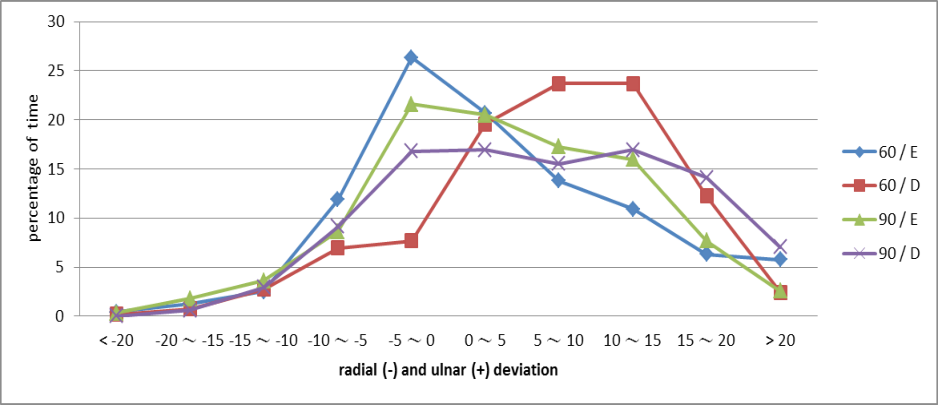
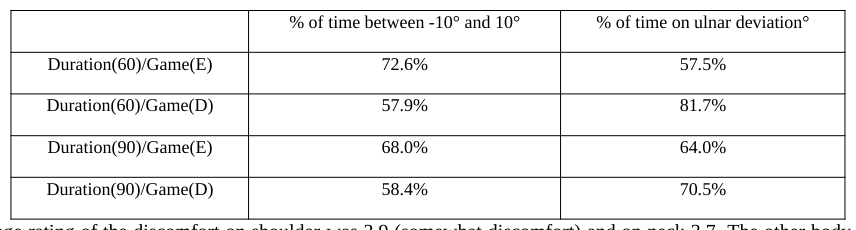
The frequency distributions for radial and ulnar deviation of the wrist was constructed using 5° bins and was expressed as a percentage of duration (see Figure 1). The angle in radial plane was presented with a minus (-) sign in front while the angle in ulnar plane was presented in positive value. Figure 1 showed the range of motion (ROM) of the wrist in four combinations, separately. Table 1 showed the duration for radial(-) and ulnar(+) deviation of the wrist. In the combination of duration at 90 minutes in difficult mode of game-setting (90/D), about 21% of the time the position of the wrist was over 15° in ulnar deviation and less than 1% over 15° radial deviation.
Figure 1. The frequency distributions for radial and ulnar deviation of the wrist
The Chi-Square test was performed to examine the difference of the percentage of time distributed on the radial/ulnar deviation between the four combinations. The results showed there was significantly difference between each other (p<0.05), except between the combination of 60/E and 90/E. In the combination of 60/D the wrist had more time distributed on ulnar deviation (see Table 1). In the difficult mode of game, the player performed more dragging movement of the mouse to keep the crosshair of the gun on the enemy due to the accompanying dodging of enemy attacks done by the keyboard. As results, the wrist spent more time on ulnar deviation.
The participants were seated with full lower arm support in the experiment. Above 80% of time the flexion deviation of wrist ranged between 20° and 40°, which mainly were caused by dragging the mouse.
Table 1. The duration for radial(-) and ulnar(+) deviation of the wrist % of time between -10° and 10° % of time on ulnar deviation°
average rating of the discomfort on shoulder was 3.9 (somewhat discomfort) and on neck 3.7. The other body parts such as wrist and forearm were 3.4. There was no statistically difference on the rating between the four combinations. However, 90 minutes duration in both modes had higher rating on wrist, arm, shoulder and neck than 60 minutes duration.
https://openaccess.cms-conferences.org/#/publications/book/978-1-4951-2104-3 Physical Ergonomics I (2018)
An analysis of variance was performed on the clicking number of left button on the mouse and the moving distance of the moues for the four combinations. The results showed the main effects were significantly difference without interaction. The duration of 90 minutes had more clicking number on the mouse and longer moving distance than that at the duration of 60 minutes simply due to the longer playing time. The game setting at the difficult mode had more clicking number of left button on the mouse than that at the easy mode. More clicking of the left button in difficult mode could be due to the more advanced dodging of enemies and the stronger armor they have on. Also, the player had to dodge the enemy’s attacks too and these movements can easily lead to missed shots of the player. Therefore the player needed to take more shots (by clicking the left button of the mouse) to eliminate the enemy.
The game setting at the difficult mode had less moving distance than that at the easy mode. At the start of each game, the mouse controlled movement was lesser. There was an approximate time of 5 to 10 seconds before the player spotted an enemy. This was where we compared the control and movement of the mouse and where we saw that the control of the mouse in the easy mode was less prominent than in the difficult mode. This could be explained in two ways: one was that in the easy mode which was with the lesser opponents to face and the lesser tension in game, the player had more time to react than in the difficult mode; the other was that the enemies were more passive in the easy mode, while in the difficult mode, they become more aggressive. As results, the player spent more time to search, find and eliminate the opponent in easy mode, while in hard mode the enemies showed themselves. This was why the game ended more quickly in the difficult mode, therefore resulting in less movement of the mouse.
There was statistically significant difference for change in median frequency between before exposure and immediately following exposure in the difficult mode in EDC. This indicated more clicking number on the mouse resulted in the fatigue in EDC muscle.
CONCLUSIONS
The game-setting and the duration did affect the ROM of the wrist. The results indicated that the game-setting will affect the player to perform differently on the control of mouse involving more dragging movement of the mouse. Thus the wrist had more time on ulnar deviation. Playing games longer than 1 hour the body part showed moderate (3 out of 10 discomfort scale) on wrist, arm, shoulder and neck. There is a need to consider the potential hazard while using the mouse to play the game.
The game setting changed the player’s attack strategy which resulted in the difference of the control of mouse. In the easy mode of the game, because the enemies were more passive, the player uses the mouse to search and find the opponent intensively which cause longer moving distance. In the difficult mode of the game, due to the interaction with the enemies, the player needs to click more the left button on the mouse which resulted in the EDC muscle fatigue.
The effect incurred in this study, basically, is a function of the nature of the human motor activities in using the mouse. The player performed more dragging movement of the mouse with the accompanying control on the keyboard in the game. However, due to individual differences, some participants were placed at high risk of injury by prolonged exposure to one of the combinations in this study, while others were not.
REFERENCES
Bergqvist, U., Wolgast, E., Nilsson, B., Voss, M. (1995). “Musculoskeletal disorders among visual display terminal workers: individual, ergonomic and work organisation factors”, Ergonomics 38:763-76. Cook, C., Burgess-Limerick, R., Chang, S. (2000). “The prevalence of neck and upper extremity musculoskeletal symptoms in
computer mouse users”, Int. J. Ind. Ergon. 26:347–356. de Krom, MCTFM, Kester, ADM, Knipschild, PG, Spaans, F. (1997). “Risk factors for carpal tunnel syndrome”, American Journal of Epidemiology 132:1102-10. Jensen, C. (2003). “Development of neck and hand-wrist symptoms in relation to duration of computer use at work”. Scand. J.
Work Environ. Health 29:197–205. Juul-Kristensen, B., Søgaard, K., Strøyer, J., Jensen, C. (2004). “Computer users’ risk factors for developing shoulder, elbow and back symptoms”. Scand. J. Work Environ. Health 30:390–398. Karlqvist, L.K., Hagberg, M., Koster, M., Wenemark, M., Anell, R. (1996). “Musculoskeletal symptoms among computerassisted design (CAD) operators and evaluation of a self-assessment questionnaire”. Int. J. Occup. Environ. Health 2:185– 194. Matias, A.C., Salvendy, G., Kuczek, T. (1998). “Predictive models of carpal tunnel syndrome causation among VDT operators”.
Ergonomics 41:213-26. Punnett, L., Bergqvist, U. (1997). “Visual display unit work and upper extremity musculoskeletal disorders”. A review of epidemiological findings, National Institute for Working Life, Stockholm. Tittiranonda, P., Burastero, S., Rempel, D. (1999). “Risk factors for musculoskeletal disorders among computer users”. Occup.
Med. 14:17–38. Weiss, N.D., Gordon, L., Bloom, T., So, Y., Rempel, D.M. (1995). “Position of the wrist associated with the lowest carpal-tunnel pressure: implications for splint design”. Journal of Bone and Joint Surgery 77A:1695-99. Werner, R., Armstrong, T.J., Aylard, M.K. (1997). “Intracarpal canal pressure: the role of finger, hand, wrist and forearm
position”. Cinical Biomechanics 12:44-51.
LISTED IN THE AHFE DIGITAL BOOKSTORE CATALOGUE
Explore the complete digital volume
Advances in Physical Ergonomics and Human Factors: Part I
Read this individual research paper free through the original publisher, or explore the full digital proceedings book.
ISBN 978-1-4951-2104-3
Explore this ISBN in the AHFE Bookstore ↗Listed in the July 2026 bookstore catalogue; search by ISBN to confirm current availability · Digital book purchase optional