Ahmed Farooq, Jussi Rantala, Zhenxing Li, Roope Raisamo (2023). Augmenting VR/XR experiences using directional vibrotactile feedback and temperature variation using wearable devices. In: Human Factors and Wearable Technologies. AHFE Open Access, vol. 85, pp. 81–91. https://doi.org/10.54941/ahfe1003629
As virtual and mixed reality hardware systems become more mainstream, users are spending substantial amounts of time in simulated environments. Unlike the transition from desktop to mobile devices, VR/XR utilizes 360 wrap-around space which can be challenging to master even for experienced users. Tasks and tools commonly utilized in 2D environments within mobile and personal computing devices may not always be intuitive for VR space. For that reason, it is important to study and evaluate which common graphical user interface (GUI) techniques can be extended to VR/XR and how the efficiency of common 2D tools need to be improved within a 360-degree space. In this study authors explore six commonly used GUI tools and evaluate them in a VR environment. The research looks at how participants deconstruct 360-degree GUI tasks by identifying the location of the controls, navigating through the VR space to the relevant area and finally adjusting the GUI controls as instructed. The study looks at augmenting the interaction by providing vibrotactile navigation cues along with kinaesthetic and temperature-based feedback to complete the GUI tasks. Comparing to conventional visual only techniques that are currently being used in VR environments, vibrotactile, kinaesthetic and temperature feedback provided faster task completion times and more pleasant user experience. Participants also rated the additional feedback channels as more informative and less distracting within the virtual environment. Overall results show that participants preferred the novel use of haptic feedback for most of the GUI controls assessed within the study. Moreover, results also show that some more complex GUI controls (i.e., dial, menus, and lists) may not be best suited for VR 360-degree interaction, using visual only information channels, especially with non-robust inside-out hand tracking techniques. Additional research is needed to validate these results across different VR/XR hardware and simulated environments, however, current results point towards utilizing multi-modal and multi-technology interaction tools to create more immersive and intuitive 360 virtual spaces across a wide range of VR/XR devices.
In the last five years there has been a large focus toward developing immersive VR, AR and XR environments. The primary emphasis is to create an all- encompassing metaverse (Rakkolainen et al., 2021; Ko and Rogers, 2021; Alcaniz et al., 2022), where users from diverse backgrounds, interests and skill levels can get together and interact with their simulated virtual envi- ronments. However, in this shift from 2D to 3D interaction, the absence of meaningful touch output restricts our ability to explore new virtual fronti- ers (Qin et al., 2019; Yeh et al., 2017). The core limitation or frustration, of not being able to reach out and feel or interpolate an object and sense its texture (contour, shape rigidity etc.), and its temperature within a virtual environment, hinders the intuitiveness of the interaction experience. These complex virtual environments require more comprehensive tactile input and output (Kovacs et al., 2020). For this reason, we need to incorporate multi- modal interaction, especially haptic feedback using multi-technology output. Conventional techniques of using global vibrotactile signals, need to give way to more precisely calibrated actuation, which is specifically delivered to various parts of the body and utilizes additional haptic technologies (i.e., pneumatic, temperature-based feedback).
One of the key benefits of haptic feedback in VR is its ability to enh- ance the sense of presence. Presence, or the feeling of being present in a virtual environment and its surroundings, is essential for creating an enga- ging and realistic VR experience. Research shows (Caeiro-Rodriguez et al., 2021; Nakagaki et al., 2019) haptic feedback can help to increase presence by providing tactile cues that reinforce the user’s sense of being in a virtual environment. For example, when a user reaches out to touch a virtual object, haptic feedback can provide a generic sense of touch and texture (Yeh et al., 2017; Caeiro-Rodriguez et al., 2021), making the object feel more real and tangible. Additionally, vibrotactile feedback has often been used to indicate when a virtual object is within reach (collision detection), when it is being touched (surface texture), or when it is being manipulated in some way (free- form orientation). This can help users to understand the state of the virtual environment, and to navigate and interact with it more effectively (Rakko- lainen et al., 2021; Farooq et al., 2020a), especially if the user is interacting with conventional graphical user interface controls (GUIs).
However, in most existing research vibration feedback is used to rende- ring both texture and provide navigational cues within the 360-environment. As in such dynamic environments, meaningful events and triggers can be generated all around the user, therefore, to ensure users are continuously engaged within the desired focused area subtle navigation cues may be nee- ded which are separate from texture or tactile feedback. Muti-technology haptic interaction can serve as such triggers and can enhance users immer- sive experience without creating overly distractive navigation cues. In this study we research how combining vibrotactile and temperature variation triggers can guide users to specific GUI controls within a 360 VR environ- ment and if such triggers can improve usability and enhance users’ reaction time.
Augmenting VR/XR Experiences 83
DEVELOPING A MULTI-TECHNOLOGY WEARABLE INTERACTION SYSTEM Research shows that additional modalities in VR/XR interaction can not only improve the immersiveness of the experience but also reduce task com- pletion times. Cheng et al. (1997) illustrated simple vibrotactile feedback significantly improve task completion times whereas, Moehring and Fro- ehlich, (2011) showed that addition of vibrotactile actuation signals with reference to grasping and manipulating virtual object can increase system immersion. However, addition of haptic feedback does not always improve system interaction, as concluded by Pawar and Steed, (2009) and it is impor- tant to pair natural feedback cues to interaction and environment specific tasks. Moreover, delays and inconsistent force feedback (Van-Den-Berg et al., 2017) parameters can negatively impact user perception and the use of large heavy tethered wearable devices (Blake et al., 2009) can limit the overall experience.
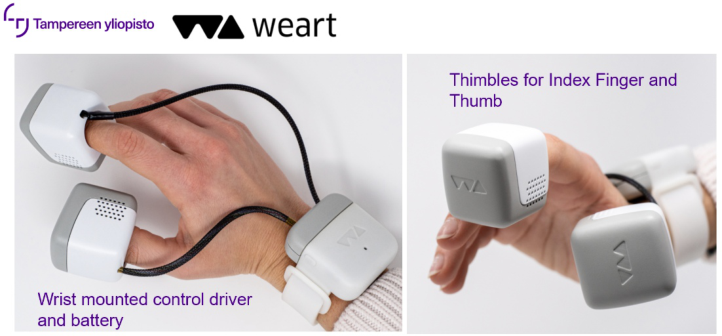
This research explores two basic issues within VR/XR environments, to develop more immersive interaction experiences using wearable haptic feed- back. Firstly, the lack of multi-technology localized vibrotactile feedback when interactive with a virtual object, environment or even other users, limits the immersiveness of the experience. Secondly, as VR environments can have key interaction points within a 360-degree scope, guiding or directing the user to the correct focus / viewpoint can also be a challenge. To solve the lat- ter, we utilized our Dynamic Self-sensing and Actuation Architecture (DSAA) (Farooq et al., 2020b). This architecture consists of an actuator, a battery, dri- ving circuitry, a wireless transceiver, and an onboard 6-axis gyroscope within a wireless PUCK device. Using one PUCK, attached to each shoulder blade of the user, we can create dynamic directional information and orient the user towards the necessary area of focus in the VR space. To solve the first issue, we utilize the WEART Thimble device, which consists of three wearable thim- bles that can be worn on the fingertip (the distal phalanx that includes the perionychium, nail plate, and volar pad). The device includes two pressures plates that can be actuated to provide vibrotactile and kinaesthetic (squee- zing effect) force outputs simulating various hand-based interaction effects. Additionally, the lower plate houses two Peltier elements that can change the temperature of the plate to simulate hot and cold effects to the distal phalanx.
System Design Using the Haptic Mediation concept (Farooq et al., 2020b; Farooq et al., 2021), we developed a Dynamic Self-sensing and Actuation Architecture (DSAA). The architecture consists of an Adaptive actuation approach where vibrotactile feedback is calibrated according to the use case scenarios, envi- ronmental conditions and relayed to the point of contact to provide consisten- tly reliable output. The proposed method in this research uses a novel appro- ach of generating, propagating, and sampling the output signals in a real-time feedback loop, consistently optimizing the intended feedback, using existing actuation technologies. The framework consists of three components: Active
Actuation Engine (AAE), Dynamic Real-time Signal Mediation (DRSM) and User Sampling Feedback Loop (USFL).
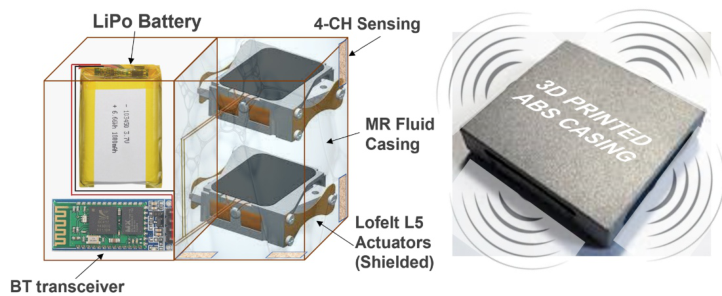
The Active Actuation Engine (AAE) utilizes two Lofelt L5 actuators in a stacked layout. This configuration (Farooq et al., 2022a) helps create reliable actuation in most orientations and ensures that the entire PUCK mediates the generated signals. Using a dynamically controlled magneto-rheological Fluid, (see Fig. 1) as an independent channel that can actively relay or isolate the propagation of actuation signals, as necessary during user interaction (Farooq et al., 2017), we created Dynamic Realtime Signal Mediation (DRSM) Farooq et al., 2022b). Whereas, the Signal Correction Feedback Loop (SCFL) utilized the onboard gyro-sensors, to identify orientation, motion and position of the PUCKs and dynamically adjusted the driving signal for the L5 actuators with reference to user motion and environmental conditions.
Figure 1: WEART Thimble device consisting of three wearable thimbles that can be worn on the fingertip (the distal phalanx that includes the perionychium, nail plate, and volar pad) along with the wrist mounted control trigger and battery bank.Figure 2: The self-sensing device architecture DSAA, and vibrotactile PUCK device consisting of dual L5 Lofelt actuator, control circuitry and battery.
Augmenting VR/XR Experiences 85
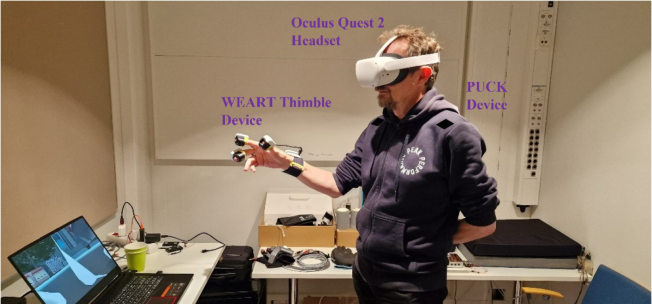
Experimental Design For testing the Thimble device and directional PUCKs we developed a dynamic VR environment where participants completed specific tasks using common Graphical User Interface (GUI) controls. We wanted to understand how participants would interact with common GUI controls (buttons, sli- ders, dials, knobs, lists and menus) in a VR environment and if in fact some GUI controls are better suited for VR/XR interaction over others. Most GUI controls designed to be interacted with in 2D space, where the users have visual confirmation of the various states of the control and a physical sur- face to adjust and manipulate common parameters. To counter this bias, we introduced six GUI controls randomly around the user within a 360-degree interface using an Oculus Quest 2 VR headset in a lab setting.
Once the specific Graphical User Interface tools spawned randomly around the participants, and the participants were required to adjust the controls as instructed. The instructions were provided as an audio cue just before the GUI control was visible to ensure participants did not have to be in a specific view/orientation to read the instructions in the VR space. The instructions were designed to be very simple such as: adjust the value of the control (i.e., set volume slider to 80%, or adjust dial 3 notches in a clockwise direction etc.). Participants were asked to complete the task as quickly as possible by first locating the controls, within the 360-degree VR space and then adjusting them as instructed.
Feedback for Locating the controls was either provided using visual cues (“Left” or “Right” arrow in the participant’s line of sight) or through vibro- tactile feedback on the left or right shoulder through the wireless PUCKs. The visual arrows were setup to be presented as a Head-up display (HUD), so that even if the participants moved around within the VR space, the directional arrows were always visible. Only one arrow was made visible at any given time, which most closely represented the location of the GUI controls within the 360 space.
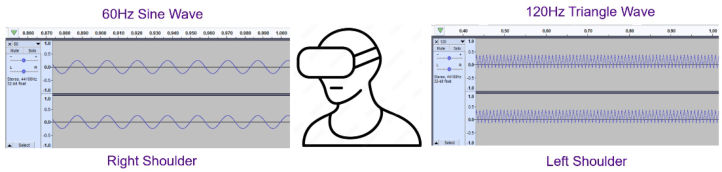
The vibrotactile feedback generated through the wireless PUCKs utilized custom vibrotones for each direction, using complementing waveforms. Simi- lar to the visual cues (HUD arrows), the actuation was provided to one shoulder at a time and was created to the shoulder closest to the location of the GUI object, as seen in the figure below. If the participant was equally divergent from the GUI object (i.e., 180-degress) both PUCK devices were fired.
Figure 3: The left and right channel actuation signals provided through the VT PUCK simulating haptic directional cues within the VR 360 environment.Figure 4: Users navigating through 360 VR environment to locate and interact with 6 common GUI tool using Oculus Quest 2, VT PUCK, and WEART Thimble device.
The granular tactile output (i.e., simulating notches of a slider, expanding a menu or list, and turning a switch on/off) was generated using vibrota- ctile and kinaesthetic feedback while task completion status was simulated using temperature variation. Both kinaesthetic and temperature feedback was provided to the right hand of the user through the WEART thimble device worn on the wrist. The device provided stimulation to the cuticles on the thumb, index, and middle fingers while the users manipulated the VR ver- sions of the GUI controls. For the visual only conditions, the GUI controls simulated conventional visual and auditory output similar to 2D touchscreen feedback on mobile and handheld devices. In both conditions participants kept the WEART Thimble device on, as it ensured user hand tracking was consistent throughout the user testing. After the test participants were asked to complete a questionnaire on their experience and a follow up interview was also conducted to ascertain which GUI controls were best suited for the VR environment.
RESULTS AND DISCUSSION
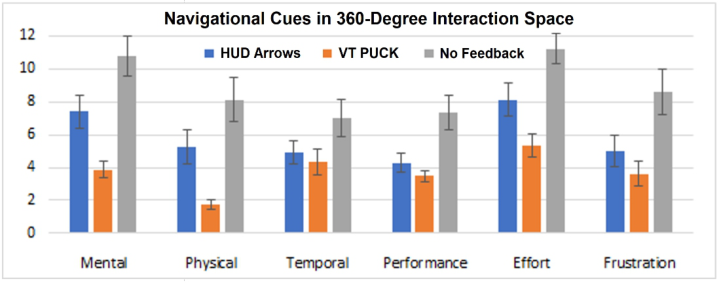
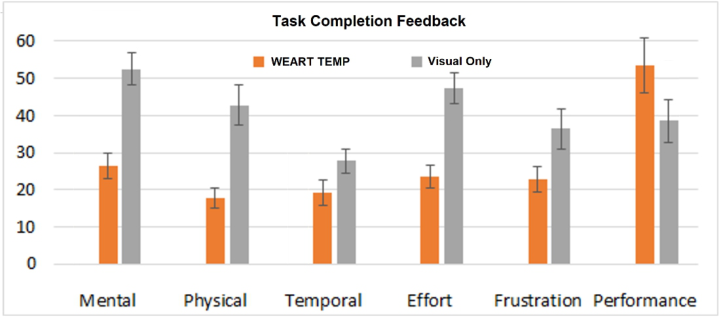
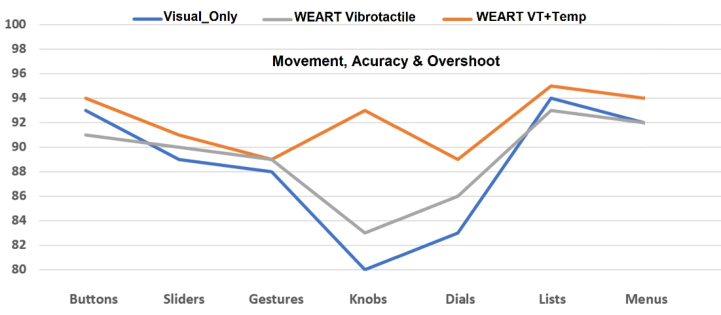
During the interaction we measured task completion times, and errors / overshoots, while after each session participants filled-out the NASA TLX load index questionnaire. additionally, a free form interview was also con- ducted recording any usability constraints experienced by the participants (Fig. 5 – Fig. 8).
If we look at the different navigational cues and how users rated each cue, we see that both HUD arrows and vibrotactile feedback provided on the shoulder blades using the VT PUCK devices were preferred over conventional no feedback condition. Users found no feedback was mentally and physically challenging, more so than normal because they felt the task could be com- pleted faster if they did not have to search for the GUI controls within the 360 VR space. Participants also mentioned that the continuous searching of the GUI controls in the VR space made them frustrated and that the task also caused some VR sickness. Additionally, they rated the No Feedback condition
Augmenting VR/XR Experiences 87
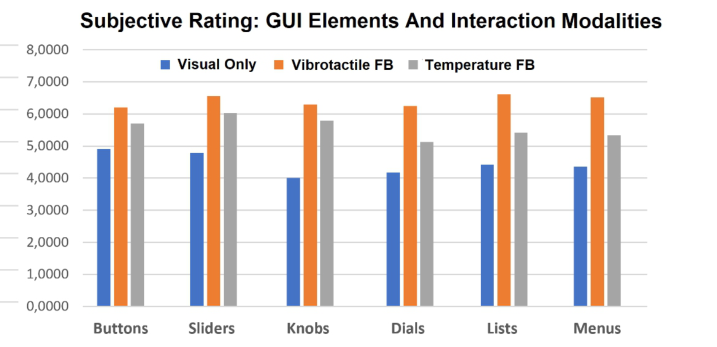
Figure 5: NASA TLX results of the navigations cues provided using visual HUD. VT PUCK and No feedback conditions.Figure 6: NASA TLX results of different task completion conditions (WEART Tempera- ture and kinaesthetic feedback vs visual only feedback).Figure 7: Results of subjective rating preferences of the different GUI controls accor- ding to the three conditions (visual only, WEART kinaesthetic & WEART vibrotactile & temperature feedback).Figure 8: Results of subjective rating preferences of the 6 GUI controls according to the three conditions (visual only, kinaesthetic & vibrotactile feedback and temperature feedback).
as twice as slow and requiring the most effort to complete the task. Compa- ring HUD arrows and VT PUCK conditions, users found the haptic feedback cues as more intuitive and easier to utilize in the VR space. However, users did feel that the vibratones required some learning to distinguish between the two conditions. Overall, the VT PUCK was mentally and physically least difficult to use and participants felt was fastest in performing the tasks.
Similarly, if we compare temperature and kinaesthetic feedback provided to the users while completing the GUI tasks, we see users reacting faster and more accurately to WEART Kinaesthetic feedback compared to visual only feedback (Fig. 7). Additionally, the combination of WEART Kinaesthe- tic feedback and Temperature variation yielded the fastest and most accurate movements with only minor overshoot for all the eight UI Controls.
Subjective results show users rated overall haptic feedback as pleasant and useful (Fig. 8). When asked if the addition of temperature and kinaesthetic feedback to the fingers using the WEART thimble device increase the com- plexity of the task, participants overwhelmingly rated the feedback as less mentally and physically challenging. Participants felt that they performed the task much faster in the presence of haptic feedback and that in a 360 VR environment (no physical surface) haptic feedback is needed to operate GUIs controls effectively. On the other hand, participants rated visual and auditory feedback of the GUI controls as less intuitive and difficult to use through the WEART Thimble devices. Most participants said they would have prefer- red the Oculus Quest 2 native controllers over the WEART thimble device; however, they would utilize the Thimble device to experience haptic feedback.
If we look at how the participants rated the different GUI controls, we see that conventional controls such as “Buttons and sliders” were considered usable for all three conditions (visual only, kinaesthetic and temperature feed- back). However, as the complexity of the controls increased (i.e., Dials, Lists and Menus), the visual only conditions was least preferred, while kinaesthetic
Augmenting VR/XR Experiences 89
feedback was most preferred. In fact both knobs and dials were rated to be the most difficult to use in the presence of no haptic feedback. Similarly, temperature feedback was also rated high for most GUI controls, as partici- pants felt that the change in temperature provided a useful cue in complex tasks. However, as with visual only condition, as the GUIs tasks became more complex (dials, lists and menus), user preference changed to kinaesthetic and vibrotactile feedback.
CONCLUSION
The study looks at augmenting conventional VR/XR interaction by providing vibrotactile navigation cues along with kinaesthetic and temperature-based feedback to complete six common GUI tasks. Comparing to conventional visual only techniques that are currently being used in VR devices, vibro- tactile, kinaesthetic and temperature feedback provided more intuitive VR interaction and yielded an overall pleasant user experience. Results show that using the PUCK devices to help orient the participants yielder fast TCTs as compared to using visual arrow cues. Participants also preferred the gen- tle nudge of the tactile effect created by the PUCK devices on the shoulder. Similarly, using the WEART thimble device participants made fewer errors or overshoots while interacting with the GUI, specifically for menus, sliders, and lists. Participants rated the temperature feedback metaphor (hot or cold) as an informative tool in completing complex tasks (i.e., adjust slider to 72, or rotate dial 37 notches anticlockwise). Overall participants preferred the novel use of haptic feedback for most of the GUI controls and rated it as least intrusive, most pleasurable, and informative modality especially, similar VR interaction. Except for 2 layered menus and lists, participant rated all existing GUI controls usable with VR if supplementary haptic feedback was available during the section process. Researchers plan to utilize these results and develop customized virtual experiences and validate these findings across different VR environments.
ACKNOWLEDGMENT
This research is part of the Adaptive Multimodal In-Car Interaction (AMICI) Project funded by Business Finland (decision # 1316/31/2021), and the Augmented Eating Experience (AEE) Project funded by Academy of Fin- land (decision # 326415). This research was conducted in collaboration with various project partners including Finnish Technical Research Centre (VTT).
REFERENCES
Alcañiz, M., Sacco, M., & Tromp, J. G. (Eds.). (2022). Road-mapping Extended Reality: Fundamentals and Applications. John Wiley & Sons. Blake J., and Gurocak, H. B. (2009) Haptic Glove with MR Brakes for Virtual Rea-
lity. In IEEE/ASME Transactions on Mechatronics, vol. 14, no. 5, pp. 606–615, Oct. 2009, doi: 10.1109/TMECH.2008.2010934. Caeiro-Rodríguez, M.; Otero-González, I.; Mikic-Fonte, F. A.; Llamas-Nistal, M. A systematic review of commercial smart gloves: Current status and applications. Sensors 2021, 21, 2667.
Cheng, L. T., Kazman, R., & Robinson, J. (1997, February). Vibrotactile feedback in delicate virtual reality operations. In Proceedings of the fourth ACM international conference on multimedia (pp. 243–251). Farooq, A. (2017). Developing technologies to provide haptic feedback for surface-
based interaction in mobile devices, PhD Thesis, University of Tampere, Faculty of Communication Sciences. http://tampub.uta.fi/handle/10024/102318 Farooq, A., Evreinov, G., Raisamo, R. (2020a). Enhancing Multimodal Interaction for Virtual Reality Using Haptic Mediation Technology. In: Ahram, T. (eds) Advances in Human Factors in Wearable Technologies and Game Design. AHFE 2019. Advances in Intelligent Systems and Computing, vol 973. Springer, Cham. https://doi.org/10.1007/978-3-030-20476-1_38 Farooq, A., Coe, P., Evreinov, G., Raisamo, R. (2020b). Using Dynamic Real-Time
Haptic Mediation in VR and AR Environments. In: Ahram, T., Taiar, R., Col- son, S., Choplin, A. (eds) Human Interaction and Emerging Technologies. IHIET 2019. Advances in Intelligent Systems and Computing, vol 1018. Springer, Cham. https://doi.org/10.1007/978-3-030-25629-6_63 Farooq, A., Venesvirta, H., Sinivaara, H., Laaksonen, M., Hippula, A., Surakka, V., Raisamo, R. (2021) Origo Steering Wheel: Improving Tactile Feedback for Stee- ring Wheel IVIS Interaction using Embedded Haptic Wave Guides and Constru- ctive Wave Interference. In Proceedings of the 13th International Conference on Automotive User Interfaces and Interactive Vehicular Applications (AutomotiveUI ‘21). Association for Computing Machinery, New York, NY, USA. Farooq, A., Rantala, J., Raisamo, R., and Hippula, A. (2022a). Haptic Medi-
ation through Artificial Intelligence: Magnetorheological Fluid as Vibrotactile Signal Mediator, In IEEE Symposium on Design, Test, Integration and Packaging of MEMS/MOEMS (DTIP), pp. 1–4, https://doi.org/10.1109/DTIP56576.2022. 9911712 Farooq A., Rantala J., Raisamo R. (2022b) Creating Dynamic Vibrotactile Output using Magnetorheological Fluid as Signal Mediator. 8th International Confere- nce on Sensors and Electronic Instrumentation Advances (SEIA’ 2022), 21-23 September 2022. Ko, S. H., & Rogers, J. (2021). Functional materials and devices for XR (VR/AR/MR)
applications. Advanced Functional Materials, 31(39), 2106546. Kovacs, R.; Ofek, E.; Gonzalez Franco, M.; Siu, A. F.; Marwecki, S.; Holz, C.; Sinclair, M. Haptic PIVOT: On-demand handhelds in VR. In Proceedings of the 33rd Annual Association for Computing Machinery Symposium on User Inter- face Software and Technology, Online, 20–23 October 2020; Association for Computing Machinery: New York, NY, USA, 2020; pp. 1046–1059. Moehring M. and Froehlich, B. (2011) Effective manipulation of virtual objects
within arm’s reach,” 2011 IEEE Virtual Reality Conference, 2011, pp. 131–138, doi: 10.1109/VR.2011.5759451. Nakagaki, K.; Fitzgerald, D.; Ma, Z. J.; Vink, L.; Levine, D.; Ishii, H (2019).
InFORCE: Bi-directional “Force” Shape Display for Haptic Interaction. In Pro- ceedings of the Thirteenth International Conference on Tangible, Embedded, and Embodied Interaction, Tempe, AR, USA, 17–20 March 2019; Association for Computing Machinery: New York, NY, USA, 2019; pp. 615–623. Pawar, V. M., & Steed, A. (2009). Evaluating the influence of haptic force-feedback on 3D selection tasks using natural egocentric gestures. In 2009 IEEE Virtual Reality Conference (pp. 11–18). IEEE. Qin, Z., Tai, Y., Xia, C., Peng, J., Huang, X., Chen, Z., & Shi, J. (2019). Towards
virtual VATS, face, and construct evaluation for peg transfer training of box, VR, AR, and MR trainer. Journal of healthcare engineering, 2019.
Augmenting VR/XR Experiences 91
Rakkolainen, I., Farooq, A., Kangas, J., Hakulinen, J., Rantala, J., Turunen, M., & Raisamo, R. (2021). Technologies for Multimodal Interaction in Extended Reality—A Scoping Review. Multimodal Technologies and Interaction, 5(12), [81]. https://doi.org/10.3390/mti5120081 Van Den Berg, D., Glans, R., De Koning, D., Kuipers, F. A., Lugtenburg, J., Polachan,
K., & Van Wijk, B. (2017). Challenges in haptic communications over the tactile internet. IEEE Access, 5, 23502–23518. Yeh, S. C.; Lee, S. H.; Chan, R. C.; Wu, Y.; Zheng, L. R.; Flynn, S. The Efficacy of a Haptic-Enhanced Virtual Reality System for Precision Grasp Acquisition in Stroke Rehabilitation. J. Healthc. Eng. 2017, 2017, 9840273.
LISTED IN THE AHFE DIGITAL BOOKSTORE CATALOGUE
Explore the complete digital volume
Human Factors and Wearable Technologies
Read this individual research paper free through the original publisher, or explore the full digital proceedings book.
ISBN 978-1-958651-61-2
Explore this ISBN in the AHFE Bookstore ↗Listed in the July 2026 bookstore catalogue; search by ISBN to confirm current availability · Digital book purchase optional